
実務1年目駆け出しエンジニアがLaravel&ReactでWebアプリケーション開発に挑戦してみた!(その38)
0. 初めに
こんにちは!
Webアプリケーション開発をゼロから解説しているシリーズです。
今回は、以下の三つを一気に作成したいと思います!
- 編集履歴閲覧ページ
- 削除依頼作成ページ
- 通知一覧表示ドロップダウン
盛りだくさんですが、頑張って行きましょう!!
1. 編集履歴閲覧ページ作成
では、さっそく編集履歴閲覧ページから作っていきましょう!
1.1 ブランチ運用
例によって、developブランチを最新化させて、そこから新しいブランチを切って作業をしましょう。
ブランチ名は、feature/frontend/edit-history-pageでいきます。
1.2 大学編集履歴閲覧ページ作成
最初は、大学の編集履歴ページから作ります。
実は既にバックエンド編で動作確認用に仮ページを作成済みでした。
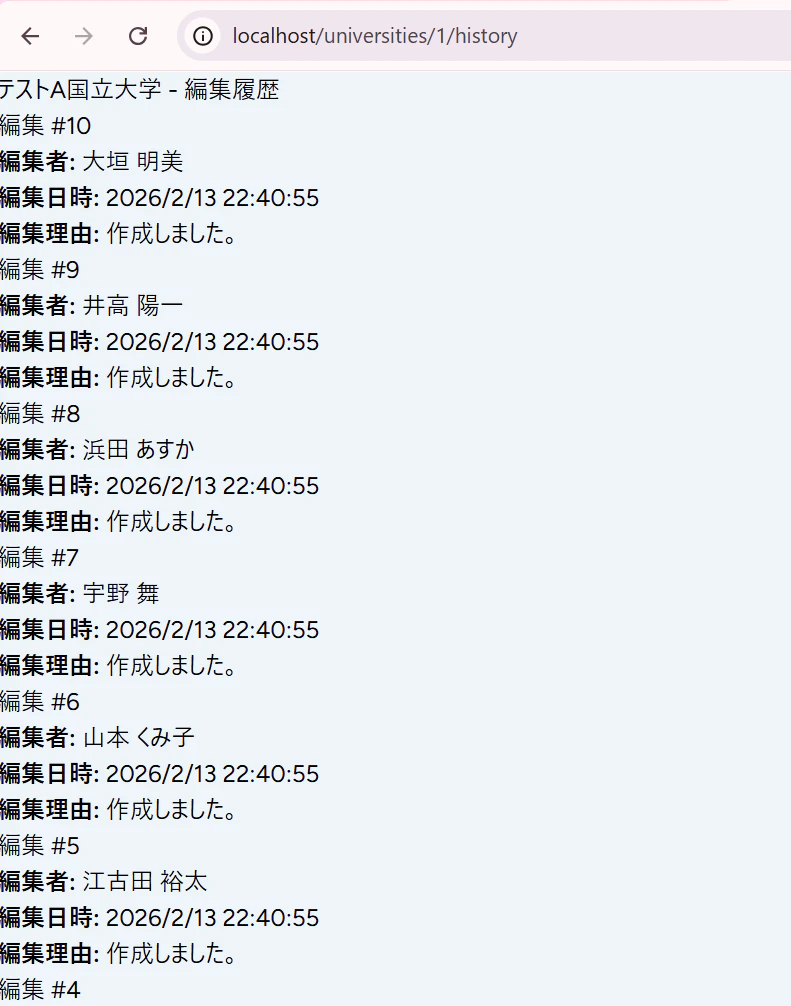
これだと不格好すぎるので良い感じにしましょう。
University\History.jsxを修正する
そのため、既にページコンポーネントがあるのですが、すべて消して以下のように作り直しましょう。
resources/js/Pages/University/History.jsx
クリックでコードを見る
import AppLayout from "@/Layouts/AppLayout";
import { Head, router } from "@inertiajs/react";

/**
 * 大学編集履歴表示コンポーネント
 * @param {Object} props - コンポーネントのprops
 * @param {Object} props.university - 大学オブジェクト
 * @param {Array} props.editHistory - 編集履歴の配列
 * @param {string} props.query - 検索クエリ文字列
 * @returns {JSX.Element} コンポーネントのJSX
 */
const History = ({ university, editHistory, query = '' }) => {
  return(
    <AppLayout title={`${university.name}の編集履歴`}>
      <Head title={`${university.name}の編集履歴`} />
      <div className="flex flex-col items-center min-h-full">
        <div className="w-full max-w-3xl">
          <div className="flex justify-end mb-4">
            <button
              onClick={() => router.get(route('faculties.index', { university: university.id }), { query })}
              className="px-4 py-2 text-sm rounded-lg"
              style={{ backgroundColor: '#8D9DB3 ', color: '#FFFFFF', fontWeight: 'bold' }}
            >
              < 大学に戻る
            </button>
          </div>
          {editHistory.length > 0 ? (
            <div className="divide-y divide-gray-200 border-t border-b border-gray-200">
              {editHistory.map((history, index) => (
                <div key={index} className="py-4 flex gap-6">
                  <div className="flex-shrink-0">
                    <p className="text-[#747D8C]">{new Date(history.updated_at).toLocaleString("ja-JP", { year: "numeric", month: "2-digit", day: "2-digit", hour: "2-digit", minute: "2-digit" })}</p>
                  </div>
                  <div className="flex flex-col">
                    <p className="text-[#747D8C]">{history.user || "退会したユーザーです"}</p>
                    <p className="text-[#747D8C]">{history.comment || "作成しました。"}</p>
                  </div>
                </div>
              ))}
            </div>
          ) : (
            <p>編集履歴がありません。</p>
          )}
        </div>
      </div>
    </AppLayout>
  )
}

export default History;
Faculty/Index.jsx画面修正
このページを開くすべがないので、メニューポップオーバーから開けるようにします。
resources/js/Pages/Faculty/Index.jsx
クリックでコードを見る
import { Head, router } from "@inertiajs/react";

  /**
   * メニューポップオーバーの「編集履歴を見る」クリック時の処理
   * @returns {void}
   */
  const handleViewHistoryClick = () => {
    setIsMenuOpen(false);
    router.get(route('university.history', { university: university.id }), { query });
  }

              {isMenuOpen && <MenuPopover addLabel="学部を追加する" onAddClick={handleAddFacultyClick} onEditClick={handleEditClick} onViewHistoryClick={handleViewHistoryClick} />}
MenuPopover.jsx修正
resources/js/Components/Common/MenuPopover.jsx
クリックでコードを見る
/**
 * メニューポップオーバーコンポーネント
 * @param {Object} props - コンポーネントのプロパティ
 * @param {string} props.addLabel - 追加ボタンのラベルに表示する文字列
 * @param {Function} props.onAddClick - 「〇〇を追加する」クリック時のハンドラ
 * @param {Function} props.onEditClick - 「編集する」クリック時のハンドラ
 * @param {Function} props.onViewHistoryClick - 「編集履歴を見る」クリック時のハンドラ
 * @returns {JSX.Element} コンポーネントのJSX
 */
const MenuPopover = ({ addLabel, onAddClick, onEditClick, onViewHistoryClick }) => {
  const menuItems = [
    ...(addLabel ? [{ label: addLabel, onClick: onAddClick }] : []),
    { label: '編集する', onClick: onEditClick },
    { label: '編集履歴を見る', onClick: onViewHistoryClick },
    { label: '削除依頼をする', onClick: () => {} },
  ];
UniversityController.php修正
戻るボタンを押したときに、検索クエリ文字列の情報があったほうが、検索結果にまで戻れて便利です。
しかし、肝心のクエリをReact側に渡していなかったので、追加します。
app/Http/Controllers/UniversityController.php
クリックでコードを見る
    public function history(University $university)
    {
        $query = request('query', '');

        $editHistory = $university->users()
            ->withPivot('comment', 'created_at', 'updated_at')
            ->get()
        ->sortByDesc(fn($user) => $user->pivot->updated_at)
        ->values()
        ->map(function ($user) {
            return [
                'user' => $user->name,
                'comment' => $user->pivot->comment,
                'created_at' => $user->pivot->created_at,
                'updated_at' => $user->pivot->updated_at,
            ];
    });

        return Inertia::render('University/History', [
            'university' => $university,
            'editHistory' => $editHistory,
            'query' => $query,
        ]);
    }
「ページネーションにした方が良いのでは?」って思うかもですよねw
まあ、大学名を変えることってあんまりないと思うので、そんなに長くならないから、しばらくはいいかな...
動作確認
こんな感じです!
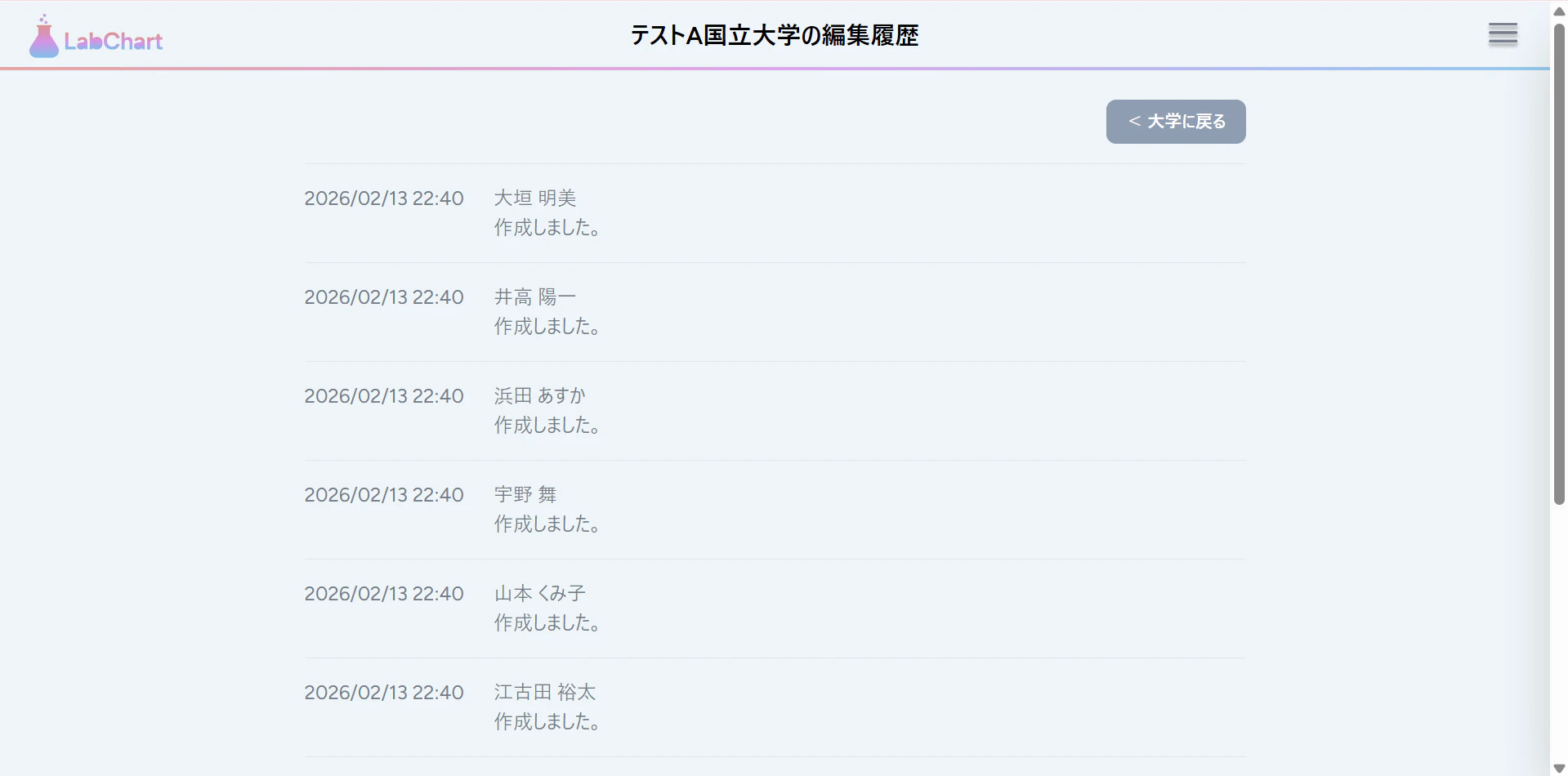
問題なさそうなら、コミットしましょう~!
プッシュ、マージは今はしないで後でまとめてしましょうか。
1.3 学部編集履歴閲覧ページ作成
次は、学部編集履歴閲覧ページを作成します!
Faculty\History.jsx作成
既存のファイルを以下のように置き換えてください。
resources/js/Pages/Faculty/History.jsx
クリックでコードを見る
import AppLayout from "@/Layouts/AppLayout";
import { Head, router } from "@inertiajs/react";

/**
 * 学部編集履歴表示コンポーネント
 * @param {Object} props - コンポーネントのprops
 * @param {Object} props.faculty - 学部オブジェクト
 * @param {Array} props.editHistory - 編集履歴の配列
 * @param {string} props.query - 検索クエリ文字列
 * @returns {JSX.Element} コンポーネントのJSX
 */
const History = ({ faculty, editHistory, query = '' }) => {
  return(
    <AppLayout title={`${faculty.name}の編集履歴`}>
      <Head title={`${faculty.name}の編集履歴`} />
      <div className="flex flex-col items-center min-h-full">
        <div className="w-full max-w-3xl">
          <div className="flex justify-end mb-4">
            <button
              onClick={() => router.get(route('faculties.index', { university: faculty.university_id }), { query })}
              className="px-4 py-2 text-sm rounded-lg"
              style={{ backgroundColor: '#8D9DB3 ', color: '#FFFFFF', fontWeight: 'bold' }}
            >
              < 大学に戻る
            </button>
          </div>
          {editHistory.length > 0 ? (
            <div className="divide-y divide-gray-200 border-t border-b border-gray-200">
              {editHistory.map((history, index) => (
                <div key={index} className="py-4 flex gap-6">
                  <div className="flex-shrink-0">
                    <p className="text-[#747D8C]">{new Date(history.updated_at).toLocaleString("ja-JP", { year: "numeric", month: "2-digit", day: "2-digit", hour: "2-digit", minute: "2-digit" })}</p>
                  </div>
                  <div className="flex flex-col">
                    <p className="text-[#747D8C]">{history.user || "退会したユーザーです"}</p>
                    <p className="text-[#747D8C]">{history.comment || "作成しました。"}</p>
                  </div>
                </div>
              ))}
            </div>
          ) : (
            <p className="text-[#747D8C]">編集履歴がありません。</p>
          )}
        </div>
      </div>
    </AppLayout>
  )
}

export default History;
Lab\Index.jsx修正
resources/js/Pages/Lab/Index.jsx
クリックでコードを見る
  /**
   * メニューポップオーバーの「編集履歴を見る」クリック時の処理
   * @returns {void}
   */
  const handleViewHistoryClick = () => {
    setIsMenuOpen(false);
    router.get(route('faculty.history', { faculty: faculty.id }), { query });
  }

              {isMenuOpen && <MenuPopover addLabel="研究室を追加する" onAddClick={handleAddLabClick} onEditClick={handleEditClick} onViewHistoryClick={handleViewHistoryClick} />}
FacultyController.php
app/Http/Controllers/FacultyController.php
クリックでコードを見る
    public function history(Faculty $faculty)
    {
        $query = request('query', '');

        $editHistory = $faculty->users()
            ->withPivot('comment', 'created_at', 'updated_at')
            ->get()
        ->sortByDesc(fn($user) => $user->pivot->updated_at)
        ->values()
        ->map(function ($user) {
            return [
                'user' => $user->name,
                'comment' => $user->pivot->comment,
                'created_at' => $user->pivot->created_at,
                'updated_at' => $user->pivot->updated_at,
            ];
    });

        return Inertia::render('Faculty/History', [
            'faculty' => $faculty,
            'editHistory' => $editHistory,
            'query' => $query,
        ]);
    }
動作確認
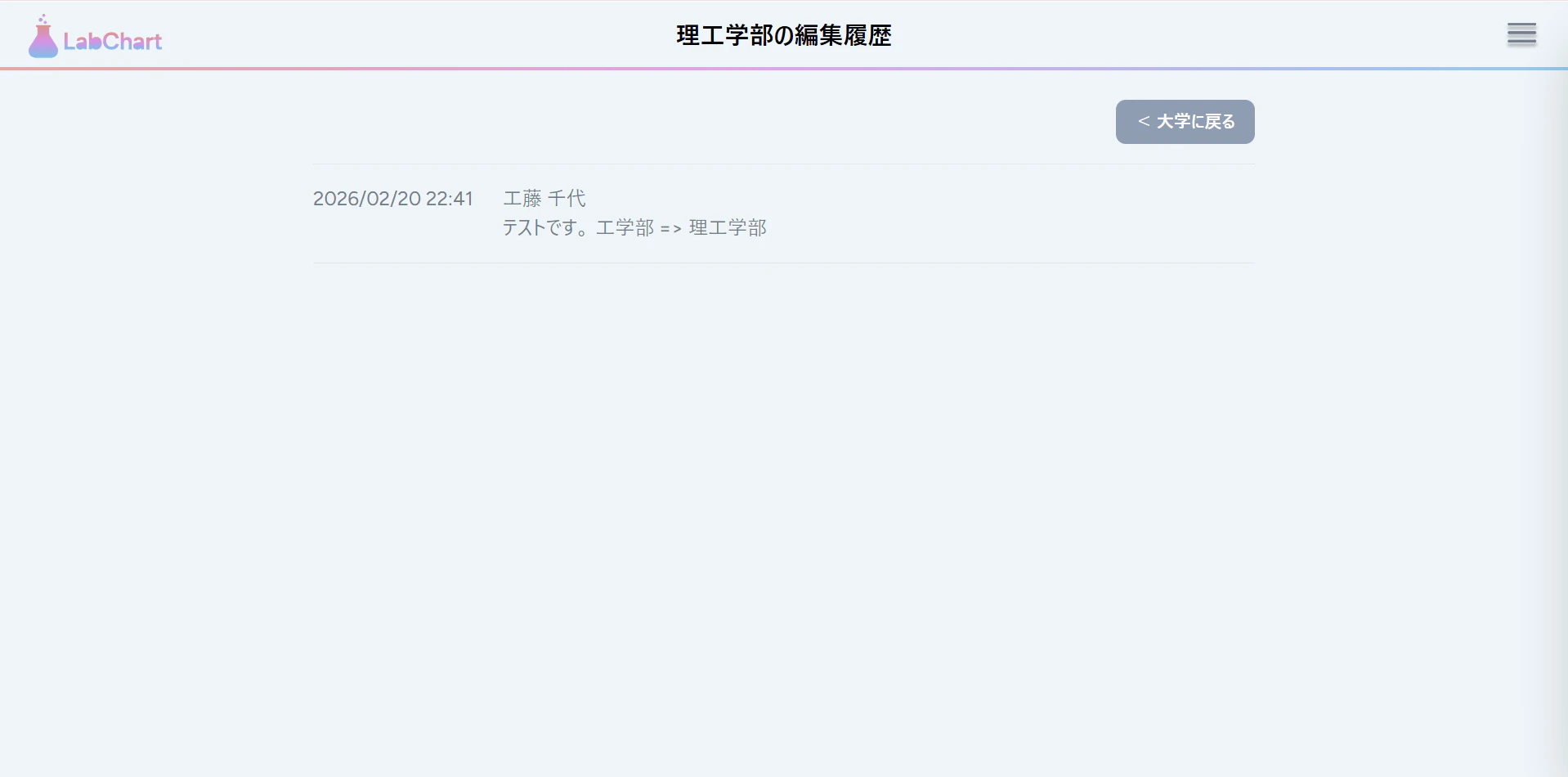
こんな感じっすね!
ってかなんで大学の時はあんなに「作成しました」連呼されていたんだっけ...??(何か理由があったような...調査しておきます...w)
1.4 研究室編集履歴閲覧ページ作成
最後は、研究室編集履歴閲覧ページを作るよ。(*´ω`)
修正・作成
学部の時とほとんど同じなので、説明は割愛です。
resources/js/Pages/Lab/History.jsx
クリックでコードを見る
import AppLayout from "@/Layouts/AppLayout";
import { Head, router } from "@inertiajs/react";

/**
 * 研究室編集履歴表示コンポーネント
 * @param {Object} props - コンポーネントのprops
 * @param {Object} props.lab - 研究室オブジェクト
 * @param {Array} props.editHistory - 編集履歴の配列
 * @param {string} props.query - 検索クエリ文字列
 * @returns {JSX.Element} コンポーネントのJSX
 */
const History = ({ lab, editHistory, query = '' }) => {
  return(
    <AppLayout title={`${lab.name}の編集履歴`}>
      <Head title={`${lab.name}の編集履歴`} />
      <div className="flex flex-col items-center min-h-full">
        <div className="w-full max-w-3xl">
          <div className="flex justify-end mb-4">
            <button
              onClick={() => router.get(route('labs.show', { lab: lab.id }), { query })}
              className="px-4 py-2 text-sm rounded-lg"
              style={{ backgroundColor: '#8D9DB3 ', color: '#FFFFFF', fontWeight: 'bold' }}
            >
              < 研究室に戻る
            </button>
          </div>
          {editHistory.length > 0 ? (
            <div className="divide-y divide-gray-200 border-t border-b border-gray-200">
              {editHistory.map((history, index) => (
                <div key={index} className="py-4 flex gap-6">
                  <div className="flex-shrink-0">
                    <p className="text-[#747D8C]">{new Date(history.updated_at).toLocaleString("ja-JP", { year: "numeric", month: "2-digit", day: "2-digit", hour: "2-digit", minute: "2-digit" })}</p>
                  </div>
                  <div className="flex flex-col">
                    <p className="text-[#747D8C]">{history.user || "退会したユーザーです"}</p>
                    <p className="text-[#747D8C]">{history.comment || "作成しました。"}</p>
                  </div>
                </div>
              ))}
            </div>
          ) : (
            <p className="text-[#747D8C]">編集履歴がありません。</p>
          )}
        </div>
      </div>
    </AppLayout>
  )
}

export default History;
resources/js/Pages/Lab/Show.jsx
クリックでコードを見る
  /**
   * メニューポップオーバーの「編集履歴を見る」クリック時の処理
   * @returns {void}
   */
  const handleViewHistoryClick = () => {
    setIsMenuOpen(false);
    router.get(route('lab.history', { lab: lab.id }), { query });
  }

              <MenuPopover
                {...(!userReview ? { addLabel: 'レビューを投稿する', onAddClick: handleAddReviewClick } : {})}
                onEditClick={handleLabEditClick}
                onViewHistoryClick={handleViewHistoryClick}
              />
app/Http/Controllers/LabController.php
クリックでコードを見る
    public function history(Lab $lab)
    {
        $query = request('query', '');

        $editHistory = $lab->users()
            ->withPivot('comment', 'created_at', 'updated_at')
            ->get()
        ->sortByDesc(fn($user) => $user->pivot->updated_at)
        ->values()
        ->map(function ($user) {
            return [
                'user' => $user->name,
                'comment' => $user->pivot->comment,
                'created_at' => $user->pivot->created_at,
                'updated_at' => $user->pivot->updated_at,
            ];
    });

        return Inertia::render('Lab/History', [
            'lab' => $lab,
            'editHistory' => $editHistory,
            'query' => $query,
        ]);
    }
動作確認
こんな感じですー。
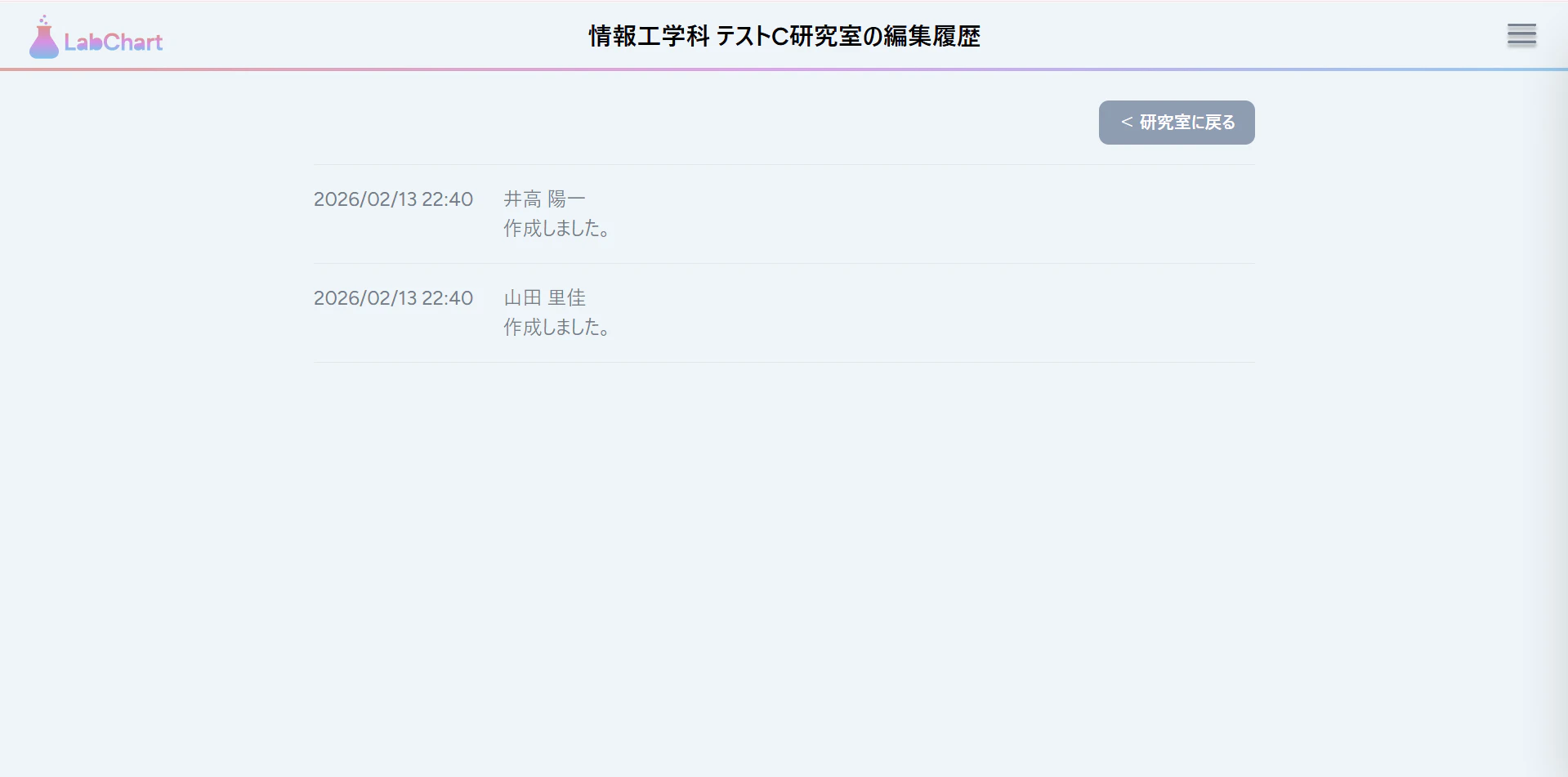
問題なく表示できれば、コミットして、プッシュ・PR作成、マージをしておきましょう。
これにて、編集履歴閲覧ページの実装は終わりです!
2. 削除依頼作成ページ作成
次に、削除依頼作成ページを作成します。
2.1 ブランチ運用
先ほどの変更をdevelopブランチでプルして、新しいブランチを切って作業をします。
ブランチ名は、feature/frontend/delete-request-pageとかにしておきます。
2.2 削除依頼ページ作成
バックエンド実装編を思い出してもらえれば分かるのですが、削除依頼作成ページは、先ほど実装した編集履歴閲覧ページと違って、1ページで大学・学部・研究室すべてに対応しています。
それが、以下のファイルです。
resources/js/Pages/DeletionRequest/Create.jsx
現状の見た目は、共通レイアウトが適用されておらず不格好なので、きれいに整えます。
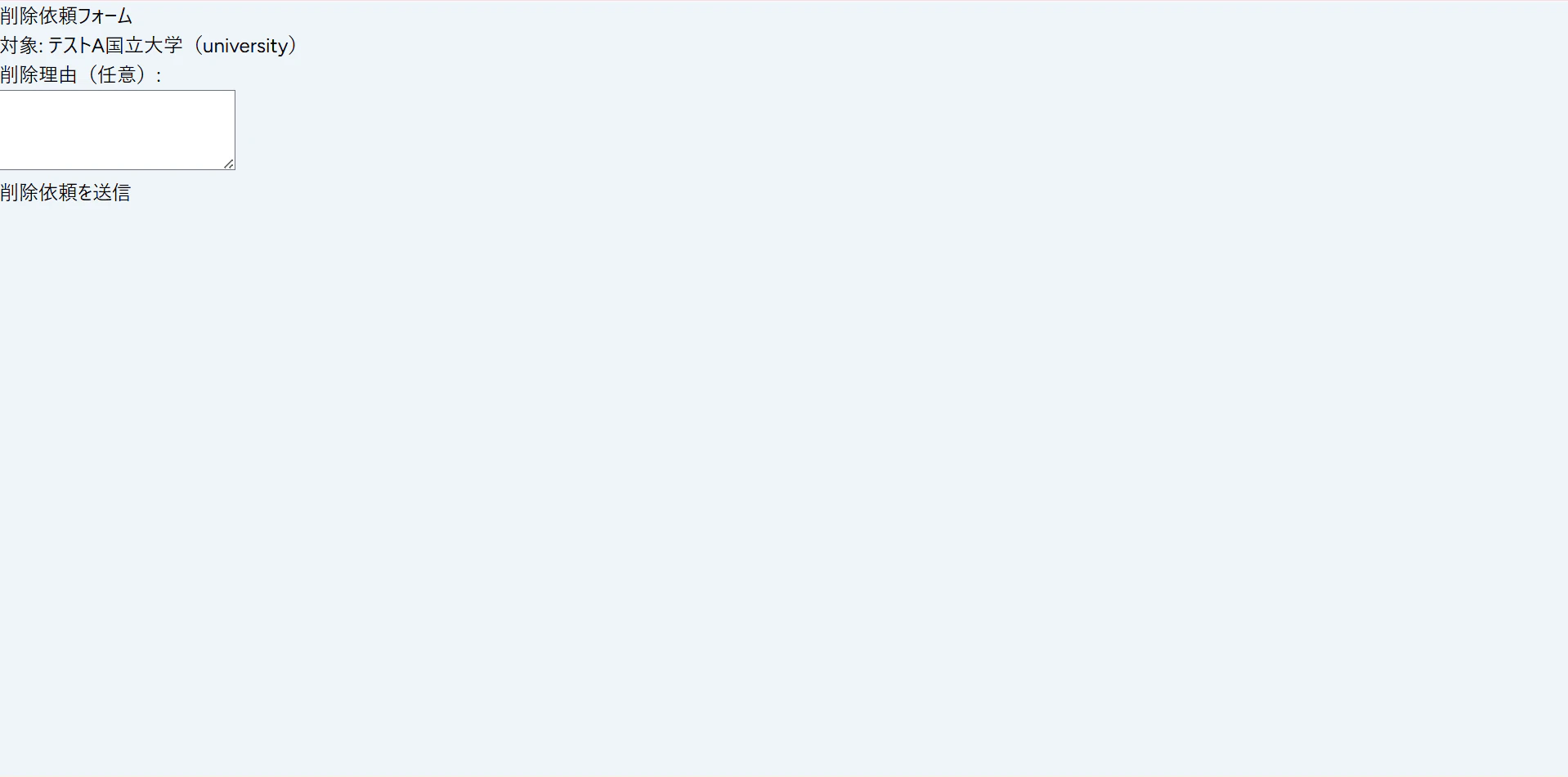
resources/js/Pages/DeletionRequest/Create.jsx
クリックでコードを見る
import AppLayout from '@/Layouts/AppLayout';
import TextareaField from '@/Components/Common/TextareaField';
import { Head, router, useForm } from '@inertiajs/react';

const typeLabels = {
  university: '大学',
  faculty: '学部',
  lab: '研究室',
};

const Create = ({ target, backUrl, query = '' }) => {
  return (
    <AppLayout title={`削除依頼フォーム - ${target.name}`}>
      <Head title={`削除依頼フォーム - ${target.name}`} />
      <div className="flex flex-col items-center min-h-full">
        <div className="w-full max-w-3xl">
          <div className="flex justify-end mb-4">
            <button
              onClick={() => router.get(backUrl, { query })}
              className="px-4 py-2 text-sm rounded-lg"
              style={{ backgroundColor: '#8D9DB3 ', color: '#FFFFFF', fontWeight: 'bold' }}
            >
              {`< ${typeLabels[target.type] ?? target.type}に戻る`}
            </button>
          </div>
          <p className="text-[#747D8C]">
            掲載情報の削除をご希望の場合は、削除を希望する理由をご記入のうえ、送信してください。
            <br />
            いただいたリクエストは順次確認し、対応いたします。
          </p>
          <DeletionRequestForm target={target} />
        </div>
      </div>
    </AppLayout>
  );
};

const DeletionRequestForm = ({ target}) => {
  const { data, setData, post, processing, errors } = useForm({
    target_id: target.id,
    target_type: target.type,
    reason: '',
  });

  const submit = (e) => {
    e.preventDefault();
    post(route('deletion_requests.store'));
  };

  return (
    <form onSubmit={submit} className="mt-6 flex flex-col">
      <div className="flex-1">
        <ErrorSlot message={errors.reason} />
        <TextareaField
          value={data.reason}
          onChange={e => setData('reason', e.target.value)}
          placeholder="削除を希望する理由をご記入ください。"
          size="sm"
          className="mb-2 w-full"
          rows={5}
        />
      </div>

      <div className="mt-6 flex justify-center">
        <button
          type="submit"
          disabled={processing}
          className={`p-1 bg-[#33E1ED] shadow-md rounded-md hover:shadow-lg transition-shadow ${processing ? 'opacity-50 cursor-not-allowed' : 'cursor-pointer'}`}
        >
          <span className="px-14 py-1 block rounded text-white font-bold">
            送信
          </span>
        </button>
      </div>
    </form>
  );
};

const ErrorSlot = ({ message }) => (
  <p className="h-5 text-sm leading-5 text-red-500 overflow-hidden">
    {message ?? '\u00A0'}
  </p>
);

export default Create;
フォームをコンポーネントに切り出したり、大学検索文字クエリパラメータや戻るボタン用のURLの取得をバックエンドからするようにしています。
2.3 削除依頼送信完了ページ作成
リダイレクト先として、「ご協力ありがとうございました」的なメッセージを表示して、ホームへ戻るボタンを付けておきます。
resources/js/Pages/DeletionRequest/Complete.jsx
クリックでコードを見る
import AppLayout from "@/Layouts/AppLayout";
import { router } from "@inertiajs/react";

const Complete = () => {
	return (
		<AppLayout title="削除依頼送信完了">
			<div className="flex flex-col items-center min-h-full">
				<div className="w-full max-w-3xl">
					<p className="text-[#747D8C]">
						削除依頼をお送りいただき、ありがとうございました。<br />
						いただいた内容を確認し、妥当と判断した場合は速やかに削除対応を行います。<br />
						しばらくお待ちください。
					</p>
          <div className="flex justify-center mt-4">
            <button
              onClick={() =>router.get(route('home'))}
              className="px-4 py-2 text-sm text-[#747D8C] bg-transparent"
            >
              ホームへ戻る
            </button>
           </div>
         </div>
       </div>
     </AppLayout>
   );
};

export default Complete;
2.4 削除依頼コントローラー修正
しかし、コントローラー側ではこのページへのリダイレクトが設定されていませんので、修正します。
ついでに、バリデーションも修正しておきました。
削除依頼の作成理由は、必須項目にします。
app/Http/Controllers/DeletionRequestController.php
クリックでコードを見る
      public function create(string $type, int $id): Response
    {
        $query = request('query', '');

        $model = match ($type) {
            'university' => University::find($id),
            'faculty' => Faculty::find($id),
            'lab' => Lab::find($id),
        };

        $backUrl = match ($type) {
            'university' => route('faculties.index', ['university' => $model->id]),
            'faculty' => route('labs.index', ['faculty' => $model->id]),
            'lab' => route('labs.show', ['lab' => $model->id]),
        };

        return Inertia::render('DeletionRequest/Create', [
            'target' => [
                'id' => $model->id,
                'name' => $model->name,
                'type' => $type,
            ],
            'backUrl' => $backUrl,
            'query' => $query,
        ]);
    }

    public function store(Request $request): Response
    {
        $validated = $request->validate([
            'target_id' => 'required|integer',
            'target_type' => 'required|string|in:university,faculty,lab',
            'reason' => 'required|string|max:1000',
        ]);

        $model = match ($validated['target_type']) {
            'university' => University::class,
            'faculty' => Faculty::class,
            'lab' => Lab::class,
        };

        $deletionRequests = new DeletionRequest();
        $deletionRequests->requested_by = $request->user()->id;
        $deletionRequests->target_id = $validated['target_id'];
        $deletionRequests->target_type = $model;
        $deletionRequests->reason = $validated['reason'] ?? null;
        $deletionRequests->status = 'pending';

        $deletionRequests->save();

        $admins = User::where('is_admin', true)->get();

        foreach ($admins as $admin) {
            $admin->notify(new DeletionRequestNotification(
                $model::find($validated['target_id'])->name,
                $validated['target_type'],
                $validated['target_id']
            ));
        }

        return Inertia::render('DeletionRequest/Complete');
    }
その他、微調整も入れてますので、ご確認をお願いいたします。
2.5 バリデーション修正
日本語でバリデーションメッセージを表示できるようにします。
resources/lang/ja/validation.php
クリックでコードを見る
return [
    // 基本的なバリデーションメッセージ

    'custom' => [
        // 大学関連

        // 学部関連

        // 研究室関連

        // 削除依頼関連 これ追加
        'reason' => [
            'required' => '削除理由は必須項目です。',
            'max' => '削除理由は1000文字以下にしてください。',
        ],

        // レビュー関連
    ],
];
2.6 メニューポップオーバー修正
resources/js/Components/Common/MenuPopover.jsx
クリックでコードを見る
 * @param {Function} props.onDeletionRequestClick - 「削除依頼をする」クリック時のハンドラ
 * @returns {JSX.Element} コンポーネントのJSX
 */
const MenuPopover = ({ addLabel, onAddClick, onEditClick, onViewHistoryClick, onDeletionRequestClick }) => {
  const menuItems = [
    ...(addLabel ? [{ label: addLabel, onClick: onAddClick }] : []),
    { label: '編集する', onClick: onEditClick },
    { label: '編集履歴を見る', onClick: onViewHistoryClick },
    { label: '削除依頼をする', onClick: onDeletionRequestClick },
  ];
2.7 呼び出し元修正
resources/js/Pages/Faculty/Index.jsx
クリックでコードを見る
  /**
   * メニューポップオーバーの「削除依頼をする」クリック時の処理
   * @returns {void}
   */
  const handleDeletionRequestClick = () => {
    setIsMenuOpen(false);
    router.get(route('deletion_requests.create', { type: 'university', id: university.id }), { query });
  }

              {isMenuOpen && <MenuPopover addLabel="学部を追加する" onAddClick={handleAddFacultyClick} onEditClick={handleEditClick} onViewHistoryClick={handleViewHistoryClick} onDeletionRequestClick={handleDeletionRequestClick} />}
resources/js/Pages/Lab/Index.jsx
クリックでコードを見る
  /**
   * メニューポップオーバーの「削除依頼をする」クリック時の処理
   * @returns {void}
   */
  const handleDeletionRequestClick = () => {
    setIsMenuOpen(false);
    router.get(route('deletion_requests.create', { type: 'faculty', id: faculty.id }), { query });
  }

              {isMenuOpen && <MenuPopover addLabel="研究室を追加する" onAddClick={handleAddLabClick} onEditClick={handleEditClick} onViewHistoryClick={handleViewHistoryClick} onDeletionRequestClick={handleDeletionRequestClick} />}
resources/js/Pages/Lab/Show.jsx
クリックでコードを見る
  /**
   * メニューポップオーバーの「削除依頼をする」クリック時の処理
   * @returns {void}
   */
  const handleDeletionRequestClick = () => {
    setIsMenuOpen(false);
    router.get(route('deletion_requests.create', { type: 'lab', id: lab.id }), { query });
  };

            {isMenuOpen && (
              <MenuPopover
                {...(!userReview ? { addLabel: 'レビューを投稿する', onAddClick: handleAddReviewClick } : {})}
                onEditClick={handleLabEditClick}
                onViewHistoryClick={handleViewHistoryClick}
                onDeletionRequestClick={handleDeletionRequestClick}
              />
            )}
2.8 動作確認
例えば、大学ですが、こんな感じに表示されていればおk!
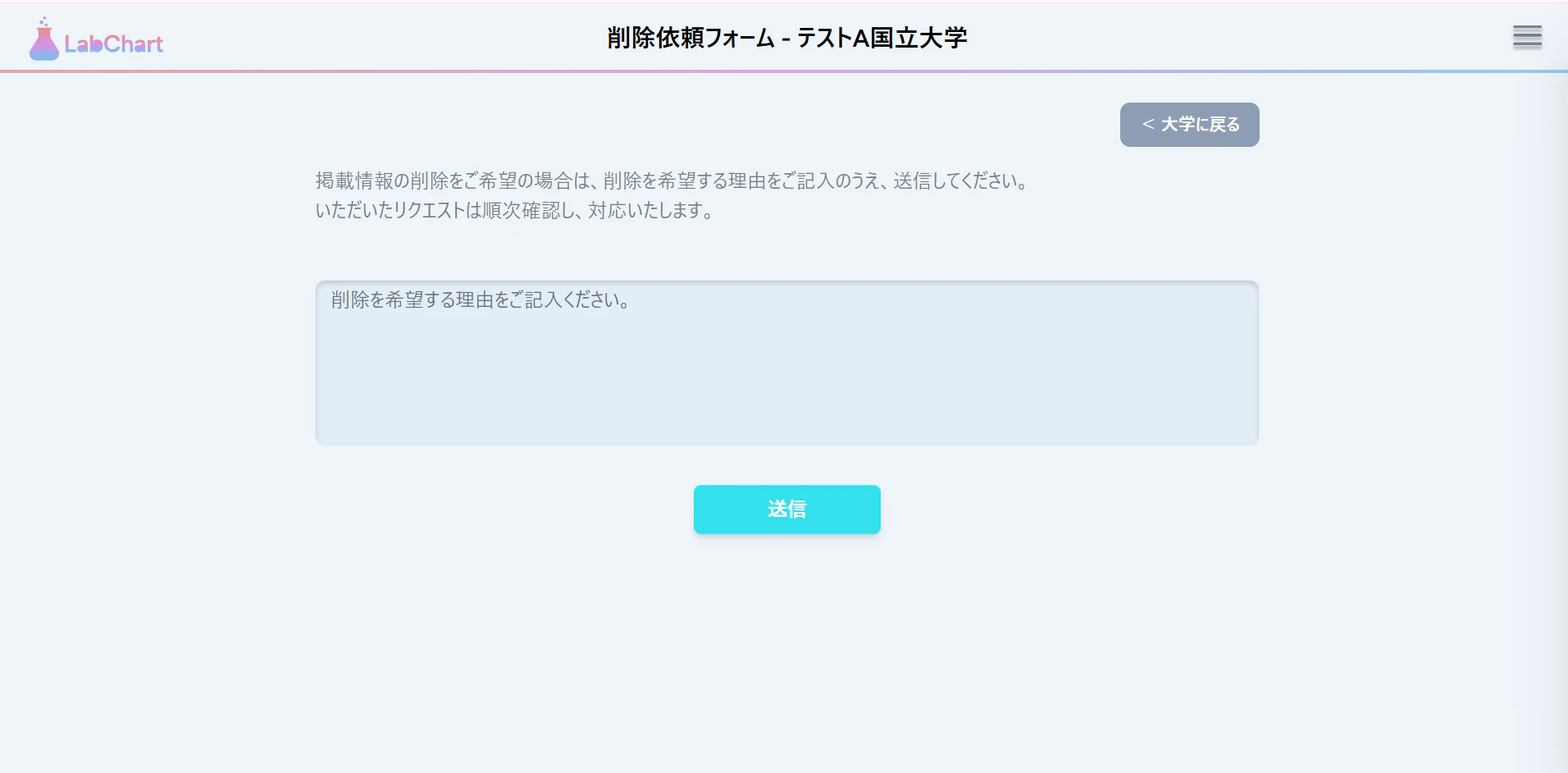
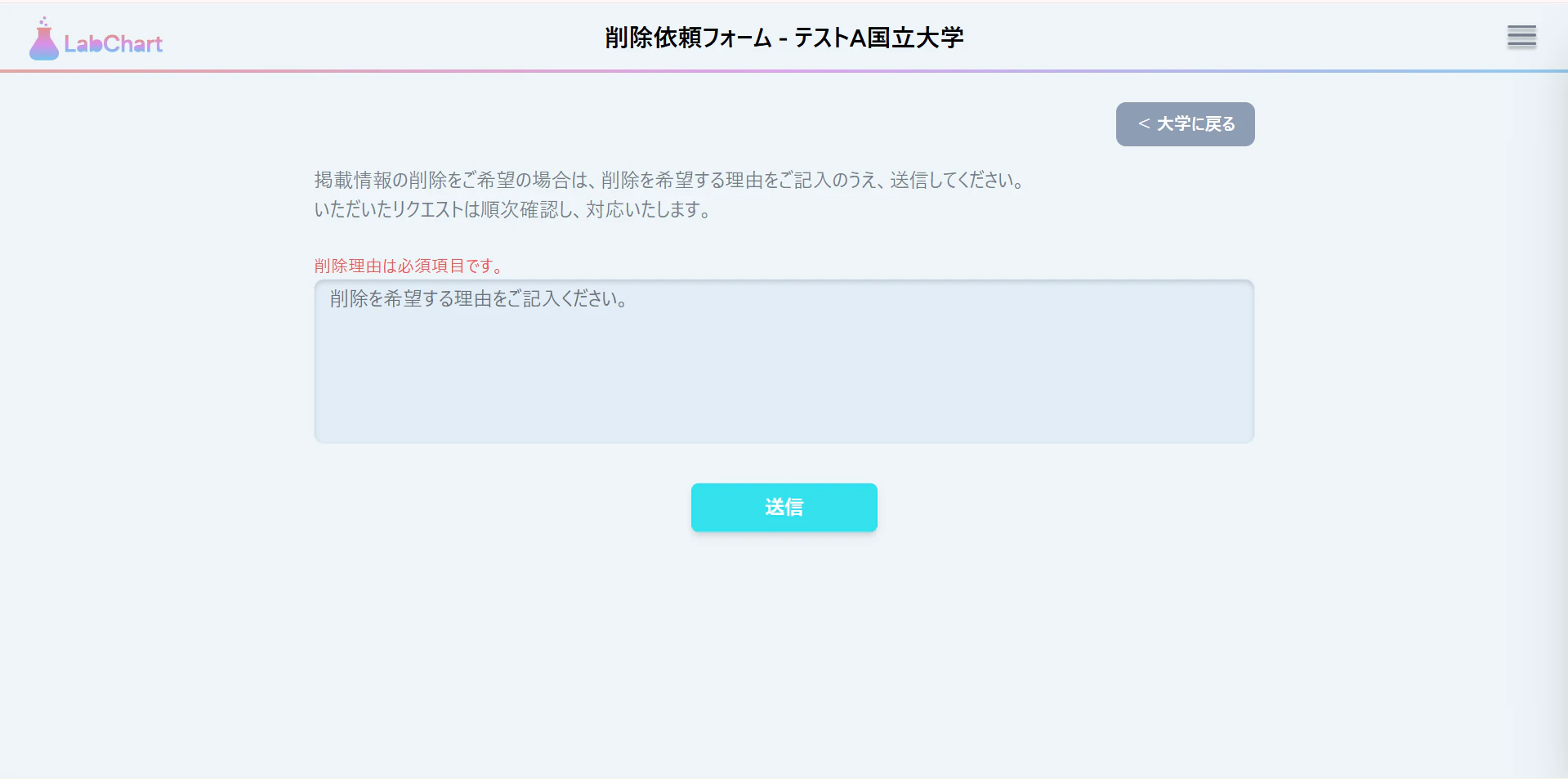
バリデーションメッセージも表示されます。
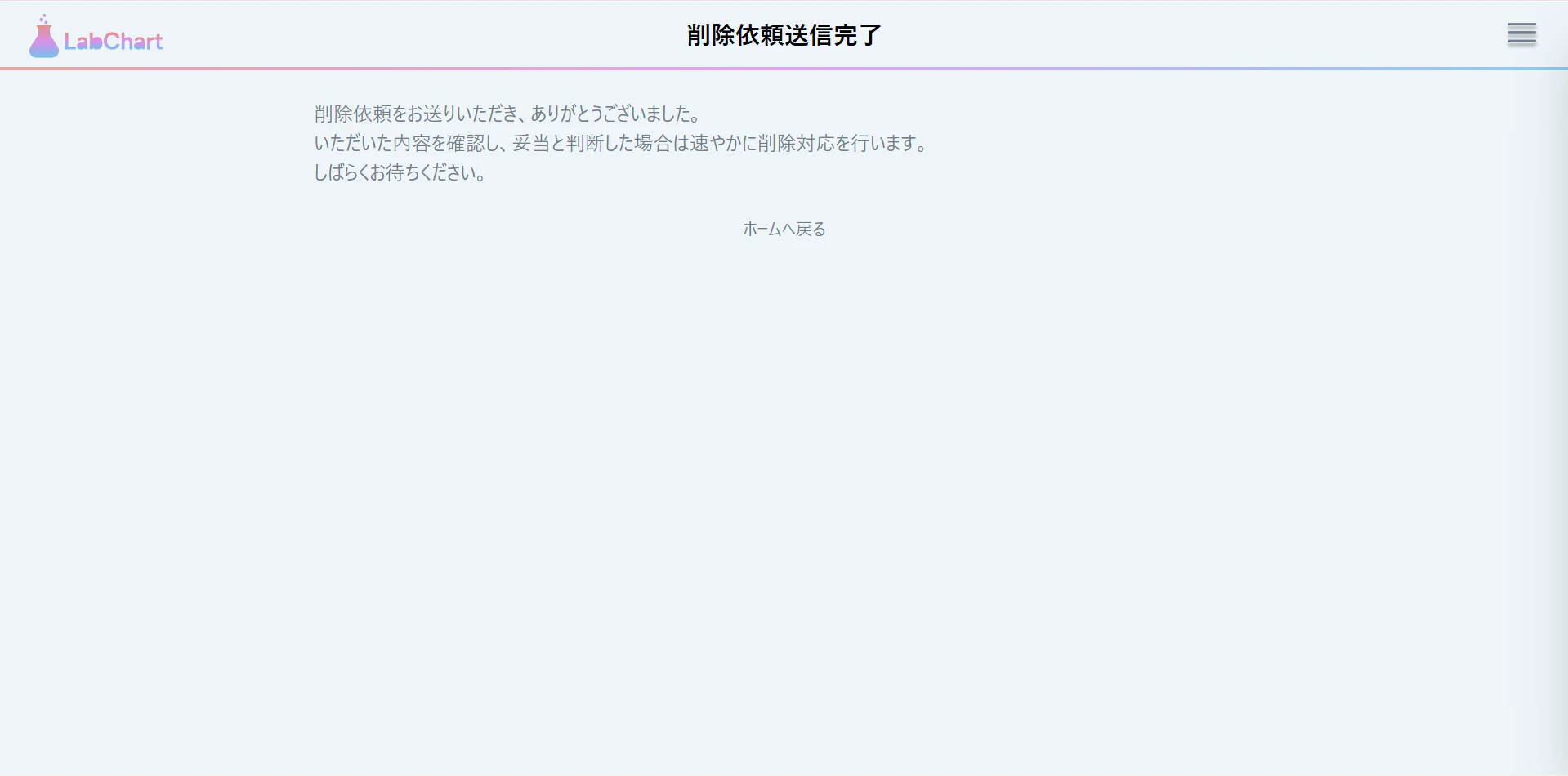
送信後は、完了ページに移動します。
DBにも登録ができていることを確認!

その他、戻るボタンなどが押せるかどうかチェックしてみてください。
問題なさそうであれば、コミット・プッシュ、PR作成、マージまでしておきましょう~!
これにて、削除依頼ページ作成は完了です。
3. 通知一覧表示ドロップダウン作成
最後に作成するのは、通知一覧表示ドロップダウンです。
3.1 ブランチ運用
先ほどの変更をdevelopブランチでプルして、新しいブランチを切って作業をします。
ブランチ名は、feature/frontend/notification-dropdownとかにしておきます。
3.2 通知アイコンの移設
現在、通知アイコンはマイページにあります。
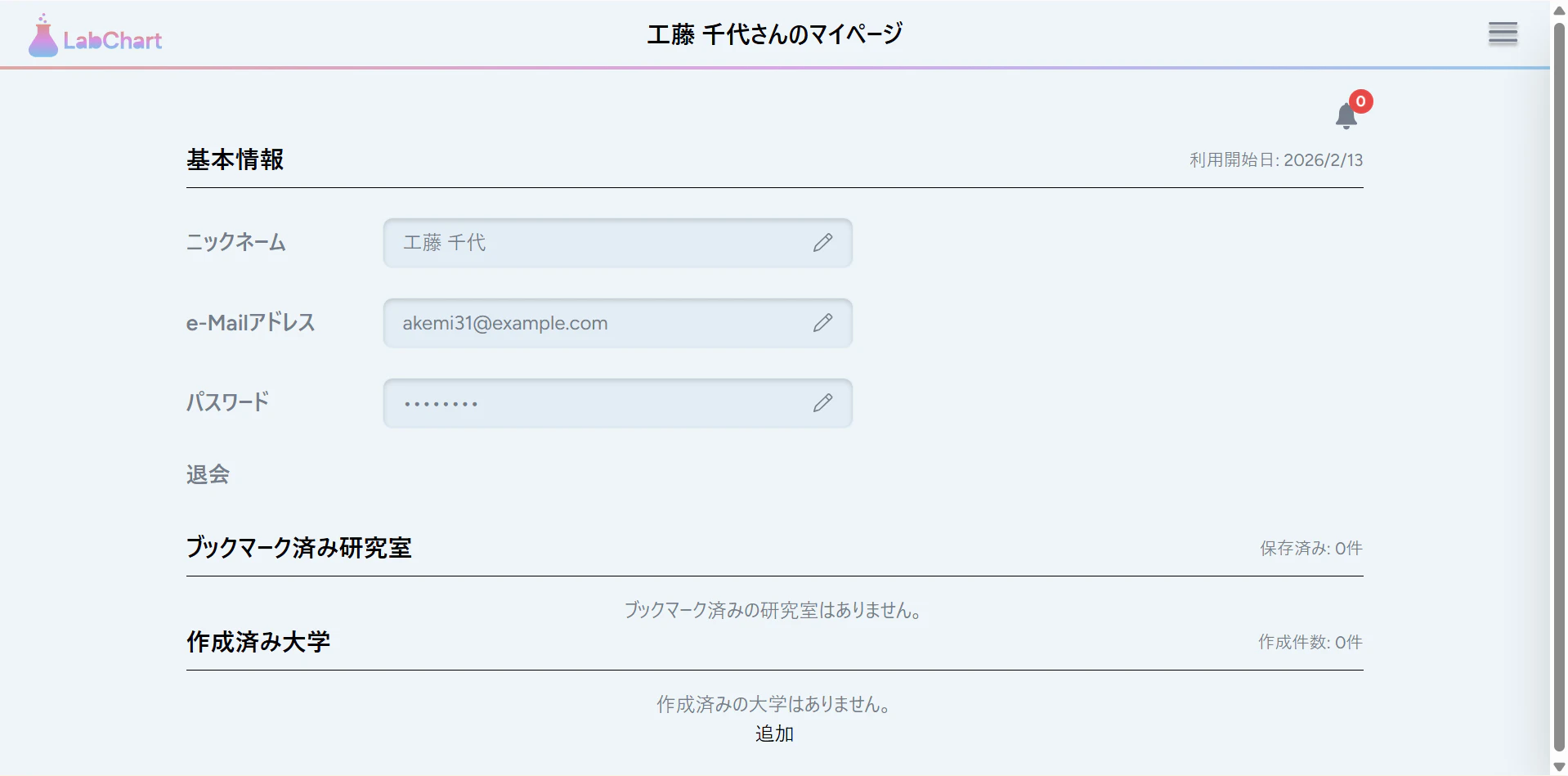
このアイコンを、コンテンツ領域から、ヘッダーに移動させたいと思います(その方が見やすいかと思って)。
マイページ修正
resources/js/Pages/MyPage/Index.jsx
クリックでコードを見る
/**
 * マイページのトップコンポーネント
 * @param {Object} props - コンポーネントのprops
 * @param {string} props.title - ページタイトル
 * @param {Object} props.user - ユーザー情報オブジェクト
 * @param {Array} [props.bookmarks=[]] - ブックマークされた研究室のリスト
 * @param {number} [props.notificationCount=0] - 未読通知の数
 * @returns {JSX.Element} コンポーネントのJSX
 */
const Index = ({ title, user, bookmarks = [], notificationCount = 0 }) => {

	// ヘッダー右側に表示する通知アイコン
	const notificationHeaderIcon = (
		<div className="relative">
			<img src={NotificationIcon} alt="通知" className="w-7 h-7 cursor-pointer" />
			{notificationCount > 0 && (
				<span className="absolute -top-2 -right-2 w-5 h-5 bg-red-500 rounded-full z-10 flex items-center justify-center text-xs font-bold text-white">
					{notificationCount}
				</span>
			)}
		</div>
	);

	return (
		<AppLayout title={title} headerRight={notificationHeaderIcon}>
共通レイアウト修正
resources/js/Layouts/AppLayout.jsx
クリックでコードを見る
/**
 * アプリケーションのレイアウトコンポーネント
 * @param {Object} props - コンポーネントのprops
 * @param {React.ReactNode} props.children - レイアウト内に表示するコンテンツ
 * @param {string} props.title - ページタイトル
 * @param {string} [props.mode='default'] - レイアウトモード
 * @param {React.ReactNode} [props.headerRight] - ヘッダー右側に表示する追加コンテンツ
 * @returns {JSX.Element} コンポーネントのJSX
 */
const AppLayout = ({ children, title, mode='default', headerRight }) => {

        /* デフォルト: フルヘッダー表示 */
        <Header title={title} onOpenSidebar={() => setIsSidebarOpen(true)} headerRight={headerRight} />
ヘッダー修正
resources/js/Components/Header.jsx
クリックでコードを見る
/**
 * ヘッダーコンポーネント
 * @param {Object} props - コンポーネントのprops
 * @param {string} props.title - ページタイトル
 * @param {Function} props.onOpenSidebar - サイドバーを開くためのコールバック関数
 * @param {React.ReactNode} [props.headerRight] - ヘッダー右側に表示する追加コンテンツ
 * @returns {JSX.Element} コンポーネントのJSX
 */
const Header = ({ title, onOpenSidebar, headerRight }) => {

      {/* 右:追加コンテンツ+ハンバーガーアイコンメニュー */}
      <div className="flex items-center gap-4">
        {headerRight}
        <HamburgerMenu onOpenSidebar={onOpenSidebar} />
      </div>
動作確認
こんな感じになっていればOKです~。
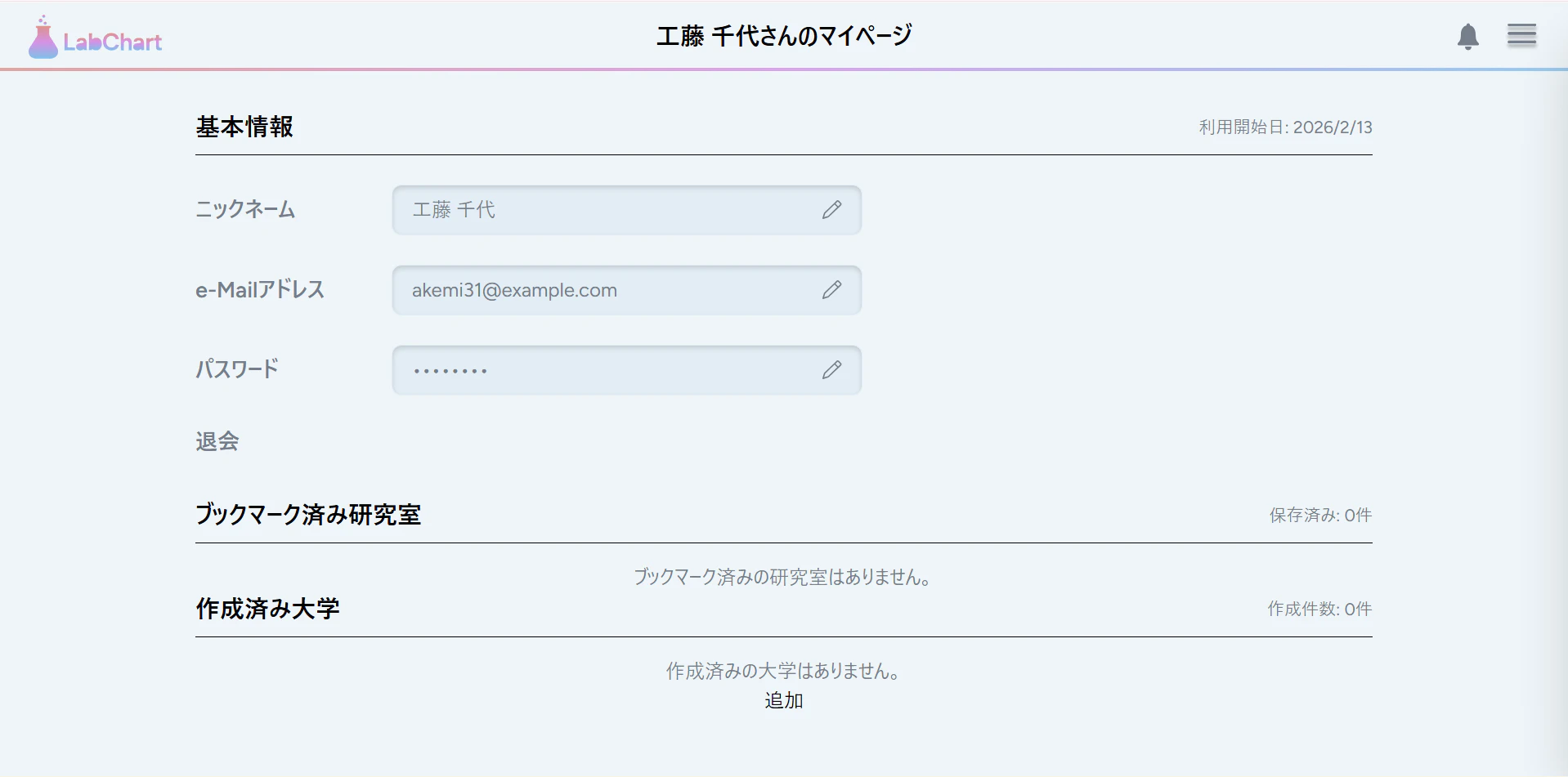
問題なさそうなら、コミットしておきましょう。
3.3 ドロップダウン作成
では、いよいよベルアイコンをクリックしたときにドロップダウンが出現するように修正しましょう。
コントローラー修正
app/Http/Controllers/NotificationController.php
まずは、通知コントローラーに、新しく通知に既読を付けるメソッドを追加します。
クリックでコードを見る
use Illuminate\Http\RedirectResponse;

    /**
     * 未読通知をすべて既読にする
     */
    public function markAsRead(): RedirectResponse
    {
        $user = Auth::user();
        $user->unreadNotifications->markAsRead();

        return back();
    }
$user->unreadNotificationsで未読通知を取得することができ、markAsRead()メソッドで既読にすることができます。
https://readouble.com/laravel/11.x/ja/notifications.html
また、このメソッドを呼び出せるようにルーティングを追加しておきましょう。
    // 通知関連
    Route::get('/notifications', [NotificationController::class, 'index'])->name('notifications.index');
    Route::post('/notifications/mark-as-read', [NotificationController::class, 'markAsRead'])->name('notifications.markAsRead'); // 追加
他のコントローラーを修正する前におさらいです。
バックエンド編で実装済みの通知は以下の二つでした。
- 大学・学部・研究室削除依頼及び削除完了通知
- 作成済み大学・学部・研究室編集及び削除通知
まずは、大学・学部・研究室削除依頼及び削除完了通知に関するコントローラーを順々に修正していきます。
というのも、通知一覧ページから、編集された対象のページに遷移できた方が便利かなと思い、そのためには対象IDを渡す必要があるからです。
app/Http/Controllers/UniversityController.php
クリックでコードを見る
    public function update(Request $request, University $university)
    {

        try {

            // 作成者へ通知を送信
            if ($userId !== $current->created_by && $current->creator) {
                $changes = collect($current->getChanges())
                    ->only(['name'])
                    ->map(fn($new, $key) => [
                        'old' => $old[$key] ?? null,
                        'new' => $new,
                    ])
                    ->toArray();

                $current->creator->notify(
                    new ModelChangedNotification('edited', '大学', $current->name, $current->id, $changes)
                ); // 修正
            }

             // リダイレクト
            return redirect()->route('faculties.index', ['university' => $current])->with('success', '大学情報が更新されました。');
        } catch (\Exception $e) {
            DB::rollBack(); // エラー時はロールバック
            throw $e;
        }
    }
学部・研究室も同様の修正です。
app/Http/Controllers/FacultyController.php
                $current->creator->notify(
                    new ModelChangedNotification('edited', '学部', $current->name, $current->id, $changes)
                );
            }
app/Http/Controllers/LabController.php
                $current->creator->notify(
                    new ModelChangedNotification('edited', '研究室', $current->name, $current->id, $changes)
                );
当然、IDを渡せるようにModelChangedNotificationクラスのコンストラクタ側も修正する必要があります。
app/Notifications/ModelChangedNotification.php
クリックでコードを見る
<?php

namespace App\Notifications;

use Illuminate\Bus\Queueable;
use Illuminate\Contracts\Queue\ShouldQueue;
use Illuminate\Notifications\Messages\MailMessage;
use Illuminate\Notifications\Notification;

class ModelChangedNotification extends Notification
{
    use Queueable;

    protected $action; // 'edited' or 'deleted'
    protected $modelType; // '大学', '学部', '研究室'
    protected $modelName; // 対象の名前
    protected $modelId; // 対象のID
    protected $changes;

    /**
     * Create a new notification instance.
     */
    public function __construct(string $action, string $modelType, string $modelName, ?int $modelId = null, ?array $changes = null)
    {
        $this->action = $action;
        $this->modelType = $modelType;
        $this->modelName = $modelName;
        $this->modelId = $modelId;
        $this->changes = $changes;
    }

    /**
     * Get the notification's delivery channels.
     *
     * @return array<int, string>
     */
    public function via(object $notifiable): array
    {
        return ['database'];
    }

    /**
     * Get the array representation of the notification.
     *
     * @return array<string, mixed>
     */
    public function toArray(object $notifiable): array
    {
        $message = match($this->action) {
            'edited' => "あなたが作成した「{$this->modelName}({$this->modelType})」が編集されました。",
            'deleted' => "あなたが作成した「{$this->modelName}({$this->modelType})」が削除されました。",
            default => "あなたが作成した「{$this->modelName}({$this->modelType})」に変更がありました。",
        };

        return [
            'message' => $message,
            'action' => $this->action,
            'model_type' => $this->modelType,
            'model_name' => $this->modelName,
            'model_id' => $this->modelId,
            'changes' => $this->changes,
        ];
    }
}
あとは、管理者で大学を削除する機能です。
ただし、現状、管理者が削除するUIを作っていないので、この部分の動作確認は次回以降に回したいと思います...w
app/Http/Controllers/Admin/AdminController.php
クリックでコードを見る
<?php

namespace App\Http\Controllers\Admin; // 名前空間が他のコントローラーと異なり、整理されている

use App\Http\Controllers\Controller;
use App\Models\Comment;
use App\Models\DeletionRequest;
use App\Models\Faculty;
use App\Models\Lab;
use App\Models\University;
use App\Notifications\DeletionCompletedNotification;
use App\Notifications\ModelChangedNotification;
use Illuminate\Foundation\Auth\Access\AuthorizesRequests;
use Illuminate\Http\RedirectResponse;

class AdminController extends Controller
{
    use AuthorizesRequests;

    public function destroyUniversity(University $university): RedirectResponse
    {
        // 認可チェック
        $this->authorize('delete', $university);

        $creator = $university->creator; // 作成者を取得
        $universityName = $university->name; // 通知用に大学名を取得

        // 対象の削除依頼があれば取得
        $deletionRequest = DeletionRequest::where('target_type', University::class)
            ->where('target_id', $university->id)
            ->first();

        // 通知送信
        if ($deletionRequest) {
            $requester = $deletionRequest->requester;
            $requester->notify(new DeletionCompletedNotification($university->name, '大学'));

            $deletionRequest->processed_by = auth()->id();
            $deletionRequest->status = 'approved';
            $deletionRequest->save();
        }

        $university->delete();

        // 通知送信(作成者へ)
        if ($creator && auth()->id() !== $creator->id) {
            $creator->notify(new ModelChangedNotification(
                'deleted',
                '大学',
                $universityName,
                $university->id
            ));
        }

        return redirect()->route('labs.home')->with('success', '大学が削除されました。');
    }

    public function destroyFaculty(Faculty $faculty): RedirectResponse
    {
        // 認可チェック
        $this->authorize('delete', $faculty);

        $creator = $faculty->creator; // 作成者を取得
        $facultyName = $faculty->name; // 通知用に学部名を取得

        // 対象の削除依頼があれば取得
        $deletionRequest = DeletionRequest::where('target_type', Faculty::class)
            ->where('target_id', $faculty->id)
            ->first();

        // 通知送信
        if ($deletionRequest) {
            $requester = $deletionRequest->requester;
            $requester->notify(new DeletionCompletedNotification($faculty->name, '学部'));

            $deletionRequest->processed_by = auth()->id();
            $deletionRequest->status = 'approved';
            $deletionRequest->save();
        }

        $faculty->delete();

        // 通知送信(作成者へ)
        if ($creator && auth()->id() !== $creator->id) {
            $creator->notify(new ModelChangedNotification(
                'deleted',
                '学部',
                $facultyName,
                $faculty->id
            ));
        }

        return redirect()->route('labs.home')->with('success', '学部が削除されました。');
    }

    public function destroyLab(Lab $lab)
    {
        // 認可チェック
        $this->authorize('delete', $lab);

        $creator = $lab->creator; // 作成者を取得
        $labName = $lab->name; // 通知用に研究室名を取得

        // 対象の削除依頼があれば取得
        $deletionRequest = DeletionRequest::where('target_type', Lab::class)
            ->where('target_id', $lab->id)
            ->first();

        // 通知送信(削除依頼者へ)
        if ($deletionRequest) {
            $requester = $deletionRequest->requester;
            $requester->notify(new DeletionCompletedNotification($lab->name, '研究室'));

            $deletionRequest->processed_by = auth()->id();
            $deletionRequest->status = 'approved';
            $deletionRequest->save();
        }

        $lab->delete();

        // 通知送信(作成者へ)
        if ($creator && auth()->id() !== $creator->id) {
            $creator->notify(new ModelChangedNotification(
                'deleted',
                '研究室',
                $labName,
                $lab->id
            ));
        }

        return redirect()->route('labs.home')->with('success', '研究室が削除されました。');
    }

    public function destroyComment(Comment $comment)
    {
        // 認可チェック
        $this->authorize('delete', $comment);

        $comment->delete();
        return redirect()->route('labs.home')->with('success', 'コメントが削除されました。');
    }
}
ドロップダウンコンポーネント作成
resources/js/Components/MyPage/NotificationDropdown.jsx
クリックでコードを見る
import { useState, useRef, useEffect } from "react";
import { router } from "@inertiajs/react";
import NotificationIcon from "@/Assets/icons/notification.svg";

/**
 * 通知ベルアイコン + ドロップダウンコンポーネント
 * @param {Object} props
 * @param {Array} props.notifications - 通知オブジェクトの配列
 * @returns {JSX.Element}
 */
const NotificationDropdown = ({ notifications = [] }) => {
	const [isOpen, setIsOpen] = useState(false);
	const dropdownRef = useRef(null);

	// 未読件数
	const unreadCount = notifications.filter((n) => !n.read_at).length;

	// 直近10件のみ表示
	const latestNotifications = notifications.slice(0, 10);

	// 外側クリックでドロップダウンを閉じる
	useEffect(() => {
		const handleClickOutside = (e) => {
			if (dropdownRef.current && !dropdownRef.current.contains(e.target)) {
				setIsOpen(false);
			}
		};
		document.addEventListener("mousedown", handleClickOutside);
		return () => document.removeEventListener("mousedown", handleClickOutside);
	}, []);

	// ドロップダウン開閉のトグル
	const toggleDropdown = () => {
		const nextOpen = !isOpen;
		setIsOpen(nextOpen);

		// 開いたときに未読を既読にする
		if (nextOpen && unreadCount > 0) {
			router.post(
				route("notifications.markAsRead"),
				{},
				{ preserveState: true, preserveScroll: true }
			);
		}
	};

	// 経過時間を表示用にフォーマット
	const formatTime = (dateString) => {
		if (!dateString) return "";
		const diff = Date.now() - new Date(dateString).getTime();
		const minutes = Math.floor(diff / 60000);
		if (minutes < 1) return "たった今";
		if (minutes < 60) return `${minutes}分前`;
		const hours = Math.floor(minutes / 60);
		if (hours < 24) return `${hours}時間前`;
		const days = Math.floor(hours / 24);
		if (days < 30) return `${days}日前`;
		return new Date(dateString).toLocaleDateString("ja-JP");
	};

	/**
	 * 通知に対応する遷移先URLを取得する
	 * @param {Object} notification - 通知オブジェクト
	 * @returns {string|null} 遷移先URL(遷移不可の場合はnull)
	 */
	const getNotificationUrl = (notification) => {
		const data = notification.data || {};
		const type = notification.type || "";

		// ModelChangedNotification(編集通知)
		if (type.endsWith("ModelChangedNotification") && data.action === "edited" && data.model_id) {
			if (data.model_type === "大学") {
				return route("faculties.index", { university: data.model_id });
			}
			if (data.model_type === "学部") {
				return route("labs.index", { faculty: data.model_id });
			}
			if (data.model_type === "研究室") {
				return route("labs.show", { lab: data.model_id });
			}
		}

		// DeletionRequestNotification(削除依頼通知)→ 削除依頼一覧ページへ
		if (type.endsWith("DeletionRequestNotification")) {
			return route("admin.deletion_requests.index");
		}

		return null;
	};

	/**
	 * 通知クリック時のハンドラ
	 * @param {Object} notification - 通知オブジェクト
	 */
	const handleNotificationClick = (notification) => {
		const url = getNotificationUrl(notification);
		if (url) {
			setIsOpen(false);
			router.get(url);
		}
	};

	return (
		<div className="relative" ref={dropdownRef}>
			{/* ベルアイコン */}
			<button
				type="button"
				onClick={toggleDropdown}
				className="relative cursor-pointer focus:outline-none"
				aria-label="通知"
			>
				<img src={NotificationIcon} alt="通知" className="w-7 h-7" />
				{unreadCount > 0 && (
					<span className="absolute -top-2 -right-2 w-5 h-5 bg-red-500 rounded-full z-10 flex items-center justify-center text-xs font-bold text-white">
						{unreadCount > 99 ? "99+" : unreadCount}
					</span>
				)}
			</button>

			{/* ドロップダウン */}
			{isOpen && (
				<div className="absolute right-0 mt-2 w-80 bg-white rounded-lg shadow-lg border border-gray-200 z-50 overflow-hidden">
					{/* ヘッダー */}
					<div className="px-4 py-3 bg-[#EEF5F9]">
						<h3 className="text-sm font-bold text-black">通知</h3>
					</div>
					<div className="h-1 w-full bg-[#EEF5F9] border-b border-gray-200" />

					{/* 通知リスト */}
					<div className="max-h-96 overflow-y-auto">
						{latestNotifications.length === 0 ? (
							<div className="px-4 py-6 text-center bg-[#EEF5F9] text-sm text-gray-400">
								通知はありません
							</div>
						) : (
							latestNotifications.map((notification) => (
								<div
									key={notification.id}
									onClick={() => handleNotificationClick(notification)}
									className={`px-4 py-3 border-b bg-[#EEF5F9] hover:bg-[#E2EDF6] transition ${
										!notification.read_at ? "bg-blue-50" : "border-gray-200"
									} ${getNotificationUrl(notification) ? "cursor-pointer" : ""}`}
								>
									<div className="flex items-start gap-2">
										{/* 未読インジケータ */}
										{!notification.read_at && (
											<span className="mt-1.5 w-2 h-2 bg-blue-500 rounded-full shrink-0" />
										)}
										<div className="flex-1 min-w-0">
											<p className="text-sm text-[#747D8C] break-words">
												{notification.data?.message || "通知メッセージがありません"}
											</p>
											<p className="text-xs text-gray-400 mt-1">
												{formatTime(notification.created_at)}
											</p>
										</div>
									</div>
								</div>
							))
						)}
					</div>

					{/* フッター: すべて見るリンク */}
					{notifications.length > 0 && (
						<div className="px-4 py-2 border-t border-gray-200 bg-[#EEF5F9] text-center">
							<a
								href={route("notifications.index")}
								className="text-sm text-black hover:underline"
							>
								すべての通知を見る
							</a>
						</div>
					)}
				</div>
			)}
		</div>
	);
};

export default NotificationDropdown;
通知一覧ページコンポーネント作成
既存ファイルを修正してください。
resources/js/Pages/DeletionRequest/Index.jsx
クリックでコードを見る
import React from 'react';
import { router } from '@inertiajs/react';
import { Head } from '@inertiajs/react';
import AppLayout from '@/Layouts/AppLayout';

const getTargetRoute = (type, id) => {
  switch (type) {
    case 'App\\Models\\University':
      return route('faculties.index', { university: id });
    case 'App\\Models\\Faculty':
      return route('labs.index', { faculty: id });
    case 'App\\Models\\Lab':
      return route('labs.show', { lab: id });
    default:
      return '#';
  }
};

const getTargetLabel = (type) => {
  switch (type) {
    case 'App\\Models\\University':
      return '大学';
    case 'App\\Models\\Faculty':
      return '学部';
    case 'App\\Models\\Lab':
      return '研究室';
    default:
      return '不明';
  }
};

export default function DeletionRequestIndex({ deletionRequests }) {
  return (
    <AppLayout title="削除依頼一覧">
      <Head title="削除依頼一覧" />
      <div className="flex flex-col items-center min-h-full">
        <div className="w-full max-w-3xl">
          <div className="flex justify-end mb-4">
            <button
              onClick={() => router.get(route('mypage.index'))}
              className="px-4 py-2 text-sm rounded-lg"
              style={{ backgroundColor: '#8D9DB3', color: '#FFFFFF', fontWeight: 'bold' }}
            >
              < マイページに戻る
            </button>
          </div>
          {deletionRequests.length > 0 ? (
            <div className="divide-y divide-gray-200 border-t border-b border-gray-200">
              {deletionRequests.map((req) => (
                <div key={req.id} className="py-4 flex gap-6">
                  <div className="flex-shrink-0">
                    <p className="text-[#747D8C]">
                      {new Date(req.created_at).toLocaleString("ja-JP", {
                        year: "numeric",
                        month: "2-digit",
                        day: "2-digit",
                        hour: "2-digit",
                        minute: "2-digit",
                      })}
                    </p>
                  </div>
                  <div className="flex flex-col">
                    <p className="text-[#747D8C]">
                      <span
                        onClick={() => router.get(getTargetRoute(req.target_type, req.target_id))}
                        className="text-blue-600 hover:underline cursor-pointer"
                      >
                        {req.target?.name ?? '(名称不明)'}
                      </span>
                      ({getTargetLabel(req.target_type)})への削除依頼
                    </p>
                    <p className="text-[#747D8C]">理由: {req.reason || '(理由なし)'}</p>
                    <p className="text-[#747D8C]">依頼者: {req.requester?.name ?? '(不明)'}</p>
                  </div>
                </div>
              ))}
            </div>
          ) : (
            <p className="text-[#747D8C]">削除依頼はありません。</p>
          )}
        </div>
      </div>
    </AppLayout>
  );
}
削除依頼一覧ページ作成
既存のファイルを修正してください。
resources/js/Pages/Notification/Index.jsx
クリックでコードを見る
import React from 'react';
import { router } from '@inertiajs/react';
import { Head } from '@inertiajs/react';
import AppLayout from '@/Layouts/AppLayout';

const getTargetRoute = (type, id) => {
  switch (type) {
    case 'App\\Models\\University':
      return route('faculties.index', { university: id });
    case 'App\\Models\\Faculty':
      return route('labs.index', { faculty: id });
    case 'App\\Models\\Lab':
      return route('labs.show', { lab: id });
    default:
      return '#';
  }
};

const getTargetLabel = (type) => {
  switch (type) {
    case 'App\\Models\\University':
      return '大学';
    case 'App\\Models\\Faculty':
      return '学部';
    case 'App\\Models\\Lab':
      return '研究室';
    default:
      return '不明';
  }
};

export default function DeletionRequestIndex({ deletionRequests }) {
  return (
    <AppLayout title="削除依頼一覧">
      <Head title="削除依頼一覧" />
      <div className="flex flex-col items-center min-h-full">
        <div className="w-full max-w-3xl">
          <div className="flex justify-end mb-4">
            <button
              onClick={() => router.get(route('mypage.index'))}
              className="px-4 py-2 text-sm rounded-lg"
              style={{ backgroundColor: '#8D9DB3', color: '#FFFFFF', fontWeight: 'bold' }}
            >
              < マイページに戻る
            </button>
          </div>
          {deletionRequests.length > 0 ? (
            <div className="divide-y divide-gray-200 border-t border-b border-gray-200">
              {deletionRequests.map((req) => (
                <div key={req.id} className="py-4 flex gap-6">
                  <div className="flex-shrink-0">
                    <p className="text-[#747D8C]">
                      {new Date(req.created_at).toLocaleString("ja-JP", {
                        year: "numeric",
                        month: "2-digit",
                        day: "2-digit",
                        hour: "2-digit",
                        minute: "2-digit",
                      })}
                    </p>
                  </div>
                  <div className="flex flex-col">
                    <p className="text-[#747D8C]">
                      <span
                        onClick={() => router.get(getTargetRoute(req.target_type, req.target_id))}
                        className="text-blue-600 hover:underline cursor-pointer"
                      >
                        {req.target?.name ?? '(名称不明)'}
                      </span>
                      ({getTargetLabel(req.target_type)})への削除依頼
                    </p>
                    <p className="text-[#747D8C]">理由: {req.reason || '(理由なし)'}</p>
                    <p className="text-[#747D8C]">依頼者: {req.requester?.name ?? '(不明)'}</p>
                  </div>
                </div>
              ))}
            </div>
          ) : (
            <p className="text-[#747D8C]">削除依頼はありません。</p>
          )}
        </div>
      </div>
    </AppLayout>
  );
}
その他のコンポーネント修正
呼び出し元を修正して終わりです!
resources/js/Pages/MyPage/Index.jsx
クリックでコードを見る
import NotificationDropdown from "@/Components/MyPage/NotificationDropdown";

 * @param {Array} [props.notifications=[]] - 通知オブジェクトの配列
 * @returns {JSX.Element} コンポーネントのJSX
 */
const Index = ({ title, user, bookmarks = [], notifications = [] }) => {

	// ヘッダー右側に表示する通知ドロップダウン
	const notificationHeaderIcon = (
		<NotificationDropdown notifications={notifications} />
	);

	// ヘッダー右側に表示する通知ドロップダウン
	const notificationHeaderIcon = (
		<NotificationDropdown notifications={notifications} />
	);
これは、前からあった、サイドバーを開いたときに通知数バッチの方が手前に表示されてしまう問題を解消したものになります。
resources/js/Components/Sidebar.jsx
クリックでコードを見る
      {/* オーバーレイ */}
      <div
        onClick={onClose}
        className={`
          fixed inset-0 bg-black/40 transition-opacity duration-300 z-40
          ${isOpen ? 'opacity-100 pointer-events-auto' : 'opacity-0 pointer-events-none'}
        `}
        aria-hidden="true"
      />

      {/* 本体 */}
      <aside
        role="dialog"
        aria-modal="true"
        className={`
          fixed right-0 top-0 h-dvh w-[270px] max-w-[90vw] bg-[#EEF5F9] shadow-2xl z-50
          transform transition-transform duration-300
          ${isOpen ? 'translate-x-0' : 'translate-x-full'}
          flex flex-col
        `}
      >
動作確認
各ページこんな感じになっていれば完了です!
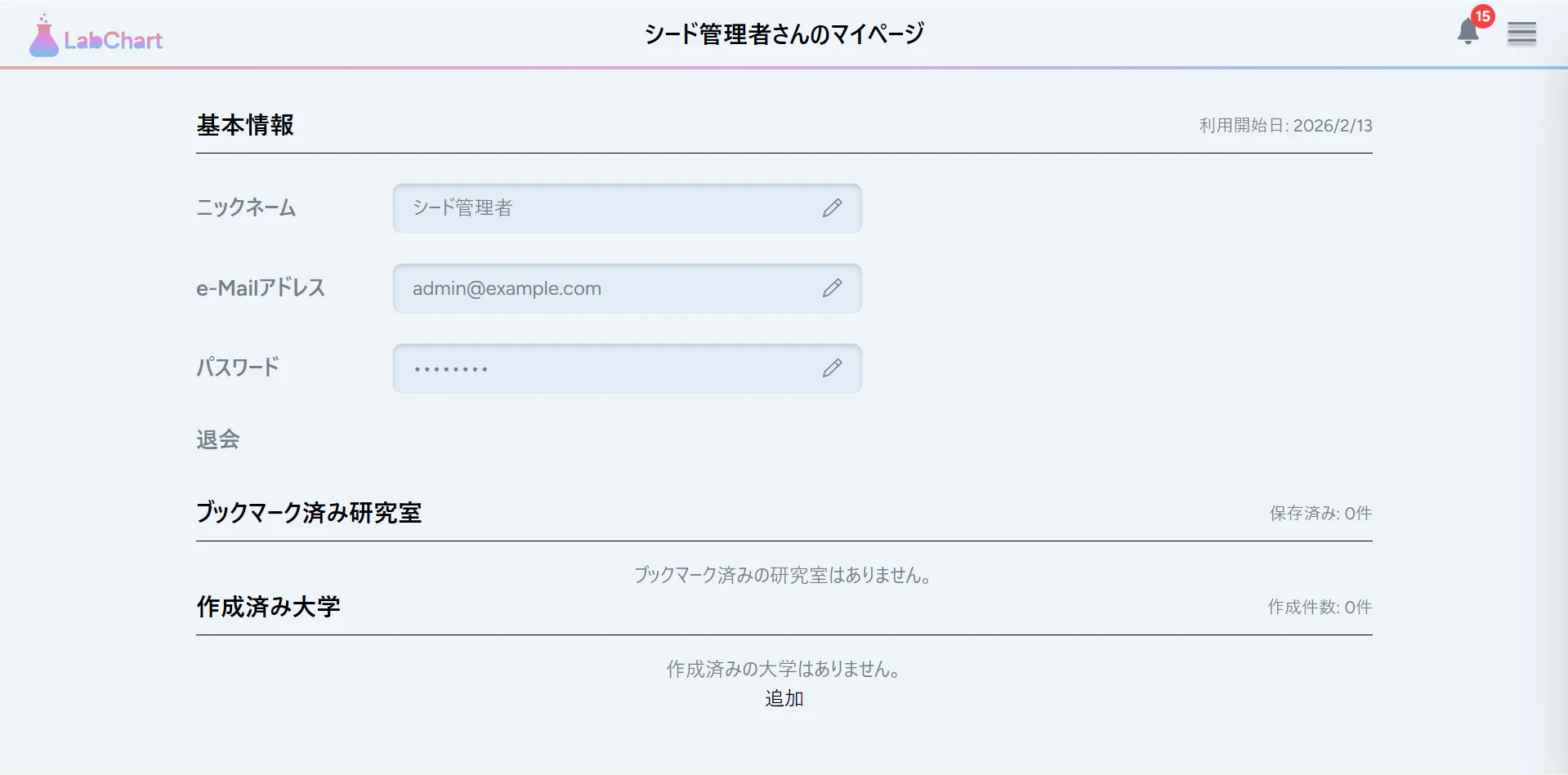
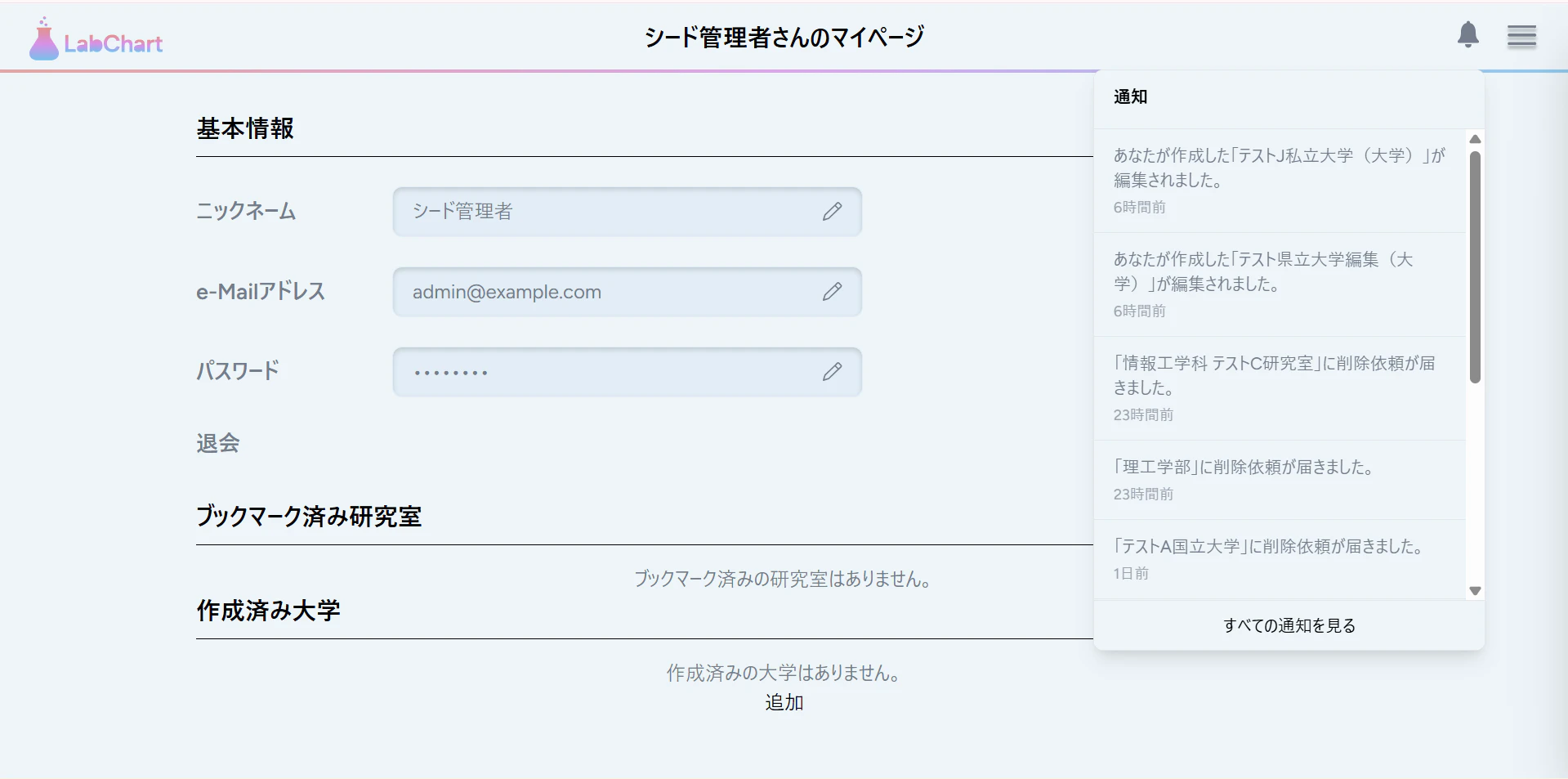
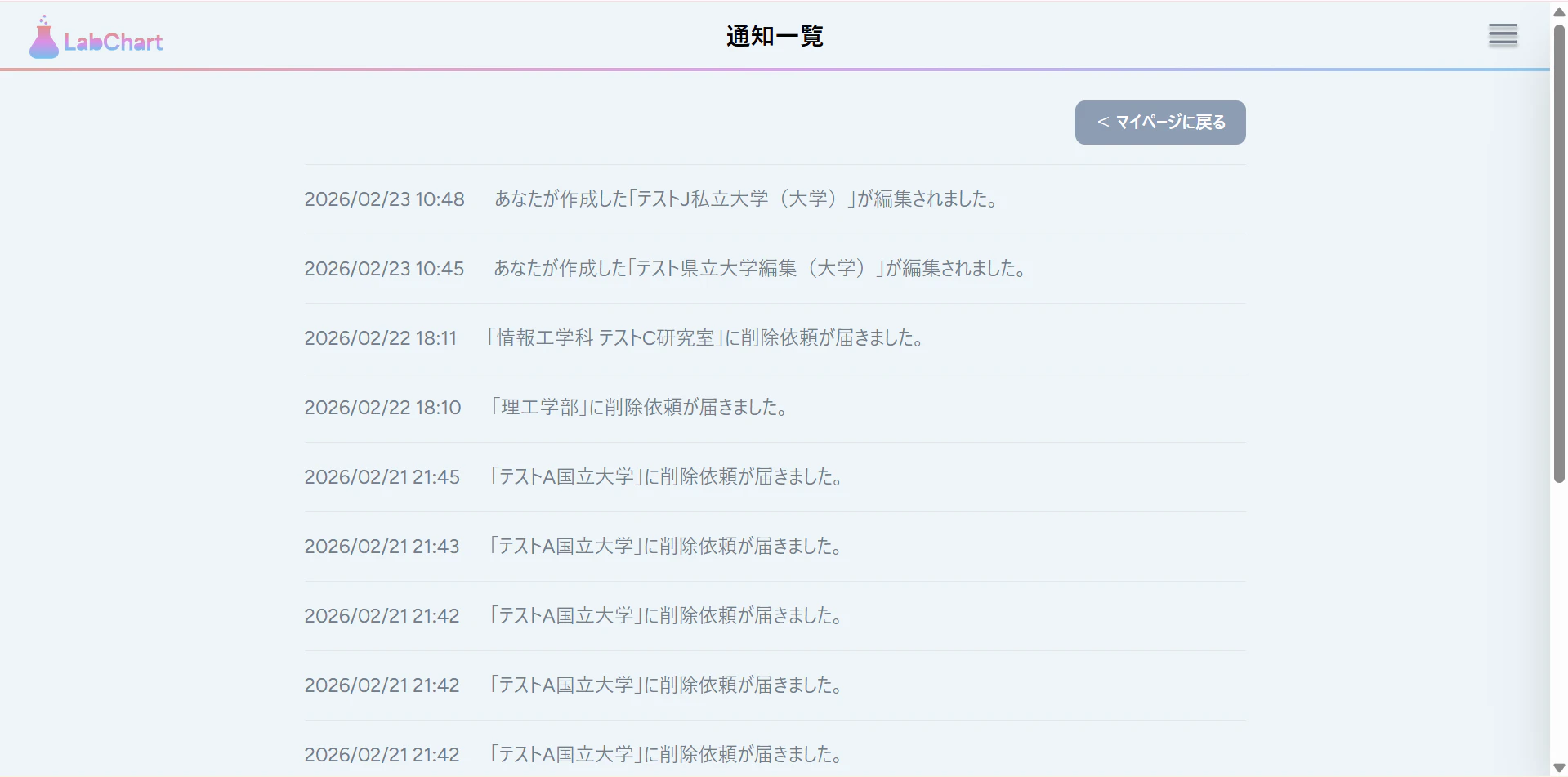
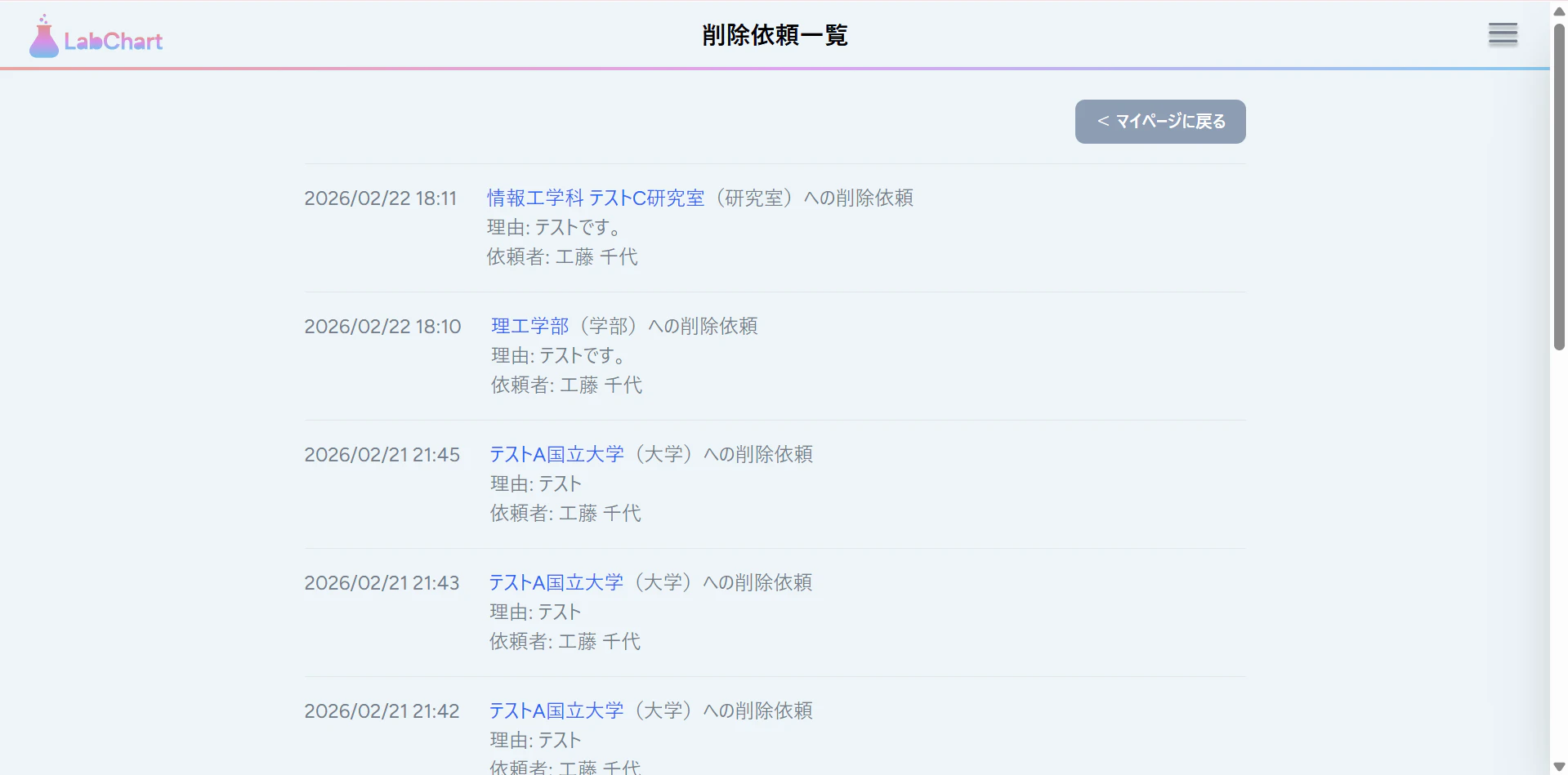
コミット・プッシュ、PR作成、マージを忘れずに!
4. まとめ・次回予告
今回は、編集履歴ページ・削除依頼ページ・通知ドロップダウンの3つを一気に作りました。
盛りだくさんでしたね!
次回は、トーストを作成したいと思います!
これまでの記事一覧
☆要件定義・設計編
☆環境構築編
☆バックエンド実装編
- その7: バックエンド実装編① ~認証機能作成~
- その8: バックエンド実装編②前編 ~レビュー投稿機能作成~
- その8.5: バックエンド実装編②後編 ~レビュー投稿機能作成~
- その9: バックエンド実装編③ ~レビューCRUD機能作成~
- その10: バックエンド実装編④ ~レビューCRUD機能作成その2~
- その11: バックエンド実装編⑤ ~新規大学・学部・研究室作成機能作成~
- その12: バックエンド実装編⑥ ~大学検索機能作成~
- その13: バックエンド実装編⑦ ~大学・学部・研究室編集機能作成~
- その14: バックエンド実装編⑧ ~コメント投稿機能~
- その15: バックエンド実装編⑨ ~コメント編集・削除機能~
- その16: バックエンド実装編⑩ ~ブックマーク機能~
- その17: バックエンド実装編⑪ ~排他制御・トランザクション処理~
- その18: バックエンド実装編⑫ ~マイページ機能作成~
- その19: バックエンド実装編⑬ ~管理者アカウント機能作成~
- その20: バックエンド実装編⑭ ~通知機能作成~
- その21: バックエンド実装編⑮ ~ソーシャルログイン機能作成~
☆フロントエンド実装編
- その22: フロントエンド実装編① ~メインコンテンツ領域作成~
- その23: フロントエンド実装編② ~ヘッダー作成~
- その24: フロントエンド実装編③ ~サイドバー作成~
- その25: フロントエンド実装編④ ~ホームページ作成~
- その26: フロントエンド実装編⑤ ~大学検索結果画面作成~
- その27: フロントエンド実装編⑥ ~大学詳細・学部一覧画面作成~
- その28: フロントエンド実装編⑦ ~学部詳細・研究室一覧画面作成~
- その29: フロントエンド実装編⑧前編 ~研究室詳細・レビュー画面作成前編~
- その29.5: フロントエンド実装編⑧後編 ~研究室詳細・レビュー画面作成後編~
- その30: フロントエンド実装編⑨ ~マイページ作成~
- その31: フロントエンド実装編⑩ ~パンくずリスト作成~
- その32: フロントエンド実装編⑪ ~ログイン・新規登録モーダル作成~
- その33: フロントエンド実装編⑫ ~大学作成・編集モーダル作成~
- その34: フロントエンド実装編⑬ ~学部作成・編集モーダル作成~
- その35: フロントエンド実装編⑭ ~研究室作成・編集モーダル作成~
- その36: フロントエンド実装編⑮ ~レビュー作成・編集モーダル作成~
- その37: フロントエンド実装編⑯ ~コメント一覧表示モーダル作成~
軽く宣伝
YouTubeを始めました(というか始めてました)。
内容としては、Webエンジニアの生活や稼げるようになるまでの成長記録などを発信していく予定です。
現在、まったく再生されておらず、落ち込みそうなので、見てくださる方はぜひ高評価を教えもらえると励みになると思います。"(-""-)"