
実務1年目駆け出しエンジニアがLaravel&ReactでWebアプリケーション開発に挑戦してみた!(その29.5)
この記事は、前編の続きです!
6. コメント一覧部分作成(UI作成)
コメント一覧を作りたいと思います。
シーディングを修正・再実行
しかし、コメントに関してはシーダーがないので、動作確認がしにくい状況です。
まず、シーダー用のファイルを作成します。
Dockerコンテナの中で実行してください。
実行コマンド
$ php artisan make:seeder CommentSeeder
シーダーファイルができたら以下のようにしてください。
<?php

namespace Database\Seeders;

use App\Models\Comment;
use App\Models\Lab;
use App\Models\User;
use Illuminate\Database\Seeder;

class CommentSeeder extends Seeder
{
    /**
     * Run the database seeds.
     */
    public function run(): void
    {
        $users = User::all();
        $labs = Lab::all();

        // サンプルコメントのテンプレート
        $commentTemplates = [
            '研究室の雰囲気がとても良さそうですね。',
            'この研究室に興味があります。もう少し詳しく教えていただけますか?',
            '設備が充実していて魅力的です。',
            '研究テーマがとても興味深いです。',
            '先輩方の就職実績が気になります。',
            'ゼミの進め方について教えてください。',
            '週何日くらい研究室に通っていますか?',
            'コアタイムはありますか?',
            '学会発表の機会は多いですか?',
            '他大学との共同研究はありますか?',
            '研究室見学は可能でしょうか?',
            'プログラミングのスキルはどの程度必要ですか?',
            '院進学を考えているのですが、おすすめですか?',
            '就職活動と研究の両立は大変ですか?',
            '先生との距離感はどのような感じですか?',
            '研究室のイベントはありますか?',
            'とても参考になりました。ありがとうございます!',
            '私も同じ研究室を検討中です。',
            '実際に配属されてみてどうでしたか?',
            '英語力はどの程度求められますか?',
        ];

        // 各研究室に対して1〜5件のコメントを生成
        foreach ($labs as $lab) {
            $commentCount = rand(1, 5);
            $selectedUsers = $users->random(min($commentCount, $users->count()));

            foreach ($selectedUsers as $user) {
                Comment::create([
                    'user_id' => $user->id,
                    'lab_id' => $lab->id,
                    'content' => $commentTemplates[array_rand($commentTemplates)],
                ]);
            }
        }
    }
}
シーダーとして登録します。
<?php

namespace Database\Seeders;

use App\Models\Lab;
use App\Models\Review;
use App\Models\User;
// use Illuminate\Database\Console\Seeds\WithoutModelEvents;
use Illuminate\Database\Seeder;
use Illuminate\Support\Facades\Hash;

class DatabaseSeeder extends Seeder
{
    /**
     * Seed the application's database.
     */
    public function run(): void
    {
        // 管理者を先に作成
        $email = 'admin@example.com';

        $admin = User::updateOrCreate(
            ['email' => $email],
            [
                'name' => 'シード管理者',
                'password' => Hash::make('password'),
                'is_admin' => true,
            ]
        );

        // 大学・学部・研究室のSeederクラスを呼び出す
        $this->call([
            UniversitySeeder::class,
            FacultySeeder::class,
            LabSeeder::class,
        ]);

        // ユーザー30人分を作成、さらにリレーションを付与
        User::factory()->count(30)->create()->each(function ($user) {
            // 大学・学部・研究室のリレーションを付与
            $user->universities()->attach(rand(1, 3)); // university_id: 1~3
            $user->faculties()->attach(rand(1, 4)); // faculty_id: 1~4
            $user->labs()->attach(rand(1, 5)); // lab_id: 1~5
        });

        // レビューを50件作成
        // ただし、重複を回避しながら作成
        $users = User::all();
        $labs = Lab::all();
        $createdCombinations = [];
        $targetCount = 50;

        while (count($createdCombinations) < $targetCount) {
            $userId = $users->random()->id;
            $labId = $labs->random()->id;
            $combination = "{$userId}-{$labId}";

            if (!in_array($combination, $createdCombinations)) {
                Review::factory()->create([
                    'user_id' => $userId,
                    'lab_id' => $labId,
                ]);
                $createdCombinations[] = $combination;
            }
        }

        // 追加です: コメントのシード(ユーザー作成後に実行)
        $this->call([
            CommentSeeder::class,
        ]);
    }
}
出来たら、以下のコマンドでシーディングをやり直します。
実行コマンド
$ php artisan migrate:fresh --seed
UIに追加する
import { useState } from "react";
import { Head } from "@inertiajs/react";
import AppLayout from "@/Layouts/AppLayout";
import StarRating from "@/Components/Lab/Star/StarRating";
import { formatRating } from "@/utils/formatRating";
import {
  Chart as ChartJS,
  RadialLinearScale,
  PointElement,
  LineElement,
  Filler,
  Tooltip,
  Legend,
} from "chart.js";
import { Radar } from "react-chartjs-2";

// Chart.jsのコンポーネントを登録
ChartJS.register(
  RadialLinearScale,
  PointElement,
  LineElement,
  Filler,
  Tooltip,
  Legend
);

const Show = ({ lab, averagePerItem, overallAverage, comments }) => {
  const [showAllComments, setShowAllComments] = useState(false);

  // 7つの評価指標のラベル
  const labels = [
    "指導スタイル",
    "雰囲気・文化",
    "成果・活動",
    "拘束度",
    "設備",
    "働き方",
    "人数バランス",
  ];

  // LabControllerから渡された平均評価データを配列に変換
  const averageRatings = averagePerItem
    ? [
        averagePerItem.mentorship_style || 0,
        averagePerItem.lab_atmosphere || 0,
        averagePerItem.achievement_activity || 0,
        averagePerItem.constraint_level || 0,
        averagePerItem.facility_quality || 0,
        averagePerItem.work_style || 0,
        averagePerItem.student_balance || 0,
      ]
    : [0, 0, 0, 0, 0, 0, 0];

  // レーダーチャートのデータ
  const chartData = {
    labels: labels,
    datasets: [
      {
        label: "全投稿者の平均評価",
        data: averageRatings,
        backgroundColor: "rgba(51, 225, 237, 0.2)",
        borderColor: "rgba(51, 225, 237, 1)",
        borderWidth: 2,
        pointBackgroundColor: "rgba(51, 225, 237, 1)",
        pointBorderColor: "#fff",
        pointHoverBackgroundColor: "#fff",
        pointHoverBorderColor: "rgba(51, 225, 237, 1)",
      },
    ],
  };

  // レーダーチャートのオプション
  const chartOptions = {
    responsive: true,
    maintainAspectRatio: true,
    scales: {
      r: {
        angleLines: {
          display: true,
        },
        suggestedMin: 0,
        suggestedMax: 5,
        ticks: {
          stepSize: 1,
          font: {
            size: 12,
          },
        },
        pointLabels: {
          font: {
            size: 14,
          },
        },
      },
    },
    plugins: {
      legend: {
        position: "top",
      },
      tooltip: {
        callbacks: {
          label: (context) => {
            return `${context.dataset.label}: ${context.raw.toFixed(2)}`;
          },
        },
      },
    },
  };

  return (
    <AppLayout title={`${lab.faculty.university.name} ${lab.faculty.name} ${lab.name}`}>
      <Head title={`${lab.faculty.university.name} ${lab.faculty.name} ${lab.name}`} />

      <div className="py-12">
        <div className="max-w-7xl mx-auto sm:px-6 lg:px-8">
          <div className="overflow-hidden sm:rounded-lg">
            <div className="p-6">
              <div className="grid grid-cols-1 md:grid-cols-2 gap-8">
                {/* 左側: レーダーチャート */}
                <div className="flex justify-center items-start">
                  {lab.reviews && lab.reviews.length > 0 ? (
                    <div className="w-full max-w-sm">
                      <Radar data={chartData} options={chartOptions} />
                    </div>
                  ) : (
                    <p className="text-center text-gray-500">
                      まだレビューがありません
                    </p>
                  )}
                </div>

                {/* 右側: 総合評価と研究室概要 */}
                <div>
                  {/* 総合評価 */}
                  <div className="mb-4">
                    <h2 className="text-base font-semibold text-gray-800 mb-2">
                      総合評価({lab.reviews?.length || 0})
                    </h2>
                    {lab.reviews && lab.reviews.length > 0 ? (
                      <div className="flex items-center gap-2">
                        <StarRating rating={overallAverage || 0} />
                        <span className="text-sm text-[#F4BB42]">
                          {formatRating(overallAverage, "0.00")}
                        </span>
                      </div>
                    ) : (
                      <p className="text-sm text-gray-500">まだ評価がありません</p>
                    )}
                  </div>

                  {/* 研究室概要 */}
                  <h2 className="text-base font-semibold text-gray-800 mb-2">
                    研究室概要
                  </h2>
                  <p className="text-sm text-gray-600 whitespace-pre-wrap leading-tight">
                    {lab.description || "概要はまだ登録されていません"}
                  </p>

                  {/* 研究室ページ */}
                  <div className="mt-4">
                    <h2 className="text-base font-semibold text-gray-800 mb-2">
                      研究室ページ
                    </h2>
                    {lab.url ? (
                      <a
                        href={lab.url}
                        target="_blank"
                        rel="noopener noreferrer"
                        className="text-sm text-blue-600 hover:text-blue-800 hover:underline break-all"
                      >
                        {lab.url}
                      </a>
                    ) : (
                      <p className="text-sm text-gray-500">URLはまだ登録されていません</p>
                    )}
                  </div>

                  {/* 教授 */}
                  <div className="mt-4">
                    <h2 className="text-base font-semibold text-gray-800 mb-2">
                      教授
                    </h2>
                    <p className="text-sm text-gray-600">
                      {lab.professor_name ? `${lab.professor_name} 先生` : "教授名はまだ登録されていません"}
                    </p>
                  </div>

                  {/* 男女比 */}
                  <div className="mt-4">
                    <h2 className="text-base font-semibold text-gray-800 mb-2">
                      男女比{(lab.gender_ratio_male != null && lab.gender_ratio_female != null) && `(${lab.gender_ratio_male}:${lab.gender_ratio_female})`}
                    </h2>
                    {(lab.gender_ratio_male != null && lab.gender_ratio_female != null) ? (
                      <div className="flex w-full h-6 rounded overflow-hidden text-sm text-white font-medium">
                        {lab.gender_ratio_male > 0 && (
                          <div
                            className="flex items-center justify-center"
                            style={{
                              backgroundColor: "#7BB3CE",
                              width: `${(lab.gender_ratio_male / (lab.gender_ratio_male + lab.gender_ratio_female)) * 100}%`,
                            }}
                          >
                            男
                          </div>
                        )}
                        {lab.gender_ratio_female > 0 && (
                          <div
                            className="flex items-center justify-center"
                            style={{
                              backgroundColor: "#E89EB9",
                              width: `${(lab.gender_ratio_female / (lab.gender_ratio_male + lab.gender_ratio_female)) * 100}%`,
                            }}
                          >
                            女
                          </div>
                        )}
                      </div>
                    ) : (
                      <p className="text-sm text-gray-500">男女比はまだ登録されていません</p>
                    )}
                  </div>

                  {/* コメント一覧 */}
                  <div className="mt-4">
                    <h2 className="text-base font-semibold text-gray-800 mb-2">
                      {comments?.length || 0}件のコメント
                    </h2>
                    {comments && comments.length > 0 ? (
                      <div className="space-y-3">
                        {/* 最初の1件は常に表示 */}
                        <div key={comments[0].id} className="border-b border-gray-200 pb-3">
                          <h3 className="text-sm font-medium text-gray-700">
                            {comments[0].user?.name || "匿名"}
                          </h3>
                          <p className="text-sm text-gray-600 mt-1 whitespace-pre-wrap">
                            {comments[0].content}
                          </p>
                        </div>

                        {/* 2件以上の場合、もっと見るボタンまたは残りのコメントを表示 */}
                        {comments.length > 1 && (
                          <>
                            {showAllComments ? (
                              // 残りのコメントを表示
                              comments.slice(1).map((comment) => (
                                <div key={comment.id} className="border-b border-gray-200 pb-3">
                                  <h3 className="text-sm font-medium text-gray-700">
                                    {comment.user?.name || "匿名"}
                                  </h3>
                                  <p className="text-sm text-gray-600 mt-1 whitespace-pre-wrap">
                                    {comment.content}
                                  </p>
                                </div>
                              ))
                            ) : (
                              // もっと見るボタン
                              <button
                                onClick={() => setShowAllComments(true)}
                                className="text-sm text-gray-600 hover:text-gray-800 hover:underline"
                              >
                                もっと見る...
                              </button>
                            )}
                          </>
                        )}
                      </div>
                    ) : (
                      <p className="text-sm text-gray-500">まだコメントがありません</p>
                    )}
                  </div>
                </div>
              </div>
            </div>
          </div>
        </div>
      </div>
    </AppLayout>
  );
};

export default Show;
コメントは、useState()を用いて、最初に1件のみ表示して「もっと見る...」をクリックすると全件表示されるようにしました。
ただ、このままだとコメントが100件とか多い場合にとんでもなく長く下まで伸びてしまうので、それは今後直す必要がありそうです。💦
クリック前

クリック後

7. ブックマーク機能作成(UI作成)
ブックマーク機能を実装しました。
import { useState } from "react";
import { Head, router } from "@inertiajs/react";
import AppLayout from "@/Layouts/AppLayout";
import StarRating from "@/Components/Lab/Star/StarRating";
import { formatRating } from "@/utils/formatRating";
import {
  Chart as ChartJS,
  RadialLinearScale,
  PointElement,
  LineElement,
  Filler,
  Tooltip,
  Legend,
} from "chart.js";
import { Radar } from "react-chartjs-2";

// Chart.jsのコンポーネントを登録
ChartJS.register(
  RadialLinearScale,
  PointElement,
  LineElement,
  Filler,
  Tooltip,
  Legend
);

const Show = ({ lab, averagePerItem, overallAverage, comments, auth, userReview, userBookmark, bookmarkCount }) => {

  const [showAllComments, setShowAllComments] = useState(false);

  // ブックマーク状態とカウントをローカルstateで管理
  const [isBookmarked, setIsBookmarked] = useState(auth?.user && userBookmark);
  const [currentBookmarkCount, setCurrentBookmarkCount] = useState(bookmarkCount || 0);
  const [bookmarkId, setBookmarkId] = useState(userBookmark?.id || null);

  // ブックマークのトグル処理
  const handleBookmarkClick = () => {
    // ログインしていない場合は何もしない
    if (!auth?.user) {
      return;
    }

    if (isBookmarked) {
      // ブックマーク解除
      router.delete(route('bookmark.destroy', bookmarkId), {
        preserveScroll: true,
        onSuccess: () => {
          setIsBookmarked(false);
          setCurrentBookmarkCount((prev) => Math.max(0, prev - 1));
          setBookmarkId(null);
        },
      });
    } else {
      // ブックマーク追加
      router.post(route('bookmark.store'), {
        lab_id: lab.id,
      }, {
        preserveScroll: true,
        onSuccess: (page) => {
          setIsBookmarked(true);
          setCurrentBookmarkCount((prev) => prev + 1);
          // 新しいブックマークIDを取得(ページデータから)
          if (page.props.userBookmark) {
            setBookmarkId(page.props.userBookmark.id);
          }
        },
      });
    }
  };

  // 7つの評価指標のラベル
  const labels = [
    "指導スタイル",
    "雰囲気・文化",
    "成果・活動",
    "拘束度",
    "設備",
    "働き方",
    "人数バランス",
  ];

  // LabControllerから渡された平均評価データを配列に変換
  const averageRatings = averagePerItem
    ? [
        averagePerItem.mentorship_style || 0,
        averagePerItem.lab_atmosphere || 0,
        averagePerItem.achievement_activity || 0,
        averagePerItem.constraint_level || 0,
        averagePerItem.facility_quality || 0,
        averagePerItem.work_style || 0,
        averagePerItem.student_balance || 0,
      ]
    : [0, 0, 0, 0, 0, 0, 0];

  // レーダーチャートのデータ
  const chartData = {
    labels: labels,
    datasets: [
      {
        label: "全投稿者の平均評価",
        data: averageRatings,
        backgroundColor: "rgba(51, 225, 237, 0.2)",
        borderColor: "rgba(51, 225, 237, 1)",
        borderWidth: 2,
        pointBackgroundColor: "rgba(51, 225, 237, 1)",
        pointBorderColor: "#fff",
        pointHoverBackgroundColor: "#fff",
        pointHoverBorderColor: "rgba(51, 225, 237, 1)",
      },
    ],
  };

  // レーダーチャートのオプション
  const chartOptions = {
    responsive: true,
    maintainAspectRatio: true,
    scales: {
      r: {
        angleLines: {
          display: true,
        },
        suggestedMin: 0,
        suggestedMax: 5,
        ticks: {
          stepSize: 1,
          font: {
            size: 12,
          },
        },
        pointLabels: {
          font: {
            size: 14,
          },
        },
      },
    },
    plugins: {
      legend: {
        position: "top",
      },
      tooltip: {
        callbacks: {
          label: (context) => {
            return `${context.dataset.label}: ${context.raw.toFixed(2)}`;
          },
        },
      },
    },
  };

  return (
    <AppLayout title={`${lab.faculty.university.name} ${lab.faculty.name} ${lab.name}`}>
      <Head title={`${lab.faculty.university.name} ${lab.faculty.name} ${lab.name}`} />

      <div className="flex flex-col min-h-full">
        {/* レビュー投稿状態を右上に表示 */}
        <div className="w-full flex flex-col items-end gap-2 mb-4">
          {auth?.user && userReview ? (
            <p className="text-[#747D8C]">レビューを投稿済みです。</p>
          ) : (
            <p className="text-[#747D8C]">まだ、レビューを投稿していません。</p>
          )}
        </div>

        <div className="max-w-7xl mx-auto w-full">
          <div className="grid grid-cols-1 md:grid-cols-2 gap-8">
                {/* 左側: レーダーチャート */}
                <div className="flex justify-center items-start">
                  {lab.reviews && lab.reviews.length > 0 ? (
                    <div className="w-full max-w-sm">
                      <Radar data={chartData} options={chartOptions} />
                    </div>
                  ) : (
                    <p className="text-center text-gray-500">
                      まだレビューがありません
                    </p>
                  )}
                </div>

                {/* 右側: 総合評価と研究室概要 */}
                <div>
                  {/* 総合評価 */}
                  <div className="mb-4">
                    <h2 className="text-base font-semibold text-gray-800 mb-2">
                      総合評価({lab.reviews?.length || 0})
                    </h2>
                    {lab.reviews && lab.reviews.length > 0 ? (
                      <div className="flex items-center gap-2">
                        <StarRating rating={overallAverage || 0} />
                        <span className="text-sm text-[#F4BB42]">
                          {formatRating(overallAverage, "0.00")}
                        </span>
                      </div>
                    ) : (
                      <p className="text-sm text-gray-500">まだ評価がありません</p>
                    )}
                  </div>

                  {/* 研究室概要 */}
                  <h2 className="text-base font-semibold text-gray-800 mb-2">
                    研究室概要
                  </h2>
                  <p className="text-sm text-gray-600 whitespace-pre-wrap leading-tight">
                    {lab.description || "概要はまだ登録されていません"}
                  </p>

                  {/* 研究室ページ */}
                  <div className="mt-4">
                    <h2 className="text-base font-semibold text-gray-800 mb-2">
                      研究室ページ
                    </h2>
                    {lab.url ? (
                      <a
                        href={lab.url}
                        target="_blank"
                        rel="noopener noreferrer"
                        className="text-sm text-blue-600 hover:text-blue-800 hover:underline break-all"
                      >
                        {lab.url}
                      </a>
                    ) : (
                      <p className="text-sm text-gray-500">URLはまだ登録されていません</p>
                    )}
                  </div>

                  {/* 教授 */}
                  <div className="mt-4">
                    <h2 className="text-base font-semibold text-gray-800 mb-2">
                      教授
                    </h2>
                    <p className="text-sm text-gray-600">
                      {lab.professor_name ? `${lab.professor_name} 先生` : "教授名はまだ登録されていません"}
                    </p>
                  </div>

                  {/* 男女比 */}
                  <div className="mt-4">
                    <h2 className="text-base font-semibold text-gray-800 mb-2">
                      男女比{(lab.gender_ratio_male != null && lab.gender_ratio_female != null) && `(${lab.gender_ratio_male}:${lab.gender_ratio_female})`}
                    </h2>
                    {(lab.gender_ratio_male != null && lab.gender_ratio_female != null) ? (
                      <div className="flex w-full h-6 rounded overflow-hidden text-sm text-white font-medium">
                        {lab.gender_ratio_male > 0 && (
                          <div
                            className="flex items-center justify-center"
                            style={{
                              backgroundColor: "#7BB3CE",
                              width: `${(lab.gender_ratio_male / (lab.gender_ratio_male + lab.gender_ratio_female)) * 100}%`,
                            }}
                          >
                            男
                          </div>
                        )}
                        {lab.gender_ratio_female > 0 && (
                          <div
                            className="flex items-center justify-center"
                            style={{
                              backgroundColor: "#E89EB9",
                              width: `${(lab.gender_ratio_female / (lab.gender_ratio_male + lab.gender_ratio_female)) * 100}%`,
                            }}
                          >
                            女
                          </div>
                        )}
                      </div>
                    ) : (
                      <p className="text-sm text-gray-500">男女比はまだ登録されていません</p>
                    )}
                  </div>

                  {/* コメント一覧 */}
                  <div className="mt-4">
                    <h2 className="text-base font-semibold text-gray-800 mb-2">
                      {comments?.length || 0}件のコメント
                    </h2>
                    {comments && comments.length > 0 ? (
                      <div className="space-y-3">
                        {/* 最初の1件は常に表示 */}
                        <div key={comments[0].id} className="border-b border-gray-200 pb-3">
                          <h3 className="text-sm font-medium text-gray-700">
                            {comments[0].user?.name || "匿名"}
                          </h3>
                          <p className="text-sm text-gray-600 mt-1 whitespace-pre-wrap">
                            {comments[0].content}
                          </p>
                        </div>

                        {/* 2件以上の場合、もっと見るボタンまたは残りのコメントを表示 */}
                        {comments.length > 1 && (
                          <>
                            {showAllComments ? (
                              // 残りのコメントを表示
                              comments.slice(1).map((comment) => (
                                <div key={comment.id} className="border-b border-gray-200 pb-3">
                                  <h3 className="text-sm font-medium text-gray-700">
                                    {comment.user?.name || "匿名"}
                                  </h3>
                                  <p className="text-sm text-gray-600 mt-1 whitespace-pre-wrap">
                                    {comment.content}
                                  </p>
                                </div>
                              ))
                            ) : (
                              // もっと見るボタン
                              <button
                                onClick={() => setShowAllComments(true)}
                                className="text-sm text-gray-600 hover:text-gray-800 hover:underline"
                              >
                                もっと見る...
                              </button>
                            )}
                          </>
                        )}
                      </div>
                    ) : (
                      <p className="text-sm text-gray-500">まだコメントがありません</p>
                    )}
                  </div>

                  {/* ブックマークアイコン */}
                  <div className="mt-4 flex items-center justify-end">
                    <div className="flex items-center gap-1 min-w-[50px] justify-end">
                      <svg
                        width="20"
                        height="20"
                        viewBox="0 0 24 24"
                        xmlns="http://www.w3.org/2000/svg"
                        onClick={handleBookmarkClick}
                        className={`flex-shrink-0 ${auth?.user ? "cursor-pointer hover:opacity-70" : "cursor-default"}`}
                      >
                        <path
                          d="M5 2C4.44772 2 4 2.44772 4 3V21C4 21.3746 4.21048 21.7178 4.54555 21.8892C4.88062 22.0606 5.28335 22.0315 5.59026 21.8137L12 17.229L18.4097 21.8137C18.7166 22.0315 19.1194 22.0606 19.4545 21.8892C19.7895 21.7178 20 21.3746 20 21V3C20 2.44772 19.5523 2 19 2H5Z"
                          fill={isBookmarked ? "#747D8C" : "transparent"}
                          stroke="#747D8C"
                          strokeWidth="2"
                        />
                      </svg>
                      <span className="text-sm text-gray-600 tabular-nums min-w-[1.5ch] text-left">{currentBookmarkCount}</span>
                    </div>
                  </div>
                </div>
              </div>
            </div>
          </div>
    </AppLayout>
  );
};

export default Show;
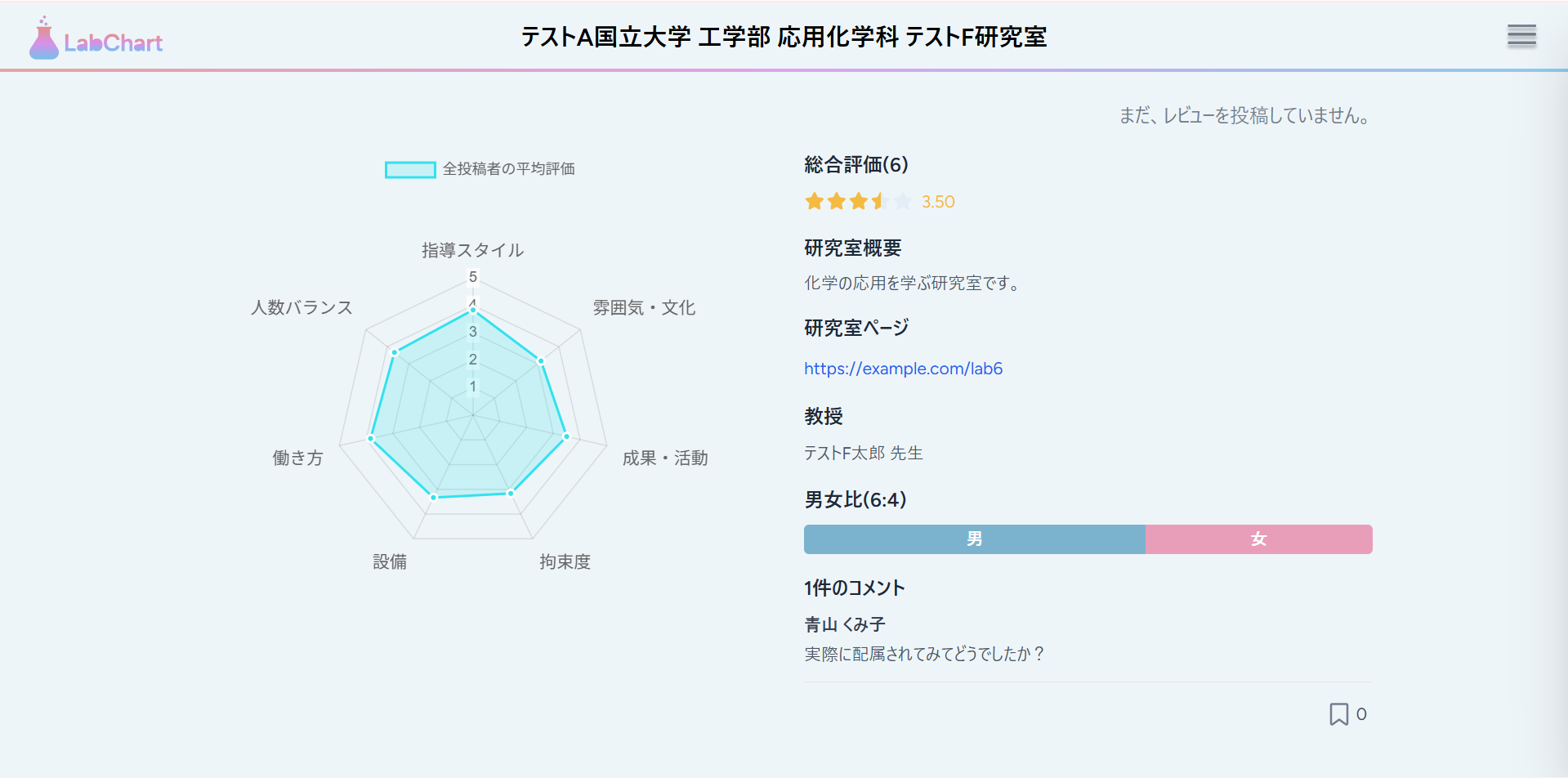
handleBookmarkClick()関数を定義して、バックエンドへのリクエスト送信やブックマーク数及びブックマークの状態の更新をします。
また、レビューの状態を右上に表示しました。
ついでに、余白がおかしい部分があったので修正しておきました。
8. ボタン追加
前ページに戻るボタンとレビュー作成ボタンを追加したいと思います。
まだ、レビュー作成ボタンはないので、新規ファイルを作成してください。
import { router } from "@inertiajs/react";

/**
 * レビュー作成ボタンコンポーネント
 * @param {Object} props - コンポーネントのprops
 * @param {string} props.routerName - 遷移先のルート名
 * @param {Object} [props.params={}] - ルートに渡すパラメータ
 * @returns {JSX.Element} コンポーネントのJSX
 */
const CreateReviewButton = ({ routerName, params = {}}) => {
  return (
    <button
        className="p-1 bg-[#EEF7FB] shadow-md rounded-md hover:shadow-lg transition-shadow cursor-pointer"
        onClick={() => router.get(route(routerName, params))}
      >
        <span className="px-14 py-1 block border-2 border-[#33E1ED] rounded text-[#747D8C] font-bold">
          レビューする
        </span>
    </button>
  );
}

export default CreateReviewButton;
文字数によって、ボタンの横幅が変わってしまうことを防ぐため、BackButtonの方にも最大幅を競ってしておきます。
import { router } from "@inertiajs/react";

/**
 * 戻るボタンコンポーネント
 * @param {Object} props - コンポーネントのprops
 * @param {string} props.routerName - 遷移先のルート名
 * @param {Object} [props.params={}] - ルートに渡すパラメータ
 * @returns {JSX.Element} コンポーネントのJSX
 */
const BackButton = ({ routerName, params = {}}) => {
  return (
    <button
        className="px-16 py-2 bg-[#EEF7FB] text-[#747D8C] shadow-md font-bold rounded-md hover:shadow-lg transition-shadow cursor-pointer min-w-[180px]"
        onClick={() => router.get(route(routerName, params))}
      >
        戻る
    </button>
  );
}

export default BackButton;
これらのインポートして使います。
import { useState } from "react";
import { Head, router } from "@inertiajs/react";
import AppLayout from "@/Layouts/AppLayout";
import StarRating from "@/Components/Lab/Star/StarRating";
import BackButton from "@/Components/Common/BackButton";
import CreateReviewButton from "@/Components/Review/CreateReviewButton";
import { formatRating } from "@/utils/formatRating";
import {
  Chart as ChartJS,
  RadialLinearScale,
  PointElement,
  LineElement,
  Filler,
  Tooltip,
  Legend,
} from "chart.js";
import { Radar } from "react-chartjs-2";

// Chart.jsのコンポーネントを登録
ChartJS.register(
  RadialLinearScale,
  PointElement,
  LineElement,
  Filler,
  Tooltip,
  Legend
);

const Show = ({ lab, averagePerItem, overallAverage, comments, auth, userReview, userBookmark, bookmarkCount, query }) => {

  const [showAllComments, setShowAllComments] = useState(false);

  // ブックマーク状態とカウントをローカルstateで管理
  const [isBookmarked, setIsBookmarked] = useState(auth?.user && userBookmark);
  const [currentBookmarkCount, setCurrentBookmarkCount] = useState(bookmarkCount || 0);
  const [bookmarkId, setBookmarkId] = useState(userBookmark?.id || null);

  // ブックマークのトグル処理
  const handleBookmarkClick = () => {
    // ログインしていない場合は何もしない
    if (!auth?.user) {
      return;
    }

    if (isBookmarked) {
      // ブックマーク解除
      router.delete(route('bookmark.destroy', bookmarkId), {
        preserveScroll: true,
        onSuccess: () => {
          setIsBookmarked(false);
          setCurrentBookmarkCount((prev) => Math.max(0, prev - 1));
          setBookmarkId(null);
        },
      });
    } else {
      // ブックマーク追加
      router.post(route('bookmark.store'), {
        lab_id: lab.id,
      }, {
        preserveScroll: true,
        onSuccess: (page) => {
          setIsBookmarked(true);
          setCurrentBookmarkCount((prev) => prev + 1);
          // 新しいブックマークIDを取得(ページデータから)
          if (page.props.userBookmark) {
            setBookmarkId(page.props.userBookmark.id);
          }
        },
      });
    }
  };

  // 7つの評価指標のラベル
  const labels = [
    "指導スタイル",
    "雰囲気・文化",
    "成果・活動",
    "拘束度",
    "設備",
    "働き方",
    "人数バランス",
  ];

  // LabControllerから渡された平均評価データを配列に変換
  const averageRatings = averagePerItem
    ? [
        averagePerItem.mentorship_style || 0,
        averagePerItem.lab_atmosphere || 0,
        averagePerItem.achievement_activity || 0,
        averagePerItem.constraint_level || 0,
        averagePerItem.facility_quality || 0,
        averagePerItem.work_style || 0,
        averagePerItem.student_balance || 0,
      ]
    : [0, 0, 0, 0, 0, 0, 0];

  // レーダーチャートのデータ
  const chartData = {
    labels: labels,
    datasets: [
      {
        label: "全投稿者の平均評価",
        data: averageRatings,
        backgroundColor: "rgba(51, 225, 237, 0.2)",
        borderColor: "rgba(51, 225, 237, 1)",
        borderWidth: 2,
        pointBackgroundColor: "rgba(51, 225, 237, 1)",
        pointBorderColor: "#fff",
        pointHoverBackgroundColor: "#fff",
        pointHoverBorderColor: "rgba(51, 225, 237, 1)",
      },
    ],
  };

  // レーダーチャートのオプション
  const chartOptions = {
    responsive: true,
    maintainAspectRatio: true,
    scales: {
      r: {
        angleLines: {
          display: true,
        },
        suggestedMin: 0,
        suggestedMax: 5,
        ticks: {
          stepSize: 1,
          font: {
            size: 12,
          },
        },
        pointLabels: {
          font: {
            size: 14,
          },
        },
      },
    },
    plugins: {
      legend: {
        position: "top",
      },
      tooltip: {
        callbacks: {
          label: (context) => {
            return `${context.dataset.label}: ${context.raw.toFixed(2)}`;
          },
        },
      },
    },
  };

  return (
    <AppLayout title={`${lab.faculty.university.name} ${lab.faculty.name} ${lab.name}`}>
      <Head title={`${lab.faculty.university.name} ${lab.faculty.name} ${lab.name}`} />

      <div className="flex flex-col min-h-full">
        {/* レビュー投稿状態を右上に表示 */}
        <div className="w-full flex flex-col items-end gap-2 mb-4">
          {auth?.user && userReview ? (
            <p className="text-[#747D8C]">レビューを投稿済みです。</p>
          ) : (
            <p className="text-[#747D8C]">まだ、レビューを投稿していません。</p>
          )}
        </div>

        <div className="max-w-7xl mx-auto w-full">
          <div className="grid grid-cols-1 md:grid-cols-2 gap-8">
                {/* 左側: レーダーチャート */}
                <div className="flex justify-center items-start">
                  {lab.reviews && lab.reviews.length > 0 ? (
                    <div className="w-full max-w-sm">
                      <Radar data={chartData} options={chartOptions} />
                    </div>
                  ) : (
                    <p className="text-center text-gray-500">
                      まだレビューがありません
                    </p>
                  )}
                </div>

                {/* 右側: 総合評価と研究室概要 */}
                <div>
                  {/* 総合評価 */}
                  <div className="mb-4">
                    <h2 className="text-base font-semibold text-gray-800 mb-2">
                      総合評価({lab.reviews?.length || 0})
                    </h2>
                    {lab.reviews && lab.reviews.length > 0 ? (
                      <div className="flex items-center gap-2">
                        <StarRating rating={overallAverage || 0} />
                        <span className="text-sm text-[#F4BB42]">
                          {formatRating(overallAverage, "0.00")}
                        </span>
                      </div>
                    ) : (
                      <p className="text-sm text-gray-500">まだ評価がありません</p>
                    )}
                  </div>

                  {/* 研究室概要 */}
                  <h2 className="text-base font-semibold text-gray-800 mb-2">
                    研究室概要
                  </h2>
                  <p className="text-sm text-gray-600 whitespace-pre-wrap leading-tight">
                    {lab.description || "概要はまだ登録されていません"}
                  </p>

                  {/* 研究室ページ */}
                  <div className="mt-4">
                    <h2 className="text-base font-semibold text-gray-800 mb-2">
                      研究室ページ
                    </h2>
                    {lab.url ? (
                      <a
                        href={lab.url}
                        target="_blank"
                        rel="noopener noreferrer"
                        className="text-sm text-blue-600 hover:text-blue-800 hover:underline break-all"
                      >
                        {lab.url}
                      </a>
                    ) : (
                      <p className="text-sm text-gray-500">URLはまだ登録されていません</p>
                    )}
                  </div>

                  {/* 教授 */}
                  <div className="mt-4">
                    <h2 className="text-base font-semibold text-gray-800 mb-2">
                      教授
                    </h2>
                    <p className="text-sm text-gray-600">
                      {lab.professor_name ? `${lab.professor_name} 先生` : "教授名はまだ登録されていません"}
                    </p>
                  </div>

                  {/* 男女比 */}
                  <div className="mt-4">
                    <h2 className="text-base font-semibold text-gray-800 mb-2">
                      男女比{(lab.gender_ratio_male != null && lab.gender_ratio_female != null) && `(${lab.gender_ratio_male}:${lab.gender_ratio_female})`}
                    </h2>
                    {(lab.gender_ratio_male != null && lab.gender_ratio_female != null) ? (
                      <div className="flex w-full h-6 rounded overflow-hidden text-sm text-white font-medium">
                        {lab.gender_ratio_male > 0 && (
                          <div
                            className="flex items-center justify-center"
                            style={{
                              backgroundColor: "#7BB3CE",
                              width: `${(lab.gender_ratio_male / (lab.gender_ratio_male + lab.gender_ratio_female)) * 100}%`,
                            }}
                          >
                            男
                          </div>
                        )}
                        {lab.gender_ratio_female > 0 && (
                          <div
                            className="flex items-center justify-center"
                            style={{
                              backgroundColor: "#E89EB9",
                              width: `${(lab.gender_ratio_female / (lab.gender_ratio_male + lab.gender_ratio_female)) * 100}%`,
                            }}
                          >
                            女
                          </div>
                        )}
                      </div>
                    ) : (
                      <p className="text-sm text-gray-500">男女比はまだ登録されていません</p>
                    )}
                  </div>

                  {/* コメント一覧 */}
                  <div className="mt-4">
                    <h2 className="text-base font-semibold text-gray-800 mb-2">
                      {comments?.length || 0}件のコメント
                    </h2>
                    {comments && comments.length > 0 ? (
                      <div className="space-y-3">
                        {/* 最初の1件は常に表示 */}
                        <div key={comments[0].id} className="border-b border-gray-200 pb-3">
                          <h3 className="text-sm font-medium text-gray-700">
                            {comments[0].user?.name || "匿名"}
                          </h3>
                          <p className="text-sm text-gray-600 mt-1 whitespace-pre-wrap">
                            {comments[0].content}
                          </p>
                        </div>

                        {/* 2件以上の場合、もっと見るボタンまたは残りのコメントを表示 */}
                        {comments.length > 1 && (
                          <>
                            {showAllComments ? (
                              // 残りのコメントを表示
                              comments.slice(1).map((comment) => (
                                <div key={comment.id} className="border-b border-gray-200 pb-3">
                                  <h3 className="text-sm font-medium text-gray-700">
                                    {comment.user?.name || "匿名"}
                                  </h3>
                                  <p className="text-sm text-gray-600 mt-1 whitespace-pre-wrap">
                                    {comment.content}
                                  </p>
                                </div>
                              ))
                            ) : (
                              // もっと見るボタン
                              <button
                                onClick={() => setShowAllComments(true)}
                                className="text-sm text-gray-600 hover:text-gray-800 hover:underline"
                              >
                                もっと見る...
                              </button>
                            )}
                          </>
                        )}
                      </div>
                    ) : (
                      <p className="text-sm text-gray-500">まだコメントがありません</p>
                    )}
                  </div>

                  {/* ブックマークアイコン */}
                  <div className="mt-4 flex items-center justify-end">
                    <div className="flex items-center gap-1 min-w-[50px] justify-end">
                      <svg
                        width="20"
                        height="20"
                        viewBox="0 0 24 24"
                        xmlns="http://www.w3.org/2000/svg"
                        onClick={handleBookmarkClick}
                        className={`flex-shrink-0 ${auth?.user ? "cursor-pointer hover:opacity-70" : "cursor-default"}`}
                      >
                        <path
                          d="M5 2C4.44772 2 4 2.44772 4 3V21C4 21.3746 4.21048 21.7178 4.54555 21.8892C4.88062 22.0606 5.28335 22.0315 5.59026 21.8137L12 17.229L18.4097 21.8137C18.7166 22.0315 19.1194 22.0606 19.4545 21.8892C19.7895 21.7178 20 21.3746 20 21V3C20 2.44772 19.5523 2 19 2H5Z"
                          fill={isBookmarked ? "#747D8C" : "transparent"}
                          stroke="#747D8C"
                          strokeWidth="2"
                        />
                      </svg>
                      <span className="text-sm text-gray-600 tabular-nums min-w-[1.5ch] text-left">{currentBookmarkCount}</span>
                    </div>
                  </div>
                </div>
              </div>
            </div>

          {/* ボタンエリア */}
          <div className="mt-auto pt-8 pb-12 flex justify-center gap-4">
            <BackButton routerName="labs.index" params={{ faculty: lab.faculty, query }} />
            <CreateReviewButton routerName="review.create" params={{ lab: lab }} />
          </div>
          </div>
    </AppLayout>
  );
};

export default Show;
こんな感じでしょうか?

9. グラフ切り替え機能作成(UI作成)
レビュー作成用のボタンを作ったので、ログイン状態で試しにレビューを投稿してみましょう。
すると右上の表示が「まだ、レビューを投稿していません。」から「レビューを投稿済みです。」に変わるはずです。
しかし、自分が投稿したレビューの値が見えないので、それを異なる色を使ってグラフの切り替えで表示できるようにしたいと思います。
import { useState } from "react";
import { Head, router } from "@inertiajs/react";
import AppLayout from "@/Layouts/AppLayout";
import StarRating from "@/Components/Lab/Star/StarRating";
import BackButton from "@/Components/Common/BackButton";
import CreateReviewButton from "@/Components/Review/CreateReviewButton";
import { formatRating } from "@/utils/formatRating";
import {
  Chart as ChartJS,
  RadialLinearScale,
  PointElement,
  LineElement,
  Filler,
  Tooltip,
  Legend,
} from "chart.js";
import { Radar } from "react-chartjs-2";

// Chart.jsのコンポーネントを登録
ChartJS.register(
  RadialLinearScale,
  PointElement,
  LineElement,
  Filler,
  Tooltip,
  Legend
);

const Show = ({ lab, averagePerItem, overallAverage, comments, auth, userReview, userBookmark, bookmarkCount, query }) => {

  const [showAllComments, setShowAllComments] = useState(false);

  // ブックマーク状態とカウントをローカルstateで管理
  const [isBookmarked, setIsBookmarked] = useState(auth?.user && userBookmark);
  const [currentBookmarkCount, setCurrentBookmarkCount] = useState(bookmarkCount || 0);
  const [bookmarkId, setBookmarkId] = useState(userBookmark?.id || null);

  // ブックマークのトグル処理
  const handleBookmarkClick = () => {
    // ログインしていない場合は何もしない
    if (!auth?.user) {
      return;
    }

    if (isBookmarked) {
      // ブックマーク解除
      router.delete(route('bookmark.destroy', bookmarkId), {
        preserveScroll: true,
        onSuccess: () => {
          setIsBookmarked(false);
          setCurrentBookmarkCount((prev) => Math.max(0, prev - 1));
          setBookmarkId(null);
        },
      });
    } else {
      // ブックマーク追加
      router.post(route('bookmark.store'), {
        lab_id: lab.id,
      }, {
        preserveScroll: true,
        onSuccess: (page) => {
          setIsBookmarked(true);
          setCurrentBookmarkCount((prev) => prev + 1);
          // 新しいブックマークIDを取得(ページデータから)
          if (page.props.userBookmark) {
            setBookmarkId(page.props.userBookmark.id);
          }
        },
      });
    }
  };

  // 7つの評価指標のラベル
  const labels = [
    "指導スタイル",
    "雰囲気・文化",
    "成果・活動",
    "拘束度",
    "設備",
    "働き方",
    "人数バランス",
  ];

  // LabControllerから渡された平均評価データを配列に変換
  const averageRatings = averagePerItem
    ? [
        averagePerItem.mentorship_style || 0,
        averagePerItem.lab_atmosphere || 0,
        averagePerItem.achievement_activity || 0,
        averagePerItem.constraint_level || 0,
        averagePerItem.facility_quality || 0,
        averagePerItem.work_style || 0,
        averagePerItem.student_balance || 0,
      ]
    : [0, 0, 0, 0, 0, 0, 0];

  // ログインユーザーのレビューデータを配列に変換
  const userRatings = userReview
    ? [
        userReview.mentorship_style || 0,
        userReview.lab_atmosphere || 0,
        userReview.achievement_activity || 0,
        userReview.constraint_level || 0,
        userReview.facility_quality || 0,
        userReview.work_style || 0,
        userReview.student_balance || 0,
      ]
    : null;

  // レーダーチャートのデータセットを構築
  const datasets = [
    {
      label: "全投稿者の平均評価",
      data: averageRatings,
      backgroundColor: "rgba(51, 225, 237, 0.2)",
      borderColor: "rgba(51, 225, 237, 1)",
      borderWidth: 2,
      pointBackgroundColor: "rgba(51, 225, 237, 1)",
      pointBorderColor: "#fff",
      pointHoverBackgroundColor: "#fff",
      pointHoverBorderColor: "rgba(51, 225, 237, 1)",
    },
  ];

  // ログインユーザーのレビューがある場合、データセットに追加
  if (userRatings) {
    datasets.push({
      label: "あなたの投稿済み評価",
      data: userRatings,
      backgroundColor: "rgba(244, 187, 66, 0.2)",
      borderColor: "rgba(244, 187, 66, 1)",
      borderWidth: 2,
      pointBackgroundColor: "rgba(244, 187, 66, 1)",
      pointBorderColor: "#fff",
      pointHoverBackgroundColor: "#fff",
      pointHoverBorderColor: "rgba(244, 187, 66, 1)",
    });
  }

  // レーダーチャートのデータ
  const chartData = {
    labels: labels,
    datasets: datasets,
  };

  // レーダーチャートのオプション
  const chartOptions = {
    responsive: true,
    maintainAspectRatio: true,
    scales: {
      r: {
        angleLines: {
          display: true,
        },
        suggestedMin: 0,
        suggestedMax: 5,
        ticks: {
          stepSize: 1,
          font: {
            size: 12,
          },
        },
        pointLabels: {
          font: {
            size: 14,
          },
        },
      },
    },
    plugins: {
      legend: {
        position: "top",
      },
      tooltip: {
        callbacks: {
          label: (context) => {
            return `${context.dataset.label}: ${context.raw.toFixed(2)}`;
          },
        },
      },
    },
  };

  return (
    <AppLayout title={`${lab.faculty.university.name} ${lab.faculty.name} ${lab.name}`}>
      <Head title={`${lab.faculty.university.name} ${lab.faculty.name} ${lab.name}`} />

      <div className="flex flex-col min-h-full">
        {/* レビュー投稿状態を右上に表示 */}
        <div className="w-full flex flex-col items-end gap-2 mb-4">
          {auth?.user && userReview ? (
            <p className="text-[#747D8C]">レビューを投稿済みです。</p>
          ) : (
            <p className="text-[#747D8C]">まだ、レビューを投稿していません。</p>
          )}
        </div>

        <div className="max-w-7xl mx-auto w-full">
          <div className="grid grid-cols-1 md:grid-cols-2 gap-8">
                {/* 左側: レーダーチャート */}
                <div className="flex justify-center items-start">
                  {lab.reviews && lab.reviews.length > 0 ? (
                    <div className="w-full max-w-sm">
                      <Radar data={chartData} options={chartOptions} />
                    </div>
                  ) : (
                    <p className="text-center text-gray-500">
                      まだレビューがありません
                    </p>
                  )}
                </div>

                {/* 右側: 総合評価と研究室概要 */}
                <div>
                  {/* 総合評価 */}
                  <div className="mb-4">
                    <h2 className="text-base font-semibold text-gray-800 mb-2">
                      総合評価({lab.reviews?.length || 0})
                    </h2>
                    {lab.reviews && lab.reviews.length > 0 ? (
                      <div className="flex items-center gap-2">
                        <StarRating rating={overallAverage || 0} />
                        <span className="text-sm text-[#F4BB42]">
                          {formatRating(overallAverage, "0.00")}
                        </span>
                      </div>
                    ) : (
                      <p className="text-sm text-gray-500">まだ評価がありません</p>
                    )}
                  </div>

                  {/* 研究室概要 */}
                  <h2 className="text-base font-semibold text-gray-800 mb-2">
                    研究室概要
                  </h2>
                  <p className="text-sm text-gray-600 whitespace-pre-wrap leading-tight">
                    {lab.description || "概要はまだ登録されていません"}
                  </p>

                  {/* 研究室ページ */}
                  <div className="mt-4">
                    <h2 className="text-base font-semibold text-gray-800 mb-2">
                      研究室ページ
                    </h2>
                    {lab.url ? (
                      <a
                        href={lab.url}
                        target="_blank"
                        rel="noopener noreferrer"
                        className="text-sm text-blue-600 hover:text-blue-800 hover:underline break-all"
                      >
                        {lab.url}
                      </a>
                    ) : (
                      <p className="text-sm text-gray-500">URLはまだ登録されていません</p>
                    )}
                  </div>

                  {/* 教授 */}
                  <div className="mt-4">
                    <h2 className="text-base font-semibold text-gray-800 mb-2">
                      教授
                    </h2>
                    <p className="text-sm text-gray-600">
                      {lab.professor_name ? `${lab.professor_name} 先生` : "教授名はまだ登録されていません"}
                    </p>
                  </div>

                  {/* 男女比 */}
                  <div className="mt-4">
                    <h2 className="text-base font-semibold text-gray-800 mb-2">
                      男女比{(lab.gender_ratio_male != null && lab.gender_ratio_female != null) && `(${lab.gender_ratio_male}:${lab.gender_ratio_female})`}
                    </h2>
                    {(lab.gender_ratio_male != null && lab.gender_ratio_female != null) ? (
                      <div className="flex w-full h-6 rounded overflow-hidden text-sm text-white font-medium">
                        {lab.gender_ratio_male > 0 && (
                          <div
                            className="flex items-center justify-center"
                            style={{
                              backgroundColor: "#7BB3CE",
                              width: `${(lab.gender_ratio_male / (lab.gender_ratio_male + lab.gender_ratio_female)) * 100}%`,
                            }}
                          >
                            男
                          </div>
                        )}
                        {lab.gender_ratio_female > 0 && (
                          <div
                            className="flex items-center justify-center"
                            style={{
                              backgroundColor: "#E89EB9",
                              width: `${(lab.gender_ratio_female / (lab.gender_ratio_male + lab.gender_ratio_female)) * 100}%`,
                            }}
                          >
                            女
                          </div>
                        )}
                      </div>
                    ) : (
                      <p className="text-sm text-gray-500">男女比はまだ登録されていません</p>
                    )}
                  </div>

                  {/* コメント一覧 */}
                  <div className="mt-4">
                    <h2 className="text-base font-semibold text-gray-800 mb-2">
                      {comments?.length || 0}件のコメント
                    </h2>
                    {comments && comments.length > 0 ? (
                      <div className="space-y-3">
                        {/* 最初の1件は常に表示 */}
                        <div key={comments[0].id} className="border-b border-gray-200 pb-3">
                          <h3 className="text-sm font-medium text-gray-700">
                            {comments[0].user?.name || "匿名"}
                          </h3>
                          <p className="text-sm text-gray-600 mt-1 whitespace-pre-wrap">
                            {comments[0].content}
                          </p>
                        </div>

                        {/* 2件以上の場合、もっと見るボタンまたは残りのコメントを表示 */}
                        {comments.length > 1 && (
                          <>
                            {showAllComments ? (
                              // 残りのコメントを表示
                              comments.slice(1).map((comment) => (
                                <div key={comment.id} className="border-b border-gray-200 pb-3">
                                  <h3 className="text-sm font-medium text-gray-700">
                                    {comment.user?.name || "匿名"}
                                  </h3>
                                  <p className="text-sm text-gray-600 mt-1 whitespace-pre-wrap">
                                    {comment.content}
                                  </p>
                                </div>
                              ))
                            ) : (
                              // もっと見るボタン
                              <button
                                onClick={() => setShowAllComments(true)}
                                className="text-sm text-gray-600 hover:text-gray-800 hover:underline"
                              >
                                もっと見る...
                              </button>
                            )}
                          </>
                        )}
                      </div>
                    ) : (
                      <p className="text-sm text-gray-500">まだコメントがありません</p>
                    )}
                  </div>

                  {/* ブックマークアイコン */}
                  <div className="mt-4 flex items-center justify-end">
                    <div className="flex items-center gap-1 min-w-[50px] justify-end">
                      <svg
                        width="20"
                        height="20"
                        viewBox="0 0 24 24"
                        xmlns="http://www.w3.org/2000/svg"
                        onClick={handleBookmarkClick}
                        className={`flex-shrink-0 ${auth?.user ? "cursor-pointer hover:opacity-70" : "cursor-default"}`}
                      >
                        <path
                          d="M5 2C4.44772 2 4 2.44772 4 3V21C4 21.3746 4.21048 21.7178 4.54555 21.8892C4.88062 22.0606 5.28335 22.0315 5.59026 21.8137L12 17.229L18.4097 21.8137C18.7166 22.0315 19.1194 22.0606 19.4545 21.8892C19.7895 21.7178 20 21.3746 20 21V3C20 2.44772 19.5523 2 19 2H5Z"
                          fill={isBookmarked ? "#747D8C" : "transparent"}
                          stroke="#747D8C"
                          strokeWidth="2"
                        />
                      </svg>
                      <span className="text-sm text-gray-600 tabular-nums min-w-[1.5ch] text-left">{currentBookmarkCount}</span>
                    </div>
                  </div>
                </div>
              </div>
            </div>

          {/* ボタンエリア */}
          <div className="mt-auto pt-8 pb-12 flex justify-center gap-4">
            <BackButton routerName="labs.index" params={{ faculty: lab.faculty, query }} />
            <CreateReviewButton routerName="review.create" params={{ lab: lab }} />
          </div>
          </div>
    </AppLayout>
  );
};

export default Show;
フォントやインデントをそろえました。
import { useState } from "react";
import { Head, router } from "@inertiajs/react";
import AppLayout from "@/Layouts/AppLayout";
import StarRating from "@/Components/Lab/Star/StarRating";
import BackButton from "@/Components/Common/BackButton";
import CreateReviewButton from "@/Components/Review/CreateReviewButton";
import { formatRating } from "@/utils/formatRating";
import {
  Chart as ChartJS,
  RadialLinearScale,
  PointElement,
  LineElement,
  Filler,
  Tooltip,
  Legend,
} from "chart.js";
import { Radar } from "react-chartjs-2";

// Chart.jsのコンポーネントを登録
ChartJS.register(
  RadialLinearScale,
  PointElement,
  LineElement,
  Filler,
  Tooltip,
  Legend
);

const Show = ({ lab, averagePerItem, overallAverage, comments, auth, userReview, userBookmark, bookmarkCount, query }) => {

  const [showAllComments, setShowAllComments] = useState(false);

  // ブックマーク状態とカウントをローカルstateで管理
  const [isBookmarked, setIsBookmarked] = useState(auth?.user && userBookmark);
  const [currentBookmarkCount, setCurrentBookmarkCount] = useState(bookmarkCount || 0);
  const [bookmarkId, setBookmarkId] = useState(userBookmark?.id || null);

  // ブックマークのトグル処理
  const handleBookmarkClick = () => {
    // ログインしていない場合は何もしない
    if (!auth?.user) {
      return;
    }

    if (isBookmarked) {
      // ブックマーク解除
      router.delete(route('bookmark.destroy', bookmarkId), {
        preserveScroll: true,
        onSuccess: () => {
          setIsBookmarked(false);
          setCurrentBookmarkCount((prev) => Math.max(0, prev - 1));
          setBookmarkId(null);
        },
      });
    } else {
      // ブックマーク追加
      router.post(route('bookmark.store'), {
        lab_id: lab.id,
      }, {
        preserveScroll: true,
        onSuccess: (page) => {
          setIsBookmarked(true);
          setCurrentBookmarkCount((prev) => prev + 1);
          // 新しいブックマークIDを取得(ページデータから)
          if (page.props.userBookmark) {
            setBookmarkId(page.props.userBookmark.id);
          }
        },
      });
    }
  };

  // 7つの評価指標のラベル
  const labels = [
    "指導スタイル",
    "雰囲気・文化",
    "成果・活動",
    "拘束度",
    "設備",
    "働き方",
    "人数バランス",
  ];

  // LabControllerから渡された平均評価データを配列に変換
  const averageRatings = averagePerItem
    ? [
        averagePerItem.mentorship_style || 0,
        averagePerItem.lab_atmosphere || 0,
        averagePerItem.achievement_activity || 0,
        averagePerItem.constraint_level || 0,
        averagePerItem.facility_quality || 0,
        averagePerItem.work_style || 0,
        averagePerItem.student_balance || 0,
      ]
    : [0, 0, 0, 0, 0, 0, 0];

  // ログインユーザーのレビューデータを配列に変換
  const userRatings = userReview
    ? [
        userReview.mentorship_style || 0,
        userReview.lab_atmosphere || 0,
        userReview.achievement_activity || 0,
        userReview.constraint_level || 0,
        userReview.facility_quality || 0,
        userReview.work_style || 0,
        userReview.student_balance || 0,
      ]
    : null;

  // レーダーチャートのデータセットを構築
  const datasets = [
    {
      label: "全投稿者の平均評価",
      data: averageRatings,
      backgroundColor: "rgba(51, 225, 237, 0.2)",
      borderColor: "rgba(51, 225, 237, 1)",
      borderWidth: 2,
      pointBackgroundColor: "rgba(51, 225, 237, 1)",
      pointBorderColor: "#fff",
      pointHoverBackgroundColor: "#fff",
      pointHoverBorderColor: "rgba(51, 225, 237, 1)",
    },
  ];

  // ログインユーザーのレビューがある場合、データセットに追加
  if (userRatings) {
    datasets.push({
      label: "あなたの投稿済み評価",
      data: userRatings,
      backgroundColor: "rgba(244, 187, 66, 0.2)",
      borderColor: "rgba(244, 187, 66, 1)",
      borderWidth: 2,
      pointBackgroundColor: "rgba(244, 187, 66, 1)",
      pointBorderColor: "#fff",
      pointHoverBackgroundColor: "#fff",
      pointHoverBorderColor: "rgba(244, 187, 66, 1)",
    });
  }

  // レーダーチャートのデータ
  const chartData = {
    labels: labels,
    datasets: datasets,
  };

  // レーダーチャートのオプション
  const chartOptions = {
    responsive: true,
    maintainAspectRatio: true,
    scales: {
      r: {
        angleLines: {
          display: true,
        },
        suggestedMin: 0,
        suggestedMax: 5,
        ticks: {
          stepSize: 1,
          font: {
            size: 12,
          },
        },
        pointLabels: {
          font: {
            size: 14,
          },
        },
      },
    },
    plugins: {
      legend: {
        position: "top",
      },
      tooltip: {
        callbacks: {
          label: (context) => {
            return `${context.dataset.label}: ${context.raw.toFixed(2)}`;
          },
        },
      },
    },
  };

  return (
    <AppLayout title={`${lab.faculty.university.name} ${lab.faculty.name} ${lab.name}`}>
      <Head title={`${lab.faculty.university.name} ${lab.faculty.name} ${lab.name}`} />

      <div className="flex flex-col min-h-full">
        {/* レビュー投稿状態を右上に表示 */}
        <div className="w-full flex flex-col items-end gap-2 mb-4">
          {auth?.user && userReview ? (
            <p className="text-[#747D8C]">レビューを投稿済みです。</p>
          ) : (
            <p className="text-[#747D8C]">まだ、レビューを投稿していません。</p>
          )}
        </div>

        <div className="max-w-7xl mx-auto w-full">
          <div className="grid grid-cols-1 md:grid-cols-2 gap-8">
                {/* 左側: レーダーチャート */}
                <div className="flex justify-center items-start">
                  {lab.reviews && lab.reviews.length > 0 ? (
                    <div className="w-full max-w-sm">
                      <Radar data={chartData} options={chartOptions} />
                    </div>
                  ) : (
                    <p className="text-center text-[#747D8C]">
                      まだレビューがありません
                    </p>
                  )}
                </div>

                {/* 右側: 総合評価と研究室概要 */}
                <div>
                  {/* 総合評価 */}
                  <div className="mb-4">
                    <h2 className="text-base font-semibold text-black mb-2">
                      総合評価({lab.reviews?.length || 0})
                    </h2>
                    {lab.reviews && lab.reviews.length > 0 ? (
                      <div className="flex items-center gap-2 ml-4">
                        <StarRating rating={overallAverage || 0} />
                        <span className="text-sm text-[#F4BB42]">
                          {formatRating(overallAverage, "0.00")}
                        </span>
                      </div>
                    ) : (
                      <p className="text-sm text-[#747D8C] ml-4">まだ評価がありません</p>
                    )}
                  </div>

                  {/* 研究室概要 */}
                  <h2 className="text-base font-semibold text-black mb-2">
                    研究室概要
                  </h2>
                  <p className="text-sm text-[#747D8C] whitespace-pre-wrap leading-tight ml-4">
                    {lab.description || "概要はまだ登録されていません"}
                  </p>

                  {/* 研究室ページ */}
                  <div className="mt-4">
                    <h2 className="text-base font-semibold text-black mb-2">
                      研究室ページ
                    </h2>
                    {lab.url ? (
                      <a
                        href={lab.url}
                        target="_blank"
                        rel="noopener noreferrer"
                        className="text-sm text-[#747D8C] hover:text-black hover:underline break-all ml-4"
                      >
                        {lab.url}
                      </a>
                    ) : (
                      <p className="text-sm text-[#747D8C] ml-4">URLはまだ登録されていません</p>
                    )}
                  </div>

                  {/* 教授 */}
                  <div className="mt-4">
                    <h2 className="text-base font-semibold text-black mb-2">
                      教授
                    </h2>
                    <p className="text-sm text-[#747D8C] ml-4">
                      {lab.professor_name ? `${lab.professor_name} 先生` : "教授名はまだ登録されていません"}
                    </p>
                  </div>

                  {/* 男女比 */}
                  <div className="mt-4">
                    <h2 className="text-base font-semibold text-black mb-2">
                      男女比{(lab.gender_ratio_male != null && lab.gender_ratio_female != null) && `(${lab.gender_ratio_male}:${lab.gender_ratio_female})`}
                    </h2>
                    {(lab.gender_ratio_male != null && lab.gender_ratio_female != null) ? (
                      <div className="flex w-full h-6 rounded overflow-hidden text-sm text-white font-medium ml-4">
                        {lab.gender_ratio_male > 0 && (
                          <div
                            className="flex items-center justify-center"
                            style={{
                              backgroundColor: "#7BB3CE",
                              width: `${(lab.gender_ratio_male / (lab.gender_ratio_male + lab.gender_ratio_female)) * 100}%`,
                            }}
                          >
                            男
                          </div>
                        )}
                        {lab.gender_ratio_female > 0 && (
                          <div
                            className="flex items-center justify-center"
                            style={{
                              backgroundColor: "#E89EB9",
                              width: `${(lab.gender_ratio_female / (lab.gender_ratio_male + lab.gender_ratio_female)) * 100}%`,
                            }}
                          >
                            女
                          </div>
                        )}
                      </div>
                    ) : (
                      <p className="text-sm text-[#747D8C] ml-4">男女比はまだ登録されていません</p>
                    )}
                  </div>

                  {/* コメント一覧 */}
                  <div className="mt-4">
                    <h2 className="text-base font-semibold text-black mb-2">
                      {comments?.length || 0}件のコメント
                    </h2>
                    {comments && comments.length > 0 ? (
                      <div className="space-y-3 ml-4">
                        {/* 最初の1件は常に表示 */}
                        <div key={comments[0].id} className="border-b border-gray-200 pb-3">
                          <h3 className="text-sm font-medium text-black">
                            {comments[0].user?.name || "匿名"}
                          </h3>
                          <p className="text-sm text-[#747D8C] mt-1 whitespace-pre-wrap">
                            {comments[0].content}
                          </p>
                        </div>

                        {/* 2件以上の場合、もっと見るボタンまたは残りのコメントを表示 */}
                        {comments.length > 1 && (
                          <>
                            {showAllComments ? (
                              // 残りのコメントを表示
                              comments.slice(1).map((comment) => (
                                <div key={comment.id} className="border-b border-gray-200 pb-3">
                                  <h3 className="text-sm font-medium text-black">
                                    {comment.user?.name || "匿名"}
                                  </h3>
                                  <p className="text-sm text-[#747D8C] mt-1 whitespace-pre-wrap">
                                    {comment.content}
                                  </p>
                                </div>
                              ))
                            ) : (
                              // もっと見るボタン
                              <button
                                onClick={() => setShowAllComments(true)}
                                className="text-sm text-[#747D8C] hover:text-black hover:underline"
                              >
                                もっと見る...
                              </button>
                            )}
                          </>
                        )}
                      </div>
                    ) : (
                      <p className="text-sm text-[#747D8C] ml-4">まだコメントがありません</p>
                    )}
                  </div>

                  {/* ブックマークアイコン */}
                  <div className="mt-4 flex items-center justify-end">
                    <div className="flex items-center gap-1 min-w-[50px] justify-end">
                      <svg
                        width="20"
                        height="20"
                        viewBox="0 0 24 24"
                        xmlns="http://www.w3.org/2000/svg"
                        onClick={handleBookmarkClick}
                        className={`flex-shrink-0 ${auth?.user ? "cursor-pointer hover:opacity-70" : "cursor-default"}`}
                      >
                        <path
                          d="M5 2C4.44772 2 4 2.44772 4 3V21C4 21.3746 4.21048 21.7178 4.54555 21.8892C4.88062 22.0606 5.28335 22.0315 5.59026 21.8137L12 17.229L18.4097 21.8137C18.7166 22.0315 19.1194 22.0606 19.4545 21.8892C19.7895 21.7178 20 21.3746 20 21V3C20 2.44772 19.5523 2 19 2H5Z"
                          fill={isBookmarked ? "#747D8C" : "transparent"}
                          stroke="#747D8C"
                          strokeWidth="2"
                        />
                      </svg>
                      <span className="text-sm text-gray-600 tabular-nums min-w-[1.5ch] text-left">{currentBookmarkCount}</span>
                    </div>
                  </div>
                </div>
              </div>
            </div>

          {/* ボタンエリア */}
          <div className="mt-auto pt-8 pb-12 flex justify-center gap-4">
            <BackButton routerName="labs.index" params={{ faculty: lab.faculty, query }} />
            <CreateReviewButton routerName="review.create" params={{ lab: lab }} />
          </div>
          </div>
    </AppLayout>
  );
};

export default Show;
こんな感じです。

ボタンがスクロールしないと見えないという問題はどこかで解決したいと思います。
今回は以上です。コミット・プッシュを忘れずにしておきましょう。