
実務1年目駆け出しエンジニアがLaravel&ReactでWebアプリケーション開発に挑戦してみた!(その31)
0. 初めに
見習いエンジニアの僕が、Webアプリケーションをゼロから開発するシリーズです!
前回までで、一通りページを作成し終えました。
前回は、マイページを作成しましたね!
しかし、そこでは問題が発生しました...
発生した問題を振り返る
フロントエンド各ページの実装では、一貫して戻るボタンを用意していました。
しかし、この戻るボタンはホーム画面から大学を検索してきて使うことが前提となっているため、マイページから研究室一覧ページに移動してから戻るボタンを押した場合、マイページに戻れません。
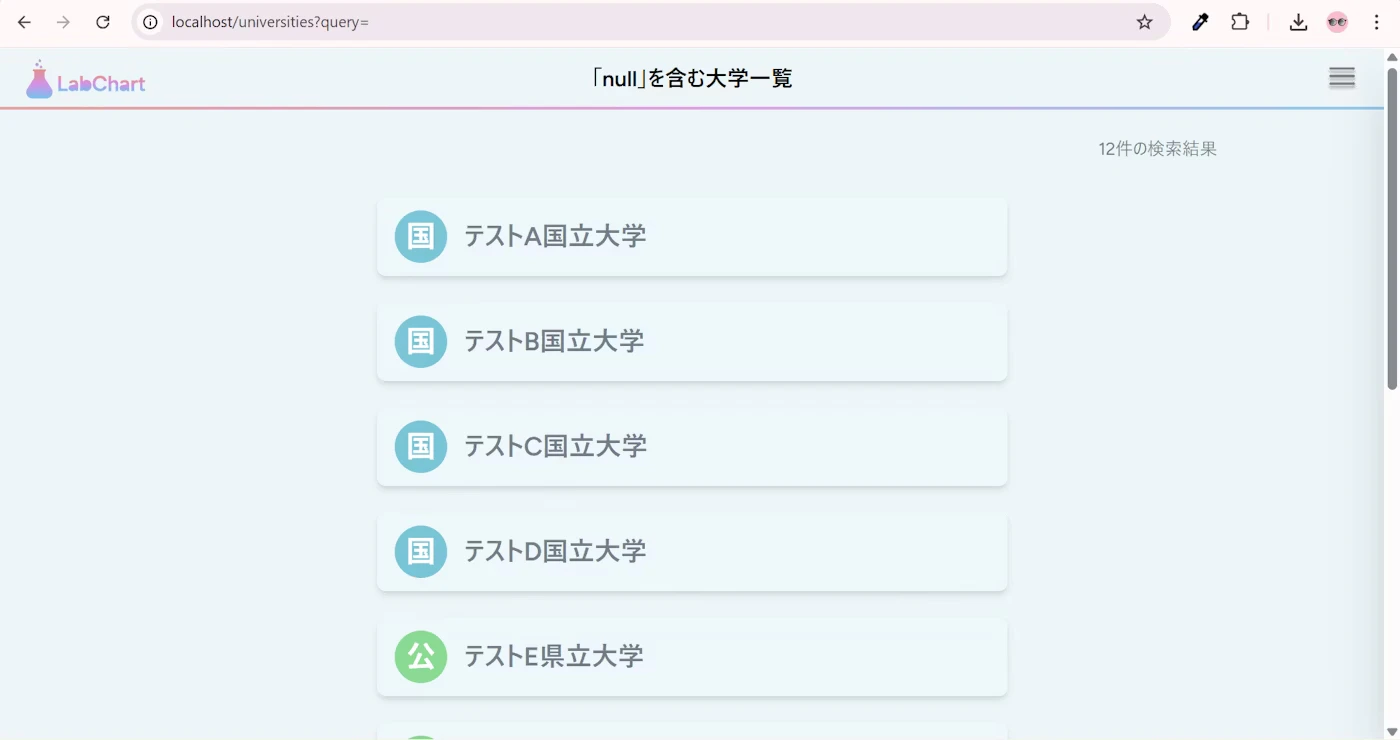
それどころか、当然検索文字列のクエリがないため、「「null」を含む大学一覧」のようにタイトルがおかしくなってしまいます。
方針を決める
色々悩んだ末に出した答えが、戻るボタンをやめることです。
やはり、戻るボタンは前に開いていたページに戻らなければ、ユーザーの直観に反します。
一方で、その研究室が所属している大学・学部一覧ページにも簡単に移動できるようにする便利さは残したいですよね。
そこで、思いついたのが、パンくずリストです!
英語は、breadcrumbというそうですが、これは主に画面上に表示され、自分が今どの階層のページを開いているかを可視化するものです。
詳しくは以下をご覧ください。
https://developer.mozilla.org/ja/docs/Web/CSS/How_to/Layout_cookbook/Breadcrumb_navigation
このいわばナビゲーションがあることで、ユーザーは自分の開いている研究室がどの大学・学部に所属しているかを明確にすることができますし、クリックで移動できるようにすれば利便性も損なわれないと思います!
そのため、今日のゴールは、このパンくずリストを作成して、各ページに適用することにします!
1. ブランチ運用
例によって、developブランチを最新化してください。
そこから新規ブランチを切って作業しましょう。
ブランチ名の例: feature/frontend/common/breadcrumb
2. パンくずリストコンポーネント作成
新規ファイルを作成してください。
/**
 * パンくずリストを表示する共通コンポーネント。
 *
 * @param {Object} props
 * @param {Object} [props.university] - 大学オブジェクト(省略可)
 * @param {Object} [props.faculty] - 学部オブジェクト(省略可)
 * @param {Object} [props.lab] - 研究室オブジェクト(省略可)
 * @param {string} [props.query] - 検索クエリ(省略可)
 * @returns {JSX.Element}
 */
import { Link } from "@inertiajs/react";


/**
 * クエリが存在する場合はパラメータに含めて返す
 * @param {Object} baseParams - ベースとなるパラメータ
 * @returns {Object} クエリを含めたパラメータ
 */
const Breadcrumb = ({ university, faculty, lab, query }) => {
  const buildParams = (baseParams) => {
    if (query) {
      return { ...baseParams, query };
    }
    return baseParams;
  };

  return (
    <nav className="text-sm text-[#747D8C] mb-4">
      <ol className="flex items-center gap-2 flex-wrap">
        {/* 検索クエリがある場合、検索結果へのリンクを表示 */}
        {query && (
          <>
            <li>
              <Link
               href={route('universities.index', { query })}
               className="hover:text-black hover:underline"
              >
                「{query}」の検索結果
              </Link>
            </li>
            <li>{'>'}</li>
          </>
        )}

        {/* 大学 */}
        {university && (
          <>
            <li>
              <Link
                href={route('faculties.index', buildParams({ university: university.id }))}
                className="hover:text-black hover:underline"
              >
                {university.name}
              </Link>
            </li>
            {faculty && <li>{'>'}</li>}
          </>
        )}

        {/* 学部 */}
        {faculty && (
          <>
            <li>
              <Link
                href={route('labs.index', buildParams({ faculty: faculty.id }))}
                className="hover:text-black hover:underline"
              >
                {faculty.name}
              </Link>
            </li>
            {lab && <li>{'>'}</li>}
          </>
        )}

        {/* 研究室 */}
        {lab && (
          <>
            <li>
              <Link
                href={route('labs.show', buildParams({ lab: lab.id }))}
                className="hover:text-black hover:underline"
              >
                {lab.name}
              </Link>
            </li>
          </>
        )}
      </ol>
    </nav>
  )
}

export default Breadcrumb;
関数Breadcrumbを定義して、スプレッド構文によりクエリがない場合は、検索結果を表示しないようにしています。
3. パンくずリストコンポーネント適用
今作成したパンくずリストを各ページに適用していきましょう。
ついでに、戻るボタンを消します。
大学検索結果に適用する
まずは、大学検索結果です。
import { Head } from "@inertiajs/react";
import AppLayout from '@/Layouts/AppLayout';
import UniversityCard from '../../Components/University/UniversityCard';
import Pagination from "../../Components/Common/Pagination";
import Breadcrumb from "../../Components/Common/Breadcrumb";

/**
 * 大学一覧ページコンポーネント
 * @param {Object} props - コンポーネントのprops
 * @param {Object} props.universities - ページネーション付き大学データ
 * @param {string} props.query - 検索クエリ文字列
 * @returns {JSX.Element} コンポーネントのJSX
 */
const Index = ({ universities, query}) => {
  const hasResults = universities.data.length > 0;

  return (
    <AppLayout title={`「${query}」を含む大学一覧`}>
      <Head title={`「${query}」を含む大学一覧`} />

      {hasResults ? (
        // 1件以上の場合:コンテンツが少なければ戻るボタンは画面下部、多ければスクロール後に表示
        <div className="flex flex-col items-center min-h-full">
          <div className="w-full flex flex-row items-center justify-between">
            {/* パンくずリスト */}
            <div>
              <Breadcrumb query={query} />
            </div>
            {/* 検索結果件数 */}
            <p className="text-[#747D8C]">{universities.total}件の検索結果</p>
          </div>
          <div className="w-full max-w-xl space-y-6 mt-8">
            {universities.data.map(university => (
              <UniversityCard key={university.id} university={university} query={query} />
            ))}
          </div>

          {/* ページネーション */}
          <Pagination paginator={universities} />
        </div>
      ) : (
        // 0件の場合:メッセージを画面中央に、戻るボタンは下部に固定
        <div className="flex flex-col items-center min-h-full">
          <div className="flex-1 flex items-center justify-center">
            <p className="text-[#747D8C]">0件の検索結果</p>
          </div>
        </div>
      )}
    </AppLayout>
  )
}

export default Index;
学部一覧に適用する
次に、学部一覧画面です。
import { Head } from "@inertiajs/react";
import AppLayout from '@/Layouts/AppLayout';
import FacultyCard from '../../Components/Faculty/FacultyCard';
import Breadcrumb from '../../Components/Common/Breadcrumb';

/**
 * 学部一覧ページコンポーネント
 * @param {Object} props - コンポーネントのprops
 * @param {Array} props.faculties - 学部データの配列
 * @param {Object} props.university - 大学オブジェクト
 * @param {string} [props.query=''] - 検索クエリ文字列
 * @returns {JSX.Element} コンポーネントのJSX
 */
const Index = ({ faculties, university, query = '' }) => {
  const hasResults = faculties.length > 0;

  return (
    <AppLayout title={`${university.name}の学部一覧`}>
      <Head title={`${university.name}の学部一覧`} />
      {hasResults ? (
        <div className="flex flex-col items-center min-h-full">
          <div className="w-full flex flex-row items-center justify-between">
            {/* パンくずリスト 左寄せ */}
            <div>
              <Breadcrumb university={university} query={query} />
            </div>
            {/* 学部件数 右寄せ */}
            <p className="text-[#747D8C]">{faculties.length}件の学部</p>
          </div>
          <div className="w-full grid grid-cols-3 gap-6 mt-8 justify-items-center">
            {faculties.map(faculty => (
              <FacultyCard key={faculty.id} faculty={faculty} query={query} />
            ))}
          </div>
        </div>
      ) : (
        <div className="flex flex-col items-center min-h-full">
          <div className="flex-1 flex items-center justify-center">
            <p className="text-[#747D8C]">0件の学部</p>
          </div>
        </div>
      )}
    </AppLayout>
  )
}

export default Index;
研究室一覧に適用する
続いて、研究室一覧画面です。
import { Head, router } from "@inertiajs/react";
import AppLayout from '@/Layouts/AppLayout';
import LabCard from '../../Components/Lab/LabCard';
import Pagination from "../../Components/Common/Pagination";
import Breadcrumb from "../../Components/Common/Breadcrumb";

/**
 * ソートオプションの定義
 */
const sortOptions = [
  { value: 'overall', label: '総合評価の高い順' },
  { value: 'reviews_count', label: 'レビュー数の多い順' },
  { value: 'mentorship_style', label: '指導スタイルの高い順' },
  { value: 'lab_atmosphere', label: '雰囲気・文化の高い順' },
  { value: 'achievement_activity', label: '成果・活動の高い順' },
  { value: 'constraint_level', label: '拘束度の高い順' },
  { value: 'facility_quality', label: '設備の高い順' },
  { value: 'work_style', label: '働き方の高い順' },
  { value: 'student_balance', label: '人数バランスの高い順' },
];

/**
 * 研究室一覧ページコンポーネント
 * @param {Object} props - コンポーネントのprops
 * @param {Object} props.labs - ページネーション付き研究室データ
 * @param {Object} props.faculty - 学部オブジェクト
 * @param {string} props.query - 検索クエリ文字列
 * @param {string} props.sort - ソート条件
 * @returns {JSX.Element} コンポーネントのJSX
 */
const Index = ({ labs, faculty, query, sort = 'overall' }) => {
  const hasResults = labs.data.length > 0;

  /**
   * ソート条件変更時のハンドラ
   * @param {Event} e - イベントオブジェクト
   */
  const handleSortChange = (e) => {
    const newSort = e.target.value;
    router.get(route('labs.index', { faculty: faculty.id }), {
      query,
      sort: newSort,
    }, {
      preserveState: true,
      preserveScroll: true,
    });
  };

  return (
    <AppLayout title={`${faculty.university.name} ${faculty.name}`}>
      <Head title={`${faculty.university.name} ${faculty.name}`} />

      {hasResults ? (
        // 1件以上の場合:コンテンツが少なければ戻るボタンは画面下部、多ければスクロール後に表示
        <div className="flex flex-col items-center min-h-full">
          <div className="w-full flex flex-row items-center justify-between">
            {/* パンくずリスト 左寄せ */}
            <div>
              <Breadcrumb university={faculty.university} faculty={faculty} query={query} />
            </div>
            {/* 研究室件数 右寄せ+ソート */}
            <div className="flex flex-col items-end gap-2">
              <p className="text-[#747D8C]">{labs.total}件の研究室</p>
              <select
                value={sort}
                onChange={handleSortChange}
                className="text-sm text-[#747D8C] bg-[#EEF5F9] border border-[#747D8C] rounded px-3 py-1 pr-8 outline-none focus:outline-none focus:ring-0 focus:border-[#747D8C]"
              >
                {sortOptions.map(option => (
                  <option key={option.value} value={option.value}>
                    {option.label}
                  </option>
                ))}
              </select>
            </div>
          </div>
          <div className="w-full max-w-xl space-y-6 mt-8">
            {labs.data.map(lab => (
              <LabCard key={lab.id} lab={lab} query={query} sort={sort} />
            ))}
          </div>

          {/* ページネーション */}
          <Pagination paginator={labs} />

        </div>
      ) : (
        // 0件の場合:メッセージを画面中央に、戻るボタンは下部に固定
        <div className="flex flex-col items-center min-h-full">
          <div className="flex-1 flex items-center justify-center">
            <p className="text-[#747D8C]">0件の研究室</p>
          </div>
        </div>
      )}
    </AppLayout>
  )
};

export default Index;
研究室詳細に適用する
最後に、研究室詳細画面です。
import { useState } from "react";
import { Head, router } from "@inertiajs/react";
import AppLayout from "@/Layouts/AppLayout";
import StarRating from "@/Components/Lab/Star/StarRating";
import Breadcrumb from "@/Components/Common/Breadcrumb";
import CreateReviewButton from "@/Components/Review/CreateReviewButton";
import { formatRating } from "@/utils/formatRating";
import {
Chart as ChartJS,
RadialLinearScale,
PointElement,
LineElement,
Filler,
Tooltip,
Legend,
} from "chart.js";
import { Radar } from "react-chartjs-2";
// Chart.jsのコンポーネントを登録
ChartJS.register(
RadialLinearScale,
PointElement,
LineElement,
Filler,
Tooltip,
Legend
);
/**
* 研究室詳細ページコンポーネント
* @param {Object} props - コンポーネントのprops
* @param {Object} props.lab - 研究室オブジェクト
* @param {Object} props.averagePerItem - 各評価項目の平均値
* @param {number} props.overallAverage - 総合評価の平均値
* @param {Array} props.comments - コメント一覧
* @param {Object} props.auth - 認証情報
* @param {Object|null} props.userReview - ログインユーザーのレビュー
* @param {Object|null} props.userBookmark - ログインユーザーのブックマーク
* @param {number} props.bookmarkCount - ブックマーク数
* @param {string} props.query - 検索クエリ文字列
* @returns {JSX.Element} コンポーネントのJSX
*/
const Show = ({ lab, averagePerItem, overallAverage, comments, auth, userReview, userBookmark, bookmarkCount, query }) => {
const [showAllComments, setShowAllComments] = useState(false);
// ブックマーク状態とカウントをローカルstateで管理
const [isBookmarked, setIsBookmarked] = useState(auth?.user && userBookmark);
const [currentBookmarkCount, setCurrentBookmarkCount] = useState(bookmarkCount || 0);
const [bookmarkId, setBookmarkId] = useState(userBookmark?.id || null);
// ブックマークのトグル処理
const handleBookmarkClick = () => {
// ログインしていない場合は何もしない
if (!auth?.user) {
return;
}
if (isBookmarked) {
// ブックマーク解除
router.delete(route('bookmark.destroy', bookmarkId), {
preserveScroll: true,
onSuccess: () => {
setIsBookmarked(false);
setCurrentBookmarkCount((prev) => Math.max(0, prev - 1));
setBookmarkId(null);
},
});
} else {
// ブックマーク追加
router.post(route('bookmark.store'), {
lab_id: lab.id,
}, {
preserveScroll: true,
onSuccess: (page) => {
setIsBookmarked(true);
setCurrentBookmarkCount((prev) => prev + 1);
// 新しいブックマークIDを取得(ページデータから)
if (page.props.userBookmark) {
setBookmarkId(page.props.userBookmark.id);
}
},
});
}
};
// 7つの評価指標のラベル
const labels = [
"指導スタイル",
"雰囲気・文化",
"成果・活動",
"拘束度",
"設備",
"働き方",
"人数バランス",
];
// LabControllerから渡された平均評価データを配列に変換
const averageRatings = averagePerItem
? [
averagePerItem.mentorship_style || 0,
averagePerItem.lab_atmosphere || 0,
averagePerItem.achievement_activity || 0,
averagePerItem.constraint_level || 0,
averagePerItem.facility_quality || 0,
averagePerItem.work_style || 0,
averagePerItem.student_balance || 0,
]
: [0, 0, 0, 0, 0, 0, 0];
// ログインユーザーのレビューデータを配列に変換
const userRatings = userReview
? [
userReview.mentorship_style || 0,
userReview.lab_atmosphere || 0,
userReview.achievement_activity || 0,
userReview.constraint_level || 0,
userReview.facility_quality || 0,
userReview.work_style || 0,
userReview.student_balance || 0,
]
: null;
// レーダーチャートのデータセットを構築
const datasets = [
{
label: "全投稿者の平均評価",
data: averageRatings,
backgroundColor: "rgba(51, 225, 237, 0.2)",
borderColor: "rgba(51, 225, 237, 1)",
borderWidth: 2,
pointBackgroundColor: "rgba(51, 225, 237, 1)",
pointBorderColor: "#fff",
pointHoverBackgroundColor: "#fff",
pointHoverBorderColor: "rgba(51, 225, 237, 1)",
},
];
// ログインユーザーのレビューがある場合、データセットに追加
if (userRatings) {
datasets.push({
label: "あなたの投稿済み評価",
data: userRatings,
backgroundColor: "rgba(244, 187, 66, 0.2)",
borderColor: "rgba(244, 187, 66, 1)",
borderWidth: 2,
pointBackgroundColor: "rgba(244, 187, 66, 1)",
pointBorderColor: "#fff",
pointHoverBackgroundColor: "#fff",
pointHoverBorderColor: "rgba(244, 187, 66, 1)",
});
}
// レーダーチャートのデータ
const chartData = {
labels: labels,
datasets: datasets,
};
// レーダーチャートのオプション
const chartOptions = {
responsive: true,
maintainAspectRatio: true,
scales: {
r: {
angleLines: {
display: true,
},
suggestedMin: 0,
suggestedMax: 5,
ticks: {
stepSize: 1,
font: {
size: 12,
},
},
pointLabels: {
font: {
size: 14,
},
},
},
},
plugins: {
legend: {
position: "top",
},
tooltip: {
callbacks: {
label: (context) => {
return `${context.dataset.label}: ${context.raw.toFixed(2)}`;
},
},
},
},
};
return (
<AppLayout title={`${lab.faculty.university.name} ${lab.faculty.name} ${lab.name}`}>
<Head title={`${lab.faculty.university.name} ${lab.faculty.name} ${lab.name}`} />
{/* パンくずリスト+レビュー投稿状態 横並び */}
<div className="w-full flex flex-row items-center justify-between mb-2">
<div>
<Breadcrumb university={lab.faculty.university} faculty={lab.faculty} lab={lab} query={query} />
</div>
<div>
{auth?.user && userReview ? (
<p className="text-[#747D8C]">レビューを投稿済みです。</p>
) : (
<p className="text-[#747D8C]">まだ、レビューを投稿していません。</p>
)}
</div>
</div>
<div className="flex flex-col min-h-full">
<div className="max-w-7xl mx-auto w-full">
<div className="grid grid-cols-1 md:grid-cols-2 gap-8">
{/* 左側: レーダーチャート */}
<div className="flex justify-center items-start">
{lab.reviews && lab.reviews.length > 0 ? (
<div className="w-full max-w-sm">
<Radar data={chartData} options={chartOptions} />
</div>
) : (
<p className="text-center text-[#747D8C]">
まだレビューがありません
</p>
)}
</div>
{/* 右側: 総合評価と研究室概要 */}
<div>
{/* 総合評価 */}
<div className="mb-4">
<h2 className="text-base font-semibold text-black mb-2">
総合評価({lab.reviews?.length || 0})
</h2>
{lab.reviews && lab.reviews.length > 0 ? (
<div className="flex items-center gap-2 ml-4">
<StarRating rating={overallAverage || 0} />
<span className="text-sm text-[#F4BB42]">
{formatRating(overallAverage, "0.00")}
</span>
</div>
) : (
<p className="text-sm text-[#747D8C] ml-4">まだ評価がありません</p>
)}
</div>
{/* 研究室概要 */}
<h2 className="text-base font-semibold text-black mb-2">
研究室概要
</h2>
<p className="text-sm text-[#747D8C] whitespace-pre-wrap leading-tight ml-4">
{lab.description || "概要はまだ登録されていません"}
</p>
{/* 研究室ページ */}
<div className="mt-4">
<h2 className="text-base font-semibold text-black mb-2">
研究室ページ
</h2>
{lab.url ? (
<a
href={lab.url}
target="_blank"
rel="noopener noreferrer"
className="text-sm text-[#747D8C] hover:text-black hover:underline break-all ml-4"
>
{lab.url}
</a>
) : (
<p className="text-sm text-[#747D8C] ml-4">URLはまだ登録されていません</p>
)}
</div>
{/* 教授 */}
<div className="mt-4">
<h2 className="text-base font-semibold text-black mb-2">
教授
</h2>
<p className="text-sm text-[#747D8C] ml-4">
{lab.professor_name ? `${lab.professor_name} 先生` : "教授名はまだ登録されていません"}
</p>
</div>
{/* 男女比 */}
<div className="mt-4">
<h2 className="text-base font-semibold text-black mb-2">
男女比{(lab.gender_ratio_male != null && lab.gender_ratio_female != null) && `(${lab.gender_ratio_male}:${lab.gender_ratio_female})`}
</h2>
{(lab.gender_ratio_male != null && lab.gender_ratio_female != null) ? (
<div className="flex w-full h-6 rounded overflow-hidden text-sm text-white font-medium ml-4">
{lab.gender_ratio_male > 0 && (
<div
className="flex items-center justify-center"
style={{
backgroundColor: "#7BB3CE",
width: `${(lab.gender_ratio_male / (lab.gender_ratio_male + lab.gender_ratio_female)) * 100}%`,
}}
>
男
</div>
)}
{lab.gender_ratio_female > 0 && (
<div
className="flex items-center justify-center"
style={{
backgroundColor: "#E89EB9",
width: `${(lab.gender_ratio_female / (lab.gender_ratio_male + lab.gender_ratio_female)) * 100}%`,
}}
>
女
</div>
)}
</div>
) : (
<p className="text-sm text-[#747D8C] ml-4">男女比はまだ登録されていません</p>
)}
</div>
{/* コメント一覧 */}
<div className="mt-4">
<h2 className="text-base font-semibold text-black mb-2">
{comments?.length || 0}件のコメント
</h2>
{comments && comments.length > 0 ? (
<div className="space-y-3 ml-4">
{/* 最初の1件は常に表示 */}
<div key={comments[0].id} className="border-b border-gray-200 pb-3">
<h3 className="text-sm font-medium text-black">
{comments[0].user?.name || "匿名"}
</h3>
<p className="text-sm text-[#747D8C] mt-1 whitespace-pre-wrap">
{comments[0].content}
</p>
</div>
{/* 2件以上の場合、もっと見るボタンまたは残りのコメントを表示 */}
{comments.length > 1 && (
<>
{showAllComments ? (
// 残りのコメントを表示
comments.slice(1).map((comment) => (
<div key={comment.id} className="border-b border-gray-200 pb-3">
<h3 className="text-sm font-medium text-black">
{comment.user?.name || "匿名"}
</h3>
<p className="text-sm text-[#747D8C] mt-1 whitespace-pre-wrap">
{comment.content}
</p>
</div>
))
) : (
// もっと見るボタン
<button
onClick={() => setShowAllComments(true)}
className="text-sm text-[#747D8C] hover:text-black hover:underline"
>
もっと見る...
</button>
)}
</>
)}
</div>
) : (
<p className="text-sm text-[#747D8C] ml-4">まだコメントがありません</p>
)}
</div>
{/* ブックマークアイコン */}
<div className="mt-4 flex items-center justify-end">
<div className="flex items-center gap-1 min-w-[50px] justify-end">
<svg
width="20"
height="20"
viewBox="0 0 24 24"
xmlns="http://www.w3.org/2000/svg"
onClick={handleBookmarkClick}
className={`flex-shrink-0 ${auth?.user ? "cursor-pointer hover:opacity-70" : "cursor-default"}`}
>
<path
d="M5 2C4.44772 2 4 2.44772 4 3V21C4 21.3746 4.21048 21.7178 4.54555 21.8892C4.88062 22.0606 5.28335 22.0315 5.59026 21.8137L12 17.229L18.4097 21.8137C18.7166 22.0315 19.1194 22.0606 19.4545 21.8892C19.7895 21.7178 20 21.3746 20 21V3C20 2.44772 19.5523 2 19 2H5Z"
fill={isBookmarked ? "#747D8C" : "transparent"}
stroke="#747D8C"
strokeWidth="2"
/>
</svg>
<span className="text-sm text-gray-600 tabular-nums min-w-[1.5ch] text-left">{currentBookmarkCount}</span>
</div>
</div>
</div>
</div>
</div>
{/* ボタンエリア */}
<div className="mt-auto pt-8 pb-12 flex justify-center gap-4">
<CreateReviewButton routerName="review.create" params={{ lab: lab }} />
</div>
</div>
</AppLayout>
);
};
export default Show;
以下のように表示されていればOK!!
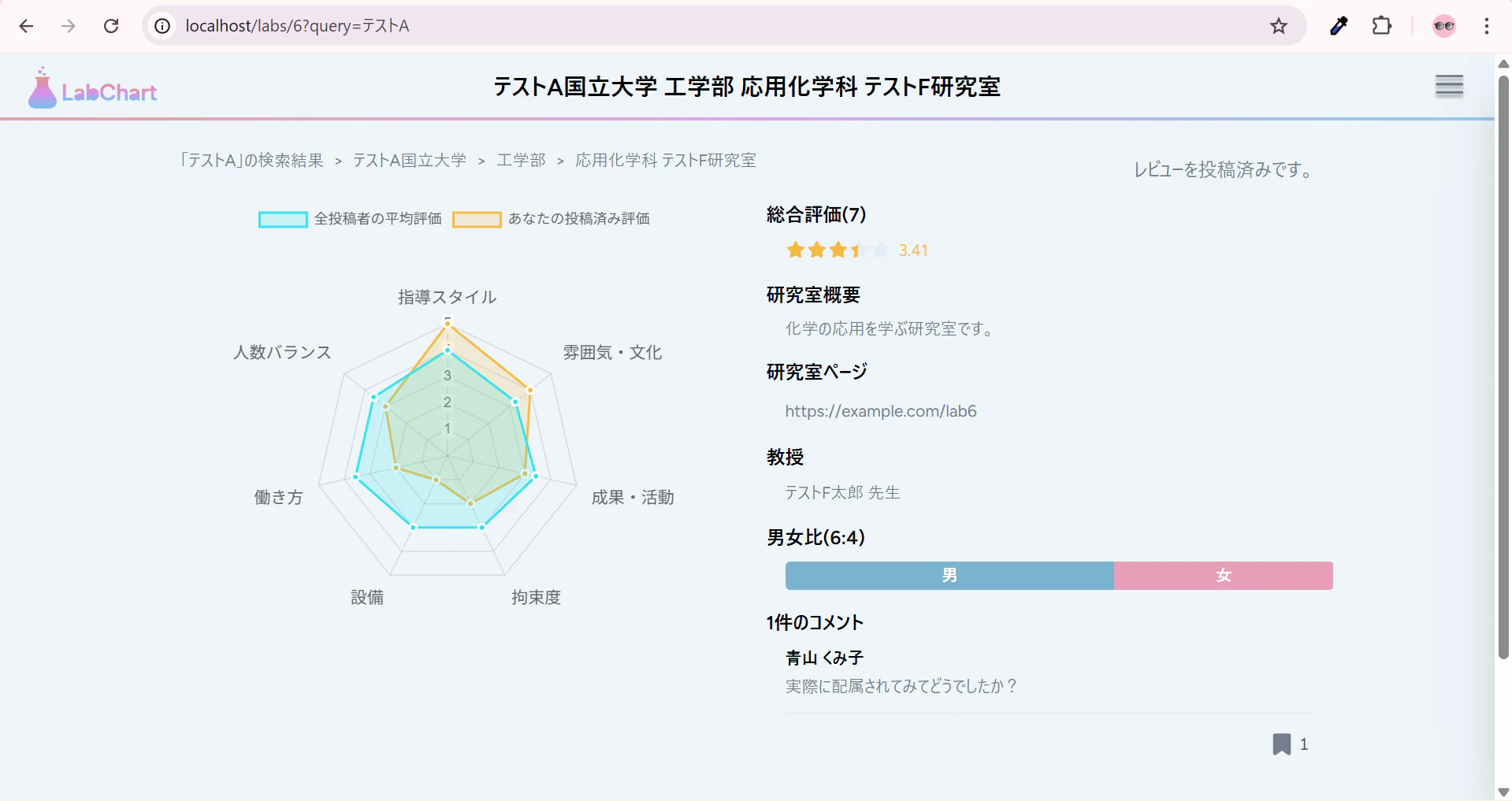
なお、マイページから移動してきた場合は、検索結果のパンくずリストは表示されていないことも確認しておいてください。
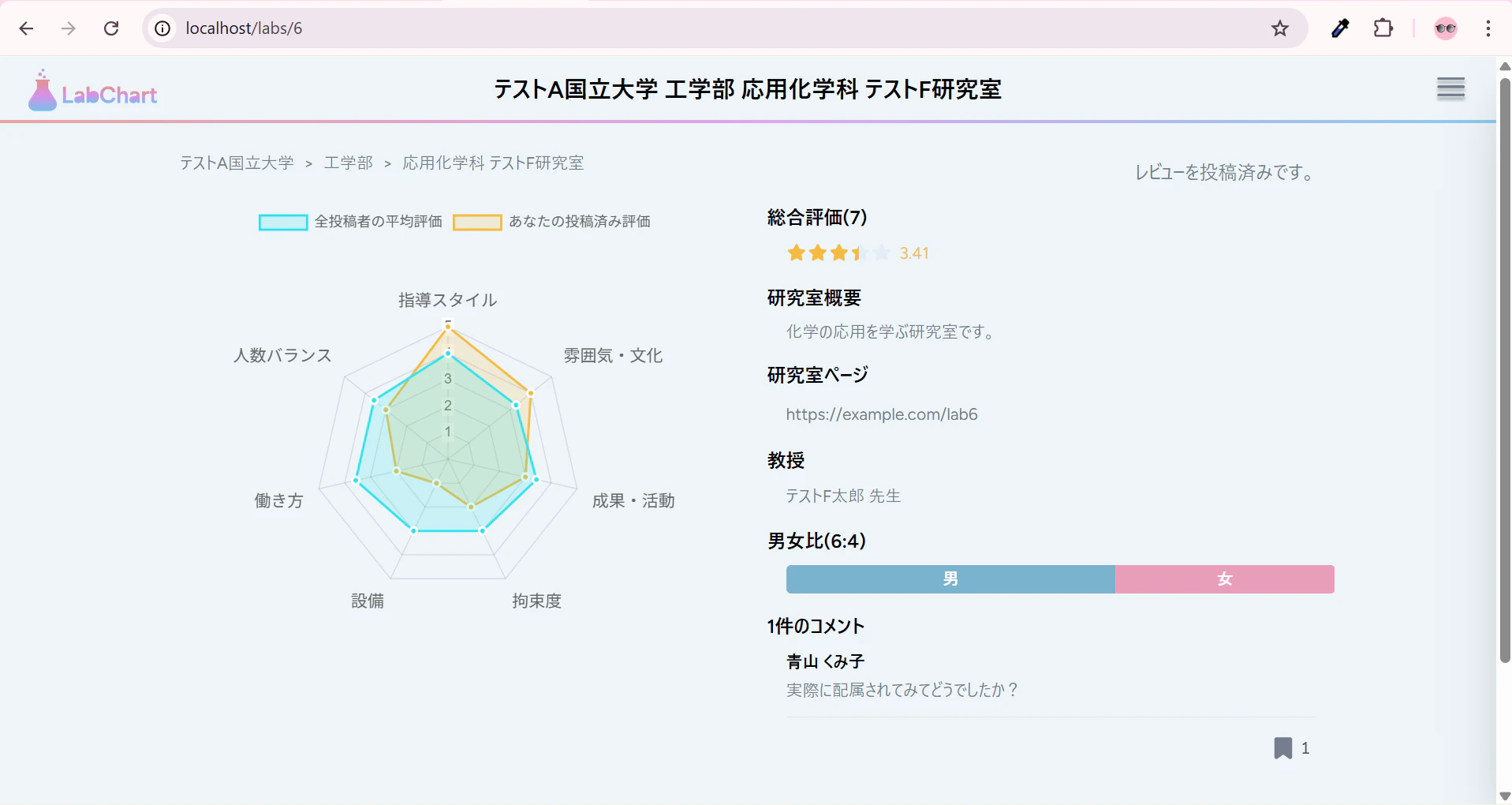
なお、BackButton.jsxは削除しちゃって大丈夫です。
4. (おまけその7)修正: 前回のミス
前回のおまけコーナーで、Lab/Show.jsxの関数コンポーネントにコメントアウトを付与しましたが、その中にある関数にコメントアウトを付けるのをすっかり忘れていました。
handleBookmarkClickの上に追加です。
  /**
   * ブックマークのトグル処理
   * ログインしていない場合は何もしない。
   * 既にブックマーク済みなら解除、未ブックマークなら追加する。
   * @returns {void}
   */
  const handleBookmarkClick = () => {
5. まとめ・次回予告
今回は、戻るボタンをやめて、パンくずリストを採用したことで問題を解決しました!
次回は、ログイン・新規登録ダイアログを作成したいと思います!
ありがとうございました。
これまでの記事一覧
☆要件定義・設計編
☆環境構築編
- その2: 環境構築編① ~WSL, Ubuntuインストール~
- その3: 環境構築編② ~Docker Desktopインストール~
- その4: 環境構築編③ ~Dockerコンテナ立ち上げ~
- その5: 環境構築編④ ~Laravelインストール~
- その6: 環境構築編⑤ ~Gitリポジトリ接続~
☆バックエンド実装編
- その7: バックエンド実装編① ~認証機能作成~
- その8: バックエンド実装編②前編 ~レビュー投稿機能作成~
- その8.5: バックエンド実装編②後編 ~レビュー投稿機能作成~
- その9: バックエンド実装編③ ~レビューCRUD機能作成~
- その10: バックエンド実装編④ ~レビューCRUD機能作成その2~
- その11: バックエンド実装編⑤ ~新規大学・学部・研究室作成機能作成~
- その12: バックエンド実装編⑥ ~大学検索機能作成~
- その13: バックエンド実装編⑦ ~大学・学部・研究室編集機能作成~
- その14: バックエンド実装編⑧ ~コメント投稿機能~
- その15: バックエンド実装編⑨ ~コメント編集・削除機能~
- その16: バックエンド実装編⑩ ~ブックマーク機能~
- その17: バックエンド実装編⑪ ~排他制御・トランザクション処理~
- その18: バックエンド実装編⑫ ~マイページ機能作成~
- その19: バックエンド実装編⑬ ~管理者アカウント機能作成~
- その20: バックエンド実装編⑭ ~通知機能作成~
- その21: バックエンド実装編⑮ ~ソーシャルログイン機能作成~
☆フロントエンド実装編
- その22: フロントエンド実装編① ~メインコンテンツ領域作成~
- その23: フロントエンド実装編② ~ヘッダー作成~
- その24: フロントエンド実装編③ ~サイドバー作成~
- その25: フロントエンド実装編④ ~ホームページ作成~
- その26: フロントエンド実装編⑤ ~大学検索結果画面作成~
- その27: フロントエンド実装編⑥ ~大学詳細・学部一覧画面作成~
- その28: フロントエンド実装編⑦ ~学部詳細・研究室一覧画面作成~
- その29: フロントエンド実装編⑧前編 ~研究室詳細・レビュー画面作成前編~
- その29.5: フロントエンド実装編⑧後編 ~研究室詳細・レビュー画面作成後編~
- その30: フロントエンド実装編⑨ ~マイページ作成~
軽く宣伝
YouTubeを始めました(というか始めてました)。
内容としては、Webエンジニアの生活や稼げるようになるまでの成長記録などを発信していく予定です。
現在、まったく再生されておらず、落ち込みそうなので、見てくださる方はぜひ高評価を教えもらえると励みになると思います。"(-""-)"