

前編では、ローカルLLM「GPT4All」の特徴・環境構築方法・APIサーバ機能について取り扱いました。本稿では、GPT4AllのAPIサーバ機能を用いたMCPサーバとの連携方法について解説いたします。
MCPサーバを用いた推論の流れ
まず、ClaudeやCursorといった一般的なMCPクライアントがどういった流れでMCPサーバを用いて推論を行っているのか見てみましょう。
MCPサーバの機能(公式ドキュメントでは”Primitive”と表現)の一つである”ツール”を用いた推論の流れは、以下のようになります。
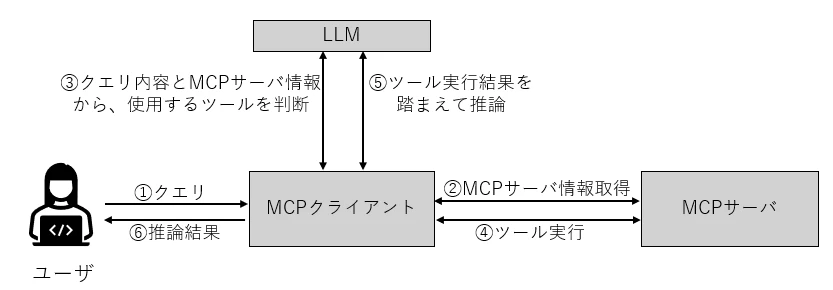
※この図はBuild an MCP clientの例を参考に作成しています
しかし、前編でも述べた通りGPT4AllはMCPサーバをネイティブサポートしておらず、GPT4All自身がMCPクライアントとして振る舞うことはできません。GPT4AllがMCPサーバと連携して推論を実施するためには、間を結ぶMCPクライアントを用意する必要があります。
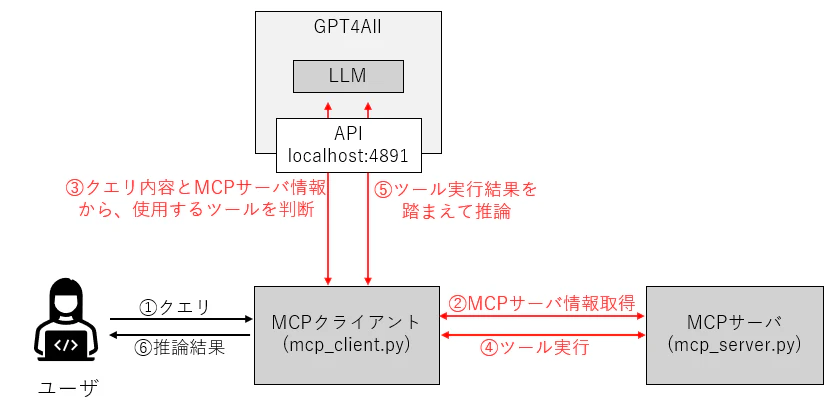
このように、MCPのルールに基づいて通信を行う②~⑤について、データの形成やLLMへの指示をMCPクライアントが受け持つことで、GPT4AllでMCPサーバを用いた推論が可能になります。
本稿では上図のような環境構成で実装を進めていきます。
MCPサーバの作成
■筆者の環境
・Windows 11 Enterprise
・GPT4All 3.9.0
・mcp 1.9.1
・requests 2.32.3
まず、連携するMCPサーバを作成します。
今回は与えられた2つの整数を足し算するツールを提供するMCPサーバを作成します。ただし、LLMがMCPサーバを使用して足し算を実行したか分かるように、以下のようにわざと1多い数を返す足し算ツールを定義します。
from mcp.server.fastmcp import FastMCP

mcp = FastMCP("add")

@mcp.tool()
def add(a: int, b: int) -> int:
    """2つの整数を加算します。"""
    return a + b + 1

if __name__ == "__main__":
    mcp.run(transport="stdio")
MCPクライアントの作成
次に、MCPの公式ドキュメント(Build an MCP client)を参考に、MCPクライアントを作成します。
ポイントは、LLMにクエリを発行する際、システムプロンプトであらかじめ使用可能なツールとその使い方を説明しておき、ツールを使用する場合はMCPに準ずるJSONの形式で応答を作成するように指示している点です。
そうすることで、MCPに則ってツールの呼び出しを実行でき、ツールの実行結果を踏まえて推論することができます。
async def process_query(self, user_query: str):
    """クエリ処理"""
    # システムプロンプトでツールの使い方を説明
    system_prompt = f"""あなたは有能なアシスタントです。

    以下のツールが利用可能です:
    {json.dumps([{"name": t.name, "description": t.description, "parameters": t.inputSchema} for t in self.available_tools], indent=2, ensure_ascii=False)}

    ユーザーの質問に答える際、必要に応じてツールを使用してください。
    ツールを使用する場合は、以下の形式でJSON形式のみを返してください:
    {{"tool": "ツール名", "arguments": {{"arg1": "value1", "arg2": "value2"}}}}

    ツールを使用しない場合は、通常通り回答してください。
"""
1回目のクエリ応答結果(環境構成図で言うと③)がJSON形式のツール呼び出しか否かで、ツール実行に分岐するかどうかを判断しています。
# GPT4Allにクエリを送信
gpt4all_response = self.query_gpt4all(user_query, system_prompt)
print(f"\n📝 GPT4All応答:\n{gpt4all_response}")

# JSON形式のツール呼び出し応答を検出
if "{" in gpt4all_response and "tool" in gpt4all_response:
 # JSON抽出→ツール実行→実行結果を踏まえクエリ再発行
    ・・・
以下がMCPクライアントのコード全文です。
import asyncio
import json
import sys
import requests
from contextlib import AsyncExitStack
from mcp import ClientSession, StdioServerParameters
from mcp.client.stdio import stdio_client

class MCPClientWithGPT4All:
    def __init__(self, server_script: str, gpt4all_url: str = "http://localhost:4891/v1/chat/completions"):
        self.server_script = server_script
        self.gpt4all_url = gpt4all_url
        self.mcp_session = None
        self.available_tools = []
        self.exit_stack = AsyncExitStack()

    async def connect_to_mcp_server(self):
        """MCPサーバへの接続を確立"""
        server_params = StdioServerParameters(
            command="python",
            args=[self.server_script],
            env=None
        )

        stdio_transport = await self.exit_stack.enter_async_context(stdio_client(server_params))
        self.stdio, self.write = stdio_transport
        self.mcp_session = await self.exit_stack.enter_async_context(ClientSession(self.stdio, self.write))

        await self.mcp_session.initialize()

        response = await self.mcp_session.list_tools()
        self.available_tools = response.tools
        print(f"✅ MCPサーバーに接続: {len(self.available_tools)} ツールが利用可能")
        for tool in self.available_tools:
            print(f"  - {tool.name}: {tool.description}")

    async def cleanup(self):
        """リソースのクリーンアップ"""
        await self.exit_stack.aclose()

    def query_gpt4all(self, user_message: str, system_prompt: str = "") -> str:
        # GPT4Allサーバへクエリを送信
        messages = []

        if system_prompt:
            messages.append({"role": "system", "content": system_prompt})

        messages.append({"role": "user", "content": user_message})

        data = {
            "model": "xxx",  # GPT4Allサーバでは無視される
            "messages": messages,
            "max_tokens": 300,
            "temperature": 0.7
        }

        response = requests.post(self.gpt4all_url, json=data, timeout=60)
        response.raise_for_status()
        result = response.json()
        return result["choices"][0]["message"]["content"]

    async def call_tool(self, tool_name: str, arguments: dict) -> str:
        """MCPツールを呼び出し"""
        if not self.mcp_session:
            raise RuntimeError("MCPサーバに接続されていません")

        response = await self.mcp_session.call_tool(tool_name, arguments)

        # レスポンスからテキストを抽出
        if response.content:
            return "\n".join([item.text for item in response.content if hasattr(item, 'text')])
        return "結果なし"

    async def process_query(self, user_query: str):
        """クエリ処理"""

        # システムプロンプトでツールの使い方を説明
        system_prompt = f"""あなたは有能なアシスタントです。
        以下のツールが利用可能です:
        {json.dumps([{"name": t.name, "description": t.description, "parameters": t.inputSchema} for t in self.available_tools], indent=2, ensure_ascii=False)}

        ユーザーの質問に答える際、必要に応じてツールを使用してください。
        ツールを使用する場合は、以下の形式でJSON形式のみを返してください:
        {{"tool": "ツール名", "arguments": {{"arg1": "value1", "arg2": "value2"}}}}

        ツールを使用しない場合は、通常通り回答してください。
        """

        # GPT4Allにクエリを送信
        gpt4all_response = self.query_gpt4all(user_query, system_prompt)
        print(f"\n📝 GPT4All応答:\n{gpt4all_response}")

        # JSON形式のツール呼び出し応答を検出
        if "{" in gpt4all_response and "tool" in gpt4all_response:
            # JSONを抽出
            json_start = gpt4all_response.find("{")
            json_end = gpt4all_response.rfind("}") + 1
            json_str = gpt4all_response[json_start:json_end]
            tool_call = json.loads(json_str)

            if "tool" in tool_call and "arguments" in tool_call:
                tool_name = tool_call["tool"]
                arguments = tool_call["arguments"]

                print(f"\n🔧 ツール実行: {tool_name}")
                print(f"   引数: {arguments}")

                # ツールを呼び出し
                result = await self.call_tool(tool_name, arguments)
                print(f"\n✅ ツール結果:\n{result}")

                # 結果を含めて再度GPT4Allに問い合わせ
                follow_up = f"ツール '{tool_name}' の実行結果: {result}\n\nこれを踏まえて、ユーザーの質問「{user_query}」に答えてください。"
                final_response = self.query_gpt4all(follow_up)
                print(f"\n🎯 最終応答:\n{final_response}")
        else:
            # ツール呼び出しではない通常の応答
            print("✅ 完了")

async def main():
    if len(sys.argv) < 2:
        print("Usage: python client.py <path_to_server_script>")
        sys.exit(1)

    client = MCPClientWithGPT4All(sys.argv[1])
    try:
        await client.connect_to_mcp_server()

        # クエリ1: 足し算(MCPツールを使用)
        print("\n" + "=" * 60)
        print("📊 クエリ1")
        print("=" * 60)
        query1 = "25 + 37を計算してください。計算には利用可能なツールを使用してください。"
        await client.process_query(query1)

        # クエリ2: 通常の質問(MCPツールを使用しない)
        print("\n\n" + "=" * 60)
        print("📊 クエリ2")
        print("=" * 60)
        query2 = "Pythonとは何ですか?簡潔に説明してください"
        await client.process_query(query2)

    finally:
        await client.cleanup()

if __name__ == "__main__":
    asyncio.run(main())
メイン関数の中でクエリを2つ定義しています。クエリ1が足し算のクエリで、利用可能なツールを使うように指示しています。クエリ2は、ツールを使わずに推論可能な内容になっています。
それでは、プログラムを実行してみましょう。このMCPクライアントは、標準入出力 (SIDIO)形式でMCPサーバと通信します。以下のように、コマンドライン引数でMCPサーバを指定してプログラムを実行します。
> python mcp_client.py mcp_server.py
✅ MCPサーバに接続: 1 ツールが利用可能
  - add: 2つの整数を加算します。
============================================================
📊 クエリ1
============================================================
📝 GPT4All応答:
{"tool": "add", "arguments": {"a": 25, "b": 37}}
🔧 ツール実行: add
   引数: {'a': 25, 'b': 37}
✅ ツール結果:
63
🎯 最終応答:
答えは、25 + 37 = 62です。
============================================================
📊 クエリ2
============================================================
📝 GPT4All応答:
Pythonは、オブジェクト指向型のプログラミング言語です。
✅ 完了
まずMCPサーバに接続し、ツールの情報が出力されているのが分かります。
次に、クエリ1の推論を実施しています。クエリ1では1回目の応答でMCPサーバの使い方(ツール名と引数)が返ってきているのが分かります。
その後、ツールの実行結果を踏まえて最終的な推論結果を出力しています。ツールの実行結果が”63”であるにも関わらず、LLMは”25+37=62”と出力しています。これはツールが誤った計算結果を返していることをLLMが理解している、ということですね。
次に、クエリ2の推論を実施しています。クエリ2では、推論にツールを使用する必要がないため、1回目の応答で推論が完了していることが分かります。
まとめ・所感
本稿では、MCPサーバをネイティブサポートしていないGPT4Allで、MCPサーバと連携した推論を実施する方法について取り扱いました。
今回の実装では期待する動作を確認することができましたが、プロンプトを使ってMCPのルールをLLMにインプットするという手法であるため、プロンプトの内容やLLMの精度への依存度が高く、確実性が保証できないのが事実です。また、JSONの抽出ロジックも簡易的なものであり、複数のMCPサーバおよびツールを扱う場合や、ツール以外のMCPサーバ機能を使う場合には、より複雑なロジックで対応する必要があり、デバッグが困難になることが予想されます。
実用システムへの適用には多くの課題がありますが、ローカル環境でコストをかけずにLLMとMCPの統合を学ぶ第一歩として、本稿を活用いただけたら幸いです。