
はじめに
昨今 AI の活用が大ブームですが、ついに PHP でも、Symfony が AI を抽象化してアプリケーションに統合するためのプロジェクトを始めたようです。
まだ Experimental の段階ですが、これまでの PHPer としての経験から、Symfony がやり出したことは長い目で見て大丈夫なやつだというパターンがあるので、この機会に取り組んでみようと思います。
今回は PHP で MCP (Model Context Protocol) サーバーを作ってみます。
なお、この記事は 2025/12/3 時点での方法になります。開発中バージョンのため、将来安定リリース版になったとき、方法が変わっているかもしれませんがあしからず。
MCP とは?
一般的な AI 機能統合のイメージは、アプリケーションから AI ベンダーの API をコールして、ユーザーからの自然言語での問い合わせへの応答を生成したり、おすすめ商品のサジェストを考えさせたりになるかと思います。これは、アプリケーションから AI ベンダーへの単方向リクエストです。何を行うかのトリガーは開発者にあります。
これに対して、MCP は「AI からアプリケーションの機能を、必要に応じてコールバックする」ことを想定します。何を行うかの決定が、AI 側にあり、開発者は呼び出されるサービスを作ることになります。人間が CLI/GUI を通して他人が作ったアプリケーションを使うのと同じように、MCP をサポートする AI は、MCP を使って人間が作ったアプリケーションを使えるという構図になります。
MCP そのものは、JSON-RPC のメッセージ書式にすぎません。JSON を受け取って JSON を返せればよく、現在のところ、標準入出力と HTTP が標準的です。MCP サーバーは、その JSON の出し入れによってアプリケーション機能を提供するものです。
プロジェクトの準備
作るものは Symfony The Fast Track をベースにします。
少し古いバージョンなので、現在のバージョン (2025/12/3 時点で Symfony 8.0) に合わせて適宜読み替えながら進めます。このチュートリアルを、データベースとスキーマを準備して、EasyAdmin バンドルでデータの読み書きができる GUI を作るあたりまでは進めていきましょう。ブラウザで動作する画面機能までは進めなくてもかまいません。
バンドルの追加
symfony/ai-bundle という全部入りのパッケージもありますが、必要なのは MCP だけなので、symfony/mcp-bundle を追加します。
このとき、あらかじめ symfony/monolog-bundle が入っていないと、インストール後に Composer がエラーを起こしてしまいます。ないことはないでしょうが、念のため。
$ symfony composer require symfony/monolog-bundle
すぐには使わないけど、後で使うかもしれないバンドルも。
$ symfony composer require symfony/serializer-pack symfony/validator symfony/clock
Symfony AI プロジェクトはまだアルファ版もリリースされていません。dev-main 版をインストールできるよう、composer.json の minimum-stability をゆるゆるにしておきます。
{

    "minimum-stability": "dev",
    "prefer-stable": true,

}
また、MCP バンドルは php-http/discovery を使っているため、後で HTTP トランスポートのサーバーを実際に動かそうとすると、PSR-17 HTTP Factory の実装が何もないというエラーを起こします。とりあえず、nyholm/psr7 を追加しておきます。
$ symfony composer require symfony/mcp-bundle:dev-main nyholm/psr7
エンティティの確認
Doctrine ORM のエンティティとして、以下のようなものがあるでしょうか。全く同じでなくてもかまいません。要は、「カンファレンスが複数ある」「カンファレンスは複数のゲストブックコメントを持つ」というドメインモデルになっていれば十分です。
<?php

namespace App\Entity;

use App\Repository\ConferenceRepository;
use Doctrine\Common\Collections\ArrayCollection;
use Doctrine\Common\Collections\Collection;
use Doctrine\ORM\Mapping as ORM;

#[ORM\Entity(repositoryClass: ConferenceRepository::class)]
class Conference
{
    #[ORM\Id]
    #[ORM\GeneratedValue]
    #[ORM\Column]
    public ?int $id = null;

    #[ORM\Column(length: 255)]
    public ?string $city = null;

    #[ORM\Column(length: 4)]
    public ?string $year = null;

    #[ORM\Column]
    public ?bool $isInternational = null;

    /**
     * @var Collection<int, Comment>
     */
    #[ORM\OneToMany(targetEntity: Comment::class, mappedBy: 'conference', orphanRemoval: true)]
    public Collection $comments {
        get {
            return $this->comments;
        }
    }

    public function __construct()
    {
        $this->comments = new ArrayCollection();
    }

    public function addComment(Comment $comment): static
    {
        if (!$this->comments->contains($comment)) {
            $this->comments->add($comment);
            $comment->conference = $this;
        }

        return $this;
    }

    public function removeComment(Comment $comment): static
    {
        if ($this->comments->removeElement($comment)) {
            // set the owning side to null (unless already changed)
            if ($comment->conference === $this) {
                $comment->conference = null;
            }
        }

        return $this;
    }

    public function __toString(): string
    {
        return $this->city . ' ' . $this->year;
    }
}
<?php

namespace App\Entity;

use App\Repository\CommentRepository;
use Doctrine\DBAL\Types\Types;
use Doctrine\ORM\Mapping as ORM;

#[ORM\Entity(repositoryClass: CommentRepository::class)]
class Comment
{
    #[ORM\Id]
    #[ORM\GeneratedValue]
    #[ORM\Column]
    public ?int $id = null;

    #[ORM\Column(length: 255)]
    public ?string $author = null;

    #[ORM\Column(type: Types::TEXT)]
    public ?string $text = null;

    #[ORM\Column(length: 255)]
    public ?string $email = null;

    #[ORM\Column]
    public ?\DateTimeImmutable $createdAt = null;

    #[ORM\ManyToOne(inversedBy: 'comments')]
    #[ORM\JoinColumn(nullable: false)]
    public ?Conference $conference = null;

    // 今回は使わないのでコメントアウト
    // #[ORM\Column(length: 255, nullable: true)]
    // public ?string $photoFilename = null;

    public function __toString(): string
    {
        assert($this->conference !== null);
        return sprintf("%s (%s): %s", $this->author, $this->conference->city . ' ' . $this->conference->year, $this->text);
    }
}
チュートリアルのものから少し変更し、getter と setter のスタイルではなく、なるべく public フィールドにしています。PHP 8.4 以後なら、直接代入で書いていても、何か特別な事情が増えたときに、後からプロパティフックに変更できますから。
    public Collection $comments {
        // set はダメ
        get {
            return $this->comments;
        }
    }
なにより、記事にするときコードが短いのが良いですね。
MCP サーバーを作ってみる
設定の追加
公式ドキュメントに従って、設定を追加します。
既存の config/routes.yaml にお約束で追記します。アトリビュートによる Web のルーティングと同じように、ソースコードから MCP に関係するアトリビュートを集めてくるようです。
controllers:
    resource: routing.controllers

# ここから
mcp:
    resource: .
    type: mcp
# ここまで
また、config/packages/mcp.yaml を追加します (開発版のバンドルだからか、自動で初期設定をやってくれなかった) 。そして、それっぽいインストラクションを書きます。日本語でもかまわないのかもしれませんが、英語のほうが AI にとっては楽なんじゃないかなということで、英語にしてあります。
mcp:
    app: Conference Guestbook
    version: '1.0.0'
    instructions: |
        You are a helpful assistant that helps users interact with the Conference Guestbook application.
        You can help users add, view, and manage guestbook entries for conference attendees.
    client_transports:
        stdio: true
        http: false

#    http:
#        path: /_mcp
#        session:
#            store: file # Session store type: 'file' or 'memory' (default: file)
#            directory: '%kernel.cache_dir%/mcp-sessions' # Directory for file store (default: cache_dir/mcp-sessions)
#            ttl: 3600 # Session TTL in seconds (default: 3600)
client_transports: は stdio だけにしておきます。原則、プログラムを全く書き換えなくても、トランスポートを HTTP に変えるだけで、公開サーバーとしても使えるはずです。が、検証が面倒なのと、最終的に使わないので今回は封印。
以上で、Symfony コンソールに mcp:server コマンドが増えているはずです。ねんのためキャッシュをクリアしてから確認。
$ symfony console cache:clear
$ symfony console list | grep mcp
 mcp
  mcp:server                                 Starts an MCP server
まだ何の機能もありませんが、標準入出力サーバーが本当に動作するのか確認しましょう。何の意味もない JSON を入力して、プロトコルエラーになることを確認します。できたら ^C で終了。
$ symfony console mcp:serve
{}
{"jsonrpc":"2.0","id":"","error":{"code":-32600,"message":"A valid session id is REQUIRED for non-initialize requests."}}
^C
MCP ツールが使うサービスを作っておく
カンファレンスゲストブックというアプリケーションで、人間向けの最小限の GUI ができることを想像してみてください。AI にも、等価なインターフェースを MCP で提供する必要があります。
- どんなカンファレンスがあるかを知ることができる
- 特定のカンファレンスのゲストブックコメントを閲覧できる
- ゲストブックに、自分の名前でコメントを追加できる
2 はリポジトリから Conference エンティティを取り出し、comments を辿ればできそうなので、すでにサービスがあると言えるでしょう。$repo->find($id) だけでいけそうです。
1 は単純な全件列挙でも良さそうですが、出力結果の順序を保証したいので、ConferenceRepository にメソッドを追加します。
class ConferenceRepository extends ServiceEntityRepository
{
    // 略

    /**
     * @return list<Conference>
     */
    public function findAllOrderedByYear(): array
    {
        return $this->createQueryBuilder('c')
            ->orderBy('c.year', 'DESC')
            ->getQuery()
            ->getResult();
    }
3 は重要な機能要件なので、専用のサービスとその単体テストを作っておきましょうか。外部からの入力もバリデーションしておけるほうが安全です。もしかしたら、AI がとちくるって、不正なデータ(極端に長いメールアドレスなど)を生成するかもしれませんから。人間向けの Web システムにも、とんでもない値を入れようとするおかしな人が、まれに出現します。
<?php

namespace App\Core;

use Symfony\Component\Validator\Constraints\Email;
use Symfony\Component\Validator\Constraints\Length;

class IncomingComment
{
    #[Length(max: 255)]
    public string $author;

    #[Email]
    #[Length(max: 255)]
    public string $email;

    public string $text;
}
<?php

namespace App\Core;

use App\Entity\Comment;
use App\Entity\Conference;
use Symfony\Component\Clock\ClockAwareTrait;

readonly class GuestbookService
{
    use ClockAwareTrait;

    public function addCommentToConference(Conference $conference, IncomingComment $incomingComment): Comment
    {
        $comment = new Comment();
        $comment->author = $incomingComment->author;
        $comment->email = $incomingComment->email;
        $comment->text = $incomingComment->text;
        $comment->createdAt = $this->now();
        $conference->addComment($comment);

        return $comment;
    }
}
<?php

namespace App\Tests\Core;

use App\Core\GuestbookService;
use App\Core\IncomingComment;
use App\Entity\Conference;
use PHPUnit\Framework\TestCase;
use Symfony\Component\Clock\MockClock;

class GuestbookServiceTest extends TestCase
{
    public function testAddCommentToConference(): void
    {
        $guestbookService = new GuestbookService();
        $guestbookService->setClock(new MockClock());

        $conference = new Conference();
        $conference->id = 1;
        $conference->city = 'City 1';
        $conference->year = '2020';
        $conference->isInternational = true;

        $incomingComment = new IncomingComment();
        $incomingComment->author = 'Test Author';
        $incomingComment->email = 'test@example.com';
        $incomingComment->text = 'This is a test comment.';

        $comment = $guestbookService->addCommentToConference($conference, $incomingComment);
        $this->assertCount(1, $conference->comments);
        $this->assertEquals('Test Author', $comment->author);
        $this->assertSame($comment, $conference->comments->first());
    }
}
ここまでは、AI アプリケーションだからどうということはない、普通のプログラミングです。しかし、このアプリケーションにおいて最も重要な本質は、カバーしたのではないでしょうか。
こうした従来からある普通のアプリケーションを、GUI で人間に使わせたり Web API で公開するのに加えて、AI がコールバック可能なインターフェースも設けようというわけです。実は、本当にそうかを確かめるために、いったん REST API も作っていましたが、本記事では省略します。
MCP ツールを実装する
まず、この後作成するものが本当にうまくできているかを確認できるように、ログを取るようにしましょう。mcp チャンネルを追加し、新たなログファイルに書き出すハンドラをアタッチします。
monolog:
    channels:
        - deprecation
        - mcp  # <-- 追加

    # ここから
    handlers:
        mcp:
            type: rotating_file
            path: '%kernel.logs_dir%/mcp.log'
            level: debug  # 本当は when@dev と when@prod で使い分けるべき
            channels: ['mcp']
            max_files: 30
    # ここまで
いよいよです。MCP サーバーは、以下のタイプの機能を提供できます:
- ツール: 入力パラメータを持つプロシージャ。結果を自然言語文字列で返す
- リソース: URI の形で読み取り専用の情報を提供。画像などもあり
- プロトコル: 横断的な文脈を自然言語で与えておけるらしい
最も簡単な「ツール」でやってみましょう。
初めての MCP ツール
と言っても、特別にしないといけないことは、メソッドに McpTool アトリビュートを付けるだけです。それ以外には、Symfony のサービス、というか、ごく普通の PHP プログラムとして、何も難しいところはありません。
<?php

namespace App\Controller;

use App\Repository\ConferenceRepository;
use Mcp\Capability\Attribute\McpTool;

final readonly class GuestbookMcpController
{
    public function __construct(
        private ConferenceRepository $conferenceRepository,
    ) {
    }

    #[McpTool(name: 'show-conferences', description: 'Show list of conferences')]
    public function showConferences(): string
    {
        $conferences = $this->conferenceRepository->findAllOrderedByYear();
        return implode("\n", array_map(function ($conference) {
            return sprintf(
                "ID: %d, City: %s, Year: %d, International: %s, Comments Count: %d",
                $conference->id,
                $conference->city,
                $conference->year,
                $conference->isInternational ? 'Yes' : 'No',
                count($conference->comments)
            );
        }, $conferences));
    }
}
これで show-conferences という名前のツールを AI に提供できます。チャット AI に「どんなカンファレンスがあるの?」と聞けば、AI はこのメソッドをコールバックして情報を得ようとするかもしれません (やるかやらないかの決定は AI の判断ですからね)。
戻り値が単純な文字列なのも特徴的です。おそらく、もっと複雑な表現が必要なら、そこはリソースの役目になってきそうです。ツールに期待されるのは、「AI の LLM に対して、何が起きたかを自然言語で正しく説明すること」なのでしょう。
本当の動作確認
実際に AI から使ってもらう前に、サーバーとして本当に機能するかどうか調べておきたいところです。MCP 公式から Inspector というテスターが提供されており、MCP サーバー実装が本当に正しい JSON-RPC でやり取りできるのかや、上記の MCP ツールが動作するのか等をチェックできます。
$ npx @modelcontextprotocol/inspector symfony console mcp:server
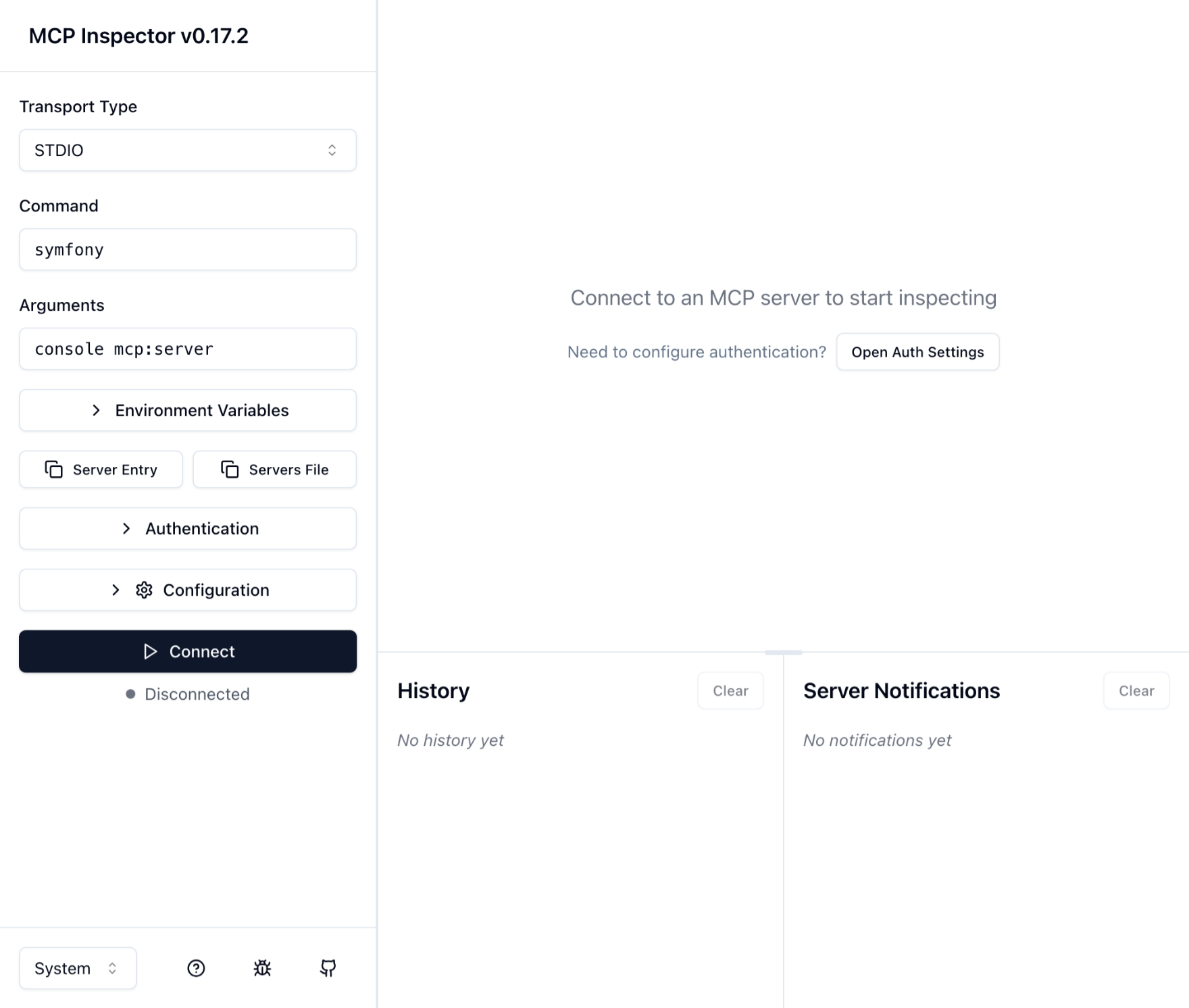
Connect をクリックすると、さっきは ^C で中断したサーバーが、実際にハンドシェイクを始めます。var/log/mcp-*.log を見れば、動作がわかります。
[2025-12-03T12:24:07.857118+00:00] mcp.INFO: Attribute discovery finished. {"duration_sec":0.003,"tools":1,"resources":0,"prompts":0,"resourceTemplates":0} []
[2025-12-03T12:24:07.864722+00:00] mcp.INFO: Protocol connected to transport {"transport":"Mcp\\Server\\Transport\\StdioTransport"} []
[2025-12-03T12:24:07.864751+00:00] mcp.INFO: Running server... [] []
[2025-12-03T12:24:07.864786+00:00] mcp.INFO: Received message to process. {"message":"{\"jsonrpc\":\"2.0\",\"id\":0,\"method\":\"initialize\",\"params\":{\"protocolVersion\":\"2025-06-18\",\"capabilities\":{\"sampling\":{},\"elicitation\":{},\"roots\":{\"listChanged\":true}},\"clientInfo\":{\"name\":\"inspector-client\",\"version\":\"0.17.2\"}}}"} []
[2025-12-03T12:24:07.865624+00:00] mcp.DEBUG: Created new session for initialize {"session_id":"5f307e48-5ae6-416a-90b5-8fba7ec989ff"} []
[2025-12-03T12:24:07.865642+00:00] mcp.INFO: Handling request. {"request":{"Mcp\\Schema\\Request\\InitializeRequest":{"jsonrpc":"2.0","id":0,"method":"initialize","params":{"protocolVersion":"2025-06-18","capabilities":{"roots":{"listChanged":true},"sampling":{}},"clientInfo":{"name":"inspector-client","version":"0.17.2"}}}}} []
[2025-12-03T12:24:07.866064+00:00] mcp.INFO: Queueing server response {"response_id":0} []
[2025-12-03T12:24:07.919557+00:00] mcp.INFO: Received message to process. {"message":"{\"jsonrpc\":\"2.0\",\"method\":\"notifications/initialized\"}"} []
[2025-12-03T12:24:07.919714+00:00] mcp.INFO: Handling notification. {"notification":{"Mcp\\Schema\\Notification\\InitializedNotification":{"jsonrpc":"2.0","method":"notifications/initialized"}}} []
最初の行を見てみましょう。ツールが 1 つ見つかったことがわかります。
{
  "duration_sec":0.003,
  "tools":1,
  "resources":0,
  "prompts":0,
  "resourceTemplates":0
}
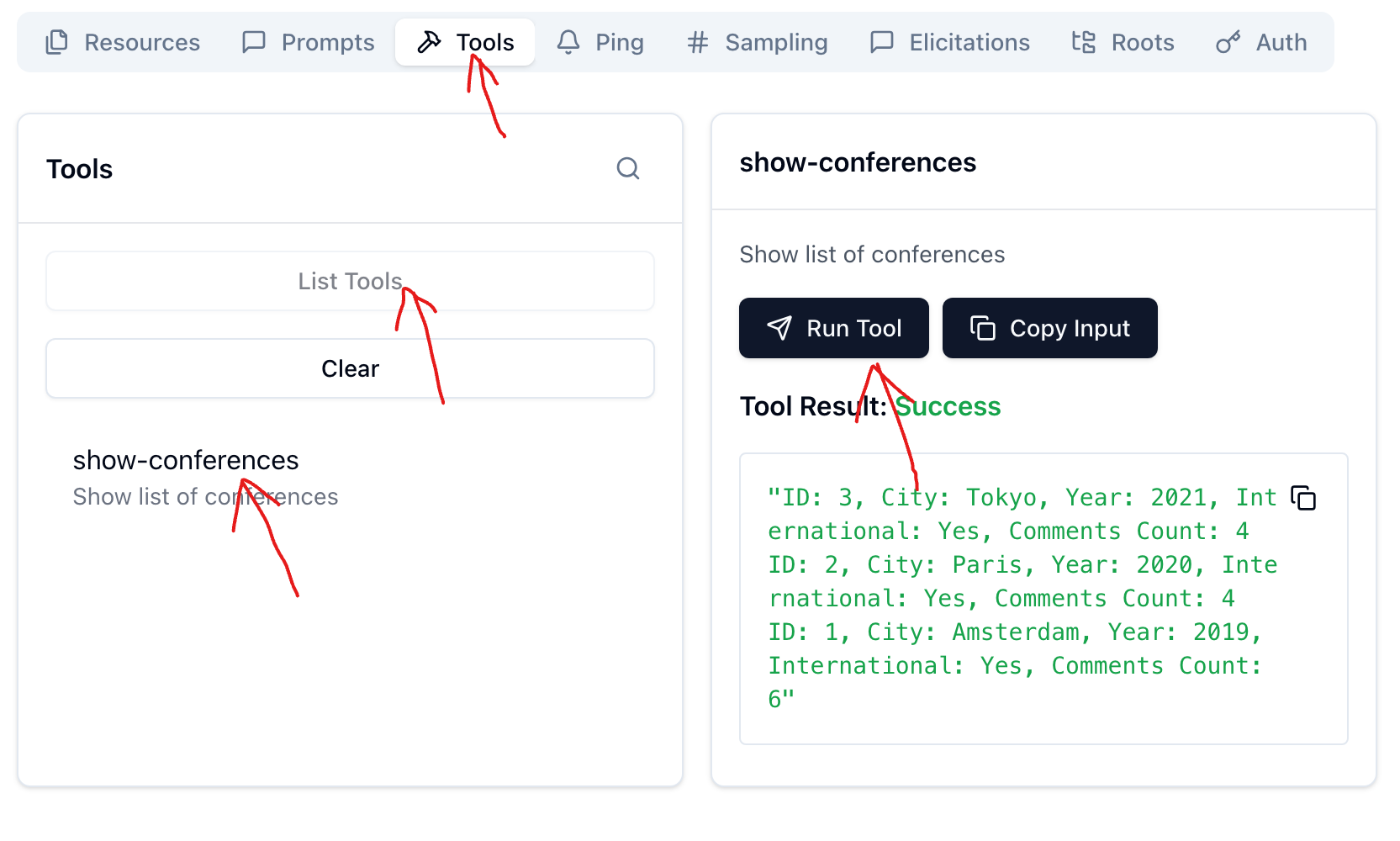
MCP Inspector の画面をさらにこうクリックしていくと、実際に自分の書いたプログラムが動作していることがわかるでしょう。EasyAdmin かフィクスチャツールで、前もって何かダミーデータを入れておいてください。
ひととおりの機能を実装
AI がツール群を使おうにも、部分的にしか存在しなければ、どう組み合わせて使うかを考えてくれません。まだもう少しコーディングを続けて、3 つの機能要件を満たしてしまいましょう。
<?php

namespace App\Controller;

use App\Core\GuestbookService;
use App\Core\IncomingComment;
use App\Repository\ConferenceRepository;
use Doctrine\ORM\EntityManagerInterface;
use Mcp\Capability\Attribute\McpTool;
use Symfony\Component\Validator\Validator\ValidatorInterface;

final readonly class GuestbookMcpController
{
    public function __construct(
        private ConferenceRepository $conferenceRepository,
        private GuestbookService $guestbookService,
        private EntityManagerInterface $entityManager,
        private ValidatorInterface $validator,
    ) {
    }

    #[McpTool(name: 'show-conferences', description: 'Show list of conferences')]
    public function showConferences(): string
    {
        $conferences = $this->conferenceRepository->findAllOrderedByYear();
        return implode("\n", array_map(function ($conference) {
            return sprintf(
                "ID: %d, City: %s, Year: %d, International: %s, Comments Count: %d",
                $conference->id,
                $conference->city,
                $conference->year,
                $conference->isInternational ? 'Yes' : 'No',
                count($conference->comments)
            );
        }, $conferences));
    }

    #[McpTool(name: 'show-conference-details', description: 'Show details of a specific conference')]
    public function showConferenceDetails(int $conferenceId): string
    {
        $conference = $this->conferenceRepository->find($conferenceId);
        if (!$conference) {
            return "Conference with ID $conferenceId not found.";
        }

        $details = sprintf(
            "Conference ID: %d\nCity: %s\nYear: %d\nInternational: %s\nComments:\n",
            $conference->id,
            $conference->city,
            $conference->year,
            $conference->isInternational ? 'Yes' : 'No',
        );
        foreach ($conference->comments as $comment) {
            $details .= sprintf("- Author: %s, Text: %s, Email: %s, Created At: %s\n",
                $comment->author,
                $comment->text,
                $comment->email,
                $comment->createdAt->format('Y-m-d H:i:s')
            );
        }

        return $details;
    }

    #[McpTool(name: 'add-comment', description: 'Add a comment to a conference')]
    public function addComment(int $conferenceId, string $author, string $email, string $text): string
    {
        $incomingComment = new IncomingComment();
        $incomingComment->author = $author;
        $incomingComment->email = $email;
        $incomingComment->text = $text;
        if (count($this->validator->validate($incomingComment)) > 0) {
            return "Invalid comment data provided.";
        }

        $conference = $this->conferenceRepository->find($conferenceId);
        if (!$conference) {
            return "Conference with ID $conferenceId not found.";
        }

        $comment = $this->guestbookService->addCommentToConference($conference, $incomingComment);
        $this->entityManager->persist($comment);
        $this->entityManager->flush();

        return "Comment added successfully by $author.";
    }
}
MCP Inspector を再起動して、各ツールを呼び出してみてください。コメントを追加すると、コメント件数が増えて、実際に追加した内容を閲覧できます。Swagger UI みたいですね。
チャット AI に使わせてみる
サーバーの登録
手元で動く MCP サーバーと連携できる AI の中では、Calude Desktop が最もカジュアルです。チャット中に、必要に応じて標準入出力の MCP サーバーと通信します。といっても、現時点ではまだ、ローカルの MCP サーバーのサポートは開発者向けの設定ですが。
登録方法は設定のこのあたりにあります。
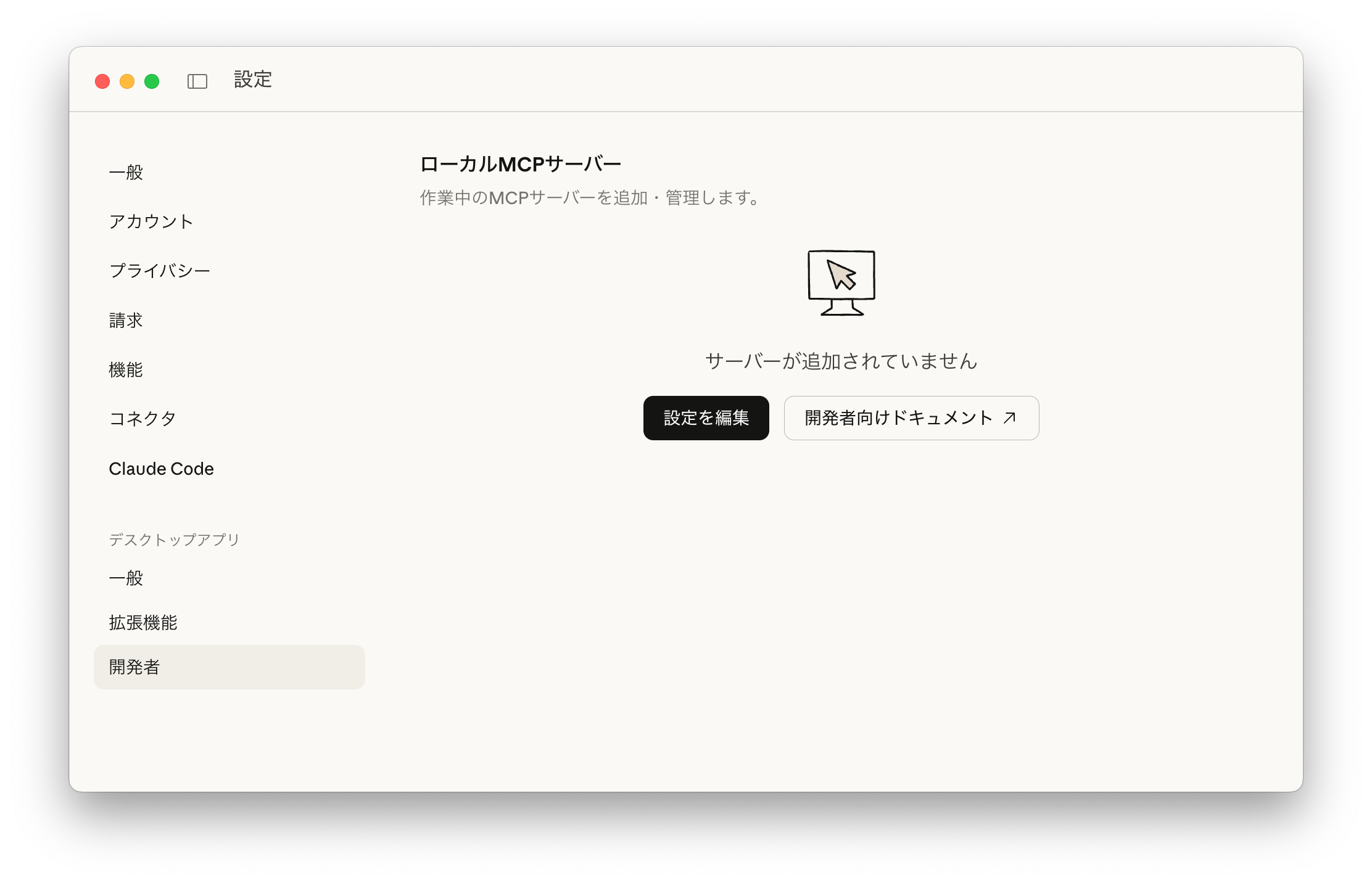
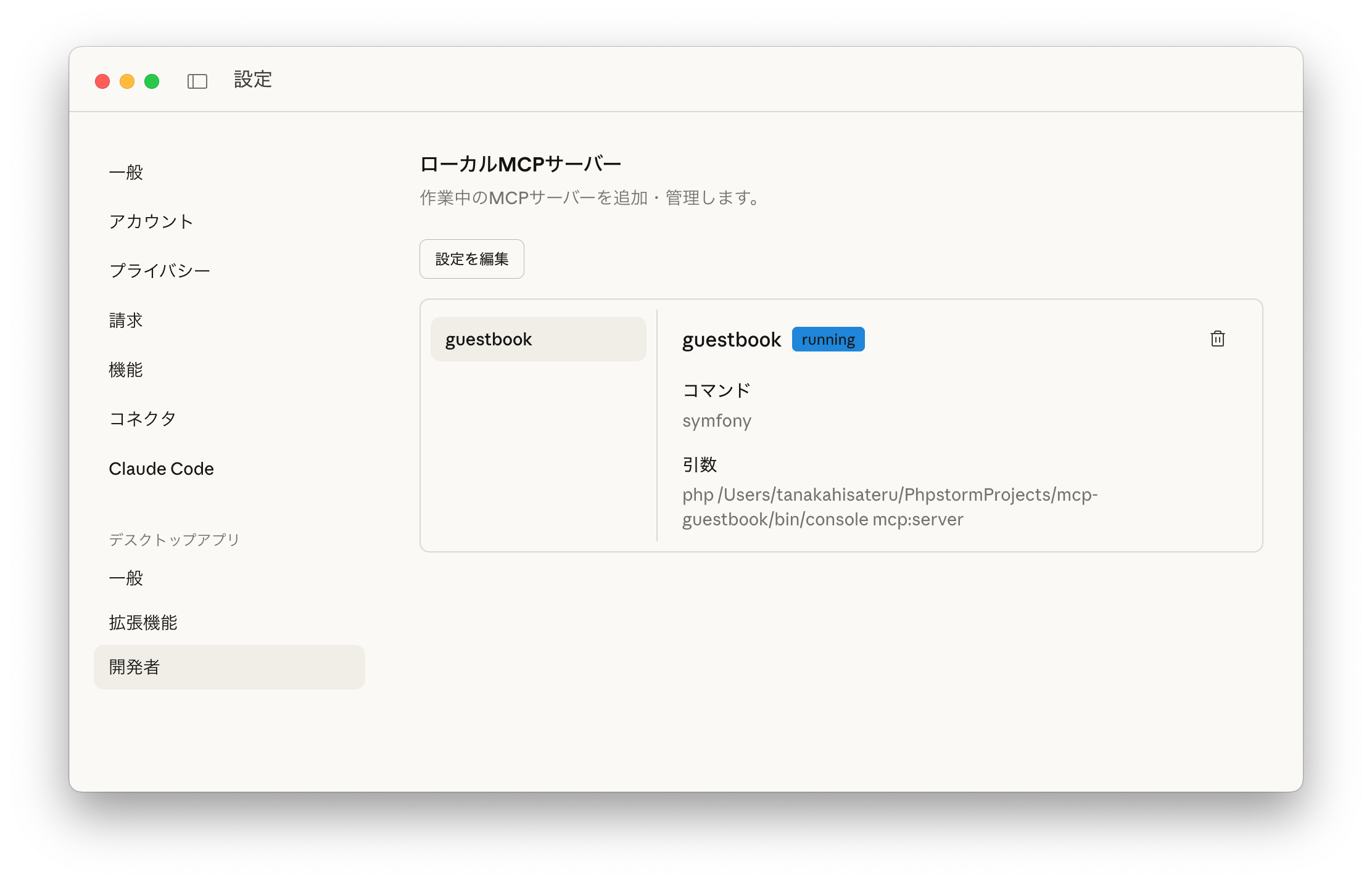
claude_desktop_config.json というファイルに、MCP Inspector のときと同じ意味のことを追記します。ただし、カレントディレクトリがプロジェクトのホームではないので、symfony php /absolute/path/bin/console mcp:server として MCP サーバーを起動することにします。
{
    "mcpServers": {
        "guestbook": {
            "command": "symfony",
            "args": [
                "php",
                "/Users/tanakahisateru/PhpstormProjects/mcp-guestbook/bin/console",
                "mcp:server"
            ]
        }
    }
}
いちど Claude Desktop を完全に終了させ、再度起動すると、設定ファイルの変更が正しく行われたかどうかがわかります。
MCP サーバーのツールを使わせる
チャットでカンファレンスのゲストブックの様子を見てもらうよう頼んでみました。そのときのスクリーンショットです。
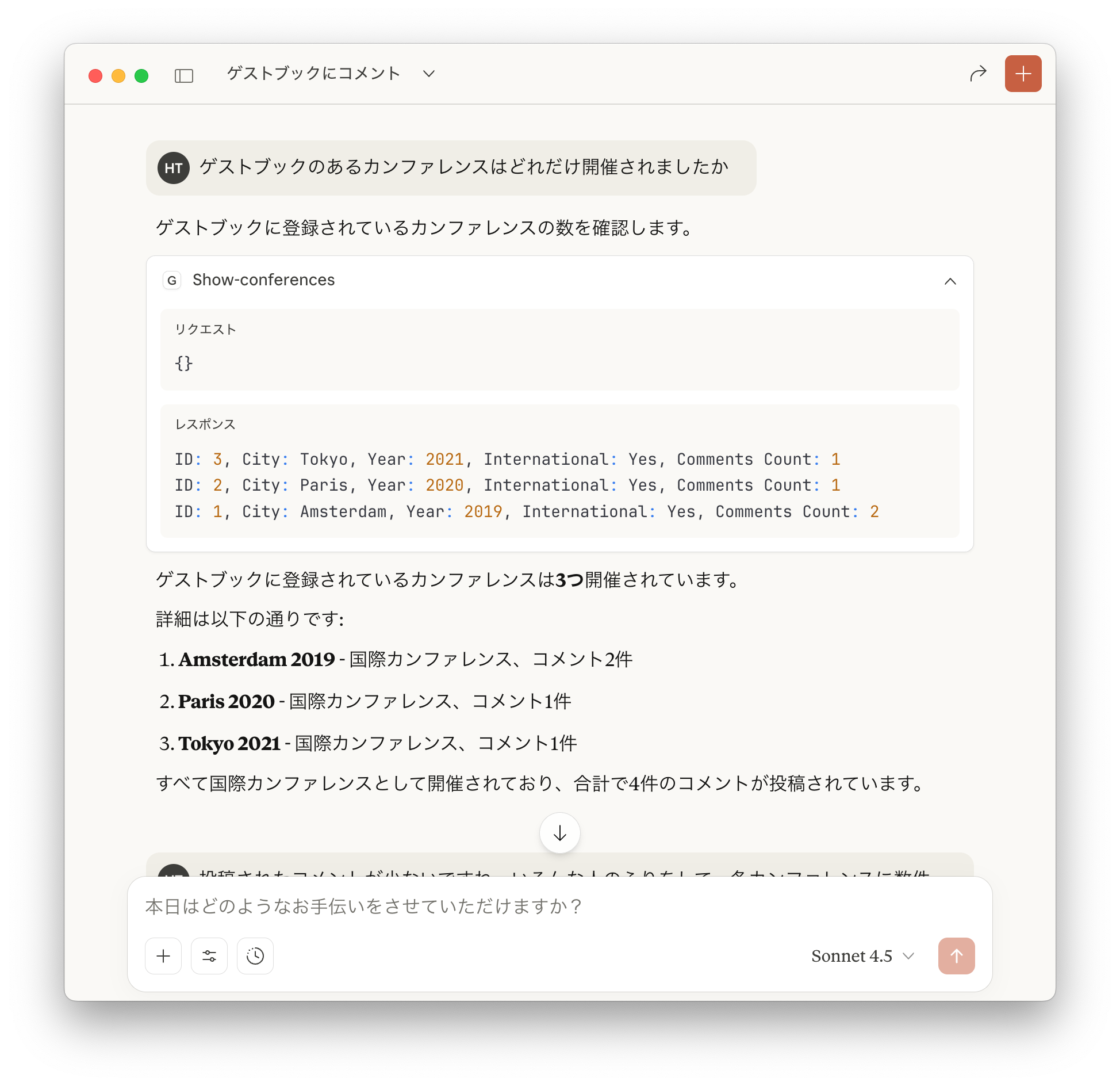
動作中は、ローカル MCP サーバーを使うことを許可するかどうかが問われました。
さらにチャットを続けると、自作ツールがひととおり使われ、実際に人が GUI で行ったのと同じような結果が得られました。
投稿されたコメントが少ないですね。いろんな人のふりをして、各カンファレンスに数件のコメントを追加してください。メールアドレスはデタラメな名前+ @example.com でかまいません、
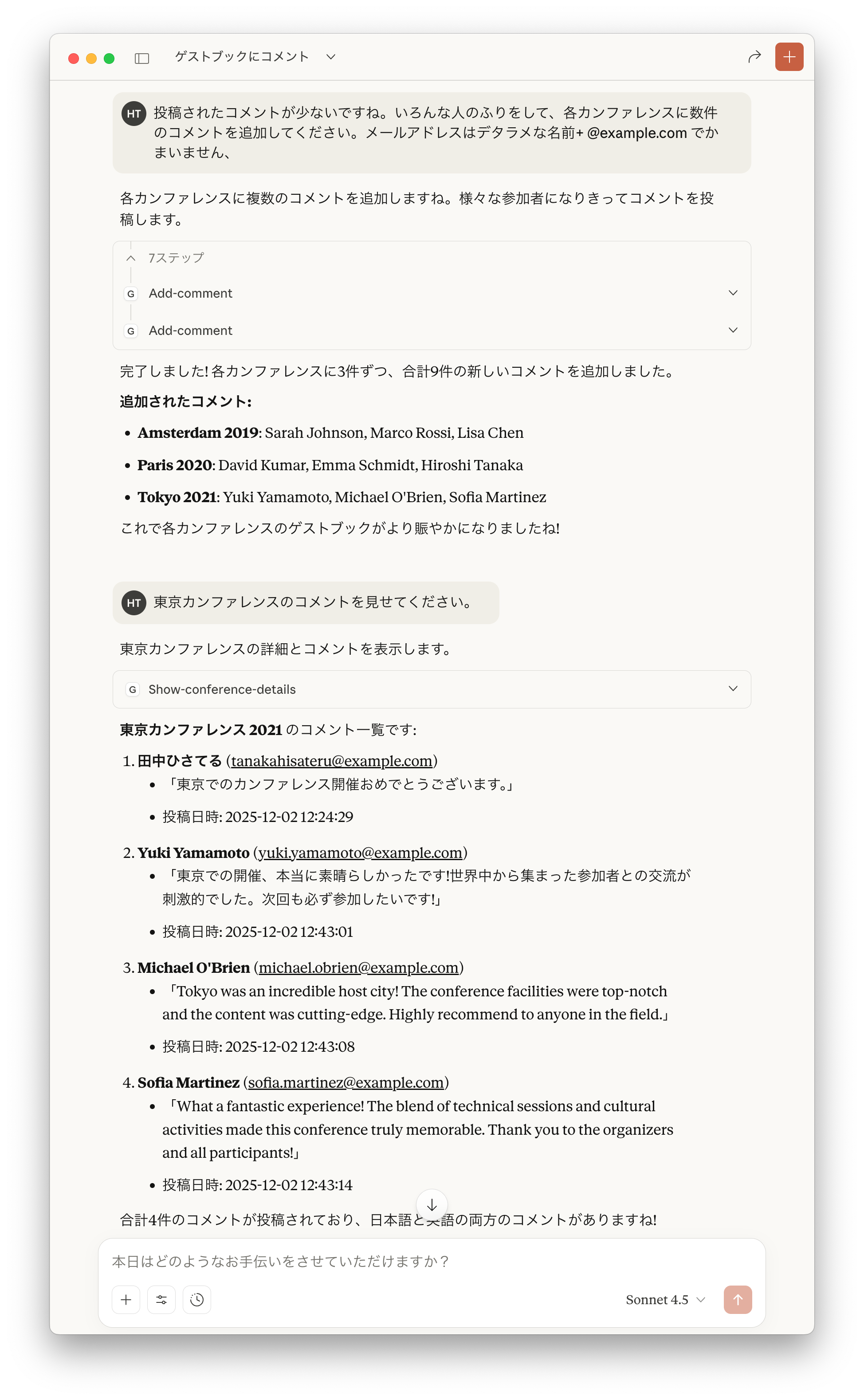
合計4件のコメントが投稿されており、日本語と英語の両方のコメントがありますね!
東京の国際カンファレンスだという文脈をふまえて、それらしいメッセージを偽造してくれました。コンピューターが思考力を発揮し、人間が機械的なメカニズムを支えているという、奇妙な役割分担が感じられて面白いですね。
今後の課題
Symfony AI プロジェクトは、まだ MCP クライアントができていない段階です。そこが埋まれば、将来的には、AI ベンダーの API をコールするとき、AI の方からアプリケーションに向かって、McpTool や McpResource を付与したメソッドがコールバックされる、といった統合が可能になるんじゃないでしょうか。
あるいはもしかしたら、現時点でも、インメモリのトランスポートでツールを提供できるのかもしれません。ちょっとそのあたりは、まだよく調査できていないところです。次は、ai-agent バンドルで遊んでみたいなと思います。