
はじめに
Ninune-wa さんの IoT BASIC サンプルを『Turbo Pascal』へ移植してみたのですが、
後で Ninune-wa さんから「IoT BASIC デバイスツリーにバイブレーション機能のノードあるよ」と教えて頂きました。あー、去年の今頃 1 の更新 (ファームウェア v0.15.20) で追加されてますね。見落としてました。
| ノード名 | ノードタイプ | 概要 | 単位 | 備考 |
|---|---|---|---|---|
| device/vibration | 整数 | バイブレーション | 0~100 |
と、いう事で、今回は device/vibration ノードを使って振動モーターを制御してみたいと思います。
本記事の内容を試すには MSX0 Stack のファームウエアバージョンを 0.15.20 以上にする必要があります。
See also:
MSX0VIB2.BAS
オリジナルの BASIC のソースコードというものはないので、MSX0VIBE.BAS を参考に自分で書いてみます。
| 項目 | 説明 |
|---|---|
| 概要 | 内蔵振動モーターを 2 秒間振動させます。 |
| ファイル名 | MSX0VIB2.BAS |
| 対応デバイス | |
| コメント | Face Bottom Base や Battery Bottoms を装着して、プログラムを実行してください。 |
100 'SAVE "MSX0VIB2.BAS"
110 'Test Code: MSX0Stack Vibration motor
120 'Init
130   CLS:SCREEN 1:DEFINT A-Z:KEY OFF:WIDTH 32:COLOR 15,0,0
140   DT$="device/vibration" 'Device Tree
150 'Main
160   GOSUB 200'VIBE ON
170   GOSUB 280'Wait
180   GOSUB 240'VIBE OFF
190   END
200 'Vibration ON
210   PRINT "Vibration ON"
220   _IOTPUT(DT$,100)
230   RETURN
240 'Vibration OFF
250   PRINT "Vibration OFF"
260   _IOTPUT(DT$,0)
270   RETURN
280 'Wait n Second
290   TIME=0
300   N=2'n Second
310   WT=N*60
320   PRINT "Wait";N;"Second"
330   IF TIME<WT THEN 330
340   RETURN
随分すっきりしましたね。
See also:
MSX0 Stack での挙動
MSX0VIB2.BAS をロードして、

実行してみました。
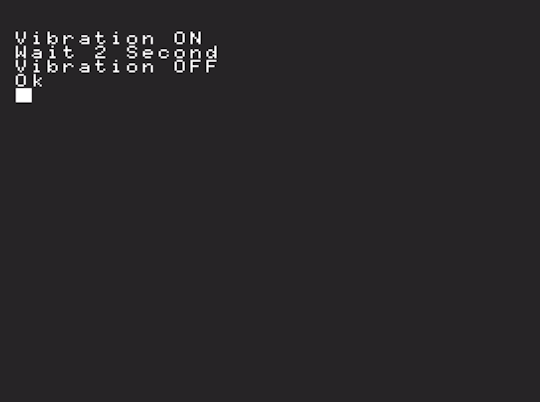
内蔵振動モーターが 2 秒振動し、その後停止しました。
今回は連続して実行しても振動モーターが停止しなかったり AXP192 が見つからなくなったりする事はありませんでした。直接制御は MSX0 の機能とコンフリクトするのでしょうか?
プログラムは〔Ctrl〕+〔Stop〕(リモートコントロールパネルからは〔Ctrl〕+〔F12〕)で中断できます。
Turbo Pascal へ移植
別途、SYSUTILS.LIB と IOT.LIB が必要です。
こちらも随分すっきりしたコードになりました。
(* Test Code: MSX0Stack Vibration motor *)
program MSX0VIB2;
type
  LibStr = string[80];
{$I SYSUTILS.LIB}
{$I IOT.LIB}
  procedure Vibe(Mode: Boolean);
  const
    MStr: array [Boolean] of String[3] = ('OFF', 'ON');
    MVal: array [Boolean] of Integer = (0, 100);
  begin
    Writeln('Vibration ', MStr[Mode]);
    IotPutInt('device/vibration', MVal[Mode]);
  end; { Vibe() }
  procedure Wait(n: Integer);
  begin
    Writeln('Wait ', n , ' Second');
    Delay(n * 894); { 1sec = 3.579545 / 4 * 1000 }
  end; { Wait() }
begin
  (* Init *)
  ClrScr;
  (* Vibrator ON *)
  Vibe(True);
  (* Wait n Second *)
  Wait(2);
  (* Vibrator OFF *)
  Vibe(False);
end.
実行した結果です。

こちらも、連続実行に問題はありませんでした。バイブレーション機能 (内蔵振動モーター) を使うなら IoT デバイスツリーに用意されたノードを利用した方がよさそうです。
解説
前回と内容はほぼ変わらないので特筆すべき点はないですね。
Vibe()
Turbo Pascal では三項演算子が使えないのでこのようなコードになっています。
  procedure Vibe(Mode: Boolean);
  const
    MStr: array [Boolean] of String[3] = ('OFF', 'ON');
    MVal: array [Boolean] of Integer = (0, 100);
  begin
    Writeln('Vibration ', MStr[Mode]);
    IotPutInt('device/vibration', MVal[Mode]);
  end; { Vibe() }
素直に書くとこうなります。長いですね。
  procedure Vibe(Mode: Boolean);
  var
    MStr: String[3];
    MVal: Integer;
  begin
    if Mode then
    begin
      MStr := 'ON';
      MVal := 100;
    end
    else
    begin
      MStr := 'OFF';
      MVal := 0;
    end;
    Writeln('Vibration ', MStr);
    IotPutInt('device/vibration', MVal);
  end; { Vibe() }
BASIC のマルチステートメント的に変形するとこうなります。
  procedure Vibe(Mode: Boolean);
  var
    MStr: String[3];
    MVal: Integer;
  begin
    if Mode then
      begin MStr := 'ON';  MVal := 100 end
    else
      begin MStr := 'OFF'; MVal :=   0 end;
    Writeln('Vibration ', MStr);
    IotPutInt('device/vibration', MVal);
  end; { Vibe() }
変数宣言しなければ短くは書けますが、似たようなコードを何度も書くのはあまり好きではありません。
  procedure Vibe(Mode: Boolean);
  begin
    if Mode then
    begin
      Writeln('Vibration ON');
      IotPutInt('device/vibration', 100);
    end
    else
    begin
      Writeln('Vibration OFF');
      IotPutInt('device/vibration', 0);
    end
  end; { Vibe() }
二値なら計算で値を出すのもよくやりますけどね。
  procedure Vibe(Mode: Boolean);
  const
    MStr: array [Boolean] of String[3] = ('OFF', 'ON');
  begin
    Writeln('Vibration ', MStr[Mode]);
    IotPutInt('device/vibration', Ord(Mode) * 100]);
  end; { Vibe() }
Ord() は順序型の順序値を返す関数で、Boolean 型は False = 0, True = 1 を返します。
Delphi は 13 Florence にて三項演算子相当の If 条件演算子が使えるようになりました。
おわりに
今回の移植に関して難しい所は特にありませんでした。
-
本記事執筆は 2025/12/29 です。 ↩