
シャッターはWindowCovering、照明はOnOffLight、換気扇はFanControlをベースにするとして、まずは単純な照実装を詰める。
イベントの受信
device-composed-wc-lightテンプレートベースだとこんな感じのコードが生成される。(元はexamplesにあるソースの通り1ファイルだけど、デバイスごとにファイルを分離した。GPIO関連は追加済)
light.ts
#!/usr/bin/env node
/**
 * @license
 * Copyright 2022-2025 Matter.js Authors
 * Copyright 2025 KGS Lab. NAGASAWA Takahiro
 * SPDX-License-Identifier: Apache-2.0
 */
import { OnOffLightRequirements } from "@matter/main/devices/on-off-light";
import { Gpio } from "pigpio";
import * as Consts from "./consts.js"

/**照明スイッチのGPIOピンNo */
const GPIO_SW_TOGGLE_LIGHT = 17;

/**実機側照明のGPIOピンNo */
const GPIO_DEV_LIGHT = 24;
/**照明インジケータLEDのGPIOピンNo */
const GPIO_IND_LIGHT = 7;

const BTN_LIGHT = new Gpio(GPIO_SW_TOGGLE_LIGHT, {
  mode: Gpio.INPUT,
  pullUpDown: Gpio.PUD_UP,
  alert: true,
});

const DEV_LIGHT = new Gpio(GPIO_DEV_LIGHT, {
  mode: Gpio.OUTPUT,
  pullUpDown: Gpio.PUD_DOWN,
});

const IND_LIGHT = new Gpio(GPIO_IND_LIGHT, {
  mode: Gpio.OUTPUT,
  pullUpDown: Gpio.PUD_UP,
});

/**
 * 照明のON/OFFサーバ
 */
export class Light extends OnOffLightRequirements.OnOffServer {
  override initialize() {
    this.reactTo(this.events.onOff$Changed, this.#stateChanged);
  }

  #stateChanged(value: boolean) {
    console.log(`Light is now ${value ? "illuminated" : "dark"}`);
  }
}
ステータスの更新方法
イベントの受け取り方はわかったけど、ハードウェアからのフィードバックはどうやって行うの?というのがわからず、example内を彷徨うこと数日。
見つけたのがDeviceNodeFull.ts。
状態の取得はendpoint.state.onOff.onOffのような形で取得できることは、早い段階でわかっていたのだけど、この変数に値を設定しようとすると、エラーになってしまう。
値を設定するにはsetメソッドを使用する。
light.ts
await endpoint.set({
            onOff: {
                onOff: true, // trueでON
            },
        });
(今のところの)最終型
Endpoint以外からもsetで値を設定できるんだろうけど、とりあえず今わかっていることをまとめたらこうなった。
light.ts
#!/usr/bin/env node
/**
 * @license
 * Copyright 2022-2025 Matter.js Authors
 * Copyright 2025 KGS Lab. NAGASAWA Takahiro
 * SPDX-License-Identifier: Apache-2.0
 */
import { Endpoint } from "@matter/main";
import { OnOffLightDevice } from "@matter/main/devices/on-off-light";
import { Gpio } from "pigpio";
import * as Consts from "./consts.js"

/**照明スイッチのGPIOピンNo */
const GPIO_SW_TOGGLE_LIGHT = 17;

/**実機側照明のGPIOピンNo */
const GPIO_DEV_LIGHT = 27;
/**照明インジケータLEDのGPIOピンNo */
const GPIO_IND_LIGHT = 18;

const BTN_LIGHT = new Gpio(GPIO_SW_TOGGLE_LIGHT, {
  mode: Gpio.INPUT,
  pullUpDown: Gpio.PUD_UP,
  alert: true,
});

const DEV_LIGHT = new Gpio(GPIO_DEV_LIGHT, {
  mode: Gpio.OUTPUT,
  pullUpDown: Gpio.PUD_DOWN,
});

const IND_LIGHT = new Gpio(GPIO_IND_LIGHT, {
  mode: Gpio.OUTPUT,
  pullUpDown: Gpio.PUD_UP,
});

/**
 * 照明用エンドポイントを作成.
 */
export const LightEndpoint = new Endpoint(OnOffLightDevice, {
  id: 'light'
});

/**
 * リモートからのON/OFFイベントの処理.
 */
LightEndpoint.events.onOff.onOff$Changed.on((swOn: any) => {
  console.log(`Light is now ${swOn ? "ON" : "OFF"}`);
  if (swOn) {
    switchOn();
  } else {
    switchOff();
  }
});

/**
 * 照明ボタンの設定.
 * GLITCH_INTERVAL_NS以下の信号は無視.
 */
BTN_LIGHT.glitchFilter(Consts.GLITCH_INTERVAL_NS);
/**
 * 照明ボタン押下時の処理.
 */
BTN_LIGHT.on("alert", async (level: any, tickl: any) => {
  if (level == 0) {
    const onOffValue = LightEndpoint.state.onOff.onOff;
    await LightEndpoint.set({
      onOff: {
          onOff: !onOffValue,
      },
    });
  }
});

/**
 * 照明ON.
 */
function switchOn() {
  DEV_LIGHT.digitalWrite(1);
  IND_LIGHT.digitalWrite(0);
}

/**
 * 照明OFF.
 */
function switchOff() {
  DEV_LIGHT.digitalWrite(0);
  IND_LIGHT.digitalWrite(1);
}
Endpointを作るようにしたので、ノードの作り方も変わる。
GarageManage.ts
#!/usr/bin/env node
/**
 * @license
 * Copyright 2022-2025 Matter.js Authors
 * Copyright 2025 KGS Lab. NAGASAWA Takahiro
 * SPDX-License-Identifier: Apache-2.0
 */
import {
    Bytes,
    DeviceTypeId,
    Endpoint,
    Environment,
    LogDestination,
    LogLevel,
    Logger,
    ServerNode,
    StorageService,
    Time,
    VendorId,
} from "@matter/main";
import { MovementDirection, MovementType, WindowCoveringServer } from "@matter/main/behaviors/window-covering";

import { WindowCoveringDevice } from "@matter/main/devices/window-covering";
import { OnOffLightDevice } from "@matter/main/devices/on-off-light";
import { FanDevice } from "@matter/main/devices/fan";

//import { ShutterEndpoint } from "./devices/shutter.js"
import { LightEndpoint } from "./devices/light.js"
//import { VentilationFanEndpoint } from "./devices/fan.js"

/** Initialize configuration values */
const { deviceName, vendorName, passcode, discriminator, vendorId, productName, productId, port, uniqueId } =
    await getConfiguration();

/**
 * Matter サーバノードを作成.
 */
const server = new ServerNode({
    id: uniqueId,

    productDescription: {
        name: deviceName,
        deviceType: DeviceTypeId(WindowCoveringDevice.deviceType)
    },

    commissioning: {
        passcode,
        discriminator,
    },

    basicInformation: {
        vendorName,
        productName,
        vendorId,
        productId,
        serialNumber: `gm001-${uniqueId}`,
    },
});


//await server.add(ShutterEndpoint);
await server.add(LightEndpoint);
//await server.add(VentilationFanEndpoint);

await server.run();

/**
 *
 */
async function getConfiguration() {
    const environment = Environment.default;

    const storageService = environment.get(StorageService);
    console.log(`Storage location: ${storageService.location} (Directory)`);
    const deviceStorage = (await storageService.open("device")).createContext("data");

    const deviceName = "GarageManage";
    const vendorName = "KGS Lab.";
    const passcode = environment.vars.number("passcode") ?? (await deviceStorage.get("passcode", 19750608));
    const discriminator = environment.vars.number("discriminator") ?? (await deviceStorage.get("discriminator", 3840));
    const vendorId = environment.vars.number("vendorid") ?? (await deviceStorage.get("vendorid", 0xfff1));
    const productName = "GarageManage001";
    const productId = environment.vars.number("productid") ?? (await deviceStorage.get("productid", 0x8000));

    const port = environment.vars.number("port") ?? 5540;

    const nowMs = Time.nowMs().toString();
    const uniqueId =
        environment.vars.string("uniqueid") ?? (await deviceStorage.get("uniqueid", nowMs));

    console.log(`uniqueId: ${uniqueId} / ${nowMs}`);

    // Persist basic data to keep them also on restart
    await deviceStorage.set({
        passcode,
        discriminator,
        vendorid: vendorId,
        productid: productId,
        uniqueid: uniqueId,
    });

    return {
        deviceName,
        vendorName,
        passcode,
        discriminator,
        vendorId,
        productName,
        productId,
        port,
        uniqueId,
    };
}
起動するにはpigpioがsu権限を要求するので、sudoつけて実行。
sudo npm run app
自分はAndroidユーザなので、Google Homeにデバイス登録。
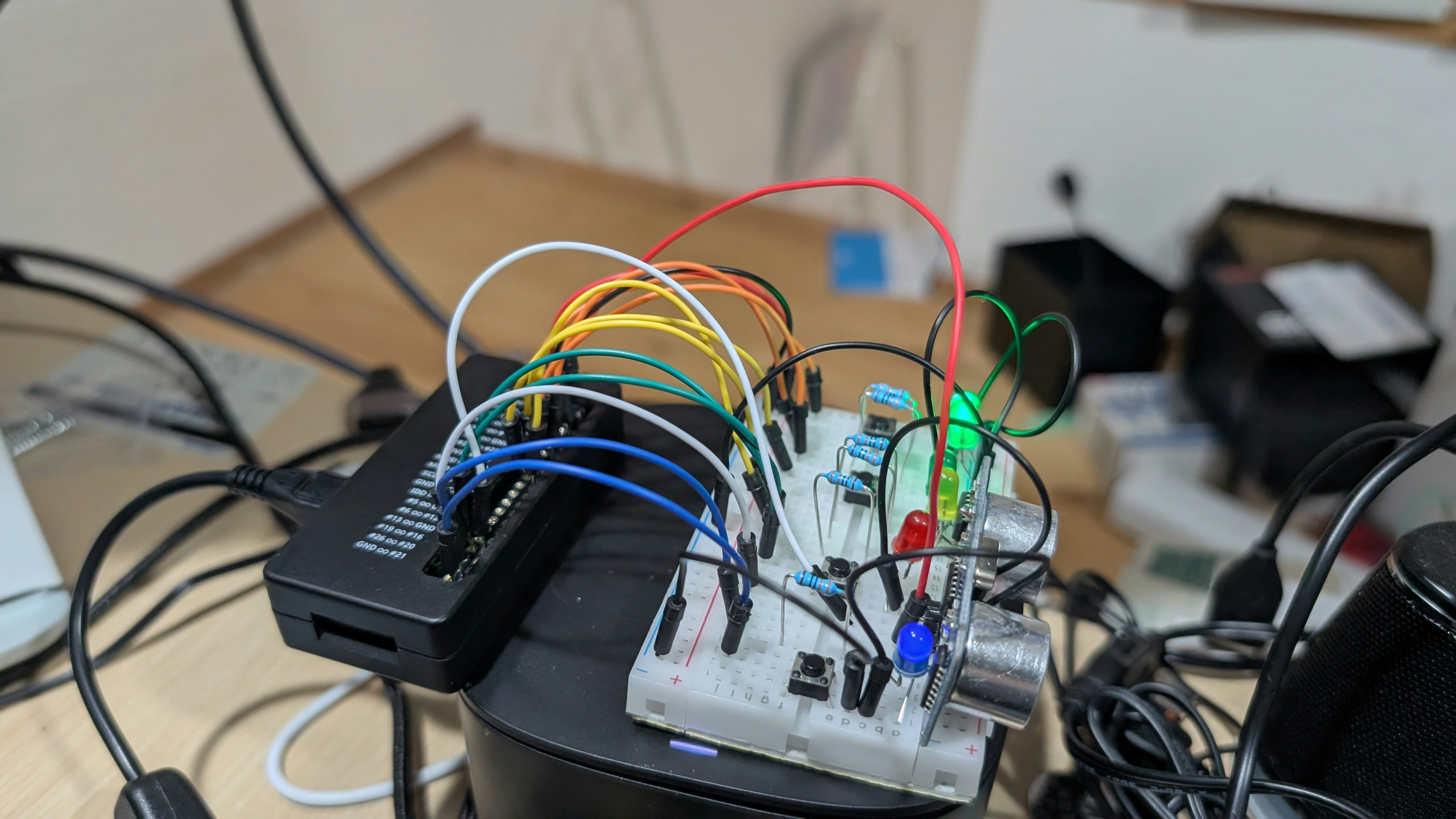
物理ボタン、Google Homeからの操作いずれもLED点灯/消灯が確認できた。
(試験ハードはPIN配置を変えて若干シンプル化)
次は再起動時に前回の状態を回復するために、永続化機能をつけるかな。