
第6章 データストア設計・IAM設計(DynamoDB/S3/IAM)
本章はDynamoDB/S3/IAMの構築です。
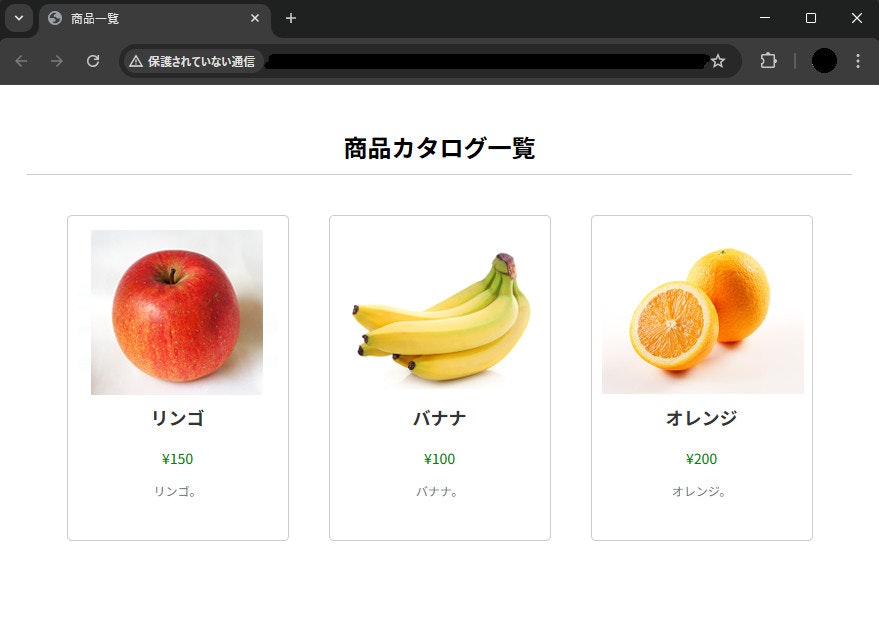
この章で作成していたwebページが完成します。
①構成の説明
②S3(静的Webサイトホスティング)/フロントエンド
③VPC関連
④Docker/バックエンド
⑤ECS + ALB
⑥DynamoDB・S3連携
⑦CI/CD(アプリケーション)
⑧CI/CD(インフラ)
目次
1. 構成の説明
何をしたいか
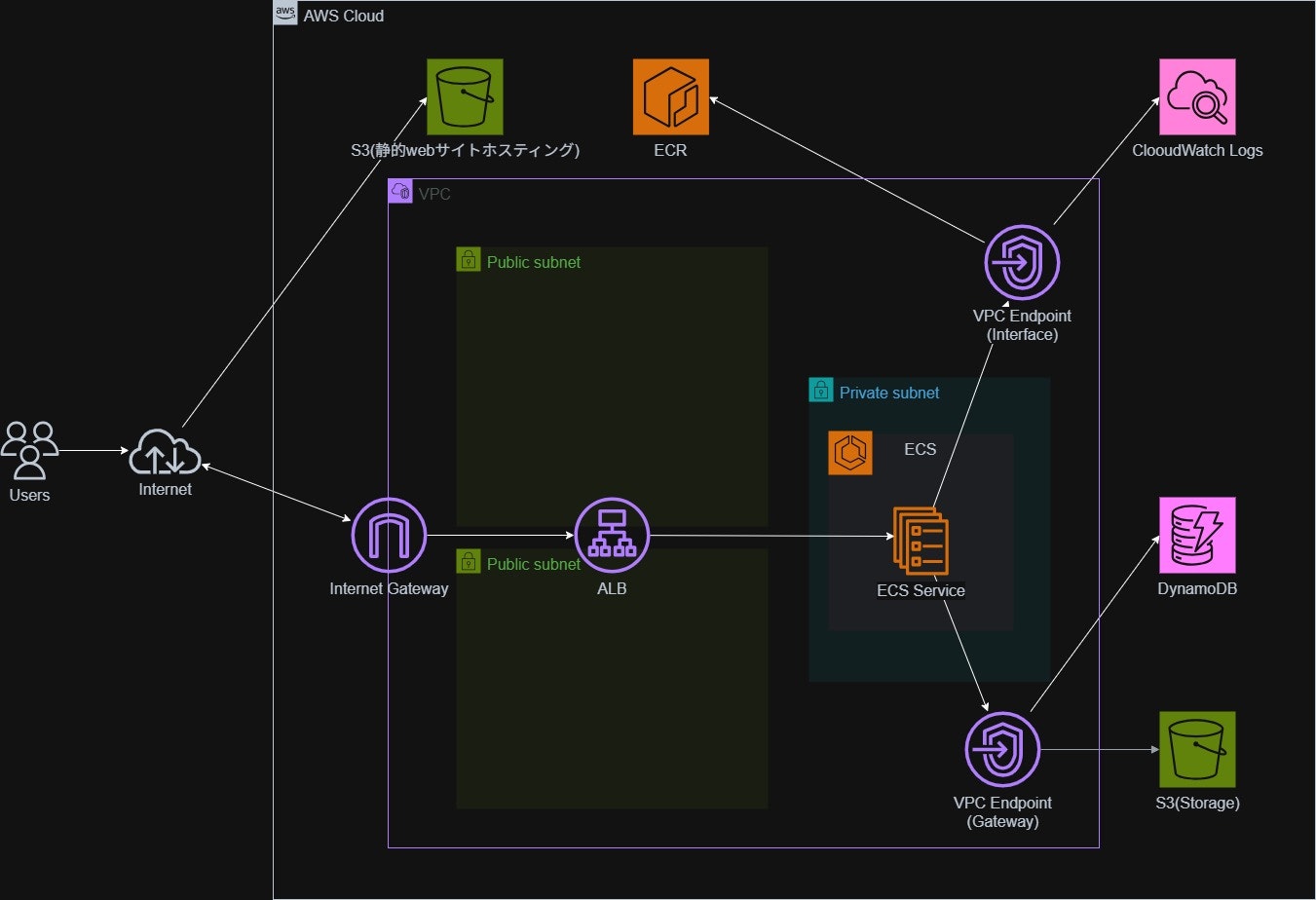
ECS(Fargate)上で動作するアプリケーションから、
- 構造化データ を DynamoDB に保存・参照
- ファイルデータ を S3 に保存・取得
どんな構成か・何ができるか
- ECS タスクは IAM ロール(タスクロール) を通じて DynamoDB / S3 にアクセス
- 認証情報(アクセスキー等)をアプリケーションに持たせない
構成上のポイントは以下の通り。
- IAM ロールベース認可 によるセキュアなアクセス制御
- 永続データはすべてマネージドサービスで管理
2. 作成方法
前提条件
以下がローカル環境にインストールされていることを前提とする。
- Terraform
構築順序
- DynamoDB テーブルの作成
- S3 バケットの作成
- DynamoDB / S3 へのアクセス用 IAM ポリシーの作成
- ECS タスクロールの作成
- タスクロールへのポリシーアタッチ
- S3に画像ファイルをアップロード, DynamoDBにデータ保存
6.について補足
S3に下記構成でフォルダをアップロード
※画像はご用意ください。
images/
    ├── apple.jpg
    ├── banana.jpg
    └── orange.jpg
DynamoDBに下記データを追加
{
  "id": {
    "S": "1"
  },
  "price": {
    "S": "100"
  },
  "title": {
    "S": "バナナ"
  },
      "description": {
    "S": "バナナ。"
  },
  "image_key": {
    "S": "images/banana.jpg"
  }
}
{
  "id": {
    "S": "2"
  },
  "title": {
    "S": "リンゴ"
  },
  "price": {
    "N": "150"
  },
  "description": {
    "S": "リンゴ。"
  },
  "image_key": {
    "S": "images/apple.jpg"
  }
}
{
  "id": {
    "S": "3"
  },
  "title": {
    "S": "オレンジ"
  },
  "price": {
    "N": "200"
  },
  "description": {
    "S": "オレンジ。"
  },
  "image_key": {
    "S": "images/orange.jpg"
  }
}
主要な設定内容と注意点
DynamoDB
- 課金モード:オンデマンド
S3
- バージョニング:無効(学習用途のため)
- サーバーサイド暗号化:有効(AES256)
-
force_destroy = trueを設定(学習用途のため)
※本番用途では force_destroy は非推奨
IAM
| 分類 | リソース名 | 許可アクション | 権限の対象(Resource) | 役割・用途 |
|---|---|---|---|---|
| ポリシー | s3_access_policy |
ListBucket, GetObject, PutObject, DeleteObject | S3バケット本体および配下のオブジェクト | S3の読み書き・一覧表示 |
| ポリシー | dynamodb_access_policy |
Scan, GetItem, Query, DescribeTable | 指定したDynamoDBテーブル | DynamoDBのデータ読み取り |
| ロール | ecs_task_execution_role |
ECRからのイメージ取得、CloudWatch Logsへの出力など | AWS管理ポリシーにより定義 | ECS自体がコンテナを起動するために使う権限 |
| ロール | ecs_task_role |
上記2つのS3/DynamoDB操作 | S3バケット・DynamoDBテーブル | コンテナ内のアプリがAWSリソースを操作するための権限 |
- ECS タスクロールを使用
- 最小権限の原則に従い、操作を限定
3. Terraform構成
フォルダ構成(例)
terraform/
├── modules/
│   ├── dynamodb/
│   ├── s3/
│   └── iam/
├── backend.tf
├── provider.tf
├── main.tf
├── variables.tf
└── outputs.tf
6.コード全体にterraform配下のコードも掲載しています。
実際に構築される方は参考にしてください。
※terraform配下のコードについての説明は省略します。
コードの解説
DynamoDB
aws_dynamodb_table
resource "aws_dynamodb_table" "app_table" {
  name           = var.table_name
  billing_mode   = var.billing_mode # オンデマンドモードを指定
  hash_key       = var.hash_key # パーティションキー
  range_key      = var.range_key # ソートキー
  # --- 略 ---
}
- 常時アクセスがあるわけではないのでオンデマンドモードを選択し、コスト最適化
パーティションキー (Hash Key)
役割: データをどの物理的なサーバー(パーティション)に保存するかを決めるための鍵。
ソートキー (Range Key)
役割: 同じパーティションキーの中で、データを並べ替えるための鍵。
dynamic "attribute"
  dynamic "attribute" {
    for_each = var.attributes
    content {
      name = attribute.value.name
      type = attribute.value.type
    }
  }
変数(リストやマップ)の中身に合わせて、attribute ブロックを自動的に量産する。
テーブルによってキーの数や名前が変わるため、dynamic ブロックを使用して汎用性を持たせている。
具体的な値は varialbles.tfでリスト形式で渡している。
dynamic "global_secondary_index"
  dynamic "global_secondary_index" {
    for_each = var.global_secondary_indexes
    content {
      name            = global_secondary_index.value.name
      hash_key        = global_secondary_index.value.hash_key
      range_key       = global_secondary_index.value.range_key
      projection_type = global_secondary_index.value.projection_type
    }
  }
本構成では使用しないが、将来的に別のテーブルでGSIを使えるように記述。
GSI
本来のパーティションキー(ユーザーIDなど)以外の項目を使って、特定の項目をキーとして機能させて高速に検索するための仕組み。
point_in_time_recovery
  point_in_time_recovery {
    enabled = var.point_in_time_recovery
  }
過去35日間の任意の時点にデータを復元できる**機能の有効化設定
server_side_encryption
  server_side_encryption {
    enabled = var.server_side_encryption
  }
サーバー側の暗号化を設定
S3
resource "aws_s3_bucket" "storage_bucket" {
  bucket = var.storage_bucket_name
  force_destroy = true
}
学習用途で頻繁に作成・削除を行うため、force_destroyを有効化
※実運用では非推奨
resource "aws_s3_bucket_server_side_encryption_configuration" "storage_bucket_sse" {
  bucket = aws_s3_bucket.storage_bucket.id

  rule {
    apply_server_side_encryption_by_default {
      sse_algorithm = "AES256"
    }
  }
}
暗号化設定を明示的に定義
IAM
S3アクセス用ポリシー
resource "aws_iam_policy" "s3_access_policy" {
  name        = var.s3_access_policy_name
  description = "IAM policy for S3 access"
  policy = jsonencode({
    Version = "2012-10-17",
    Statement = [
      {
        Effect   = "Allow",
        Action   = ["s3:ListBucket"],
        Resource = var.storage_s3_arn
      },
      {
        Effect   = "Allow",
        Action   = ["s3:GetObject", "s3:PutObject", "s3:DeleteObject"],
        Resource = "${var.storage_s3_arn}/*"
      }
    ]
  })
}
S3のIAMポリシーで、バケット名のみの指定(arn:aws:s3:::bucket-name)と、末尾にスラッシュとワイルドカードを付けた指定(arn:aws:s3:::bucket-name/*)を使い分けている理由は、「操作の対象が、箱(バケット)なのか、中身(オブジェクト)なのか」という違いがあるからです。
| アクション | 対象 (Resource) | 権限の種類 | 内容 |
|---|---|---|---|
s3:ListBucket |
バケット自体 | バケット単位 | バケット内のファイル一覧(リスト)を取得する。 |
s3:GetObject |
バケットの中身 (/*) |
オブジェクト単位 | ファイルを読み取る(ダウンロードする)。 |
s3:PutObject |
バケットの中身 (/*) |
オブジェクト単位 | ファイルを保存・更新(アップロード)する。 |
s3:DeleteObject |
バケットの中身 (/*) |
オブジェクト単位 | ファイルを削除する。 |
DynamoDBアクセス用ポリシー
resource "aws_iam_policy" "dynamodb_access_policy" {
  name        = var.dynamodb_access_policy_name
  description = "IAM policy for DynamoDB access"
  policy = jsonencode({
    Version = "2012-10-17",
    Statement = [
      {
        Effect = "Allow",
        Action = [
          "dynamodb:Scan",
          "dynamodb:GetItem",
          "dynamodb:Query",
          "dynamodb:DescribeTable"
        ],
        Resource = var.dynamodb_table_arn
      }
    ]
  })
}
| アクション | 意味 | 内容 |
|---|---|---|
dynamodb:GetItem |
1件取得 | パーティションキーを指定して、特定の1件のデータを直接取得。 |
dynamodb:Query |
条件検索 | キーを使って、特定の範囲のデータを効率的に検索。 |
dynamodb:Scan |
全件取得 | テーブルにあるすべてのデータを端から順に読み出す。 |
dynamodb:DescribeTable |
設定確認 | テーブルのステータス(起動中かなど)や項目数、サイズなどの情報を取得。 |
ECSタスクロール
resource "aws_iam_role" "ecs_task_role" {
  name               = var.ecs_task_role_name
  assume_role_policy = jsonencode({
    Version = "2012-10-17",
    Statement = [
      {
        Action    = "sts:AssumeRole",
        Effect    = "Allow",
        Principal = {
          Service = "ecs-tasks.amazonaws.com"
        }
      }
    ]
  })
}
resource "aws_iam_role_policy_attachment" "ecs_task_role_dynamodb_access" {
  role       = aws_iam_role.ecs_task_role.name
  policy_arn = aws_iam_policy.dynamodb_access_policy.arn
}

resource "aws_iam_role_policy_attachment" "ecs_task_role_s3_access" {
  role       = aws_iam_role.ecs_task_role.name
  policy_arn = aws_iam_policy.s3_access_policy.arn
}
ECSタスクロールを作成し、S3,DynamoDBアクセス用ポリシーをアタッチ。
ECSタスク実行ロール
resource "aws_iam_role" "ecs_task_execution_role" {
  name               = var.ecs_task_execution_role_name
  assume_role_policy = jsonencode({
    Version = "2012-10-17",
    Statement = [
      {
        Action    = "sts:AssumeRole",
        Effect    = "Allow",
        Principal = {
          Service = "ecs-tasks.amazonaws.com"
        }
      }
    ]
  })
}
resource "aws_iam_role_policy_attachment" "ecs_task_execution_role_policy" {
  role       = aws_iam_role.ecs_task_execution_role.name
  policy_arn = "arn:aws:iam::aws:policy/service-role/AmazonECSTaskExecutionRolePolicy"
}
ECSタスク実行ロールを作成し、AWS管理のECS実行ロールポリシーをアタッチ。
4. 振り返り
改善できる点
- DynamoDB のアクセス権限がやや広い
- S3 のバージョニング・ライフサイクル未設定
次にやりたいこと
次章では、
CI/CDパイプラインを実装し、Github Actions経由で自動テスト・自動デプロイ 可能にします。
- ①構成の説明
- ②S3(静的Webサイトホスティング)/フロントエンド
- ③VPC関連
- ④Docker/バックエンド
- ⑤ECS + ALB
- ⑥DynamoDB・S3連携
- ⑦CI/CD(アプリケーション)
- ⑧CI/CD(インフラ)
5. 参照
6. コード全体
- terraform/provider.tf
- terraform/backend.tf
- terraform/variables.tf
- terraform/main.tf
- terraform/modules/dynamodb/variables.tf
- terraform/modules/dynamodb/main.tf
- terraform/modules/s3/variables.tf
- terraform/modules/s3/main.tf
- terraform/modules/iam/variables.tf
- terraform/modules/iam/main.tf
terraform/provider.tf
provider "aws" {
  region  = var.aws_region
}

terraform {
  required_version = ">= 1.10.0, < 2.0.0"
  }
terraform/backend.tf
terraform {
  backend "s3" {
    key            = "dev/terraform.tfstate"
    region         = "ap-northeast-1"
    encrypt        = true
  }
}
terraform/variables.tf
variable "aws_region" {
  description = "AWS region"
  type        = string
  default     = "ap-northeast-1"
}

variable "aws_account_id" {
  description = "AWS Account ID"
  type        = string
  default     = "123456789012" # サンプル値に変更
}

variable "environment" {
  description = "Environment (e.g. dev, stg, prod)"
  type        = string
  default     = "dev"
}

variable "vpc_cidr" {
  description = "CIDR block for VPC"
  type        = string
  default     = "10.0.0.0/16"
}

variable "public_subnets" {
  description = "Public subnets map"
  type = map(object({
    cidr = string
    az   = string
  }))
  default = {
    "public-subnet-1a" = { cidr = "10.0.1.0/24", az = "ap-northeast-1a" },
    "public-subnet-1c" = { cidr = "10.0.2.0/24", az = "ap-northeast-1c" },
  }
}

variable "private_subnets" {
  description = "Private subnets map"
  type = map(object({
    cidr = string
    az   = string
  }))
  default = {
    "private-subnet-1a" = { cidr = "10.0.3.0/24", az = "ap-northeast-1a" },
    "private-subnet-1c" = { cidr = "10.0.4.0/24", az = "ap-northeast-1c" },
  }
}


variable "alb_ingress_source_ip" {
  description = "Allowed source IP for ALB ingress"
  type        = string
  default     = "0.0.0.0/0" # サンプルとして広範囲なIPに変更
}

variable "s3_web_bucket_access_ip" {
  description = "IP CIDR allowed to access web S3 bucket"
  type        = string
  default     = "0.0.0.0/0" # サンプルとして広範囲なIPに変更
}

variable "web_bucket_name" {
  description = "Web S3 bucket name"
  type        = string
  default     = "your-web-s3-bucket-name-example" # サンプル値に変更
}

variable "storage_bucket_name" {
  description = "Storage S3 bucket name"
  type        = string
  default     = "your-storage-s3-bucket-name-example" # サンプル値に変更
}

variable "api_ecr_image_tag" {
    description = "ECR repository image_tag"
  type        = string
  default     = "latest" # サンプル値に変更
}
terraform/main.tf
module "vpc" {
  source = "./modules/vpc"

  region                   = var.aws_region
  vpc_name                 = "${var.environment}-net-vpc-01"
  vpc_cidr                 = var.vpc_cidr
  enable_dns_support       = true
  enable_dns_hostnames     = true
  igw_name                 = "${var.environment}-net-igw-01"
  s3_gateway_endpoint_name = "${var.environment}-net-s3-gateway-01"
  public_route_table_name  = "${var.environment}-net-public-route-table-01"
  private_route_table_name = "${var.environment}-net-private-route-table-01"
  environment              = var.environment
  public_subnets           = var.public_subnets
  private_subnets          = var.private_subnets
}

module "vpc_endpoint" {
  source = "./modules/vpc_endpoint"

  region                   = var.aws_region
  vpce_sg_id               = module.sg.vpce_sg_id
  vpc_id                   = module.vpc.vpc_id
  private_subnet_ids       = module.vpc.private_subnet_ids
}

module "sg" {
  source = "./modules/sg"

  vpc_id           = module.vpc.vpc_id
  alb_sg_name      = "${var.environment}-net-sg-alb-01"
  alb_ingress_cidr = var.alb_ingress_source_ip
  ecs_sg_name      = "${var.environment}-net-sg-ecs-01"
  environment      = var.environment
  vpc_cidr         = var.vpc_cidr
}

module "s3" {
  source = "./modules/s3"

  web_bucket_name           = var.web_bucket_name
  storage_bucket_name       = var.storage_bucket_name
  web_bucket_access_ip_cidr = var.s3_web_bucket_access_ip
  environment               = var.environment
}

module "iam" {
  source                       = "./modules/iam"
  aws_region                   = var.aws_region
  aws_account_id               = var.aws_account_id
  s3_access_policy_name        = "${var.environment}-sec-iam-policy-s3-access"
  dynamodb_access_policy_name  = "${var.environment}-sec-iam-policy-dynamodb-access"
  web_s3_arn                   = module.s3.web_bucket_arn
  storage_s3_arn               = module.s3.storage_bucket_arn
  dynamodb_table_arn           = module.dynamodb.table_arn
  ecs_task_execution_role_name = "${var.environment}-sec-iam-role-ecs-task-exe-01"
  ecs_task_role_name           = "${var.environment}-sec-iam-role-ecs-task-01"
  environment                  = var.environment
}

module "dynamodb" {
  source = "./modules/dynamodb"

  table_name      = "${var.environment}-app-data-table"
  hash_key        = "id"
  billing_mode    = "PAY_PER_REQUEST"
  attributes = [
    {
      name = "id"
      type = "S"
    }
  ]
  point_in_time_recovery = true
  server_side_encryption = true
  environment = var.environment
}

module "alb" {
  source = "./modules/alb"

  vpc_id                = module.vpc.vpc_id
  public_subnet_ids     = module.vpc.public_subnet_ids
  alb_name              = "${var.environment}-api-alb-01"
  alb_security_group_id = module.sg.alb_sg_id
  listener_port         = 80
  listener_protocol     = "HTTP"
  target_group_name     = "${var.environment}-api-alb-tg-01"
  target_group_port     = 3000
  target_group_protocol = "HTTP"
  health_check_path     = "/"
  environment           = var.environment
}

module "ecs" {
  source = "./modules/ecs"

  region                       = var.aws_region
  ecs_cluster_name             = "${var.environment}-api-ecs-cluster-01"
  task_definition_family       = "${var.environment}-api-ecs-task-01"
  task_cpu                     = 512
  task_memory                  = 1024
  ecs_task_execution_role_arn  = module.iam.ecs_task_execution_role_arn
  ecs_task_role_arn            = module.iam.ecs_task_role_arn
  container_name               = "${var.environment}-api-ecs-task-container-01"
  ecr_repository_url           = module.ecr.ecr_repository_url
  container_image_tag          = var.api_ecr_image_tag
  container_port               = 3000
  ecs_service_name             = "${var.environment}-api-ecs-service-01"
  desired_task_count           = 1
  private_subnet_ids           = module.vpc.private_subnet_ids
  ecs_security_group_id        = module.sg.ecs_sg_id
  alb_target_group_arn         = module.alb.target_group_arn
  dynamodb_table_name          = module.dynamodb.table_name
  s3_storage_bucket_name       = module.s3.storage_bucket_name
  environment                  = var.environment
  ecr_repository_name          = module.ecr.api_ecr_repository_name
}

module "ecr" {
  source = "./modules/ecr"

  ecr_name = "${var.environment}-api-ecr-01"
}
terraform/modules/dynamodb/variables.tf
variable "table_name" {
  description = "Name of the DynamoDB table"
  type        = string
}

variable "billing_mode" {
  description = "Controls how you are charged for read and write throughput"
  type        = string
  default     = "PAY_PER_REQUEST"
}

variable "hash_key" {
  description = "The attribute to use as the hash (partition) key"
  type        = string
}

variable "range_key" {
  description = "The attribute to use as the range (sort) key"
  type        = string
  default     = null
}

variable "attributes" {
  description = "List of nested attribute definitions"
  type = list(object({
    name = string
    type = string
  }))
  default = []
}

variable "global_secondary_indexes" {
  description = "Describe a GSI for the table"
  type = list(object({
    name            = string
    hash_key        = string
    range_key       = string
    projection_type = string
  }))
  default = []
}

variable "point_in_time_recovery" {
  description = "Whether to enable point-in-time recovery"
  type        = bool
  default     = true
}

variable "server_side_encryption" {
  description = "Whether to enable server-side encryption"
  type        = bool
  default     = true
}

variable "environment" {
  description = "Environment name"
  type        = string
}
terraform/modules/dynamodb/main.tf
resource "aws_dynamodb_table" "app_table" {
  name           = var.table_name
  billing_mode   = var.billing_mode
  hash_key       = var.hash_key
  range_key      = var.range_key

  dynamic "attribute" {
    for_each = var.attributes
    content {
      name = attribute.value.name
      type = attribute.value.type
    }
  }

  dynamic "global_secondary_index" {
    for_each = var.global_secondary_indexes
    content {
      name            = global_secondary_index.value.name
      hash_key        = global_secondary_index.value.hash_key
      range_key       = global_secondary_index.value.range_key
      projection_type = global_secondary_index.value.projection_type
    }
  }

  point_in_time_recovery {
    enabled = var.point_in_time_recovery
  }

  server_side_encryption {
    enabled = var.server_side_encryption
  }

  tags = {
    Environment = var.environment
    Name        = var.table_name
  }
}
terraform/modules/s3/variables.tf
variable "storage_bucket_name" {
  description = "Name of the S3 bucket for storage"
  type        = string
}

variable "environment" {
  description = "Environment tag"
  type        = string
}
terraform/modules/s3/main.tf
resource "aws_s3_bucket" "storage_bucket" {
  bucket = var.storage_bucket_name

  force_destroy = true

  tags = {
    Name        = var.storage_bucket_name
    Environment = var.environment
  }
}

resource "aws_s3_bucket_versioning" "storage_bucket_versioning" {
  bucket = aws_s3_bucket.storage_bucket.id

  versioning_configuration {
    status = "Suspended" # バージョニング無効化
  }
}

resource "aws_s3_bucket_server_side_encryption_configuration" "storage_bucket_sse" {
  bucket = aws_s3_bucket.storage_bucket.id

  rule {
    apply_server_side_encryption_by_default {
      sse_algorithm = "AES256"
    }
  }
}
terraform/modules/iam/variables.tf
variable "aws_account_id" {
  description = "AWS Account ID"
  type        = string
}

variable "aws_region" {
  description = "AWS region"
  type        = string
}

variable "s3_access_policy_name" {
  description = "Name of the S3 access IAM policy"
  type        = string
}

variable "dynamodb_access_policy_name" {
  description = "Name of the DynamoDB access IAM policy"
  type        = string
}

variable "web_s3_arn" {
  description = "ARN of the S3 web bucket"
  type        = string
}

variable "storage_s3_arn" {
  description = "ARN of the S3 storage bucket"
  type        = string
}

variable "ecs_task_execution_role_name" {
  description = "Name of the ECS task execution role"
  type        = string
}

variable "ecs_task_role_name" {
  description = "Name of the ECS task role"
  type        = string
}

variable "environment" {
  description = "Environment tag"
  type        = string
}

variable "dynamodb_table_arn" {
  description = "ARN of the DynamoDB table"
  type        = string
}
terraform/modules/iam/main.tf
# ECSタスクロールにアタッチするS3アクセス用のIAMポリシーの作成
resource "aws_iam_policy" "s3_access_policy" {
  name        = var.s3_access_policy_name
  description = "IAM policy for S3 access"
  policy = jsonencode({
    Version = "2012-10-17",
    Statement = [
      {
        Effect   = "Allow",
        Action   = ["s3:ListBucket"],
        Resource = var.storage_s3_arn
      },
      {
        Effect   = "Allow",
        Action   = ["s3:GetObject", "s3:PutObject", "s3:DeleteObject"],
        Resource = "${var.storage_s3_arn}/*"
      }
    ]
  })

  tags = {
    Name        = var.s3_access_policy_name
    Environment = var.environment
  }
}

# ECSタスクロールにアタッチするDynamoDBアクセス用のIAMポリシーの作成
resource "aws_iam_policy" "dynamodb_access_policy" {
  name        = var.dynamodb_access_policy_name
  description = "IAM policy for DynamoDB access"
  policy = jsonencode({
    Version = "2012-10-17",
    Statement = [
      {
        Effect = "Allow",
        Action = [
          "dynamodb:Scan",
          "dynamodb:GetItem",
          "dynamodb:Query",
          "dynamodb:DescribeTable"
        ],
        Resource = var.dynamodb_table_arn
      }
    ]
  })

  tags = {
    Name        = var.dynamodb_access_policy_name
    Environment = var.environment
  }
}

resource "aws_iam_role" "ecs_task_execution_role" {
  name               = var.ecs_task_execution_role_name
  assume_role_policy = jsonencode({
    Version = "2012-10-17",
    Statement = [
      {
        Action    = "sts:AssumeRole",
        Effect    = "Allow",
        Principal = {
          Service = "ecs-tasks.amazonaws.com"
        }
      }
    ]
  })

  tags = {
    Name        = var.ecs_task_execution_role_name
    Environment = var.environment
  }
}

resource "aws_iam_role_policy_attachment" "ecs_task_execution_role_policy" {
  role       = aws_iam_role.ecs_task_execution_role.name
  policy_arn = "arn:aws:iam::aws:policy/service-role/AmazonECSTaskExecutionRolePolicy"
}

# ECSタスクロールの作成
resource "aws_iam_role" "ecs_task_role" {
  name               = var.ecs_task_role_name
  assume_role_policy = jsonencode({
    Version = "2012-10-17",
    Statement = [
      {
        Action    = "sts:AssumeRole",
        Effect    = "Allow",
        Principal = {
          Service = "ecs-tasks.amazonaws.com"
        }
      }
    ]
  })

  tags = {
    Name        = var.ecs_task_role_name
    Environment = var.environment
  }
}

# DynamoDBアクセス用のポリシーのアタッチメント
resource "aws_iam_role_policy_attachment" "ecs_task_role_dynamodb_access" {
  role       = aws_iam_role.ecs_task_role.name
  policy_arn = aws_iam_policy.dynamodb_access_policy.arn
}

# S3アクセス用のポリシーのアタッチメント
resource "aws_iam_role_policy_attachment" "ecs_task_role_s3_access" {
  role       = aws_iam_role.ecs_task_role.name
  policy_arn = aws_iam_policy.s3_access_policy.arn
}