@akua123 (asd fgh)

Are you sure you want to delete the question?

If your question is resolved, you may close it.

Leaving a resolved question undeleted may help others!

We hope you find it useful!

Python 画像処理

解決したいこと

Pythonで画像に2つの条件でマスク処理を行い、画像の発光の検出・発光の重心計算を行うプログラムを作成しています。
記事を投稿する機能の実装中にエラーが発生しました。
解決方法を教えて下さい。

発生している問題・エラー
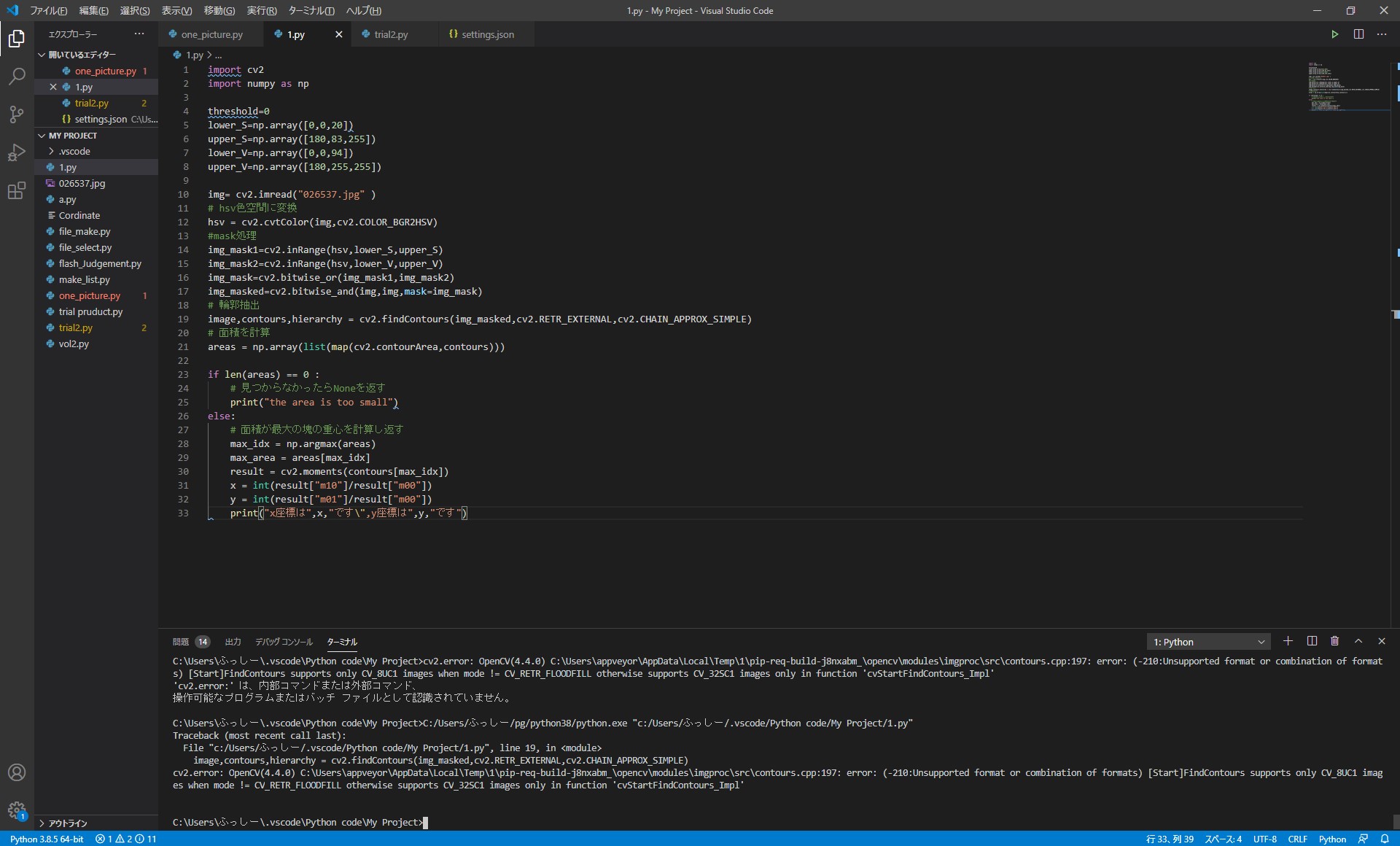
エラー.jpg

該当するソースコード

Python
import cv2
import numpy as np

threshold=0
lower_S=np.array([0,0,20])
upper_S=np.array([180,83,255])
lower_V=np.array([0,0,94])
upper_V=np.array([180,255,255])

img= cv2.imread("026537.jpg" )

hsv色空間に変換

hsv = cv2.cvtColor(img,cv2.COLOR_BGR2HSV)

mask処理

img_mask1=cv2.inRange(hsv,lower_S,upper_S)
img_mask2=cv2.inRange(hsv,lower_V,upper_V)
img_mask=cv2.bitwise_or(img_mask1,img_mask2)
img_masked=cv2.bitwise_and(img,img,mask=img_mask)

輪郭抽出

image,contours,hierarchy = cv2.findContours(img_masked,cv2.RETR_EXTERNAL,cv2.CHAIN_APPROX_SIMPLE)

面積を計算

areas = np.array(list(map(cv2.contourArea,contours)))

if len(areas) == 0 :
# 見つからなかったらNoneを返す
print("the area is too small")

else:
# 面積が最大の塊の重心を計算し返す
max_idx = np.argmax(areas)
max_area = areas[max_idx]
result = cv2.moments(contours[max_idx])
x = int(result["m10"]/result["m00"])
y = int(result["m01"]/result["m00"])
print("x座標は",x,"です\",y座標は",y,"です")
```

0 likes

4Answer

Comments

  1. @akua123

    Questioner

    回答いただいたコードを追加して実行してみたのですが、同様のエラーが発生しました。コードを追加した箇所がよくなかったのでしょうか?

    回答コードを追加後のコード
    picture="026537.jpg"
    img= cv2.imread( picture)
    # hsv色空間に変換
    hsv = cv2.cvtColor(img,cv2.COLOR_BGR2HSV)
    #mask処理
    img_mask1=cv2.inRange(hsv,lower_S,upper_S)
    img_mask2=cv2.inRange(hsv,lower_V,upper_V)
    img_mask=cv2.bitwise_or(img_mask1,img_mask2)
    img_masked=cv2.bitwise_and(img,img,mask=img_mask)
    dst = np.uint8(img_masked)

    # 輪郭抽出
    dst,contours,hierarchy = cv2.findContours(dst,cv2.RETR_EXTERNAL,cv2.CHAIN_APPROX_SIMPLE)

    エラー内容
    File "c:/Users/ふっしー/.vscode/Python code/My Project/1.py", line 22, in <module>
    dst,contours,hierarchy = cv2.findContours(dst,cv2.RETR_EXTERNAL,cv2.CHAIN_APPROX_SIMPLE)
    cv2.error: OpenCV(4.4.0) C:\Users\appveyor\AppData\Local\Temp\1\pip-req-build-j8nxabm_\opencv\modules\imgproc\src\contours.cpp:197: error: (-210:Unsupported format or combination of formats) [Start]FindContours supports only CV_8UC1 images when mode != CV_RETR_FLOODFILL otherwise supports CV_32SC1 images only in function 'cvStartFindContours_Impl'

  2. エラー内容だけ見て答えてました。
    CV_8UC1 images when mode != CV_RETR_FLOODFILL otherwise supports CV_32SC1

    実装してみると違いました。
画像
元画像
mask_1
mask_2
mask (orで合成、黒が重なっている部分のみ抽出)
mask(元画像と合成)

@akua123 のコードで実装してみました。
img_masked=cv2.bitwise_and(img,img,mask=img_mask)img_masked は元画像と白黒のマスク画像を合成したカラー画像で、channelは3(RGB)です。

もし、この画像の輪郭抽出する場合はグレイスケールにしないとエラーになります。

なので

dst = cv2.cvtColor(img_masked,cv2.COLOR_BGR2GRAY)
image,contours = cv2.findContours(dst,cv2.RETR_EXTERNAL,cv2.CHAIN_APPROX_SIMPLE)

でいいと思います。
また、findContoursの返り値の数は今は2つ(image,contours)です。

あとは、輪郭抽出にかけたい画像は img_masked ではなくて マスク画像である img_mask な気もします。

0Like

Comments

  1. @akua123

    Questioner

    丁寧な回答ありがとうございます。
    質問なのですが、RGB画像をHSV変換し、マスク処理を行った後に輪郭検出をおこなうことはできないのでしょうか?
  2. HSVはchannelが3なのでできません。
    channelが1のgrayscaleであればできます。
  3. @akua123

    Questioner

    たびたび、質問すいません。回答いただいたコードを追加し、下記の画像の発光を検出し、発光の重心の計算そして計算結果をcsvファイルを作成&書き込みを行おうとしているのですが以下のようなエラーが出ました。対策方法をわかりますか?

    使用コード
    dst = cv2.cvtColor(img_masked,cv2.COLOR_BGR2GRAY)
    #輪郭検出
    image,contours =cv2.findContours(dst,cv2.RETR_EXTERNAL,cv2.CHAIN_APPROX_SIMPLE)
    #面積計算
    areas = np.array(list(map(cv2.contourArea,contours)))
    # 重心の計算
    max_idx = np.argmax(areas)
    max_area = areas[max_idx]
    result = cv2.moments(contours[max_idx])
    x = int(result["m10"]/result["m00"])
    y = int(result["m01"]/result["m00"])
    coordination=([])
    #CSVファイル作成
    with open('Cordinations.csv','w') as f:
    writer=csv.writer(f)
    writer.writerow([x],[y])
    f.close()

    エラー内容
    areas = np.array(list(map(cv2.contourArea,contours)))
    cv2.error: OpenCV(4.4.0) C:\Users\appveyor\AppData\Local\Temp\1\pip-req-build-j8nxabm_\opencv\modules\imgproc\src\shapedescr.cpp:315: error: (-215:Assertion failed) npoints >= 0 && (depth == CV_32F || depth == CV_32S) in function 'cv::contourArea'

opencv 公式doc findContours

を見ると、
contours, hierarchy = cv.findContours( image, mode, method[, contours[, hierarchy[, offset]]] )
となっています。

サーセン:bow:。出力値は image,contours ではなく contours, hierarchy でした。

OpenCV-Pythonチュートリアル 領域(輪郭)の特徴 では出力されるパラメータの数がimgEdge,contours,hierarchy = cv2.findContours(thresh, 1, 2) となっていますが、古い情報です。

輪郭情報は出力された1つ目のパラメータにあります。

0Like

Your answer might help someone💌