
はじめに
2025年11月の Ignite で発表された Foundry IQ を個人で検証しました。
今回は検索インデックスと Custom Bing Search をナレッジソースとして、最近 X でも話題(?)で、和多志の前世の記憶にも登場する “タ〇〇〇ア” をテーマにしたナレッジエージェントを実装しています。
Foundryの構成
APIMによる負荷分散やトークン制御を組み込んだ構成にしています。
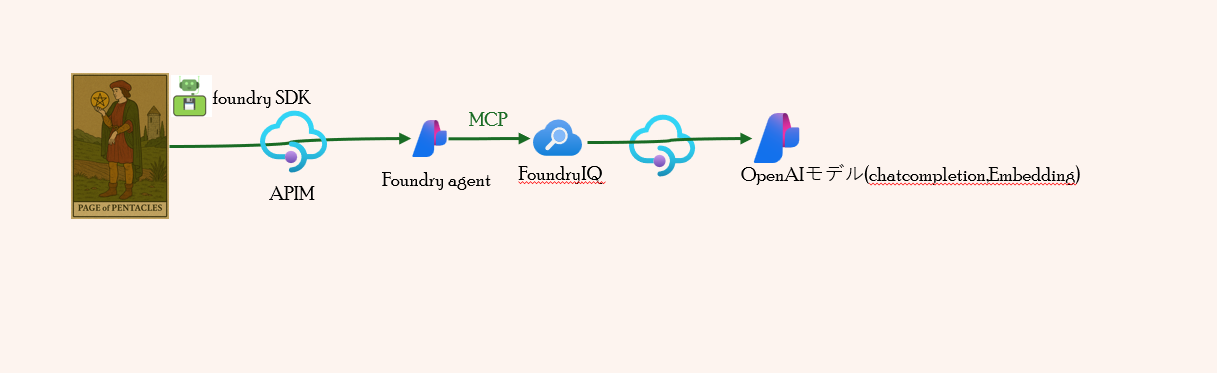
Foundry SDK〜APIM〜Foundryエージェント
Foundry SDK
vibe codingで作成したFoundry SDKのpythonコードを掲載しています。
- Entra ID認証でAPIMエンドポイント(PROJECT_ENDPOINT)に接続
- httpx.ClientによるCookie自動管理でエージェントセッション維持
- レスポンスIDによる会話セッション管理(2回目以降は同じレスポンスIDを利用)
# Test the new agent with no approval required - Interactive mode
import os
import sys
import httpx
from azure.identity import DefaultAzureCredential, get_bearer_token_provider
from azure.ai.projects import AIProjectClient
from azure.core.exceptions import HttpResponseError, ResourceNotFoundError
from datetime import datetime, timezone
from openai import AzureOpenAI

def validate_env_vars():
    """環境変数の検証"""
    required_vars = {
        "PROJECT_ENDPOINT": "Azure AI Project endpoint URL",
        "AGENT_NAME": "Agent name to use"
    }

    missing_vars = []
    for var, description in required_vars.items():
        if not os.getenv(var):
            missing_vars.append(f"  {var}: {description}")

    if missing_vars:
        print("❌ 必須の環境変数が設定されていません:", file=sys.stderr)
        for var in missing_vars:
            print(var, file=sys.stderr)
        print("\n環境変数を設定してから再実行してください。", file=sys.stderr)
        sys.exit(1)

def main():
    """メイン処理"""
    try:
        # 環境変数の検証
        validate_env_vars()

        # 環境変数から設定を取得
        project_endpoint = os.getenv("PROJECT_ENDPOINT")
        agent_name = os.getenv("AGENT_NAME")

        print(f"=== エージェント接続情報 ===")
        print(f"Project: {project_endpoint}")
        print(f"Agent: {agent_name}")

        # Entra ID 認証情報作成
        print(f"\n接続中(Entra ID 認証)...")
        credential = DefaultAzureCredential()

        # プロジェクトクライアント作成
        project_client = AIProjectClient(
            endpoint=project_endpoint,
            credential=credential
        )

        # エージェント取得
        print(f"エージェント '{agent_name}' を取得中...")
        agent = project_client.agents.get(agent_name=agent_name)

        # エージェント情報表示
        if hasattr(agent, 'versions') and 'latest' in agent.versions:
            version = agent.versions['latest']['version']
        elif hasattr(agent, 'version'):
            version = agent.version
        else:
            version = "unknown"

        print(f"✅ エージェント取得成功: {agent.name} (version {version})")

        # ツール設定確認
        if hasattr(agent, 'definition') and hasattr(agent.definition, 'tools'):
            print(f"\nツール設定:")
            for tool in agent.definition.tools:
                if hasattr(tool, 'type'):
                    print(f"  - Type: {tool.type}")
                if hasattr(tool, 'require_approval'):
                    print(f"    Approval: {tool.require_approval}")

        # httpx.Client を使用して Cookie を自動管理
        http_client = httpx.Client()

        # Entra ID トークンプロバイダー作成
        token_provider = get_bearer_token_provider(
            credential,
            "https://ai.azure.com/.default"
        )

        # OpenAI クライアント取得 (Entra ID 認証)
        openai_client = AzureOpenAI(
            azure_endpoint=project_endpoint,
            azure_ad_token_provider=token_provider,
            api_version="2025-11-15-preview",
            http_client=http_client
        )

        # 対話ループ
        print("\n" + "="*60)
        print("対話を開始します。終了するには 'exit', 'quit', 'q' を入力してください。")
        print("="*60)

        # 会話の状態管理(previous_response_id のみで会話を繋げる)
        previous_response_id = None

        while True:
            try:
                # ユーザー入力
                print("\n質問を入力してください:")
                user_input = input("ユーザー: ").strip()

                # 終了チェック
                if user_input.lower() in ["exit", "quit", "q"]:
                    print("\n対話を終了します。")
                    break

                # 空入力チェック
                if not user_input:
                    print("質問を入力してください。")
                    continue

                # クエリ送信
                print(f"\n=== クエリ送信中 ===")
                print(f"質問: {user_input}")

                # 現在の日付を取得して質問に追加
                current_date = datetime.now(timezone.utc).strftime("%Y年%m月%d日")
                enhanced_input = f"今日は{current_date}です。\n\n{user_input}"

                # リクエストボディの構築
                request_body = {"agent": {"name": agent.name, "type": "agent_reference"}}

                # previous_response_id で会話を繋げる(2回目以降)
                if previous_response_id:
                    request_body["previous_response_id"] = previous_response_id
                    print(f"前回レスポンスID: {previous_response_id}")
                else:
                    print("新しい会話を開始します")

                print(f"日付情報を追加: {current_date}")

                # Cookie情報をデバッグ出力(送信前)
                if http_client.cookies:
                    print(f"[DEBUG] 送信するCookie: {dict(http_client.cookies)}")
                else:
                    print(f"[DEBUG] Cookie未設定(初回リクエスト)")

                response = openai_client.responses.create(
                    input=enhanced_input,
                    extra_body=request_body
                )

                # Cookie情報をデバッグ出力(受信後)
                if http_client.cookies:
                    print(f"[DEBUG] 受信後のCookie Jar: {dict(http_client.cookies)}")

                # レスポンス情報
                print(f"\n=== レスポンス ===")
                print(f"Status: {response.status}")
                print(f"Response ID: {response.id}")

                # previous_response_id を保存(次回リクエストで使用)
                previous_response_id = response.id

                # 出力内容確認
                if hasattr(response, 'output_text') and response.output_text:
                    print(f"\n回答:\n{response.output_text}")
                else:
                    print("\n回答:")
                    has_text_output = False
                    for item in response.output:
                        if hasattr(item, 'type'):
                            if item.type == 'text' and hasattr(item, 'text'):
                                print(item.text)
                                has_text_output = True
                            elif item.type == 'mcp_approval_request':
                                print(f"\n⚠️  承認が必要です: {item}", file=sys.stderr)

                    if not has_text_output:
                        print("(回答が取得できませんでした)")

                # 使用量表示
                if hasattr(response, 'usage'):
                    print(f"\nトークン使用量: {response.usage}")

            except KeyboardInterrupt:
                print("\n\n対話を中断します。")
                break
            except HttpResponseError as e:
                print(f"\n❌ HTTP エラー: {e.status_code} - {e.message}", file=sys.stderr)
                if e.status_code == 429:
                    print("  レート制限に達しました。しばらく待ってから再試行してください。", file=sys.stderr)
                elif e.status_code >= 500:
                    print("  サーバーエラーです。しばらく待ってから再試行してください。", file=sys.stderr)
                continue
            except Exception as e:
                print(f"\n❌ エラーが発生しました: {type(e).__name__}: {e}", file=sys.stderr)
                print("  続行しますか? (y/n): ", end="")
                choice = input().strip().lower()
                if choice != 'y':
                    break
                continue

        print("\n✅ 正常に終了しました。")

    except ResourceNotFoundError as e:
        print(f"\n❌ リソースが見つかりません: {e.message}", file=sys.stderr)
        print(f"  エージェント '{agent_name}' が存在するか確認してください。", file=sys.stderr)
        sys.exit(1)
    except HttpResponseError as e:
        print(f"\n❌ HTTP エラー: {e.status_code} - {e.message}", file=sys.stderr)
        if e.status_code == 401:
            print("  認証に失敗しました。Azure CLI でログインしているか確認してください。", file=sys.stderr)
        elif e.status_code == 403:
            print("  アクセスが拒否されました。適切な権限があるか確認してください。", file=sys.stderr)
        sys.exit(1)
    except KeyboardInterrupt:
        print("\n\n⚠️  ユーザーによって中断されました。", file=sys.stderr)
        sys.exit(130)
    except Exception as e:
        print(f"\n❌ 予期しないエラー: {type(e).__name__}: {e}", file=sys.stderr)
        sys.exit(1)
    finally:
        # HTTP クライアントをクローズ
        if 'http_client' in locals():
            http_client.close()

if __name__ == "__main__":
    main()
APIM
APIM側の主な工夫点:
- validate-azure-ad-tokenポリシーで特定のEntra IDグループのみアクセス許可
- llm-token-limitやconditionで柔軟なトークン制限
- 製品スコープでtokenlimit-<モデルデプロイメント名>のvariableを設定し、APIスコープに引き継ぎ
<!-- apiスコープポリシー -->
<inbound>
        <base />
        <validate-azure-ad-token tenant-id="{{EntraIDTenantId}}" output-token-variable-name="validated-token" header-name="Authorization" failed-validation-httpcode="401" failed-validation-error-message="Unauthorized. Access token is missing or invalid.">
            <audiences>
                <audience>https://ai.azure.com/</audience>
            </audiences>
            <required-claims>
                <claim name="groups" match="all">
                    <value>{{entraidgroup}}</value>
                </claim>
            </required-claims>
        </validate-azure-ad-token>
        <set-backend-service id="apim-generated-policy" backend-id="{{aifbackendpool}}" />
        <choose>
            <when condition="@(context.Variables.ContainsKey("tokenlimit-"+(string)context.Request.Foundry.Deployment) || context.Variables.ContainsKey("tokenquota-"+(string)context.Request.Foundry.Deployment))">
                <set-variable name="deploymentName" value="@((string)context.Request.Foundry.Deployment)" />
                <set-variable name="counterKey" value="@("product/"+ context.Product?.Id + "/deployment/" + (string)context.Variables["deploymentName"])" />
                <set-variable name="limitVariableName" value="@("tokenlimit-"+(string)context.Variables["deploymentName"])" />
                <set-variable name="quotaVariableName" value="@("tokenquota-"+(string)context.Variables["deploymentName"])" />
                <set-variable name="tokenLimitValue" value="@(context.Variables.ContainsKey((string)context.Variables["limitVariableName"]) ? (string)context.Variables[(string)context.Variables["limitVariableName"]] : null)" />
                <set-variable name="tokenQuotaValue" value="@(context.Variables.ContainsKey((string)context.Variables["quotaVariableName"]) ? ((string)context.Variables[(string)context.Variables["quotaVariableName"]]).Split('|')[0] : null)" />
                <set-variable name="tokenQuotaPeriod" value="@(context.Variables.ContainsKey((string)context.Variables["quotaVariableName"]) ? (((string)context.Variables[(string)context.Variables["quotaVariableName"]]).Split('|').Length > 1 ? ((string)context.Variables[(string)context.Variables["quotaVariableName"]]).Split('|')[1] : null) : null)" />
                <choose>
                    <when condition="@(context.Variables.ContainsKey((string)context.Variables["limitVariableName"]) && context.Variables.ContainsKey((string)context.Variables["quotaVariableName"]))">
                        <choose>
                            <when condition="@(((string)context.Variables["tokenQuotaPeriod"]) == "Hourly")">
                                <llm-token-limit counter-key="@((string)context.Variables["counterKey"])" tokens-per-minute="@(int.Parse((context.Variables["tokenLimitValue"] as string) ?? "0"))" token-quota="@(long.Parse((context.Variables["tokenQuotaValue"] as string) ?? "0"))" token-quota-period="Hourly" estimate-prompt-tokens="false" />
                            </when>
                            <when condition="@(((string)context.Variables["tokenQuotaPeriod"]) == "Daily")">
                                <llm-token-limit counter-key="@((string)context.Variables["counterKey"])" tokens-per-minute="@(int.Parse((context.Variables["tokenLimitValue"] as string) ?? "0"))" token-quota="@(long.Parse((context.Variables["tokenQuotaValue"] as string) ?? "0"))" token-quota-period="Daily" estimate-prompt-tokens="false" />
                            </when>
                            <when condition="@(((string)context.Variables["tokenQuotaPeriod"]) == "Weekly")">
                                <llm-token-limit counter-key="@((string)context.Variables["counterKey"])" tokens-per-minute="@(int.Parse((context.Variables["tokenLimitValue"] as string) ?? "0"))" token-quota="@(long.Parse((context.Variables["tokenQuotaValue"] as string) ?? "0"))" token-quota-period="Weekly" estimate-prompt-tokens="false" />
                            </when>
                            <when condition="@(((string)context.Variables["tokenQuotaPeriod"]) == "Monthly")">
                                <llm-token-limit counter-key="@((string)context.Variables["counterKey"])" tokens-per-minute="@(int.Parse((context.Variables["tokenLimitValue"] as string) ?? "0"))" token-quota="@(long.Parse((context.Variables["tokenQuotaValue"] as string) ?? "0"))" token-quota-period="Monthly" estimate-prompt-tokens="false" />
                            </when>
                            <otherwise>
                                <llm-token-limit counter-key="@((string)context.Variables["counterKey"])" tokens-per-minute="@(int.Parse((context.Variables["tokenLimitValue"] as string) ?? "0"))" token-quota="@(long.Parse((context.Variables["tokenQuotaValue"] as string) ?? "0"))" token-quota-period="Yearly" estimate-prompt-tokens="false" />
                            </otherwise>
                        </choose>
                    </when>
                    <when condition="@(context.Variables.ContainsKey((string)context.Variables["limitVariableName"]))">
                        <llm-token-limit counter-key="@((string)context.Variables["counterKey"])" tokens-per-minute="@(int.Parse((context.Variables["tokenLimitValue"] as string) ?? "0"))" estimate-prompt-tokens="false" />
                    </when>
                    <otherwise>
                        <choose>
                            <when condition="@(((string)context.Variables["tokenQuotaPeriod"]) == "Hourly")">
                                <llm-token-limit counter-key="@((string)context.Variables["counterKey"])" token-quota="@(long.Parse((context.Variables["tokenQuotaValue"] as string) ?? "0"))" token-quota-period="Hourly" estimate-prompt-tokens="false" />
                            </when>
                            <when condition="@(((string)context.Variables["tokenQuotaPeriod"]) == "Daily")">
                                <llm-token-limit counter-key="@((string)context.Variables["counterKey"])" token-quota="@(long.Parse((context.Variables["tokenQuotaValue"] as string) ?? "0"))" token-quota-period="Daily" estimate-prompt-tokens="false" />
                            </when>
                            <when condition="@(((string)context.Variables["tokenQuotaPeriod"]) == "Weekly")">
                                <llm-token-limit counter-key="@((string)context.Variables["counterKey"])" token-quota="@(long.Parse((context.Variables["tokenQuotaValue"] as string) ?? "0"))" token-quota-period="Weekly" estimate-prompt-tokens="false" />
                            </when>
                            <when condition="@(((string)context.Variables["tokenQuotaPeriod"]) == "Monthly")">
                                <llm-token-limit counter-key="@((string)context.Variables["counterKey"])" token-quota="@(long.Parse((context.Variables["tokenQuotaValue"] as string) ?? "0"))" token-quota-period="Monthly" estimate-prompt-tokens="false" />
                            </when>
                            <otherwise>
                                <llm-token-limit counter-key="@((string)context.Variables["counterKey"])" token-quota="@(long.Parse((context.Variables["tokenQuotaValue"] as string) ?? "0"))" token-quota-period="Yearly" estimate-prompt-tokens="false" />
                            </otherwise>
                        </choose>
                    </otherwise>
                </choose>
            </when>
            <otherwise />
        </choose>
    </inbound>
<!-- 製品スコープのポリシー-->
<!-- Add policies as children to the <inbound>, <outbound>, <backend>, and <on-error> elements -->
<policies>
    <!-- Throttle, authorize, validate, cache, or transform the requests -->
    <inbound>
        <base />
        <set-variable name="tokenlimit-gpt-4.1-nano-2025-04-14" value="20000" />
        <set-variable name="tokenlimit-gpt-4.1-mini" value="50000" />
    </inbound>
    <!-- Control if and how the requests are forwarded to services  -->
    <backend>
        <base />
    </backend>
    <!-- Customize the responses -->
    <outbound>
        <base />
    </outbound>
    <!-- Handle exceptions and customize error responses  -->
    <on-error>
        <base />
    </on-error>
</policies>
- バックエンドでサーキットブレイカーとロードバランサー(セッションアフィニティ)を設定
<!-- ロードバランサーの設定(テスト用なので1台のみで、ラウンドロビン) -->
{
  "name": "aifbackendpool",
  "properties": {
    "pool": {
      "services": [
        {
          "id": <バックエンド(aif-service-endpoint)のリソースID>
        }
      ],
      <!-- セッションアフィニティの設定 -->
      "sessionAffinity": {
        "sessionId": {
          "name": "SessionId",
          "source": "cookie"
        }
      }
    },
    "protocol": null,
    "title": null,
    "type": "Pool",
    "url": null
  },
  "type": "Microsoft.ApiManagement/service/backends"
}
<!-- バックエンドの設定 -->
{
  "name": "aif-service-endpoint",
  "properties": {
    "circuitBreaker": {
      "rules": [
        {
          "acceptRetryAfter": true,
          "failureCondition": {
            "count": 3,
            "errorReasons": [],
            "interval": "PT5M",
            "statusCodeRanges": [
              {
                "max": 429,
                "min": 429
              },
              {
                "max": 599,
                "min": 500
              }
            ]
          },
          "name": "AIBreakerRule",
          "tripDuration": "PT1M"
        }
      ]
    },
    "credentials": {
      "managedIdentity": {
        "clientId": null,
        "resource": "https://ai.azure.com/"
      }
    },
    "protocol": "http",
    "title": null,
    "tls": {
      "validateCertificateChain": false,
      "validateCertificateName": false
    },
    "url": "https://<aifインスタンス名>.services.ai.azure.com/"
  },
  "type": "Microsoft.ApiManagement/service/backends"
}
Foundryエージェント
テスト用にgpt4o-miniモデルを使用し、インストラクションは以下の通りです
- すべての情報はツールまたはナレッジから取得してください。
- 都市伝説的要素を含む場合でも、AI 独自の見解や評価は加えず、取得情報の提示のみに徹してください。
     - 都市伝説的要素を含む回答の末尾には、最終的な判断をユーザーに委ねる旨の一文を必ず追記してください。(都市伝説的要素以外の場合は不要)
- 必ず参照情報も併せて提示してください。
FoundryIQ〜APIM〜OpenAIモデルエンドポイント
FoundryIQの「セルフリフレクション検索」機能を活用し、エージェントが自身の知識ベース(Foundry IQ Knowledge Base)に対して複数のサブクエリや分解検索を自動で行い、最も関連性の高い情報を根拠付きで返します。
今回の構成ではこの機能を使い、LLMモデル(chatcompletion、embedding)はAPIM経由で呼び出しています。ナレッジソースはAI Searchの検索インデックスとCustom Bing Searchを利用。
Retrieval reasoning effortはmedium、Retrieval instructionsは以下の通り:
- タ〇〇〇アに関する情報は、ナレッジソースの検索インデックスを主に利用してください。検索インデックスから十分な情報が得られない場合はweb-custom-bingsearchを併用してください。
- タ〇〇〇ア以外のトピック(例:ドル為替レートなど)については、web-custom-bingsearchを使用してください。
- 都市伝説的要素を含む場合でも、AI 独自の見解や評価は加えず、取得情報の提示のみに徹してください。
APIM側の工夫点:
- chatcompletion・Embeddingモデル以外はアクセス禁止(404返却)
<!-- apiスコープポリシー -->
<inbound>
        <validate-azure-ad-token tenant-id="{{EntraIDTenantId}}" header-name="Authorization" failed-validation-httpcode="401" failed-validation-error-message="Unauthorized. Access token is missing or invalid.">
            <!-- Azure AI SearchのManaged Identityを許可 -->
            <client-application-ids>
                <application-id>{{AIS-MI-CLIENT-ID}}</application-id>
            </client-application-ids>
        </validate-azure-ad-token>
        <!-- 既定ではエラーで折り返す -->
        <return-response>
            <set-status code="400" reason="Bad Request" />
            <set-body>{
            "error": {
                "code": "OperationNotSupported",
                "message": "Your request operation is not supported"
            }
         }</set-body>
        </return-response>
</inbound>
- AI Search(FoundryIQ)からのみ呼び出せるようvalidate-azure-ad-tokenポリシーでManaged Identityのみ許可(chatcompletion・Embeddingモデルのapiオペレーションスコープで設定)
<!-- オペレーションスコープポリシー -->
    <inbound>
        <validate-azure-ad-token tenant-id="{{EntraIDTenantId}}" header-name="Authorization" failed-validation-httpcode="401" failed-validation-error-message="Unauthorized. Access token is missing or invalid.">
            <!-- Azure AI SearchのManaged Identityを許可 -->
            <client-application-ids>
                <application-id>{{AIS-MI-CLIENT-ID}}</application-id>
            </client-application-ids>
        </validate-azure-ad-token>
        <set-backend-service id="apim-generated-policy" backend-id="{{aif-openai-backendpool}}" />
    </inbound>
- バックエンドでサーキットブレイカーとロードバランサー設定
<!-- バックエンドの設定 -->
{
  "name": "aif-openai-ai-endpoint",
  "properties": {
    "circuitBreaker": {
      "rules": [
        {
          "acceptRetryAfter": true,
          "failureCondition": {
            "count": 3,
            "errorReasons": [],
            "interval": "PT5M",
            "statusCodeRanges": [
              {
                "max": 429,
                "min": 429
              },
              {
                "max": 599,
                "min": 500
              }
            ]
          },
          "name": "AIBreakerRule",
          "tripDuration": "PT1M"
        }
      ]
    },
    "credentials": {
      "managedIdentity": {
        "clientId": null,
        "resource": "https://cognitiveservices.azure.com/"
      }
    },
    "protocol": "http",
    "title": null,
    "url": "https://<aifインスタンス名>.services.ai.azure.com/openai"
  },
  "type": "Microsoft.ApiManagement/service/backends"
}
<!-- ロードバランサーの設定(テスト用なので1台のみで、ラウンドロビン) -->
{
  "name": "aif-openai-backendpool",
  "properties": {
    "pool": {
      "services": [
        {
          "id": <バックエンド(aif-openai-ai-endpoint)のID>
        }
      ]
    },
    "protocol": null,
    "title": null,
    "type": "Pool",
    "url": null
  },
  "type": "Microsoft.ApiManagement/service/backends"
}
ナレッジエージェント実行
ナレッジエージェントの実行結果です。
$ python ./test_knowledge-agent_apim.py
=== エージェント接続情報 ===
Project: https://xxxxxxx.azure-api.net/xxxxxxxx/api/projects/xxxxxxxx
Agent: info-agent

接続中(Entra ID 認証)...
エージェント 'info-agent' を取得中...
✅ エージェント取得成功: info-agent (version 3)

============================================================
対話を開始します。終了するには 'exit', 'quit', 'q' を入力してください。
============================================================

質問を入力してください:
ユーザー: タ○○○ア文明について教えて

=== クエリ送信中 ===
質問: タ○○○ア文明について教えて
新しい会話を開始します
日付情報を追加: 2025年12月22日
[DEBUG] Cookie未設定(初回リクエスト)
[DEBUG] 受信後のCookie Jar: {'SessionId': 'xxxxxxxx'}

=== レスポンス ===
Status: completed
Response ID: resp_xxxxxxxxxxx

回答:
タ○○○ア文明について、以下の情報を得ています。

【概要】
- タ○○○アは、モンゴル帝国以前に北アジアで起こり、北半球全体に広がった大帝国で、当時最大の帝国であったとされる。
- 一つの世界文明として統一され、共通言語(タルタ語、アラビア語、サンスクリット語)を話し、国境のない文明であった。
- 彼らは高度な建築技術や蒸気機械スタイルの技術、普遍的な自由エネルギーの利用、壮大なローマ・ゴシック様式の建築を持っていた。これらの建築物は今も良好な状態で残っているものが多い。

【歴史】
- タ○○○ア帝国は19世紀まで存在し、その後、地球の地殻変動やエネルギー兵器(Directed Energy Weapons:DEW)による破壊、歴史の改ざんによって消滅したとされる。
- xxxx家によってタ○○○アは征服され、首都がサンクトペテルブルクに移された。
- 歴史は隠蔽され、ロ○○カ○○○クの○○暦(グ○○○○暦)に置き換えられたとされる。

【特徴】
- タ○○○ア人は非常に背が高く、平均約2.4~3.7メートル(8~12フィート)であった。
- 彼らは「ブレスアリアン」と呼ばれ、食物や水を消化するのではなくエーテル(空間の織物、電子、大気中のガスなど)から直接エネルギーを得ていたと考えられている。
- 下水道システムやトイレがあまり存在しなかったが、それは体内で廃棄物がほとんど出なかったためとされる。
- 建築物はエネルギー抽出装置としての機能も持ち、タワーやオベリスク、銅の装飾、屋根のグリッドなどで電磁エネルギーを集め蓄えていた。
- 都市間は地下トンネルで繋がり、世界中の通信、交通、食料供給システムを管理していたとされる。

【都市伝説・ミステリー】
- 19〜20世紀初頭にかけて洪水やエネルギー兵器による大量破壊で滅亡し、その歴史は隠蔽されたという説がある。
- 多くの壮大な建築物や技術は「ムーリッシュ・リバイバル」「ゴシック」などの建築様式として偽装され、真の機能や起源は秘匿された。
- サンフランシスコなどの都市は、実はタ○○○アの帝国都市であり、公式の歴史とは異なって1000年以上の歴史を持つとする説がある。
- タ○○○ア人は巨人であったとされ、世界各地で巨人の骨や遺跡が見つかっているという伝説がある。
- 世界中の共通言語や建築様式の存在から、タ○○○アが統一された世界文明であったと考えられている。

以上、タ○○○ア文明に関する情報は大部分が歴史の隠蔽や改竄、あるいは伝説的・都市伝説的な要素を含んでいますので、最終的な判断はご自身で行われることをおすすめします。

【参照情報】
- XXXXXXXXXXXX (複数ページ)
- タ○○○ア関連の神話的要素、歴史改竄に関する記述文献群

何かさらに詳しく知りたい点などがあればお知らせください。

トークン使用量: ResponseUsage(input_tokens=10662, input_tokens_details=InputTokensDetails(cached_tokens=0), output_tokens=1065, output_tokens_details=OutputTokensDetails(reasoning_tokens=0), total_tokens=11727)

質問を入力してください:
ユーザー: タ○○○アの技術について

=== クエリ送信中 ===
質問: タ○○○アの技術について
前回レスポンスID: resp_xxxxxxxxx
日付情報を追加: 2025年12月22日
[DEBUG] 送信するCookie: {'SessionId': 'XXXXXXXXXXXX'}
[DEBUG] 受信後のCookie Jar: {'SessionId': 'XXXXXXXXXXXX'}

=== レスポンス ===
Status: completed
Response ID: resp_xxxxxxxxx

回答:
タ○○○アの技術について、以下の内容が得られています。

【建築技術】
- ローマン様式やゴシック様式を基盤とし、巨大で構造的に堅牢な建物が多い。現在も多くが良好な状態で残っている。
- 建築物はアーチ、柱、ドーム、塔を特徴とし、ローズウィンドウやムカルナスなどの装飾が電磁エネルギーの振動を象徴している。
- 建物には水路が組み込まれ、音響エネルギーを導く設計もある。
- スター・フォート(星形要塞)は微小ドームを形成し、住民を保護し調和を共鳴させる役割を持つ。
- 建築物は大気中の電磁エネルギーを抽出し、塔やオベリスクを通じて捕捉・蓄積していた。
- 赤と白の縞模様の電力ステーションや銅の装飾も特徴的である。

【エネルギー技術】
- 「エーテル」(時空の織物、電子や大気中の気体などに関係)から直接エネルギーを抽出する技術を持っていた。
- 建築物の塔やドームにはトロイドコイルが設置され、銅、鉄、マーキュリー(水銀)を用いて電磁エネルギーを生成・蓄積。
- これにより建物全体に電気や熱を供給し、各部屋の暖房も可能であった。
- スター・フォートは水、ガス、電磁エネルギーの分配を担い、世界の食料、交通、通信、健康、教育、文化を支えていた。
- ニコラ・テスラの無線送電技術もタ○○○アの技術の延長線上にあるとされ、テスラタワーは大気および地中のエネルギーを利用していた。
- これらの技術は19世紀から20世紀初頭にかけて破壊・隠蔽されたとされる。

【交通技術】
- 動物力に頼らず、圧縮空気を利用した地下パイプラインやトンネルで人や物資を高速輸送。
- ワシントンD.C.の「モールウェイ」と呼ばれる地下トンネル網には、酸素ランプつきの車両が空気の力で加速して移動していた。
- これらは19世紀後半の高度な技術とされる。

【通信技術】
- 19世紀初頭から無線通信技術が発展。
- グリエルモ・マルコーニは大西洋横断無線信号送信に成功。
- タ○○○アの技術は電波に加え、地中伝播の超低周波(ULF)エネルギーも利用し、地球規模通信やエネルギー伝送が可能だった。
- テスラのワーデンクリフ塔は大気と地中のエネルギーで無線電力供給を目指したが、支配層によって妨害されたとされる。

以上は一部都市伝説的要素も含みますので、最終的な判断はご自身でお願いします。

【参照情報】
- 複数PDF資料(例:XXXXXXXXXXXXなど)
- 上記情報はタ○○○ア文明の建築、エネルギー、交通、通信技術に関する説明から抽出しました。

トークン使用量: ResponseUsage(input_tokens=14939, input_tokens_details=InputTokensDetails(cached_tokens=1408), output_tokens=957, output_tokens_details=OutputTokensDetails(reasoning_tokens=0), total_tokens=15896)

質問を入力してください:
ユーザー: タ○○○アの精神および哲学

=== クエリ送信中 ===
質問: タ○○○アの精神および哲学
前回レスポンスID: resp_xxxxxxxxx
日付情報を追加: 2025年12月22日
[DEBUG] 送信するCookie: {'SessionId': 'XXXXXXXXXXXX'}
[DEBUG] 受信後のCookie Jar: {'SessionId': 'XXXXXXXXXXXX'}

=== レスポンス ===
Status: completed
Response ID: resp_xxxxxxxxx

回答:
タ○○○アの精神および哲学について、得られた情報は以下の通りです。

・タ○○○アは一つの国家、一つの国、一つの人種、一つの言語で構成されており、民主主義的な社会であったとされる。
・最高統治者はxxxxxxxx大王で、国民に「等しい者の最初の一人」と呼ばれ、すべての住民が兄弟姉妹で一つの家族の末裔という理念を持っていた。
・人命は神聖な創造物として尊重され、憲法によって強力に保護されていた。社会における家庭的な価値観が最優先されていた。
・戦争や病気がなく、都市は宇宙エネルギーフィールドと調和し、ヒーリングエネルギーセンターとして機能し、住民は常に健康な状態に保たれていたとされる。
・タ○○○ア人は「ブレスリアン」と呼ばれ、食事をせず呼吸からエネルギーを得る存在であり、テレパシー能力を持ち、テクノロジーを使わずにコミュニケーションを行っていた。
・言語は一つだけで、マケドニア語に近いもので、異なる言語の出現はテレパシー能力の減少や社会の分裂を引き起こしたと考えられている。
・人体は楽器のような役割を果たし、身体の電磁場が創造のモルフィックフィールドと連動しているという哲学的考え方もあった。
・建築や技術面では3Dプリント技術を用い、地下都市やトンネル網、テレポーテーション技術も有していたとされる。

なお、これらの内容は一般的な歴史認識とは大きく異なり、陰謀論的・都市伝説的な要素を含むため、最終的な判断はご自身でお願いします。

【参照情報】
- タ○○○ア - Wikipedia
- タ○○○アに関する精神性、哲学、社会的価値観に関するブログや解説文献

トークン使用量: ResponseUsage(input_tokens=3744, input_tokens_details=InputTokensDetails(cached_tokens=0), output_tokens=620, output_tokens_details=OutputTokensDetails(reasoning_tokens=0), total_tokens=4364)

質問を入力してください:
ユーザー: タ○○○アの動物

=== クエリ送信中 ===
質問: タ○○○アの動物
前回レスポンスID: resp_xxxxxxxxx
日付情報を追加: 2025年12月22日
[DEBUG] 送信するCookie: {'SessionId': 'XXXXXXXXXXXX'}
[DEBUG] 受信後のCookie Jar: {'SessionId': 'XXXXXXXXXXXX'}

=== レスポンス ===
Status: completed
Response ID: resp_xxxxxxxxx

回答:
タ○○○アに関する動物の情報を以下にまとめます。

- グリフィン(グリフォン)は伝説上の生き物で、ライオンの体、尾、後ろ足、ワシの頭と翼、時にはワシの鉤爪を前足に持つとされています。中世には特に強力で威厳のある生き物と考えられ、宝物や貴重品を守る存在として知られていました。
- タ○○○アの伝説では、グリフィンは一生涯つがいであり、片方が死ぬともう片方は再婚しないと信じられていました。
- グリフィンの存在は、砂漠で発見されるプロトケラトプスの化石が古代の人々に誤解されて生まれた可能性も指摘されています。
- その他、タ○○○アの地図や伝説にはケンタウロス、飛ぶカメ、ユニコーン、女性の頭を持つライオンやトカゲなどの生き物も描かれており、これらの生物が実在した可能性や高度なクローン技術を持っていた可能性が示唆されています。
- タ○○○アの旗にはグリフィンが描かれており、これは実在の動物で、人間、ワシ、ライオン、両性具有の雄牛の特徴を持つとも伝えられています。
- 女王カリフィアはグリフィンを使ってスペインの侵略者を撃退し、グリフィンに男性の肉を与えて守らせたとの伝説もあります。

これらの情報は伝説や神話、化石発見に基づく解釈が混在しています。最終的な判断はユーザー様にお任せします。

参照情報:
- XXXXXXXXXXXXXXXXXXXXX (複数ページより抜粋)

トークン使用量: ResponseUsage(input_tokens=3400, input_tokens_details=InputTokensDetails(cached_tokens=0), output_tokens=522, output_tokens_details=OutputTokensDetails(reasoning_tokens=0), total_tokens=3922)

質問を入力してください:
ユーザー: exit

対話を終了します。

✅ 正常に終了しました。
最後に
今回は APIM を経由して Foundry IQ のナレッジエージェントを構築してみました。
タ〇〇〇アに関して、信じるか信じないかはあなた次第です。
次回記事
次回は、エージェントのエンドツーエンド分散トレースについてご紹介します。
Foundry × APIM × SDK で実現するエージェントのエンドツーエンド分散トレース