
以前の記事
はじめに
前回は Foundry IQ を用いたナレッジエージェント を構築しました。今回はその続編として、エージェントのトレース可視化の実装した内容を紹介します。
AIエージェントの一貫したトレース
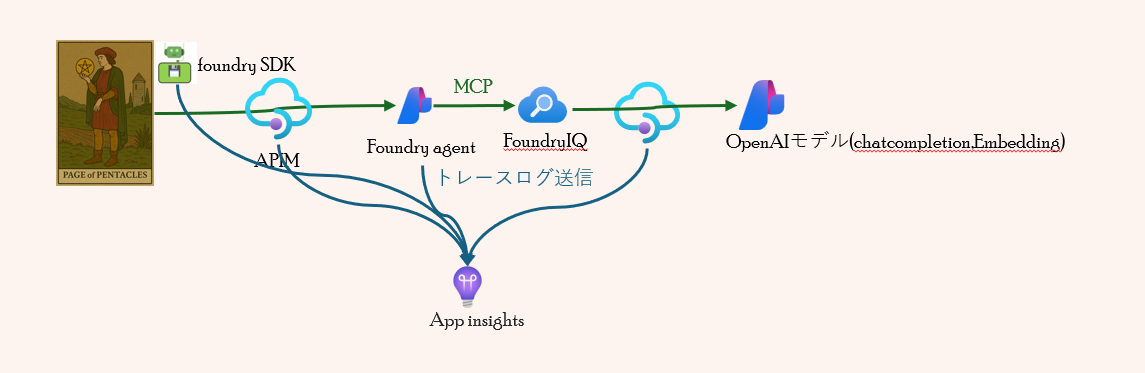
エージェント呼び出し(SDK)から エージェントレスポンスまでを一貫して追跡できるよう、
Python コード、APIM、Foundry の各レイヤーから Application Insights へトレースログを送信する仕組みを構築しました。
これにより、リクエストの流れや処理時間、ボトルネックを横断的に把握できるようになります。
設定の工夫点
トレースログ送信の設定の工夫点をそれぞれ説明します。
SDK(pythonコード)
全体コード
# Test the new agent with no approval required - Interactive mode
import os
import sys
import httpx
from azure.identity import DefaultAzureCredential, get_bearer_token_provider
from azure.ai.projects import AIProjectClient
from azure.core.exceptions import HttpResponseError, ResourceNotFoundError
from datetime import datetime, timezone
from openai import AzureOpenAI
from azure.monitor.opentelemetry import configure_azure_monitor
from opentelemetry import trace # 追加
from opentelemetry.instrumentation.httpx import (
HTTPXClientInstrumentor,
SyncOpenTelemetryTransport,
)
from opentelemetry.trace import Status, StatusCode
def validate_env_vars():
"""環境変数の検証"""
required_vars = {
"PROJECT_ENDPOINT": "Azure AI Project endpoint URL",
"AGENT_NAME": "Agent name to use",
"OTEL_SERVICE_NAME": "OpenTelemetry Service Name (分散トレース用)",
"APPLICATIONINSIGHTS_CONNECTION_STRING": "Application Insights の接続文字列 (トレース送信先)"
}
missing_vars = []
for var, description in required_vars.items():
if not os.getenv(var):
missing_vars.append(f" {var}: {description}")
if missing_vars:
print("❌ 必須の環境変数が設定されていません:", file=sys.stderr)
for var in missing_vars:
print(var, file=sys.stderr)
print("\n環境変数を設定してから再実行してください。", file=sys.stderr)
sys.exit(1)
def _try_get(obj, keys):
"""usageオブジェクトから各種トークン数を堅牢に取り出すヘルパー(dict/attr両対応)"""
for k in keys:
if isinstance(obj, dict) and k in obj:
return obj[k]
if hasattr(obj, k):
return getattr(obj, k)
return None
def main():
"""メイン処理"""
try:
# 環境変数から設定を取得
project_endpoint = os.getenv("PROJECT_ENDPOINT")
agent_name = os.getenv("AGENT_NAME")
print(f"=== エージェント接続情報 ===")
print(f"Project: {project_endpoint}")
print(f"Agent: {agent_name}")
# プロジェクトクライアント作成
project_client = AIProjectClient(
endpoint=project_endpoint,
credential=credential
)
# エージェント取得
print(f"エージェント '{agent_name}' を取得中...")
agent = project_client.agents.get(agent_name=agent_name)
# エージェント情報表示
if hasattr(agent, 'versions') and 'latest' in agent.versions:
version = agent.versions['latest']['version']
elif hasattr(agent, 'version'):
version = agent.version
else:
version = "unknown"
print(f"✅ エージェント取得成功: {agent.name} (version {version})")
# ツール設定確認
if hasattr(agent, 'definition') and hasattr(agent.definition, 'tools'):
print(f"\nツール設定:")
for tool in agent.definition.tools:
if hasattr(tool, 'type'):
print(f" - Type: {tool.type}")
if hasattr(tool, 'require_approval'):
print(f" Approval: {tool.require_approval}")
def _inject_traceparent(request: httpx.Request):
# 現在スパンの SpanContext を取得して W3C TraceContext で送る
current_span = trace.get_current_span()
sc = current_span.get_span_context() if current_span else None
if sc is not None and sc.is_valid:
trace_id_hex = f"{sc.trace_id:032x}"
span_id_hex = f"{sc.span_id:016x}"
# flags はサンプル 01 を設定(必要に応じて制御)
request.headers["traceparent"] = f"00-{trace_id_hex}-{span_id_hex}-01"
# tracestate を使う場合はここで追加(任意)
# request.headers["tracestate"] = "..."
# --- httpx のトランスポートを OTEL でラップして確実に計装 ---
telemetry_transport = SyncOpenTelemetryTransport(httpx.HTTPTransport())
# httpx.Client を使用(イベントフック + OTEL トランスポート)
http_client = httpx.Client(
transport=telemetry_transport,
event_hooks={"request": [_inject_traceparent]},
)
# 念のため、クライアント単位の計装も有効化(二重注入はヘッダー上書きで対応)
HTTPXClientInstrumentor.instrument_client(http_client)
# Entra ID トークンプロバイダー作成
token_provider = get_bearer_token_provider(
credential,
"https://ai.azure.com/.default"
)
# OpenAI クライアント取得 (Entra ID 認証)
openai_client = AzureOpenAI(
azure_endpoint=project_endpoint,
azure_ad_token_provider=token_provider,
api_version="2025-11-15-preview",
http_client=http_client
)
# 対話ループ
print("\n" + "="*60)
print("対話を開始します。終了するには 'exit', 'quit', 'q' を入力してください。")
print("="*60)
# 会話の状態管理(previous_response_id のみで会話を繋げる)
previous_response_id = None
while True:
try:
# ユーザー入力
print("\n質問を入力してください:")
user_input = input("ユーザー: ").strip()
# 終了チェック
if user_input.lower() in ["exit", "quit", "q"]:
print("\n対話を終了します。")
break
# 空入力チェック
if not user_input:
print("質問を入力してください。")
continue
# クエリ送信
print(f"\n=== クエリ送信中 ===")
print(f"質問: {user_input}")
# ユーザーターンのスパン(App Insightsに属性送信)
with tracer.start_as_current_span("user_chat_turn") as span:
span.set_attribute("project_endpoint", project_endpoint)
span.set_attribute("agent_name", agent_name)
span.set_attribute("gen_ai.prompt", user_input)
# 現在の日付を取得して質問に追加
current_date = datetime.now(timezone.utc).strftime("%Y年%m月%d日")
enhanced_input = f"今日は{current_date}です。\n\n{user_input}"
# リクエストボディの構築
request_body = {"agent": {"name": agent.name, "type": "agent_reference"}}
# previous_response_id で会話を繋げる(2回目以降)
if previous_response_id:
request_body["previous_response_id"] = previous_response_id
print(f"前回レスポンスID: {previous_response_id}")
span.set_attribute("conversation.previous_response_id", previous_response_id)
else:
print("新しい会話を開始します")
print(f"日付情報を追加: {current_date}")
span.set_attribute("conversation.is_new", True)
# Cookie情報をデバッグ出力(送信前)
if http_client.cookies:
print(f"[DEBUG] 送信するCookie: {dict(http_client.cookies)}")
else:
print(f"[DEBUG] Cookie未設定(初回リクエスト)")
try:
response = openai_client.responses.create(
input=enhanced_input,
extra_body=request_body
)
except HttpResponseError as e:
# エラーハンドリングをAppInsightsへ
span.set_status(Status(StatusCode.ERROR, str(e)))
span.record_exception(e)
span.set_attribute("error.type", type(e).__name__)
# 一部SDKでは e.status_code/e.message が存在
status_code = getattr(e, "status_code", None)
message = getattr(e, "message", str(e))
span.set_attribute("error.status_code", status_code if status_code is not None else -1)
span.set_attribute("error.message", message)
# レート制限/サーバーエラーのフラグ
if status_code == 429:
span.set_attribute("error.rate_limit", True)
if status_code and status_code >= 500:
span.set_attribute("error.server_error", True)
# 元の表示
print(f"\n❌ HTTP エラー: {status_code} - {message}", file=sys.stderr)
if status_code == 429:
print(" レート制限に達しました。しばらく待ってから再試行してください。", file=sys.stderr)
elif status_code and status_code >= 500:
print(" サーバーエラーです。しばらく待ってから再試行してください。", file=sys.stderr)
# 次のループへ
continue
except Exception as e:
# その他の例外もAppInsightsへ
span.set_status(Status(StatusCode.ERROR, str(e)))
span.record_exception(e)
span.set_attribute("error.type", type(e).__name__)
span.set_attribute("error.message", str(e))
print(f"\n❌ エラーが発生しました: {type(e).__name__}: {e}", file=sys.stderr)
print(" 続行しますか? (y/n): ", end="")
choice = input().strip().lower()
if choice != 'y':
break
continue
# Cookie情報をデバッグ出力(受信後)
if http_client.cookies:
print(f"[DEBUG] 受信後のCookie Jar: {dict(http_client.cookies)}")
# レスポンス情報
print(f"\n=== レスポンス ===")
print(f"Status: {response.status}")
print(f"Response ID: {response.id}")
span.set_attribute("response.status", getattr(response, "status", "unknown"))
span.set_attribute("response.id", getattr(response, "id", "unknown"))
# previous_response_id を保存(次回リクエストで使用)
previous_response_id = response.id
# 出力内容確認
has_text_output = False
if hasattr(response, 'output_text') and response.output_text:
print(f"\n回答:\n{response.output_text}")
span.set_attribute("response.output_text.length", len(response.output_text))
has_text_output = True
else:
print("\n回答:")
for item in response.output:
if hasattr(item, 'type'):
if item.type == 'text' and hasattr(item, 'text'):
print(item.text)
span.set_attribute("response.output_text.length", len(item.text))
has_text_output = True
elif item.type == 'mcp_approval_request':
print(f"\n⚠️ 承認が必要です: {item}", file=sys.stderr)
# 承認要求検知を属性に記録
span.set_attribute("mcp.approval_required", True)
if not has_text_output:
print("(回答が取得できませんでした)")
span.set_attribute("response.output_text.empty", True)
# 使用量表示 & トークン数をAppInsightsへ
usage = getattr(response, 'usage', None)
if usage is not None:
# 可能なキーを網羅的に探索
input_tokens = _try_get(usage, ['input_tokens', 'input_text_tokens', 'prompt_tokens'])
output_tokens = _try_get(usage, ['output_tokens', 'output_text_tokens', 'completion_tokens'])
total_tokens = _try_get(usage, ['total_tokens', 'total_text_tokens'])
if total_tokens is None and (isinstance(input_tokens, (int, float)) and isinstance(output_tokens, (int, float))):
total_tokens = input_tokens + output_tokens
# input_tokens_details, output_tokens_details から詳細情報を取得
input_tokens_details = getattr(usage, 'input_tokens_details', None)
output_tokens_details = getattr(usage, 'output_tokens_details', None)
if isinstance(input_tokens, (int, float)):
span.set_attribute("tokens.input", int(input_tokens))
# cached_tokens
cached_tokens = None
if input_tokens_details is not None:
cached_tokens = _try_get(input_tokens_details, ['cached_tokens'])
if isinstance(cached_tokens, (int, float)):
span.set_attribute("tokens.input.cached", int(cached_tokens))
if isinstance(output_tokens, (int, float)):
span.set_attribute("tokens.output", int(output_tokens))
# reasoning_tokens
reasoning_tokens = None
if output_tokens_details is not None:
reasoning_tokens = _try_get(output_tokens_details, ['reasoning_tokens'])
if isinstance(reasoning_tokens, (int, float)):
span.set_attribute("tokens.output.reasoning", int(reasoning_tokens))
if isinstance(total_tokens, (int, float)):
span.set_attribute("tokens.total", int(total_tokens))
print(f"\nトークン使用量: {usage}")
else:
span.set_attribute("tokens.info_available", False)
except KeyboardInterrupt:
print("\n\n対話を中断します。")
break
except HttpResponseError as e:
# ループ外側のHTTPエラー(念のため)
with tracer.start_as_current_span("http_error") as span:
span.set_status(Status(StatusCode.ERROR, str(e)))
span.record_exception(e)
span.set_attribute("error.type", type(e).__name__)
status_code = getattr(e, "status_code", None)
span.set_attribute("error.status_code", status_code if status_code is not None else -1)
span.set_attribute("error.message", getattr(e, "message", str(e)))
print(f"\n❌ HTTP エラー: {getattr(e, 'status_code', '?')} - {getattr(e, 'message', str(e))}", file=sys.stderr)
if getattr(e, 'status_code', None) == 429:
print(" レート制限に達しました。しばらく待ってから再試行してください。", file=sys.stderr)
elif getattr(e, 'status_code', 0) >= 500:
print(" サーバーエラーです。しばらく待ってから再試行してください。", file=sys.stderr)
continue
except Exception as e:
with tracer.start_as_current_span("unexpected_error") as span:
span.set_status(Status(StatusCode.ERROR, str(e)))
span.record_exception(e)
span.set_attribute("error.type", type(e).__name__)
span.set_attribute("error.message", str(e))
print(f"\n❌ エラーが発生しました: {type(e).__name__}: {e}", file=sys.stderr)
print(" 続行しますか? (y/n): ", end="")
choice = input().strip().lower()
if choice != 'y':
break
continue
print("\n✅ 正常に終了しました。")
except ResourceNotFoundError as e:
with tracer.start_as_current_span("resource_not_found") as span:
span.set_status(Status(StatusCode.ERROR, str(e)))
span.record_exception(e)
span.set_attribute("error.type", type(e).__name__)
span.set_attribute("error.message", getattr(e, 'message', str(e)))
print(f"\n❌ リソースが見つかりません: {getattr(e, 'message', str(e))}", file=sys.stderr)
print(f" エージェント '{agent_name}' が存在するか確認してください。", file=sys.stderr)
sys.exit(1)
except HttpResponseError as e:
with tracer.start_as_current_span("http_error_main") as span:
span.set_status(Status(StatusCode.ERROR, str(e)))
span.record_exception(e)
span.set_attribute("error.type", type(e).__name__)
span.set_attribute("error.status_code", getattr(e, 'status_code', -1))
span.set_attribute("error.message", getattr(e, 'message', str(e)))
print(f"\n❌ HTTP エラー: {getattr(e, 'status_code', '?')} - {getattr(e, 'message', str(e))}", file=sys.stderr)
if getattr(e, 'status_code', None) == 401:
print(" 認証に失敗しました。Azure CLI でログインしているか確認してください。", file=sys.stderr)
elif getattr(e, 'status_code', None) == 403:
print(" アクセスが拒否されました。適切な権限があるか確認してください。", file=sys.stderr)
sys.exit(1)
except KeyboardInterrupt:
print("\n\n⚠️ ユーザーによって中断されました。", file=sys.stderr)
sys.exit(130)
except Exception as e:
with tracer.start_as_current_span("unexpected_error_main") as span:
span.set_status(Status(StatusCode.ERROR, str(e)))
span.record_exception(e)
span.set_attribute("error.type", type(e).__name__)
span.set_attribute("error.message", str(e))
print(f"\n❌ 予期しないエラー: {type(e).__name__}: {e}", file=sys.stderr)
sys.exit(1)
finally:
# HTTP クライアントをクローズ
if 'http_client' in locals():
http_client.close()
if __name__ == "__main__":
# 環境変数の検証
validate_env_vars()
# Entra ID 認証情報作成
print(f"\n接続中(Entra ID 認証)...")
credential = DefaultAzureCredential()
# 1. OpenTelemetryの初期化(環境変数 APPLICATIONINSIGHTS_CONNECTION_STRING を自動参照)
configure_azure_monitor(credential=credential)
tracer = trace.get_tracer(__name__)
# プロセス全体の親スパンを作成し、その中でmainを実行する
with tracer.start_as_current_span("foundry-sdk-session") as span:
# 環境情報などを記録(AppInsightsでフィルタしやすく)
span.set_attribute("env.project_endpoint", os.getenv("PROJECT_ENDPOINT", ""))
span.set_attribute("env.agent_name", os.getenv("AGENT_NAME", ""))
main()
工夫点
-
スパン単位での詳細な属性付与
- 各ユーザーターン(user_chat_turn)やエラー発生時にwith文でスパンを開始し、project_endpointやagent_name、gen_ai.promptなどの属性を付与
- レスポンスIDやトークン数、エラー種別・メッセージなどもspan.set_attributeで細かく記録
- 会話継続時はprevious_response_idも属性として記録し、トレースから会話の流れを追いやすくしている
-
httpx通信のトレース連携
- SyncOpenTelemetryTransportでhttpxのトランスポートをOpenTelemetry対応にラップ
- HTTPXClientInstrumentor.instrument_clientでhttpx.Client自体も計装
- _inject_traceparent関数でW3C TraceContext(traceparentヘッダー)を手動注入し、外部API呼び出し(APIM以降)も一貫したトレースとして可視化可能
-
エラー・例外時のトレース強化
- HttpResponseErrorやResourceNotFoundError、その他Exception発生時に専用スパンを作成し、Status(StatusCode.ERROR)やrecord_exceptionでエラー内容をApplication Insightsに送信
- エラー種別やHTTPステータス、メッセージも属性として記録
-
トークン使用量や会話状態の可視化
- レスポンスのusage情報からinput/output/totalトークン数や詳細(cached_tokens, reasoning_tokensなど)を抽出し、span属性として記録
- 会話の新規/継続状態や承認要求の有無も属性で明示
APIM
- AI エージェント実行(Foundry Agent)と AI モデルエンドポイント(Foundry IQ側で使用)の両方で Diagnostics を W3C テレメトリ形式に設定。これにより、SDK から送信される traceparent ヘッダーのトレース ID をそのまま引き継げる

Fonudry
- MS Foundry ポータルのエージェント設定で Monitoring に Application Insights を指定すると、自動的に接続が作成され、エージェント実行時にトレースログが送信されるようなる。これにより、エージェント内部でのツール呼び出しやナレッジベース参照も含めて、トレースログとして記録される
Application insightsでのトレース表示
アプリケーションマップ
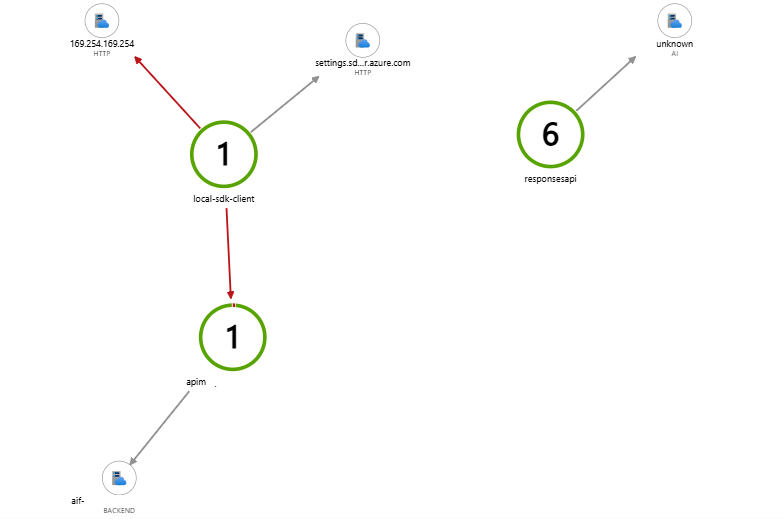
Application Insights のアプリケーションマップでは、SDK から始まるトレース ID が一貫して引き継がれるため、SDK から Foundry エージェントまでの処理フローがそのまま可視化されます。
なお、AI Search は Application Insights へトレースログを送信できないため、Foundry IQ 側からの呼び出し部分は unknown として表示されます。
その他
- 「エンド ツー エンド トランザクションの詳細」では、SDK → Foundry エージェント → ナレッジベース呼び出し → モデルエンドポイント呼び出し → エージェントレスポンスまでが、一貫したトレースとして可視化されます。
なお、フル FQDN などの固有情報が含まれるため、今回この記事ではトレースのスクリーンショットは掲載していません。
Foundryポータルでのトレース表示
Foundry ポータルでは、Foundry エージェント側で生成されたトレースログが確認できます。
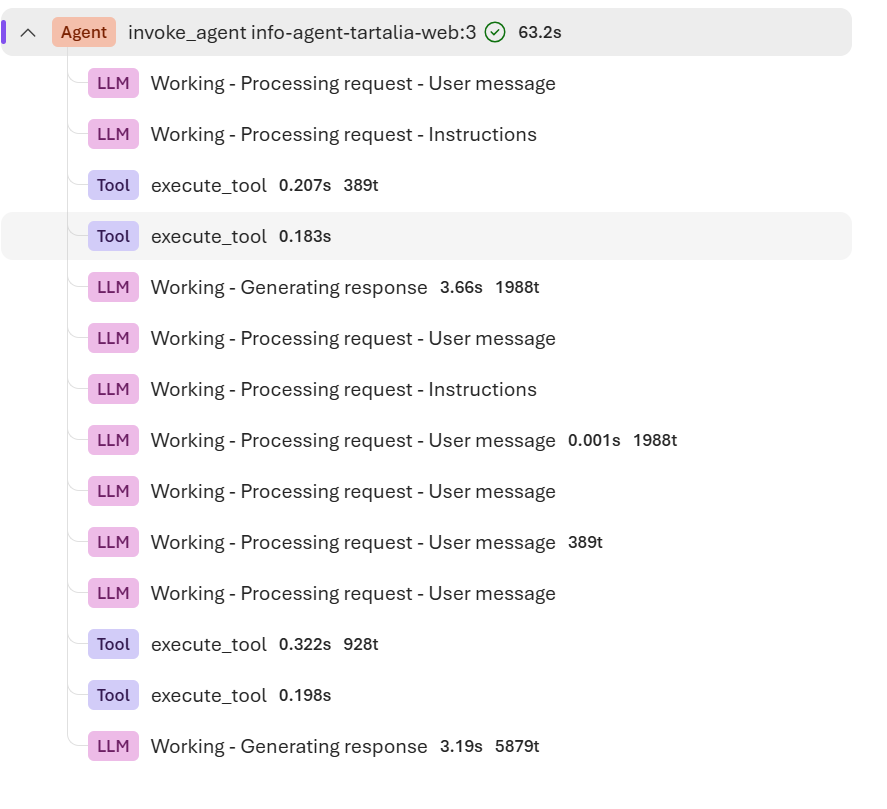
metadata には input トークンや output トークンが自動的に表示されますが、キャッシュトークンなど追加で記録したい情報がある場合は、SDK 側で span 属性として明示的に送信する必要があります。これらの追加情報は Application Insights 側でのみ確認できます。

最後に
今回は、SDK からエージェントのレスポンスまでを一貫して追跡できるトレースを実装しました。
トラブルシューティングの観点では、この一連のトレースが非常に分析しやすく、有効に機能します。
一方で、日常的なモニタリングには、トークン平均利用量の推移やエージェントの失敗数の推移といった、グラフ化された可視化が必要になります。
そのためには、Grafana などの可視化ツールを併用するのが適しています。
次回は、この Grafana を使った可視化方法について紹介したいと思います。