

はじめに
本記事はS3 Tables × Icebergシリーズの第2弾です。
| # | テーマ | 記事 |
|---|---|---|
| 1 | S3 Tables + Apache Icebergのテーブルを構築、Athenaからのクエリ、Glue JobでのETLを実施 | 前回 |
| 2 | EventBridge + Step Functionsで自動ETLパイプラインを構築 | 本記事 |
前回の記事では、S3 Tables + Apache IcebergのテーブルをTerraformで構築し、Athenaからのクエリ、Glue JobでのETLを実施しました。
しかし本番運用では「手動でCSVをアップロードして、手動でGlue Jobを実行」では話になりません。ファイルがS3に配置されたら、自動でETLが走り、Icebergテーブルに投入される。これがデータ基盤のあるべき姿です。
本記事では、S3 → EventBridge → Step Functions → Glue Job → Icebergのイベント駆動パイプラインをTerraformで構築します。
この記事でやること
- S3 ランディングバケットへのファイル配置をEventBridgeで検知
- Step Functionsでワークフローを制御(バリデーション → Glue Job → 成功/失敗通知)
- Glue JobでCSV → IcebergテーブルへETL処理とデータ投入
- 失敗時のSNS通知とリトライ戦略
- 全リソースをTerraformでIaC化
用語・技術をざっくり理解する
記事全体で登場する用語を、先にまとめて解説します。
イベント駆動アーキテクチャの基本概念
| 用語 | 解説 |
|---|---|
| イベント駆動 | スケジュール(毎時実行等)ではなく、「ファイルが来た」「DBが更新された」等のイベントをトリガーに処理を開始する |
| イベントバス | 発生したイベントを受け取り、ルールに基づいて適切なターゲットに振り分ける仕組み |
| ステートマシン | 状態遷移を定義したワークフロー。「開始 → バリデーション → ETL → 成功 or 失敗通知」のように、処理の流れと分岐を定義する。 |
AWS サービス
| 用語 | 解説 |
|---|---|
| Amazon EventBridge | S3、EC2、Lambda などAWSサービスのイベントを受け取り、ルールに基づいて別のサービスにルーティングする |
| AWS Step Functions | 複数のAWSサービスの呼び出しを、ASLで定義したステートマシンで順序制御・分岐・エラーハンドリングするオーケストレーションツール |
| ASL (Amazon States Language) | Step Functionsのワークフロー定義言語。JSON形式でステートマシンを記述する。状態の種類にTask,Choice,Wait,Parallel,Fail等がある |
| Amazon SNS | プッシュ通知サービス。メール、Slack、Lambda等にメッセージを送信する。パイプラインの成功/失敗通知に使う。 |
前提条件
| 項目 | 要件 |
|---|---|
| 前回記事 | 生データランディング用S3バケット + Glue job + S3 Tables + Iceberg テーブルが構築済み |
| AWS アカウント | 前回と同じ |
| リージョン | ap-northeast-1(東京) |
| Terraform | >= 1.5.0 |
| AWS Provider | >= 5.82.0 |
アーキテクチャ
CSV形式のファイルをランディング用バケットへ配置したことをトリガーにStep Functionsのワークフローを起動し、その中でデータのチェック、Glue Job(CSVからIcebergへの変換)、ジョブステータス成否チェックと通知を行い、S3 Tablesへのデータ投入を行います。

なぜStep Functionsを挟むのか?
EventBridge → Glue Jobを直接つなぐこともできますが、Step Functionsを間に入れると以下のようなメリットがあります。
- バリデーション : ファイル形式やサイズの事前チェック(意図しないファイルでGlue Jobを起動しない)
- リトライ制御 : Glue Job失敗時の自動リトライ回数・間隔を細かく設定
- ステータス監視 : Glue Jobは非同期なので完了を待つポーリングが必要。Step Functionsなら組み込み
- 通知 : 成功・失敗で異なるSNS通知を送れる
- 可視化 : AWSコンソールでワークフローの実行状況がビジュアルで分かりやすく把握できる
- 拡張性 : 後から「完了後にAthenaで集計」「別テーブルにも投入」等の追加が容易
Terraformディレクトリ構成
前回記事のディレクトリ構成に今記事用のリソースを追加しました。
s3-tables-iceberg-lab/
├── main.tf          ← モジュールの呼び出し
├── providers.tf     ← プロバイダー情報
├── variables.tf     ← 変数
└── modules/         ← 各モジュールを格納
    ├── s3_tables/   ← S3テーブル関連
    │   ├── main.tf
    │   ├── variables.tf
    │   └── outputs.tf
    ├── s3_landing/  ← 生データ格納S3関連
    │   ├── main.tf
    │   ├── variables.tf
    │   └── outputs.tf
    ├── iam/         ← IAM権限関連
    │   ├── main.tf
    │   ├── variables.tf
    │   └── outputs.tf
    ├── glue/        ← glue関連
    │   ├── main.tf
    │   ├── variables.tf
    │   ├── outputs.tf
    │   └── scripts/
    └── step_functions/ ← step functions関連
        ├── main.tf
        ├── variables.tf
        └── outputs.tf
Step 1:S3ランディングバケット+EventBridge通知有効化
modules/s3_landing/main.tf
ランディングバケットのイベント通知を有効化します。また、EventBridgeのルール内容を設定します。
# 現在の実行アカウント情報を取得
data "aws_caller_identity" "current" {}

# ランディングゾーンS3バケット(CSV 生データ格納用)
resource "aws_s3_bucket" "landing" {
  bucket = "${var.project_name}-landing-${data.aws_caller_identity.current.account_id}"
}

# バージョニングの有効化
resource "aws_s3_bucket_versioning" "landing" {
  bucket = aws_s3_bucket.landing.id
  versioning_configuration {
    status = "Enabled"
  }
}


#### 以下今回追加箇所


# イベント通知設定
resource "aws_s3_bucket_notification" "landing_eventbridge" {
  bucket      = aws_s3_bucket.landing.id
  eventbridge = true
}

# S3にCSVが配置されたらStep Functionsを起動するルール
resource "aws_cloudwatch_event_rule" "s3_csv_arrived" {
  name        = "${var.project_name}-csv-arrived"
  description = "s3_landingバケットのraw/にCSVが配置されたらStep Functionsを起動"

  event_pattern = jsonencode({
    source      = ["aws.s3"] # S3から発生したイベント
    detail-type = ["Object Created"] # オブジェクト作成イベント
    detail = {
      bucket = {
        name = [aws_s3_bucket.landing.id]
      }
      object = {
        key = [{
          prefix = "raw/" # rawプレフィックス配下のファイルのみ
        }]
      }
    }
  })
}

# EventBridge → Step Functionsのターゲット設定
resource "aws_cloudwatch_event_target" "step_functions" {
  rule     = aws_cloudwatch_event_rule.s3_csv_arrived.name
  arn      = var.etl_pipeline_statemachine_arn
  role_arn = var.eventbridge_iamrole_arn
}
modules/s3_landing/variables.tf
s3_tablesモジュールのmain.tfで使用する変数を定義します。
variable "project_name" {
  description = "プロジェクト名"
  type        = string
  default     = "iceberg-lab"
}

#### 以下今回追加箇所

variable "etl_pipeline_statemachine_arn" {
  description = "ETLパイプラインステートマシンARN"
  type        = string
}

variable "eventbridge_iamrole_arn" {
  description = "EventBridgeIAMロールARN"
  type        = string
}
Step 2:Step Functionsステートマシン + Glue Job
ステートマシンを定義します。
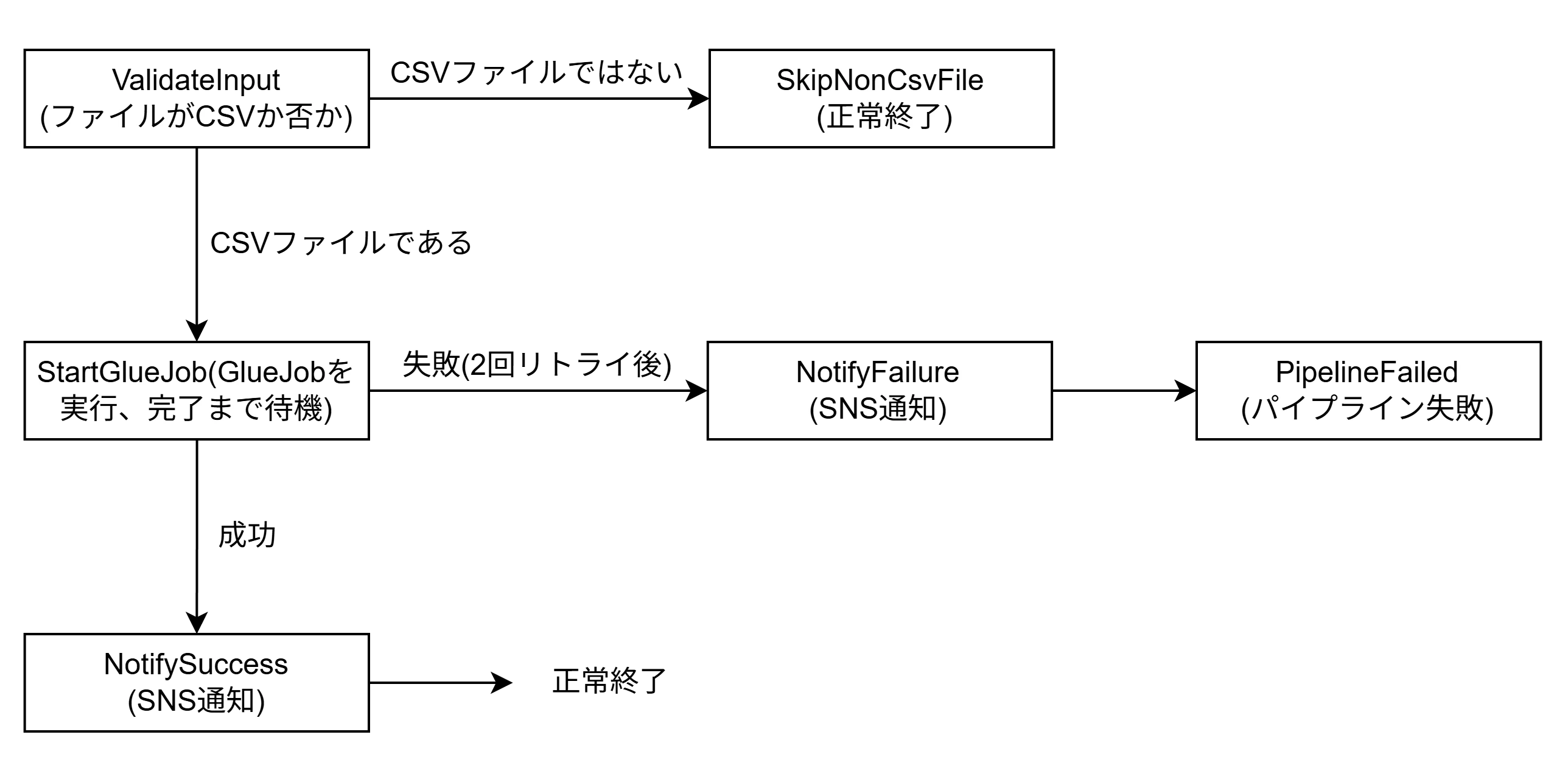
ステートマシンの処理フロー
ランディングバケットに配置されたファイルがCSVか否かを判定し、CSVのみGlue Jobによる処理を行い、成否に従ってSNS通知、終了処理を行う。
modules/step_functions/main.tf
# 現在の実行アカウント情報を取得
data "aws_caller_identity" "current" {}

# ステートマシン
resource "aws_sfn_state_machine" "etl_pipeline" {
  name     = "${var.project_name}-etl-pipeline"
  role_arn = var.step_functions_iam_role_arn

  definition = jsonencode({
    Comment = "CSV → Iceberg ETLパイプライン"
    # ワークフロー開始時に最初に実行するステート名
    StartAt = "ValidateInput"

    # 各ステートの定義
    States = {

      # ── Step 1: 入力バリデーション ──
      ValidateInput = {
      # 条件分岐ステート。入力値を評価して次のステートを選択する。
        Type = "Choice"
        # 評価するルールのリスト(上から順に評価し、最初にマッチしたものが採用される)
        Choices = [
          {
            # S3からのイベント通知時、EventBridgeにJSONが送信される。$は入力JSON全体のルートを指す。
            Variable     = "$.detail.object.key"
            # "*.csv" = .csv で終わるファイルのみ通過させる
            StringMatches = "*.csv"
            # 条件が真の場合に遷移する次のステート
            Next         = "StartGlueJob"
          }
        ]
        # どの Choices にもマッチしなかった場合に遷移する
        Default = "SkipNonCsvFile"
      }

      # CSV 以外のファイルは無視して正常終了
      SkipNonCsvFile = {
        # ワークフローを正常終了させるステート
        Type    = "Succeed"
        Comment = "CSV以外のファイルはスキップ"
      }

      # ── Step 2: Glue Jobを起動 ──
      StartGlueJob = {
        # 実際の処理を行うステート
        Type     = "Task"
        # 呼び出すAWSサービスのARN
        # Glue Jobを起動し、完了(SUCCEEDED/FAILED)まで待機する(.sync = 同期実行)
        Resource = "arn:aws:states:::glue:startJobRun.sync"
        # Resourceに渡すAPIパラメータ
        Parameters = {
          JobName = var.csv_to_iceberg_glue_job_name
          Arguments = {
            # "$" サフィックス付きのキー = 値をASL式(States.Format等)で動的に評価する。これが無ければ、States.Format(...) という文字列がそのままGlueに渡されてしまう。{} はプレースホルダー。
            "--SOURCE_PATH.$"  = "States.Format('s3://{}/{}', $.detail.bucket.name, $.detail.object.key)"
            "--TARGET_TABLE"   = "analytics.orders"
            "--CATALOG_ID"     = "${data.aws_caller_identity.current.account_id}:s3tablescatalog/${var.s3tables_bucket_name}"
            "--WAREHOUSE_PATH" = "s3://${var.s3tables_bucket_name}/warehouse/"
            "--datalake-formats" = "iceberg"
          }
        }
        # ステート全体のタイムアウト秒数
        TimeoutSeconds = 1800
        # 元の入力JSONを保持しつつ、Glueの出力を glueResultキーとしてJSONに追記
        ResultPath = "$.glueResult"
        # リトライ設定
        Retry = [
          {
            # Taskステートの実行失敗
            ErrorEquals     = ["States.TaskFailed"]
            # 初回リトライまでの待機秒数
            IntervalSeconds = 60
            # 最大リトライ回数
            MaxAttempts     = 2
            # 指数バックオフの倍率
            BackoffRate     = 2.0
          }
        ]
        # エラーキャッチ設定(リトライ上限を超えた場合や対象外エラー時に発動)
        Catch = [
          {
            # 全エラー種別をキャッチ
            ErrorEquals = ["States.ALL"]
            # エラー発生時に遷移するステート
            Next        = "NotifyFailure"
            # 入力JSONに$.errorキーとしてエラー詳細を追記して引き渡す
            ResultPath  = "$.error"
          }
        ]
        Next = "NotifySuccess"
      }

      # ── Step 3: 成功通知 ──
      NotifySuccess = {
        Type     = "Task"
        Resource = "arn:aws:states:::sns:publish"
        Parameters = {
          TopicArn = aws_sns_topic.pipeline_notification.arn
          Subject  = "ETLパイプライン成功"
          "Message.$" = "States.Format('ファイル{}のIcebergテーブルへの投入が完了しました。', $.detail.object.key)"
        }
        # このステートでワークフローを正常終了する
        End = true
      }

      # ── Step 4: 失敗通知 ──
      NotifyFailure = {
        Type     = "Task"
        Resource = "arn:aws:states:::sns:publish"
        Parameters = {
          TopicArn = aws_sns_topic.pipeline_notification.arn
          Subject  = "ETLパイプライン失敗"
          # $.error.Cause = Catchで格納したエラー情報の原因メッセージ
          "Message.$" = "States.Format('ファイル{}の処理に失敗しました。エラー:{}', $.detail.object.key, $.error.Cause)"
        }
        Next = "PipelineFailed"
      }
      # ワークフローを異常終了させるステート。CloudWatchやStep Functions履歴にエラーとして記録される。
      PipelineFailed = {
        Type  = "Fail"
        Error = "ETLPipelineFailed"
        Cause = "Glue Jobの実行に失敗しました"
      }
    }
  })
}
パイプライン成功、失敗通知用のSNSリソースを定義します。
# SNSトピック
resource "aws_sns_topic" "pipeline_notification" {
  name = "${var.project_name}-pipeline-notification"
}

# メール通知(検証用)
# terraform apply 後にメール認証が必要
resource "aws_sns_topic_subscription" "email" {
  topic_arn = aws_sns_topic.pipeline_notification.arn
  protocol  = "email"
  endpoint  = var.notification_email
}
Step Functionsステート間のJSON受け渡し
各ステートは入力JSONを受け取り、処理結果を出力JSONとして次のステートに渡す。デフォルトでは実行結果が入力を丸ごと上書きする。
ResultPathで出力の置き場所を指定することで元の入力を保持できる。
- ResultPath指定なし→出力が入力を丸ごと上書き
-
$.glueResult→元の入力を保持しつつ出力を追記 -
$.error→Catch時にエラー情報を追記
modules/step_functions/variables.tf
step_functionsモジュールのmain.tfで使用する変数を定義します。
variable "project_name" {
  description = "プロジェクト名"
  type        = string
  default     = "iceberg-lab"
}

variable "step_functions_iam_role_arn" {
  description = "StepFunctionsIAMロールARN"
  type        = string
}

variable "csv_to_iceberg_glue_job_name" {
  description = "GlueJob名"
  type        = string
}

variable "s3tables_bucket_name" {
  description = "S3tablesバケット名"
  type        = string
}

variable "notification_email" {
  description = "SNS通知先メールアドレス"
  type        = string
}
modules/step_functions/output.tf
他モジュールで使用する出力を定義します。
output "etl_pipeline_statemachine_arn" {
  value = aws_sfn_state_machine.etl_pipeline.arn
}

output "pipeline_notification_sns_topic_arn" {
  value = aws_sns_topic.pipeline_notification.arn
}
modules/glue/output.tf
glueモジュール内に他モジュールで使用する出力を新規で定義します。
output "scripts_bucket_arn" {
  value = aws_s3_bucket.glue_scripts.arn
}


#### 以下今回追加箇所
output "csv_to_iceberg_glue_job_name" {
  value = aws_glue_job.csv_to_iceberg.name
}

output "csv_to_iceberg_glue_job_arn" {
  value = aws_glue_job.csv_to_iceberg.arn
}
Step 3:IAMロール
各リソースが処理を実行するためのIAM権限を定義します。
modules/iam/main.tf
#glue用IAMロール
resource "aws_iam_role" "glue" {
  name = "${var.project_name}-glue-role"

  assume_role_policy = jsonencode({
    Version = "2012-10-17"
    Statement = [{
      Action    = "sts:AssumeRole"
      Effect    = "Allow"
      Principal = { Service = "glue.amazonaws.com" }
    }]
  })

  tags = {
    created_by = "tomoya.konagayoshi"
  }
}

#glue用IAMポリシーアタッチ
resource "aws_iam_role_policy_attachment" "glue_service" {
  role       = aws_iam_role.glue.name
  policy_arn = "arn:aws:iam::aws:policy/service-role/AWSGlueServiceRole"
}

#glue用IAMポリシー
resource "aws_iam_role_policy" "glue_data_access" {
  name = "${var.project_name}-glue-data-access"
  role = aws_iam_role.glue.id

  # 生データランディング用バケット、S3Tables用バケット、Lakeformation、Glueに対する権限
  policy = jsonencode({
    Version = "2012-10-17"
    Statement = [
      {
        Sid    = "S3LandingAccess"
        Effect = "Allow"
        Action = ["s3:GetObject", "s3:ListBucket"]
        Resource = [
          var.landing_bucket_arn,
          "${var.landing_bucket_arn}/*",
          var.scripts_bucket_arn,
          "${var.scripts_bucket_arn}/*",
        ]
      },
      {
        Sid      = "S3TablesAccess"
        Effect   = "Allow"
        Action   = ["s3tables:*"]
        Resource = [
          var.s3tables_bucket_arn,
          "${var.s3tables_bucket_arn}/*"
        ]
      },
      {
        Sid      = "GlueAndLakeFormation"
        Effect   = "Allow"
        Action   = ["glue:*", "lakeformation:GetDataAccess"]
        Resource = ["*"]
      }
    ]
  })
}

#### 以下今回追加箇所


# EventBridge用ロール
# EventBridge が Step Functions を起動するために必要
resource "aws_iam_role" "eventbridge" {
  name = "${var.project_name}-eventbridge-role"

  assume_role_policy = jsonencode({
    Version = "2012-10-17"
    Statement = [
      {
        Action = "sts:AssumeRole"
        Effect = "Allow"
        Principal = {
          Service = "events.amazonaws.com"
        }
      }
    ]
  })
}

resource "aws_iam_role_policy" "eventbridge_start_sfn" {
  name = "start-step-functions"
  role = aws_iam_role.eventbridge.id

  policy = jsonencode({
    Version = "2012-10-17"
    Statement = [
      {
        Effect   = "Allow"
        Action   = "states:StartExecution"
        Resource = var.etl_pipeline_statemachine_arn
      }
    ]
  })
}

# Step Functions用ロール
# Step Functions が Glue Job を起動し、SNS に通知するために必要
resource "aws_iam_role" "step_functions" {
  name = "${var.project_name}-sfn-role"

  assume_role_policy = jsonencode({
    Version = "2012-10-17"
    Statement = [
      {
        Action = "sts:AssumeRole"
        Effect = "Allow"
        Principal = {
          Service = "states.amazonaws.com"
        }
      }
    ]
  })
}

resource "aws_iam_role_policy" "sfn_glue_sns" {
  name = "glue-and-sns"
  role = aws_iam_role.step_functions.id

  policy = jsonencode({
    Version = "2012-10-17"
    Statement = [
      {
        # Glue Job の起動・ステータス確認
        Effect = "Allow"
        Action = [
          "glue:StartJobRun",
          "glue:GetJobRun",
          "glue:GetJobRuns",
          "glue:BatchStopJobRun"
        ]
        Resource = var.csv_to_iceberg_glue_job_arn
      },
      {
        # SNS への通知
        Effect   = "Allow"
        Action   = "sns:Publish"
        Resource = var.pipeline_notification_sns_topic_arn
      }
    ]
  })
}
modules/iam/variables.tf
iamモジュールのmain.tfで使用する変数を定義します。
variable "project_name" {
  description = "プロジェクト名"
  type        = string
  default     = "iceberg-lab"
}

variable "landing_bucket_arn" {
  description = "生データランディング用バケットARN"
  type        = string
}

variable "s3tables_bucket_arn" {
  description = "S3テーブル用バケットARN"
  type        = string
}

variable "scripts_bucket_arn" {
  description = "glueスクリプト配置用バケットARN"
  type        = string
}

#### 以下今回追加箇所

variable "etl_pipeline_statemachine_arn" {
  description = "ETLパイプラインステートマシンARN"
  type        = string
}

variable "csv_to_iceberg_glue_job_arn" {
  description = "ETLGlueJobARN"
  type        = string
}

variable "pipeline_notification_sns_topic_arn" {
  description = "ETLパイプライン通知用SNSトピックARN"
  type        = string
}
modules/iam/output.tf
他モジュールで使用する出力を定義します。
output "glue_iamrole_arn" {
  value = aws_iam_role.glue.arn
}


#### 以下今回追加箇所

output "eventbridge_iamrole_arn" {
  value = aws_iam_role.eventbridge.arn
}

output "step_functions_iam_role_arn" {
  value = aws_iam_role.step_functions.arn
}
Step 4:モジュール呼び出し
main.tf
モジュールの呼び出し側となるtfファイルを定義します。
# S3テーブル関連
module "s3_tables" {
  source = "./modules/s3_tables/"

  project_name = var.project_name
}

# 生データ格納S3関連
module "s3_landing" {
  source = "./modules/s3_landing/"

  project_name = var.project_name

  #### 以下今回追加箇所
  etl_pipeline_statemachine_arn = module.step_functions.etl_pipeline_statemachine_arn
  eventbridge_iamrole_arn       = module.iam.eventbridge_iamrole_arn
}

# IAM関連
module "iam" {
  source = "./modules/iam/"

  project_name        = var.project_name
  landing_bucket_arn  = module.s3_landing.landing_bucket_arn
  s3tables_bucket_arn = module.s3_tables.s3tables_bucket_arn
  scripts_bucket_arn  = module.glue.scripts_bucket_arn

  #### 以下今回追加箇所
  etl_pipeline_statemachine_arn       = module.step_functions.etl_pipeline_statemachine_arn
  csv_to_iceberg_glue_job_arn         = module.glue.csv_to_iceberg_glue_job_arn
  pipeline_notification_sns_topic_arn = module.step_functions.pipeline_notification_sns_topic_arn
}

# Glue関連
module "glue" {
  source = "./modules/glue/"

  project_name         = var.project_name
  s3tables_bucket_name = module.s3_tables.s3tables_bucket_name
  glue_iamrole_arn     = module.iam.glue_iamrole_arn
}


#### 以下今回追加箇所
# StepFunctions関連
module "step_functions" {
  source = "./modules/step_functions/"

  project_name                 = var.project_name
  step_functions_iam_role_arn  = module.iam.step_functions_iam_role_arn
  csv_to_iceberg_glue_job_name = module.glue.csv_to_iceberg_glue_job_name
  s3tables_bucket_name         = module.s3_tables.s3tables_bucket_name
  notification_email           = var.notification_email
}
variables.tf
モジュール呼び出し側のmain.tfで使用する変数を定義します。
variable "aws_region" {
  description = "AWS リージョン"
  type        = string
  default     = "ap-northeast-1"
}

variable "project_name" {
  description = "プロジェクト名"
  type        = string
  default     = "iceberg-lab"
}

#### 以下今回追加箇所
variable "notification_email" {
  description = "通知先メールアドレス"
  type        = string
  default     = xxx
}
今回は検証のためメールアドレスをデフォルト値としてコードに記載しているが、本番では動的に入力を行う
Step 5:デプロイ
まずは新しく作成したモジュールを読み込むためにterraform initを実行します。
C:\s3-tables-iceberg-lab > terraform init
Initializing the backend...
Initializing modules...
- step_functions in modules\step_functions
Initializing provider plugins...
- Reusing previous version of hashicorp/aws from the dependency lock file
- Using previously-installed hashicorp/aws v6.33.0

Terraform has been successfully initialized!

You may now begin working with Terraform. Try running "terraform plan" to see
any changes that are required for your infrastructure. All Terraform commands
should now work.

If you ever set or change modules or backend configuration for Terraform,
rerun this command to reinitialize your working directory. If you forget, other
commands will detect it and remind you to do so if necessary.
次にterraform planを実行します。
C:\s3-tables-iceberg-lab > terraform plan
module.glue.data.aws_caller_identity.current: Reading...
module.s3_landing.data.aws_caller_identity.current: Reading...
module.step_functions.data.aws_caller_identity.current: Reading...
module.s3_tables.data.aws_caller_identity.current: Reading...
module.iam.aws_iam_role.glue: Refreshing state... [id=iceberg-lab-glue-role]
module.s3_tables.aws_s3tables_table_bucket.main: Refreshing state... [name=iceberg-lab]
module.s3_tables.data.aws_caller_identity.current: Read complete after 0s [id={AccountId}]
module.s3_landing.data.aws_caller_identity.current: Read complete after 0s [id={AccountId}]
module.s3_landing.aws_s3_bucket.landing: Refreshing state... [id=iceberg-lab-landing-{AccountId}]
module.glue.data.aws_caller_identity.current: Read complete after 0s [id={AccountId}]
module.glue.aws_s3_bucket.glue_scripts: Refreshing state... [id=iceberg-lab-glue-scripts-{AccountId}]
module.step_functions.data.aws_caller_identity.current: Read complete after 0s [id={AccountId}]
module.s3_landing.aws_s3_bucket_versioning.landing: Refreshing state... [id=iceberg-lab-landing-{AccountId}]
module.glue.aws_s3_object.glue_script: Refreshing state... [id=iceberg-lab-glue-scripts-{AccountId}/scripts/glue_csv_to_iceberg.py]
module.s3_tables.aws_s3tables_namespace.analytics: Refreshing state...
module.s3_tables.data.aws_iam_policy_document.table_bucket: Reading...
module.s3_tables.data.aws_iam_policy_document.table_bucket: Read complete after 0s [id=3931547792]
module.s3_tables.aws_s3tables_table_bucket_policy.main: Refreshing state...
module.s3_tables.aws_s3tables_table.orders: Refreshing state... [name=orders]
module.s3_tables.aws_s3tables_table.customers: Refreshing state... [name=customers]
module.iam.aws_iam_role_policy_attachment.glue_service: Refreshing state... [id=iceberg-lab-glue-role/arn:aws:iam::aws:policy/service-role/AWSGlueServiceRole]
module.iam.aws_iam_role_policy.glue_data_access: Refreshing state... [id=iceberg-lab-glue-role:iceberg-lab-glue-data-access]
module.glue.aws_glue_job.csv_to_iceberg: Refreshing state... [id=iceberg-lab-csv-to-iceberg]

Terraform used the selected providers to generate the following execution plan. Resource actions are indicated with the
following symbols:
  + create

Terraform will perform the following actions:

  # module.iam.aws_iam_role.eventbridge will be created
  + resource "aws_iam_role" "eventbridge" {
      + arn                   = (known after apply)
      + assume_role_policy    = jsonencode(
            {
              + Statement = [
                  + {
                      + Action    = "sts:AssumeRole"
                      + Effect    = "Allow"
                      + Principal = {
                          + Service = "events.amazonaws.com"
                        }
                    },
                ]
              + Version   = "2012-10-17"
            }
        )
      + create_date           = (known after apply)
      + force_detach_policies = false
      + id                    = (known after apply)
      + managed_policy_arns   = (known after apply)
      + max_session_duration  = 3600
      + name                  = "iceberg-lab-eventbridge-role"
      + name_prefix           = (known after apply)
      + path                  = "/"
      + unique_id             = (known after apply)

      + inline_policy (known after apply)
    }

  # module.iam.aws_iam_role.step_functions will be created
  + resource "aws_iam_role" "step_functions" {
      + arn                   = (known after apply)
      + assume_role_policy    = jsonencode(
            {
              + Statement = [
                  + {
                      + Action    = "sts:AssumeRole"
                      + Effect    = "Allow"
                      + Principal = {
                          + Service = "states.amazonaws.com"
                        }
                    },
                ]
              + Version   = "2012-10-17"
            }
        )
      + create_date           = (known after apply)
      + force_detach_policies = false
      + id                    = (known after apply)
      + managed_policy_arns   = (known after apply)
      + max_session_duration  = 3600
      + name                  = "iceberg-lab-sfn-role"
      + name_prefix           = (known after apply)
      + path                  = "/"
      + unique_id             = (known after apply)

      + inline_policy (known after apply)
    }

  # module.iam.aws_iam_role_policy.eventbridge_start_sfn will be created
  + resource "aws_iam_role_policy" "eventbridge_start_sfn" {
      + id          = (known after apply)
      + name        = "start-step-functions"
      + name_prefix = (known after apply)
      + policy      = (known after apply)
      + role        = (known after apply)
    }

  # module.iam.aws_iam_role_policy.sfn_glue_sns will be created
  + resource "aws_iam_role_policy" "sfn_glue_sns" {
      + id          = (known after apply)
      + name        = "glue-and-sns"
      + name_prefix = (known after apply)
      + policy      = (known after apply)
      + role        = (known after apply)
    }

  # module.s3_landing.aws_cloudwatch_event_rule.s3_csv_arrived will be created
  + resource "aws_cloudwatch_event_rule" "s3_csv_arrived" {
      + arn            = (known after apply)
      + description    = "s3_landingバケットのraw/にCSVが配置されたらStep Functionsを起動"
      + event_bus_name = "default"
      + event_pattern  = jsonencode(
            {
              + detail      = {
                  + bucket = {
                      + name = [
                          + "iceberg-lab-landing-{AccountId}",
                        ]
                    }
                  + object = {
                      + key = [
                          + {
                              + prefix = "raw/"
                            },
                        ]
                    }
                }
              + detail-type = [
                  + "Object Created",
                ]
              + source      = [
                  + "aws.s3",
                ]
            }
        )
      + force_destroy  = false
      + id             = (known after apply)
      + name           = "iceberg-lab-csv-arrived"
      + name_prefix    = (known after apply)
      + region         = "ap-northeast-1"
      + tags_all       = (known after apply)
    }

  # module.s3_landing.aws_cloudwatch_event_target.step_functions will be created
  + resource "aws_cloudwatch_event_target" "step_functions" {
      + arn            = (known after apply)
      + event_bus_name = "default"
      + force_destroy  = false
      + id             = (known after apply)
      + region         = "ap-northeast-1"
      + role_arn       = (known after apply)
      + rule           = "iceberg-lab-csv-arrived"
      + target_id      = (known after apply)
    }

  # module.s3_landing.aws_s3_bucket_notification.landing_eventbridge will be created
  + resource "aws_s3_bucket_notification" "landing_eventbridge" {
      + bucket      = "iceberg-lab-landing-{AccountId}"
      + eventbridge = true
      + id          = (known after apply)
      + region      = "ap-northeast-1"
    }

  # module.step_functions.aws_sfn_state_machine.etl_pipeline will be created
  + resource "aws_sfn_state_machine" "etl_pipeline" {
      + arn                       = (known after apply)
      + creation_date             = (known after apply)
      + definition                = (known after apply)
      + description               = (known after apply)
      + id                        = (known after apply)
      + name                      = "iceberg-lab-etl-pipeline"
      + name_prefix               = (known after apply)
      + publish                   = false
      + region                    = "ap-northeast-1"
      + revision_id               = (known after apply)
      + role_arn                  = (known after apply)
      + state_machine_version_arn = (known after apply)
      + status                    = (known after apply)
      + tags_all                  = (known after apply)
      + type                      = "STANDARD"
      + version_description       = (known after apply)

      + encryption_configuration (known after apply)

      + logging_configuration (known after apply)

      + tracing_configuration (known after apply)
    }

  # module.step_functions.aws_sns_topic.pipeline_notification will be created
  + resource "aws_sns_topic" "pipeline_notification" {
      + arn                         = (known after apply)
      + beginning_archive_time      = (known after apply)
      + content_based_deduplication = false
      + fifo_throughput_scope       = (known after apply)
      + fifo_topic                  = false
      + id                          = (known after apply)
      + name                        = "iceberg-lab-pipeline-notification"
      + name_prefix                 = (known after apply)
      + owner                       = (known after apply)
      + policy                      = (known after apply)
      + region                      = "ap-northeast-1"
      + signature_version           = (known after apply)
      + tags_all                    = (known after apply)
      + tracing_config              = (known after apply)
    }

  # module.step_functions.aws_sns_topic_subscription.email will be created
  + resource "aws_sns_topic_subscription" "email" {
      + arn                             = (known after apply)
      + confirmation_timeout_in_minutes = 1
      + confirmation_was_authenticated  = (known after apply)
      + endpoint                        = "xxx"
      + endpoint_auto_confirms          = false
      + filter_policy_scope             = (known after apply)
      + id                              = (known after apply)
      + owner_id                        = (known after apply)
      + pending_confirmation            = (known after apply)
      + protocol                        = "email"
      + raw_message_delivery            = false
      + region                          = "ap-northeast-1"
      + topic_arn                       = (known after apply)
    }

Plan: 10 to add, 0 to change, 0 to destroy.

───────────────────────────────────────────────────────────────────────────────────────────────────────────────────────

Note: You didn't use the -out option to save this plan, so Terraform can't guarantee to take exactly these actions if
you run "terraform apply" now.
terraform applyを実行します。
C:\s3-tables-iceberg-lab > terraform apply
module.s3_tables.aws_s3tables_table_bucket.main: Refreshing state... [name=iceberg-lab]
module.iam.aws_iam_role.glue: Refreshing state... [id=iceberg-lab-glue-role]
module.glue.data.aws_caller_identity.current: Reading...
module.step_functions.data.aws_caller_identity.current: Reading...
module.s3_landing.data.aws_caller_identity.current: Reading...
module.s3_tables.data.aws_caller_identity.current: Reading...
module.s3_tables.data.aws_caller_identity.current: Read complete after 0s [id={AccountId}]
module.s3_landing.data.aws_caller_identity.current: Read complete after 0s [id={AccountId}]
module.s3_landing.aws_s3_bucket.landing: Refreshing state... [id=iceberg-lab-landing-{AccountId}]
module.step_functions.data.aws_caller_identity.current: Read complete after 0s [id={AccountId}]
module.glue.data.aws_caller_identity.current: Read complete after 0s [id={AccountId}]
module.glue.aws_s3_bucket.glue_scripts: Refreshing state... [id=iceberg-lab-glue-scripts-{AccountId}]
module.s3_tables.aws_s3tables_namespace.analytics: Refreshing state...
module.s3_tables.data.aws_iam_policy_document.table_bucket: Reading...
module.s3_tables.data.aws_iam_policy_document.table_bucket: Read complete after 0s [id=3931547792]
module.s3_tables.aws_s3tables_table_bucket_policy.main: Refreshing state...
module.s3_tables.aws_s3tables_table.orders: Refreshing state... [name=orders]
module.s3_tables.aws_s3tables_table.customers: Refreshing state... [name=customers]
module.s3_landing.aws_s3_bucket_versioning.landing: Refreshing state... [id=iceberg-lab-landing-{AccountId}]
module.glue.aws_s3_object.glue_script: Refreshing state... [id=iceberg-lab-glue-scripts-{AccountId}/scripts/glue_csv_to_iceberg.py]
module.iam.aws_iam_role_policy_attachment.glue_service: Refreshing state... [id=iceberg-lab-glue-role/arn:aws:iam::aws:policy/service-role/AWSGlueServiceRole]
module.iam.aws_iam_role_policy.glue_data_access: Refreshing state... [id=iceberg-lab-glue-role:iceberg-lab-glue-data-access]
module.glue.aws_glue_job.csv_to_iceberg: Refreshing state... [id=iceberg-lab-csv-to-iceberg]

Terraform used the selected providers to generate the following execution plan. Resource actions are indicated with the
following symbols:
  + create
  ~ update in-place

Terraform will perform the following actions:

  # module.glue.aws_s3_object.glue_script will be updated in-place
  ~ resource "aws_s3_object" "glue_script" {
      ~ etag                          = "d53f7bef0b492fe7c2c8cc397a5a56dd" -> "0ee861034ec9a8427213431434baa45e"
        id                            = "iceberg-lab-glue-scripts-{AccountId}/scripts/glue_csv_to_iceberg.py"
        tags                          = {}
      + version_id                    = (known after apply)
        # (25 unchanged attributes hidden)
    }

  # module.iam.aws_iam_role.eventbridge will be created
  + resource "aws_iam_role" "eventbridge" {
      + arn                   = (known after apply)
      + assume_role_policy    = jsonencode(
            {
              + Statement = [
                  + {
                      + Action    = "sts:AssumeRole"
                      + Effect    = "Allow"
                      + Principal = {
                          + Service = "events.amazonaws.com"
                        }
                    },
                ]
              + Version   = "2012-10-17"
            }
        )
      + create_date           = (known after apply)
      + force_detach_policies = false
      + id                    = (known after apply)
      + managed_policy_arns   = (known after apply)
      + max_session_duration  = 3600
      + name                  = "iceberg-lab-eventbridge-role"
      + name_prefix           = (known after apply)
      + path                  = "/"
      + unique_id             = (known after apply)

      + inline_policy (known after apply)
    }

  # module.iam.aws_iam_role.step_functions will be created
  + resource "aws_iam_role" "step_functions" {
      + arn                   = (known after apply)
      + assume_role_policy    = jsonencode(
            {
              + Statement = [
                  + {
                      + Action    = "sts:AssumeRole"
                      + Effect    = "Allow"
                      + Principal = {
                          + Service = "states.amazonaws.com"
                        }
                    },
                ]
              + Version   = "2012-10-17"
            }
        )
      + create_date           = (known after apply)
      + force_detach_policies = false
      + id                    = (known after apply)
      + managed_policy_arns   = (known after apply)
      + max_session_duration  = 3600
      + name                  = "iceberg-lab-sfn-role"
      + name_prefix           = (known after apply)
      + path                  = "/"
      + unique_id             = (known after apply)

      + inline_policy (known after apply)
    }

  # module.iam.aws_iam_role_policy.eventbridge_start_sfn will be created
  + resource "aws_iam_role_policy" "eventbridge_start_sfn" {
      + id          = (known after apply)
      + name        = "start-step-functions"
      + name_prefix = (known after apply)
      + policy      = (known after apply)
      + role        = (known after apply)
    }

  # module.iam.aws_iam_role_policy.sfn_glue_sns will be created
  + resource "aws_iam_role_policy" "sfn_glue_sns" {
      + id          = (known after apply)
      + name        = "glue-and-sns"
      + name_prefix = (known after apply)
      + policy      = (known after apply)
      + role        = (known after apply)
    }

  # module.s3_landing.aws_cloudwatch_event_rule.s3_csv_arrived will be created
  + resource "aws_cloudwatch_event_rule" "s3_csv_arrived" {
      + arn            = (known after apply)
      + description    = "s3_landingバケットのraw/にCSVが配置されたらStep Functionsを起動"
      + event_bus_name = "default"
      + event_pattern  = jsonencode(
            {
              + detail      = {
                  + bucket = {
                      + name = [
                          + "iceberg-lab-landing-{AccountId}",
                        ]
                    }
                  + object = {
                      + key = [
                          + {
                              + prefix = "raw/"
                            },
                        ]
                    }
                }
              + detail-type = [
                  + "Object Created",
                ]
              + source      = [
                  + "aws.s3",
                ]
            }
        )
      + force_destroy  = false
      + id             = (known after apply)
      + name           = "iceberg-lab-csv-arrived"
      + name_prefix    = (known after apply)
      + region         = "ap-northeast-1"
      + tags_all       = (known after apply)
    }

  # module.s3_landing.aws_cloudwatch_event_target.step_functions will be created
  + resource "aws_cloudwatch_event_target" "step_functions" {
      + arn            = (known after apply)
      + event_bus_name = "default"
      + force_destroy  = false
      + id             = (known after apply)
      + region         = "ap-northeast-1"
      + role_arn       = (known after apply)
      + rule           = "iceberg-lab-csv-arrived"
      + target_id      = (known after apply)
    }

  # module.s3_landing.aws_s3_bucket_notification.landing_eventbridge will be created
  + resource "aws_s3_bucket_notification" "landing_eventbridge" {
      + bucket      = "iceberg-lab-landing-{AccountId}"
      + eventbridge = true
      + id          = (known after apply)
      + region      = "ap-northeast-1"
    }

  # module.step_functions.aws_sfn_state_machine.etl_pipeline will be created
  + resource "aws_sfn_state_machine" "etl_pipeline" {
      + arn                       = (known after apply)
      + creation_date             = (known after apply)
      + definition                = (known after apply)
      + description               = (known after apply)
      + id                        = (known after apply)
      + name                      = "iceberg-lab-etl-pipeline"
      + name_prefix               = (known after apply)
      + publish                   = false
      + region                    = "ap-northeast-1"
      + revision_id               = (known after apply)
      + role_arn                  = (known after apply)
      + state_machine_version_arn = (known after apply)
      + status                    = (known after apply)
      + tags_all                  = (known after apply)
      + type                      = "STANDARD"
      + version_description       = (known after apply)

      + encryption_configuration (known after apply)

      + logging_configuration (known after apply)

      + tracing_configuration (known after apply)
    }

  # module.step_functions.aws_sns_topic.pipeline_notification will be created
  + resource "aws_sns_topic" "pipeline_notification" {
      + arn                         = (known after apply)
      + beginning_archive_time      = (known after apply)
      + content_based_deduplication = false
      + fifo_throughput_scope       = (known after apply)
      + fifo_topic                  = false
      + id                          = (known after apply)
      + name                        = "iceberg-lab-pipeline-notification"
      + name_prefix                 = (known after apply)
      + owner                       = (known after apply)
      + policy                      = (known after apply)
      + region                      = "ap-northeast-1"
      + signature_version           = (known after apply)
      + tags_all                    = (known after apply)
      + tracing_config              = (known after apply)
    }

  # module.step_functions.aws_sns_topic_subscription.email will be created
  + resource "aws_sns_topic_subscription" "email" {
      + arn                             = (known after apply)
      + confirmation_timeout_in_minutes = 1
      + confirmation_was_authenticated  = (known after apply)
      + endpoint                        = "xxx"
      + endpoint_auto_confirms          = false
      + filter_policy_scope             = (known after apply)
      + id                              = (known after apply)
      + owner_id                        = (known after apply)
      + pending_confirmation            = (known after apply)
      + protocol                        = "email"
      + raw_message_delivery            = false
      + region                          = "ap-northeast-1"
      + topic_arn                       = (known after apply)
    }

Plan: 10 to add, 0 to change, 0 to destroy.

Do you want to perform these actions?
  Terraform will perform the actions described above.
  Only 'yes' will be accepted to approve.

  Enter a value: yes

module.s3_landing.aws_s3_bucket_notification.landing_eventbridge: Creating...
module.s3_landing.aws_cloudwatch_event_rule.s3_csv_arrived: Creating...
module.iam.aws_iam_role.step_functions: Creating...
module.iam.aws_iam_role.eventbridge: Creating...
module.step_functions.aws_sns_topic.pipeline_notification: Creating...
module.s3_landing.aws_cloudwatch_event_rule.s3_csv_arrived: Creation complete after 0s [id=iceberg-lab-csv-arrived]
module.step_functions.aws_sns_topic.pipeline_notification: Creation complete after 0s [id=arn:aws:sns:ap-northeast-1:{AccountId}:iceberg-lab-pipeline-notification]
module.step_functions.aws_sns_topic_subscription.email: Creating...
module.s3_landing.aws_s3_bucket_notification.landing_eventbridge: Creation complete after 0s [id=iceberg-lab-landing-{AccountId}]
module.step_functions.aws_sns_topic_subscription.email: Creation complete after 1s [id=arn:aws:sns:ap-northeast-1:{AccountId}:iceberg-lab-pipeline-notification:e0e63b7a-82f3-44ea-8a59-ba38e5f2af88]
module.iam.aws_iam_role.eventbridge: Creation complete after 1s [id=iceberg-lab-eventbridge-role]
module.iam.aws_iam_role.step_functions: Creation complete after 1s [id=iceberg-lab-sfn-role]
module.iam.aws_iam_role_policy.sfn_glue_sns: Creating...
module.step_functions.aws_sfn_state_machine.etl_pipeline: Creating...
module.step_functions.aws_sfn_state_machine.etl_pipeline: Creation complete after 1s [id=arn:aws:states:ap-northeast-1:{AccountId}:stateMachine:iceberg-lab-etl-pipeline]
module.iam.aws_iam_role_policy.eventbridge_start_sfn: Creating...
module.s3_landing.aws_cloudwatch_event_target.step_functions: Creating...
module.s3_landing.aws_cloudwatch_event_target.step_functions: Creation complete after 0s [id=iceberg-lab-csv-arrived-terraform-20260225153517622700000001]
module.iam.aws_iam_role_policy.sfn_glue_sns: Creation complete after 1s [id=iceberg-lab-sfn-role:glue-and-sns]
module.iam.aws_iam_role_policy.eventbridge_start_sfn: Creation complete after 0s [id=iceberg-lab-eventbridge-role:start-step-functions]

Apply complete! Resources: 10 added, 0 changed, 0 destroyed.
apply実行後、SNSサブスクリプションの確認メールがvariables.tfのnotification_email変数に設定したメールアドレスに届きます。
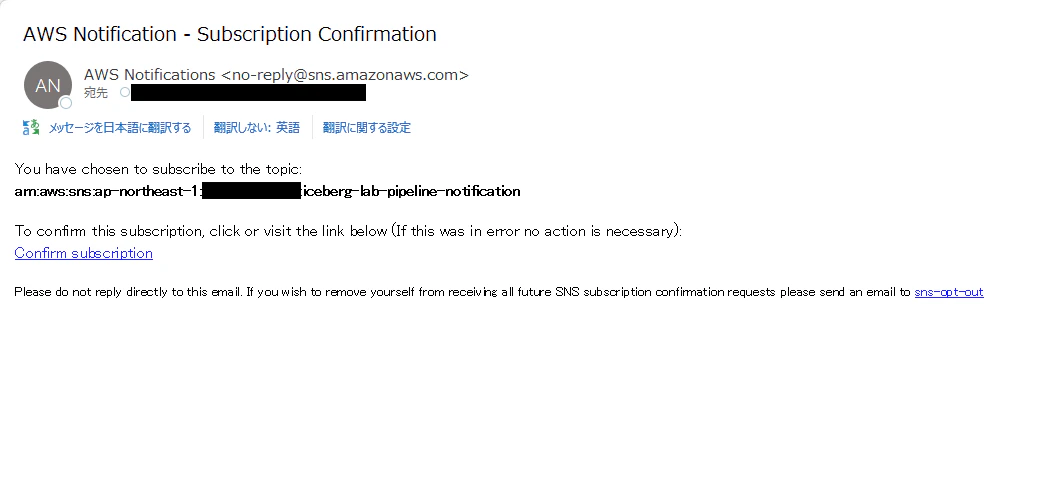
Confirm Subscriptionのリンクをコピーし、コンソールで確認作業を行います。


これでSNSトピックに届いた通知がメールアドレス宛に届くようになりました。
Step 6:動作確認・検証
6-1. パイプラインでのETL処理成功
まずはパイプラインが想定通り成功することを検証していきます。テスト用CSVを作成します。
order_id,customer_id,order_date,product_name,quantity,unit_price,total_amount,status,region,created_at,discount_rate,note
1012,2001,2024-01-15,ノートPC,1,98000.00,98000.00,completed,東京,2024-01-15 10:30:00,0.00,
1013,2002,2024-01-16,マウス,3,2500.00,7500.00,completed,大阪,2024-01-16 11:00:00,0.05,まとめ買い割引
1014,2003,2024-01-17,キーボード,2,5800.00,11600.00,pending,名古屋,2024-01-17 09:15:00,0.00
CSVファイルをS3のraw/プレフィックスにアップロードすることでパイプラインを自動で起動します。

パイプラインでのETL処理に成功しました。

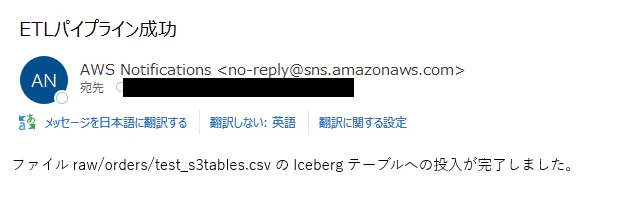
パイプラインの成功に合わせて、SNSによりメールが送信されていました。
ETLパイプライン処理前後でのs3tableのデータを比較してみます。
パイプライン実行前のテーブル内データ
select order_id, customer_id, order_date, product_name from analytics.orders;

-- 実行結果
order_id customer_id	order_date	product_name
1001	  1	            2024-06-01	Cloud Storage 1TB
1002	  2	            2024-06-05	Compute Instance m5.xl
1003	  3	            2024-06-10	Database RDS
1004	  1	            2024-07-01	Cloud Storage 1TB
1005	  4	            2024-07-15	Compute Instance m5.xl
1007	  2	            2024-09-01	Compute Instance m5.xl
1008	  3	            2024-10-01	Support Plan Business
1009	  2001	        2024-01-15	ノートPC
1010	  2002	        2024-01-16	マウス
1011	  2003	        2024-01-17	キーボード
パイプライン実行後のテーブル内データ
select order_id, customer_id, order_date, product_name from analytics.orders;

-- 実行結果
order_id customer_id	order_date	product_name
1001	  1	            2024-06-01	Cloud Storage 1TB
1002	  2	            2024-06-05	Compute Instance m5.xl
1003	  3	            2024-06-10	Database RDS
1004	  1	            2024-07-01	Cloud Storage 1TB
1005	  4	            2024-07-15	Compute Instance m5.xl
1007	  2	            2024-09-01	Compute Instance m5.xl
1008	  3	            2024-10-01	Support Plan Business
1009	  2001	        2024-01-15	ノートPC
1010	  2002	        2024-01-16	マウス
1011	  2003	        2024-01-17	キーボード
1012	  2001	        2024-01-15	ノートPC
1013	  2002	        2024-01-16	マウス
1014	  2003	        2024-01-17	キーボード
S3に配置したCSVファイルのデータがテーブルに読み込まれていることを確認できました。
6-2. パイプラインでのETL処理失敗
次にパイプラインを失敗させてみます。orderテーブルに存在しない列であるamountを含んだテスト用CSVを作成します。
order_id,customer_id,order_date,amount,status
2001,1,2026-02-24,15000,completed
2002,2,2026-02-24,8500,completed
2003,3,2026-02-24,22000,pending
2004,1,2026-02-24,3200,completed
2005,5,2026-02-24,41000,processing
CSVファイルをS3のraw/プレフィックスにアップロードすることでパイプラインを自動で起動します。

パイプラインでのETL処理に失敗しました。ステートマシンの定義通り、リトライが2度行われています。


パイプラインの失敗に合わせて、SNSによりメールが送信されていました。

6-3. パイプラインでのETL処理スキップ
最後にETL処理をスキップさせてみます。
何の記載もないテキストファイルを所定のS3フォルダ内へ配置します。

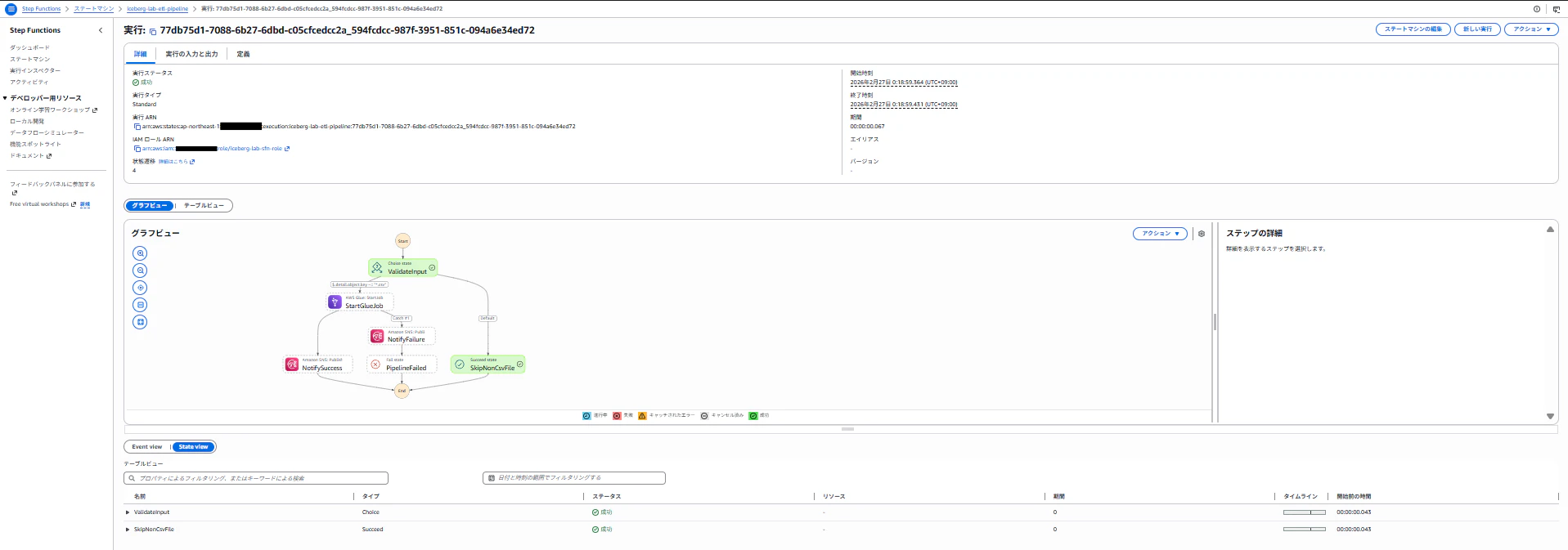
ステートマシンが自動起動し、CSVファイルでないため、ETL処理がスキップされました。
まとめ
今回はS3へのCSVファイル配置をトリガーとした自動ETLパイプライン実行をTerraformで構築してみました。Step Functionsでリトライ制御などを設定したワークフローを使用することで、様々な条件に従って意図した動作をさせることができました。また、Terraformを用いて構築したことで環境上のリソースを把握することが容易であり、実運用する際も管理にかかる労力を抑えることができるのではないかと思いました。
次にやりたいこと
- Redshift ServerlessからのIcebergクエリ: AthenaだけでなくRedshiftからもクエリする
- Glue Data Quality: ETL中にデータ品質チェックを追加し、不正データの早期検知を実現
- MERGE INTOによるインクリメンタルロード: 今回はINSERTのみだが、CDCを想定したUpsertパイプラインに拡張