

はじめに
本記事ではS3 Tablesを使ってIcebergテーブルを構築し、Athenaからクエリするまでの一連の手順をTerraformコード付きで解説します。
用語・技術をざっくり理解する
記事全体で登場する用語を、先にまとめて解説します。
データ基盤の基本概念
| 用語 | 解説 |
|---|---|
| データレイク | 構造化・非構造化を問わず、S3などのストレージに生データを集約する仕組み |
| データウェアハウス (DWH) | RedshiftやSnowflakeなど。データを事前に加工・整理してから格納する。 |
| レイクハウス | 生データをS3に置きつつ、DWHのようにトランザクションや高速クエリを実現するアーキテクチャ |
| ETL | データを抽出・変換・格納する一連の処理。Glue JobでCSVをIcebergに変換するのが典型例 |
| CDC | ソースDBの変更(INSERT/UPDATE/DELETE)を検知してデータレイクに反映する手法 |
Apache Icebergまわり
| 用語 | 解説 |
|---|---|
| Apache Iceberg | Netflixが開発したOSSテーブルフォーマット。S3に置いたParquetファイルに対して、RDBのようにUPDATE/DELETEなどを可能にする。 |
| テーブルフォーマット | データファイルをどう配置し、メタデータをどう管理するかの規格。Icebergの他にDeltaLake、Apache Hudiがある |
| Parquet | データ分析に最適化された列指向バイナリ形式。列単位で圧縮されるため、特定カラムだけ読む分析クエリが高速 |
| スナップショット | テーブルのある時点の状態。Icebergは変更のたびにスナップショットを作成する。 |
| タイムトラベル | 過去のデータを参照する機能。スナップショットを辿って「xxx日前のテーブルの状態」をクエリできる |
| スキーマ進化 | テーブル構造の変更(カラムの追加・削除・リネーム)を、既存データに影響なく実行できる。従来は「テーブル作り直し」が必要だった。 |
| コンパクション | INSERTを繰り返すと小さいParquetファイルが大量に生成される。これを統合してクエリ性能を維持する。 |
| MERGE INTO | Upsert(Update + Insert)とも呼ばれる。条件に合致すれば更新、しなければ挿入を行うSQL。 |
| OPTIMIZE | データファイルの再編成。コンパクション(小ファイル統合)と、DELETE済み行の物理除去を行うメンテナンスコマンド。 |
| VACUUM | 古いスナップショットと不要ファイルの物理削除 |
AWSサービス
| 用語 | 解説 |
|---|---|
| Amazon S3 Tables | S3にテーブルを作れるサービス。通常のS3バケット(オブジェクト置き場)とは別に「テーブルバケット」という概念があり、そこにテーブルを格納する。Icebergテーブルの自動メンテナンス付き。 |
| テーブルバケット | テーブル専用のS3バケット。通常バケットがファイルを格納するのに対し、テーブルバケットはIcebergテーブルを格納する。 |
| Namespace | テーブルのグループ(≒DB名)。RDBの「データベース」に相当。テーブルバケット内でテーブルを分類する単位。 |
| Amazon Athena | S3上のデータにSQLを投げるサービス。サーバーレスでインフラ管理不要。IcebergテーブルへのCRUDもSQLで実行できる。 |
| AWS Glue | ETLとデータカタログのサービス。Data Catalog(テーブルのメタデータ管理)とGlue Job(PySparkでのETL実行)の2つの役割がある。 |
| AWS Glue Data Catalog | 「どのテーブルがどこにあるか、カラム定義は何か」を管理するメタデータストア。S3 Tablesと連携するとs3tablescatalogとして自動登録される |
| AWS Lake Formation | データレイクの権限管理サービス。「誰がどのテーブルのどのカラム、行にアクセスできるか」を制御する。S3 TablesをAthenaから使うために必須。 |
インフラ・IaC
| 用語 | 解説 |
|---|---|
| Terraform | インフラをコードで定義するツール。.tfファイルにAWSリソースの設定を書き、terraform applyで自動構築。 |
| IaC | インフラの構成をコードで管理する手法。手動のマネコン操作をなくし、再現性と変更管理を実現する |
| AWSマネジメントコンソール | ブラウザでAWSを操作するGUI画面 |
この記事でやること
- TerraformでS3 Tables(テーブルバケット/Namespace/テーブル)を構築
- Lake Formationで権限を設定してAthenaと統合
- AthenaでIcebergテーブルにデータ投入・クエリ
- Icebergの機能群紹介、検証(UPDATE / DELETE / スキーマ進化 / タイムトラベル / MERGE INTO / OPTIMIZE + VACUUM)
- Glue JobでCSV → IcebergのETLパイプラインを構築
なぜTerraformで書くのか
- コードレビュー可能:チームで「このデータ基盤どう作ったの?」にコードで答えられる
- 再利用可能:tfファイルを使って、異なる環境やプロジェクトで再利用できる
- リソース管理を容易に : どんなリソースが存在するかを即座に把握、バージョン管理も可能
Lake Formationの一部設定は2026年2月時点でTerraform未対応のため、該当箇所はマネコン手順を記載しています。
前提条件
| 項目 | 要件 |
|---|---|
| AWS アカウント | S3 Tables対応リージョンを使用 |
| リージョン | ap-northeast-1(東京) |
| Terraform | >= 1.5.0 |
| AWS Provider | >= 5.82.0(S3 Tablesサポート) |
| AWS CLI | v2 |
| IAM権限 | AdministratorAccess(検証用) |
S3Tablesとは
Amazon S3 Tablesは、S3に導入された新しいバケットであるテーブルバケットを使用し、Apache Icebergテーブルをネイティブにサポートするサービスです。
通常のS3バケットとの違い
| 通常のS3バケット | S3 テーブルバケット | |
|---|---|---|
| 格納単位 | オブジェクト(ファイル) | テーブル(Iceberg) |
| メンテナンス | 自前で実装 | 自動(コンパクション、スナップショット管理、不要ファイル削除) |
| クエリ性能 | - | 自己管理Iceberg比で最大3倍 |
| TPS | - | 自己管理Iceberg比で最大10倍 |
2025年12月のre:InventではIntelligent-Tiering(アクセスパターンに応じた自動ストレージ階層化)とクロスリージョンレプリケーションが追加発表されました。
アーキテクチャ
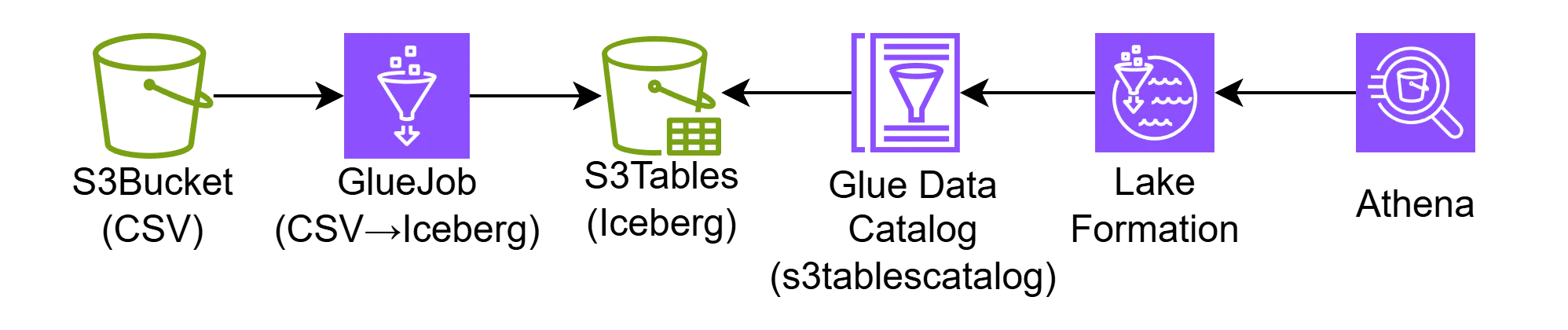
CSV形式の生ファイルをGlueJobでIcebargに変換し、S3 Tables(テーブルバケット)に格納します。Glue Data Catalogを介し、S3 TablesとLake Formationを統合することでAthenaがクエリ可能なデータを制御します。
Step 1:TerraformでS3 Tablesを構築する
ディレクトリ構成
プロジェクトのルート直下に配置したmain.tfからmodulesフォルダ内の各リソース作成モジュールを呼び出す構成です。
s3-tables-iceberg-lab/
├── main.tf          ← モジュールの呼び出し
├── providers.tf     ← プロバイダー情報
├── variables.tf     ← 変数
└── modules/         ← 各モジュールを格納
    ├── s3_tables/   ← S3テーブル関連
    │   ├── main.tf
    │   ├── variables.tf
    │   └── outputs.tf
    ├── s3_landing/  ← 生データ格納S3関連
    │   ├── main.tf
    │   ├── variables.tf
    │   └── outputs.tf
    ├── iam/         ← IAM権限関連
    │   ├── main.tf
    │   ├── variables.tf
    │   └── outputs.tf
    └── glue/        ← glue関連
        ├── main.tf
        ├── variables.tf
        ├── outputs.tf
        └── scripts/
modules/s3_tables/main.tf
S3テーブル関連のリソースをモジュールとして定義しています。
# S3 テーブルバケット
resource "aws_s3tables_table_bucket" "main" {
  name = var.project_name

  encryption_configuration {
    sse_algorithm = "AES256"
    kms_key_arn   = null
  }

}


# 現在の実行アカウント情報を取得
data "aws_caller_identity" "current" {}

# S3 Tablesバケットポリシードキュメントの定義(awsにリソースは作成しない)
data "aws_iam_policy_document" "table_bucket" {
  statement {
    sid     = "AllowAccountAccess"
    actions = ["s3tables:*"]

    principals {
      type        = "AWS"
      identifiers = [data.aws_caller_identity.current.account_id]
    }

    resources = [
      "${aws_s3tables_table_bucket.main.arn}/*"
    ]
  }
}

# テーブルバケットポリシー
resource "aws_s3tables_table_bucket_policy" "main" {
  resource_policy  = data.aws_iam_policy_document.table_bucket.json
  table_bucket_arn = aws_s3tables_table_bucket.main.arn
}


# Namespace
resource "aws_s3tables_namespace" "analytics" {
  namespace        = "analytics"
  table_bucket_arn = aws_s3tables_table_bucket.main.arn
}

# Icebergテーブル(箱だけ。スキーマはAthenaで定義)
resource "aws_s3tables_table" "orders" {
  name             = "orders"
  namespace        = aws_s3tables_namespace.analytics.namespace
  table_bucket_arn = aws_s3tables_table_bucket.main.arn
  format           = "ICEBERG"
}

resource "aws_s3tables_table" "customers" {
  name             = "customers"
  namespace        = aws_s3tables_namespace.analytics.namespace
  table_bucket_arn = aws_s3tables_table_bucket.main.arn
  format           = "ICEBERG"
}
aws_s3tables_tableはテーブルの「箱」を作るだけです。カラム定義(スキーマ)はAthenaやSparkから行います。これはTerraformのS3 Tablesリソースの現時点の仕様です。
modules/s3_tables/variables.tf
モジュール内で使用する変数を定義しています。
variable "project_name" {
  description = "プロジェクト名"
  type        = string
  default     = "iceberg-lab"
}
modules/s3_landing/main.tf
生データ格納S3関連のリソースをモジュールとして定義しています。
# 現在の実行アカウント情報を取得
data "aws_caller_identity" "current" {}

# ランディングゾーンS3バケット(CSV生データ格納用)
resource "aws_s3_bucket" "landing" {
  bucket = "${var.project_name}-landing-${data.aws_caller_identity.current.account_id}"
}

# バージョニングの有効化
resource "aws_s3_bucket_versioning" "landing" {
  bucket = aws_s3_bucket.landing.id
  versioning_configuration {
    status = "Enabled"
  }
}
modules/s3_landing/variables.tf
モジュール内で使用する変数を定義しています。
variable "project_name" {
  description = "プロジェクト名"
  type        = string
  default     = "iceberg-lab"
}
providers.tf
awsのリソース管理を行うため、AWS Providerを含めています。
terraform {
  required_version = ">= 1.5.0"

  required_providers {
    aws = {
      source  = "hashicorp/aws"
      version = ">= 5.82.0"
    }
  }
}

provider "aws" {
  region = var.aws_region
}
variables.tf
プロジェクトのルート直下に配置したmain.tfで使用する変数を定義しています。
variable "aws_region" {
  description = "AWS リージョン"
  type        = string
  default     = "ap-northeast-1"
}

variable "project_name" {
  description = "プロジェクト名"
  type        = string
  default     = "iceberg-lab"
}
main.tf
プロジェクトのルート直下に配置したmain.tfからmodulesフォルダ内の各リソース作成モジュールを呼び出しています。
# S3テーブル関連
module "s3_tables" {
  source        = "./modules/s3_tables/"
  project_name  = var.project_name
}

# 生データ格納S3関連
module "s3_landing" {
  source        = "./modules/s3_landing/"
  project_name  = var.project_name
}
デプロイ
terraformを実行し、定義したリソースをデプロイしていきます。
C:\s3-tables-iceberg-lab > terraform init

Initializing the backend...
Initializing modules...
- s3_landing in modules\s3_landing
- s3_tables in modules\s3_tables
Initializing provider plugins...
- Finding hashicorp/aws versions matching ">= 5.82.0"...
- Installing hashicorp/aws v6.33.0...
- Installed hashicorp/aws v6.33.0 (signed by HashiCorp)
Terraform has created a lock file .terraform.lock.hcl to record the provider
selections it made above. Include this file in your version control repository
so that Terraform can guarantee to make the same selections by default when
you run "terraform init" in the future.

Terraform has been successfully initialized!

You may now begin working with Terraform. Try running "terraform plan" to see
any changes that are required for your infrastructure. All Terraform commands
should now work.

If you ever set or change modules or backend configuration for Terraform,
rerun this command to reinitialize your working directory. If you forget, other
commands will detect it and remind you to do so if necessary.
C:\s3-tables-iceberg-lab > terraform plan

module.s3_landing.data.aws_caller_identity.current: Reading...
module.s3_tables.data.aws_caller_identity.current: Reading...
module.s3_landing.data.aws_caller_identity.current: Read complete after 0s [id={AccoundID}]
module.s3_tables.data.aws_caller_identity.current: Read complete after 0s [id={AccoundID}]

Terraform used the selected providers to generate the following execution plan. Resource actions are indicated with the
following symbols:
  + create
 <= read (data resources)

Terraform will perform the following actions:

  # module.s3_landing.aws_s3_bucket.landing will be created
  + resource "aws_s3_bucket" "landing" {
      + acceleration_status         = (known after apply)
      + acl                         = (known after apply)
      + arn                         = (known after apply)
      + bucket                      = "iceberg-lab-landing-{AccoundID}"
      + bucket_domain_name          = (known after apply)
      + bucket_prefix               = (known after apply)
      + bucket_region               = (known after apply)
      + bucket_regional_domain_name = (known after apply)
      + force_destroy               = false
      + hosted_zone_id              = (known after apply)
      + id                          = (known after apply)
      + object_lock_enabled         = (known after apply)
      + policy                      = (known after apply)
      + region                      = "ap-northeast-1"
      + request_payer               = (known after apply)
      + website_domain              = (known after apply)
      + website_endpoint            = (known after apply)

      + cors_rule (known after apply)

      + grant (known after apply)

      + lifecycle_rule (known after apply)

      + logging (known after apply)

      + object_lock_configuration (known after apply)

      + replication_configuration (known after apply)

      + server_side_encryption_configuration (known after apply)

      + versioning (known after apply)

      + website (known after apply)
    }

  # module.s3_landing.aws_s3_bucket_versioning.landing will be created
  + resource "aws_s3_bucket_versioning" "landing" {
      + bucket = (known after apply)
      + id     = (known after apply)
      + region = "ap-northeast-1"

      + versioning_configuration {
          + mfa_delete = (known after apply)
          + status     = "Enabled"
        }
    }

  # module.s3_tables.data.aws_iam_policy_document.table_bucket will be read during apply
  # (config refers to values not yet known)
 <= data "aws_iam_policy_document" "table_bucket" {
      + id            = (known after apply)
      + json          = (known after apply)
      + minified_json = (known after apply)

      + statement {
          + actions   = [
              + "s3tables:*",
            ]
          + resources = [
              + (known after apply),
            ]
          + sid       = "AllowAccountAccess"

          + principals {
              + identifiers = [
                  + "{AccoundID}",
                ]
              + type        = "AWS"
            }
        }
    }

  # module.s3_tables.aws_s3tables_namespace.analytics will be created
  + resource "aws_s3tables_namespace" "analytics" {
      + created_at       = (known after apply)
      + created_by       = (known after apply)
      + namespace        = "analytics"
      + owner_account_id = (known after apply)
      + region           = "ap-northeast-1"
      + table_bucket_arn = (known after apply)
    }

  # module.s3_tables.aws_s3tables_table.customers will be created
  + resource "aws_s3tables_table" "customers" {
      + arn                       = (known after apply)
      + created_at                = (known after apply)
      + created_by                = (known after apply)
      + encryption_configuration  = (known after apply)
      + format                    = "ICEBERG"
      + maintenance_configuration = (known after apply)
      + metadata_location         = (known after apply)
      + modified_at               = (known after apply)
      + modified_by               = (known after apply)
      + name                      = "customers"
      + namespace                 = "analytics"
      + owner_account_id          = (known after apply)
      + region                    = "ap-northeast-1"
      + table_bucket_arn          = (known after apply)
      + tags_all                  = {}
      + type                      = (known after apply)
      + version_token             = (known after apply)
      + warehouse_location        = (known after apply)
    }

  # module.s3_tables.aws_s3tables_table.orders will be created
  + resource "aws_s3tables_table" "orders" {
      + arn                       = (known after apply)
      + created_at                = (known after apply)
      + created_by                = (known after apply)
      + encryption_configuration  = (known after apply)
      + format                    = "ICEBERG"
      + maintenance_configuration = (known after apply)
      + metadata_location         = (known after apply)
      + modified_at               = (known after apply)
      + modified_by               = (known after apply)
      + name                      = "orders"
      + namespace                 = "analytics"
      + owner_account_id          = (known after apply)
      + region                    = "ap-northeast-1"
      + table_bucket_arn          = (known after apply)
      + tags_all                  = {}
      + type                      = (known after apply)
      + version_token             = (known after apply)
      + warehouse_location        = (known after apply)
    }

  # module.s3_tables.aws_s3tables_table_bucket.main will be created
  + resource "aws_s3tables_table_bucket" "main" {
      + arn                       = (known after apply)
      + created_at                = (known after apply)
      + encryption_configuration  = {
          + sse_algorithm = "AES256"
        }
      + force_destroy             = false
      + maintenance_configuration = (known after apply)
      + name                      = "iceberg-lab"
      + owner_account_id          = (known after apply)
      + region                    = "ap-northeast-1"
    }

  # module.s3_tables.aws_s3tables_table_bucket_policy.main will be created
  + resource "aws_s3tables_table_bucket_policy" "main" {
      + region           = "ap-northeast-1"
      + resource_policy  = (known after apply)
      + table_bucket_arn = (known after apply)
    }

Plan: 7 to add, 0 to change, 0 to destroy.

───────────────────────────────────────────────────────────────────────────────────────────────────────────────────────

Note: You didn't use the -out option to save this plan, so Terraform can't guarantee to take exactly these actions if
you run "terraform apply" now.
C:\s3-tables-iceberg-lab > terraform apply
module.s3_tables.data.aws_caller_identity.current: Reading...
module.s3_landing.data.aws_caller_identity.current: Reading...
module.s3_tables.data.aws_caller_identity.current: Read complete after 0s [id={AccoundID}]
module.s3_landing.data.aws_caller_identity.current: Read complete after 0s [id={AccoundID}]

Terraform used the selected providers to generate the following execution plan. Resource actions are indicated with the
following symbols:
  + create
 <= read (data resources)

Terraform will perform the following actions:

  # module.s3_landing.aws_s3_bucket.landing will be created
  + resource "aws_s3_bucket" "landing" {
      + acceleration_status         = (known after apply)
      + acl                         = (known after apply)
      + arn                         = (known after apply)
      + bucket                      = "iceberg-lab-landing-{AccoundID}"
      + bucket_domain_name          = (known after apply)
      + bucket_prefix               = (known after apply)
      + bucket_region               = (known after apply)
      + bucket_regional_domain_name = (known after apply)
      + force_destroy               = false
      + hosted_zone_id              = (known after apply)
      + id                          = (known after apply)
      + object_lock_enabled         = (known after apply)
      + policy                      = (known after apply)
      + region                      = "ap-northeast-1"
      + request_payer               = (known after apply)
      + website_domain              = (known after apply)
      + website_endpoint            = (known after apply)

      + cors_rule (known after apply)

      + grant (known after apply)

      + lifecycle_rule (known after apply)

      + logging (known after apply)

      + object_lock_configuration (known after apply)

      + replication_configuration (known after apply)

      + server_side_encryption_configuration (known after apply)

      + versioning (known after apply)

      + website (known after apply)
    }

  # module.s3_landing.aws_s3_bucket_versioning.landing will be created
  + resource "aws_s3_bucket_versioning" "landing" {
      + bucket = (known after apply)
      + id     = (known after apply)
      + region = "ap-northeast-1"

      + versioning_configuration {
          + mfa_delete = (known after apply)
          + status     = "Enabled"
        }
    }

  # module.s3_tables.data.aws_iam_policy_document.table_bucket will be read during apply
  # (config refers to values not yet known)
 <= data "aws_iam_policy_document" "table_bucket" {
      + id            = (known after apply)
      + json          = (known after apply)
      + minified_json = (known after apply)

      + statement {
          + actions   = [
              + "s3tables:*",
            ]
          + resources = [
              + (known after apply),
            ]
          + sid       = "AllowAccountAccess"

          + principals {
              + identifiers = [
                  + "{AccoundID}",
                ]
              + type        = "AWS"
            }
        }
    }

  # module.s3_tables.aws_s3tables_namespace.analytics will be created
  + resource "aws_s3tables_namespace" "analytics" {
      + created_at       = (known after apply)
      + created_by       = (known after apply)
      + namespace        = "analytics"
      + owner_account_id = (known after apply)
      + region           = "ap-northeast-1"
      + table_bucket_arn = (known after apply)
    }

  # module.s3_tables.aws_s3tables_table.customers will be created
  + resource "aws_s3tables_table" "customers" {
      + arn                       = (known after apply)
      + created_at                = (known after apply)
      + created_by                = (known after apply)
      + encryption_configuration  = (known after apply)
      + format                    = "ICEBERG"
      + maintenance_configuration = (known after apply)
      + metadata_location         = (known after apply)
      + modified_at               = (known after apply)
      + modified_by               = (known after apply)
      + name                      = "customers"
      + namespace                 = "analytics"
      + owner_account_id          = (known after apply)
      + region                    = "ap-northeast-1"
      + table_bucket_arn          = (known after apply)
      + tags_all                  = {}
      + type                      = (known after apply)
      + version_token             = (known after apply)
      + warehouse_location        = (known after apply)
    }

  # module.s3_tables.aws_s3tables_table.orders will be created
  + resource "aws_s3tables_table" "orders" {
      + arn                       = (known after apply)
      + created_at                = (known after apply)
      + created_by                = (known after apply)
      + encryption_configuration  = (known after apply)
      + format                    = "ICEBERG"
      + maintenance_configuration = (known after apply)
      + metadata_location         = (known after apply)
      + modified_at               = (known after apply)
      + modified_by               = (known after apply)
      + name                      = "orders"
      + namespace                 = "analytics"
      + owner_account_id          = (known after apply)
      + region                    = "ap-northeast-1"
      + table_bucket_arn          = (known after apply)
      + tags_all                  = {}
      + type                      = (known after apply)
      + version_token             = (known after apply)
      + warehouse_location        = (known after apply)
    }

  # module.s3_tables.aws_s3tables_table_bucket.main will be created
  + resource "aws_s3tables_table_bucket" "main" {
      + arn                       = (known after apply)
      + created_at                = (known after apply)
      + encryption_configuration  = {
          + sse_algorithm = "AES256"
        }
      + force_destroy             = false
      + maintenance_configuration = (known after apply)
      + name                      = "iceberg-lab"
      + owner_account_id          = (known after apply)
      + region                    = "ap-northeast-1"
    }

  # module.s3_tables.aws_s3tables_table_bucket_policy.main will be created
  + resource "aws_s3tables_table_bucket_policy" "main" {
      + region           = "ap-northeast-1"
      + resource_policy  = (known after apply)
      + table_bucket_arn = (known after apply)
    }

Plan: 7 to add, 0 to change, 0 to destroy.

Do you want to perform these actions?
  Terraform will perform the actions described above.
  Only 'yes' will be accepted to approve.

  Enter a value: yes

module.s3_landing.aws_s3_bucket.landing: Creating...
module.s3_tables.aws_s3tables_table_bucket.main: Creating...
module.s3_landing.aws_s3_bucket.landing: Creation complete after 2s [id=iceberg-lab-landing-{AccoundID}]
module.s3_landing.aws_s3_bucket_versioning.landing: Creating...
module.s3_tables.aws_s3tables_table_bucket.main: Creation complete after 3s [name=iceberg-lab]
module.s3_tables.data.aws_iam_policy_document.table_bucket: Reading...
module.s3_tables.aws_s3tables_namespace.analytics: Creating...
module.s3_tables.data.aws_iam_policy_document.table_bucket: Read complete after 0s [id=3931547792]
module.s3_tables.aws_s3tables_table_bucket_policy.main: Creating...
module.s3_tables.aws_s3tables_namespace.analytics: Creation complete after 0s
module.s3_tables.aws_s3tables_table.customers: Creating...
module.s3_tables.aws_s3tables_table.orders: Creating...
module.s3_landing.aws_s3_bucket_versioning.landing: Creation complete after 1s [id=iceberg-lab-landing-{AccoundID}]
module.s3_tables.aws_s3tables_table_bucket_policy.main: Creation complete after 0s
module.s3_tables.aws_s3tables_table.orders: Creation complete after 1s [name=orders]
module.s3_tables.aws_s3tables_table.customers: Creation complete after 1s [name=customers]

Apply complete! Resources: 7 added, 0 changed, 0 destroyed.
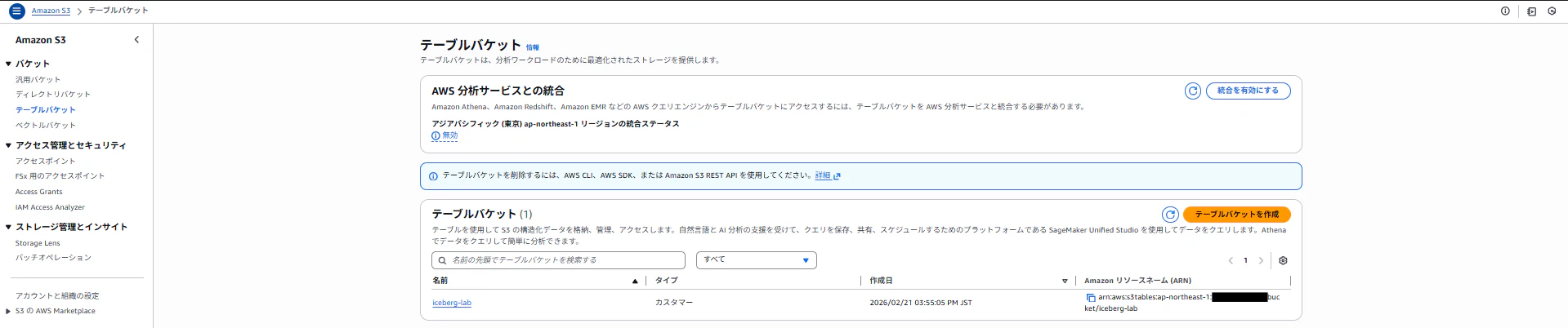
terraform applyが成功すると、S3コンソールにテーブルバケットが表示されます。
Step 2:Lake Formationを設定する(マネコン作業)
S3 TablesをAthenaからクエリするには、Lake Formationの権限設定が必須です。
ここは2026年2月時点でTerraformだけでは完結しません。
2-1. AWS分析サービスとの統合を有効化
「統合を有効にする」から、統合を有効にします。統合すると以下が自動で行われます。
- アカウントとリージョンごとに、Glue Data Catalog内にs3tablescatalogという単一の親カタログが作成される。また、そのカタログにテーブルバケットごとのサブカタログが作成される。
- Lake FormationがバケットテーブルにアクセスするためのIAM権限が作成される

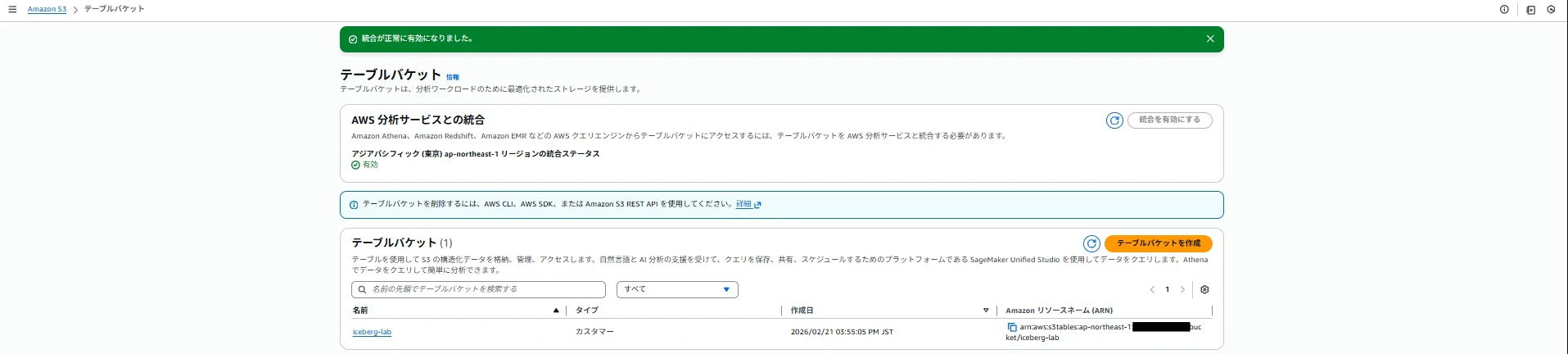
LakeFormationのカタログから確認できます。

GlueデータカタログとS3 Tablesカタログの違い
| Glueカタログ | S3 Tablesカタログ | |
|---|---|---|
| メタデータの管理者 | Glue | S3 |
| カタログの種類 | Managed(Glue自身がメタデータを自前のDBに保持) | Federated(Glueは「このカタログはS3 Tablesに聞いてね」という転送先情報だけを持っていて、実際のメタデータは外部から取得) |
| テーブルの実体 | 通常のS3オブジェクト | Table Bucket内の専用リソース |
| カタログID | 123456789012(12桁) | 123456789012:s3tablescatalog/バケット名 |
| Crawlerの必要性 | スキーマ検出にCrawlerが必要 | 不要(S3が自動でメタデータ管理) |
| Athenaでの参照 | AwsDataCatalog.db.table | s3tablescatalog/バケット名.namespace.table |
統合が必要な理由
S3 TablesはS3独自にメタデータを管理しているため、AthenaやLake FormationといったAWSの分析サービスはそのままでは認識できない。そこでGlueがs3tablescatalogというフェデレーテッドカタログを自動作成し、S3への問い合わせを仲介することで、既存のAWSサービスから透過的にアクセスできるようにしている。つまりGlueはメタデータの実体を持たず、あくまでS3 Tablesへのリクエストを中継する翻訳機として機能している。
2-2. Lake Formationのデータベースレベル権限を付与
AthenaよりS3 Tablesにクエリを実行するためのデータベース、テーブルに対するアクセス権限をLake Formationで設定します。
| 項目 | 設定値 |
|---|---|
| Principals | 自分のIAMユーザーorロール(コンソールよりクエリ実行するため) |
| LF-Tags or catalog resources | Named Data Catalog resources |
| Catalogs | s3tablescatalog/<テーブルバケット名> |
| Databases | analytics |
| Tables | customers, orders |
| Database permissions | Super(全権限) |
| Grantable permissions | Super(全権限) |
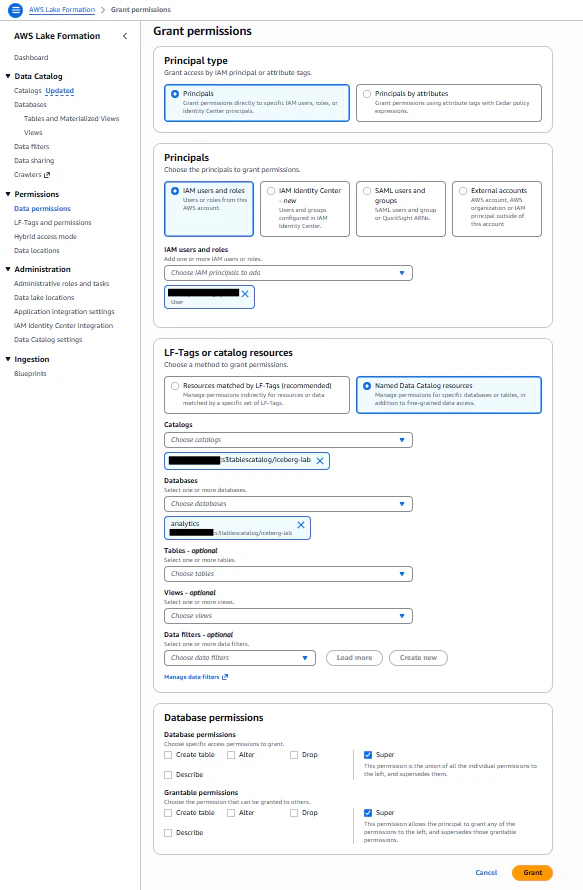
2-3. Lake Formation のテーブルレベル権限を付与
同様にテーブルレベルでも付与します。
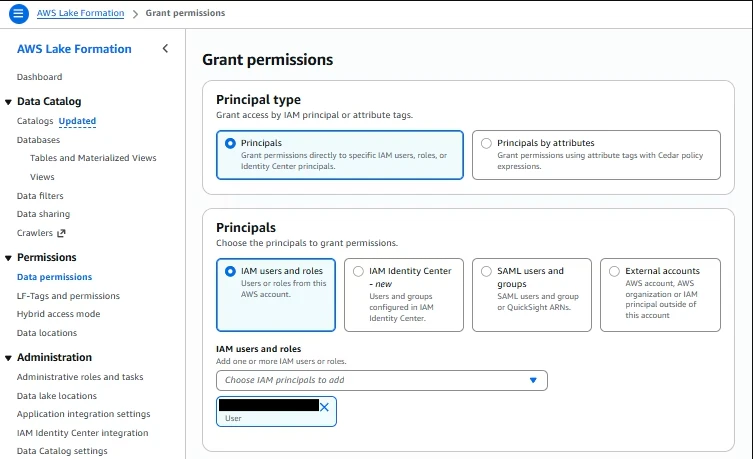
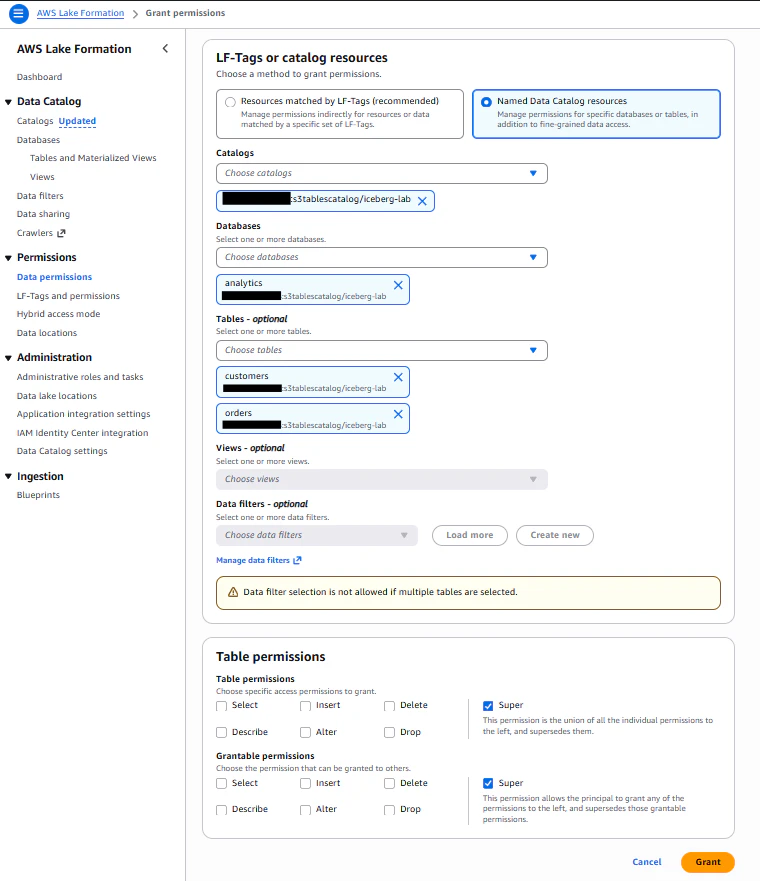
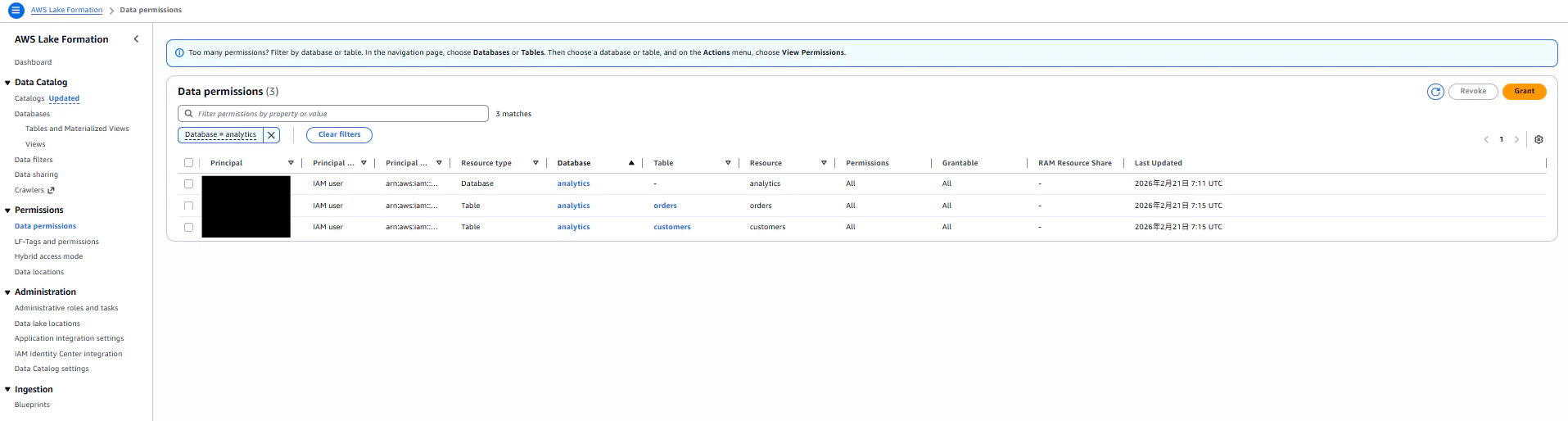
データベース、テーブル共に指定したIAMユーザからのアクセス許可を設定しました。
Step 3:Athenaでテーブルを定義してデータ投入する
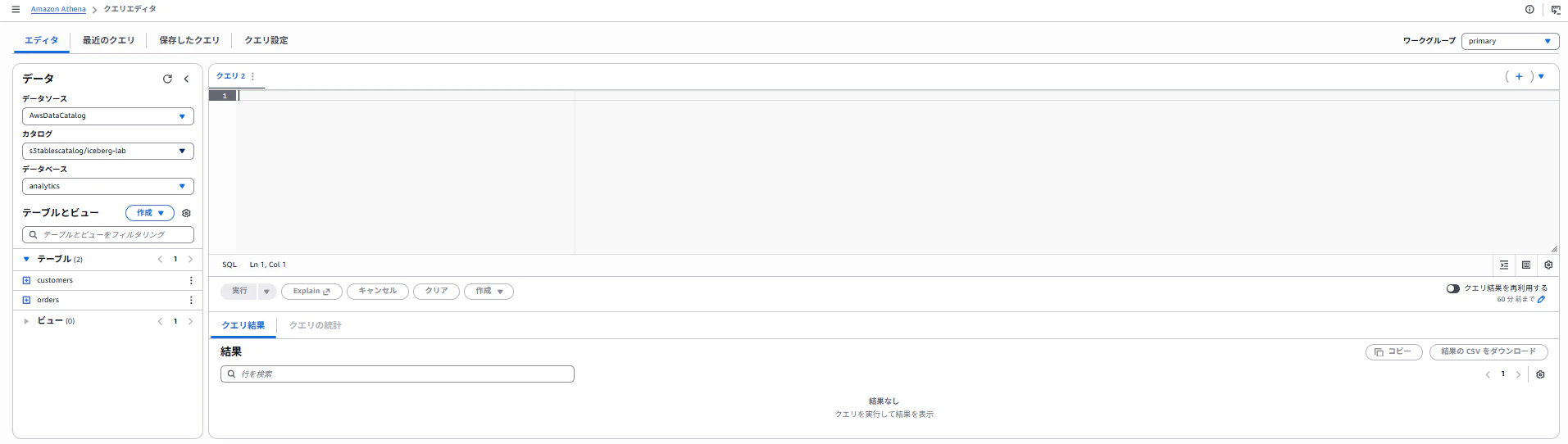
3-1. Athenaのカタログ選択
Athenaのコンソール画面にてクエリ対象となるデータカタログ、データベースを選択します。
Catalog : s3tablescatalog/<テーブルバケット名>
Database : analytics
3-2. テーブルスキーマの定義
以下のクエリを実行し、テーブルスキーマを定義します。
-- ordersテーブル
CREATE TABLE analytics.orders (
    order_id       BIGINT,
    customer_id    BIGINT,
    order_date     DATE,
    product_name   STRING,
    quantity       INT,
    unit_price     DECIMAL(10,2),
    total_amount   DECIMAL(10,2),
    status         STRING,
    region         STRING,
    created_at     TIMESTAMP
)
TBLPROPERTIES ('table_type' = 'iceberg');
-- customersテーブル
CREATE TABLE analytics.customers (
    customer_id    BIGINT,
    customer_name  STRING,
    email          STRING,
    city           STRING,
    country        STRING,
    segment        STRING,
    created_at     TIMESTAMP
)
TBLPROPERTIES ('table_type' = 'iceberg');
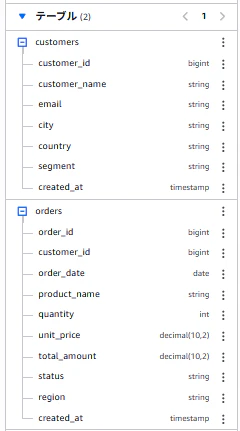
クエリ実行後、Athenaの画面上で各テーブルのスキーマ情報が確認できました。
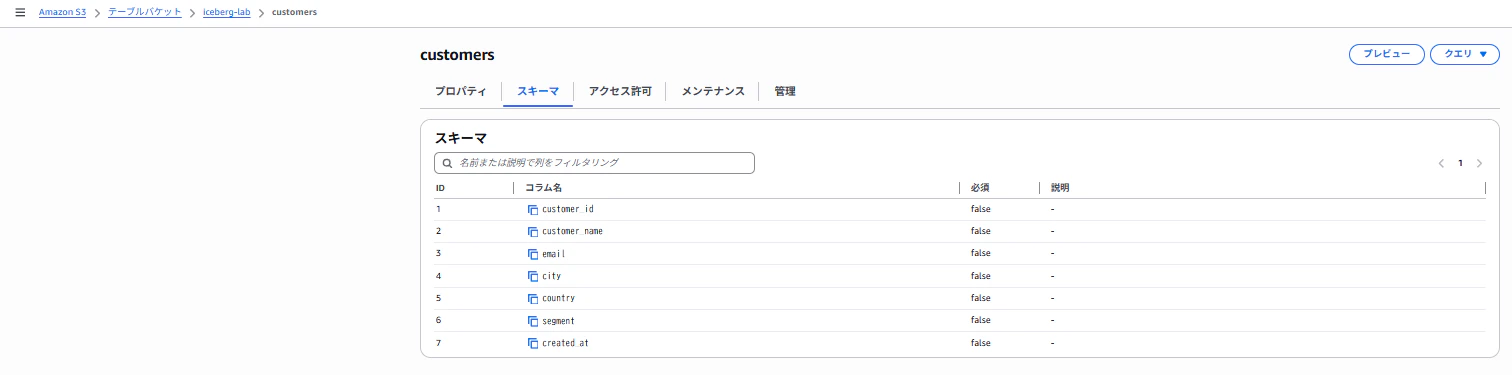
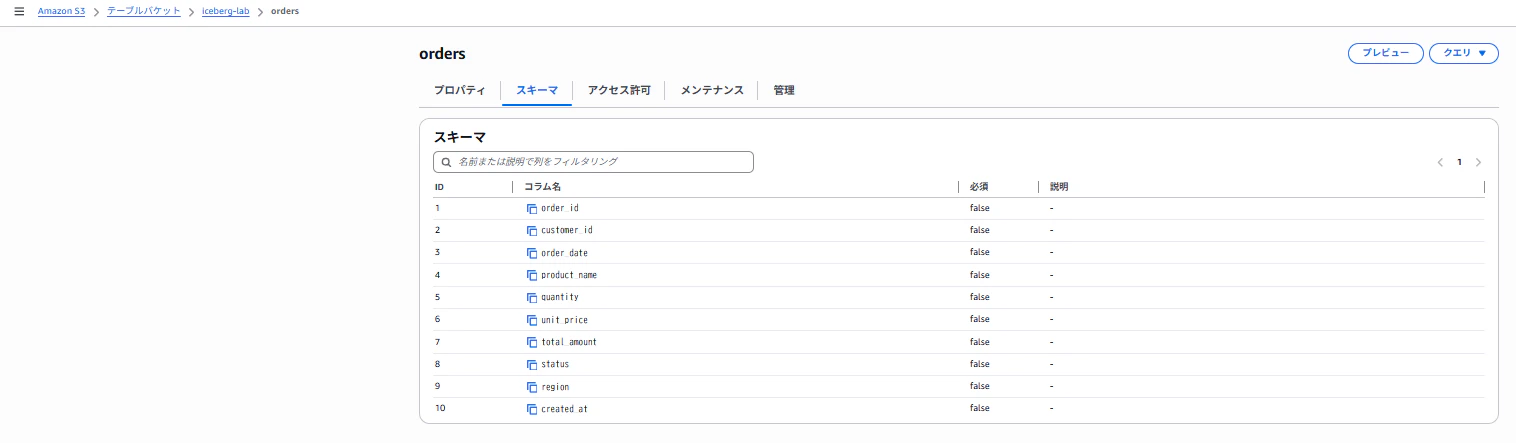
また、S3のテーブルバケットからも各テーブルのスキーマ情報が確認できました。
3-3. テストデータのINSERT
それでは実際に各テーブルにテストデータを挿入していきます。
INSERT INTO analytics.customers VALUES
(1, '田中太郎',   'tanaka@example.com', '東京',        'Japan', 'Enterprise', TIMESTAMP '2024-01-15 09:00:00'),
(2, '佐藤花子',   'sato@example.com',   '大阪',        'Japan', 'SMB',        TIMESTAMP '2024-02-20 10:30:00'),
(3, 'John Smith', 'john@example.com',   'New York',    'USA',   'Enterprise', TIMESTAMP '2024-03-10 14:00:00'),
(4, '鈴木一郎',   'suzuki@example.com', '名古屋',      'Japan', 'Startup',    TIMESTAMP '2024-04-05 08:45:00'),
(5, 'Emily Chen', 'emily@example.com',  'San Francisco','USA',  'Enterprise', TIMESTAMP '2024-05-12 16:20:00');
INSERT INTO analytics.orders VALUES
(1001, 1, DATE '2024-06-01', 'Cloud Storage 1TB',      12, 29.99,  359.88, 'completed', 'ap-northeast-1', TIMESTAMP '2024-06-01 10:00:00'),
(1002, 2, DATE '2024-06-05', 'Compute Instance m5.xl',  3, 199.99, 599.97, 'completed', 'ap-northeast-1', TIMESTAMP '2024-06-05 11:30:00'),
(1003, 3, DATE '2024-06-10', 'Database RDS',             1, 499.99, 499.99, 'completed', 'us-east-1',      TIMESTAMP '2024-06-10 09:15:00'),
(1004, 1, DATE '2024-07-01', 'Cloud Storage 1TB',       24, 29.99,  719.76, 'completed', 'ap-northeast-1', TIMESTAMP '2024-07-01 10:00:00'),
(1005, 4, DATE '2024-07-15', 'Compute Instance m5.xl',   1, 199.99, 199.99, 'pending',   'ap-northeast-1', TIMESTAMP '2024-07-15 14:00:00'),
(1006, 5, DATE '2024-08-01', 'ML Training GPU',          2, 999.99,1999.98, 'completed', 'us-west-2',      TIMESTAMP '2024-08-01 08:00:00');
3-4. クエリの実行
データが挿入されたS3 Tablesに対してクエリを実行します。
-- 顧客ごとの売上集計
SELECT
    c.customer_name,
    c.segment,
    COUNT(o.order_id)  AS order_count,
    SUM(o.total_amount) AS total_revenue
FROM analytics.orders o
JOIN analytics.customers c ON o.customer_id = c.customer_id
WHERE o.status = 'completed'
GROUP BY c.customer_name, c.segment
ORDER BY total_revenue DESC;
実行結果
#	customer_name  segment	   order_count	total_revenue
1	Emily Chen	   Enterprise  1	        1999.98
2	田中太郎	       Enterprise  2	        1079.64
3	佐藤花子	       SMB	       1	        599.97
4	John Smith	   Enterprise  1	        499.99
ここまでがS3 Tables+AthenaでIcebergを使う最小構成です。
Step 4:Icebergの機能群紹介、検証
ここからはIcebergで可能になった、従来のS3+Hiveでは不可能だった操作を試します。
従来のS3データレイクではS3上のファイルは追記のみが基本で、データの更新・削除は「全件洗い替え」で対応するしかありませんでした。例えば1行修正するだけでも、全データを読み込んで書き直す必要がありました。
Icebergはこの制限を「追記のみ」という原則を維持しながら解消しています。UPDATEやDELETEを実行しても元のデータファイルは書き換えず、変更差分や削除差分だけを新しいファイルとして追記します。そして「今どのファイルを組み合わせれば最新状態になるか」をメタデータ(snapshotファイル)が管理することで、クエリ時に正しいデータを返す仕組みになっています。
イメージ図
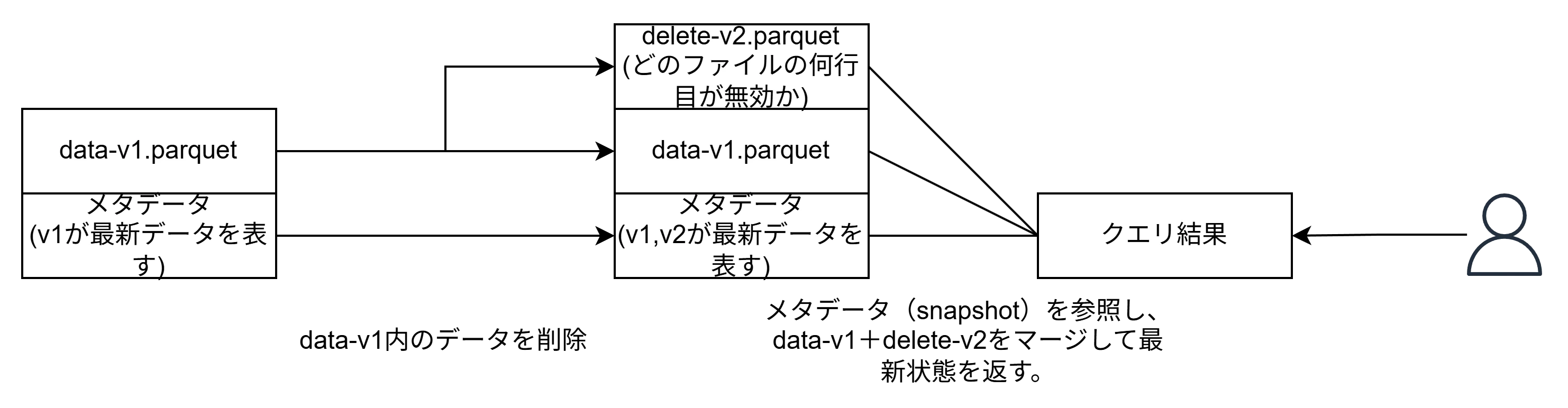
これにより、AthenaからUPDATE・DELETE・MERGE INTOが直接実行できるようになり、全件洗い替えをする必要がなくなります。また、スキーマ進化やタイムトラベル、メタデータ管理も可能になっています。
4-1. UPDATE / DELETE(行レベル操作)
行レベルでのデータ更新を行います。
-- pending → completed、total_amountの値更新
UPDATE analytics.orders
SET status = 'completed', total_amount = 189.99
WHERE order_id = 1005;
更新前データ
SELECT order_id, status, total_amount FROM analytics.orders WHERE order_id = 1005;

-- 実行結果
#	order_id	status	    total_amount
1	1005	    pending	    199.99
更新後データ
SELECT order_id, status, total_amount FROM analytics.orders WHERE order_id = 1005;

-- 実行結果
#	order_id	status	    total_amount
1	1005	    completed	189.99
行レベルでのデータ削除を行います。
-- 特定行の削除
DELETE FROM analytics.orders WHERE order_id = 1006;
削除前データ
SELECT order_id FROM analytics.orders ORDER BY order_id;

-- 実行結果
#	order_id
1	1001
2	1002
3	1003
4	1004
5	1005
6	1006
削除後データ
SELECT order_id FROM analytics.orders ORDER BY order_id;

-- 実行結果
#	order_id
1	1001
2	1002
3	1003
4	1004
5	1005
更新、削除共に行レベルでの実行に成功しました。
4-2. スキーマ進化(Schema Evolution)
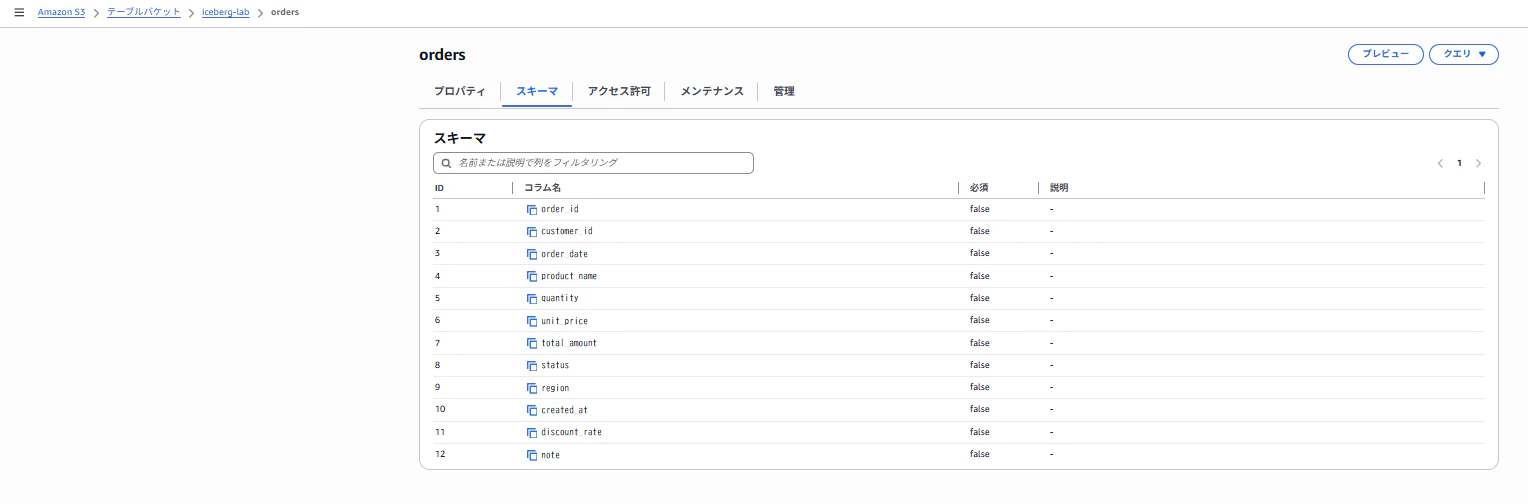
テーブルを作り直さずにカラムを追加できます。
-- カラム追加
ALTER TABLE analytics.orders ADD COLUMNS (
    discount_rate DECIMAL(5,2),
    note          STRING
);

-- 新しいカラムを含むデータをINSERT
INSERT INTO analytics.orders VALUES
(1007, 2, DATE '2024-09-01', 'Compute Instance m5.xl', 5, 199.99, 849.96, 'completed', 'ap-northeast-1', TIMESTAMP '2024-09-01 12:00:00', 0.15, '長期契約割引');

-- データ確認
SELECT order_id, product_name, discount_rate, note
FROM analytics.orders
ORDER BY order_id;

-- 実行結果(既存行は新カラムがNULL、新しい行には値が入っている)
#	order_id	product_name	        discount_rate	note
1	1001	    Cloud Storage 1TB
2	1002	    Compute Instance m5.xl
3	1003	    Database RDS
4	1004	    Cloud Storage 1TB
5	1005	    Compute Instance m5.xl
6	1007	    Compute Instance m5.xl	0.15	        長期契約割引
S3のテーブルバケットからも該当テーブルのスキーマが変更されていることが確認できました。
4-3. MERGE INTO(Upsert)── データ基盤で最も使う操作
データ基盤の実務では「新規行はINSERT、既存行はUPDATE」というUpsert(MERGE INTO)が最頻出パターンです。
たとえば毎晩、業務DBから注文データを取り込む場合を考えてください。昨日と今日で同じorder_idがあったら最新の状態に更新し、新しいorder_idがあったら追加したい。これがUpsertであり、CDC(変更データキャプチャ)や増分ロードで使います。
-- Athenaより一時的なステージングテーブルを用意(新しいデータが到着した想定)。4-3完了次第、削除する。
CREATE TABLE analytics.orders_staging (
    order_id       BIGINT,
    customer_id    BIGINT,
    order_date     DATE,
    product_name   STRING,
    quantity       INT,
    unit_price     DECIMAL(10,2),
    total_amount   DECIMAL(10,2),
    status         STRING,
    region         STRING,
    created_at     TIMESTAMP,
    discount_rate  DECIMAL(5,2),
    note           STRING
)
TBLPROPERTIES ('table_type' = 'iceberg');

-- ステージングにデータ投入(既存order_id=1001の更新 + 新規order_id=1008)
INSERT INTO analytics.orders_staging VALUES
(1001, 1, DATE '2024-06-01', 'Cloud Storage 1TB', 12, 29.99, 359.88, 'refunded', 'ap-northeast-1', TIMESTAMP '2024-06-01 10:00:00', NULL, '返金処理済'),
(1008, 3, DATE '2024-10-01', 'Support Plan Business', 1, 299.99, 299.99, 'completed', 'us-east-1', TIMESTAMP '2024-10-01 09:00:00', 0.00, NULL);
クエリ実行後、Athenaの画面上で該当テーブルのスキーマ情報が確認できました。
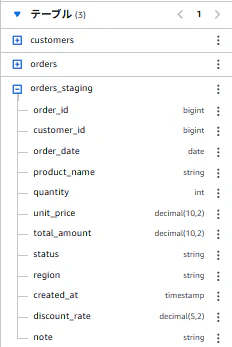
また、S3のテーブルバケットからも該当テーブルのスキーマ情報が確認できました。

-- MERGE INTOでUpsert実行
MERGE INTO analytics.orders AS target
USING analytics.orders_staging AS source
ON target.order_id = source.order_id
WHEN MATCHED THEN
    UPDATE SET
        status       = source.status,
        total_amount = source.total_amount,
        note         = source.note
WHEN NOT MATCHED THEN
    INSERT (order_id, customer_id, order_date, product_name, quantity,
            unit_price, total_amount, status, region, created_at, discount_rate, note)
    VALUES (source.order_id, source.customer_id, source.order_date, source.product_name,
            source.quantity, source.unit_price, source.total_amount, source.status,
            source.region, source.created_at, source.discount_rate, source.note);
マージ実行前データ
SELECT order_id, status, note FROM analytics.orders
WHERE order_id IN (1001, 1008) ORDER BY order_id;

-- 実行結果
#	order_id  status	 note
1	1001	  completed
マージ実行後データ
SELECT order_id, status, note FROM analytics.orders
WHERE order_id IN (1001, 1008) ORDER BY order_id;

-- 実行結果
#	order_id status	    note
1	1001	 refunded	返金処理済
2	1008	 completed
ON条件で合致した既存のデータは更新、合致しないデータは挿入されました。
AthenaのMERGE INTOで注意すべき構文
-
WHEN MATCHED THEN UPDATE SETの後に括弧をつけない(括弧をつけるとエラー) - SET句のカラム名にテーブルエイリアスをつけない(
target.status = ...ではなくstatus = ...) - 1つのソース行が複数のターゲット行にマッチするとエラーになる(ON条件のキー設計が重要)
4-4. タイムトラベルクエリ
Icebergはすべての変更をスナップショットとして保持します。過去のデータを参照できます。
まずはスナップショットの一覧を確認します。
-- スナップショット一覧
SELECT
    snapshot_id,
    committed_at,
    operation,
    summary
FROM analytics.orders$snapshots
ORDER BY committed_at;

-- 実行結果
-- snapshot_id → そのスナップショットを一意に識別するID
-- committed_at → そのスナップショットが作成された日時
-- parent_id → 1つ前のスナップショットのID(最初のsnapshotはNULL)
-- oparation → そのスナップショットで行われた操作の種類
#	snapshot_id	        committed_at	            parent_id            operation	summary
1	2653307256820405384	2026-02-21 07:38:47.958 UTC	                     append	    {changed-partition-count=1, added-data-files=1, total-equality-deletes=0, added-records=6, trino_query_id=20260221_073846_00043_scsts, total-position-deletes=0, added-files-size=2044, total-delete-files=0, total-files-size=2044, total-records=6, total-data-files=1}
2	7682000187644658140	2026-02-21 13:14:30.408 UTC	2653307256820405384  overwrite	{added-data-files=1, added-position-deletes=1, total-equality-deletes=0, added-records=1, trino_query_id=20260221_131427_00070_i3adm, added-position-delete-files=1, added-delete-files=1, total-records=7, changed-partition-count=1, total-position-deletes=1, added-files-size=2850, total-delete-files=1, total-files-size=4894, total-data-files=2}
3	382385938249511333	2026-02-21 13:26:54.733 UTC	7682000187644658140  overwrite	{added-position-deletes=1, total-equality-deletes=0, trino_query_id=20260221_132652_00043_dzsdt, added-position-delete-files=1, added-delete-files=1, total-records=7, changed-partition-count=1, total-position-deletes=2, added-files-size=1105, total-delete-files=2, total-files-size=5999, total-data-files=2}
4	3735536292944924017	2026-02-21 13:39:27.179 UTC	382385938249511333   append	    {changed-partition-count=1, added-data-files=1, total-equality-deletes=0, added-records=1, trino_query_id=20260221_133924_00016_dj44t, total-position-deletes=2, added-files-size=2097, total-delete-files=2, total-files-size=8096, total-records=8, total-data-files=3}
5	6146627773770661249	2026-02-21 16:56:15.753 UTC	3735536292944924017  overwrite	{added-data-files=1, added-position-deletes=1, total-equality-deletes=0, added-records=2, trino_query_id=20260221_165612_00232_z44c4, added-position-delete-files=1, added-delete-files=1, total-records=10, changed-partition-count=1, total-position-deletes=3, added-files-size=3130, total-delete-files=3, total-files-size=11226, total-data-files=4}
summary用語一覧
added-records : そのsnapshotで新たに追加されたレコード数
total-records : 削除マークを除いた現時点のテーブル合計レコード数
added-data-files : そのsnapshotで新たに追加されたParquetファイルの数
total-data-files : 現時点で有効なParquetファイルの累計数
added-position-deletes : そのsnapshotで新たに追加された削除マークの数
total-position-deletes : 現時点で蓄積している削除マークの累計数(大きくなるとcompaction推奨)
added-delete-files : そのsnapshotで新たに追加された削除ファイル(.parquet)の数
total-delete-files : 現時点で存在する削除ファイルの累計数
added-files-size : そのsnapshotで追加されたファイルの合計バイトサイズ
total-files-size : 現時点の全ファイル(データ+削除)の合計バイトサイズ
changed-partition-count : そのsnapshotで変更が加わったパーティションの数
削除マーク
レコード削除時に作成される「どのファイルの何行目が無効か」を記録した小さなファイル。蓄積するほどクエリ時のマージ処理が増えてパフォーマンスが落ちる。定期的にcompactionを実行して、削除マークを反映した新しいParquetに書き直す必要がある。S3 Tablesは自動compactionが有効なのでこれを自動でやってくれる。
次に、特定時刻を指定し、4-1で実行したデータ削除(条件はorder_id=1006)を実行する前のデータを参照します。
-- 特定時刻のデータを参照(DELETE前の状態を確認)
SELECT *
FROM analytics.orders
FOR TIMESTAMP AS OF TIMESTAMP '2026-02-21 13:14:30.408';

-- 実行結果
#	order_id  customer_id	order_date	product_name	        quantity  unit_price  total_amount	status	   region	       created_at
1	1001	  1	            2024-06-01	Cloud Storage 1TB	    12	      29.99	      359.88	    completed  ap-northeast-1  2024-06-01 10:00:00.000000
2	1002	  2	            2024-06-05	Compute Instance m5.xl	3	      199.99	  599.97	    completed  ap-northeast-1  2024-06-05 11:30:00.000000
3	1003	  3	            2024-06-10	Database RDS	        1	      499.99	  499.99	    completed  us-east-1	   2024-06-10 09:15:00.000000
4	1004	  1	            2024-07-01	Cloud Storage 1TB	    24	      29.99	      719.76	    completed  ap-northeast-1  2024-07-01 10:00:00.000000
5	1005	  4	            2024-07-15	Compute Instance m5.xl	1	      199.99	  189.99	    completed  ap-northeast-1  2024-07-15 14:00:00.000000
6	1006	  5	            2024-08-01	ML Training GPU	        2	      999.99	  1999.98	    completed  us-west-2	   2024-08-01 08:00:00.000000
order_idが1006のレコードが残っている削除前のデータを参照できました。
また、スナップショットIDを指定しての参照も可能です。4-1でのデータ更新(条件はorder_id=1005。statusをcompletedに)を実行する前のデータを参照します。
-- スナップショットIDを指定して参照
SELECT *
FROM analytics.orders
FOR VERSION AS OF 2653307256820405384; # snapshot_id

-- 実行結果
#	order_id  total_amount	status
1	1001	  359.88	    completed
2	1002	  599.97	    completed
3	1003	  499.99	    completed
4	1004	  719.76	    completed
5	1005	  199.99	    pending
6	1006	  1999.98	    completed
order_idが1005のレコードが変更前の状態でデータ参照できました。
4-5. Icebergメタデータテーブル
テーブルの内部構造を可視化できます。パフォーマンスチューニングやトラブルシュートに有用です。
-- スナップショットの一覧
SELECT snapshot_id, committed_at, operation, summary
FROM analytics."orders$snapshots";

-- 実行結果
-- snapshot_id : そのスナップショットを一意に識別するID
-- committed_at : そのスナップショットが作成された日時
-- parent_id : 1つ前のスナップショットのID(最初のsnapshotはNULL)。これによりsnapshotが連鎖的に繋がり履歴を辿れる。
-- oparation : そのスナップショットで行われた操作の種類
#	snapshot_id	        committed_at	            operation	summary
1	2653307256820405384	2026-02-21 07:38:47.958 UTC	append	    {changed-partition-count=1, added-data-files=1, total-equality-deletes=0, added-records=6, trino_query_id=20260221_073846_00043_scsts, total-position-deletes=0, added-files-size=2044, total-delete-files=0, total-files-size=2044, total-records=6, total-data-files=1}
2	7682000187644658140	2026-02-21 13:14:30.408 UTC	overwrite	{added-data-files=1, added-position-deletes=1, total-equality-deletes=0, added-records=1, trino_query_id=20260221_131427_00070_i3adm, added-position-delete-files=1, added-delete-files=1, total-records=7, changed-partition-count=1, total-position-deletes=1, added-files-size=2850, total-delete-files=1, total-files-size=4894, total-data-files=2}
3	382385938249511333	2026-02-21 13:26:54.733 UTC	overwrite	{added-position-deletes=1, total-equality-deletes=0, trino_query_id=20260221_132652_00043_dzsdt, added-position-delete-files=1, added-delete-files=1, total-records=7, changed-partition-count=1, total-position-deletes=2, added-files-size=1105, total-delete-files=2, total-files-size=5999, total-data-files=2}
4	3735536292944924017	2026-02-21 13:39:27.179 UTC	append	    {changed-partition-count=1, added-data-files=1, total-equality-deletes=0, added-records=1, trino_query_id=20260221_133924_00016_dj44t, total-position-deletes=2, added-files-size=2097, total-delete-files=2, total-files-size=8096, total-records=8, total-data-files=3}
5	6146627773770661249	2026-02-21 16:56:15.753 UTC	overwrite	{added-data-files=1, added-position-deletes=1, total-equality-deletes=0, added-records=2, trino_query_id=20260221_165612_00232_z44c4, added-position-delete-files=1, added-delete-files=1, total-records=10, changed-partition-count=1, total-position-deletes=3, added-files-size=3130, total-delete-files=3, total-files-size=11226, total-data-files=4}

-- マニフェスト一覧
SELECT added_snapshot_id, path, length, added_data_files_count, existing_data_files_count
FROM analytics."orders$manifests";

-- 実行結果
-- 表示されるのは最新スナップショットが参照している全マニフェストの一覧
-- added_snapshot_id : マニフェストが作成されたスナップショットのID
-- path : マニフェストが格納されているS3のパス
-- added_data_files_count : マニフェスト作成時に新規追加されたファイル数
-- added_rows_count : マニフェスト作成時に追加されたレコード数

#	added_snapshot_id    path	        length	 added_data_files_count	added_rows_count
1	6146627773770661249  s3://xxx.avro	7578     1	                    2
2	3735536292944924017  s3://xxx.avro	7527     1	                    1
3	7682000187644658140  s3://xxx.avro	7353     1	                    1
4	2653307256820405384  s3://xxx.avro	7428     1	                    6
5	6146627773770661249  s3://xxx.avro	7426     1	                    1
6	382385938249511333   s3://xxx.avro	7293     1	                    1
7	768200018764465814   s3://xxx.avro	7295	 1  	                1

-- データファイル一覧
SELECT file_path, file_format, record_count, file_size_in_bytes
FROM analytics."orders$files";

-- 実行結果
-- 表示されるのは最新スナップショットが参照しているマニフェストファイルが参照しているデータファイルの一覧
-- file_path : データファイルが格納されているS3のパス
-- file_format : データファイルのフォーマット
-- record_count : データファイルのレコード数
-- file_size_in_bytes : データファイルのサイズ
#	file_path	        file_format	record_count	file_size_in_bytes
1	s3://xxx.parquet	PARQUET	    1	            2097
2	s3://xxx.parquet	PARQUET	    6	            2044
3	s3://xxx.parquet	PARQUET	    1	            1745
4	s3://xxx.parquet	PARQUET	    2	            2025
スナップショット・マニフェスト・データファイルの関係
Icebergのメタデータは以下の3層構造になっています。
スナップショット($snapshots)
テーブルの操作履歴を表す単位。INSERT/UPDATE/DELETEのたびに新しいスナップショットが作成される。
クエリ時は最新スナップショットを起点にデータを解決する。
マニフェスト($manifests)
スナップショットが参照するファイル管理の単位。$manifestsで表示される一覧は最新スナップショットが参照している全マニフェストの一覧。
スナップショットが新しくなるたびに差分だけ新しいマニフェストを追加し、過去のマニフェストは再利用する設計になっているため、最新スナップショットは過去のものを含め複数のマニフェストを参照する。
データファイル($files)
実際のParquetファイルの一覧。$filesで返されるのは最新スナップショットが参照しているマニフェスト群が指しているデータファイルのみ(削除ファイル・過去のsnapshotにしか存在しないファイルは含まない)。
4-6. テーブルメンテナンス(OPTIMIZE + VACUUM)
IcebergはUPDATE/DELETEのたびにファイルが増え続けます。メンテナンスを怠るとクエリ性能が劣化し、ストレージコストが膨らみます。テーブルを作って終わりではなく、継続的なメンテナンスが必要です。
DELETEの内部挙動を理解する
IcebergのDELETEはデータファイルを直接書き換えません。代わりに「どのファイルのどの行を削除したか」を記録するPositionDeleteファイルを新たに作成します。
イメージ図
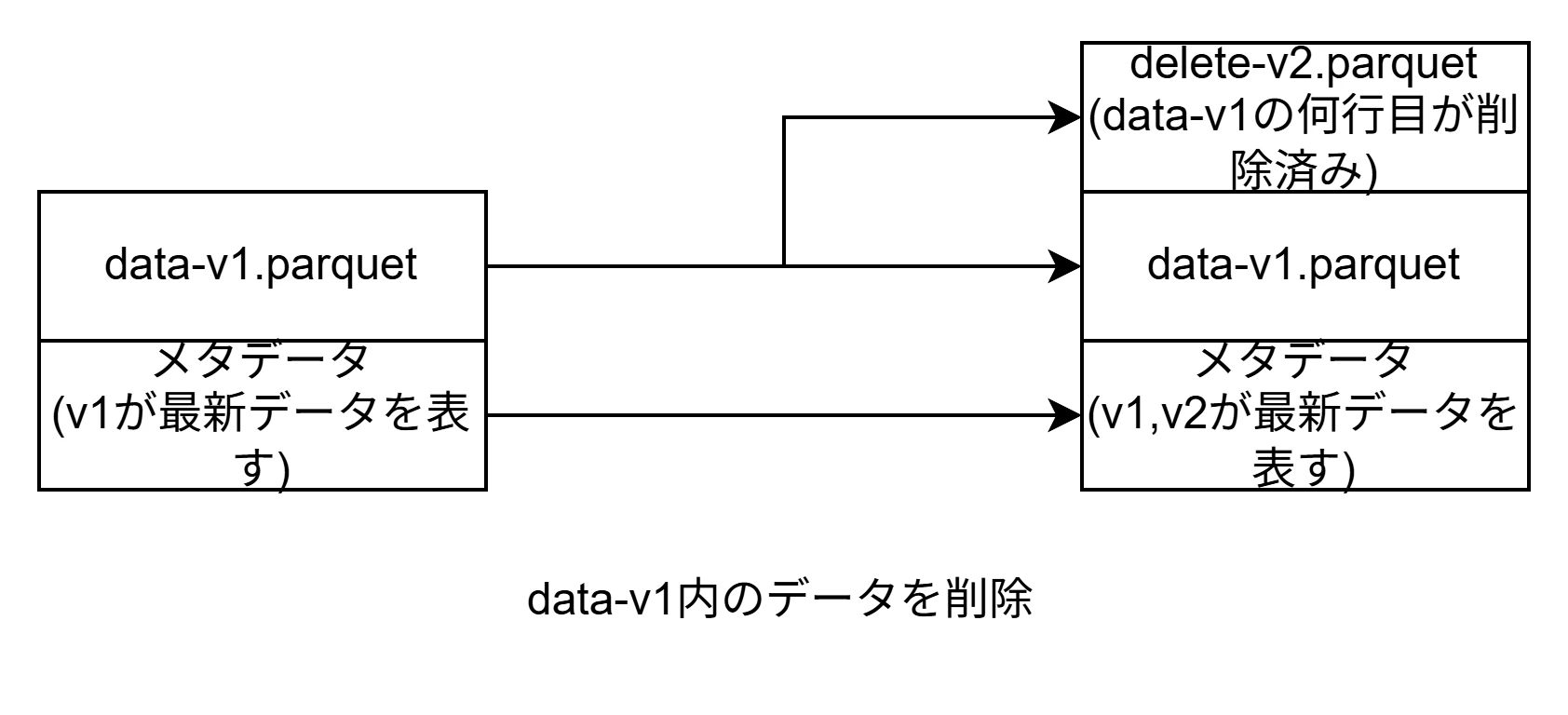
クエリ時にIcebergはPositionDeleteファイルを読み、該当行をスキップします(Merge-on-Readと呼ばれる方式)。つまりDELETEしてもS3のファイルサイズは減りません。これが「メンテナンスが必要」な理由です。
OPTIMIZE:小さいファイルを大きいファイルに統合する
INSERTを繰り返すと、1回のINSERTごとに小さなParquetファイルが作られます。ファイルが1000個あると、クエリ時に1000ファイルを開く必要があり遅くなります。OPTIMIZEはこれを新たなスナップショットとして数個の大きなファイルにまとめます。
-- コンパクション(小さいファイルをまとめる + DELETE済み行を物理除去)
OPTIMIZE analytics.orders REWRITE DATA USING BIN_PACK;
OPTIMIZE がやっていること
- 小さいParquetファイルを大きいファイルに統合(コンパクション)
- Position Deleteファイルの内容を実データに反映し、新しいParquetを作る
- 結果としてクエリ時のI/Oが減り、性能が改善
VACUUM:期限切れのスナップショットと孤立ファイルを物理削除する
期限切れのスナップショット、OPTIMIZEによって不要になったPosition Deleteファイルは物理削除しない限りS3ストレージコストがかかります。また、期限切れとなったスナップショットを削除したことでどのスナップショットからも参照されなくなったデータファイルもS3に残ったままです。VACUUMを行うことでこれらのファイルが初めて物理削除され、S3のストレージコストが下がります。
-- VACUUM 実行
VACUUM analytics.orders;
VACUUMを実行すると、保持期間外のスナップショットでのタイムトラベルが不可能になる。本番環境では保持期間を慎重に設定する必要がある(7〜30日が一般的)。
S3 Tablesの自動メンテナンスとの関係
S3 Tablesはコンパクション(OPTIMIZE)、スナップショット管理・不要ファイル削除(VACUUM)を自動で実行します。
以下の考慮事項があります。
- コンパクションのタイミングは制御不能
- スナップショットは、保持するスナップショットの最小数(minimumSnapshots)と指定された保持期間(MaximumSnapshotAge)という両方の基準が満たされている場合にのみ保持される。これらの設定に基づいてテーブルスナップショットが有効期限切れになり、削除される。
- データファイルは、どのスナップショットからも参照されなくなってからの日数(unreferencedDays)とunreferencedDays経過後削除までの期間(nonCurrentDays)の2つのプロパティに従って削除される。参照されなくなりunreferencedDaysの日数が経過後、データファイルは最新ではないものとしてマークされ、nonCurrentDaysで指定された日数が経過すると削除される。
Step 5:Glue JobでCSV → Iceberg ETLパイプラインを構築する
実運用に近い形として、S3ランディングゾーンに配置したCSVをGlue JobでIcebergテーブルに変換します。
5-1. TerraformでETLパイプラインを構築する
modules/s3_tables/output.tf
iamモジュールが参照するための出力値をs3_tablesモジュール内で定義します。
output "s3tables_bucket_arn" {
  value = aws_s3tables_table_bucket.main.arn
}

output "s3tables_bucket_name" {
  value = aws_s3tables_table_bucket.main.name
}
modules/s3_landing/output.tf
iamモジュールが参照するための出力値をs3_tablesモジュール内で定義します。
output "landing_bucket_arn" {
  value = aws_s3_bucket.main.arn
}
modules/iam/main.tf
glueがジョブを実行するために必要な権限を作成します。
#glue用IAMロール
resource "aws_iam_role" "glue" {
  name = "${var.project_name}-glue-role"

  assume_role_policy = jsonencode({
    Version = "2012-10-17"
    Statement = [{
      Action    = "sts:AssumeRole"
      Effect    = "Allow"
      Principal = { Service = "glue.amazonaws.com" }
    }]
  })
}

#glue用IAMポリシーアタッチ
resource "aws_iam_role_policy_attachment" "glue_service" {
  role       = aws_iam_role.glue.name
  policy_arn = "arn:aws:iam::aws:policy/service-role/AWSGlueServiceRole"
}

#glue用IAMポリシー
resource "aws_iam_role_policy" "glue_data_access" {
  name = "${var.project_name}-glue-data-access"
  role = aws_iam_role.glue.id

  # 生データランディング用バケット、S3Tables用バケット、Lakeformation、Glueに対する権限
  policy = jsonencode({
    Version = "2012-10-17"
    Statement = [
      {
        Sid    = "S3LandingAccess"
        Effect = "Allow"
        Action = ["s3:GetObject", "s3:ListBucket"]
        Resource = [
          var.landing_bucket_arn,
          "${var.landing_bucket_arn}/*",
          var.scripts_bucket_arn,
          "${var.scripts_bucket_arn}/*",
        ]
      },
      {
        Sid      = "S3TablesAccess"
        Effect   = "Allow"
        Action   = ["s3tables:*"]
        Resource = [
          var.s3tables_bucket_arn,
          "${var.s3tables_bucket_arn}/*"
        ]
      },
      {
        Sid      = "GlueAndLakeFormation"
        Effect   = "Allow"
        Action   = ["glue:*", "lakeformation:GetDataAccess"]
        Resource = ["*"]
      }
    ]
  })
}
modules/iam/variables.tf
モジュール内で使用する変数を定義しています。
variable "project_name" {
  description = "プロジェクト名"
  type        = string
  default     = "iceberg-lab"
}

variable "landing_bucket_arn" {
  description = "生データランディング用バケットARN"
  type        = string
}

variable "s3tables_bucket_arn" {
  description = "S3テーブル用バケットARN"
  type        = string
}

variable "scripts_bucket_arn" {
  description = "glueスクリプト配置用バケットARN"
  type        = string
}
modules/iam/output.tf
glueモジュールで参照するための出力値をiamモジュール内で定義します。
output "glue_iamrole_arn" {
  value = aws_iam_role.glue.arn
}
modules/glue/main.tf
# 現在の実行アカウント情報を取得
data "aws_caller_identity" "current" {}

# gluescript格納用バケット
resource "aws_s3_bucket" "glue_scripts" {
  bucket = "${var.project_name}-glue-scripts-${data.aws_caller_identity.current.account_id}"
}

# gluescriptをS3バケットへ配置
resource "aws_s3_object" "glue_script" {
  bucket = aws_s3_bucket.glue_scripts.id
  key    = "scripts/glue_csv_to_iceberg.py"
  source = "${path.module}/scripts/glue_csv_to_iceberg.py" #
  etag   = filemd5("${path.module}/scripts/glue_csv_to_iceberg.py")
}

# gluejob
resource "aws_glue_job" "csv_to_iceberg" {
  name     = "${var.project_name}-csv-to-iceberg"
  role_arn = var.glue_iamrole_arn

  command {
    script_location = "s3://${aws_s3_bucket.glue_scripts.id}/scripts/glue_csv_to_iceberg.py"
    python_version  = "3"
  }

  glue_version      = "5.0"
  number_of_workers = 2
  worker_type       = "G.1X"
  timeout           = 60

  default_arguments = {
    "--job-language"                    = "python"
    "--enable-metrics"                  = "true"
    "--enable-continuous-cloudwatch-log" = "true"
    "--datalake-formats"                = "iceberg"
    "--CATALOG_ID"                      = "${data.aws_caller_identity.current.account_id}:s3tablescatalog/${var.s3tables_bucket_name}"
    "--WAREHOUSE_PATH"                  = "s3://${var.s3tables_bucket_name}/warehouse/"
  }
${path.module}
Terraformの組み込み変数で、現在実行中の.tfファイルが置かれているディレクトリのパスを指します。モジュール内でファイルパスを指定するときに、実行する場所に関わらずそのモジュールからの相対パスで確実にファイルを指定できるのがメリット。
modules/glue/variables.tf
モジュール内で使用する変数を定義しています。
variable "project_name" {
  description = "プロジェクト名"
  type        = string
  default     = "iceberg-lab"
}

variable "glue_iamrole_arn" {
  description = "glue用IAMロールARN"
  type        = string
}

variable "s3tables_bucket_name" {
  description = "S3テーブル用バケット名"
  type        = string
}
modules/glue/output.tf
iamモジュールで参照するための出力値をglueモジュール内で定義します。
output "scripts_bucket_arn" {
  value = aws_s3_bucket.glue_scripts.arn
}
main.tf
プロジェクトのルート直下に配置したmain.tfからmodulesフォルダ内の各リソース作成モジュールを呼び出しています。
# S3テーブル関連
module "s3_tables" {
  source        = "./modules/s3_tables/"
  project_name  = var.project_name
}

# 生データ格納S3関連
module "s3_landing" {
  source        = "./modules/s3_landing/"
  project_name  = var.project_name
}

# IAM関連
module "iam" {
  source          = "./modules/iam/"
  project_name    = var.project_name
  # S3関連モジュールのoutput.tfにて定義した出力変数を渡す
  landing_bucket_arn  = module.s3_landing.landing_bucket_arn
  s3tables_bucket_arn = module.s3_tables.s3tables_bucket_arn
  # glueモジュールのoutput.tfにて定義した出力変数を渡す
  scripts_bucket_arn = module.glue.scripts_bucket_arn
}

# Glue関連
module "glue" {
  source        = "./modules/glue/"
  project_name  = var.project_name
  # iamモジュールのoutput.tfにて定義した出力変数を渡す
  s3tables_bucket_name = module.s3_tables.s3tables_bucket_name
  glue_iamrole_arn  = module.iam.glue_iamrole_arn
}
5-2. PySparkスクリプト
以下のスクリプトをmodules/glue/scripts/glue_csv_to_iceberg.pyとして保存します。
import sys
from awsglue.utils import getResolvedOptions
from pyspark.sql import SparkSession
from pyspark.context import SparkContext
from awsglue.context import GlueContext
from awsglue.job import Job

args = getResolvedOptions(sys.argv, [
    'JOB_NAME', 'SOURCE_PATH', 'TARGET_TABLE',
    'CATALOG_ID', 'WAREHOUSE_PATH'
])

# ---- SparkセッションにS3 Tablesカタログを登録 ----
spark = (SparkSession.builder
    # IcebergのSQL拡張機能を有効化(UPDATE/DELETE/MERGE等のDML構文を使えるようにする)
    .config("spark.sql.extensions",
            "org.apache.iceberg.spark.extensions.IcebergSparkSessionExtensions")
    # デフォルトカタログをs3tablescatalogに設定(カタログ名を省略してSQLを書けるようにする)
    .config("spark.sql.defaultCatalog","s3tablescatalog")
    # s3tablescatalogという名前のカタログにIcebergのSparkCatalog実装を使用することを宣言
    .config("spark.sql.catalog.s3tablescatalog",
            "org.apache.iceberg.spark.SparkCatalog")
    # カタログの実装としてGlue Data Catalogを使用(s3tablescatalogはGlue経由でアクセス)
    .config("spark.sql.catalog.s3tablescatalog.catalog-impl",
            "org.apache.iceberg.aws.glue.GlueCatalog")
    # 接続先のGlueカタログID(account_id:s3tablescatalog/バケット名の形式)
    .config("spark.sql.catalog.s3tablescatalog.glue.id",
            args['CATALOG_ID'])
    # S3 Tablesのウェアハウスパス(arn:aws:s3tables:region:account_id:bucket/バケット名)
    .config("spark.sql.catalog.s3tablescatalog.warehouse",
            args['WAREHOUSE_PATH'])
    # SparkはデフォルトでTIMESTAMP WITHOUT TIME ZONE型を扱えないため、タイムゾーンなしのtimestampをタイムゾーンありとして処理することを許可する
    .config("spark.sql.iceberg.handle-timestamp-without-timezone","true")
    .getOrCreate())

sc = spark.sparkContext
glueContext = GlueContext(sc)
job = Job(glueContext)
job.init(args['JOB_NAME'], args)

# ---- CSV読み込み ----
df = (spark.read
      .option("header", "true")
      .option("inferSchema", "true")
      .csv(args['SOURCE_PATH']))

print(f"読み込み件数: {df.count()}")
df.printSchema()

# ---- IcebergテーブルへINSERT ----
# TARGET_TABLE 例: "analytics.orders"(defaultCatalogを設定済みなのでcatalog prefix不要)
table_id = args['TARGET_TABLE']
df.createOrReplaceTempView("src")
spark.sql(f"INSERT INTO {table_id} SELECT * FROM src")

print(f"INSERT完了: {table_id}")
job.commit()
SparkのS3 Tables向けカタログ設定について
Sparkはデフォルトでは独自のカタログ(spark_catalog)しか認識できないため、
S3 TablesのIcebergテーブルを操作するには以下の設定が必要になります。
spark.sql.extensions
IcebergのSQL拡張機能を有効化します。これがないとUPDATE/DELETE/MERGE等の
Iceberg固有のDML構文がSparkに認識されず、構文エラーになります。
spark.sql.defaultCatalog
SQLを書くときに省略するカタログ名を指定します。
設定しない場合はSQLのたびにs3tablescatalog.analytics.ordersのようにカタログ名をフルで書く必要があります。
spark.sql.catalog.s3tablescatalog
s3tablescatalogという名前のカタログに対してIcebergのSparkCatalog実装を使うことをSparkに宣言します。これがないとSparkがs3tablescatalogという名前を解決できません。
spark.sql.catalog.s3tablescatalog.catalog-impl
SparkCatalogが内部で使うカタログ実装を指定します。S3 TablesはGlue Data Catalog経由でメタデータを管理しているため、GlueCatalogを指定します。
spark.sql.catalog.s3tablescatalog.glue.id
接続先のGlueカタログIDを指定します。S3 Tablesのカタログは通常の12桁のアカウントIDではなくaccount_id:s3tablescatalog/バケット名という特殊な形式になります。
spark.sql.catalog.s3tablescatalog.warehouse
S3 Tablesのウェアハウスパス(ARN形式)を指定します。
Icebergがテーブルの実体データの場所を解決するために必要です。
spark.sql.iceberg.handle-timestamp-without-timezone
SparkはデフォルトでタイムゾーンなしのTIMESTAMP型(例: 2024-01-15 10:30:00)を扱えません。このオプションをtrueにすることで、タイムゾーンなしtimestampをUTC基準のtimestampとして処理できるようになります。
5-3. デプロイ
terraformを実行し、定義したリソースをデプロイしていきます。
C:\s3-tables-iceberg-lab > terraform init
Initializing the backend...
Initializing modules...
- glue in modules\glue
- s3_landing in modules\s3_landing
- iam in modules\iam
Initializing provider plugins...
- Reusing previous version of hashicorp/aws from the dependency lock file
- Using previously-installed hashicorp/aws v6.33.0

Terraform has been successfully initialized!

You may now begin working with Terraform. Try running "terraform plan" to see
any changes that are required for your infrastructure. All Terraform commands
should now work.

If you ever set or change modules or backend configuration for Terraform,
rerun this command to reinitialize your working directory. If you forget, other
commands will detect it and remind you to do so if necessary.
C:\s3-tables-iceberg-lab > terraform plan
module.s3_tables.data.aws_caller_identity.current: Reading...
module.s3_landing.data.aws_caller_identity.current: Reading...
module.glue.data.aws_caller_identity.current: Reading...
module.s3_tables.aws_s3tables_table_bucket.main: Refreshing state... [name=iceberg-lab]
module.s3_tables.data.aws_caller_identity.current: Read complete after 0s [id={AccountId}]
module.s3_landing.data.aws_caller_identity.current: Read complete after 0s [id={AccountId}]
module.s3_landing.aws_s3_bucket.landing: Refreshing state... [id=iceberg-lab-landing-{AccountId}]
module.glue.data.aws_caller_identity.current: Read complete after 0s [id={AccountId}]
module.s3_tables.aws_s3tables_namespace.analytics: Refreshing state...
module.s3_tables.data.aws_iam_policy_document.table_bucket: Reading...
module.s3_tables.data.aws_iam_policy_document.table_bucket: Read complete after 0s [id=3931547792]
module.s3_tables.aws_s3tables_table_bucket_policy.main: Refreshing state...
module.s3_tables.aws_s3tables_table.customers: Refreshing state... [name=customers]
module.s3_tables.aws_s3tables_table.orders: Refreshing state... [name=orders]
module.s3_landing.aws_s3_bucket_versioning.landing: Refreshing state... [id=iceberg-lab-landing-{AccountId}]

Terraform used the selected providers to generate the following execution plan. Resource actions are indicated with the
following symbols:
  + create

Terraform will perform the following actions:

  # module.glue.aws_glue_job.csv_to_iceberg will be created
  + resource "aws_glue_job" "csv_to_iceberg" {
      + arn               = (known after apply)
      + default_arguments = {
          + "--CATALOG_ID"                       = "{AccountId}:s3tablescatalog/iceberg-lab"
          + "--WAREHOUSE_PATH"                   = "s3://iceberg-lab/warehouse/"
          + "--datalake-formats"                 = "iceberg"
          + "--enable-continuous-cloudwatch-log" = "true"
          + "--enable-metrics"                   = "true"
          + "--job-language"                     = "python"
        }
      + glue_version      = "5.0"
      + id                = (known after apply)
      + job_mode          = (known after apply)
      + max_capacity      = (known after apply)
      + name              = "iceberg-lab-csv-to-iceberg"
      + number_of_workers = 2
      + region            = "ap-northeast-1"
      + role_arn          = (known after apply)
      + timeout           = 60
      + worker_type       = "G.1X"

      + command {
          + name            = "glueetl"
          + python_version  = "3"
          + runtime         = (known after apply)
          + script_location = (known after apply)
        }

      + execution_property (known after apply)

      + notification_property (known after apply)
    }

  # module.glue.aws_s3_bucket.glue_scripts will be created
  + resource "aws_s3_bucket" "glue_scripts" {
      + acceleration_status         = (known after apply)
      + acl                         = (known after apply)
      + arn                         = (known after apply)
      + bucket                      = "iceberg-lab-glue-scripts-{AccountId}"
      + bucket_domain_name          = (known after apply)
      + bucket_prefix               = (known after apply)
      + bucket_region               = (known after apply)
      + bucket_regional_domain_name = (known after apply)
      + force_destroy               = false
      + hosted_zone_id              = (known after apply)
      + id                          = (known after apply)
      + object_lock_enabled         = (known after apply)
      + policy                      = (known after apply)
      + region                      = "ap-northeast-1"
      + request_payer               = (known after apply)
      + website_domain              = (known after apply)
      + website_endpoint            = (known after apply)

      + cors_rule (known after apply)

      + grant (known after apply)

      + lifecycle_rule (known after apply)

      + logging (known after apply)

      + object_lock_configuration (known after apply)

      + replication_configuration (known after apply)

      + server_side_encryption_configuration (known after apply)

      + versioning (known after apply)

      + website (known after apply)
    }

  # module.glue.aws_s3_object.glue_script will be created
  + resource "aws_s3_object" "glue_script" {
      + acl                    = (known after apply)
      + arn                    = (known after apply)
      + bucket                 = (known after apply)
      + bucket_key_enabled     = (known after apply)
      + checksum_crc32         = (known after apply)
      + checksum_crc32c        = (known after apply)
      + checksum_crc64nvme     = (known after apply)
      + checksum_sha1          = (known after apply)
      + checksum_sha256        = (known after apply)
      + content_type           = (known after apply)
      + etag                   = "d53f7bef0b492fe7c2c8cc397a5a56dd"
      + force_destroy          = false
      + id                     = (known after apply)
      + key                    = "scripts/glue_csv_to_iceberg.py"
      + kms_key_id             = (known after apply)
      + region                 = "ap-northeast-1"
      + server_side_encryption = (known after apply)
      + source                 = "modules/glue/scripts/glue_csv_to_iceberg.py"
      + storage_class          = (known after apply)
      + tags_all               = (known after apply)
      + version_id             = (known after apply)
    }

  # module.iam.aws_iam_role.glue will be created
  + resource "aws_iam_role" "glue" {
      + arn                   = (known after apply)
      + assume_role_policy    = jsonencode(
            {
              + Statement = [
                  + {
                      + Action    = "sts:AssumeRole"
                      + Effect    = "Allow"
                      + Principal = {
                          + Service = "glue.amazonaws.com"
                        }
                    },
                ]
              + Version   = "2012-10-17"
            }
        )
      + create_date           = (known after apply)
      + force_detach_policies = false
      + id                    = (known after apply)
      + managed_policy_arns   = (known after apply)
      + max_session_duration  = 3600
      + name                  = "iceberg-lab-glue-role"
      + name_prefix           = (known after apply)
      + path                  = "/"
      + unique_id             = (known after apply)

      + inline_policy (known after apply)
    }

  # module.iam.aws_iam_role_policy.glue_data_access will be created
  + resource "aws_iam_role_policy" "glue_data_access" {
      + id          = (known after apply)
      + name        = "iceberg-lab-glue-data-access"
      + name_prefix = (known after apply)
      + policy      = (known after apply)
      + role        = (known after apply)
    }

  # module.iam.aws_iam_role_policy_attachment.glue_service will be created
  + resource "aws_iam_role_policy_attachment" "glue_service" {
      + id         = (known after apply)
      + policy_arn = "arn:aws:iam::aws:policy/service-role/AWSGlueServiceRole"
      + role       = "iceberg-lab-glue-role"
    }

Plan: 6 to add, 0 to change, 0 to destroy.
C:s3-tables-iceberg-lab > terraform apply
module.glue.data.aws_caller_identity.current: Reading...
module.s3_tables.data.aws_caller_identity.current: Reading...
module.s3_landing.data.aws_caller_identity.current: Reading...
module.s3_tables.aws_s3tables_table_bucket.main: Refreshing state... [name=iceberg-lab]
module.s3_tables.data.aws_caller_identity.current: Read complete after 0s [id={AccountId}]
module.glue.data.aws_caller_identity.current: Read complete after 0s [id={AccountId}]
module.s3_landing.data.aws_caller_identity.current: Read complete after 0s [id={AccountId}]
module.s3_landing.aws_s3_bucket.landing: Refreshing state... [id=iceberg-lab-landing-{AccountId}]
module.s3_tables.data.aws_iam_policy_document.table_bucket: Reading...
module.s3_tables.aws_s3tables_namespace.analytics: Refreshing state...
module.s3_tables.data.aws_iam_policy_document.table_bucket: Read complete after 0s [id=3931547792]
module.s3_tables.aws_s3tables_table_bucket_policy.main: Refreshing state...
module.s3_tables.aws_s3tables_table.orders: Refreshing state... [name=orders]
module.s3_tables.aws_s3tables_table.customers: Refreshing state... [name=customers]
module.s3_landing.aws_s3_bucket_versioning.landing: Refreshing state... [id=iceberg-lab-landing-{AccountId}]

Terraform used the selected providers to generate the following execution plan. Resource actions are indicated with the
following symbols:
  + create

Terraform will perform the following actions:

  # module.glue.aws_glue_job.csv_to_iceberg will be created
  + resource "aws_glue_job" "csv_to_iceberg" {
      + arn               = (known after apply)
      + default_arguments = {
          + "--CATALOG_ID"                       = "{AccountId}:s3tablescatalog/iceberg-lab"
          + "--WAREHOUSE_PATH"                   = "s3://iceberg-lab/warehouse/"
          + "--datalake-formats"                 = "iceberg"
          + "--enable-continuous-cloudwatch-log" = "true"
          + "--enable-metrics"                   = "true"
          + "--job-language"                     = "python"
        }
      + glue_version      = "5.0"
      + id                = (known after apply)
      + job_mode          = (known after apply)
      + max_capacity      = (known after apply)
      + name              = "iceberg-lab-csv-to-iceberg"
      + number_of_workers = 2
      + region            = "ap-northeast-1"
      + role_arn          = (known after apply)
      + timeout           = 60
      + worker_type       = "G.1X"

      + command {
          + name            = "glueetl"
          + python_version  = "3"
          + runtime         = (known after apply)
          + script_location = (known after apply)
        }

      + execution_property (known after apply)

      + notification_property (known after apply)
    }

  # module.glue.aws_s3_bucket.glue_scripts will be created
  + resource "aws_s3_bucket" "glue_scripts" {
      + acceleration_status         = (known after apply)
      + acl                         = (known after apply)
      + arn                         = (known after apply)
      + bucket                      = "iceberg-lab-glue-scripts-{AccountId}"
      + bucket_domain_name          = (known after apply)
      + bucket_prefix               = (known after apply)
      + bucket_region               = (known after apply)
      + bucket_regional_domain_name = (known after apply)
      + force_destroy               = false
      + hosted_zone_id              = (known after apply)
      + id                          = (known after apply)
      + object_lock_enabled         = (known after apply)
      + policy                      = (known after apply)
      + region                      = "ap-northeast-1"
      + request_payer               = (known after apply)
      + website_domain              = (known after apply)
      + website_endpoint            = (known after apply)

      + cors_rule (known after apply)

      + grant (known after apply)

      + lifecycle_rule (known after apply)

      + logging (known after apply)

      + object_lock_configuration (known after apply)

      + replication_configuration (known after apply)

      + server_side_encryption_configuration (known after apply)

      + versioning (known after apply)

      + website (known after apply)
    }

  # module.glue.aws_s3_object.glue_script will be created
  + resource "aws_s3_object" "glue_script" {
      + acl                    = (known after apply)
      + arn                    = (known after apply)
      + bucket                 = (known after apply)
      + bucket_key_enabled     = (known after apply)
      + checksum_crc32         = (known after apply)
      + checksum_crc32c        = (known after apply)
      + checksum_crc64nvme     = (known after apply)
      + checksum_sha1          = (known after apply)
      + checksum_sha256        = (known after apply)
      + content_type           = (known after apply)
      + etag                   = "d53f7bef0b492fe7c2c8cc397a5a56dd"
      + force_destroy          = false
      + id                     = (known after apply)
      + key                    = "scripts/glue_csv_to_iceberg.py"
      + kms_key_id             = (known after apply)
      + region                 = "ap-northeast-1"
      + server_side_encryption = (known after apply)
      + source                 = "modules/glue/scripts/glue_csv_to_iceberg.py"
      + storage_class          = (known after apply)
      + tags_all               = (known after apply)
      + version_id             = (known after apply)
    }

  # module.iam.aws_iam_role.glue will be created
  + resource "aws_iam_role" "glue" {
      + arn                   = (known after apply)
      + assume_role_policy    = jsonencode(
            {
              + Statement = [
                  + {
                      + Action    = "sts:AssumeRole"
                      + Effect    = "Allow"
                      + Principal = {
                          + Service = "glue.amazonaws.com"
                        }
                    },
                ]
              + Version   = "2012-10-17"
            }
        )
      + create_date           = (known after apply)
      + force_detach_policies = false
      + id                    = (known after apply)
      + managed_policy_arns   = (known after apply)
      + max_session_duration  = 3600
      + name                  = "iceberg-lab-glue-role"
      + name_prefix           = (known after apply)
      + path                  = "/"
      + unique_id             = (known after apply)

      + inline_policy (known after apply)
    }

  # module.iam.aws_iam_role_policy.glue_data_access will be created
  + resource "aws_iam_role_policy" "glue_data_access" {
      + id          = (known after apply)
      + name        = "iceberg-lab-glue-data-access"
      + name_prefix = (known after apply)
      + policy      = (known after apply)
      + role        = (known after apply)
    }

  # module.iam.aws_iam_role_policy_attachment.glue_service will be created
  + resource "aws_iam_role_policy_attachment" "glue_service" {
      + id         = (known after apply)
      + policy_arn = "arn:aws:iam::aws:policy/service-role/AWSGlueServiceRole"
      + role       = "iceberg-lab-glue-role"
    }

Plan: 6 to add, 0 to change, 0 to destroy.

Do you want to perform these actions?
  Terraform will perform the actions described above.
  Only 'yes' will be accepted to approve.

  Enter a value: yes

module.iam.aws_iam_role.glue: Creating...
module.glue.aws_s3_bucket.glue_scripts: Creating...
module.glue.aws_s3_bucket.glue_scripts: Creation complete after 1s [id=iceberg-lab-glue-scripts-{AccountId}]
module.glue.aws_s3_object.glue_script: Creating...
module.glue.aws_s3_object.glue_script: Creation complete after 0s [id=iceberg-lab-glue-scripts-{AccountId}/scripts/glue_csv_to_iceberg.py]
module.iam.aws_iam_role.glue: Creation complete after 1s [id=iceberg-lab-glue-role]
module.iam.aws_iam_role_policy_attachment.glue_service: Creating...
module.iam.aws_iam_role_policy.glue_data_access: Creating...
module.glue.aws_glue_job.csv_to_iceberg: Creating...
module.glue.aws_glue_job.csv_to_iceberg: Creation complete after 1s [id=iceberg-lab-csv-to-iceberg]
module.iam.aws_iam_role_policy_attachment.glue_service: Creation complete after 1s [id=iceberg-lab-glue-role/arn:aws:iam::aws:policy/service-role/AWSGlueServiceRole]
module.iam.aws_iam_role_policy.glue_data_access: Creation complete after 1s [id=iceberg-lab-glue-role:iceberg-lab-glue-data-access]

Apply complete! Resources: 6 added, 0 changed, 0 destroyed.
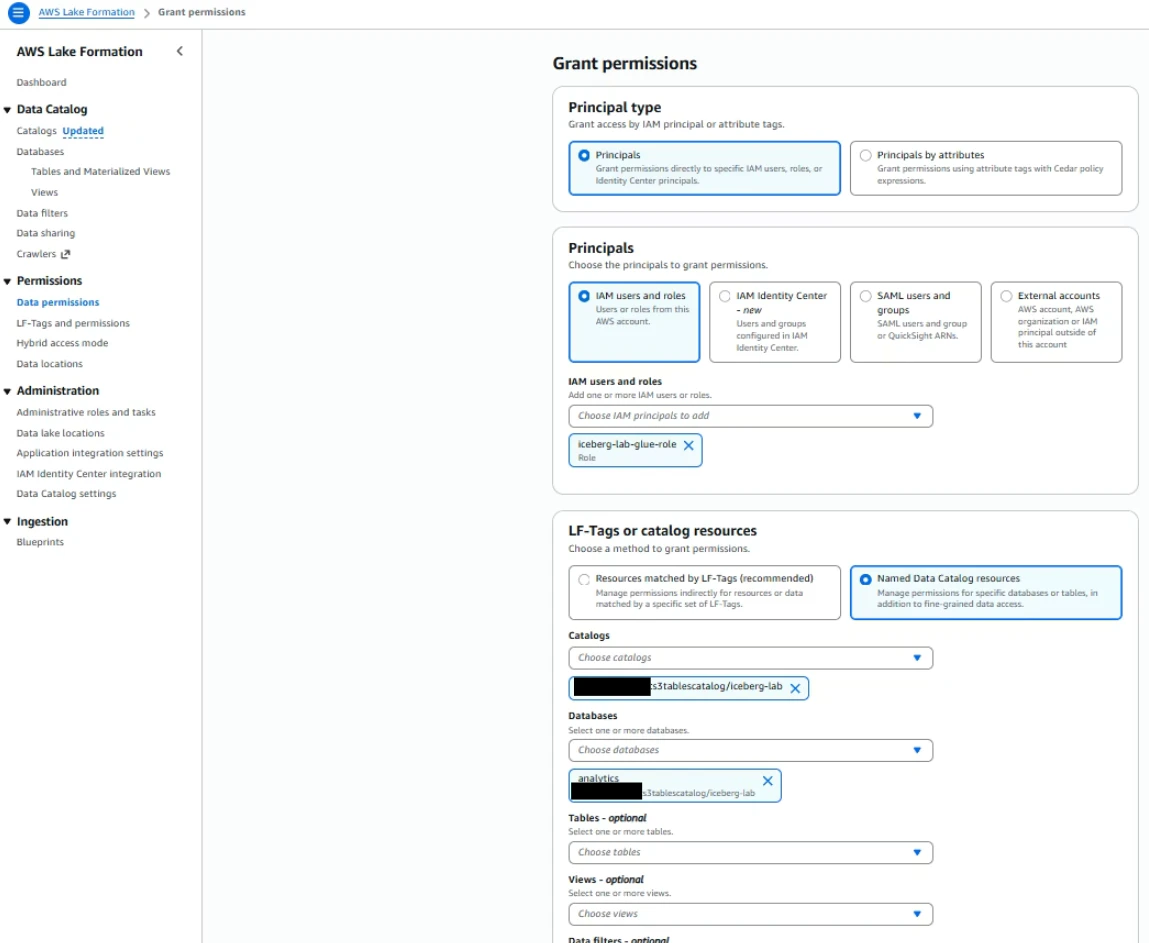
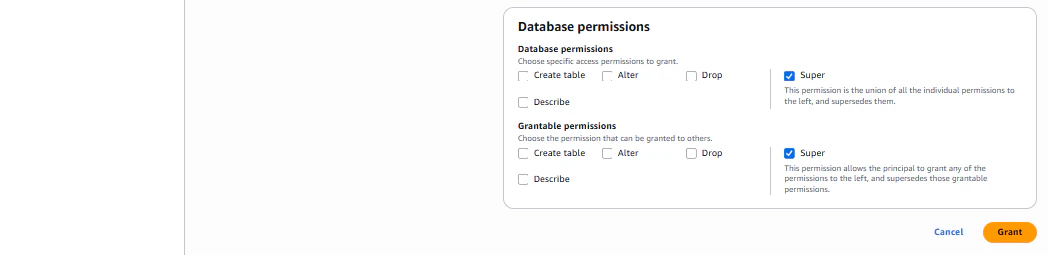
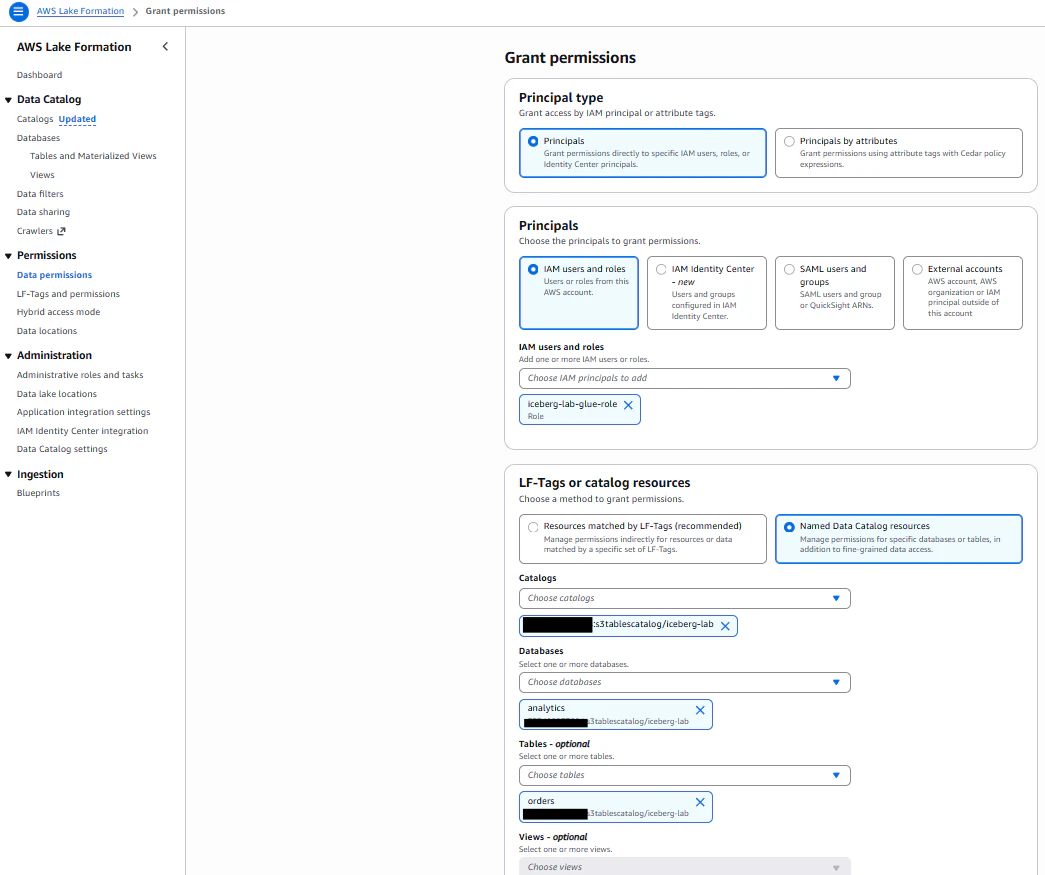
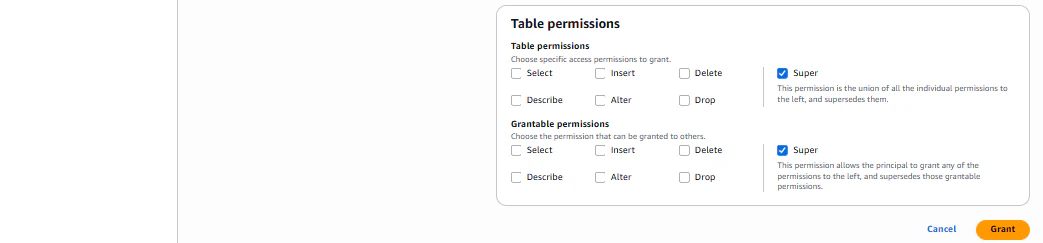
GlueロールにもLake Formation側で権限付与が必要です。Step2と同様の手順でGlueロールに対してanalyticsデータベース、ordersテーブルに対するSuper権限を付与してください。
データベース
テーブル

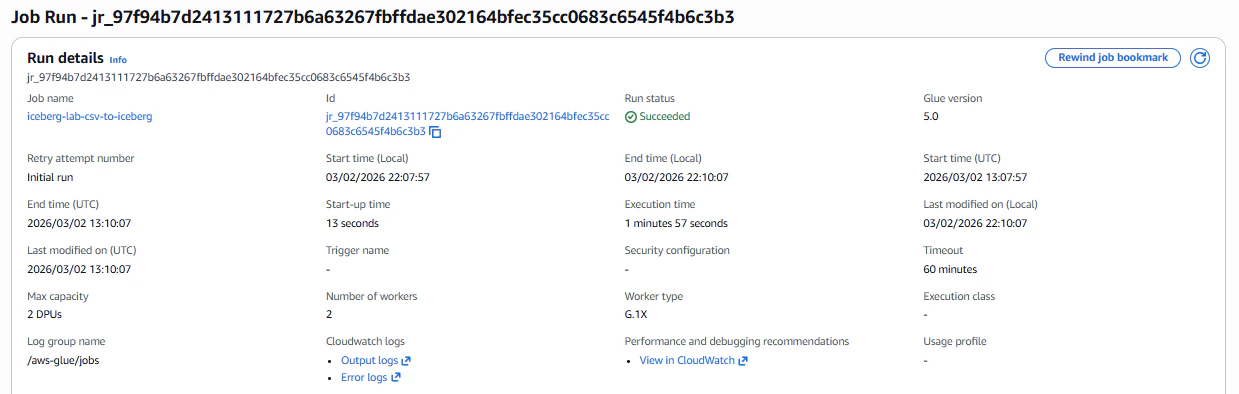
5-4. Glue Jobの実行
サンプルデータCSVをランディングバケットにアップロードします。

sample-orders.csv
order_id,customer_id,order_date,product_name,quantity,unit_price,total_amount,status,region,created_at,discount_rate,note
1009,2001,2024-01-15,ノートPC,1,98000.00,98000.00,completed,東京,2024-01-15 10:30:00,0.00,
1010,2002,2024-01-16,マウス,3,2500.00,7500.00,completed,大阪,2024-01-16 11:00:00,0.05,まとめ買い割引
1011,2003,2024-01-17,キーボード,2,5800.00,11600.00,pending,名古屋,2024-01-17 09:15:00,0.00
次に以下パラメータを追加し、Glueジョブを実行します。
- SOURCE_PATH : s3://iceberg-lab-landing-{accountId}/raw/orders/
- TARGET_TABLE : analytics.orders
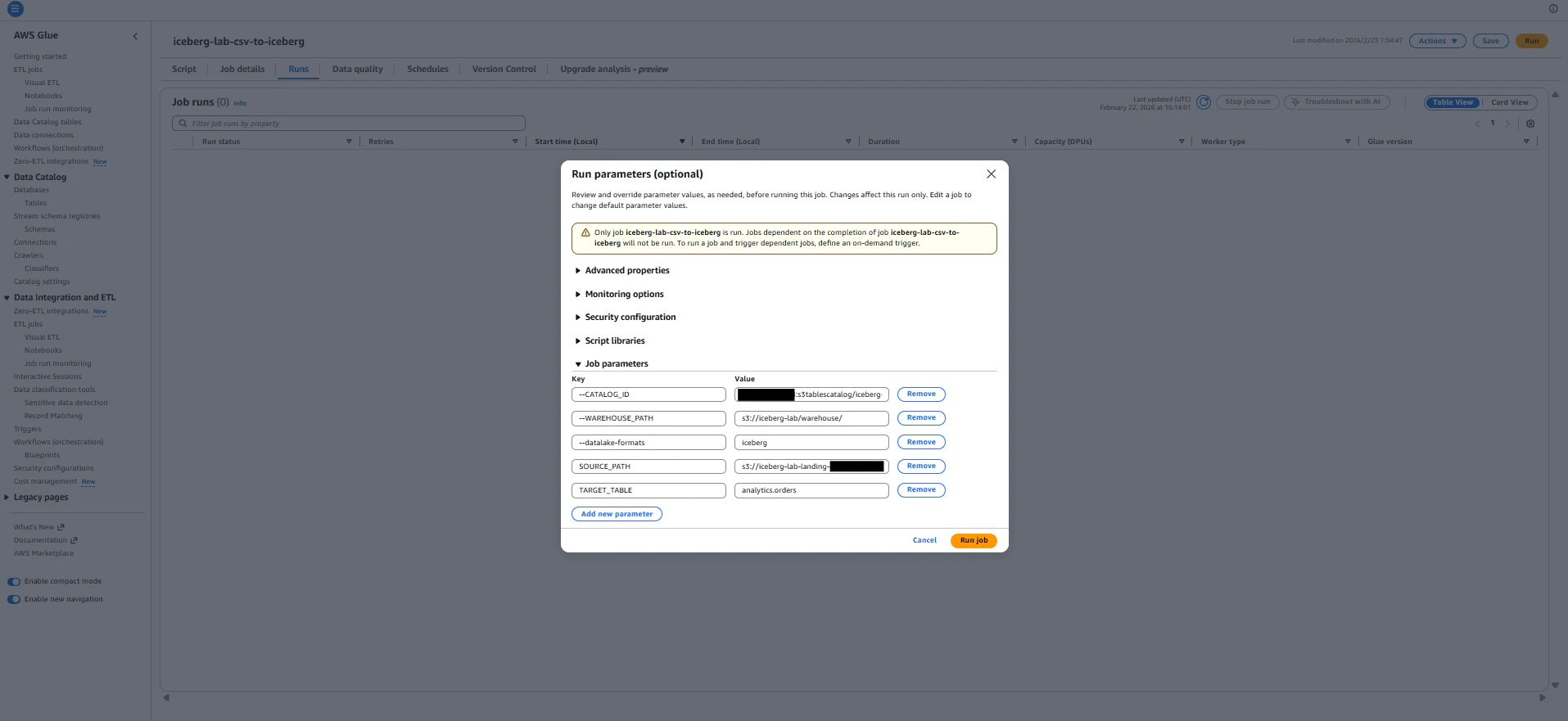
ジョブ実行に成功しました。ジョブ実行前後のテーブルデータを比較してみます。
ジョブ実行前のordersテーブル
select order_id, customer_id, order_date, product_name from analytics.orders;

-- 実行結果
order_id  customer_id  order_date	product_name
1001	  1	           2024-06-01	Cloud Storage 1TB
1002	  2	           2024-06-05	Compute Instance m5.xl
1003	  3	           2024-06-10	Database RDS
1004	  1	           2024-07-01	Cloud Storage 1TB
1005	  4	           2024-07-15	Compute Instance m5.xl
1007	  2	           2024-09-01	Compute Instance m5.xl
1008	  3	           2024-10-01	Support Plan Business
ジョブ実行後のordersテーブル
select order_id, customer_id, order_date, product_name from analytics.orders;

-- 実行結果
order_id customer_id	order_date	product_name
1001	  1	            2024-06-01	Cloud Storage 1TB
1002	  2	            2024-06-05	Compute Instance m5.xl
1003	  3	            2024-06-10	Database RDS
1004	  1	            2024-07-01	Cloud Storage 1TB
1005	  4	            2024-07-15	Compute Instance m5.xl
1007	  2	            2024-09-01	Compute Instance m5.xl
1008	  3	            2024-10-01	Support Plan Business
1009	  2001	        2024-01-15	ノートPC
1010	  2002	        2024-01-16	マウス
1011	  2003	        2024-01-17	キーボード
ordersテーブルにcsvファイルのデータが追加されていることが確認できました。
クリーンアップ
検証で使用したリソースを削除します。
# Athenaで作成したテーブル定義を削除(Terraform管理外のため)
# Athena Query Editorで実行:
DROP TABLE analytics.orders;
DROP TABLE analytics.customers;

# Terraformリソースを全削除
terraform destroy
まとめ
| やったこと | 使ったサービス / ツール |
|---|---|
| テーブルバケット / Namespace / テーブル作成 | S3 Tables + Terraform |
| 権限管理 | Lake Formation(マネコン) |
| スキーマ定義・クエリ | Athena |
| UPDATE / DELETE / スキーマ進化 / タイムトラベル | Iceberg (Athena) |
| MERGE INTO(Upsert) | Iceberg (Athena) |
| CSV → Iceberg ETL | Glue Job (PySpark) + Terraform |
所感
- S3 Tablesは「データレイクの運用負荷を劇的に下げる」サービス。コンパクションやスナップショット管理を自分で実装しなくていいのは大きい
- MERGE INTOがSQLだけで完結するのは革命的。従来はSparkジョブを書かないとできなかったUpsertが、AthenaのSQL一発でできる
- OPTIMIZE、VACUUMの挙動は必ず理解しておくべき。DELETEしてもS3のファイルは消えない、というIcebergの設計思想を知らないとストレージコストが減らない
- Lake Formationの設定がボトルネック。Terraform対応が進めば完全IaC化が視野に入る
- TerraformでIaC化しておくと検証の再現と横展開が圧倒的に楽
次にやりたいこと
- EventBridge+Step Functionsでファイル着信トリガーの自動パイプライン化
- Lake Formationの列レベル・行レベルアクセス制御の検証
- Redshift ServerlessからのS3 Tablesクエリ
- S3 Tables Intelligent-Tieringのコスト最適化検証