
概要
Googleスプレッドシートに登録したRSSフィードから記事情報を取得し、Gemini APIを利用して各記事の要約を生成します。生成された要約はDiscordの指定チャンネルにWebhook経由で自動的に通知されます。Gemini APIの無料枠とGASを活用して無料で構築することができます。
通知先についてはLINEも検討しましたが、Messaging APIの無料枠だと月200通しか送れないので本記事では通知先としてDiscordを選択しています。
要約する件数を制限すればLINE通知でも十分だと思います。
完成イメージ
Qiitaの人気記事のRSSフィードを登録してみました。
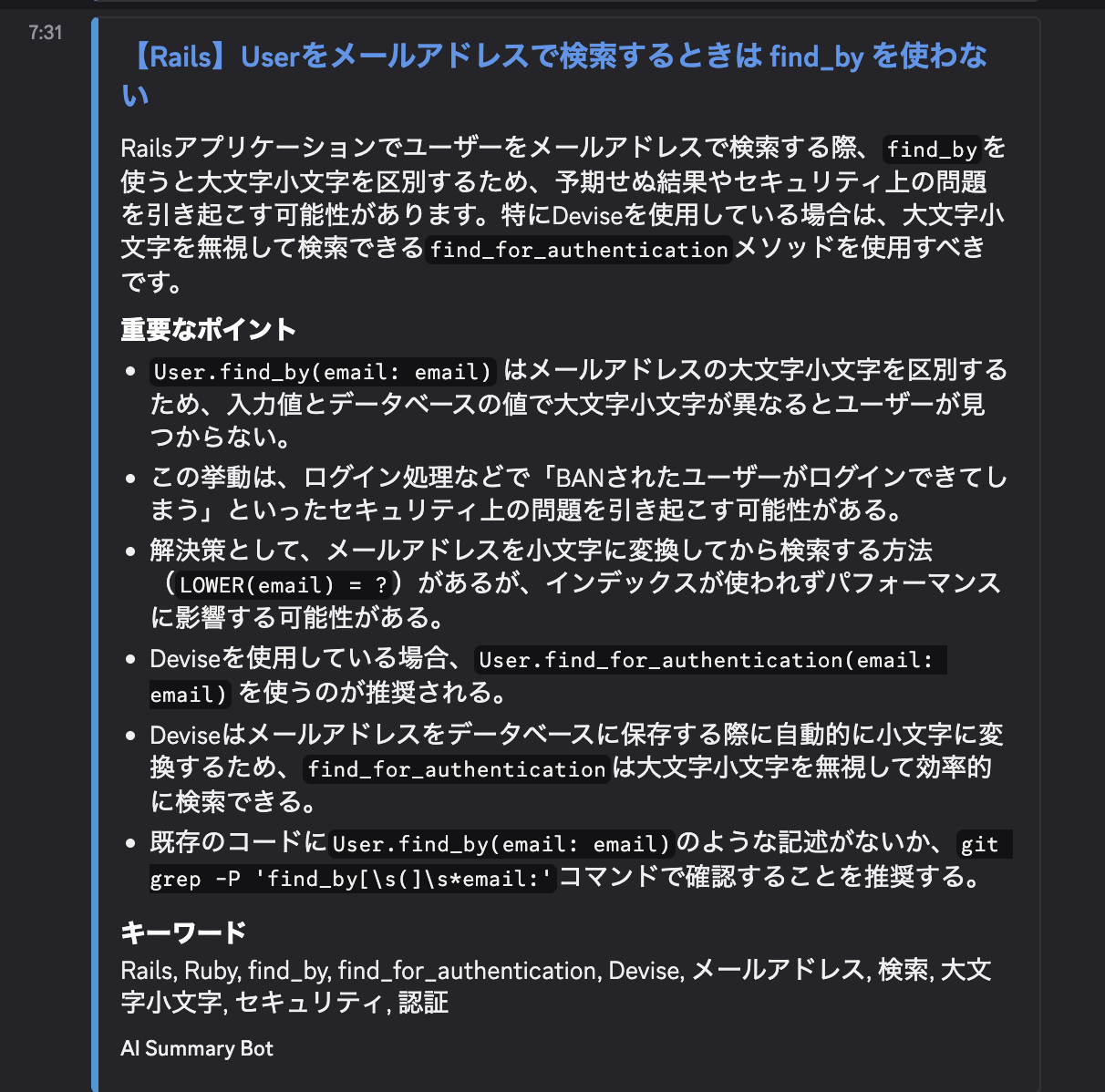
以下の記事の要約が表示されています。
セットアップ手順
1. スプレッドシートの準備
まず、取得対象のRSSフィードを管理するGoogleスプレッドシートを作成します。
- 新規にGoogleスプレッドシートを作成する
- A列にサイト名、B列にRSSフィードのURLを2行目以降に入力する。1行目はヘッダーとする。シート名はデフォルトの
シート1のままでOK
2. APIキーとWebhook URLの取得
Gemini APIキー
- Google AI Studioにアクセスする
-
Get API keyを選択し、APIキーを生成・コピーする
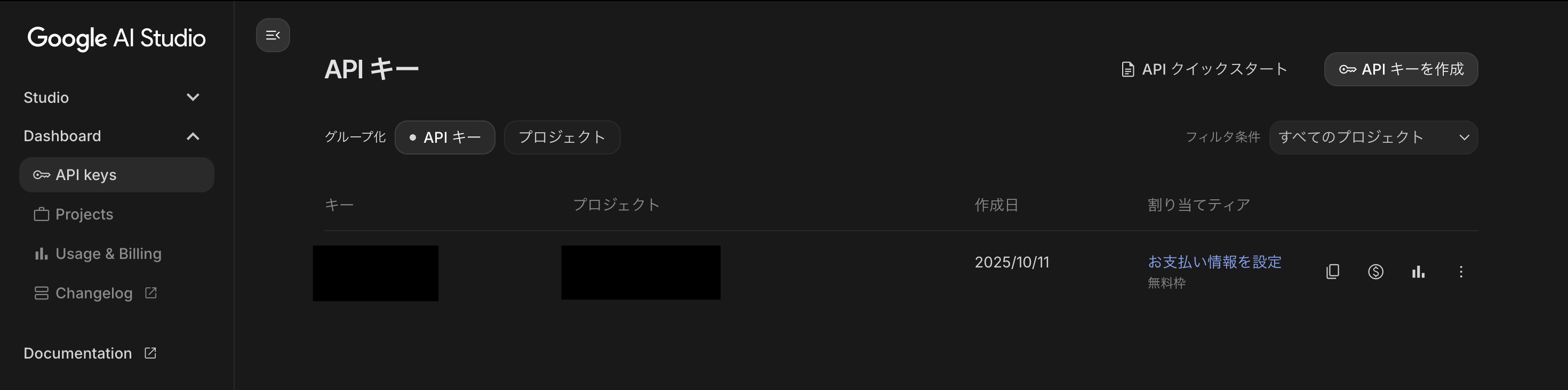
【API料金について】
Google AI StudioからのAPIキー取得の詳細手順は割愛しますが、以下画像のように割り当てティアが無料枠となっていれば課金されないはずです。
Discord Webhook URL
- 通知を送信したいDiscordサーバーのチャンネル設定を開く
- 「連携サービス」タブから「ウェブフックを作成」を選択する
- Webhookの名前等を設定し、「ウェブフックURLをコピー」する
3. Google Apps Scriptの設定
スクリプトエディタの起動
スプレッドシートのメニューから 拡張機能 > Apps Script を選択し、スクリプトエディタを開く。
スクリプトプロパティの設定
取得したAPIキーとURLをスクリプトプロパティに保存する。
- スクリプトエディタの左メニューからプロジェクトの設定を開く
- 「スクリプト プロパティ」セクションで、以下の2つのプロパティを追加・保存する
| プロパティ | 値 |
|---|---|
GEMINI_API_KEY |
取得したGemini APIキー |
DISCORD_WEBHOOK_URL |
取得したDiscord Webhook URL |
スクリプトコードの編集
エディタ内の既存コードをすべて削除し、以下のコードを貼り付ける。
const CONFIG = {
  SHEET_NAME: 'シート1',
  SUMMARY_MAX_LENGTH: 12000,
  EXECUTION_TIME_LIMIT_SEC: 280,
  SCRIPT_PROP_KEY_ROW: 'LAST_PROCESSED_INDEX',
  MAX_RETRIES: 1,
  BASE_DELAY_MS: 2000
};

const MODEL_FALLBACK_LIST = [
  'gemini-2.5-flash-exp',
  'gemini-2.5-flash',
  'gemini-2.5-flash-lite',
  'gemma-3-27b-it',
  'gemini-1.5-flash'
];

const FAILED_MODELS_CACHE = {};

function main() {
  const startTime = new Date().getTime();
  const props = PropertiesService.getScriptProperties();
  const ss = SpreadsheetApp.getActiveSpreadsheet();
  const sheet = ss.getSheetByName(CONFIG.SHEET_NAME);

  if (!sheet) { console.error('Sheet not found'); return; }

  const lastRow = sheet.getLastRow();
  if (lastRow < 2) return;
  const data = sheet.getRange(2, 1, lastRow - 1, 2).getValues();

  let startRowIndex = parseInt(props.getProperty(CONFIG.SCRIPT_PROP_KEY_ROW) || '0', 10);
  if (startRowIndex >= data.length) startRowIndex = 0;

  if (startRowIndex > 0) {
    console.log(`Resuming execution from index ${startRowIndex}`);
  }

  const thresholdDate = new Date();
  thresholdDate.setDate(thresholdDate.getDate() - 1);

  for (let i = startRowIndex; i < data.length; i++) {
    if (new Date().getTime() - startTime > CONFIG.EXECUTION_TIME_LIMIT_SEC * 1000) {
      console.warn(`Time limit. Pausing at index ${i}. Scheduling resume...`);
      props.setProperty(CONFIG.SCRIPT_PROP_KEY_ROW, i.toString());
      createResumeTrigger('resumeMain', 1);
      return;
    }

    const row = data[i];
    const siteName = row[0];
    const rssUrl = row[1];
    if (!rssUrl) continue;

    console.log(`[Processing ${i + 1}/${data.length}] Site: ${siteName}`);
    try {
      processSite(siteName, rssUrl, thresholdDate);
    } catch (e) {
      console.error(`Error: ${e.message}`);
    }

    Utilities.sleep(1000);
  }

  props.deleteProperty(CONFIG.SCRIPT_PROP_KEY_ROW);
  cleanupResumeTriggers();
  console.log('Done.');
}

function resumeMain() {
  main();
}

function processSite(siteName, rssUrl, thresholdDate) {
  const articles = fetchAndParseRSS(rssUrl);
  if (!articles || articles.length === 0) return;

  for (const article of articles) {
    const articleDate = new Date(article.pubDate);
    if (articleDate < thresholdDate) continue;

    const articleText = getArticleText(article.link);
    if (articleText.length < 50) continue;

    console.log(`  > Summarizing: ${article.title}`);

    const summary = getGeminiSummaryFast(articleText);

    if (!summary) {
      console.warn(`  X Failed. Skipping.`);
      continue;
    }

    const payload = createDiscordPayload(siteName, article, summary);
    sendDiscordMessage(payload);

    console.log(`  O Sent.`);
    Utilities.sleep(2000);
  }
}

function createResumeTrigger(funcName, minutes) {
  ScriptApp.newTrigger(funcName)
    .timeBased()
    .after(minutes * 60 * 1000)
    .create();
  console.log(`Scheduled resumption in ${minutes} minute(s).`);
}

function cleanupResumeTriggers() {
  const triggers = ScriptApp.getProjectTriggers();
  let deletedCount = 0;
  for (const t of triggers) {
    if (t.getHandlerFunction() === 'resumeMain') {
      ScriptApp.deleteTrigger(t);
      deletedCount++;
    }
  }
  if (deletedCount > 0) {
    console.log(`Cleaned up ${deletedCount} resume trigger(s).`);
  }
}

function getGeminiSummaryFast(text) {
  const apiKey = PropertiesService.getScriptProperties().getProperty('GEMINI_API_KEY');
  if (!apiKey) return null;

  for (const model of MODEL_FALLBACK_LIST) {
    if (FAILED_MODELS_CACHE[model]) continue;

    try {
      const result = callGeminiAPI(text, model, apiKey);
      if (result) return result;
    } catch (e) {
      const msg = e.toString();

      if (msg.includes('404')) {
        FAILED_MODELS_CACHE[model] = true;
      }
      else if (msg.includes('429') || msg.includes('503')) {
        console.warn(`    - ${model} busy. Switching immediately.`);
      }
      continue;
    }
  }
  return null;
}

function callGeminiAPI(text, model, apiKey) {
  const apiUrl = `https://generativelanguage.googleapis.com/v1beta/models/${model}:generateContent?key=${apiKey}`;

  const prompt = `
あなたはシニアソフトウェアエンジニアです。以下の技術記事をエンジニア向けに要約してください。
Discordで見やすいよう、余計な装飾や絵文字は使わず、Markdownの箇条書きで簡潔に出力してください。

出力フォーマット:
---CONCLUSION---
(ここにエンジニアが得られるメリットや結論を1〜2文で記述)
---POINTS---
(ここに重要な技術的ポイントを3〜4点の箇条書きで記述。行頭は「- 」のみ)
---KEYWORDS---
(ここに技術用語をカンマ区切りで記述)

---記事本文---
${text.substring(0, CONFIG.SUMMARY_MAX_LENGTH)}`;

  const payload = {
    contents: [{ parts: [{ text: prompt }] }],
    generationConfig: { temperature: 0.3 }
  };

  const options = {
    method: 'post',
    contentType: 'application/json',
    payload: JSON.stringify(payload),
    muteHttpExceptions: true
  };

  for (let attempt = 0; attempt <= CONFIG.MAX_RETRIES; attempt++) {
    const response = UrlFetchApp.fetch(apiUrl, options);
    const code = response.getResponseCode();

    if (code === 200) {
      const json = JSON.parse(response.getContentText());
      if (json.candidates?.[0]?.content?.parts?.[0]?.text) {
        return json.candidates[0].content.parts[0].text;
      }
      return null;
    }

    if (code === 404 || code === 400) throw new Error(`Error ${code}`);

    if (attempt < CONFIG.MAX_RETRIES) {
      Utilities.sleep(CONFIG.BASE_DELAY_MS);
      continue;
    }
    throw new Error(`Rate Limit (${code})`);
  }
}

function createDiscordPayload(siteName, article, rawSummary) {
  const cleanSummary = rawSummary.split('---記事本文---')[0];
  const [conclusionPart, rest] = cleanSummary.split('---POINTS---');
  const [pointsPart, keywordsPart] = (rest || '').split('---KEYWORDS---');

  const conclusion = (conclusionPart || '').replace('---CONCLUSION---', '').trim();
  const points = (pointsPart || '').replace('---POINTS---', '').trim();
  const keywords = (keywordsPart || '').replace('---KEYWORDS---', '').trim();

  const fields = [];
  if (points) fields.push({ name: "重要ポイント", value: points.substring(0, 1024) });
  if (keywords) fields.push({ name: "キーワード", value: keywords.substring(0, 1024) });

  return {
    username: siteName,
    embeds: [{
      title: article.title,
      url: article.link,
      description: conclusion || '',
      fields: fields,
      color: 5814783,
      footer: { text: `AI Summary Bot (${siteName})` },
      timestamp: new Date().toISOString()
    }]
  };
}

function sendDiscordMessage(payload) {
  const webhookUrl = PropertiesService.getScriptProperties().getProperty('DISCORD_WEBHOOK_URL');
  if (!webhookUrl) return;
  try {
    UrlFetchApp.fetch(webhookUrl, {
      method: 'post',
      contentType: 'application/json',
      payload: JSON.stringify(payload),
      muteHttpExceptions: true
    });
  } catch (e) { console.error(e.toString()); }
}

function fetchAndParseRSS(url) {
  try {
    const response = UrlFetchApp.fetch(url, { muteHttpExceptions: true });
    if (response.getResponseCode() !== 200) return [];
    const contentType = response.getHeaders()['Content-Type'] || '';
    if (contentType.includes('text/html')) return [];

    let xml = response.getContentText().replace(/^\s+/, '').replace(/[\x00-\x08\x0B\x0C\x0E-\x1F\x7F]/g, '');
    const document = XmlService.parse(xml);
    const root = document.getRootElement();
    const articles = [];
    const nsAtom = XmlService.getNamespace('http://www.w3.org/2005/Atom');

    if (root.getName() === 'rss') {
      const items = root.getChild('channel') ? root.getChild('channel').getChildren('item') : [];
      for (const item of items) {
        articles.push({
          title: item.getChild('title') ? item.getChild('title').getText() : 'No Title',
          link: item.getChild('link') ? item.getChild('link').getText() : '',
          pubDate: item.getChild('pubDate') ? item.getChild('pubDate').getText() : new Date().toISOString()
        });
      }
    } else if (root.getName() === 'feed') {
      const entries = root.getChildren('entry', nsAtom);
      for (const entry of entries) {
        articles.push({
          title: entry.getChild('title', nsAtom) ? entry.getChild('title', nsAtom).getText() : 'No Title',
          link: entry.getChild('link', nsAtom) ? entry.getChild('link', nsAtom).getAttribute('href').getValue() : '',
          pubDate: entry.getChild('published', nsAtom) ? entry.getChild('published', nsAtom).getText() : (entry.getChild('updated', nsAtom) ? entry.getChild('updated', nsAtom).getText() : new Date().toISOString())
        });
      }
    }
    return articles;
  } catch (e) { return []; }
}

function getArticleText(url) {
  try {
    const html = UrlFetchApp.fetch(url, { muteHttpExceptions: true }).getContentText();
    return html.replace(/<script\b[^>]*>([\s\S]*?)<\/script>/gim, "")
               .replace(/<style\b[^>]*>([\s\S]*?)<\/style>/gim, "")
               .replace(/<[^>]+>/g, "\n").replace(/\n\s*\n/g, "\n").trim();
  } catch (e) { return ''; }
}
動作確認と自動実行設定
手動実行
スクリプトの動作確認のため、エディタ上部でmain関数を選択し、「実行」ボタンをクリックする。初回実行時には、Googleアカウントに対する承認が必要となる。実行後、Discordチャンネルに通知が送信されることを確認する。
自動実行(トリガー設定)
スクリプトを定期的に自動実行するため、トリガーを設定する。
- スクリプトエディタの左メニューからトリガーを開く
- 「トリガーを追加」を選択し、以下のように設定する
-
実行する関数:
main -
イベントのソース:
時間主導型 -
トリガーのタイプ:
日タイマー -
時刻: 任意の実行時間帯(例:
午前8時~9時)
-
実行する関数:
- 設定を保存する