
負荷試験を行うツールであるk6の使い方をまとめる
ツールの比較はこちらの記事が参考になる
環境
- macOS
- k6 v1.4.2
インストール
$ brew install k6
テストファイル生成
$ k6 new
script.js
import http from 'k6/http';
import { sleep, check } from 'k6';

export const options = {
  vus: 10,
  duration: '30s',
};

export default function() {
  let res = http.get('https://quickpizza.grafana.com');
  check(res, { "status is 200": (res) => res.status === 200 });
  sleep(1);
}
テスト実行
$ k6 run script.js

         /\      Grafana   /‾‾/
    /\  /  \     |\  __   /  /
   /  \/    \    | |/ /  /   ‾‾\
  /          \   |   (  |  (‾)  |
 / __________ \  |_|\_\  \_____/

     execution: local
        script: script.js
        output: -

     scenarios: (100.00%) 1 scenario, 10 max VUs, 1m0s max duration (incl. graceful stop):
              * default: 10 looping VUs for 30s (gracefulStop: 30s)


  █ TOTAL RESULTS

    checks_total.......: 251     8.048887/s
    checks_succeeded...: 100.00% 251 out of 251
    checks_failed......: 0.00%   0 out of 251

    ✓ status is 200

    HTTP
    http_req_duration..............: avg=186.77ms min=180.91ms med=186.44ms max=196.94ms p(90)=192.07ms p(95)=192.74ms
      { expected_response:true }...: avg=186.77ms min=180.91ms med=186.44ms max=196.94ms p(90)=192.07ms p(95)=192.74ms
    http_req_failed................: 0.00%  0 out of 251
    http_reqs......................: 251    8.048887/s

    EXECUTION
    iteration_duration.............: avg=1.2s     min=1.18s    med=1.18s    max=1.59s    p(90)=1.19s    p(95)=1.19s
    iterations.....................: 251    8.048887/s
    vus............................: 1      min=1        max=10
    vus_max........................: 10     min=10       max=10

    NETWORK
    data_received..................: 855 kB 27 kB/s
    data_sent......................: 31 kB  988 B/s


running (0m31.2s), 00/10 VUs, 251 complete and 0 interrupted iterations
default ✓ [======================================] 10 VUs  30s
実行時にvusとdurationを指定
$ k6 run script.js --vus 5 --duration 10s
1vuの実行数を増やす
script.js
- sleep(1);
+ // sleep(1);
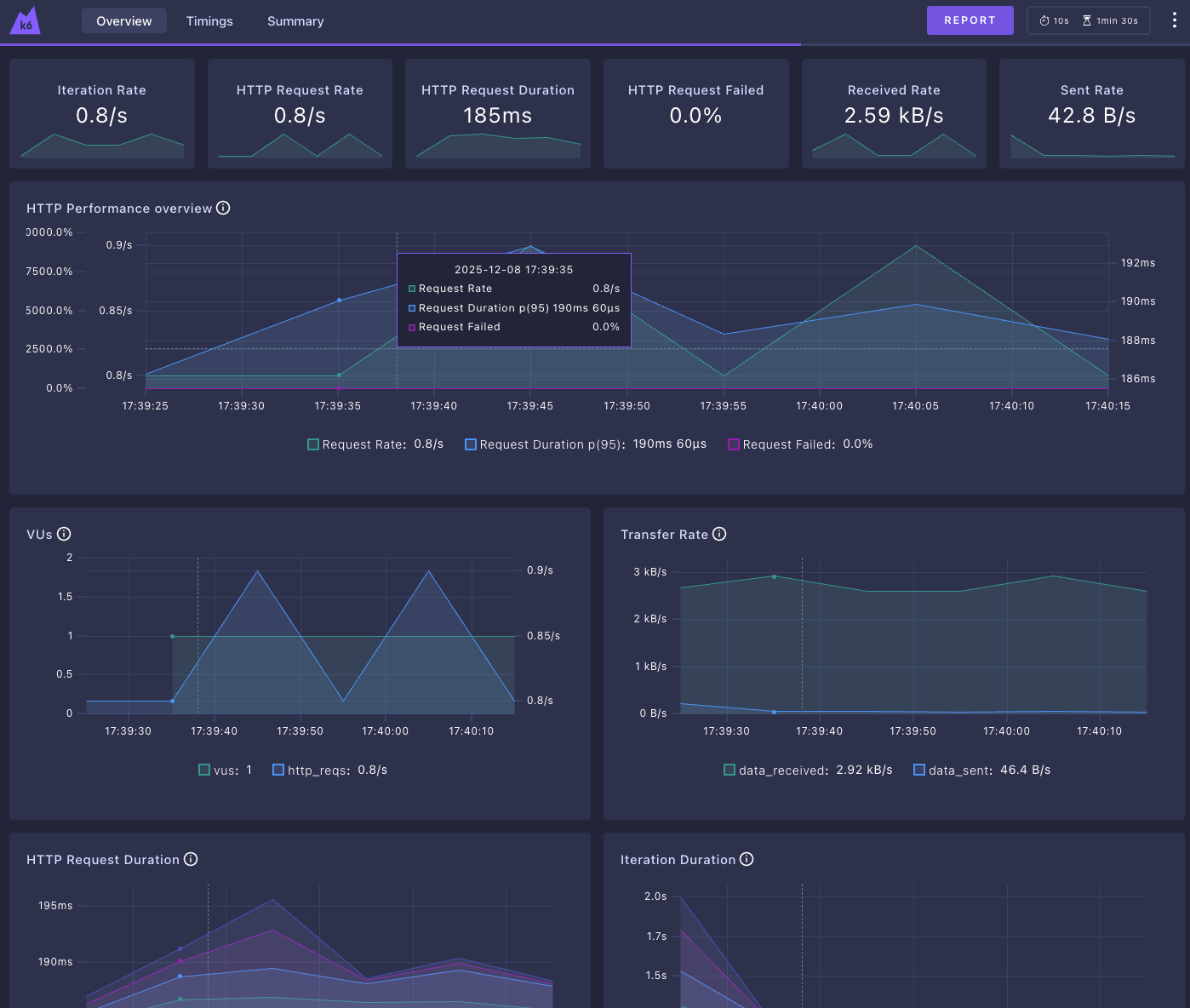
Web dashboardを使う
Web dashboardを有効にすることで、ある程度リアルタイムに状況を確認できるようになります
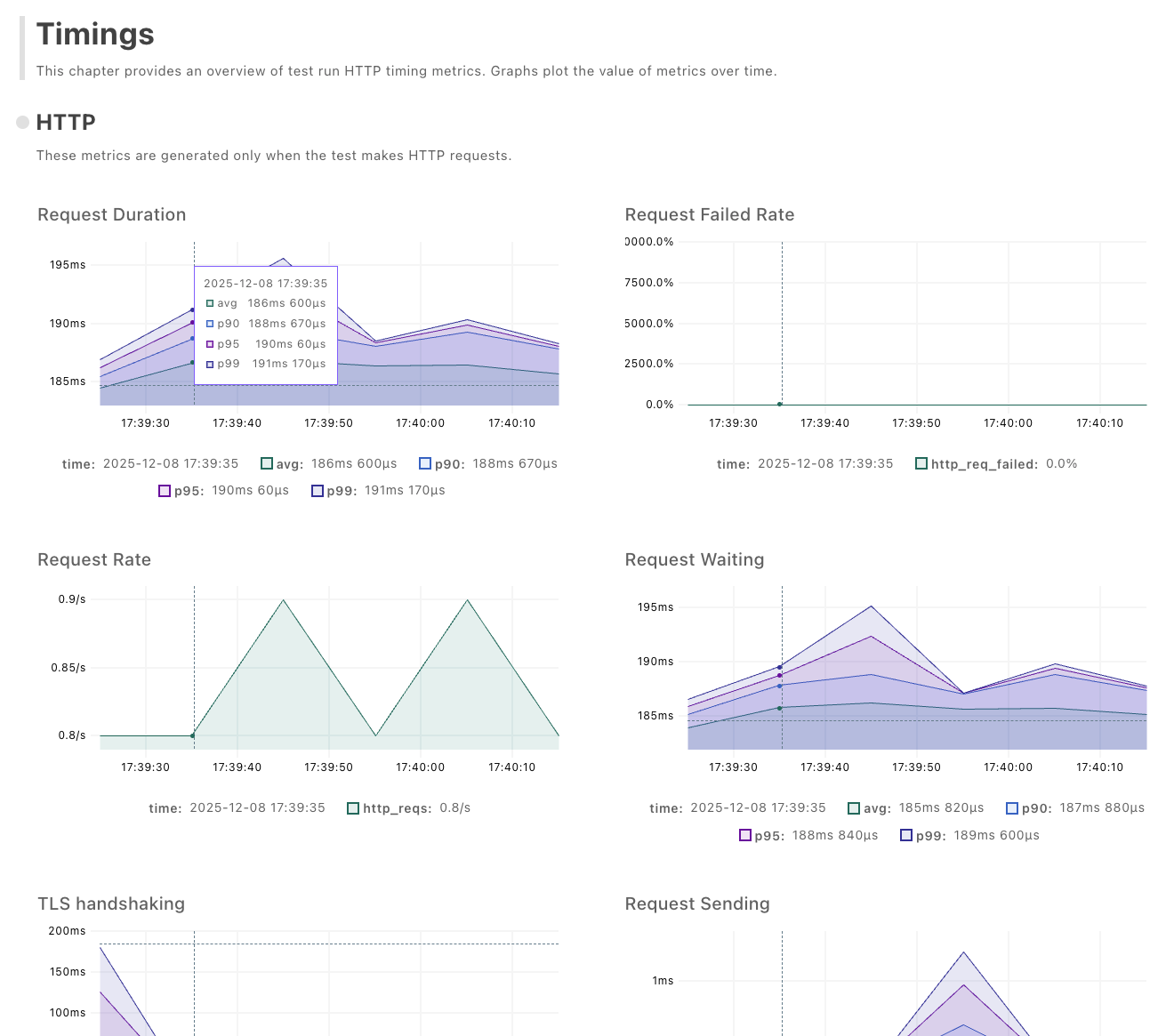
レポートをHTMLで出力することもできます
$ export K6_WEB_DASHBOARD=true
$ export K6_WEB_DASHBOARD_EXPORT=report.html

$ k6 run script.js --vus 1 --duration 1m
# http://127.0.0.1:5665
Web dashboard
出力されたHTMLではもう少し細かい情報も見れる
その他参考情報
リクエストの細かい設定などはこちらを参照
k6-operatorを使うことで、Kubernetesにデプロイして分散したリクエストを投げられるようになる