
Fortran 2018でGPUを高速化する Part 2 ― OpenACCのデータ転送を減らし、CPUとGPUの計算時間を比較する
はじめに
前回のPart 1では、Fortran 2018で使えるDO CONCURRENTとOpenACCを取り上げ、2次元拡散方程式をNVIDIA GPUへオフロードするところまで整理しました。今回も同じ5点差分を使いますが、調べたいことが少し変わります。
GPUを使えば必ず計算が速くなるわけではありません。格子計算自体が速くても、CPUメモリからGPUメモリへデータを送り、計算が終わったらCPUへ戻す処理に時間がかかることがあります。特に時間ステップを数百回、数千回と繰り返す数値計算では、毎ステップのデータ転送をなくすことが重要です。
そこでPart 2では、転送方法だけを意図的に変えた2つのOpenACC版を作り、同じCPU基準版と比較します。単に「GPUが何倍速い」と結論づけるのではなく、どの部分を高速化したのか、何を計測しているのか、計算結果は一致しているかを確かめながら進めます。
題材は、引き続き2次元拡散方程式です。これは河川・洪水氾濫解析の支配方程式ではありませんが、格子の周辺値を読み、新しい時刻の値を計算するという共通部分があります。ここで確かめたメモリの扱い方は、より大きな数値シミュレーションへ応用できます。
検証状況(2026年10月20日)
CPU環境(GNU Fortran 14.2.0)で、3方式のソースのコンパイルと計算を確認しました。gfortran -fopenaccによるホスト実行で、25×21格子・7/8/31/32ステップの全格子の値がCPU基準版と一致しています。Pythonの検証テスト6件も成功しています。一方、nvfortranでのGPUコンパイル、GPU実機上の実行、GPU速度の測定はこの環境では実施していません。数値を創作せず、GPU環境で再現できる手順と結果の記録方法を示します。
1. Part 2で比較する3つのプログラム
| 方式 | ソース | 配列の置き場所 | 計測すること |
|---|---|---|---|
| CPU基準版 | src/reference_cpu.f90 |
CPUメモリ | CPU逐次実行の基準時間 |
| OpenACC・毎回転送版 | src/acc_each_step.f90 |
時間ステップごとにGPUへ配置 | 転送の繰り返しによる負担 |
| OpenACC・GPU常駐版 | src/acc_persistent.f90 |
時間ループ全体でGPU上に保持 | 転送を減らした場合の変化 |
3方式ともreal64(倍精度)で、同じ計算式、同じ初期条件、同じゼロ固定境界を使います。OpenACC 2方式の格子更新も同じです。異なるのは、CPUとGPUの間で配列を移動させる設計と、時間ステップ間の配列の切り替え方です。
この比較には1つ注意があります。CPU基準版は1スレッドの逐次コードで、OpenMPやSIMDに特化したCPU最速版ではありません。またGPUのカーネル時間だけでなく、メモリの割り当てや転送を含んだ時間を評価します。そのため、本記事の結果をCPUとGPUの一般的な性能順位として扱わないでください。
1.1 全体構成

2. なぜデータ転送が問題になるのか
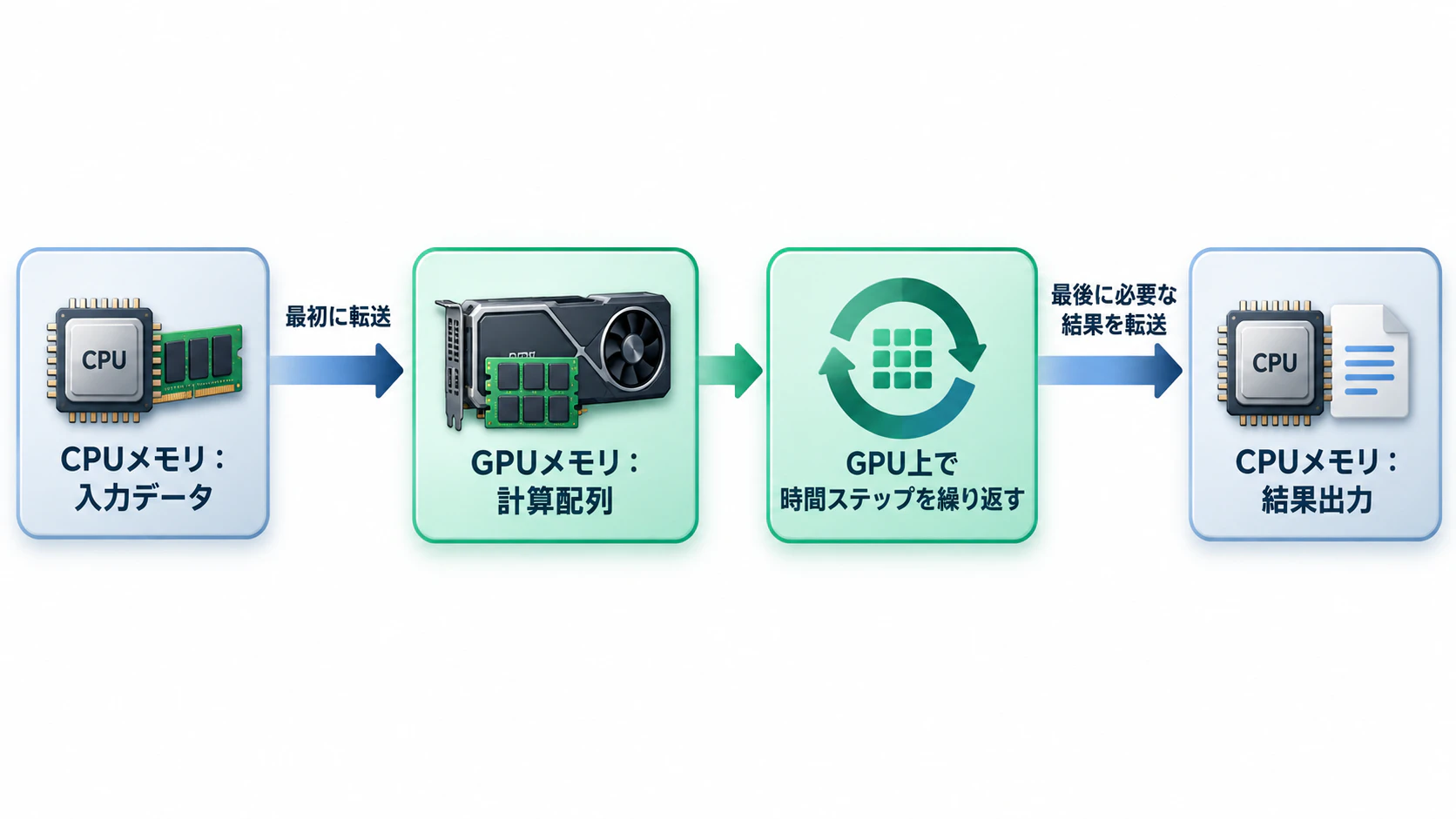
CPUメモリとGPUメモリは、通常は別の領域として扱われます。OpenACCでは、CPU側の配列をGPUへ転送するタイミングをdata指示文で明示できます。
2.1 転送量を概算する
配列がnx × nyの倍精度であれば、1配列のサイズは次のようになります。
S = n_x n_y \times 8 \quad \text{bytes}
「毎回転送版」は、各ステップで入力配列をCPUからGPUへ、出力配列をGPUからCPUへ転送します。そのため、時間ステップ数を(N)とすると、理想化した転送量は次のとおりです。
B_{\mathrm{each}} \simeq 2SN
対して「GPU常駐版」は、入力場を最初に1回送り、最後に結果場を1回だけ戻します。
B_{\mathrm{resident}} \simeq 2S
例えば2048×2048格子、500ステップの場合、倍精度1配列は32 MiBです。
| 比較項目 | 毎回転送版 | GPU常駐版 |
|---|---|---|
| CPU→GPUへの配列転送 | 500回 | 1回 |
| GPU→CPUへの配列転送 | 500回 | 1回 |
| 理論上の転送合計 | 約31.25 GiB | 64 MiB |
これは配列の本体を明示的に転送する量だけの概算です。GPU内部の読み書き、配列の確保・解放、CUDAランタイムの初期化、デバイスの実際の帯域幅は含みません。転送量が500分の1になるからといって、実行時間が500分の1になるわけではありません。
ただし、時間ステップが増えるほど「毎ステップ転送しない」利点が大きくなることは、この式から分かります。
3. 計算モデルと数値解法を統一する
今回の対象は、Part 1と同じ2次元拡散方程式です。
\frac{\partial u}{\partial t} = D\left(\frac{\partial^2u}{\partial x^2}+\frac{\partial^2u}{\partial y^2}\right)
等間隔格子・陽的時間更新・中心差分の5点式を使います。
u_{i,j}^{n+1}=u_{i,j}^{n}+\alpha\left(u_{i-1,j}^{n}+u_{i+1,j}^{n}+u_{i,j-1}^{n}+u_{i,j+1}^{n}-4u_{i,j}^{n}\right)
\alpha=\frac{D\,\Delta t}{\Delta x^2}=0.1
格子の四辺はすべて値0に固定し、最初は中央の1セルだけ値1とします。今回の等間隔格子の陽解法では、安定性の基本条件は(\alpha\leq 1/4)です。(\alpha=0.1)を使うのは、この条件を満たすためです。
! 現時刻uを読み、次時刻vの1セルを更新します。
v(i,j) = u(i,j) + alpha * ( &
  u(i-1,j) + u(i+1,j) + u(i,j-1) + u(i,j+1) &
  - 4.0_real64 * u(i,j))
この式でuを直接上書きすると、まだ計算していないセルが新時刻の値を読んでしまいます。並列処理の順序によって結果が変わるので、現在場と次時刻場の2配列を用意しておきます。
今回は境界値を分かりやすく保つため、GPUカーネルでは毎ステップ全格子を処理し、境界セルに明示的にゼロを書きます。これにより、毎回転送版のcopyout(v)で未初期化の境界値が返ってくる問題を防ぎます。
4. OpenACCのdata指示文を理解する
GPUで計算する前に、各指示文の意味を整理します。
| 指示文 | GPU領域に入るとき | 出るとき |
|---|---|---|
copy(u) |
CPU→GPUへ転送 | GPU→CPUへ転送 |
copyin(u) |
CPU→GPUへ転送 | GPU領域を解放(通常は戻さない) |
copyout(v) |
GPUに領域を確保 | GPU→CPUへ転送 |
create(v) |
GPUに領域だけ確保 | GPU領域を解放 |
present(u,v) |
既にGPU上にある領域を使う | その領域を新たに作らない |
update self(u) |
実行時点のGPU上の値をCPUへ反映 | ― |
copyinとcreateの違いは重要です。vはGPU上で全セルへ新しい値を書き込むため、最初からCPU側の値を送る必要がありません。そこで、常駐版ではcopyin(u) create(v)を使います。
!$acc data copyin(u) create(v)

! この領域内のカーネルはGPU上の同じ配列を使い続けます。

!$acc update self(v)
!$acc end data
なお、update self(v)は最終結果がvにある場合の例です。実装では奇数・偶数ステップによって最終配列が変わるため、それに合わせて更新します。
4.1 Separate Memoryを明示する
NVIDIA HPC SDK 26.9のnvfortranにはSeparate / Managed / Unifiedのメモリモードがあります。今回は転送の発生箇所を確認したいので、GPUコンパイル時に次を明示します。
-gpu=mem:separate
これはCPUとGPUのメモリを分けて扱うモードです。GPU向けOpenACCにおける通常のデフォルトもSeparate Memoryですが、実験条件としてコマンドに残しておきます。異なるモードで比較する場合は、同じ実験結果として混ぜないようにしてください。
5. 比較版A:毎ステップ転送するコード
最初は転送を減らしていない実装を見ます。
! 時間ループ内でGPUへ送り直す設計です。
do step = 1, steps
    !$acc data copyin(u) copyout(v)
    !$acc parallel loop collapse(2) present(u,v)
    do j = 1, ny
        do i = 1, nx
            ! 5点差分と境界値の更新
        end do
    end do
    !$acc end parallel loop
    !$acc end data

    ! CPU上で配列の所有権を交換します。
    call move_alloc(u, scratch)
    call move_alloc(v, u)
    call move_alloc(scratch, v)
end do
上のコードは概念を示した抜粋です。実際のソースでは、GPUで全セルを更新し、!$acc waitを使って計算完了を明示しています。毎ステップdata領域に入って出ているため、転送とGPU側領域の確保・解放を繰り返します。
この設計を悪い例として用意するのは、転送最適化がどれだけ効いたかを同じ計算問題で確認するためです。
src/acc_each_step.f90(比較版の完全なFortranソースを開く)
!> 【比較用】各ステップでCPUとGPUの間を往復するOpenACC実装。
!!
!! 正しく計算できることを優先し、あえて非効率な転送設計にしています。
!! 各ステップで u をGPUへ送り、v をCPUへ戻すため、GPU上に
!! 配列を保持する最適化版との差が測れます。
!! GPU: nvfortran -O3 -acc -gpu=mem:separate ... acc_each_step.f90
program acc_each_step
  use, intrinsic :: iso_fortran_env, only : real64, int64
  use diffusion_common, only : alpha, parse_args, set_initial_condition, &
                               elapsed_seconds, print_summary, save_field
  implicit none
  real(real64), allocatable :: u(:,:), v(:,:), scratch(:,:)
  integer :: nx, ny, steps, step, i, j
  integer(int64) :: t0, t1, rate
  real(real64) :: total_s
  character(len=512) :: field_path

  call parse_args(nx, ny, steps, field_path)
  allocate(u(nx, ny), v(nx, ny))
  call set_initial_condition(u, v)

  call system_clock(t0, rate)
  do step = 1, steps
    ! 悪い例を明示:DATA領域がループの内側にあります。
    ! copyin(u):  現在場をCPU→GPUにコピーします。
    ! copyout(v): 次時刻場はGPUで全面書込みし、GPU→CPUに返します。
    ! GPU上では境界も含め全セルへ値を書いているため、copyoutだけで
    ! 「境界未初期化」を持ち帰る危険はありません。
    !$acc data copyin(u) copyout(v)
    !$acc parallel loop collapse(2) present(u,v)
    do j = 1, ny
      do i = 1, nx
        if (i == 1 .or. i == nx .or. j == 1 .or. j == ny) then
          v(i,j) = 0.0_real64
        else
          v(i,j) = u(i,j) + alpha * ( &
            u(i-1,j) + u(i+1,j) + u(i,j-1) + u(i,j+1) &
            - 4.0_real64 * u(i,j))
        end if
      end do
    end do
    !$acc end parallel loop
    !$acc wait
    !$acc end data

    ! 結果がCPUに戻った後なので、安全にホスト配列の所有権を交換できます。
    call move_alloc(u, scratch)
    call move_alloc(v, u)
    call move_alloc(scratch, v)
  end do
  call system_clock(t1)

  total_s = elapsed_seconds(t0, t1, rate)
  call print_summary('ACC_EACH_STEP', u, total_s)
  print '(a,es24.16)', 'STEP_REGIONS_S=', total_s
  call save_field(field_path, u)
end program acc_each_step
6. 比較版B:GPUメモリを時間ループ全体で使う
今度はdata領域を時間ループの外へ移します。
!$acc data copyin(u) create(v)

do step = 1, steps
    if (mod(step, 2) == 1) then
        ! 奇数回:uを読み、vへ書く
    else
        ! 偶数回:vを読み、uへ書く
    end if
end do

!$acc wait
if (mod(steps, 2) == 1) then
    !$acc update self(v)
else
    !$acc update self(u)
end if
!$acc end data
GPU上に確保した配列は、最初に設定したdata領域を出るまで保持されます。時間ループ内では新しい配列を作成したりCPUへ転送したりしません。
6.1 GPU上で配列をコピーせずに切り替える
Part 1の初歩的なOpenACC版では、各ステップの結果vをGPU上でuへコピーしていました。正しい動作を確認するには分かりやすい方法ですが、大きな配列を毎回読み書きします。
Part 2では、**奇数回はu → v、偶数回はv → u**と切り替えます。

ホスト側のmove_allocで配列の所有権を入れ替えること自体はFortranで可能ですが、OpenACCのdata領域内では、ホストとGPUの配列の対応関係を誤りやすくなります。今回のサンプルでは配列の配置を固定したまま、書き込み先だけを切り替えます。
最初は少し冗長に見えますが、デバイス側の2配列の寿命がはっきりし、余計なコピーもありません。シミュレーションで多用される二重バッファの考え方です。
src/acc_persistent.f90(最適化版の完全なFortranソースを開く)
!> 【最適化版】OpenACCのDATA領域を時間ループの外へ移す実装。
!!
!! GPUへの初期転送は1回、最終場のCPUへの転送も1回だけです。
!! 2配列u,vをGPU上で交互に使用し、ステップごとの全面コピーは行いません。
!! 注意: uとvのホスト上の所有権をDATA領域内でmove_allocすると、
!!       デバイス上のマッピングと混乱する可能性があります。
!!       そのため、偶奇の分岐だけで読み書きを入れ替えます。
program acc_persistent
  use, intrinsic :: iso_fortran_env, only : real64, int64
  use diffusion_common, only : alpha, parse_args, set_initial_condition, &
                               elapsed_seconds, print_summary, save_field
  implicit none
  real(real64), allocatable :: u(:,:), v(:,:)
  integer :: nx, ny, steps, step, i, j
  integer(int64) :: t0, t_enter, t_loop, t_back, t_end, rate
  real(real64) :: total_s
  character(len=512) :: field_path

  call parse_args(nx, ny, steps, field_path)
  allocate(u(nx, ny), v(nx, ny))
  call set_initial_condition(u, v)

  call system_clock(t0, rate)
  ! copyin(u): 入力場を転送します。create(v): GPU側だけに作業場を確保。
  ! DATA領域に入った時点で転送・確保が行われます。
  !$acc data copyin(u) create(v)
  call system_clock(t_enter)

  do step = 1, steps
    if (mod(step,2) == 1) then
      ! 奇数ステップでは u -> v へ更新します。
      !$acc parallel loop collapse(2) present(u,v)
      do j = 1, ny
        do i = 1, nx
          if (i == 1 .or. i == nx .or. j == 1 .or. j == ny) then
            v(i,j) = 0.0_real64
          else
            v(i,j) = u(i,j) + alpha * ( &
              u(i-1,j) + u(i+1,j) + u(i,j-1) + u(i,j+1) &
              - 4.0_real64 * u(i,j))
          end if
        end do
      end do
      !$acc end parallel loop
    else
      ! 偶数ステップでは v -> u に切り替えます。
      ! 配列そのもののコピー・再確保は行いません。
      !$acc parallel loop collapse(2) present(u,v)
      do j = 1, ny
        do i = 1, nx
          if (i == 1 .or. i == nx .or. j == 1 .or. j == ny) then
            u(i,j) = 0.0_real64
          else
            u(i,j) = v(i,j) + alpha * ( &
              v(i-1,j) + v(i+1,j) + v(i,j-1) + v(i,j+1) &
              - 4.0_real64 * v(i,j))
          end if
        end do
      end do
      !$acc end parallel loop
    end if
  end do

  ! 非同期実行設定が追加された場合でも、計算完了後に時計を読みます。
  !$acc wait
  call system_clock(t_loop)

  ! 奇数回後はv、偶数回後はuに最終値があることに注意してください。
  ! 必要な最終場のみをGPU→CPUへ転送します。
  if (mod(steps,2) == 1) then
    !$acc update self(v)
  else
    !$acc update self(u)
  end if
  !$acc wait
  call system_clock(t_back)

  ! DATA領域を出る時点でGPU上の領域を解放します。
  ! copyin/createなので、ここでは新たなcopyoutは発生しません。
  !$acc end data
  call system_clock(t_end)

  total_s = elapsed_seconds(t0, t_end, rate)
  if (mod(steps,2) == 1) then
    call print_summary('ACC_PERSISTENT', v, total_s)
  else
    call print_summary('ACC_PERSISTENT', u, total_s)
  end if
  ! 各区間はCPU側の壁時計測。GPU純粋カーネル時間とは異なります。
  print '(a,es24.16)', 'ENTER_S=', elapsed_seconds(t0,t_enter,rate)
  print '(a,es24.16)', 'GPU_LOOP_S=', elapsed_seconds(t_enter,t_loop,rate)
  print '(a,es24.16)', 'READBACK_S=', elapsed_seconds(t_loop,t_back,rate)
  print '(a,es24.16)', 'EXIT_S=', elapsed_seconds(t_back,t_end,rate)

  if (mod(steps,2) == 1) then
    call save_field(field_path, v)
  else
    call save_field(field_path, u)
  end if
end program acc_persistent
7. CPU基準版と共通処理
比較のためのCPU基準版も、uとvの二重バッファを使います。GPUを呼び出さないので、毎ステップmove_allocでホスト配列の所有権を入れ替えています。これは要素の全面コピーではありません。
共通モジュールdiffusion_common.f90には、入力値の検査、初期条件、数値の妥当性判定、全格子のファイル出力、時間計測をまとめました。こうしておくと、実装ごとに初期条件や出力形式が食い違うのを防げます。
src/reference_cpu.f90(CPU基準版の完全なFortranソースを開く)
!> 2次元5点差分のCPU基準実装。
!!
!! GPU版と数学的に同じ離散化・境界条件を使用します。
!! 毎ステップ配列の所有権を交換し、余計な全面コピーを避けます。
!! ビルド例: gfortran -O3 -std=f2018 diffusion_common.f90 reference_cpu.f90 -o cpu_reference
program reference_cpu
  use, intrinsic :: iso_fortran_env, only : real64, int64
  use diffusion_common, only : alpha, parse_args, set_initial_condition, &
                               elapsed_seconds, print_summary, save_field
  implicit none
  real(real64), allocatable :: u(:,:), v(:,:), scratch(:,:)
  integer :: nx, ny, steps, step, i, j
  integer(int64) :: t0, t1, rate
  real(real64) :: total_s
  character(len=512) :: field_path

  call parse_args(nx, ny, steps, field_path)
  allocate(u(nx, ny), v(nx, ny))
  call set_initial_condition(u, v)

  ! 計測には配列確保や初期値の生成を含めず、時間積分だけを含めます。
  call system_clock(t0, rate)
  do step = 1, steps
    do j = 1, ny
      do i = 1, nx
        if (i == 1 .or. i == nx .or. j == 1 .or. j == ny) then
          v(i,j) = 0.0_real64
        else
          ! Jacobi更新:uは読み取り専用で、vの各要素は一度だけ書きます。
          v(i,j) = u(i,j) + alpha * ( &
            u(i-1,j) + u(i+1,j) + u(i,j-1) + u(i,j+1) &
            - 4.0_real64 * u(i,j))
        end if
      end do
    end do

    ! この3行は配列の要素をコピーしません(配列の所有権を交換)。
    call move_alloc(u, scratch)
    call move_alloc(v, u)
    call move_alloc(scratch, v)
  end do
  call system_clock(t1)

  total_s = elapsed_seconds(t0, t1, rate)
  call print_summary('CPU_REFERENCE', u, total_s)
  print '(a,es24.16)', 'CPU_LOOP_S=', total_s
  call save_field(field_path, u)
end program reference_cpu
src/diffusion_common.f90(共通モジュールの完全なFortranソースを開く)
!> 共通入出力・初期条件・数値検証を提供するモジュール。
!!
!! CPU、毎回転送するOpenACC版、GPU常駐版で同一の計算条件を保証します。
!! 数値計算そのものは各プログラムに明示して、GPUオフロード範囲が
!! 読者に見えるようにしています。
module diffusion_common
  use, intrinsic :: iso_fortran_env, only : real64, int64, error_unit
  use, intrinsic :: ieee_arithmetic, only : ieee_is_finite
  implicit none
  private

  real(real64), parameter, public :: alpha = 0.1_real64
  public :: parse_args, set_initial_condition, elapsed_seconds
  public :: print_summary, save_field

contains

  !> コマンドラインから格子サイズ、時間ステップ、検証用出力パスを取得します。
  !!
  !! Usage: <実行ファイル> [nx [ny [steps [field_path]]]]
  !! 計算対象は格子全域です。境界の値は常に0に固定します。
  subroutine parse_args(nx, ny, steps, field_path)
    integer, intent(out) :: nx, ny, steps
    character(len=*), intent(out) :: field_path
    integer :: argc, ios

    nx = 256
    ny = 256
    steps = 80
    field_path = ''
    argc = command_argument_count()
    if (argc > 4) then
      write(error_unit,'(a)') 'Usage: executable [nx [ny [steps [field_path]]]]'
      error stop 1
    end if
    if (argc >= 1) call parse_integer(1, nx)
    if (argc >= 2) call parse_integer(2, ny)
    if (argc >= 3) call parse_integer(3, steps)
    if (argc >= 4) then
      call get_command_argument(4, field_path, status=ios)
      if (ios /= 0 .or. len_trim(field_path) == 0) &
        error stop 'Invalid field_path argument.'
    end if

    ! 3x3以上であれば内部格子が存在しますが、ここでは境界挙動も
    ! 検証しやすいように最低5x5とします。
    if (nx < 5 .or. ny < 5 .or. steps < 1) then
      write(error_unit,'(a)') 'nx and ny must be >= 5, steps must be >= 1.'
      error stop 1
    end if
  end subroutine parse_args

  !> 正の整数だけを許可し、不正な入力では処理を止めます。
  subroutine parse_integer(number, value)
    integer, intent(in) :: number
    integer, intent(out) :: value
    integer :: ios
    character(len=80) :: buffer

    call get_command_argument(number, buffer, status=ios)
    if (ios /= 0) error stop 'Cannot read integer argument.'
    read(buffer, *, iostat=ios) value
    if (ios /= 0) error stop 'Expected an integer argument.'
    if (value <= 0) error stop 'Integer argument must be positive.'
  end subroutine parse_integer

  !> 一点だけ1、それ以外を0とする初期値を両配列へ設定します。
  !!
  !! uとvは同じ形状を持ちます。境界は0固定です。
  subroutine set_initial_condition(u, v)
    real(real64), intent(out) :: u(:,:), v(:,:)
    integer :: nx, ny

    if (any(shape(u) /= shape(v))) error stop 'Shape mismatch.'
    nx = size(u, 1)
    ny = size(u, 2)
    u = 0.0_real64
    v = 0.0_real64
    u((nx+1)/2, (ny+1)/2) = 1.0_real64
  end subroutine set_initial_condition

  !> SYSTEM_CLOCK差分を秒へ変換します(単調増加範囲での簡易計測)。
  pure function elapsed_seconds(t0, t1, rate) result(seconds)
    integer(int64), intent(in) :: t0, t1, rate
    real(real64) :: seconds
    if (rate <= 0_int64) then
      seconds = -1.0_real64
    else
      seconds = real(t1 - t0, real64) / real(rate, real64)
    end if
  end function elapsed_seconds

  !> 数値の妥当性検査と、機械可読な実行結果の表示を行います。
  !!
  !! 初期質量が1で境界が0のため、質量は通常減少します。
  !! よって、境界流出がある状況で「質量が厳密に1」とは判定しません。
  subroutine print_summary(method, final_field, total_seconds)
    character(len=*), intent(in) :: method
    real(real64), intent(in) :: final_field(:,:), total_seconds
    real(real64) :: mass, minimum, maximum, centre
    integer :: nx, ny

    nx = size(final_field, 1)
    ny = size(final_field, 2)
    if (.not. all(ieee_is_finite(final_field))) &
      error stop 'Non-finite field detected.'
    if (total_seconds < 0.0_real64) error stop 'Invalid elapsed time.'

    mass = sum(final_field)
    minimum = minval(final_field)
    maximum = maxval(final_field)
    centre = final_field((nx+1)/2, (ny+1)/2)
    if (minimum < -1.0e-12_real64 .or. maximum > 1.0_real64 + 1.0e-12_real64) &
      error stop 'Value outside physically expected bounds.'
    if (mass < -1.0e-12_real64 .or. mass > 1.0_real64 + 1.0e-10_real64) &
      error stop 'Unexpected mass: unstable calculation.'

    print '(a)', 'METHOD=' // trim(method)
    print '(a,i0)', 'NX=', nx
    print '(a,i0)', 'NY=', ny
    print '(a,es24.16)', 'MASS=', mass
    print '(a,es24.16)', 'CENTRE=', centre
    print '(a,es24.16)', 'MIN=', minimum
    print '(a,es24.16)', 'MAX=', maximum
    print '(a,es24.16)', 'TOTAL_S=', total_seconds
    print '(a)', 'CHECK=PASS'
  end subroutine print_summary

  !> 最終場を可搬性の高いプレーンテキストで保存します。
  !!
  !! 1行目にnxとny、その後はFortranの列優先順(j外側、i内側)に
  !! 1セル1行で書きます。ファイル書き込みは必ず時間計測の後です。
  !! 大格子ではファイルが非常に大きくなるため、検証時だけ使います。
  subroutine save_field(path, field)
    character(len=*), intent(in) :: path
    real(real64), intent(in) :: field(:,:)
    integer :: unit, ios, i, j

    if (len_trim(path) == 0) return
    open(newunit=unit, file=trim(path), status='replace', action='write', iostat=ios)
    if (ios /= 0) error stop 'Failed to open field file.'
    write(unit,'(i0,1x,i0)') size(field,1), size(field,2)
    do j = 1, size(field,2)
      do i = 1, size(field,1)
        write(unit,'(es24.16)') field(i,j)
      end do
    end do
    close(unit)
    print '(a)', 'FIELD_FILE=' // trim(path)
  end subroutine save_field

end module diffusion_common
8. Ubuntu 24.04・WSL2・Docker Composeで実行する
開発環境は、前回と同じNVIDIA HPC SDK 26.9とUbuntu 24.04を使います。ホストはUbuntu 24.04でも、Windows 11上のWSL2 Ubuntu 24.04でも構いません。どちらも対応するNVIDIAドライバとNVIDIA Container Toolkitの設定が必要です。
既存のDocker Desktopを前提としません。 Docker Engine + Composeで動かす構成です。
8.1 配布ZIPの構成
fortran2018_gpu_part2_r002/
├── Dockerfile
├── compose.yaml
├── README.md
├── TEST_RESULTS.md
├── src/
│   ├── diffusion_common.f90
│   ├── reference_cpu.f90
│   ├── acc_each_step.f90
│   └── acc_persistent.f90
├── scripts/
│   ├── build_cpu.sh
│   ├── build_gpu.sh
│   ├── check_cpu.sh
│   ├── check_gpu.sh
│   ├── compare_fields.py
│   └── benchmark.py
├── tests/
│   └── test_compare_fields.py
├── assets/
│   └── gpu_transfer_flow.png
└── results/
build/は実行時に自動作成されるため、ZIPにビルド済み実行ファイルは入れません。コードには処理の理由を説明するコメントを入れ、Fortranの手続きには!>の形式で説明を、Pythonにはdocstringを付けています。
8.2 GPU環境の事前確認
ホスト側で次を実行します。
nvidia-smi
docker compose version
docker info
GPUがDockerから見える状態になっていない場合は、ホストのNVIDIAドライバとNVIDIA Container Toolkitを先に設定してください。WSL2ではWindows側のNVIDIA対応ドライバを利用するので、WSL2内にLinux向けディスプレイドライバを重ねて導入しないようにします。
8.3 コンテナの起動
配布ZIPを展開し、compose.yamlがある位置で実行します。
cd fortran2018_gpu_part2_r002

docker compose config
docker compose build nvhpc

docker compose run --rm nvhpc nvfortran --version
docker compose run --rm nvhpc nvidia-smi
DockerfileはNVIDIA HPC SDK 26.9の公式イメージを土台とし、Python 3を追加します。ベンチマークと数値比較はPython標準ライブラリだけで動作します。
注意:公式HPC SDK開発用イメージは大容量です。初回のダウンロードでは、ネットワーク帯域と十分なディスク容量を確認してください。イメージタグは公式NGCで確認できるものを使っています。
Dockerfile / compose.yaml(構成ファイルを開く)
Dockerfile
# 前回のPart 1と同じ公式NVIDIA HPC SDKリリースとOSを使用します。
FROM nvcr.io/nvidia/nvhpc:26.9-devel-cuda_multi-ubuntu24.04

# ベンチマークと全格子検証は標準ライブラリだけで動くPython 3を使用します。
# pipの依存パッケージは不要です。
RUN apt-get update && \
    apt-get install -y --no-install-recommends python3 && \
    rm -rf /var/lib/apt/lists/*
compose.yaml
# Part 1で利用したNVIDIA HPC SDK 26.9 / Ubuntu 24.04コンテナを継承。
# DockerfileではPython 3だけを追加し、検証スクリプトの実行を保証します。
# NVIDIA Driver / NVIDIA Container Toolkitはホスト側で設定してください。
services:
  nvhpc:
    build:
      context: .
      dockerfile: Dockerfile
    image: fortran2018-gpu-part2-r002:26.9
    working_dir: /work
    volumes:
      - .:/work
    deploy:
      resources:
        reservations:
          devices:
            - driver: nvidia
              count: 1
              capabilities: [gpu]
    stdin_open: true
    tty: true
    command: bash
9. まずCPU側で同じ結果になることを確認する
GPUの速度を調べる前に、各方式が同じ値を返すことを確認します。ホストUbuntuにgfortranとpython3を導入して、次を実行します。
bash scripts/check_cpu.sh
このコマンドでは、CPU基準版を通常のgfortranで、OpenACC版をgfortran -fopenaccでコンパイルします。ここでのOpenACC実行はホスト側による機能検査で、NVIDIA GPUにオフロードされたことを示すものではありません。
7、8、31、32ステップの4条件で、全格子の値をファイルに書き出して比較します。奇数と偶数を両方試すのは、最終場がuかvかを取り違えた誤りを検出するためです。結果の要約値(総和と中央セル)だけが一致しても不十分なので、全セルの最大絶対誤差と許容誤差超過セル数を確認します。
成功時には、以下の判定文字列が出ます(表示する時間は環境ごとに異なるため省略します)。
COMPARE=PASS
CPU_CHECK=PASS
付属のPython比較コードは、(|a-b|\leq\text{atol}+\text{rtol}|a|)を用い、初期値はatol=2e-12、rtol=2e-10としています。異常値NaNや配列サイズの不一致も検出します。許容誤差の設定は問題に応じて見直してください。
scripts/compare_fields.py(全格子比較スクリプトを開く)
#!/usr/bin/env python3
"""Compare complete 2-D fields from CPU and GPU implementations.

The program checks every cell, not just aggregate mass or central values.
A tolerance is required because nvfortran and gfortran may differ slightly in
floating-point operation ordering or fused multiply-add decisions.

Input layout (written by diffusion_common.save_field):
    nx ny
    u(1,1)
    u(2,1)
    ...
    u(nx,ny)

Example:
    python3 scripts/compare_fields.py ref.dat naive.dat persistent.dat
"""

from __future__ import annotations

import argparse
import math
from pathlib import Path


def load_field(path: Path) -> tuple[int, int, list[float]]:
    """Load one field, ensuring shape, line count and finite values are valid."""
    with path.open(encoding="utf-8") as stream:
        header = stream.readline().split()
        if len(header) != 2:
            raise ValueError(f"{path}: invalid nx/ny header")
        try:
            nx, ny = map(int, header)
        except ValueError as exc:
            raise ValueError(f"{path}: non-integer dimensions") from exc
        if nx < 5 or ny < 5:
            raise ValueError(f"{path}: too small dimensions {nx}x{ny}")
        data: list[float] = []
        for line_number, line in enumerate(stream, start=2):
            if not line.strip():
                raise ValueError(f"{path}:{line_number}: empty numeric line")
            try:
                value = float(line.strip().replace("D", "E"))
            except ValueError as exc:
                raise ValueError(f"{path}:{line_number}: invalid number") from exc
            if not math.isfinite(value):
                raise ValueError(f"{path}:{line_number}: non-finite value")
            data.append(value)
        if len(data) != nx * ny:
            raise ValueError(
                f"{path}: expected {nx * ny} values, found {len(data)}"
            )
    return nx, ny, data


def compare_fields(
    reference: tuple[int, int, list[float]],
    candidate: tuple[int, int, list[float]],
    *,
    atol: float = 2e-12,
    rtol: float = 2e-10,
) -> tuple[float, int, int]:
    """Return (max absolute error, index, number of violations) for full arrays.

    Accept a point only when |candidate - reference| <= atol + rtol * |reference|.
    This is stricter than looking at global sums alone and catches parity errors.
    """
    if reference[:2] != candidate[:2]:
        raise ValueError("Shape mismatch between reference and candidate")
    ref = reference[2]
    got = candidate[2]
    max_abs_diff = 0.0
    worst_index = 0
    errors = 0
    for idx, (a, b) in enumerate(zip(ref, got)):
        diff = abs(a - b)
        if diff > max_abs_diff:
            max_abs_diff = diff
            worst_index = idx
        if diff > atol + rtol * abs(a):
            errors += 1
    return max_abs_diff, worst_index, errors


def main() -> None:
    """Parse file paths, compare all GPU/host variants and set exit status."""
    parser = argparse.ArgumentParser(description=__doc__)
    parser.add_argument("reference", type=Path)
    parser.add_argument("candidates", nargs="+", type=Path)
    parser.add_argument("--atol", type=float, default=2e-12)
    parser.add_argument("--rtol", type=float, default=2e-10)
    args = parser.parse_args()
    if args.atol < 0 or args.rtol < 0:
        parser.error("atol and rtol must be non-negative")
    expected = load_field(args.reference)
    has_error = False
    for path in args.candidates:
        candidate = load_field(path)
        max_abs, position, nfail = compare_fields(
            expected, candidate, atol=args.atol, rtol=args.rtol
        )
        print(
            f"FILE={path} MAX_ABS_DIFF={max_abs:.6e} "
            f"WORST_INDEX={position} FAILURES={nfail}"
        )
        has_error = has_error or nfail > 0
    if has_error:
        raise SystemExit("COMPARE=FAIL: full-field numerical differences")
    print("COMPARE=PASS")


if __name__ == "__main__":
    main()
9.1 GPUでの数値検証
Dockerコンテナ内で、GPU用のコンパイルと計算を実行します。
docker compose run --rm nvhpc bash scripts/check_gpu.sh
内部ではnvfortranを使って、CPU基準版・毎回転送版・GPU常駐版を構築します。GPU版は-acc=gpu -gpu=mem:separate -Minfo=accelを使い、CPUへの暗黙のフォールバックとメモリモードの混在を避けます。
RTX 4060 Ti用のGPUアーキテクチャを明示する場合は、例えば次のように指定できます。
docker compose run --rm -e GPU_ARCH=cc89 nvhpc bash scripts/build_gpu.sh
-Minfo=accelの出力で、該当する反復がGPUカーネルに変換されたかも確認してください。GPU側で全格子比較まで通過した場合に限り、次の判定が表示されます。
GPU_CHECK=PASS
この判定は本記事の制作環境ではまだ確認していません。 ご利用のGPU環境での実測が必要です。
10. GPUの実行時間を測る
数値検証を通過した後、次は格子数と時間ステップ数を増やして速度を比較します。GPU用の実行ファイルを一度ビルドしてから、ベンチマークを実行してください。
# 必要なら最初にビルドします。
docker compose run --rm nvhpc bash scripts/build_gpu.sh

# CPU・GPU毎回転送・GPU常駐を各5回測定します。
docker compose run --rm nvhpc python3 scripts/benchmark.py \
  --nx 2048 --ny 2048 --steps 500 \
  --warmups 1 --repeats 5 \
  --output results/bench_2048_500.csv
このスクリプトは各方式を繰り返し起動し、1試行ごとの値をCSVに保存します。実行順序を試行ごとに少しずつ入れ替え、最後に中央値を出力します。ベンチマーク処理はPythonの標準ライブラリのみで構成しています。
scripts/benchmark.py(ベンチマークスクリプトを開く)
#!/usr/bin/env python3
"""Repeat CPU/OpenACC benchmarks and save raw measurements to CSV.

The script never invents GPU measurements: it executes existing binaries and
records their TOTAL_S lines. Measurements from different computers, workload
sizes, precisions, and compiler flags should not be combined.

By default the script tries build/cpu_reference, build/acc_each_step, and
build/acc_persistent. Run it only after successful numerical comparisons.
"""

from __future__ import annotations

import argparse
import csv
import math
import statistics
import subprocess
import time
from collections import defaultdict
from pathlib import Path

METHOD_BINARIES = {
    "cpu": "cpu_reference",
    "each": "acc_each_step",
    "resident": "acc_persistent",
}
METRICS = (
    "TOTAL_S",
    "MASS",
    "CENTRE",
    "ENTER_S",
    "GPU_LOOP_S",
    "READBACK_S",
    "EXIT_S",
    "STEP_REGIONS_S",
    "CPU_LOOP_S",
)


def parse_metrics(output: str) -> dict[str, float | str]:
    """Parse machine-readable Fortran stdout and validate success markers."""
    values: dict[str, float | str] = {}
    for line in output.splitlines():
        if "=" not in line:
            continue
        name, value = line.strip().split("=", 1)
        name = name.strip()
        if name in METRICS:
            number = float(value.strip().replace("D", "E"))
            if not math.isfinite(number):
                raise ValueError(f"Invalid {name}: {number}")
            values[name] = number
        elif name in ("METHOD", "CHECK"):
            values[name] = value.strip()
    if values.get("CHECK") != "PASS" or "TOTAL_S" not in values:
        raise ValueError("No successful CHECK=PASS/TOTAL_S from solver")
    if float(values["TOTAL_S"]) < 0:
        raise ValueError("Negative TOTAL_S from solver")
    return values


def run_solver(binary: Path, nx: int, ny: int, steps: int) -> dict[str, float | str]:
    """Run one solver once and record both internal and process wall times."""
    start = time.perf_counter()
    result = subprocess.run(
        [str(binary.resolve()), str(nx), str(ny), str(steps)],
        text=True,
        capture_output=True,
        check=False,
    )
    process_wall = time.perf_counter() - start
    if result.returncode != 0:
        raise RuntimeError(
            f"{binary} returned {result.returncode}\n"
            f"STDOUT:\n{result.stdout}\nSTDERR:\n{result.stderr}"
        )
    record = parse_metrics(result.stdout)
    record["PROCESS_S"] = process_wall
    return record


def main() -> None:
    """Warm up, rotate execution order, then write individual trials to CSV."""
    parser = argparse.ArgumentParser(description=__doc__)
    parser.add_argument("--nx", type=int, default=1024)
    parser.add_argument("--ny", type=int, default=1024)
    parser.add_argument("--steps", type=int, default=300)
    parser.add_argument("--warmups", type=int, default=1)
    parser.add_argument("--repeats", type=int, default=5)
    parser.add_argument("--build-dir", type=Path, default=Path("build"))
    parser.add_argument("--output", type=Path, default=Path("results/bench_r002.csv"))
    parser.add_argument(
        "--methods", nargs="+", choices=list(METHOD_BINARIES),
        default=list(METHOD_BINARIES),
    )
    args = parser.parse_args()
    if min(args.nx, args.ny) < 5 or args.steps < 1:
        parser.error("nx and ny >= 5, steps >= 1 are required")
    if args.warmups < 0 or args.repeats < 1:
        parser.error("warmups >= 0, repeats >= 1 are required")
    selected = list(dict.fromkeys(args.methods))
    binaries = {key: args.build_dir / METHOD_BINARIES[key] for key in selected}
    for binary in binaries.values():
        if not binary.is_file():
            parser.error(f"Binary missing: {binary}. Build it first.")

    # Warm-up実行は測定CSVに入れません。GPUのクロックとキャッシュ状態を
    # ある程度整えます。ただし実行毎に新しいプロセスを作るため、
    # CUDAコンテキストの初期化費用は各測定に残る点に注意してください。
    for method in selected:
        for _ in range(args.warmups):
            run_solver(binaries[method], args.nx, args.ny, args.steps)

    rows: list[dict[str, str | int | float]] = []
    grouped: dict[str, list[float]] = defaultdict(list)
    for trial in range(1, args.repeats + 1):
        # 毎試行で順序を回転し、GPU温度や負荷の順序バイアスを減らします。
        rotated = selected[(trial - 1) % len(selected) :] + selected[: (trial - 1) % len(selected)]
        for method in rotated:
            metrics = run_solver(binaries[method], args.nx, args.ny, args.steps)
            total = float(metrics["TOTAL_S"])
            grouped[method].append(total)
            row: dict[str, str | int | float] = {
                "method": method,
                "trial": trial,
                "nx": args.nx,
                "ny": args.ny,
                "steps": args.steps,
            }
            for key in (*METRICS, "PROCESS_S"):
                row[key.lower()] = metrics.get(key, "")
            rows.append(row)
            print(f"method={method:8s} trial={trial} total_s={total:.6f}")

    args.output.parent.mkdir(parents=True, exist_ok=True)
    fieldnames = ["method", "trial", "nx", "ny", "steps"] + [
        x.lower() for x in (*METRICS, "PROCESS_S")
    ]
    with args.output.open("w", newline="", encoding="utf-8") as stream:
        writer = csv.DictWriter(stream, fieldnames=fieldnames)
        writer.writeheader()
        writer.writerows(rows)
    print(f"CSV={args.output}")

    medians = {method: statistics.median(times) for method, times in grouped.items()}
    for method in selected:
        print(f"MEDIAN_{method.upper()}_S={medians[method]:.8f}")
    if "cpu" in medians:
        for other in ("each", "resident"):
            if other in medians and medians[other] > 0:
                print(f"CPU_OVER_{other.upper()}_SPEEDUP={medians['cpu']/medians[other]:.5f}")
    if "each" in medians and "resident" in medians and medians["resident"] > 0:
        print(f"EACH_OVER_RESIDENT_SPEEDUP={medians['each']/medians['resident']:.5f}")


if __name__ == "__main__":
    main()
10.1 TOTAL_Sが示す範囲
| 指標 | 意味 | 注意点 |
|---|---|---|
TOTAL_S |
時間積分の開始から最終値をCPUへ得るまで | 入力初期化と結果のファイル保存は含みません |
ENTER_S |
GPU常駐版のdata領域へ入る時間 |
初期転送、GPU領域確保、初回実行の準備など |
GPU_LOOP_S |
常駐版の時間ステップ反復をCPU側の時計で測る時間 | カーネル起動やCPU側制御を含み、GPUカーネルだけの時間ではありません |
READBACK_S |
最終場だけをCPUへ戻す時間 | 最終場のGPU→CPU転送など |
EXIT_S |
データ領域を抜ける時間 | GPU領域の解放など |
PROCESS_S |
Pythonから起動してプロセス終了まで | プロセス起動や初期化、結果表示を含みます |
TOTAL_Sを基本比較指標にします。GPU常駐版では段階別の概算時間も出力しますが、これはCPU側の壁時計による内訳です。GPU_LOOP_Sを「GPUだけの純粋な演算時間」と呼ぶのは正確ではありません。 カーネルごとの時間を詳しく調べる場合は、後述のOpenACCランタイム計測やNsight Systemsを使います。
GPUのランタイム初期化はプロセスごとに発生します。--warmupsでは、GPUクロックやキャッシュ状態の偏りをある程度軽減しますが、毎回別プロセスを起動しているのでCUDAコンテキスト作成費用を完全には取り除けません。計測条件をそろえて読み取る必要があります。
10.2 比較表の作り方
実測後は中央値を整理して、下表を埋めます。ここでは実際にGPU測定をしていないので、数値欄は空欄のままにしています。
| 方式 | 2048×2048 / 500 step 実測中央値 | CPU基準に対する高速化倍率 |
|---|---|---|
| CPU基準 | 未測定 | 1.00(定義上) |
| OpenACC・毎回転送 | 未測定 | 未測定 |
| OpenACC・GPU常駐 | 未測定 | 未測定 |
高速化倍率は、次のように求めます。
\text{speedup} = \frac{\text{CPU基準版の実測中央値}}{\text{比較対象の実測中央値}}
1より大きい場合は比較対象が速く、1より小さい場合は遅くなっています。「GPU常駐版は毎回転送版の何倍速いか」を見る場合は、分子を毎回転送版の時間にします。
10.3 小さい格子だけで結論を出さない
小さい格子ではGPU起動や転送の固定的な負担が大きく、CPUが速いこともあります。格子数とステップ数は、例えば次のように段階的に変えてください。
| 目的 | 格子サイズ | ステップ数 |
|---|---|---|
| 動作確認 | 128×128 | 50 |
| 小さめの比較 | 512×512 | 200 |
| 中規模比較 | 1024×1024 | 300 |
| 大きめの比較 | 2048×2048 | 500 |
これは実測結果ではなく、検証条件の提案例です。大きな格子を実行する前にGPUの空きメモリを確認してください。RTX 4060 Tiのようなコンシューマー向けGPUはFP64演算が得意とは限らないので、GPU常駐にしてもCPUより必ず高速になるわけではありません。
11. 実際の転送回数を確かめる
OpenACCのコードは、意図したとおりにGPUへオフロードされ、配列が転送されているかをコンパイラ出力や実行ログから調べる必要があります。
11.1 コンパイル時:-Minfo=accel
配布スクリプトでは、nvfortranに-Minfo=accelを指定しています。ここにGPUカーネル化やループ並列化に関する情報が出ます。GPUの実行速度が出ないときは、この表示を最初に確認します。
11.2 実行時:NVCOMPILER_ACC_NOTIFY
GPUへのデータ転送を出力させるには、NVIDIA HPC SDKのOpenACCランタイム変数を使用できます。
docker compose run --rm \
  -e NVCOMPILER_ACC_NOTIFY=2 \
  nvhpc bash -lc './build/acc_persistent 128 128 6'
値2はデータ転送の通知です。毎回転送版と常駐版で、GPUへの転送頻度が違うことを比較できます。実行ログの詳細な書式はSDKのバージョンによって変わります。
11.3 実行時:NVCOMPILER_ACC_TIME
docker compose run --rm \
  -e NVCOMPILER_ACC_TIME=1 \
  nvhpc bash -lc './build/acc_persistent 1024 1024 300'
この設定はカーネルとデータ転送の簡易プロファイルを表示します。実行時間の詳細分析にはNsight Systemsも利用できます。プロファイラの出力は、計測用の付加処理によって通常実行時とは異なる場合があります。性能比較の通常実行と詳細プロファイルの実行は分けて行うのが安全です。
12. 検証で注意したい点
12.1 GPUでCHECK=PASSが出ても十分ではない
CHECK=PASSは値の範囲・有限性・総和を確認する簡易チェックです。計算式の誤りが必ず見つかるわけではありません。scripts/check_gpu.shでは、CPU基準版と全格子を比較しているため、最低限こちらまで通す必要があります。
12.2 -fastや-ffast-mathを最初から使わない
数学的に同じ計算でも、浮動小数点の演算順序によって丸め誤差が変わります。今回の基礎検証では、コードの比較が難しくなる強い浮動小数点再配置オプションは使用しません。最適化オプションを変更するときは、毎回数値比較をやり直してください。
12.3 ハードウェアと環境を記録する
GPUの型番、VRAM、ドライバ、SDK、CUDA、CPU、コンパイラのオプション、格子サイズ、ステップ数は、最低限記録してください。WSL2とネイティブUbuntuでは転送やランタイム機能の制約が同じとは限りません。
12.4 出力までの時間を比較する
GPU上のカーネルだけを測ると、結果をCPUへ戻す時間が抜けます。最終結果がCPU側の保存処理に必要なら、転送を含めたTOTAL_Sを見る必要があります。一方で、アプリケーション全体の所要時間を知りたいときはPROCESS_Sや外部の壁時計も参考にします。どの時間を比較しているかを揃えることが大切です。
12.5 CPU側も高速化できる
CPU基準版は逐次コードです。既存の数値解析プログラムでは、SIMD、OpenMP、キャッシュの使い方の改善でCPUも速くできます。本格比較を行う際は、CPU側の最適化を進めてからGPUとの優劣を確認するのが公平です。
13. 洪水・河川解析へ応用するとき
2次元差分計算でGPUメモリの扱い方を確認したら、次は実際の数値解析のどこをGPUで計算させるかを考えます。
例えば2次元浸水計算では、水深・流速・フラックスの更新に、多数の格子へ同じ演算を適用する部分があります。そこはGPUへ移しやすい候補です。一方、河道と氾濫原の接続、流量交換、可変時間刻み、複雑な境界処理などは、演算の依存関係を確認する必要があります。
特に1D–2D連成解析では、GPU化するために支配方程式や境界条件を勝手に簡略化してはいけません。CPU版とGPU版で同じ離散化・時間刻み・水収支・境界条件を使ったうえで、各時刻の流量や水深の誤差を確認することが必要です。今回の拡散計算は、あくまでその前段階としてデータ転送を学ぶためのものです。
14. まとめ
Part 2で確認したかったのは、GPUの演算そのものよりも、計算の途中でCPUとGPUの間を何度も往復しない設計です。
毎ステップ転送する実装は仕組みが分かりやすい反面、転送の負担が大きくなります。data領域を時間ループの外に移し、uとvをGPU上で交互に使えば、初期入力と最後の結果だけをCPUとやり取りできます。
ただし、実際の速度はGPU・CPU・データサイズ・精度によって変わります。今回はソース、全格子検証、CSVベンチマークまでを用意し、GPU未測定の数値を結果として書かないことにしました。
次のPart 3では、GPU上のデータ転送を減らした後に残る課題として、カーネルの実行回数、メモリアクセス、倍精度と単精度の性能・誤差を比較すると、自然な流れでさらに深く調べられると思います。
ソースコードの配布
配布ファイル :fortran2018_gpu_part2_sources_r002.zip
配布ZIPファイル:https://godo-tys.jp/downloads/fortran2018_gpu_part2_sources_r002.zip
このZIPには、Fortranソース、Docker Compose環境、シェルスクリプト、Python比較・測定スクリプト、検証用テスト、図をまとめました。)。
前回Part 1の記事・サンプルとは独立して動く構成なので、Part 2のZIPだけを展開して実行できます。