
この記事はThe Evernote SDK for Python Quick-start Guideをベースにわからないところを追加して作成しています。
zipファイルをダウンロードしてインストールしようとしましたが、うまくいかなかったため、Gitからインストールすることにしました。
特に、いきなりGitとか出てくるので、EvernoteSDKをインストールする前に
・WindowsにGitをインストールする
・Git for Windowsをインストールする
という前準備が必要です。
わからない方は上のリンク先からGitをインストール、設定ください。
EvernoteSDKインストール(Git編)
もう一つのインストール方法であるGitを使ったインストールを試してみる。
Gitのインストールについては
・WindowsにGitをインストールする
・Git for Windowsをインストールする
を参照ください。
Git Bashを開き
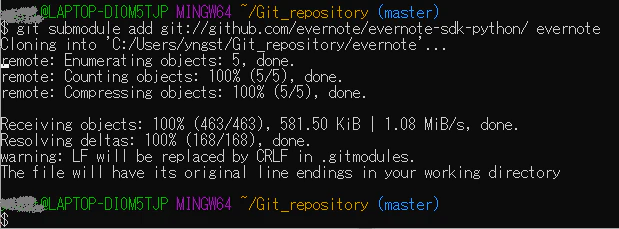
git submodule add git://github.com/evernote/evernote-sdk-python/ evernote
と入力するとインストールが進み、以下の様に表示される。
続いてサブモジュールの初期化を行う。
git submodule init

続いてサブモジュールをアップデートする
git submodule update

特に何かが表示されるわけではないが、これでアップデートが完了する。
これはThe Evernote SDK for Python Quick-start Guideに記載されていることを実施しただけですが、git submodule initはサブモジュールを初期化、git submodule updateはアップデートだから、git submodule add ***の後に初期化してアップデートしても、インストールたものを初期化してアップデートするので最初のadd だけでよいのかなと思ったけど、initしてからフォルダを見ても何も消えていないのでとりあえずこの3つを行って完了します。
EvernoteSDKのインストール(ダウンロード編)失敗編
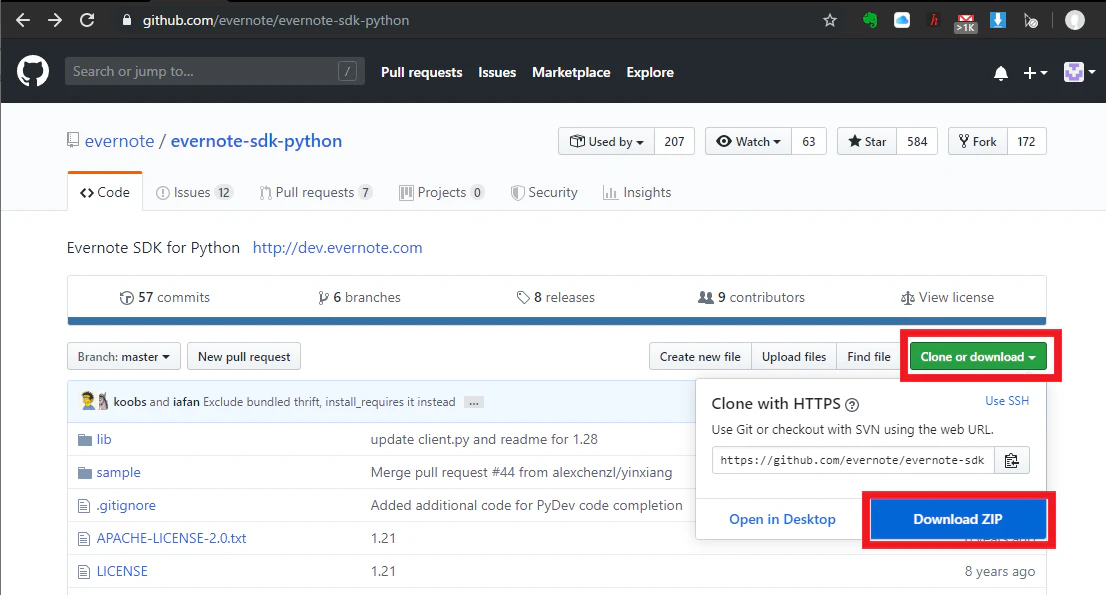
Evernote SDK for Pythonは、GitHubにホストされています。
Evernote-SDK-pythonのページの上部にある緑色のClone or downloadをクリックして、SDKをzipファイルとしてダウンロードします。
zipファイルを解凍した後、Pythonセットアップスクリプトを実行して、システムにライブラリをインストールします。
anaconda promptからpy27仮想環境に移動し、
python setup.py install
と打つと
(py27) PS C:\Users\(省略)\evernote-sdk-python-master> python setup.py install
  File "setup.py", line 22
    packages=find_packages('lib',exclude=["*.thrift", "*.thrift.*", "thrift.*", "thrift"]),
SyntaxError: keyword argument repeated
となり、インストールできない。
setup.pyの中を見てみると
import os
from setuptools import setup, find_packages

constants = open('lib/evernote/edam/userstore/constants.py').read().split("\n")
for x in [x for x in constants if x.startswith('EDAM_VERSION')]:
    exec x


def read(fname):
    return open(os.path.join(os.path.dirname(__file__), fname)).read()


setup(
    name='evernote',
    version="%i.%i.0" % (EDAM_VERSION_MAJOR, EDAM_VERSION_MINOR),
    author='Evernote Corporation',
    author_email='api@evernote.com',
    url='http://dev.evernote.com',
    description='Evernote SDK for Python',
    long_description=read('README.md'),
    packages=find_packages('lib'),
    packages=find_packages('lib',exclude=["*.thrift", "*.thrift.*", "thrift.*", "thrift"]),
    classifiers=[
        'Development Status :: 5 - Production/Stable',
        'Intended Audience :: Developers',
        'License :: OSI Approved :: BSD License',
        'Topic :: Software Development :: Libraries',
    ],
    license='BSD',
    install_requires=[
        'thrift',
        'oauth2',
    ],
)
となっており、22行目は
packages=find_packages('lib',exclude=["*.thrift", "*.thrift.*", "thrift.*", "thrift"]),
と書いてあるが、わからないので、今回は諦めますが、自分のレベルが上がって解決できそうになったら修正していきたいと思います。