
Composition Api は 各モジュールを関数ベースで定義するのがスタンダードなようですが、これにより依存性を注入しながらモジュールを初期化できるようになりました。
個人的にはそこが非常に便利だなと思いました。
今回以下のような、 商品売り上げ・支出テーブル を作成する例の中でこちらのメリットについてまとめてみたいと思います。
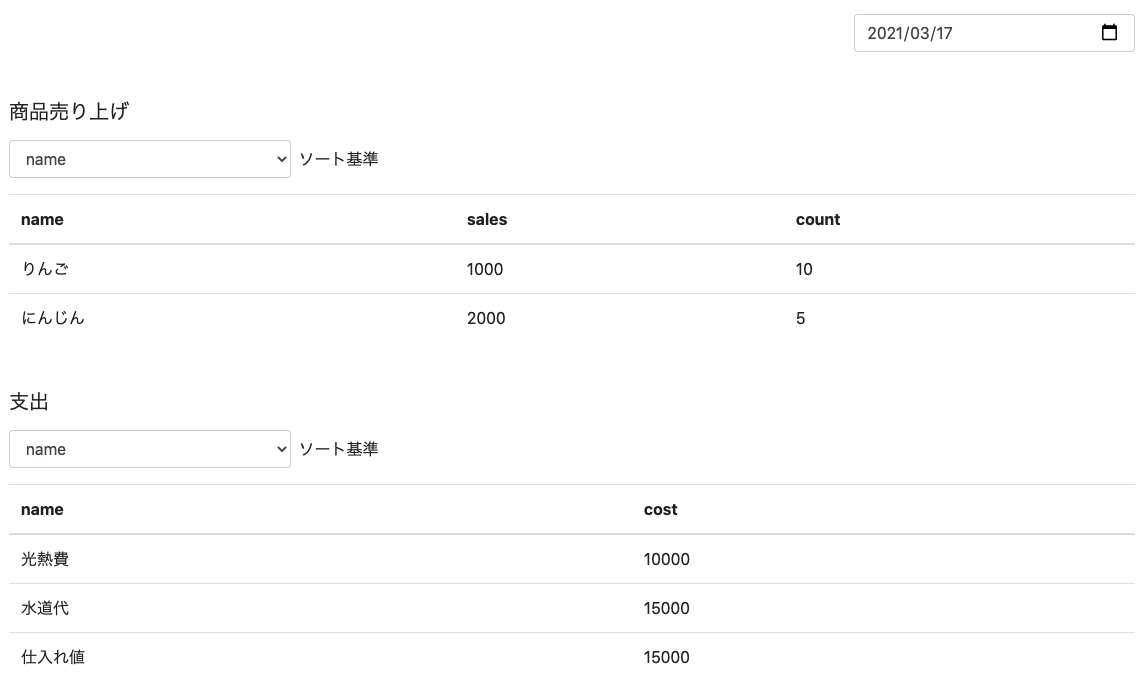
機能としては以下を想定してみます。
-
右上部カレンダーから日付を変更すると、その日付の 商品売り上げ・支出 を共に取得し描画する。
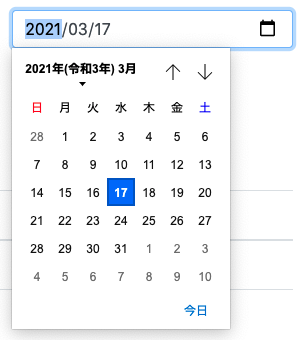
-
各テーブル左上部のソート基準のセレクトボックスからソート基準を変更すると、選択された基準で昇順でソートしたデータを取得し描画する。
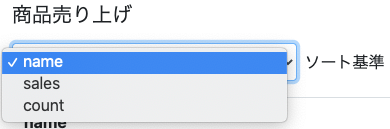
実際に今回これらの機能を完全に作り込む訳ではありませんのであくまでイメージとなります。
必要コンポーネントを作る
必要となるコンポーネントを作っていきます。
これらは今回の主題とはあまり関係がありません。
カレンダーコンポーネント
<template>
  <input
    v-model="dateAccesor"
    type="date"
    class="form-control"
  />
</template>

<script lang="ts">
import { DateTime } from 'luxon'
import { PropType, defineComponent, computed } from 'vue'

export default defineComponent({
  props: {
    date: {
      type: Object as PropType<DateTime>,
      required: true
    }
  },
  setup (props, ctx) {
    const dateAccesor = computed({
      get: () => props.date.toFormat('yyyy-MM-dd'),
      set: (updatedDate: string) => {
        ctx.emit('on-date-change', DateTime.fromISO(updatedDate))
      }
    })

    return {
      dateAccesor
    }
  }
})
</script>
- 日時ですが、今回 luxon というライブラリーで扱ってみます。
-
dateAccessorという算出プロパティが、注入された日時をinput type="date"要素がバインドできるように変換し(getter)、またこちらの変更イベントを通知する(setter)役割を担っています。
ソート基準変更セレクトボックス付きテーブルコンポーネント
<template>
  <div>
    <div class="d-flex align-items-center">
      <select
        :value="sortBy"
        @input="$emit('on-sort-by-change', $event.target.value)"
        class="form-control w-25 mb-3"
      >
        <option
          v-for="column in columns"
          :key="column"
          :value="column">
          {{ column }}
        </option>
      </select>
      <p class="ml-2">
        ソート基準
      </p>
    </div>
    <table class="table">
      <thead>
        <tr>
          <th
            v-for="column in columns"
            :key="column"
          >
            {{ column }}
          </th>
        </tr>
      </thead>
      <tbody>
        <tr
          v-for="tableItem in tableItems"
          :key="tableItem.id"
        >
          <td
            v-for="column in columns"
            :key="column"
          >
            {{ tableItem[column] }}
          </td>
        </tr>
      </tbody>
    </table>
  </div>
</template>

<script lang="ts">
import { defineComponent, PropType } from 'vue'

export default defineComponent({
  props: {
    tableItems: {
      type: Array as PropType<{ id: number; [key: string]: string | number }[]>,
      required: true
    },
    columns: {
      type: Array as PropType<string[]>,
      required: true
    },
    sortBy: {
      type: String,
      required: true
    }
  }
})
</script>
-
columnsは その名の通りテーブルカラムのリストになるのですが、こちらはソート基準を選択するセレクトボックスの各アイテムとしての機能も持ちます。 -
sortByは現在選択中のソート基準になります。
画面を作る
次にこれらのコンポーネントを利用して画面を作ってみます。
ただし最初は、支出を表示する予定はなく、商品売り上げのみ表示するという用件だったと仮定します。
商品売り上げを表示する
<template>
  <div class="position-absolute w-100 h-100 p-3">
    <calender
      :date="date"
      @on-date-change="onDateChange"
      class="w-25 mb-5 ml-auto"
    />
    <h5 class="mb-3">
      商品売り上げ
    </h5>
    <sortable-table
      :table-items="products"
      :columns="columns"
      :sort-by="sortBy"
      @on-sort-by-change="onSortByChange"
      class="mb-5"
    />
  </div>
</template>

<script lang="ts">
import { DateTime } from 'luxon'
import {
  defineComponent,
  reactive,
  ref,
  computed,
  toRefs,
  onMounted
} from 'vue'

import { Product } from '@/types/'

import Calender from '@/components/Calender.vue'
import SortableTable from '@/components/SortableTable.vue'

import fetchProductsMock from '@/mocks/fetchProduts'

export default defineComponent({
  components: {
    Calender,
    SortableTable
  },
  setup () {
    const date = ref(DateTime.local()) // カレンダーにバインドする日付
    const products = ref<Product[]>([]) // 商品売り上げリスト
    const productsInfo = reactive({ // 商品売り上げ表示情報
      sortBy: 'name',
      columns: ['name', 'sales', 'count']
    })

    // 商品売り上げ取得リクエストパラム(まだパラムは少ないが、今後増えることも想定して別 computed として切り出してみる)
    const fetchProductsParams = computed(() => {
      return {
        sortBy: productsInfo.sortBy,
        date: date.value
      }
    })

    // 商品売り上げ取得メソッド
    const fetchProducts = async () => {
      products.value = await fetchProductsMock(fetchProductsParams.value)
    }

    // ソート基準変更メソッド
    const onSortByChange = (sortBy: string) => {
      productsInfo.sortBy = sortBy
      fetchProducts()
    }

    // 日付変更メソッド
    const onDateChange = (updatedDate: DateTime) => {
      date.value = updatedDate
      fetchProducts()
    }

    onMounted(fetchProducts)

    return {
      date,
      products,
      ...toRefs(productsInfo),

      onSortByChange,
      onDateChange
    }
  }
})
</script>
要件の規模がそこまで大きくなかったので一個のコンポーネントに収めてみました。
支出も表示したい
次に支出も表示したいという要件が出たとします。
ただし、このまま一つのコンポーネントに収めると、コード量が肥大化するためロジックをモジュール化することになったとします。
もちろんモジュール化することでロジックの再利用が可能となるためそこのメリットも見込めます。
mixin
ここまで setup で書いてきたので、 mixin の例は少し分かりづらいですが、今回の要件のようなモジュール分割を mixin で書くとどうなるのか。
かなり簡単にですが、考えてみます。
商品売り上げ mixin
import fetchProductsMock from '@/mocks/fetchProduts'

export default {
  data () {
    return {
      products: [],
      productsInfo: {
        sortBy: 'name',
        columns: ['name', 'sales', 'count']
      }
    }
  },
  computed: {
    fetchProductsParams () {
      return {
        sortBy: this.productsInfo.sortBy,
        date: this.date
      }
    }
  },
  methods: {
    async fetchProducts () {
      this.products = await fetchProductsMock(this.fetchProductsParams)
    },
    async onSortByChangeProducts (updatedSortBy) {
      this.productsInfo.sortBy = updatedSortBy
      this.fetchProducts()
    }
  },
  mounted () {
    this.fetchProducts()
  }
}
こんなイメージにしてみました。
先に setup で書いた内容のうち products テーブルに関連する箇所をそのまま mixin に移しただけになります。
商品売り上げと支出を表示する
支出(spending) mixin も同じようなものを作って実際に画面側で利用すると以下のようになるかなと思います。
(実際にはそれぞれの mixin にはそれぞれ固有の処理や機能があると思いますが、今回はそこまで作り込みません)。
<template>
  <div class="position-absolute w-100 h-100 p-3">
    <calender
      :date="date"
      @on-date-change="onDateChange"
      class="w-25 mb-5 ml-auto"
    />
    <h5 class="mb-3">
      商品売り上げ
    </h5>
    <sortable-table
      :table-items="products"
      :columns="productsInfo.columns"
      :sort-by="productsInfo.sortBy"
      @on-sort-by-change="onSortByChangeProducts"
      class="mb-5"
    />
    <h5 class="mb-3">
      支出
    </h5>
    <sortable-table
      :table-items="spendings"
      :columns="spendingsInfo.columns"
      :sort-by="spendingsInfo.sortBy"
      @on-sort-by-change="onSortByChangeSpendings"
    />
  </div>
</template>

<script>
import { DateTime } from 'luxon'

import productsMixin from '@/mixins/products' // 商品売り上げ
import spendingsMixin from '@/mixins/spendings' // 支出

import Calender from '@/components/Calender.vue'
import SortableTable from '@/components/SortableTable.vue'

export default {
  components: {
    Calender,
    SortableTable
  },
  mixins: [productsMixin, spendingsMixin],
  data () {
    return {
      date: DateTime.local()
    }
  },
  methods: {
    onDateChange (updatedDate) {
      this.date = updatedDate
      this.fetchProducts()
      this.fetchSpendings()
    }
  }
}
</script>
かなりすっきりしました。
ですがいくつか弱点もあります。
今回の mixin を用いた設計の悪いところ
1. モジュールは、外部の date プロパティに依存してるが、 date の宣言を mixin 利用側に強制させる仕組みがない。
モジュール側の fetchProductsParams は date を参照します。
上記例のように、モジュール利用側で両方の mixin 共通で扱う date を宣言していますが、それが必要だということが実際にこちらの fetchProductsParams を利用する時でないと分かりません。
また、最悪な想定としては date が undefined のまま開発中エラーがスローされず正常に動作してると勘違いし、バグを生んでしまうかもしれません。
対応策として以下のようなものが挙げられるかもしれませんがちょっと微妙です。
- モジュール内の
createdのタイミングなどでdateが無かった場合にエラーをスローする。
→ できればモジュール利用時にコードベースでエラーが出てほしい。また、これをすることで少なからずコードが荒れてしまう。 -
dateを mixin 側で宣言しておく。
→ これはやっておいた方が良さそう。ただ、双方の mixin で共通のdateを利用してるということが mixin 利用側から分かりづらい。また、分かりづらさを解消するために、dateを改めて画面側で宣言しても良さそうだが、それはオーバーライドという本来の目的として使いたい。
など...。
今回同じ date を複数のモジュールで共通で利用するということなので、やはりコードベースでの外部からの注入を強制させたいです。
2. それぞれの mixin で別の date を参照したいとなった際、大規模な修正が必要になる可能性がある。
以下のような要件が出たとします。
- 新たに別のページを作りたい。
- そのページでも、 商品売り上げ・支出テーブル を表示させたい。
- ただしそのページでは、共通のカレンダーを 商品売り上げ・支出 で使うのではなく、カレンダーをもう一つ表示させ、それぞれが、 商品売り上げ用・支出用 と、異なるカレンダーから日付を選べるようにしたい。
作成済みの mixin を利用した実装イメージとしては以下のような感じでしょうか。
<template>
  <div class="position-absolute w-100 h-100 p-3">
    <calender
      :date="date"
      @on-date-change="onDateChange"
      class="w-25 mb-5 ml-auto"
    />
    <h5 class="mb-3">
      商品売り上げ
    </h5>
    <sortable-table
      :table-items="products"
      :columns="productsInfo.columns"
      :sort-by="productsInfo.sortBy"
      @on-sort-by-change="onSortByChangeProducts"
      class="mb-5"
    />
    <!-- カレンダー追加 ↓ -->
    <calender
      :date="date2"
      @on-date-change="onDateChange2"
      class="w-25 mb-5 ml-auto"
    />
    <h5 class="mb-3">
      支出
    </h5>
    <sortable-table
      :table-items="spendings"
      :columns="spendingsInfo.columns"
      :sort-by="spendingsInfo.sortBy"
      @on-sort-by-change="onSortByChangeSpendings"
    />
  </div>
</template>

<script>
import { DateTime } from 'luxon'

import productsMixin from '@/mixins/products'
import spendingsMixin from '@/mixins/spendings'

import Calender from '@/components/Calender.vue'
import SortableTable from '@/components/SortableTable.vue'

export default {
  components: {
    Calender,
    SortableTable
  },
  mixins: [productsMixin, spendingsMixin],
  data () {
    return {
      date: DateTime.local(),
      date2: DateTime.local() // 追加したカレンダーとバインドするプロパティ
    }
  },
  computed: {
    fetchSpendingsParams () { // !!! this.date2 を参照するようにオーバーライドさせなければいけない !!!
      return {
        sortBy: this.spendingsInfo.sortBy,
        date: this.date2
      }
    }
  },
  methods: {
    onDateChange (updatedDate) {
      this.date = updatedDate
      this.fetchProducts()
    },
    onDateChange2 (updatedDate) {  // 追加したカレンダーから日付を変更するメソッド
      this.date2 = updatedDate
      this.fetchSpending()
    }
  }
}
</script>
- カレンダーUIをビューに二つ用意する。
- それぞれでバインドするために
dateの他に、date2も用意する - それぞれでカレンダーの変更をハンドリングするために
onDateChangeの他にonDateChange2も用意する
ここまでは良いのですが、片方で this.date を参照してたプロパティを this.date2 を参照するようにオーバーライドしなければなりません(fetchSpendingsParams)。
これをしなければいけないプロパティ(メソッド含む)が増えてしまうと、手が回らなくなったり、バグを生む要因になってしまいます。
mixin との付き合い方
以上 mixin の悪い設計とその弱点でしたが、そもそも外部に依存するプロパティ( date ) を mixin 側で直接参照するのはやめた方が良さそうです。
従って、 computed > fetchProductsParams のようなプロパティはそもそも廃止し、その他今回の例ではありませんが this.date を参照してる他のメソッドなどは全て毎回引数で date を受け取る設計にしておくのが無難そうです。
またその場合 mixin 側で mounted フックよりデータ取得をすることができなくなりますが、それはそれでそっちの方が元々安全だったかもしれません。
いずれにしろ、 date を参照したいメソッドが多ければ多いほどそれらは毎回引数として date を受け取れなければならず mixin 利用側としても大変な作業になってしまいそうです。
そして、 date を参照する computed などをそもそも使えないというのも、やはり不便です。
Composition Api
対して Composition Api の場合は
モジュールを関数ベースで定義することができる = 依存性を注入しながらそのモジュールを初期化できる
これにより上記 mixin の問題を解消できます。
商品売り上げ mixin を Composition Api のモジュールに書き換えてみます。
import { DateTime } from 'luxon'
import {
  Ref,
  reactive,
  ref,
  computed,
  toRefs
} from 'vue'

import { Product } from '@/types/'

import fetchProductsMock from '@/mocks/fetchProducts'

export const useProducts = (date: Ref<DateTime>) => {
  const products = ref<Product[]>([])
  const productsInfo = reactive({
    sortBy: 'name',
    columns: ['name', 'sales', 'count']
  })

  const fetchProductsParams = computed(() => {
    return {
      sortBy: productsInfo.sortBy,
      date: date.value
    }
  })

  const fetchProducts = async () => {
    products.value = await fetchProductsMock(fetchProductsParams.value)
  }

  const onSortByChange = async (sortBy: string) => {
    productsInfo.sortBy = sortBy
    fetchProducts()
  }

  return {
    products,
    ...toRefs(productsInfo),

    fetchProducts,
    onSortByChange
  }
}
ポイントはやはり引数として date: Ref<DateTime> を宣言してるところです。
これにより、
- プロパティとモジュール間の連携が明示的になる。
- DateTime 型のリアクティブなプロパティを注入していない場合、TypeScript であればコードベースでエラーが表示されてくれる
(加えてコンバイルエラーになってくれる)。 - 連携させるプロパティをモジュール初期化時に自由に決められる。
など...、先ほどの mixin の問題が全て解消されました。
実際に作り直した画面は以下のようなイメージになります。
<template>
  <div class="position-absolute w-100 h-100 p-3">
    <calender
      :date="date"
      @on-date-change="onDateChange"
      class="w-25 mb-5 ml-auto"
    />
    <h5 class="mb-3">
      商品売り上げ
    </h5>
    <sortable-table
      :table-items="products"
      :columns="columnsProducts"
      :sort-by="sortByProducts"
      @on-sort-by-change="onSortByChangeProducts"
      class="mb-5"
    />
    <h5 class="mb-3">
      支出
    </h5>
    <sortable-table
      :table-items="spendings"
      :columns="columnsSpendings"
      :sort-by="sortBySpendings"
      @on-sort-by-change="onSortByChangeSpendings"
    />
  </div>
</template>

<script lang="ts">
import { DateTime } from 'luxon'
import { defineComponent, ref, onMounted } from 'vue'

import { useProducts } from '@/modules/useProducts'
import { useSpendings } from '@/modules/useSpendings'

import Calender from '@/components/Calender.vue'
import SortableTable from '@/components/SortableTable.vue'

export default defineComponent({
  components: {
    Calender,
    SortableTable
  },
  setup () {
    const date = ref(DateTime.local())
    const {
      products,
      sortBy: sortByProducts,
      columns: columnsProducts,
      fetchProducts,
      onSortByChange: onSortByChangeProducts
    } = useProducts(date)
    const {
      spendings,
      sortBy: sortBySpendings,
      columns: columnsSpendings,
      fetchSpendings,
      onSortByChange: onSortByChangeSpendings
    } = useSpendings(date)

    const onDateChange = (updatedDate: DateTime) => {
      date.value = updatedDate
      fetchProducts()
      fetchSpendings()
    }

    onMounted(() => {
      fetchProducts()
      fetchSpendings()
    })

    return {
      date,
      products,
      sortByProducts,
      columnsProducts,
      spendings,
      sortBySpendings,
      columnsSpendings,

      onDateChange,
      onSortByChangeProducts,
      onSortByChangeSpendings
    }
  }
})
</script>
1個1個モジュールから返されるプロパティを分割代入してるのでちょっとコードが冗長ですね...。
細かい設計方法やプロパティの命名方法、モジュールの利用方法などでまだまだ改良の余地がありそうですが、やはりこちらは
- プロパティ ⇄ モジュール 間の連携
- モジュール ⇄ モジュール 間のプロパティ共有
などにおいて自由な拡張性を持ちながらも堅牢に思えました。
注意点としてはおそらく、モジュール初期化時に必要とされるプロパティの数はなるべく絞るよう慎重に考えた方が良さそうです。
モジュールの一部の機能を利用したいとなった時に、その一部の機能が必要としてないプロパティをわざわざ注入しなければならないみたいな自体が起きると困るので
(Composition Api モジュールの場合、 setupコンテキスト 内で、モジュールが提供する機能のうち使いたい機能を明示的に指定することができます)。
従って、先に mixin との付き合い方 で言及したような、
従って、
computed > fetchProductsParamsのようなプロパティはそもそも廃止し、その他今回の例ではありませんがthis.dateを参照してる他のメソッドなどは全て毎回引数でdateを受け取る設計にしておくのが無難そうです。
メソッドに自由な引数を与えるような視点も常に持っておいて、良い具合にモジュールを設計する必要がありそうです。
あるいは、そもそもそういった悩みが生まれないようになるべく各モジュールは小さく定義して、ある程度の規模のモジュールはモジュール同士を組み合わせた設計にする、など...、
考えることが色々あり、Composition Api は便利なのですが、かなり腕が問われるなと思いました。
最後に
読んでくださりありがとうございました。
正直自分自身 Composition Api を利用したモジュール設計はまだまだ分からないことだらけで手探り状態です...。
引き続き今後明らかになるベストプラクティスなどをキャッチアップしていきたいです。