
概要
以前、TypeScriptでDual-eraクライアントを作成したが、GUIがなくてわかりにくかった。
今回は、MCP Inspector v2のAutoで接続を試す。
MCP Inspector v2のAutoについて
Auto は Server Setting の Protocol Eraのモードの一つ。
説明上はDual-eraに相当するものだと考えていたが、2.11.0以前はLegcayサーバにエラーで接続できなかった。

Dual-eraとは名称が違うことから、接続できないのはMCP Inspector v2独自の仕様かと思っていたが、修正されて接続できるようになった。
以下がそのPR。このPRが取り込まれているv2.1.1以降は接続可能
Legacyサーバ
サンプルサーバの立ち上げ方は以下の記事参照。
今回はtoolsの代わりにstandalone-getを立ち上げる
pnpm --filter @mcp-examples/standalone-get server -- --http --port 3000
MCP Inspectorで接続(v2)
以下でMCP Inspectorを起動
npx @modelcontextprotocol/inspector
MCP Inspectorの設定
以下の設定にする。
Server ID: 自由
Transport Type: Streamable HTTP
URL: http://127.0.0.1:3000/mcp

Protocol Era
今回は Auto を選択

接続
サーバのバージョンは2025-11-25。Legacyで接続されている。

Protocolを確認するとSERVER/DISCOVERがエラーで失敗後、続けてINITIALIZEを試し、接続に成功している。
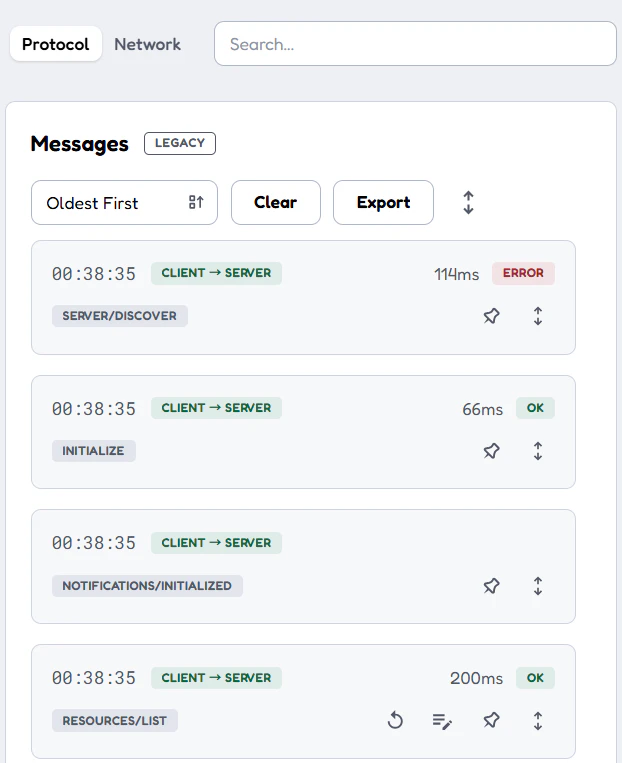
以前の確認と同じフローが確認できた。