
はじめに
私がロボットに関して興味を持っている.特にロボットの経路生成に興味がある.
前記事では,干渉物が存在する環境下での3軸ロボットアームの逆運動学を用いた経路生成を説明した.
(https://qiita.com/haruhiro1020/items/6994a94efaff98d8dae1)
本記事では,干渉物が存在しない環境下での3軸ロボットアームの微分逆運動学を用いた軌道生成を説明する.
微分逆運動学(順運動学にて算出した手先位置を微分して,逆運動学を解く)については,後ほど説明する.
また,3軸ロボットアームの順運動学 (関節角度から手先位置を算出する) と逆運動学 (手先位置から関節角度を算出する) は以下で説明した.
(・https://qiita.com/haruhiro1020/items/27c0cf098056dc792ab9
・https://qiita.com/haruhiro1020/items/3d72eddc3f623eee963a)
本記事で実装すること
・3軸ロボットアームで,微分逆運動学を使用した軌道生成を実装
本記事では実装できないこと (将来実装したい内容)
・3軸ロボットアームで,干渉物が存在する環境下での微分逆運動学と経路生成(RRT)
・特異点(逆運動学の解が一意に決まらない)対応
動作環境
・macOS Sequoia (バージョン15.5)
・Python3 (3.10.9)
・Numpy (1.23.5) (数値計算用ライブラリ)
・Matplotlib (3.7.0) (アニメーション作成用ライブラリ)
3軸ロボットアームに関して
3軸ロボットアームに関して説明する.
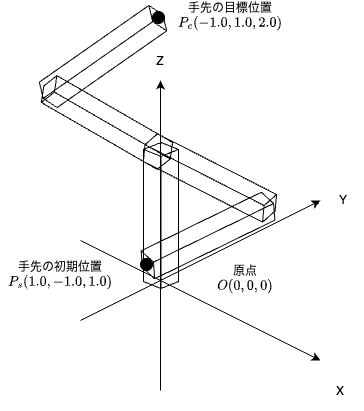
今回は下図のような3軸ロボットアームを考える.

以前の記事(https://qiita.com/haruhiro1020/items/27c0cf098056dc792ab9) にて,順運動学(関節角度からロボットの手先位置を算出)による手先位置を計算した.計算結果は下式の通りとなる.
\displaylines{
x = \cos\theta_{1} * (l_{2} * \cos\theta_{2} + l_{3} * \cos(\theta_{2} + \theta_{3}) ) ... ① \\
y = \sin\theta_{1} * (l_{2} * \cos\theta_{2} + l_{3} * \cos(\theta_{2} + \theta_{3}) ) ... ② \\
z = l_{1} + l_{2} * \sin\theta_{2} + l_{3} * \sin(\theta_{2} + \theta_{3}) ... ③ \\
}
上式を微分して,手先速度と関節速度の関係性を算出して,ロボットアームを動かすのが本記事の目標となる.
微分逆運動学に関して
下記のように,手先位置を$P(x, y, z)$から$P(x+dx, y+dy, z+dz)$)に移動させることを考えてみる.

移動させる時に,関節角度も変更する必要がある.手先速度と関節速度の関係性を算出することで,関節速度の解を使用して,目標位置へ移動させれるようになることが目標である.
手先速度を算出するために,①の$x(t)$,②の$y(t)$,③の$z(t)$を$t$で微分すると下式の通りとなる.
\displaylines{
はじめにx(t)をtで微分する.\\
dx(t)/dt = dx(t)/d\theta_{1} * d\theta_{1}/dt + dx(t)/d\theta_{2} * d\theta_{2}/dt + dx(t)/d\theta_{3} * d\theta_{3}/dt \\
dx(t)/d\theta_{1},dx(t)/d\theta_{2},dx(t)/d\theta_{3}は下式の通りとなる. \\
dx(t)/d\theta_{1} = -\sin\theta_{1} * (l_{2} * \cos\theta_{2} + l_{3} * \cos(\theta_{2} + \theta_{3}) ) \\
dx(t)/d\theta_{2} = \cos\theta_{1} * (l_{2} * (-\sin\theta_{2}) + l_{3} * (-\sin(\theta_{2} + \theta_{3})) ) = -\cos\theta_{1} * (l_{2} * \sin\theta_{2} + l_{3} * \sin(\theta_{2} + \theta_{3}) ) \\
dx(t)/d\theta_{3} = \cos\theta_{1} * (l_{3} * (-\sin(\theta_{2} + \theta_{3})) ) = -\cos\theta_{1} * l_{3} * \sin(\theta_{2} + \theta_{3}) \\


次にy(t)をtで微分する.\\
dy(t)/dt = dy(t)/d\theta_{1} * d\theta_{1}/dt + dy(t)/d\theta_{2} * d\theta_{2}/dt + dy(t)/d\theta_{3} * d\theta_{3}/dt \\
dy(t)/d\theta_{1},dy(t)/d\theta_{2},dy(t)/d\theta_{3}は下式の通りとなる. \\
dy(t)/d\theta_{1} = \cos\theta_{1} * (l_{2} * \cos\theta_{2} + l_{3} * \cos(\theta_{2} + \theta_{3}) ) \\
dy(t)/d\theta_{2} = \sin\theta_{1} * (l_{2} * (-\sin\theta_{2}) + l_{3} * (-\sin(\theta_{2} + \theta_{3})) ) = -\sin\theta_{1} * (l_{2} * \sin\theta_{2} + l_{3} * \sin(\theta_{2} + \theta_{3}) ) \\
dy(t)/d\theta_{3} = \sin\theta_{1} * (l_{3} * (-\sin(\theta_{2} + \theta_{3})) ) = -\sin\theta_{1} * l_{3} * \sin(\theta_{2} + \theta_{3} ) \\


次にz(t)をtで微分する.\\
dz(t)/dt = dz(t)/d\theta_{1} * d\theta_{1}/dt + dz(t)/d\theta_{2} * d\theta_{2}/dt + dz(t)/d\theta_{3} * d\theta_{3}/dt \\
dz(t)/d\theta_{1},dz(t)/d\theta_{2},dz(t)/d\theta_{3}は下式の通りとなる. \\
dz(t)/d\theta_{1} = 0 \\
dz(t)/d\theta_{2} = l_{2} * \cos\theta_{2} + l_{3} * \cos(\theta_{2} + \theta_{3}) \\
dz(t)/d\theta_{3} = l_{3} * \cos(\theta_{2} + \theta_{3}) \\


最後にdx(t)/dt,dy(t)/dt,dz(t)/dtを行列形式で表す.\\
dP(t)/dt
=
\begin{pmatrix}
dx(t)/dt \\
dy(t)/dt \\
dz(t)/dt \\
\end{pmatrix}
=
\begin{pmatrix}
dx(t)/d\theta_{1} & dx(t)/d\theta_{2} & dx(t)/d\theta_{3} \\
dy(t)/d\theta_{1} & dy(t)/d\theta_{2} & dy(t)/d\theta_{3} \\
dz(t)/d\theta_{1} & dz(t)/d\theta_{2} & dz(t)/d\theta_{3} \\
\end{pmatrix}
\begin{pmatrix}
d\theta_{1}/dt \\
d\theta_{2}/dt \\
d\theta_{3}/dt \\
\end{pmatrix}
=
J(\theta(t)) * d\theta/dt \\

J(\theta(t))を解析的ヤコビ行列と呼ぶ.\\
J(\theta(t))
=
\begin{pmatrix}
dx(t)/d\theta_{1} & dx(t)/d\theta_{2} & dx(t)/d\theta_{3} \\
dy(t)/d\theta_{1} & dy(t)/d\theta_{2} & dy(t)/d\theta_{3} \\
dz(t)/d\theta_{1} & dz(t)/d\theta_{2} & dz(t)/d\theta_{3} \\
\end{pmatrix}
=
\begin{pmatrix}
-\sin\theta_{1} * (l_{2} * \cos\theta_{2} + l_{3} * \cos(\theta_{2} + \theta_{3}) )
& -\cos\theta_{1} * (l_{2} * \sin\theta_{2} + l_{3} * \sin(\theta_{2} + \theta_{3}) )
& -\cos\theta_{1} * l_{3} * \sin(\theta_{2} + \theta_{3}) \\

\cos\theta_{1} * (l_{2} * \cos\theta_{2} + l_{3} * \cos(\theta_{2} + \theta_{3}) )
& -\sin\theta_{1} * (l_{2} * \sin\theta_{2} + l_{3} * \sin(\theta_{2} + \theta_{3}) )
& -\sin\theta_{1} * l_{3} * \sin(\theta_{2} + \theta_{3} ) \\

0
& l_{2} * \cos\theta_{2} + l_{3} * \cos(\theta_{2} + \theta_{3})
& l_{3} * \cos(\theta_{2} + \theta_{3}) \\
\end{pmatrix} \\

よって,手先速度と関節速度には以下のような関係式となる.\\
dP(t)/dt = J(\theta(t)) * d\theta/dt \\
}
$J(\theta(t))$を(解析的)ヤコビ行列と呼ぶ.
上式より,手先速度と関節速度の関係を式で表すことができる.
上関係より,手先速度が求まっていたら,関節速度を計算することが可能となる.
関節速度の算出方法は下式の通りとなる.
(3 * 3行列の逆行列は下記リンクを参考とした.
https://risalc.info/src/inverse-cofactor-ex3.html )
\displaylines{
dP(t)/dt = J(\theta) * d\theta/dt \\
d\theta/dt = J^{-1}(\theta) * dP(t)/dt \\
行列式である\det J(\theta(t))が0以外であれば,J^{-1}(\theta(t))を算出することが可能となる. \\
\det J(\theta) = J11 * J22 * J33 + J12 * J23 * J31 + J13 * J21 * J32 - J13 * J22 * J31 - J12 * J21 * J33 - J11 * J23 * J32 \\
ヤコビ行列の行列式を計算すると\\
\det J(\theta) = -l_{2} * l_{3} * \sin\theta_{3} * (l_{2} * \cos\theta_{2} + l_{3} * \cos(\theta_{2} + \theta_{3})) \\
}
行列式である$\det J(\theta(t))$が$0$以外であれば,$J^{-1}(\theta(t))$を算出することが可能となる.
ヤコビ行列の逆行列を算出が可能であれば,関節速度も求めることができる.
逆行列が算出できない時は特異点と呼ばれる.
ヤコビ行列の逆行列が算出できない場合を考えてみよう.
$\det J(\theta(t)) = -l_{2} * l_{3} * \sin\theta_{3} * (l_{2} * \cos\theta_{2} + l_{3} * \cos(\theta_{2} + \theta_{3}))$ が $0$ の時に,逆行列が算出できなくなる.
要するに,$\sin\theta_{3} = 0$($\theta_{3} = 0, \pi$)または$l_{2} * \cos\theta_{2} + l_{3} * \cos(\theta_{2} + \theta_{3}) = 0$(ロボットの手先位置$x=0$かつ$y=0$)の以下2パターン時に特異点となる.
パターン1:ロボットアームが伸び切った状態($\theta_{3} = 0$)または,折り畳まれた状態($\theta_{3} = \pi$)が特異点となる.ロボットの手先速度に関して自由度が減るから.
パターン2:ロボットアームの手先位置$x = 0$かつ$y = 0$が特異点となる.関節1の角度$\theta_{1}$がどのような値であっても解として成立するから(無限解となる).
今回は特異点に対しての対応はしない.
他記事にて,特異点対応の方法を説明する.
微分逆運動学のソースコード
本記事では,ロボットアームの初期位置を$P(1.0, -1.0)$,目標位置を$P(0.0, 1.8)$として,微分逆運動学によりロボットを動かす.
定数を定義するファイル (constant.py)
定数を定義するファイルを下記に記す.
# 複数ファイルで使用する定数の定義


# 次元数を定義
DIMENTION_NONE  = -1    # 未定義
DIMENTION_2D    =  2    # 2次元
DIMENTION_3D    =  3    # 3次元

# 回転軸
ROTATION_X_AXIS = "rot_x"   # x軸周りに回転
ROTATION_Y_AXIS = "rot_y"   # y軸周りに回転
ROTATION_Z_AXIS = "rot_z"   # z軸周りに回転
ROTATION_X_NEGATIVE_AXIS = "rot_neg_x"  # x軸周りに逆回転
ROTATION_Y_NEGATIVE_AXIS = "rot_neg_y"  # y軸周りに逆回転
ROTATION_Z_NEGATIVE_AXIS = "rot_neg_z"  # z軸周りに逆回転

# 0割を防ぐための定数
EPSILON                   = 1e-6
回転行列を定義するファイル (rotation.py)
回転行列を定義するファイルを下記に記す.
# 回転行列の定義

# 標準ライブラリの読み込み
import numpy as np


# サードパーティーの読み込み


# 自作モジュールの読み込み
from constant import *      # 定数


class MyRotation:
    """
    回転行列クラス
    """
    _PITCH_THRESHOLD = 1e-4             # ピッチ角の閾値
    _ZERO_NEAR = 1e-4                   # 0近傍の閾値
    _EPSILON   = 1e-5                   # 微小値

    _ROT_MAX_VALUE =  1.0           # 回転行列の最大値
    _ROT_MIN_VALUE = -1.0           # 回転行列の最小値


    def _rot_x(self, theta):
        """
        x軸方向にtheta[rad]回転させる回転行列

        パラメータ
            theta(float): 回転角度 [rad]

        戻り値
            rotation(numpy.ndarray): 回転行列
        """
        rotation = np.array([[1, 0,              0            ],
                             [0, np.cos(theta), -np.sin(theta)],
                             [0, np.sin(theta),  np.cos(theta)]])

        return rotation

    def _rot_y(self, theta):
        """
        y軸方向にtheta[rad]回転させる回転行列

        パラメータ
            theta(float): 回転角度 [rad]

        戻り値
            rotation(numpy.ndarray): 回転行列
        """
        rotation = np.array([[ np.cos(theta), 0, np.sin(theta)],
                             [ 0,             1, 0            ],
                             [-np.sin(theta), 0, np.cos(theta)]])

        return rotation

    def _rot_z(self, theta):
        """
        z軸方向にtheta[rad]回転させる回転行列

        パラメータ
            theta(float): 回転角度 [rad]

        戻り値
            rotation(numpy.ndarray): 回転行列
        """
        rotation = np.array([[np.cos(theta), -np.sin(theta), 0],
                             [np.sin(theta),  np.cos(theta), 0],
                             [0,              0,             1]])

        return rotation

    def rot(self, theta, axis):
        """
        回転軸に応じた回転行列の取得

        パラメータ
            theta(float): 回転角度 [rad]
            axis(str): 回転軸

        戻り値
            rotation(numpy.ndarray): 回転行列
        """
        if axis == ROTATION_X_AXIS:
            # 回転軸がx軸
            rotation = self._rot_x(theta)
        elif axis == ROTATION_Y_AXIS:
            # 回転軸がy軸
            rotation = self._rot_y(theta)
        elif axis == ROTATION_Z_AXIS:
            # 回転軸がz軸
            rotation = self._rot_z(theta)
        elif axis == ROTATION_X_NEGATIVE_AXIS:
            # 回転軸がx軸だが,逆回転
            rotation = self._rot_x(-theta)
        elif axis == ROTATION_Y_NEGATIVE_AXIS:
            # 回転軸がy軸だが,逆回転
            rotation = self._rot_y(-theta)
        elif axis == ROTATION_Z_NEGATIVE_AXIS:
            # 回転軸がz軸だが,逆回転
            rotation = self._rot_z(-theta)
        else:
            # 異常
            raise ValueError(f"axis is abnormal. now is {axis}")

        return rotation
3軸ロボットアームを定義するファイル (robot.py)
3軸ロボットアームを定義するファイルを下記に記す.
Roboto3DoF()クラスのdifferential_inverse_kinematics()メソッドより,微分逆運動学による目標位置までの軌道を生成する.
# ロボットアームの運動学を記載

# ライブラリの読み込み
import numpy as np

# サードパーティーの読み込み
import fcl

# 自作モジュールの読み込み
from constant import *              # 定数
from rotation import MyRotation       # 回転行列


class Robot:
    """
    ロボットのベースクラス(抽象クラス)

    プロパティ
        _links(numpy.ndarray): ロボットのリンク長 [m]
        _rot(Rotation): 回転行列クラス
        _objects(list): 干渉物オブジェクト
        _manager(fcl.DynamicAABBTreeCollisionManager): 干渉判定クラス
        _jacov_thetas(list): 微分逆行列で取得した角度を保存

    メソッド
        public
            forward_kinematics(): 順運動学 (ロボットの関節角度からロボットの手先位置を算出)
            inverse_kinematics(): 逆運動学 (ロボットの手先位置からロボットの関節角度を算出)
            forward_kinematics_all_pos(): 順運動学で全リンクの位置を取得
            update(): 角度を与えて,各リンクの直方体を更新する
            links(): _linksプロパティのゲッター
            manager(): _managerプロパティのゲッター
            jacov_thetas(): _jacov_thetasプロパティのゲッター

        protected
            _calc_homogeneou_matrix(): 同時変換行列の計算
            _jacovian(): ヤコビ行列
    """
    # 定数の定義
    _DIMENTION_POSE  = DIMENTION_NONE       # 手先位置の次元数
    _DIMENTION_THETA = DIMENTION_NONE       # 関節角度の次元数
    _DIMENTION_LINK  = DIMENTION_NONE       # リンク数
    _DIMENTION_AXIS  = DIMENTION_NONE       # 回転軸数

    _INITIAL_THETA   = 0.0                  # 初期回転角度 [rad]
    _HOMOGENEOU_MAT_ELEMENT = 4             # 同時変換行列の次元数
    _ROTATION_MAT_ELEMENT   = 3             # 回転行列の次元数

    _DETERMINANT_THRESHOLD = 1e-4           # 行列式の閾値
    _BOX_WIDTH = 1e-2                       # 各リンクの幅を定義
    _JACOV_DELTA_TIME = 0.10                # ヤコビの1時刻
    _JACOV_NEAR_POS   = 1e-6                # 目標位置との近傍距離 [m]
    _JACOV_MAX_COUNT  = 100                 # ヤコビの最大回数


    def __init__(self, links):
        """
        コンストラクタ

        パラメータ
            links(numpy.ndarray): ロボットのリンク長 [m]
        """
        if np.size(links) != self._DIMENTION_LINK:
            # 異常
            raise ValueError(f"links's size is abnormal. correct is {self._DIMENTION_Link}")

        # プロパティの初期化
        self._links = links
        self._rot = MyRotation()
        self._objects = []
        self._manager = None
        self._jacov_thetas = []

    def _reset_jacov_thetas(self):
        """
        _jacov_thetasプロパティのリセット
        """
        if len(self._jacov_thetas) != 0:
            self._jacov_thetas.clear()

    @property
    def links(self):
        """
        _linksプロパティのゲッター
        """
        return self._links

    @property
    def manager(self):
        """
        _managerプロパティのゲッター
        """
        return self._manager

    @property
    def jacov_thetas(self):
        """
        _jacov_thetasプロパティのゲッター
        """
        return self._jacov_thetas

    def forward_kinematics(self, thetas):
        """
        順運動学 (ロボットの関節角度からロボットの手先位置を算出)

        パラメータ
            thetas(numpy.ndarray): ロボットの関節角度 [rad]

        戻り値
            pose(numpy.ndarray): ロボットの手先位置 (位置 + 姿勢) [m] + [rad]
        """
        raise NotImplementedError("forward_kinematics() is necessary override.")

    def inverse_kinematics(self, pose):
        """
        逆運動学 (ロボットの手先位置からロボットの関節角度を算出)

        パラメータ
            pose(numpy.ndarray): ロボットの手先位置 (位置 + 姿勢) [m] + [rad]

        戻り値
            thetas(numpy.ndarray): ロボットの関節角度 [rad]
        """
        raise NotImplementedError("inverse_kinematics() is necessary override.")

    def forward_kinematics_all_pos(self, thetas):
        """
        順運動学で全リンクの位置を取得

        パラメータ
            thetas(numpy.ndarray): ロボットの関節角度 [rad]

        戻り値
            all_pose(numpy.ndarray): ロボットの全リンク位置 (位置 + 姿勢) [m] + [rad]
        """
        raise NotImplementedError("forward_kinematics() is necessary override.")

    def update(self, thetas):
        """
        角度を与えて,各リンクの直方体を更新する

        パラメータ
            thetas(numpy.ndarray): ロボットの関節角度 [rad]
        """
        raise NotImplementedError("update() is necessary override.")

    def differential_inverse_kinematics(self, thetas, target_pos):
        """
        2点間の微分逆運動学

        パラメータ
            thetas(numpy.ndarray): ロボットの関節角度 [rad]
            target_pos(numpy.ndarray): 目標位置 (位置[m]・姿勢[rad])

        戻り値
            target_thetas(numpy.ndarray): 目標位置の関節角度 [rad]
        """
        raise NotImplementedError("update() is necessary override.")

    def _jacovian(self, thetas):
        """
        ヤコビ行列の計算

        パラメータ
            thetas(numpy.ndarray): ロボットの関節角度 [rad]

        戻り値
            jacovian(numpy.ndarray): ヤコビ行列
        """
        raise NotImplementedError("update() is necessary override.")

    def _calc_homogeneou_matrix(self, thetas):
        """
        同時変換行列の計算

        パラメータ
            thetas(numpy.ndarray): 関節角度 [rad]

        戻り値
            homogeneou_matix(numpy.ndarray): 全リンクの同時変換行列
        """
        # パラメータの次元数を確認
        if np.size(thetas) != self._DIMENTION_THETA:
            raise ValueError(f"thetas's size is abnormal. thetas's size is {np.size(thetas)}")

        homogeneou_matix = np.zeros((self._DIMENTION_LINK, self._HOMOGENEOU_MAT_ELEMENT, self._HOMOGENEOU_MAT_ELEMENT))

        # 1リンク前の同時変換行列
        prev_homogeneou_matrix = np.eye(self._HOMOGENEOU_MAT_ELEMENT)
        for i in range(self._DIMENTION_THETA):
            # 4行4列の要素を1に更新
            homogeneou_matix[i, -1, -1] = 1
            # 回転行列の計算
            rotation_matrix   = self._rot.rot(thetas[i], self._axiss[i])
            # リンク間の相対位置を取得
            relative_position = self._relative_positions[i].reshape(1, -1)
            # 同時変換行列に回転行列を保存
            homogeneou_matix[i, :self._ROTATION_MAT_ELEMENT, :self._ROTATION_MAT_ELEMENT] = rotation_matrix
            # 同時変換行列に相対位置を保存
            homogeneou_matix[i, :self._ROTATION_MAT_ELEMENT,  self._ROTATION_MAT_ELEMENT] = relative_position
            # 1リンク前の同時変換行列と組み合わせる
            homogeneou_matix[i] = np.dot(prev_homogeneou_matrix, homogeneou_matix[i])
            # 1リンク前の同時変換行列の更新
            prev_homogeneou_matrix = homogeneou_matix[i]

        return homogeneou_matix


class Robot3DoF(Robot):
    """
    3軸ロボットクラス

    プロパティ
        _links(numpy.ndarray): ロボットのリンク長
        _rot(Rotation): 回転行列クラス
        _axiss(list): 関節の回転軸

    メソッド
        public
            forward_kinematics(): 順運動学 (ロボットの関節角度からロボットの手先位置を算出)
            inverse_kinematics(): 逆運動学 (ロボットの手先位置からロボットの関節角度を算出)
            forward_kinematics_all_pos(): 順運動学で全リンクの位置を取得
            update(): 角度を与えて,各リンクの直方体を更新する
    """
    # 定数の定義
    _DIMENTION_POSE  = DIMENTION_3D         # 手先位置の次元数
    _DIMENTION_THETA = DIMENTION_3D         # 関節角度の次元数
    _DIMENTION_LINK  = DIMENTION_3D         # リンク数

    _THETA1_XY_THRESHOLD   = 1e-4           # theta1算出時のx, y閾値


    def __init__(self, links):
        """
        コンストラクタ

        パラメータ
            links(numpy.ndarray): ロボットのリンク長 [m]
        """
        # 親クラスの初期化
        super().__init__(links)
        # ロボットの各リンクを直方体として定義する
        self._objects = []
        # (全リンクの角度を0とした時の) 各リンク間の相対位置
        self._relative_positions = np.zeros((self._DIMENTION_POSE + 1, 3))
        self._relative_positions[0] = np.array([0, 0, 0])
        self._relative_positions[1] = np.array([0,              0, self._links[0]])
        self._relative_positions[2] = np.array([self._links[1], 0, 0             ])
        self._relative_positions[3] = np.array([self._links[2], 0, 0             ])

        # リンク1は回転軸がz軸,リンク2とリンク3は回転軸がy軸である
        self._axiss = [ROTATION_Z_AXIS, ROTATION_Y_NEGATIVE_AXIS, ROTATION_Y_NEGATIVE_AXIS]
        # 初期角度
        initial_thetas = np.zeros(self._DIMENTION_THETA)
        # 順運動学により,全リンク(ベースリンク,リンク1,リンク2,リンク3)の位置を計算
        all_link_pose = self.forward_kinematics_all_link_pos(initial_thetas)

        # 1つ前のリンクの回転行列を更新
        prev_rotation = np.eye(self._ROTATION_MAT_ELEMENT)

        # 各リンクの角度が全部0の時のx, y, zを定義
        box_xyz = [[self._BOX_WIDTH * 2, self._BOX_WIDTH * 2, self._links[0]     ],
                   [self._links[1],      self._BOX_WIDTH * 2, self._BOX_WIDTH * 2],
                   [self._links[2],      self._BOX_WIDTH * 2, self._BOX_WIDTH * 2]]

        # ロボットの各リンクを直方体として定義する
        for i in range(self._DIMENTION_THETA):
            # 各リンクの回転行列を定義
            rotation = self._rot.rot(initial_thetas[i], self._axiss[i])
            rotation = np.dot(prev_rotation, rotation)
            # 各リンクの中心位置 (x, y, z) を定義
            center = (all_link_pose[i + 1] - all_link_pose[i]) / 2 + all_link_pose[i]
            # 直方体の定義 (x, y, zの長さを保存)
            x, y, z = box_xyz[i]
            box = fcl.Box(x, y, z)
            # 直方体の中心を定義 (位置・姿勢)
            translation = fcl.Transform(rotation, center)
            obj = fcl.CollisionObject(box, translation)
            # モデルを追加
            self._objects.append(obj)
            # 1つ前のリンクの回転行列を更新
            prev_rotation = rotation

        # 直方体をAABBとして,定義
        # DynamicAABBTreeCollisionManager に登録
        self._manager = fcl.DynamicAABBTreeCollisionManager()
        self._manager.registerObjects(self._objects)
        self._manager.setup()

    def forward_kinematics(self, thetas):
        """
        順運動学 (ロボットの関節角度からロボットの手先位置を算出)

        パラメータ
            thetas(numpy.ndarray): ロボットの関節角度 [rad]

        戻り値
            pose(numpy.ndarray): ロボットの手先位置 (位置) [m]
        """
        # パラメータの次元数を確認
        if np.size(thetas) != self._DIMENTION_THETA:
            raise ValueError(f"thetas's size is abnormal. thetas's size is {np.size(thetas)}")

        # 同時変換行列(3 * 4 * 4)を計算する
        homogeneou_matrix = self._calc_homogeneou_matrix(thetas)

        # 最終リンクの同時変換行列(最終リンク座標の位置・姿勢)より,手先位置を計算する
        final_link_matrix = homogeneou_matrix[self._DIMENTION_LINK - 1]
        # 最終リンクから手先位置までの早退位置(4ベクトル)を定義
        relative_pos = np.ones(self._HOMOGENEOU_MAT_ELEMENT)
        relative_pos[:self._HOMOGENEOU_MAT_ELEMENT - 1] = self._relative_positions[-1]
        pose = np.dot(final_link_matrix, relative_pos)
        # 手先位置(x, y)を取得
        pose = pose[:self._DIMENTION_POSE]

        return pose

    def differential_inverse_kinematics(self, thetas, target_pos):
        """
        2点間の微分逆運動学

        パラメータ
            thetas(numpy.ndarray): ロボットの関節角度 [rad]
            target_pos(numpy.ndarray): 目標位置 (位置[m]・姿勢[rad])

        戻り値
            target_thetas(numpy.ndarray): 目標位置の関節角度 [rad]
        """
        # 引数の確認
        if np.size(thetas) != self._DIMENTION_THETA:
            # 異常
            raise ValueError(f"theta's size is abnormal. theta's size is {np.size(thetas)}")

        # 現在の関節角度を保存 (異なるアドレスにデータを保存するためにnp.copy()を採用)
        current_thetas = np.copy(thetas)

        # 目標値の関節角度が見つかったどうか
        success_flg = False

        # 微分逆行列で取得したデータを初期化
        self._reset_jacov_thetas()
        # 計算した角度を保存する
        self._jacov_thetas.append(current_thetas)

        # 目標位置に近づくまでループ
        for i in range(self._JACOV_MAX_COUNT):
            # ヤコビ行列の取得
            jacovian = self._jacovian(current_thetas)

            # dP(位置の差分) = J(ヤコビ行列) * dTheta(角度の差分)
            # dTheta = J^(-1)(ヤコビ行列の逆行列) * dP
            # 行列式が0近傍であるかの確認(ヤコビ行列の逆行列の存在確認)
            det = np.linalg.det(jacovian)
            if abs(det) <= self._DETERMINANT_THRESHOLD:
                # 0近傍であるため,逆行列が存在しない
                raise ValueError(f"abs(det) is near 0. abs(det) is {abs(det)}")

            # 現在の手先位置を計算
            current_pos = self.forward_kinematics(current_thetas)
            # 位置の差分を計算
            dP = target_pos - current_pos
            # dTheta = J^(-1)(ヤコビ行列の逆行列) * dP
            dTheta = np.dot(np.linalg.inv(jacovian), dP)

            # 関節角度の更新 (+=とするとcurrent_thetasが常に同じアドレスになるため,current_thetasを異なるアドレスとしたい)
            # print(f"id(current_thetas) = {id(current_thetas)}")   # アドレス確認
            # current_thetas = current_thetas + dTheta * self._JACOV_DELTA_TIME
            # 位置の差分が大きいほど,角度の更新量を小さくしたい
            coefficient = 1 / max(0.1, np.linalg.norm(dP))
            current_thetas = current_thetas + dTheta * coefficient * self._JACOV_DELTA_TIME
            # print(f"id(current_thetas) = {id(current_thetas)}")   # アドレス確認

            # 計算した角度を保存する
            self._jacov_thetas.append(current_thetas)

            # 更新後の手先位置が目標位置の近傍であれば,処理終了とする
            current_pos = self.forward_kinematics(current_thetas)
            distance = np.linalg.norm(target_pos - current_pos)
            # print(f"distance = {distance}")
            if distance <= self._JACOV_NEAR_POS:
                # 近傍のため,処理終了
                success_flg = True
                break

        if not success_flg:
            # 目標位置の関節角度が見つからない
            raise ValueError(f"target_pos's theta is not found. please change target_pos")

        target_thetas = current_thetas

        return target_thetas

    def _jacovian(self, thetas):
        """
        ヤコビ行列の計算

        パラメータ
            thetas(numpy.ndarray): ロボットの関節角度 [rad]

        戻り値
            jacovian(numpy.ndarray): ヤコビ行列
        """
        # 引数の確認
        if np.size(thetas) != self._DIMENTION_THETA:
            # 異常
            raise ValueError(f"theta's size is abnormal. theta's size is {np.size(thetas)}")

        # jacovian = [[-l1 * sin(theta1) - l2 * sin(theta12), -l2 * sin(theta12)], [l1 * cos(theta1) + l2 * cos(theta12), l2 * cos(theta12)]]
        # 各リンクの長さをローカル変数に保存
        l1 = self._links[0]
        l2 = self._links[1]
        l3 = self._links[2]

        # 三角関数の計算
        sin1  = np.sin(thetas[0])
        cos1  = np.cos(thetas[0])
        sin2  = np.sin(thetas[1])
        cos2  = np.cos(thetas[1])
        sin23 = np.sin(thetas[1] + thetas[2])
        cos23 = np.cos(thetas[1] + thetas[2])

        # ヤコビ行列
        jacovian =    np.array([[-sin1 * (l2 * cos2 + l3 * cos23), -cos1 * (l2 * sin2 + l3 * sin23), -cos1 * l3 * sin23],
                                [ cos1 * (l2 * cos2 + l3 * cos23), -sin1 * (l2 * sin2 + l3 * sin23), -sin1 * l3 * sin23],
                                [ 0                              ,          l2 * cos2 + l3 * cos23 ,         l3 * cos23]])

        return jacovian

    def inverse_kinematics(self, pose, upper=False, front=True):
        """
        逆運動学 (ロボットの手先位置からロボットの関節角度を算出)

        パラメータ
            pose(numpy.ndarray): ロボットの手先位置 (位置) [m]
            upper(bool): 腕が上向かどうか
            front(bool): 正面かどうか

        戻り値
            thetas(numpy.ndarray): ロボットの関節角度 [rad]
        """
        # パラメータの次元数を確認
        if np.size(pose) != self._DIMENTION_POSE:
            raise ValueError(f"parameter pose's size is abnormal. pose's size is {np.size(pose)}")

        # はじめにtheta3を算出する
        # c3 = {(px ** 2 + py ** 2 + (pz - l1) ** 2) - (l2 ** 2 + l3 ** 2)} / (2 * l2 * l3)
        px = pose[0]
        py = pose[1]
        pz = pose[2]
        l1 = self._links[0]
        l2 = self._links[1]
        l3 = self._links[2]
        cos3  = ((px ** 2 + py ** 2 + (pz - l1) ** 2) - (l2 ** 2 + l3 ** 2)) / (2 * l2 * l3)
        # cosの範囲は-1以上1以下である
        if abs(cos3) > 1:
            # 異常
            raise ValueError(f"cos3 is abnormal. cos3 is {cos3}")

        # sinも求めて,theta3をatan2(sin2, cos2)より算出する
        sin3 = np.sqrt(1 - cos3 ** 2)
        theta3 = np.arctan2(sin3,  cos3)
        if not upper:
            # 下向きの角度のため,三角関数も更新
            theta3 = -theta3
            sin3 = np.sin(theta3)
            cos3 = np.cos(theta3)

        # 次にtheta1を算出する
        # theta1 = atan2(py, px)
        # py, pxが0近傍なら失敗
        if abs(py) <= self._THETA1_XY_THRESHOLD and abs(px) <= self._THETA1_XY_THRESHOLD:
            # 近傍のため,エラー
            raise ValueError(f"abs(py) and abs(px) is abnormal. py is {py}, px is {px}")
        if front:
            # 位置(pose)に対して正面向き
            theta1 = np.arctan2( py,  px)
        else:
            # 位置(pose)に対して後ろ向き
            theta1 = np.arctan2(-py, -px)

        # 最後にtheta2を算出する
        # 行列計算
        # [c2, s2] = [[l2 + l3 * c3, -l3 * s3], [l3 * s3, l2 + l3 * c3]] ** -1 * [root(px ** 2 + py ** 2), pz - l1]
        element1 =  l2 + l3 * cos3
        element2 = -l3 * sin3
        matrix = np.array([[ element1, element2],
                           [-element2, element1]])
        # 行列式を計算
        det = np.linalg.det(matrix)
        # 0近傍の確認
        if abs(det) <= self._DETERMINANT_THRESHOLD:
            # 0近傍 (異常)
            raise ValueError(f"det is abnormal. det is {det}")

        # 位置を保存 ([root(px ** 2 + py ** 2), pz - l1])
        position = np.array([np.sqrt(px ** 2 + py ** 2), pz - l1])

        # [c2, s2]の計算
        cos2_sin2 = np.dot(np.linalg.inv(matrix), position)
        # theta2をatan2()より算出する
        theta2 = np.arctan2(cos2_sin2[1], cos2_sin2[0])

        thetas = np.array([theta1, theta2, theta3])

        return thetas

    def forward_kinematics_all_link_pos(self, thetas):
        """
        順運動学で全リンクの位置を取得 (グラフの描画で使用する)

        パラメータ
            thetas(numpy.ndarray): ロボットの関節角度 [rad]

        戻り値
            all_link_pose(numpy.ndarray): ロボットの全リンク位置 (位置 + 姿勢) [m] + [rad]
        """
        # パラメータの次元数を確認
        if np.size(thetas) != self._DIMENTION_THETA:
            raise ValueError(f"thetas's size is abnormal. thetas's size is {np.size(thetas)}")

        # 同時変換行列(3 * 4 * 4)を計算する
        homogeneou_matix = self._calc_homogeneou_matrix(thetas)

        # 全リンクの座標系の原点を取得
        all_link_pose = np.zeros((self._DIMENTION_LINK + 1, self._DIMENTION_POSE))
        for i, matrix in enumerate(homogeneou_matix):
            # 同時変換行列から位置を取得
            pos = matrix[:self._DIMENTION_POSE, self._ROTATION_MAT_ELEMENT].reshape(1, -1)
            all_link_pose[i] = pos

        # 最後のリンクの座標
        # 最後のリンクの座標系の原点から,手先の位置を計算する
        pos = np.ones(self._HOMOGENEOU_MAT_ELEMENT)
        pos[:DIMENTION_3D] = self._relative_positions[-1]
        all_link_pose[-1]  = np.dot(homogeneou_matix[-1], pos)[:self._DIMENTION_POSE].reshape(1, -1)

        return all_link_pose

    def update(self, thetas):
        """
        角度を与えて,各リンクの直方体を更新する

        パラメータ
            thetas(numpy.ndarray): ロボットの関節角度 [rad]
        """
        # パラメータの次元数を確認
        if np.size(thetas) != self._DIMENTION_THETA:
            raise ValueError(f"thetas's size is abnormal. thetas's size is {np.size(thetas)}")

        # 順運動学により,全リンク(ベースリンク,リンク1,リンク2,リンク3)の位置を計算
        all_link_pose = self.forward_kinematics_all_link_pos(thetas)
        # 1つ前のリンクの回転行列を定義
        prev_rotation = np.eye(self._ROTATION_MAT_ELEMENT)

        # ロボットの各リンクを直方体として定義する
        for i in range(self._DIMENTION_THETA):
            # 各リンクの回転行列を定義
            rotation = self._rot.rot(thetas[i], self._axiss[i])
            # 1つ前のリンクの回転も考慮する
            rotation = np.dot(prev_rotation, rotation)
            # 各リンクの中心位置 (x, y, z) を定義
            center = (all_link_pose[i + 1] - all_link_pose[i]) / 2 + all_link_pose[i]
            # 直方体の中心を定義 (位置・姿勢)
            translation = fcl.Transform(rotation, center)
            # モデルの位置を更新
            self._objects[i].setTransform(translation)
            # 1つ前のリンクの回転行列を更新
            prev_rotation = rotation

        # AABBを更新
        self._manager.update()
ロボットのアニメーション (animation.py)
ロボットのアニメーションに関する内容を下記に記す.
# ロボットのアニメーションを実施

# ライブラリの読み込み
import numpy as np      # 数値計算
import matplotlib.pyplot as plt     # 描画用
import matplotlib.animation as ani  # アニメーション用
import matplotlib.patches as patches    # 2次元形状の描画
from mpl_toolkits.mplot3d.art3d import Poly3DCollection     # 3次元形状の描画

# 自作モジュールの読み込み
from constant import *      # 定数
from rotation import MyRotation   # 回転行列


class RRTRobotAnimation:
    """
    RRTによるロボットの経路生成アニメーション

    プロパティ
        _figure: 描画枠
        _axis: 描画内容

    publicメソッド (全てのクラスから参照可能)
        plot_Animation(): アニメーション作成

    protectedメソッド (自クラスまたは子クラスが参照可能)
        _reset2D(): 2次元データのリセット
    """
    # 定数の定義
    _ANIMATION_NAME = "robot_animation.gif"
    _PLOT_NAME      = "robot_plot.gif"
    _STRICT_POS     = 0.2

    def __init__(self):
        """
        コンストラクタ
        """
        self._rot = MyRotation()

    def _reset2D(self):
        """
        2次元データのリセット
        """
        self._figure = plt.Figure()
        self._axis = self._figure.add_subplot(111)

        # X/Y軸に文字を記載
        self._axis.set_xlabel("X")
        self._axis.set_ylabel("Y")

        self._axis.grid()
        self._axis.set_aspect("equal")

    def _plot_circle(self, x, y, radius):
        """
        円の描画

        パラメータ
            x(float): 中心点 (x)
            y(float): 中心点 (y)
            radius(float): 半径
        """
        circle = patches.Circle((x, y), radius, color="gray", alpha=0.5)
        self._axis.add_patch(circle)

    def _plot_rectangle(self, center, width, height, angle):
        """
        長方形の描画

        パラメータ
            center(numpy.ndarray): 中心の座標 (x, y)
            width(float): 幅
            height(float): 高さ
            angle(float): 角度 [deg]
        """
        # 左下隅の座標
        xy = np.array([center[0] - width / 2, center[1] - height / 2])
        rect = patches.Rectangle(xy, width, height, angle=angle, color="gray", alpha=0.5)
        # 長方形を軸に追加
        self._axis.add_patch(rect)

    def _plot_ball(self, center, radius):
        """
        円の描画

        パラメータ
            center(np.ndarray): 中心位置 (x, y, z)
            radius(float): 半径
        """
        self._axis.plot_wireframe(self._x * radius + center[0], self._y * radius + center[1], self._z * radius + center[2], color="gray", alpha=0.5)

    def _plot_cuboid(self, center, x, y, z, rotation):
        """
        直方体の描画

        パラメータ
            center(numpy.ndarray): 中心位置 (x, y, z)
            x(float): 直方体のx軸の長さ
            y(float): 直方体のy軸の長さ
            z(float): 直方体のz軸の長さ
            rotation(numpy.ndarray): 回転行列
        """
        # 直方体の頂点を算出する
        points =  np.array([[center[0] - x / 2, center[1] - y / 2, center[2] - z / 2],
                            [center[0] + x / 2, center[1] - y / 2, center[2] - z / 2],
                            [center[0] + x / 2, center[1] + y / 2, center[2] - z / 2],
                            [center[0] - x / 2, center[1] + y / 2, center[2] - z / 2],
                            [center[0] - x / 2, center[1] - y / 2, center[2] + z / 2],
                            [center[0] + x / 2, center[1] - y / 2, center[2] + z / 2],
                            [center[0] + x / 2, center[1] + y / 2, center[2] + z / 2],
                            [center[0] - x / 2, center[1] + y / 2, center[2] + z / 2]])

        # 頂点の4点から面を算出する
        verts =    [[points[0], points[1], points[2], points[3]],
                    [points[4], points[5], points[6], points[7]],
                    [points[0], points[1], points[5], points[4]],
                    [points[2], points[3], points[7], points[6]],
                    [points[1], points[2], points[6], points[5]],
                    [points[4], points[7], points[3], points[0]]]

        # 直方体の描画
        self._axis.add_collection3d(Poly3DCollection(verts, facecolors='gray', edgecolors='gray', alpha=0.5))

    def _plot_2DAnimation(self, robot, all_link_thetas, environment, anime_file_name=""):
        """
        2次元アニメーションの作成

        パラメータ
            dimention(int): 次元数
            robot(Robot2DoF): ロボットクラス
            all_link_thetas(numpy.ndarray): 全リンクの回転角度
            environment(Robot2DEnv): 経路生成時の環境
            anime_file_name(str): アニメーションのファイル名
        """
        # データをリセットする
        self._reset2D()

        # 全画像を保存する
        imgs = []

        # 手先位置の軌跡を保存
        position_trajectory = np.zeros((all_link_thetas.shape[0], DIMENTION_2D))

        # 始点と終点をプロット
        # 始点位置を取得
        start_pos   = robot.forward_kinematics(all_link_thetas[0])
        start_image = self._axis.scatter(start_pos[0], start_pos[1], color="cyan")
        end_pos   = robot.forward_kinematics(all_link_thetas[-1])
        end_image = self._axis.scatter(end_pos[0], end_pos[1], color="red")

        # 軌道生成
        for i, thetas in enumerate(all_link_thetas):
            path_images = []
            # 順運動学により,全リンク (ベースリンク, リンク1,手先位置) の位置を計算
            all_link_pos = robot.forward_kinematics_all_link_pos(thetas)
            # 線プロット
            image = self._axis.plot(all_link_pos[:, 0], all_link_pos[:, 1], color="blue")
            path_images.extend(image)
            # 点プロット
            image = self._axis.scatter(all_link_pos[:, 0], all_link_pos[:, 1], color="black", alpha=0.5)
            path_images.extend([image])

            # 手先位置を保存
            position_trajectory[i] = all_link_pos[-1]
            # 手先位置の軌跡をプロット
            image = self._axis.plot(position_trajectory[:i + 1, 0], position_trajectory[:i + 1, 1], color="lime")
            path_images.extend(image)

            # 始点と終点の画像を保存
            path_images.extend([start_image])
            path_images.extend([end_image])

            # 画像を1枚にまとめて保存
            imgs.append(path_images)

        # アニメーション作成
        animation = ani.ArtistAnimation(self._figure, imgs)
        if anime_file_name:
            # ファイル名が存在する
            animation.save(anime_file_name, writer='imagemagick')
        else:
            # ファイル名が存在しない
            animation.save(self._ANIMATION_NAME, writer='imagemagick')
        plt.show()

    def _reset3D(self):
        """
        3次元データのリセット
        """
        self._figure = plt.figure()
        self._axis = self._figure.add_subplot(111, projection="3d")

        # 0 ~ 2piまでの範囲とする
        theta_1_0 = np.linspace(0, np.pi * 2, 20)
        theta_2_0 = np.linspace(0, np.pi * 2, 20)
        theta_1, theta_2 = np.meshgrid(theta_1_0, theta_2_0)

        # x, y, zの曲座標表示 (中心点が原点である半径1の球)
        self._x = np.cos(theta_2) * np.sin(theta_1)
        self._y = np.sin(theta_2) * np.sin(theta_1)
        self._z = np.cos(theta_1)

    def _set_3DAxis(self, robot):
        """
        3次元データのラベルや範囲を設定
        """
        # X/Y/Z軸に文字を記載
        self._axis.set_xlabel("X")
        self._axis.set_ylabel("Y")
        self._axis.set_zlabel("Z")

        self._axis.grid()
        self._axis.set_aspect("equal")

    def _update_3Ddata(self, i, robot, all_link_thetas, all_link_poses, environment):
        """
        3D(3次元)各データの更新

        パラメータ
            i(int): フレーム番号
            robot(Robot3DoF): ロボットクラス
            all_link_thetas(numpy.ndarray): 始点から終点までの全角度
            all_link_poses(numpy.ndarray): 始点から終点までの全位置
            environment(Robot3DEnv): 経路生成時の環境
        """
        # 以前のプロットをクリアする
        self._axis.clear()
        self._set_3DAxis(robot)

        # 始点と終点をプロット
        # 始点位置を取得
        start_pos = robot.forward_kinematics(all_link_thetas[0])
        self._axis.scatter(start_pos[0], start_pos[1], start_pos[2], color="cyan")
        end_pos   = robot.forward_kinematics(all_link_thetas[-1])
        self._axis.scatter(end_pos[0], end_pos[1], end_pos[2], color="red")

        # 順運動学により,全リンク (ベースリンク, リンク1,手先位置) の位置を計算
        all_link_pos = robot.forward_kinematics_all_link_pos(all_link_thetas[i])
        # 線プロット
        self._axis.plot(all_link_pos[:, 0], all_link_pos[:, 1], all_link_pos[:, 2], color="blue")
        # 点プロット
        self._axis.scatter(all_link_pos[:, 0], all_link_pos[:, 1], all_link_pos[:, 2], color="black", alpha=0.5)
        # 手先位置の軌跡をプロット
        self._axis.plot(all_link_poses[:i + 1, 0], all_link_poses[:i + 1, 1], all_link_poses[:i + 1, 2], color="lime")

    def _plot_3DAnimation(self, robot, all_link_thetas, environment, anime_file_name):
        """
        3次元アニメーションの作成

        パラメータ
            robot(Robot3DoF): ロボットクラス
            all_link_thetas(numpy.ndarray): 全リンクの回転角度
            environment(Robot3DEnv): 経路生成時の環境
            anime_file_name(str): アニメーションのファイル名
        """
        # データをリセットする
        self._reset3D()

        # 全位置を計算する
        all_link_poses = np.zeros((all_link_thetas.shape[0], DIMENTION_3D))
        for i, thetas in enumerate(all_link_thetas):
            # 順運動学による位置の計算
            poses = robot.forward_kinematics(thetas)
            all_link_poses[i] = poses

        # アニメーションのフレーム数
        n_frame = all_link_thetas.shape[0]
        animation = ani.FuncAnimation(self._figure, self._update_3Ddata, fargs=(robot, all_link_thetas, all_link_poses, environment), interval=100, frames=n_frame)

        # アニメーション
        if anime_file_name:
            animation.save(anime_file_name, writer="imagemagick")
        else:
            animation.save(self._ANIMATION_NAME, writer="imagemagick")
        plt.show()

    def plot_Animation(self, dimention, robot, all_link_thetas, environment, anime_file_name=""):
        """
        アニメーション作成

        パラメータ
            dimention(int): 次元数
            robot(Robot2DoF): ロボットクラス
            all_link_thetas(numpy.ndarray): 全リンクの回転角度
            environment(Robot2DEnv): 経路生成時の環境
            anime_file_name(str): アニメーションのファイル名
        """
        # 引数の確認
        if all_link_thetas.size == 0:
            raise ValueError(f"all_link_thetas's size is abnormal. all_link_thetas's size is {all_link_thetas.size}")

        if dimention == DIMENTION_2D:
            # 2次元アニメーション
            self._plot_2DAnimation(robot, all_link_thetas, environment, anime_file_name)
        elif dimention == DIMENTION_3D:
            # 3次元アニメーション
            self._plot_3DAnimation(robot, all_link_thetas, environment, anime_file_name)
        else:
            # 異常
            raise ValueError(f"dimention is abnormal. dimention is {dimention}")
メイン処理 (main.py)
メイン処理ファイル (main.py) を下記に記す.
# メイン処理

# ライブラリの読み込み
import numpy as np                  # 数値計算
import matplotlib.pyplot as plt     # 描画

# 自作モジュールの読み込み
from constant import *              # 定数
from robot import Robot3DoF         # ロボットクラス
from animation import RRTRobotAnimation    # ロボットのアニメーション


LINE_WIDTH = 3                      # プロット時の線の太さ


def main():
    """
    メイン処理
    """
    # 3軸ロボットのリンク長
    links = np.array([1.0, 1.0, 1.0])
    # 3軸ロボットのインスタンスを作成
    robot = Robot3DoF(links)

    # 始点
    # start_pos = np.array([1.0, 0.0])
    start_pos = np.array([1.0, -1.0, 1.0])
    # 終点
    # end_pos = np.array([0.0, 1.0])
    end_pos = np.array([-1.0, 1.0, 2.0])

    try:
        # 始点と終点の逆運動学
        start_theta = robot.inverse_kinematics(start_pos)
        print("AAAAAAA")
        end_theta   = robot.inverse_kinematics(end_pos)
        print("BBBBBB")
    except Exception as e:
        # 逆運動学の解が存在しない (始点または終点が異常な値)
        raise ValueError(f"please start_pos or end_pos is change. pos is singularity")

    # 目標位置の角度を取得
    target_theta = robot.differential_inverse_kinematics(start_theta, end_pos)
    print(f"target_theta = {target_theta}")
    print(f"end_theta = {end_theta}")
    print(f"robot.jacov_thetas[-1] = {np.array(robot.jacov_thetas[-1])}")
    print(f"robot.forward_kinematics(target_theta) = {robot.forward_kinematics(target_theta)}")

    # アニメーション作成
    robotAnime = RRTRobotAnimation()

    # 関節空間による RRT 経路生成
    # ファイル名
    file_name = "jacov_robot_anime.gif"
    robotAnime.plot_Animation(DIMENTION_3D, robot, np.array(robot.jacov_thetas), None, file_name)


if __name__ == "__main__":
    # 本ファイルがメインで呼ばれた時の処理
    main()
処理結果
main.pyを実行し,初期位置から目標位置まで移動できているかのアニメーションは下図である.
アニメーションの凡例は下記の通りとなる.
・水色の点(右下側):ロボットの初期位置 $P(1.0, -1.0)$
・赤色の点(上側):ロボットの目標位置 $P(1.0, 1.8)$
・緑色の軌跡:始点から終点までのロボットの手先の軌跡
・青色の線:ロボットアームの各リンク
・黒色の点:ロボットアームの各リンクのジョイント

微分逆運動学により,3軸ロボットアームを初期位置から目標位置へ移動させれることが確認できた.
今回は3軸ロボットアームであったが,6軸ロボットアームでの微分逆運動学を実行したい.
おわりに
本記事では,Pythonを使用して,下記内容を実装しました.
・3軸ロボットアームの微分逆運動学 + アニメーション
次記事では,下記内容を実装していきます.
・6軸ロボットアームの微分逆運動学 + アニメーション