
はじめに
私がロボットに関して興味を持っており,ロボットの経路を作成したいと思ったところ,RRT (Rapidly-exploring Random Tree) と呼ばれる経路生成の手法に辿り着いた.
本記事では,経路生成の古典的手法である RRT (Rapidly-exploring Random Tree) を改良した Informed RRT* をPythonより,実装してみる.
前記事では,球の干渉物が存在する3次元空間を探索する RRT* のアニメーションを実装した.
前記事の内容を下記に記します.
・https://qiita.com/haruhiro1020/items/ad6d86c65adde3e2d1e6
本記事では,円形の干渉物が存在する2次元空間を探索する Informed RRT* を実装する.
Informed RRT* はRRT* の探索範囲を効率化させたアルゴリズムである.
RRTとRRT* の違いは以下記事で説明したため,本記事では割愛する.
・https://qiita.com/haruhiro1020/items/7c5bdbe530711c9d331b
Informed RRT* では,行列の特異値分解を実施する.特異値分解に関しては下記を参考にした.
・https://qiita.com/kidaufo/items/0f3da4ca4e19dc0e987e
Informed RRT* は下記を参考にした.
・https://datumstudio.jp/blog/%E3%83%AD%E3%83%9C%E3%83%83%E3%83%88%E3%81%AE%E6%9C%80%E9%81%A9%E7%B5%8C%E8%B7%AF%E7%94%9F%E6%88%90%E3%82%A2%E3%83%AB%E3%82%B4%E3%83%AA%E3%82%BA%E3%83%A0%E3%82%92%E5%AE%9F%E8%A3%85/#Informed-RRT
参考文献:
J.D.Gammell, S.S.Srinivasa, and T.D.Barfoot “Informed RRT*: Optimal Sampling-based Path Planning via Direct Sampling of an Admissible Ellipsoidal Heuristic.”, ,arXiv 2014
本記事では,RRT* とInformed RRT* の違いを説明したのち,ソースコードおよび性能評価を実施する.
本記事で実装すること
・円形の干渉物が存在する2次元空間でのInformed RRT* による経路生成
・RRT* とInfomred RRT* の経路生成結果をアニメーションで表現する
本記事では実装できないこと(将来実装したい内容)
・球の干渉物が存在する3次元空間でのInformed RRT* による経路生成
・円形以外の干渉物が存在する2次元空間でのInformed RRT* による経路生成
動作環境
・macOS Sequoia (バージョン15.5)
・Python3 (3.10.9)
・Numpy (1.23.5) (数値計算用ライブラリ)
・Matplotlib (3.7.0) (アニメーション作成用ライブラリ)
経路生成手法のまとめ
経路生成手法をまとめた記事を展開いたします.本記事以外の手法も記載してますので,参照いただけますと幸いです.
(https://qiita.com/haruhiro1020/items/000b3287fce082ae4283)
ソースコードに関して
投稿しているソースコードは綺麗でないため,随時更新しようと考えております.
また,処理時間を考慮した作りになっていないため,処理時間が高速となる作り方を勉強した後にソースコードを更新しようと考えております.
経路生成アルゴリズムに関して
経路生成のアルゴリズムを説明する.
RRTに関して
RRTアルゴリズムは以下記事に記載したため,本記事では割愛する.
(https://qiita.com/haruhiro1020/items/7c5bdbe530711c9d331b)
RRT* に関して
RRT* アルゴリズムは以下記事に記載したため,本記事では割愛する.
(https://qiita.com/haruhiro1020/items/7c5bdbe530711c9d331b)
Informed RRT* に関して
Informed RRT* アルゴリズムに関して説明する.
参考文献に記載されているInformed RRT* のアルゴリズムを抜粋して,下記に記す.
RRT* との差異を赤枠で記載した.
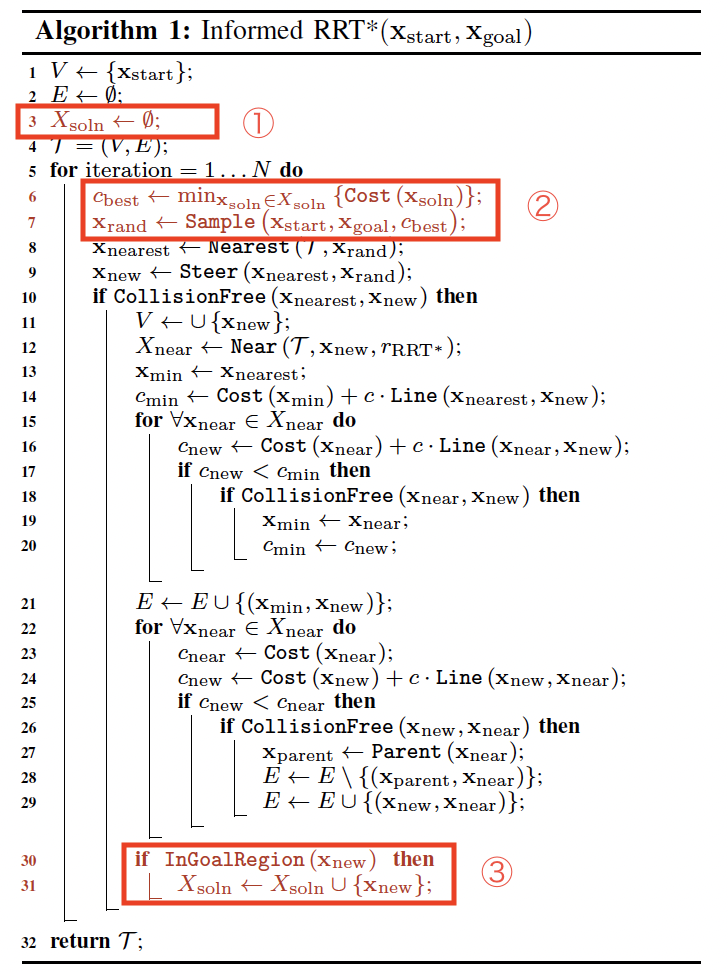
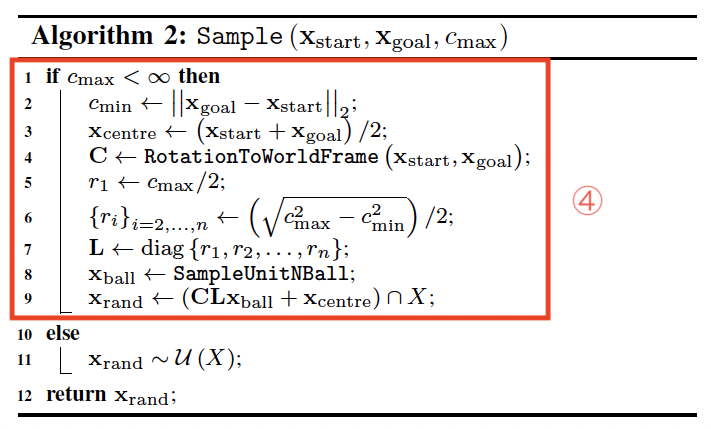
各赤枠内の内容を説明する.
赤枠①:終点に近いノードを保存するためのデータを新規追加
赤枠②:終点に近いノードの中から最小のコストを取得 (終点に近いノードが存在しなければ,コストを無限大と考える).取得したコストを使用して,ランダムな位置を算出する (詳細は赤枠④に記載).
赤枠③:新規ノードが終点に近ければ,赤枠①にノードを追加
赤枠④:コストが無限大よりも小さい (終点に近いノードが存在する) 時は,探索範囲を楕円内に制限して,ランダムな位置を算出する.コストが無限大 (終点に近いノードが存在しない) の時は,RRT* と同様に探索範囲は制限せずに,ランダムな位置を算出する.
Informed RRT* は終点に近いノードが存在するまでは,RRT* と同様の処理を実施する.終点に近いノードが存在したら,探索範囲を制限することによってRRT* よりも効率なアルゴリズムとなる.
一定回数実行後に,始点から終点までのコストが最小となる経路を選択する.
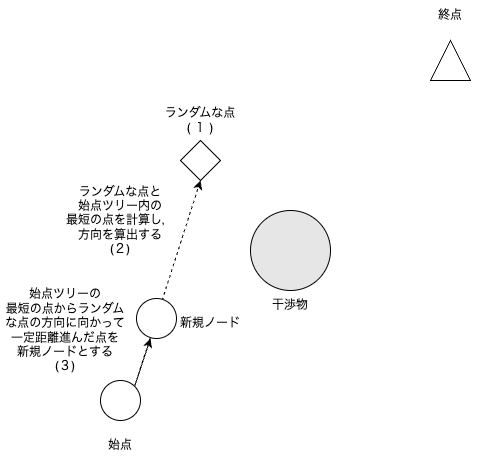
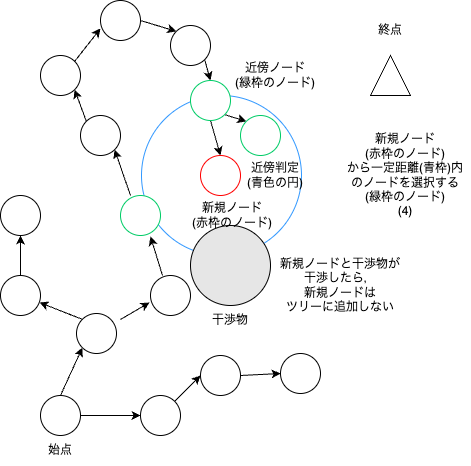
Informed RRT* は下図のようなアルゴリズムである.
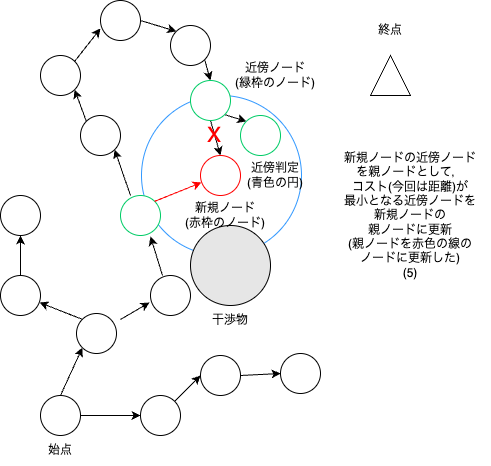
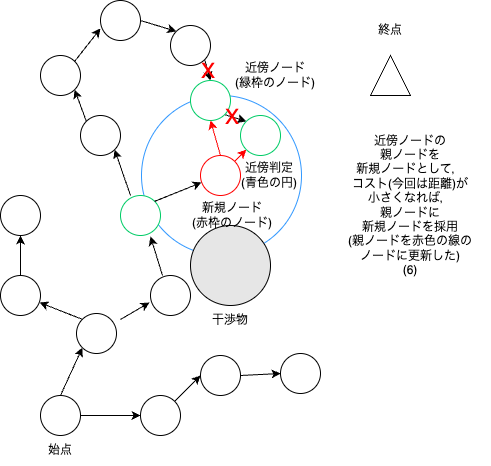
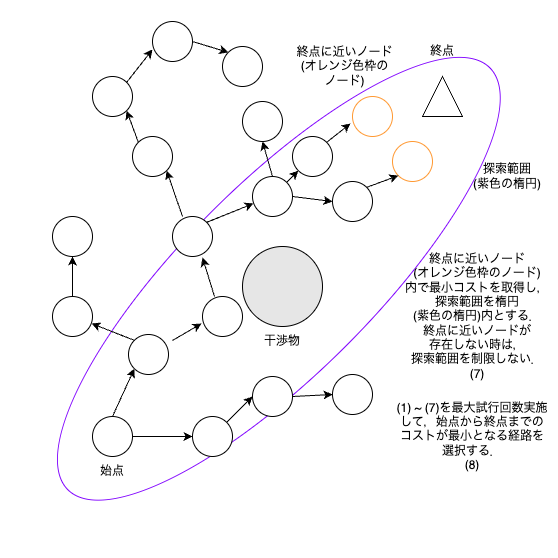
探索範囲を制限する楕円半径は下図のように定義されている.
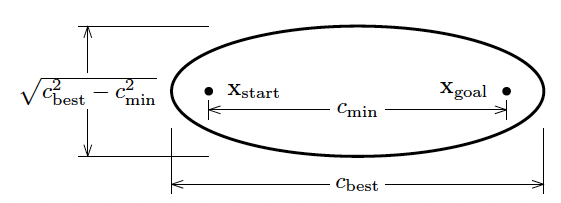
c_minは,始点と終点のコスト(距離)である.c_bestは,始点から終点までの経路の中での最小コスト(距離)である.楕円の長軸の長さは c_min,楕円の単軸の長さは root(c_best ** 2 - c_min ** 2)だそうだ.
また,楕円内をサンプリングする方法は以下の数式で定義されている.

\displaylines{
x_{center} ... 始点と終点の中点 (ベクトル) \\
x_{ball} ... 単位球内のサンプリング点 (ベクトル) \\
L ... 楕円の各軸の長さを対角要素に持つ対角行列 \\
C ... 始点から終点までの方向ベクトルを座標系とする回転行列 \\
}
数式を分解して,図を用いながら上記数式の内容を説明する.
初めに,数式の Lx_ball を説明する.

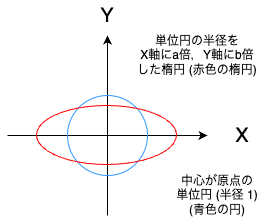
単位球を楕円に変換している.
次に,数式の CLx_ball を説明する.

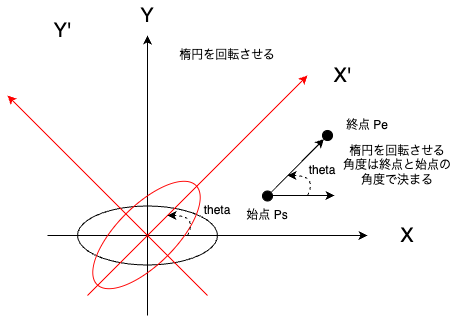
楕円を回転させている.回転角度は終点と始点の角度で決まる.
最後に,x_f を説明する.

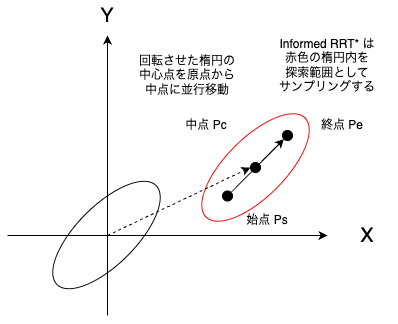
回転させた楕円の中心点を始点と終点の中点に並行移動させている.
上記のようにして,探索範囲を制限する楕円を作成している.
詳細な内容は参考文献を参照ください.
ソースコードの説明
Pythonにて,Informed RRT* のソースコードを作成したため,共有する.
定数の定義 (constant.py)
複数ファイルで使用する定数を定義したファイルは下記の通りです.
# 複数ファイルで使用する定数の定義

# RRT-Connectの状態を定義
STATE_START_TREE_RANDOM   = 0   # 始点ツリーにランダム点を追加
STATE_START_TREE_END_TREE = 1   # 始点ツリーから終点ツリーへノードを伸ばす
STATE_END_TREE_RANDOM     = 2   # 終点ツリーにランダム点を追加
STATE_END_TREE_START_TREE = 3   # 終点ツリーから始点ツリーへノードを伸ばす

# 経路生成アルゴリズムを定義
PATH_PLANNING_RRT               = 10    # RRTによる経路生成
PATH_PLANNING_RRT_CONNECT       = 11    # RRT-Connectによる経路生成
PATH_PLANNING_RRT_STAR          = 12    # RRT*による経路生成
PATH_PLANNING_INFORMED_RRT_STAR = 13    # Informed RRT*による経路生成

# ノードの最短ノード要素とコスト要素を定義
RRT_NEAR_NODE_IDX               = -1    # RRTでの最短ノード要素
RRT_CONNECT_NEAR_NODE_IDX       = -1    # RRT-Connectでの最短ノード要素
RRT_STAR_NEAR_NODE_IDX          = -3    # RRT*での最短ノード勝訴
RRT_STAR_COST_IDX               = -2    # RRT*でのコスト要素
RRT_STAR_RADIUS_IDX             = -1    # RRT*での半径要素
INFORMED_RRT_STAR_NEAR_NODE_IDX = -3    # Informed RRT*での最短ノード勝訴
INFORMED_RRT_STAR_COST_IDX      = -2    # Informed RRT*でのコスト要素
INFORMED_RRT_STAR_RADIUS_IDX    = -1    # Informed RRT*での半径要素

# 次元数を定義
DIMENTION_NONE            = -1          # 未定義
DIMENTION_2D              =  2          # 2次元
DIMENTION_3D              =  3          # 3次元

# ツリーの初期ノードの親ノード
INITIAL_NODE_NEAR_NODE    = -1          # 初期ノードに親ノードが存在しないから-1

# プロットする時にグラフ(静止画)とするかアニメーションを定義
PLOT_NONE                 = 20          # プロットしない
PLOT_GRAPH                = 21          # グラフ
PLOT_ANIMATION            = 22          # アニメーション

# 経路生成の平均処理時間などを算出するためのサンプル数
PATH_PLANNING_NUM         = 30          # 経路生成のサンプル数

# 干渉物の名称を定義
INTERFERENCE_NONE         = ""          # 未定義
# 2次元の干渉物 ↓
INTERFERENCE_CIRCLE       = "circle"    # 円形の干渉物
INTERFERENCE_RECTANGLE    = "rectangle" # 長方形の干渉物
INTERFERENCE_LINE2D       = "line2D"    # 2次元の直線
# 2次元の干渉物 ↑
# 3次元の干渉物 ↓
INTERFERENCE_BALL         = "ball"      # 球の干渉物
INTERFERENCE_CUBOID       = "cuboid"    # 直方体の干渉物
INTERFERENCE_LINE3D       = "line3D"    # 3次元の直線
# 3次元の干渉物 ↑
Informed RRT* による経路生成 (rrt.py)
上で説明した,Informed RRT* ソースコードは下記の通りです.
下記の InformedRRTStar クラスを新規作成した.
InformedRRTStarクラスの_get_random_pos()メソッドにより,探索範囲を楕円体の中に制限する.
基本的にはRRT* クラスのメソッドを利用している.
# 経路生成手法であるRRT (Rapidly-exploring Random Tree) の実装
# ライブラリの読み込み
import numpy as np
import time
import os
# 自作モジュールの読み込み
from constant import *
from interference import InterferenceDetection, Circle, Ball
class RRT:
"""
RRTクラス
プロパティ
_pathes(numpy.ndarray): 始点から終点までの経路
_debug_pathes(numpy.ndarray): デバッグ用経路
_debug_random_pathes(numpy.ndarray): デバッグ用ランダム位置
_strict_min_pos(numpy.ndarray): 探索の最小範囲
_strict_max_pos(numpy.ndarray): 探索の最大範囲
_interference_obj(list): 干渉物
publicメソッド (全てのクラスから参照可能)
planning(): 経路生成の実装
pathes(): _pathesプロパティのゲッター
debug_pathes(): _debug_pathesプロパティのゲッター
debug_random_pathes(): _debug_random_pathesプロパティのゲッター
strict_min_pos(): _strict_min_posプロパティのゲッター
strict_max_pos(): _strict_max_posプロパティのゲッター
interference_obj(): _interference_objプロパティのゲッター
protectedメソッド (自クラスまたは子クラスが参照可能)
_reset(): データの初期化
_set_node(): データにノードを設定する
_chk_end_pos_dist(): 終点との距離が一定範囲内であるかの確認
_fin_planning(): 経路生成の終了処理
_calc_new_pos(): 最短ノードからランダムな値方向へ新しいノード(位置)を作成
_get_near_node(): ランダムな位置と最短距離であるノードを取得
_strict_planning_pos(): 探索範囲を制限する
_get_random_pos(): ランダムな位置を取得
_set_interference_obj(): 干渉物を設定
_is_interference_pos(): 干渉判定処理
"""
# 定数の定義
_MOVING_VALUE = 0.25 # 1回の移動量
_STRICT_PLANNING_POS = 0.2 # 探索範囲の制限
_TIMEOUT_VALUE = 10 # タイムアウト時間 [second]
_FILE_NAME_PATHES = "pathes.csv" # _pathesプロパティを保存するファイル名
_FILE_NAME_DEBUG_PATHES = "debug_pathes.csv" # _debug_pathesプロパティを保存するファイル名
_FILE_NAME_DEBUG_RANDOM_PATHES = "debug_random_pathes.csv" # _debug_random_pathesプロパティを保存するファイル名
_NODE_RADIUS = 0.05 # ノードの半径
_NODE_NEAR_NODE_IDX = RRT_NEAR_NODE_IDX # ノード内の最短ノード要素
_GOAL_SAMPLE_RATE = 0.1 # ランダムな値を取るときに,終点を選択する確率
_DEVIDED_DISTANCE = 0.05 # 2点間を分割する際の基準距離
def __init__(self):
"""
コンストラクタ
"""
self._debug_pathes = []
self._debug_random_pathes = []
self._pathes = []
self._interference_obj = []
self._detect = InterferenceDetection()
@property
def pathes(self):
"""
_pathesプロパティのゲッター
"""
return self._pathes
@property
def debug_pathes(self):
"""
_debug_pathesプロパティのゲッター
"""
return self._debug_pathes
@property
def debug_random_pathes(self):
"""
_debug_random_pathesプロパティのゲッター
"""
return self._debug_random_pathes
@property
def strict_min_pos(self):
"""
_strict_min_posプロパティのゲッター
"""
return self._strict_min_pos
@property
def strict_max_pos(self):
"""
_strict_max_posプロパティのゲッター
"""
return self._strict_max_pos
@property
def interference_obj(self):
"""
_interference_objプロパティのゲッター
"""
return self._interference_obj
def _set_interference_obj(self, interference_obj):
"""
干渉物を設定
パラメータ
interference_obj(list): 干渉物
戻り値
set_result(bool): True / False = 設定の成功 / 失敗
"""
set_result = True
if interference_obj:
# 干渉物が存在する
# 干渉物と始点/終点の次元数が一致しているかの確認 (# 変更 ↓)
for interference in interference_obj:
if self._dim != interference.dimention:
# 不一致
set_result = False
break
if set_result:
self._interference_obj = interference_obj
# 変更 ↑
else:
self._interference_obj = []
return set_result
def _set_node(self, node):
"""
データにノードを設定する
パラメータ
node(numpy.ndarray): ノード位置と最短距離ノード番号 (最終要素)
"""
if len(self._debug_pathes) == 0:
self._debug_pathes = node
else:
self._debug_pathes = np.append(self._debug_pathes, node, axis=0)
def _set_random_node(self, node):
"""
データにノードを設定する
パラメータ
node(numpy.ndarray): ノード位置と最短距離ノード番号 (最終要素)
"""
if len(self._debug_random_pathes) == 0:
self._debug_random_pathes = node
else:
self._debug_random_pathes = np.append(self._debug_random_pathes, node, axis=0)
def planning(self, start_pos, end_pos, interference_obj):
"""
経路生成
パラメータ
start_pos(numpy.ndarray): 経路生成の始点
end_pos(numpy.ndarray): 経路生成の終点
interference_obj(list): 干渉物
戻り値
result(bool): True / False = 成功 / 失敗
"""
# 処理結果
result = False
# 始点と終点の次元数が一致しているかの確認
start_pos_dim = np.size(start_pos)
end_pos_dim = np.size(end_pos)
if start_pos_dim != end_pos_dim:
# 次元数が異なるので異常
return result
self._dim = start_pos_dim
# 干渉物を設定
if not self._set_interference_obj(interference_obj):
# 干渉物と始点/終点の次元数が不一致のため,処理失敗
return result
# 始点ノードを設定
self._set_node(np.append(start_pos, INITIAL_NODE_NEAR_NODE).reshape(1, -1))
self._set_random_node(np.append(start_pos, INITIAL_NODE_NEAR_NODE).reshape(1, -1))
# 探索する範囲を設定
self._strict_planning_pos(start_pos, end_pos)
# 経路生成は一定時間内に終了させる
start_time = time.time()
# 終点までの経路生成が終わるまでループ
while True:
# ランダムな値を取得
random_pos = self._get_random_pos(end_pos)
# ランダムな値と最短ノードを計算
near_node = self._get_near_node(random_pos)
# 最短ノード位置を取得
near_pos = self._debug_pathes[near_node, :self._NODE_NEAR_NODE_IDX]
# 最短ノードからランダムな値方向へ新しいノード(位置)を作成
new_pos = self._calc_new_pos(random_pos, near_pos)
# 新規ノードと最短ノード間での干渉判定
is_interference = self._line_interference(new_pos, near_pos)
if not is_interference:
# 干渉なしのため,データを設定する
# ランダムノードを設定
self._set_random_node(np.append(random_pos, near_node).reshape(1, -1))
# ノードを設定
self._set_node(np.append(new_pos, near_node).reshape(1, -1))
# 終点との距離が一定範囲内であるかの確認
if self._chk_end_pos_dist(new_pos, end_pos):
# 一定範囲内のため,経路生成の完了
result = True
break
# 干渉の有無に関わらずにタイムアウトの確認はする
now_time = time.time()
if now_time - start_time >= self._TIMEOUT_VALUE:
# タイムアウト
break
if result:
# 経路生成に成功のため,経路生成の終了処理
self._fin_planning(start_pos, end_pos)
return result
def _is_interference_pos(self, pos):
"""
干渉判定処理
パラメータ
pos(numpy.ndarray): 干渉判定したい点
戻り値
is_interference(bool): True / False = 干渉あり / なし
"""
is_interference = False
for interference in self._interference_obj:
if self._dim == DIMENTION_2D:
# ノードを円として干渉判定
ball = Circle(pos, self._NODE_RADIUS)
else:
# ノードを球として干渉判定
ball = Ball(pos, self._NODE_RADIUS)
if self._detect.is_interference(ball, interference):
# 干渉あり
is_interference = True
break
return is_interference
def _chk_end_pos_dist(self, pos, end_pos):
"""
終点との距離が一定範囲内かつ干渉しないかの確認
パラメータ
pos(numpy.ndarray): ノード位置
end_pos(numpy.ndarray): 経路生成の終点
戻り値
is_near(bool): True / False = 一定範囲内かつ干渉しない / 一定範囲内ではないまたは干渉する
"""
is_near = False
# 距離を計算
dist = np.linalg.norm(end_pos - pos)
# 一定範囲内であるかの確認
if dist <= self._MOVING_VALUE:
if not self._line_interference(pos, end_pos):
# 干渉しない
is_near = True
return is_near
def _fin_planning(self, start_pos, end_pos):
"""
経路生成の終了処理
パラメータ
start_pos(list): 経路生成の始点
end_pos(list): 経路生成の終点
"""
# 始点から終点までの経路に関係するノードを選択
revers_path = end_pos
near_node = -1
while True:
# 終点から始点方向へノードを取得
node = self._debug_pathes[near_node, :]
pos = node[:self._NODE_NEAR_NODE_IDX].reshape(1, -1)
# 浮動小数型になっているので,整数型に型変換
near_node = int(node[self._NODE_NEAR_NODE_IDX])
revers_path = np.append(revers_path, pos, axis=0)
if near_node == INITIAL_NODE_NEAR_NODE:
# 始点ノードまで取得できたため,処理終了
break
# 経路が終点からの順番になっているため,始点から終点とする
self._pathes = revers_path[::-1]
# デバッグ用の経路に終点を追加
self._set_random_node(np.append(end_pos, self._debug_pathes.shape[0] - 1).reshape(1, -1))
self._set_node(np.append(end_pos, self._debug_pathes.shape[0] - 1).reshape(1, -1))
def _calc_new_pos(self, random_pos, near_pos):
"""
最短ノード(位置)からランダムな値方向へ新しいノード(位置)を作成
パラメータ
random_pos(numpy.ndarray): ランダムな位置
near_pos(numpy.ndarray): 最短ノード位置
戻り値
new_pos(numpy.ndarray): 新しいノード
"""
# 方向を計算
direction = random_pos - near_pos
# 方向の大きさを1にする
norm_direction = direction / np.linalg.norm(direction)
# 新しいノードを作成
new_pos = near_pos + norm_direction * self._MOVING_VALUE
return new_pos
def _get_near_node(self, random_pos):
"""
ランダムな位置との最短距離ノードを取得
パラメータ
random_pos(numpy.ndarray): ランダムな位置
戻り値
min_dist_node(int): 最短距離ノード
"""
# 最後以外に位置が保存されている
node_pos = self._debug_pathes[:, :self._NODE_NEAR_NODE_IDX]
# 差分を計算
difference = node_pos - random_pos
# 差分から距離を計算
distance = np.linalg.norm(difference, axis=1)
# 最小距離のノードを取得
min_dist_node = np.argmin(distance)
return min_dist_node
def _strict_planning_pos(self, start_pos, end_pos):
"""
探索範囲を制限する
パラメータ
start_pos(numpy.ndarray): 始点
end_pos(numpy.ndarray): 終点
"""
all_pos = np.append(start_pos, end_pos, axis=0)
# 各列の最大/最小値を取得
min_pos = np.min(all_pos, axis=0)
max_pos = np.max(all_pos, axis=0)
self._strict_min_pos = min_pos - self._STRICT_PLANNING_POS
self._strict_max_pos = max_pos + self._STRICT_PLANNING_POS
def _get_random_pos(self, end_pos):
"""
ランダムな位置を取得
戻り値
random_pos(numpy.ndarray): ランダムな位置
"""
# ランダムな位置か終点を選択するかの確率
select_goal = np.random.rand()
if select_goal < self._GOAL_SAMPLE_RATE:
# 終点を選択する
random_pos = end_pos
else:
random_pos = np.random.uniform(self._strict_min_pos, self._strict_max_pos)
return random_pos
def _line_interference(self, pos1, pos2):
"""
2点間の干渉チェック
パラメータ
pos1(numpy.ndarray): 位置1
pos2(numpy.ndarray): 位置2
戻り値
is_interference(bool): True / False = 干渉あり / 干渉なし
"""
is_interference = False
# 2点間の距離を算出
difference = pos2 - pos1
distance = np.linalg.norm(difference)
# 2点間の分割数を算出
n_devided = max(int(distance / self._DEVIDED_DISTANCE), 1)
for i in range(n_devided + 1):
direct_pos = i / n_devided * difference
devided_pos = pos1 + direct_pos
if self._is_interference_pos(devided_pos):
# 干渉あり
is_interference = True
break
return is_interference
def save(self):
"""
生成した経路をファイル保存
"""
np.savetxt(self._FILE_NAME_PATHES, self._pathes)
np.savetxt(self._FILE_NAME_DEBUG_PATHES, self._debug_pathes)
np.savetxt(self._FILE_NAME_DEBUG_RANDOM_PATHES, self._debug_random_pathes)
class RRTConnect(RRT):
"""
RRT-Connectクラス
プロパティ
_start_tree(numpy.ndarray): 始点ツリー
_end_tree(numpy.ndarray): 終点ツリー
_state(int): ツリーの状態
_debug_states(list): ツリー状態のデバッグ
publicメソッド (全てのクラスから参照可能)
planning(): 経路生成の実装
start_tree(): _start_treeプロパティのゲッター
end_tree(): _end_treeプロパティのゲッター
debug_states(): _debug_statesプロパティのゲッター
save(): 生成した経路をファイル保存
protectedメソッド (自クラスまたは子クラスが参照可能)
_set_node_start_tree(): 始点ツリーにノードを設定する
_set_node_end_tree(): 終点ツリーにノードを設定する
_fin_planning(): 経路生成の終了処理
_get_near_node(): ランダムな位置と最短距離であるノードを取得
_save_state(): 状態を保存
_state_transition(): 状態を遷移させる
_exec_state(): 状態に応じた処理を実施
"""
# 定数の定義
_FILE_NAME_START_TREE = "start_tree.csv" # _start_treeプロパティを保存するファイル名
_FILE_NAME_END_TREE = "end_tree.csv" # _end_treeプロパティを保存するファイル名
_FILE_NAME_DEBUG_STATES = "debug_states.csv" # _debug_statesプロパティを保存するファイル名
_NODE_NEAR_NODE_IDX = RRT_CONNECT_NEAR_NODE_IDX # ノード内の最短ノード要素
def __init__(self):
"""
コンストラクタ
"""
# 親クラスの初期化
super().__init__()
# プロパティの初期化
self._start_tree = []
self._end_tree = []
self._state = STATE_START_TREE_RANDOM
self._debug_states = []
@property
def start_tree(self):
"""
_start_treeプロパティのゲッター
"""
return self._start_tree
@property
def end_tree(self):
"""
_end_treeプロパティのゲッター
"""
return self._end_tree
@property
def debug_states(self):
"""
_debug_statesプロパティのゲッター
"""
return self._debug_states
def _set_node_start_tree(self, node):
"""
始点ツリーにノードを設定する
パラメータ
node(numpy.ndarray): ノード位置
"""
if len(self._start_tree) == 0:
self._start_tree = node
else:
self._start_tree = np.append(self._start_tree, node, axis=0)
def _set_node_end_tree(self, node):
"""
終点ツリーにノードを設定する
パラメータ
node(numpy.ndarray): ノード位置
"""
if len(self._end_tree) == 0:
self._end_tree = node
else:
self._end_tree = np.append(self._end_tree, node, axis=0)
def planning(self, start_pos, end_pos, interference_obj):
"""
経路生成
パラメータ
start_pos(numpy.ndarray): 経路生成の始点
end_pos(numpy.ndarray): 経路生成の終点
interference_obj(list): 干渉物
戻り値
result(bool): True / False = 成功 / 失敗
"""
# 処理結果
result = False
# 始点と終点の次元数が一致しているかの確認
start_pos_dim = np.size(start_pos)
end_pos_dim = np.size(end_pos)
if start_pos_dim != end_pos_dim:
# 次元数が異なるので異常
return result
self._dim = start_pos_dim
# 干渉物を設定
if not self._set_interference_obj(interference_obj):
# 干渉物と始点/終点の次元数が不一致のため,処理失敗
return result
# 始点ツリーに始点ノードを設定
self._set_node_start_tree(np.append(start_pos, INITIAL_NODE_NEAR_NODE).reshape(1, -1))
# 終点ツリーに終点のーどを設定
self._set_node_end_tree(np.append(end_pos, INITIAL_NODE_NEAR_NODE).reshape(1, -1))
# 探索する範囲を設定
self._strict_planning_pos(start_pos, end_pos)
# 経路生成は一定時間内に終了させる
start_time = time.time()
# 始点から終点までの経路生成が終わるまでループ
while True:
# 1処理実施して,経路生成が完了したか確認する
if self._exec_state(start_pos, end_pos):
# 経路生成の完了
result = True
break
# 干渉の有無に関わらずにタイムアウトの確認はする
now_time = time.time()
if now_time - start_time >= self._TIMEOUT_VALUE:
# タイムアウト
break
if result:
# 経路生成に成功のため,経路生成の終了処理
self._fin_planning(start_pos, end_pos)
return result
def _state_transition(self):
"""
状態を遷移させる
"""
if self._state == STATE_START_TREE_RANDOM: # 始点ツリーにランダム点を追加する状態
self._state = STATE_END_TREE_START_TREE
elif self._state == STATE_START_TREE_END_TREE: # 始点ツリーに終点ツリーで作成したノードへ伸ばす状態
self._state = STATE_START_TREE_RANDOM
elif self._state == STATE_END_TREE_RANDOM: # 終点ツリーにランダム点を追加する状態
self._state = STATE_START_TREE_END_TREE
else: # 終点ツリーに始点ツリーで作成したノードへ伸ばす状態
self._state = STATE_END_TREE_RANDOM
def _save_state(self):
"""
状態を保存
"""
self._debug_states.append(self._state)
def _exec_state(self, start_pos, end_pos):
"""
状態(_state)に応じた処理を実施
パラメータ
start_pos(numpy.ndarray): 始点
end_pos(numpy.ndarray): 終点
戻り値
complete_path(bool): True / False = 経路生成の完了 / 未完了
"""
complete_path = False
# 最短ノードを算出したいツリーを取得
if self._state == STATE_START_TREE_RANDOM or self._state == STATE_START_TREE_END_TREE:
# 始点ツリーにランダム点を追加する状態または始点ツリーに終点ツリーで作成したノードへ伸ばす状態
my_tree = self._start_tree
your_tree = self._end_tree
set_tree_func = self._set_node_start_tree
target_pos = end_pos
else:
my_tree = self._end_tree
your_tree = self._start_tree
set_tree_func = self._set_node_end_tree
target_pos = start_pos
# ツリーにランダム点を追加
if self._state == STATE_START_TREE_RANDOM or self._state == STATE_END_TREE_RANDOM:
# 始点ツリーにランダム点を追加する状態または終点ツリーにランダム点を追加する状態
# ランダムな値を取得する
random_pos = self._get_random_pos(target_pos)
# ランダムな値とツリーの最短ノードを計算
near_node = self._get_near_node(random_pos, my_tree)
# 位置と最短ノードが保存されているから,位置だけを取得
near_pos = my_tree[near_node][:-1]
# 最短ノードからランダムな値方向へ新しいノードを作成
new_pos = self._calc_new_pos(random_pos, near_pos)
# 新規ノードと最短ノード間での干渉判定
is_interference = self._line_interference(new_pos, near_pos)
if not is_interference:
# ツリーにノードを追加
set_tree_func(np.append(new_pos, near_node).reshape(1, -1))
# 状態を保存
self._save_state()
# 干渉なしのため,状態を遷移させる
self._state_transition()
else:
# ツリーで作成したノードを取得
end_pos = your_tree[-1, :self._NODE_NEAR_NODE_IDX]
# ツリー内の最短ノードを計算
near_node = self._get_near_node(end_pos, my_tree)
# 位置と最短ノードが保存されているから,位置だけを取得
near_pos = my_tree[near_node, :self._NODE_NEAR_NODE_IDX]
# 最短ノードから終点ツリーのノード方向へ新しいノードを作成
new_pos = self._calc_new_pos(end_pos, near_pos)
# 干渉物との干渉判定
is_interference = self._line_interference(new_pos, near_pos)
if is_interference:
# 干渉ありのため,状態を遷移させる
self._state_transition()
else:
# ツリーにノードを追加
set_tree_func(np.append(new_pos, near_node).reshape(1, -1))
# 状態を保存
self._save_state()
# 始点から終点までの経路が生成できたかの確認
if self._chk_end_pos_dist(new_pos, end_pos):
# 経路生成の完了
complete_path = True
return complete_path
def _fin_planning(self, start_pos, end_pos):
"""
経路生成の終了処理
パラメータ
start_pos(list): 経路生成の始点
end_pos(list): 経路生成の終点
"""
# 始点ツリーから,終点ツリーと繋がったパスを取得
start_path = []
near_node = -1
while True:
# 終点ツリーと繋がったノードから始点へノードを取得
node = self._start_tree[near_node, :]
pos = node[:self._NODE_NEAR_NODE_IDX].reshape(1, -1)
# 浮動小数型になっているので,整数型に型変換
near_node = int(node[self._NODE_NEAR_NODE_IDX])
if len(start_path) == 0:
# 初回の場合
start_path = pos
else:
start_path = np.append(start_path, pos, axis=0)
if near_node == INITIAL_NODE_NEAR_NODE:
# 始点ノードまで取得できたため,ループ終了
break
# 始点ツリーのパスは,逆順(終点ツリーと繋がったノードから始点ノードの順番)に保存されているから,正順に変更
self._pathes = start_path[::-1]
# 終点ツリーから,始点ツリーと繋がったパスを取得
end_path = []
near_node = -1
while True:
# 始点ツリーと繋がったノードから終点へノードを取得
node = self._end_tree[near_node, :]
pos = node[:self._NODE_NEAR_NODE_IDX].reshape(1, -1)
# 浮動小数型になっているので,整数型に型変換
near_node = int(node[self._NODE_NEAR_NODE_IDX])
if len(end_path) == 0:
# 初回の場合
end_path = pos
else:
end_path = np.append(end_path, pos, axis=0)
if near_node == INITIAL_NODE_NEAR_NODE:
# 終点ノードまで取得できたため,ループ終了
break
# 始点から終点までの経路を保存
self._pathes = np.append(self._pathes, end_path, axis=0)
def _get_near_node(self, random_pos, tree):
"""
ランダムな位置とツリーの最短距離ノードを取得
パラメータ
random_pos(numpy.ndarray): ランダムな位置
tree(numpy.ndarray): ツリー
戻り値
min_dist_node(int): 最短距離ノード
"""
# 最後以外に位置が保存されている
node_pos = tree[:, :self._NODE_NEAR_NODE_IDX]
# 差分を計算
difference = node_pos - random_pos
# 差分から距離を計算
distance = np.linalg.norm(difference, axis=1)
# 最小距離のノードを取得
min_dist_node = np.argmin(distance)
return min_dist_node
def save(self):
"""
生成した経路をファイル保存
"""
np.savetxt(self._FILE_NAME_PATHES, self._pathes)
np.savetxt(self._FILE_NAME_START_TREE, self._start_tree)
np.savetxt(self._FILE_NAME_END_TREE, self._end_tree)
np.savetxt(self._FILE_NAME_DEBUG_STATES, self._debug_states)
class RRTStar(RRT):
"""
RRT*クラス
プロパティ
_pathes(numpy.ndarray): 始点から終点までの経路
_debug_pathes(numpy.ndarray): デバッグ用経路
_debug_random_pathes(numpy.ndarray): デバッグ用ランダム位置
_strict_min_pos(numpy.ndarray): 探索の最小範囲
_strict_max_pos(numpy.ndarray): 探索の最大範囲
_interference_obj(list): 干渉物
_max_iterate(int): 最大探索回数
_count_success(int): ノード追加の成功回数
_near_node_radius(float): 近傍ノードの探索半径
publicメソッド (全てのクラスから参照可能)
planning(): 経路生成の実装
count_success(int): _count_successプロパティのゲッター
protectedメソッド (自クラスまたは子クラスが参照可能)
_calc_cost(): コストの計算
_get_near_node_list(): ノードと近傍ノードをリストで取得
_get_min_cost_node(): コストが最小となる近傍ノードを取得
_update_near_node(): 近傍ノード内の親ノードを更新
_fin_planning(): 経路生成の終了処理
_save_current_tree(): 現在のツリーをファイル化
"""
# 定数の定義
_FILE_NAME_PATHES = "rrt_star_pathes.csv" # _pathesプロパティを保存するファイル名
_FILE_NAME_DEBUG_PATHES = "rrt_star_debug_pathes.csv" # _debug_pathesプロパティを保存するファイル名
_FILE_NAME_DEBUG_RANDOM_PATHES = "rrt_star_debug_random_pathes.csv" # _debug_random_pathesプロパティを保存するファイル名
_MAX_ITERATE = 200 # 最大探索回数
_NODE_NEAR_NODE_IDX = RRT_STAR_NEAR_NODE_IDX # ノード内の最短ノード要素
_NODE_COST_IDX = RRT_STAR_COST_IDX # ノード内のコスト要素
_TIMEOUT_VALUE = 1000 # タイムアウト時間 [second]
_FOLDER_NAME_CURRENT_TREE = "result" # ノード追加時の現在のツリーを保存するフォルダ名
_FILE_NAME_CURRENT_TREE = "rrt_start_current_tree" # ノード追加時の現在のツリーを保存するファイル名
_FILE_NAME_RANDOM_TREE = "rrt_start_random_tree" # ノード追加時の現在のランダムツリーを保存するファイル名
def __init__(self):
"""
コンストラクタ
"""
# 親クラスの初期化処理
super().__init__()
self._max_iterate = self._MAX_ITERATE
# フォルダを作成しておく (存在済みの場合はエラーを発生させない(引数 exist_ok をTrueとする))
os.makedirs(self._FOLDER_NAME_CURRENT_TREE, exist_ok=True)
self._near_node_radius = self._MOVING_VALUE * 20
@property
def max_iterate(self):
"""
_max_iterateプロパティのゲッター
"""
return self._max_iterate
@max_iterate.setter
def max_iterate(self, value):
"""
_max_iterateプロパティのセッター
パラメータ
value(int): 設定したい値
"""
# 負の値では何もしない
if value > 0:
self._max_iterate = value
@property
def near_node_radius(self):
"""
_near_node_radiusプロパティのゲッター
"""
return self._near_node_radius
@near_node_radius.setter
def near_node_radius(self, value):
"""
_near_node_radiusプロパティのセッター
パラメータ
value(float): 設定したい値
"""
# 負の値では,何もしない
if value > 0:
self._near_node_radius = value
@property
def count_success(self):
"""
_count_successプロパティのゲッター
"""
return self._count_success
@property
def file_name_current_tree(self):
"""
_FILE_NAME_CURRENT_TREE定数のゲッター
"""
return self._FILE_NAME_CURRENT_TREE
@property
def file_name_random_tree(self):
"""
_FILE_NAME_RANDOM_TREE定数のゲッター
"""
return self._FILE_NAME_RANDOM_TREE
@property
def foler_name_current_tree(self):
"""
_FOLDER_NAME_CURRENT_TREE定数のゲッター
"""
return self._FOLDER_NAME_CURRENT_TREE
def planning(self, start_pos, end_pos, interference_obj):
"""
経路生成
パラメータ
start_pos(numpy.ndarray): 経路生成の始点
end_pos(numpy.ndarray): 経路生成の終点
interference_obj(list): 干渉物
戻り値
result(bool): True / False = 成功 / 失敗
"""
# 処理結果
result = False
# 始点と終点の次元数が一致しているかの確認
start_pos_dim = np.size(start_pos)
end_pos_dim = np.size(end_pos)
if start_pos_dim != end_pos_dim:
# 次元数が異なるので異常
return result
self._dim = start_pos_dim
# 干渉物を設定
if not self._set_interference_obj(interference_obj):
# 干渉物と始点/終点の次元数が不一致のため,処理失敗
return result
# 始点ノードを設定 (# 変更 コストを追加した)
array_data = np.array([INITIAL_NODE_NEAR_NODE, 0.0, 0.0])
self._set_node(np.append(start_pos, array_data).reshape(1, -1))
self._set_random_node(np.append(start_pos, array_data).reshape(1, -1))
# 探索する範囲を設定
self._strict_planning_pos(start_pos, end_pos)
# 経路生成は一定時間内に終了させる
start_time = time.time()
self._count_success = 0 # ノード追加に失敗した回数
# 全探索回数ループ
for i in range(self._max_iterate):
# ランダムな値を取得
random_pos = self._get_random_pos(end_pos)
# ランダムな値と最短ノードを計算
near_node = self._get_near_node(random_pos)
# 最短ノード位置を取得
near_pos = self._debug_pathes[near_node, :self._NODE_NEAR_NODE_IDX]
# 最短ノードからランダムな値方向へ新しいノード(位置)を作成
new_pos = self._calc_new_pos(random_pos, near_pos)
# 新しい点と干渉物との干渉判定
is_interference = self._line_interference(new_pos, near_pos)
if not is_interference:
# 干渉なしのため,データを設定する
# 新規箇所 ↓
# 新規ノードのコストを計算
new_cost = self._calc_cost(new_pos, near_node)
# 近傍ノードを全部取得
near_node_list, threshold = self._get_near_node_list(new_pos)
# 近傍ノードからコストが最小となるノードを取得
min_cost_node, min_cost = self._get_min_cost_node(new_pos, near_node_list, near_node, new_cost)
# 近傍ノード内でコストが小さくなれば,最短ノードを更新
self._update_near_node(new_pos, near_node_list, min_cost)
# 新規箇所 ↑
# ランダムノードを設定
array_data = np.array([min_cost_node, min_cost, threshold])
self._set_random_node(np.append(random_pos, array_data).reshape(1, -1))
# ノードを設定
self._set_node(np.append(new_pos, array_data).reshape(1, -1))
# 終点との距離が一定範囲内であるかの確認
if self._chk_end_pos_dist(new_pos, end_pos):
# 一定範囲内のため,戻り値を成功に更新
result = True
self._count_success += 1
# 現在のツリーをファイル化する
self._save_current_tree()
# 干渉の有無に関わらずにタイムアウトの確認はする
now_time = time.time()
if now_time - start_time >= self._TIMEOUT_VALUE:
# タイムアウト
break
if result:
# 経路生成に成功のため,経路生成の終了処理
self._fin_planning(start_pos, end_pos)
return result
def _calc_cost(self, pos, near_node):
"""
ノードのコストを計算
パラメータ
pos(numpy.ndarray): 新規ノード位置
near_node(int): 新規ノードとの最短ノード
戻り値
cost(float): コスト
"""
# 最短ノードの情報を保存
node = self._debug_pathes[near_node]
node_pos = node[:self._NODE_NEAR_NODE_IDX]
node_near_node = node[self._NODE_NEAR_NODE_IDX]
node_cost = node[self._NODE_COST_IDX]
# 最短ノードと新規ノードのコスト(距離)を算出
cost = np.linalg.norm(node_pos - pos)
cost += node_cost
return cost
def _get_near_node_list(self, pos, fin_flg=False):
"""
ノードと近傍ノードをリストで取得
パラメータ
pos(numpy.ndarray): ノード位置
fin_flg(bool): 経路生成の終了フラグ
戻り値
near_node_list(list): 近傍ノードリスト
threshold(float): 近傍判定の閾値
"""
near_node_list = []
# ツリー内全ノード位置を取得
all_node_pos = self._debug_pathes[:, :self._NODE_NEAR_NODE_IDX]
# ノードとツリー内全ノードの差分を計算
difference = all_node_pos - pos
# 差分から距離(ユークリッド距離)を計算
distance = np.linalg.norm(difference, axis=1)
# 一定以内の距離
n_node = self._debug_pathes.shape[0]
threshold = self._near_node_radius * np.power(np.log(n_node) / n_node, 1 / self._dim)
# 距離が一定以内のノードだけを保存
near_node_list = [idx for idx, dist in enumerate(distance) if dist <= threshold]
return near_node_list, threshold
def _get_min_cost_node(self, pos, near_node_list, near_node, near_node_cost):
"""
コストが最小となる近傍ノードを取得
パラメータ
pos(numpy.ndarray): ノード位置
near_node_list(list): 近傍ノードリスト
near_node(int): 最短ノード
near_node_cost(float): 最短ノード追加時のコスト
戻り値
min_cost_node(int): コスト最小ノード
min_cost(float): コスト最小値
"""
# 戻り値の初期化
min_cost = near_node_cost
min_cost_node = near_node
if not near_node_list:
# 近傍ノードがないため,処理終了
return min_cost_node, min_cost
for node_idx in near_node_list:
# 近傍ノードに関する情報を保存
node = self._debug_pathes[node_idx]
node_pos = node[:self._NODE_NEAR_NODE_IDX]
node_cost = node[self._NODE_COST_IDX]
# コスト(距離)を計算
distance = np.linalg.norm(node_pos - pos)
# 2点間の干渉チェック
is_interference = self._line_interference(node_pos, pos)
if not is_interference:
# 干渉なし
new_cost = distance + node_cost
if new_cost < min_cost:
# 小さくなるため,最短ノードを修正
min_cost_node = node_idx
min_cost = new_cost
return min_cost_node, min_cost
def _update_near_node(self, pos, near_node_list, cost):
"""
近傍ノード内の親ノードを更新
パラメータ
pos(numpy.ndarray): ノード位置
near_node_list(list): 近傍ノードリスト
cost(float): コスト
"""
if not near_node_list:
# 近傍ノードがないため,処理終了
return
# 新規ノードのインデックス番号を保存
new_node_idx = self._debug_pathes.shape[0]
for node_idx in near_node_list:
# 近傍ノードに関する情報を保存
node = self._debug_pathes[node_idx]
node_pos = node[:self._NODE_NEAR_NODE_IDX]
node_near_node = node[self._NODE_NEAR_NODE_IDX]
node_cost = node[self._NODE_COST_IDX]
# コスト(距離)を計算
distance = np.linalg.norm(node_pos - pos)
# 2点間の干渉チェック
is_interference = self._line_interference(node_pos, pos)
if not is_interference:
# 干渉なし
new_cost = distance + cost
if new_cost < node_cost:
# 小さくなるため,最短ノードを修正
self._debug_pathes[node_idx, self._NODE_NEAR_NODE_IDX] = new_node_idx
self._debug_pathes[node_idx, self._NODE_COST_IDX] = new_cost
def _fin_planning(self, start_pos, end_pos):
"""
経路生成の終了処理
パラメータ
start_pos(list): 経路生成の始点
end_pos(list): 経路生成の終点
"""
# 始点から終点までの経路に関係するノードを選択
revers_path = end_pos
# 終点との最短ノードを取得
near_node = self._get_near_node(end_pos)
# 最短ノードとのコストを計算
near_node_cost = self._calc_cost(end_pos, near_node)
# 近傍ノードを全部取得
near_node_list, threshold = self._get_near_node_list(end_pos, True)
# 近傍ノードからコストが最小となるノードを取得
min_cost_node, min_cost = self._get_min_cost_node(end_pos, near_node_list, near_node, near_node_cost)
near_node = min_cost_node
while True:
# 終点から始点方向へノードを取得
node = self._debug_pathes[near_node, :]
pos = node[:self._NODE_NEAR_NODE_IDX].reshape(1, -1)
# 浮動小数型になっているので,整数型に型変換
near_node = int(node[self._NODE_NEAR_NODE_IDX])
revers_path = np.append(revers_path, pos, axis=0)
if near_node == INITIAL_NODE_NEAR_NODE:
# 始点ノードまで取得できたため,処理終了
break
# 経路が終点からの順番になっているため,始点から終点とする
self._pathes = revers_path[::-1]
# デバッグ用の経路に終点を追加
array_data = np.array([self._debug_pathes.shape[0] - 1, 0.0, threshold])
self._set_random_node(np.append(end_pos, array_data).reshape(1, -1))
self._set_node(np.append(end_pos, array_data).reshape(1, -1))
def _save_current_tree(self):
"""
現在のツリーをファイル化
"""
# 新規ノードが追加できたら,self._count_successはインクリメントされていく
file_name = f"{self._FOLDER_NAME_CURRENT_TREE}/{self._FILE_NAME_CURRENT_TREE}_{self._count_success}.csv"
np.savetxt(file_name, self._debug_pathes)
file_name = f"{self._FOLDER_NAME_CURRENT_TREE}/{self._FILE_NAME_RANDOM_TREE}_{self._count_success}.csv"
np.savetxt(file_name, self._debug_random_pathes)
# 新規追加 ↓
class InformedRRTStar(RRTStar):
"""
Informed RRT* (RRT*の改良版 (処理時間の高速化) )
RRT*ではランダムな値をサンプルしているため,効率的ではない
Informed RRT*は始点から終点までの経路生成が完了したら,ランダムな値を算出する際に範囲を制限する
制限する時に,始点から終点までの楕円を作りながら制限していく
プロパティ
_max_iterate(int): 最大探索回数
_count_success(int): ノード追加の成功回数
_near_node_radius(float): 近傍ノードの探索半径
_near_node_end_pos(numpy.ndarray): 終点と一定距離内にあるノード
_ellipse_radius(numpy.ndarray): 楕円の半径
_ellipse_rotation(numpy.ndarray): 楕円の回転行列
publicメソッド (全てのクラスから参照可能)
planning(): 経路生成の実装
ellipse_radius(): _ellipse_radiusプロパティのゲッター
protectedメソッド (自クラスまたは子クラスが参照可能)
_get_random_pos(): ランダムな値を取得
_get_unit_ball(): 単位球内の位置を取得
_calc_ellipse_radius(): 楕円の半径を計算
_rotation_to_world_frame(): 始点から終点方向の回転行列を作成
_set_near_node_end_pos(): 終点と一定距離内にあるノードを設定
_set_ellipse_radius(): 楕円の半径を設定
_get_min_cost_end_pos_near_node(): 終点に近いノードの中の最小コストを取得
"""
# 定数の定義
_FILE_NAME_PATHES = "informed_rrt_star_pathes.csv" # _pathesプロパティを保存するファイル名
_FILE_NAME_DEBUG_PATHES = "informed_rrt_star_debug_pathes.csv" # _debug_pathesプロパティを保存するファイル名
_FILE_NAME_DEBUG_RANDOM_PATHES = "informed_rrt_star_debug_random_pathes.csv" # _debug_random_pathesプロパティを保存するファイル名
_NODE_NEAR_NODE_IDX = INFORMED_RRT_STAR_NEAR_NODE_IDX # ノード内の最短ノード要素
_NODE_COST_IDX = INFORMED_RRT_STAR_COST_IDX # ノード内のコスト要素
_FILE_NAME_CURRENT_TREE = "informed_rrt_start_current_tree" # ノード追加時の現在のツリーを保存するファイル名
_FILE_NAME_RANDOM_TREE = "informed_rrt_start_random_tree" # ノード追加時の現在のランダムツリーを保存するファイル名
_COST_MAX = 1e10 # コストの最大値
def __init__(self):
"""
コンストラクタ
"""
# 親クラスの初期化処理
super().__init__()
self._near_node_radius = self._MOVING_VALUE * 20
self._near_node_end_pos = []
self._ellipse_radius = []
self._ellipse_rotation = []
@property
def ellipse_radius(self):
"""
_ellipse_radiusプロパティのゲッター
"""
return self._ellipse_radius
@property
def ellipse_rotation(self):
"""
_ellipse_rotationプロパティのゲッター
"""
return self._ellipse_rotation
def planning(self, start_pos, end_pos, interference_obj):
"""
経路生成
パラメータ
start_pos(numpy.ndarray): 経路生成の始点
end_pos(numpy.ndarray): 経路生成の終点
interference_obj(list): 干渉物
戻り値
result(bool): True / False = 成功 / 失敗
"""
# 処理結果
result = False
# 始点と終点の次元数が一致しているかの確認
start_pos_dim = np.size(start_pos)
end_pos_dim = np.size(end_pos)
if start_pos_dim != end_pos_dim:
# 次元数が異なるので異常
return result
self._dim = start_pos_dim
# 干渉物を設定
if not self._set_interference_obj(interference_obj):
# 干渉物と始点/終点の次元数が不一致のため,処理失敗
return result
# 始点ノードを設定
array_data = np.array([INITIAL_NODE_NEAR_NODE, 0.0, 0.0])
self._set_node(np.append(start_pos, array_data).reshape(1, -1))
self._set_random_node(np.append(start_pos, array_data).reshape(1, -1))
self._set_ellipse(np.zeros(self._dim).reshape(1, -1), np.zeros((1, self._dim, self._dim)))
# 探索する範囲を設定
self._strict_planning_pos(start_pos, end_pos)
# 経路生成は一定時間内に終了させる
start_time = time.time()
self._count_success = 0 # ノード追加に成功した回数
# 全探索回数ループ
for i in range(self._max_iterate):
# RRT*との差異 ↓
# 終点に近いノードの中での最小コストを取得
min_cost_near_node_end_pos = self._get_min_cost_end_pos_near_node()
# ランダムな値と楕円の半径を取得
random_pos, ellipse_radius, ellipse_rotation = self._get_random_pos(start_pos, end_pos, min_cost_near_node_end_pos)
# RRT*との差異 ↑
# ランダムな値と最短ノードを計算
near_node = self._get_near_node(random_pos)
# 最短ノード位置を取得
near_pos = self._debug_pathes[near_node, :self._NODE_NEAR_NODE_IDX]
# 最短ノードからランダムな値方向へ新しいノード(位置)を作成
new_pos = self._calc_new_pos(random_pos, near_pos)
# 新しい点と干渉物との干渉判定
is_interference = self._line_interference(new_pos, near_pos)
if not is_interference: # 干渉なしのため,データを設定する
# 新規ノードのコストを計算
new_cost = self._calc_cost(new_pos, near_node)
# 近傍ノードを全部取得
near_node_list, threshold = self._get_near_node_list(new_pos)
# 近傍ノードからコストが最小となるノードを取得
min_cost_node, min_cost = self._get_min_cost_node(new_pos, near_node_list, near_node, new_cost)
# 近傍ノード内でコストが小さくなれば,最短ノードを更新
self._update_near_node(new_pos, near_node_list, min_cost)
# ノードを設定
array_data = np.array([min_cost_node, min_cost, threshold])
self._set_random_node(np.append(random_pos, array_data).reshape(1, -1))
self._set_node(np.append(new_pos, array_data).reshape(1, -1))
# 楕円の半径を保存
self._set_ellipse(ellipse_radius.reshape(1, -1), ellipse_rotation.reshape(1, self._dim, self._dim))
# 終点との距離が一定範囲内であるかの確認
if self._chk_end_pos_dist(new_pos, end_pos):
# 一定範囲内のため,戻り値を成功に更新
result = True
# RRT*との差異 ↓
# _near_node_end_posプロパティにノードを追加
self._set_near_node_end_pos(end_pos, new_pos, min_cost_node, min_cost, threshold)
# RRT*との差異 ↑
self._count_success += 1
# 現在のツリーをファイル化する
self._save_current_tree()
# 干渉の有無に関わらずにタイムアウトの確認はする
now_time = time.time()
if now_time - start_time >= self._TIMEOUT_VALUE:
# タイムアウト
break
if result:
# 経路生成に成功のため,経路生成の終了処理
self._fin_planning(start_pos, end_pos)
return result
# RRT*との差異 ↓
def _get_random_pos(self, start_pos, end_pos, min_cost_near_node_end_pos):
"""
ランダムな位置を取得
パラメータ
start_pos(numpy.ndarray): 始点
end_pos(numpy.ndarray): 終点
min_cost_near_node_end_pos(float): 終点に近いノードの最小コスト
戻り値
random_pos(numpy.ndarray): ランダムな位置
ellipse_radius(numpy.ndarray): 楕円の半径
ellipse_rotation(numpy.ndarray): 楕円の回転行列
"""
ellipse_radius = np.zeros(self._dim)
ellipse_rotation = np.zeros((1, self._dim, self._dim))
if min_cost_near_node_end_pos < self._COST_MAX: # Informed RRT*特有の処理
min_cost = np.linalg.norm(end_pos - start_pos) # 最小コスト
center_pos = (start_pos + end_pos) / 2 # 中心点
ellipse_rotation = self._rotation_to_world_frame(start_pos, end_pos) # 回転行列を取得
ellipse_radius = self._calc_ellipse_radius(min_cost_near_node_end_pos, min_cost) # 楕円体の半径を取得
diag_ellipse_radius = np.diagflat(ellipse_radius) # 楕円体の半径をベクトルから対角行列に変換
unit_ball = self._get_unit_ball() # 単位球内をランダムにサンプリング
ellipse = np.dot(ellipse_rotation, diag_ellipse_radius) # 楕円体を回転
ellipse_pos = np.dot(ellipse, unit_ball) # 単位球から楕円体に変換 (拡張・縮小)
random_pos = ellipse_pos + center_pos # 楕円体を並行移動
else:
# 従来通りのランダムな位置を取得
random_pos = super()._get_random_pos(end_pos)
return random_pos, ellipse_radius, ellipse_rotation
def _get_unit_ball(self):
"""
単位球内の位置を取得
戻り値
position(numpy.ndarray): 単位球内の位置
"""
lenth_of_one_side = 1.0
while True:
# -1から1の範囲で,適当な座標を取得
position = np.random.uniform(np.ones(self._dim) * lenth_of_one_side * -1, np.ones(self._dim) * lenth_of_one_side)
# 距離を計算
distance = np.linalg.norm(position)
if distance <= 1:
# 単位球の中をプロット
# 単位球の中をプロットする確率は 単位球の体積 / 一辺が2の立方体の体積
break
else:
# 単位球の外をプロット
# プロットできなかった時は,辺の長さを小さくして,単位球の中をプロットしやすくする (whileループから早く抜けたいから)
lenth_of_one_side -= 0.0001
return position
def _calc_ellipse_radius(self, max_cost, min_cost):
"""
乱数生成で使用する楕円の半径を計算
パラメータ
max_cost(float): 最大コスト
min_cost(float): 最小コスト
戻り値
ellipse_radius(numpy.ndarray): 乱数生成で使用する楕円の半径(ベクトル)
"""
ellipse_radius = [max_cost / 2]
radius = np.sqrt(max_cost ** 2 - min_cost ** 2) / 2
for _ in range(1, self._dim):
ellipse_radius.append(radius)
ellipse_radius = np.array(ellipse_radius)
return ellipse_radius
def _rotation_to_world_frame(self, start_pos, end_pos):
"""
始点から終点方向の回転行列を作成
パラメータ
start_pos(numpy.ndarray): 始点
end_pos(numpy.ndarray): 終点
node(numpy.ndarray): ノード位置と最短距離ノード番号 (最終要素)
戻り値
Rotation(numpy.ndarray): 回転行列
"""
# 始点から終点までの単位方向ベクトルを作成
difference = end_pos - start_pos
norm_vector = difference / np.linalg.norm(difference)
eye = np.eye(self._dim) # 単位行列
# 単位方向ベクトルと単位行列の1行目の内積を計算して,行列とする
cross_matrix = np.dot(norm_vector.reshape(-1, 1), eye[:, 0].reshape(1, -1))
# 行列の特異値分解
U, S, V_T = np.linalg.svd(cross_matrix)
# 特異値の対角要素の最終要素を U, V_T に置き換える
diagonal = np.diagflat(np.ones(self._dim))
diagonal[-1, -1] = np.linalg.det(U) * np.linalg.det(V_T)
# 修正した特異値を使用して,行列に治す
Rotation = np.dot(U, diagonal)
Rotation = np.dot(Rotation, V_T)
return Rotation
def _set_near_node_end_pos(self, end_pos, pos, near_node, cost, threshold):
"""
データにノードを設定する
パラメータ
end_pos(numpy.ndarray): 終点
pos(numpy.ndarray): 位置
near_node(int): 最短ノード
cost(float): コスト (始点から位置(pos)までのコスト)
threshold(float): 近傍ノードの探索半径
"""
# コストに終点までのコスト(距離)も追加する
cost += np.linalg.norm(end_pos - pos)
array_data = np.array([near_node, cost, threshold])
node = np.append(pos, array_data).reshape(1, -1)
if len(self._near_node_end_pos) == 0: # 初回だけ実施
self._near_node_end_pos = node
else:
self._near_node_end_pos = np.append(self._near_node_end_pos, node, axis=0)
def _set_ellipse(self, radius, rotation):
"""
楕円情報を設定する
パラメータ
radius(numpy.ndarray): 楕円の半径
rotation(numpy.ndarray): 楕円の回転行列
"""
if len(self._ellipse_radius) == 0: # 初回だけ実施
self._ellipse_radius = radius
else:
self._ellipse_radius = np.append(self._ellipse_radius, radius, axis=0)
if len(self._ellipse_rotation) == 0: # 初回だけ実施
self._ellipse_rotation = rotation
else:
self._ellipse_rotation = np.append(self._ellipse_rotation, rotation, axis=0)
def _get_min_cost_end_pos_near_node(self):
"""
終点に近いノードの中の最小コストを取得
戻り値
min_cost(float): 最小コスト
"""
min_cost = self._COST_MAX
if len(self._near_node_end_pos) != 0: # 終点に近いノードが存在する
costs = self._near_node_end_pos[:, self._NODE_COST_IDX]
min_cost = np.min(costs)
return min_cost
# RRT*との差異 ↑
# 新規追加 ↑
円形の干渉物との干渉判定 (interference.py)
2次元,3次元の干渉物に関するクラスおよび干渉判定クラスを作成した.
現状は,円と球の干渉物を作成したが,将来的には様々な干渉物も作成したい.
# 干渉物と干渉判定を定義する

# ライブラリの読み込み
import numpy as np

# 自作モジュールの読み込み
from constant import *


class Interference2D:
    """
    2次元の干渉物クラス(抽象クラス)

    メソッド
        public
            dimention(): _DIMENTION定数のゲッター
            name(): _NAME定数のゲッター
            is_interference(): 干渉判定
    """
    # 定数の定義
    _DIMENTION = DIMENTION_2D           # 次元数
    _NAME      = INTERFERENCE_NONE      # 干渉物の名前

    @property
    def dimention(self):
        """
        _DIMENTION定数のゲッター
        """
        return self._DIMENTION

    @property
    def name(self):
        """
        _NAME定数のゲッター
        """
        if self._NAME == INTERFERENCE_NONE:
            # 未定義だから例外エラー
            raise NotImplementedError("_NAME is not implemented")

        return self._NAME


class Circle(Interference2D):
    """
    円形の干渉物クラス

    プロパティ
        _center(numpy.ndarray): 中心位置 (x, y)
        _radius(float): 半径

    メソッド
        public
            center(): _centerプロパティのゲッター
            radius(): _radiusプロパティのゲッター
    """
    # 定数の定義
    _NAME      = INTERFERENCE_CIRCLE        # 干渉物の名前

    def __init__(self, center, radius):
        """
        コンストラクタ

        パラメータ
            center(numpy.ndarray): 中心位置(x, y)
            radisu(float): 半径
        """
        # 引数の確認
        if center.size != self._DIMENTION:
            # 異常
            raise ValueError(f"center'size is not {self._DIMENTION}d. now is {center.size}d")

        if radius < 0:
            # 異常
            raise ValueError("radius is negative. non negative is corrected")

        # プロパティの初期化
        self._center = center
        self._radius = radius

    @property
    def center(self):
        """
        _centerプロパティのゲッター
        """
        return self._center

    @property
    def radius(self):
        """
        _radiusプロパティのゲッター
        """
        return self._radius


class Interference3D:
    """
    3次元の干渉物クラス(抽象クラス)

    メソッド
        public
            name(): _NAME定数のゲッター
            dimention(): _DIMENTION定数のゲッター
    """
    # 定数の定義
    _DIMENTION = DIMENTION_3D           # 次元数
    _NAME      = INTERFERENCE_NONE      # 干渉物の名前

    @property
    def dimention(self):
        """
        _DIMENTION定数のゲッター
        """
        return self._DIMENTION

    @property
    def name(self):
        """
        _NAME定数のゲッター
        """
        if self._NAME == INTERFERENCE_NONE:
            # 未定義だから例外エラー
            raise NotImplementedError("_NAME is not implemented")

        return self._NAME


class Ball(Interference3D):
    """
    球の干渉物クラス

    プロパティ
        _center(numpy.ndarray): 中心位置(x, y, z)
        _radius(float): 半径

    メソッド
        public
            center(): _centerプロパティのゲッター
            radius(): _radiusプロパティのゲッター
    """
    # 定数の定義
    _NAME = INTERFERENCE_BALL   # 干渉物の名前

    def __init__(self, center, radius):
        """
        コンストラクタ

        パラメータ
            center(numpy.ndarray): 中心位置(x, y, z)
            radisu(float): 半径
        """
        # 引数の確認
        if center.size != self._DIMENTION:
            # 異常
            raise ValueError(f"center'size is not {self._DIMENTION}d. now is {center.size}d")

        if radius < 0:
            # 異常
            raise ValueError("radius is negative. non negative is corrected")

        # プロパティの初期化
        self._center = center
        self._radius = radius

    @property
    def center(self):
        """
        _centerプロパティのゲッター
        """
        return self._center

    @property
    def radius(self):
        """
        _radiusプロパティのゲッター
        """
        return self._radius


class InterferenceDetection:
    """
    干渉判定クラス

    メソッド
        public
            is_interference(): 干渉判定
        protected
            _is_interference_2D(): 2次元の干渉物の干渉判定
            _is_interference_circles(): 円同士の干渉判定

            _is_interference_3D(): 3次元の干渉物の干渉判定
            _is_interference_balls(): 球同士の干渉判定
    """
    # 定数の定義

    def __init__(self):
        """
        コンストラクタ
        """
        pass

    def is_interference(self, Interference1, Interference2):
        """
        干渉判定

        パラメータ
            Interference1: 干渉物1
            Interference2: 干渉物2

        戻り値
            result(bool): True / False = 干渉あり / なし
        """
        result = True

        # 次元数の取得
        dimention1 = Interference1.dimention
        dimention2 = Interference2.dimention

        # 引数の確認
        if dimention1 != dimention2:
            # 次元が異なるから異常
            raise ValueError("Interference1.dimention and Interference2.dimention is not match.")

        if dimention1 == DIMENTION_2D:              # 2次元
            result = self._is_interference_2D(Interference1, Interference2)
        elif dimention1 == DIMENTION_3D:            # 3次元
            result = self._is_interference_3D(Interference1, Interference2)
        else:
            # 異常
            raise ValueError(f"Interference1.dimention and Interference2.dimention is abnormal. dimention is {dimention1}")

        return result

    def _is_interference_2D(self, Interference1, Interference2):
        """
        2次元干渉物の干渉判定

        パラメータ
            Interference1: 干渉物1
            Interference2: 干渉物2

        戻り値
            result(bool): True / False = 干渉あり / なし
        """
        result = True

        # 干渉物の名前を確認 (今回は円しかありえない)
        if Interference1.name != INTERFERENCE_CIRCLE:
            raise ValueError(f"Interference1.name is not {INTERFERENCE_CIRCLE}. name is {Interference1.name}")

        if Interference2.name != INTERFERENCE_CIRCLE:
            raise ValueError(f"Interference2.name is not {INTERFERENCE_CIRCLE}. name is {Interference2.name}")

        # 円同士の干渉判定
        result = self._is_interference_circles(Interference1, Interference2)

        return result

    def _is_interference_circles(self, circle1, circle2):
        """
        円同士の干渉判定

        パラメータ
            circle1(Circle): 円1
            circle2(Circle): 円2

        戻り値
            result(bool): True / False = 干渉あり / なし
        """
        result = False

        # 2点間の差分を計算
        difference = circle1.center - circle2.center
        # 2点間の距離(ユークリッド距離)を算出
        distance = np.linalg.norm(difference)
        if distance <= circle1.radius + circle2.radius:
            # 干渉した
            result = True

        return result

    def _is_interference_3D(self, Interference1, Interference2):
        """
        3次元干渉物の干渉判定

        パラメータ
            Interference1: 干渉物1
            Interference2: 干渉物2

        戻り値
            result(bool): True / False = 干渉あり / なし
        """
        result = True

        # 干渉物の名前を確認 (今回は球しかありえない)
        if Interference1.name != INTERFERENCE_BALL:
            raise ValueError(f"Interference1.name is not {INTERFERENCE_BALL}. name is {Interference1.name}")

        if Interference2.name != INTERFERENCE_BALL:
            raise ValueError(f"Interference2.name is not {INTERFERENCE_BALL}. name is {Interference2.name}")

        # 球同士の干渉判定
        result = self._is_interference_balls(Interference1, Interference2)

        return result

    def _is_interference_balls(self, ball1, ball2):
        """
        球同士の干渉判定

        パラメータ
            ball1(Ball): 球1
            ball2(Ball): 球2

        戻り値
            result(bool): True / False = 干渉あり / なし
        """
        result = False

        # 2点間の差分を計算
        difference = ball1.center - ball2.center
        # 2点間の距離(ユークリッド距離)を算出
        distance = np.linalg.norm(difference)
        if distance <= ball1.radius + ball2.radius:
            # 干渉した
            result = True

        return result
Informed RRT* のアニメーション (rrt_animation.py)
上記でInformed RRT* の実装をしたが,想定通りに動いているかの確認が必要なため,アニメーションを作成して確認する.
Pythonによる RRT/RRT-Connect/RRT* のアニメーション実装は下記の通りです.
# RRTで作成した経路のアニメーションを作成する
# ライブラリの読み込み
import numpy as np
import matplotlib.pyplot as plt
import matplotlib.animation as ani
import matplotlib.patches as patches
# 自作モジュールの読み込み
from constant import *
class RRTAnimation:
"""
RRTのアニメーション作成
プロパティ
_min_pos(numpy.ndarray): RRTの最小探索範囲
_max_pos(numpy.ndarray): RRTの最大探索範囲
_figure: 描画枠
_axis: 描画内容
publicメソッド (全てのクラスから参照可能)
plot(): グラフ作成
plot_Animation(): アニメーション作成
protectedメソッド (自クラスまたは子クラスが参照可能)
_plot_2D(): 2D(2次元)グラフ作成
_plot_2DAnimation(): 2D(2次元)アニメーション作成
_reset2D(): 2次元データのリセット
_plot_2Dinterference_obj(): 2次元の干渉物(円形)をプロット
_plot_3D(): 3D(3次元)グラフ作成
_plot_3DAnimation(): 3D(3次元)アニメーション作成
_reset3D(): 3次元データのリセット
_set_3DAxis(): 3次元データのラベルや範囲を設定
_update_3Ddata(): 3次元各データの更新
_plot_3Dinterference_obj(): 3次元の干渉物(球)のプロット
"""
# 定数の定義
_ONE_CUT_NUM = 6 # 1回
_ANIMATION_NAME = "rrt_animation.gif"
_PLOT_NAME = "rrt_plot.gif"
_NODE_NEAR_NODE_IDX = RRT_NEAR_NODE_IDX # ノード内の最短ノード要素
def __init__(self, min_pos, max_pos):
"""
コンストラクタ
"""
self._min_pos = min_pos
self._max_pos = max_pos
def _reset2D(self):
"""
2次元データのリセット
"""
self._figure = plt.Figure()
self._axis = self._figure.add_subplot(111)
# X/Y軸に文字を記載
self._axis.set_xlabel("X")
self._axis.set_ylabel("Y")
# プロットするX/Yの範囲を設定
self._axis.set_xlim(self._min_pos[0], self._max_pos[0])
self._axis.set_ylim(self._min_pos[1], self._max_pos[1])
self._axis.grid()
self._axis.set_aspect("equal")
def _plot_2Dinterference_obj(self, interference_obj):
"""
円形の干渉物のプロット
パラメータ
interference_obj(list): 円形の干渉物
戻り値
interference_images(list): 円形の干渉物
"""
for interference in interference_obj:
# 円形データをプロット
circle = patches.Circle(interference.center, interference.radius, color='gray', alpha=0.5)
self._axis.add_patch(circle)
def _plot_2D_all_node_parent(self, pathes, positions, parent_nodes, line_color="red", pathes_plot=True):
"""
全ノードを親ノード(最短ノード)と一緒にプロット(2次元データ)
パラメータ
pathes(numpy.ndarray): 始点から終点までの経路
positions(numpy.ndarray): 全ノード位置
parent_nodes(numpy.ndarray): 全ノードの親ノード
line_color(str): ノードと親ノードの直線の色
pathes_plot(bool): 始点から終点までの経路をプロットするか否か
戻り値
path_images(list): 全ノードをプロットしたリストデータ
"""
path_images = []
# 引数の確認
if positions.shape[0] != parent_nodes.shape[0]:
# データ数不一致で異常
return
# ノードを全部プロット
image = self._axis.scatter(positions[ :, 0], positions[ :, 1], color="gray", marker="*")
path_images.extend([image])
# 始点をプロット
image = self._axis.scatter(pathes[ 0, 0], pathes[ 0, 1], color="cyan", marker="*")
path_images.extend([image])
# 終点をプロット
image = self._axis.scatter(pathes[-1, 0], pathes[-1, 1], color="lime", marker="*")
path_images.extend([image])
for i in reversed(range(1, positions.shape[0])):
# 追加の遅いノードから順番にプロットしていく
now_position = positions[i]
now_node = i
near_node_idx = int(parent_nodes[i])
while True: # 始点をプロットするまでループ
parent_position = positions[near_node_idx]
plot_pos = np.append(now_position.reshape(1, -1), parent_position.reshape(1, -1), axis=0)
# 親ノードとの線をプロット
image = self._axis.plot(plot_pos[:, 0], plot_pos[:, 1], color=line_color)
path_images.extend(image)
# ノードおよび親ノードの更新
now_position = parent_position
near_node_idx = int(parent_nodes[near_node_idx])
if near_node_idx == INITIAL_NODE_NEAR_NODE:
# 始点には,親ノードが存在しないから,while処理を抜ける
break
# 最終的なパスをプロット
if pathes_plot:
image = self._axis.plot(pathes[:, 0], pathes[:, 1], color="green", alpha=0.7)
path_images.extend(image)
return path_images
def plot(self, pathes, debug_pathes, interference_obj, dimention):
"""
グラフ作成
パラメータ
pathes(numpy.ndarray): 経路
debug_pathes(numpy.ndarray): デバッグ用経路
interference_obj(list): 円形の干渉物
dimention(int): 次元数
戻り値
plot_result(bool): True / False = 成功 / 失敗
"""
plot_result = False
# 引数の確認
if pathes.size == 0 or debug_pathes.size == 0:
return plot_result
# デバッグ用経路から位置・親ノードを取得
debug_pathes_position = debug_pathes[:, :self._NODE_NEAR_NODE_IDX]
debug_pathes_near_node = debug_pathes[:, self._NODE_NEAR_NODE_IDX]
if dimention == DIMENTION_2D: # 2次元データ
plot_result = self._plot_2D(pathes, debug_pathes_position, debug_pathes_near_node, interference_obj)
elif dimention == DIMENTION_3D: # 3次元データ
plot_result = self._plot_3D(pathes, debug_pathes_position, debug_pathes_near_node, interference_obj)
return plot_result
def _plot_2D(self, pathes, debug_pathes_position, debug_pathes_near_node, interference_obj):
"""
2D(2次元)グラフ作成
パラメータ
pathes(numpy.ndarray): 経路
debug_pathes_position(numpy.ndarray): デバッグ用経路のノード位置
debug_pathes_near_node(numpy.ndarray): デバッグ用経路の親ノード
interference_obj(list): 円形の干渉物
戻り値
plot_result(bool): True / False = 成功 / 失敗
"""
plot_result = False
# データをリセットする
self._reset2D()
# 干渉物をプロット
self._plot_2Dinterference_obj(interference_obj)
imgs = []
# 全ノードを親ノード(最短ノード)と一緒にプロット
path_images = self._plot_2D_all_node_parent(pathes, debug_pathes_position, debug_pathes_near_node)
if path_images:
for _ in range(self._ONE_CUT_NUM):
imgs.append(path_images)
# アニメーション
animation = ani.ArtistAnimation(self._figure, imgs)
animation.save(self._PLOT_NAME, writer='imagemagick')
plt.show()
plot_result = True
return plot_result
def plot_Animation(self, pathes, debug_pathes, debug_random_pathes, interference_obj, dimention):
"""
アニメーション作成
パラメータ
pathes(numpy.ndarray): 経路
debug_pathes(numpy.ndarray): デバッグ用経路
debug_random_pathes(numpy.ndarray): デバッグ用ランダム経路
interference_obj(list): 円形の干渉物
dimention(int): 次元数
戻り値
plot_result(bool): True / False = 成功 / 失敗
"""
plot_result = False
# 引数の確認
if pathes.size == 0 or debug_pathes.size == 0 or debug_random_pathes.size == 0:
return plot_result
# デバッグ用経路とデバッグ用ランダム経路の行数が一致していることを確認
if debug_pathes.shape[0] != debug_random_pathes.shape[0]:
# 異常なデータ
return plot_result
# デバッグ用経路から位置・親ノードを取得
debug_pathes_position = debug_pathes[:, :self._NODE_NEAR_NODE_IDX]
debug_pathes_near_node = debug_pathes[:, self._NODE_NEAR_NODE_IDX]
# デバッグ用ランダム経路から位置・親ノードを取得
debug_random_pathes_position = debug_random_pathes[:, :self._NODE_NEAR_NODE_IDX]
debug_random_pathes_near_node = debug_random_pathes[:, self._NODE_NEAR_NODE_IDX]
if dimention == DIMENTION_2D: # 2次元データ
plot_result = self._plot_2DAnimation(pathes, debug_pathes_position, debug_pathes_near_node, debug_random_pathes_position, interference_obj)
elif dimention == DIMENTION_3D: # 3次元データ
plot_result = self._plot_3DAnimation(pathes, debug_pathes_position, debug_pathes_near_node, debug_random_pathes_position, interference_obj)
return plot_result
def _plot_2DAnimation(self, pathes, debug_pathes_pos, debug_pathes_near_node, debug_random_pathes_pos, interference_obj):
"""
2D(2次元)アニメーション作成
パラメータ
pathes(numpy.ndarray): 経路
debug_pathes_pos(numpy.ndarray): デバッグ用経路の位置
debug_pathes_near_node(numpy.ndarray): デバッグ用経路の親ノード
debug_random_pathes_pos(numpy.ndarray): デバッグ用ランダム経路の位置
interference_obj(list): 円形の干渉物
戻り値
plot_result(bool): True / False = 成功 / 失敗
"""
plot_result = False
# データをリセットする
self._reset2D()
# 円形の干渉物をプロット
self._plot_2Dinterference_obj(interference_obj)
imgs = []
# アニメーション
for i in range(debug_pathes_pos.shape[0]):
for j in range(self._ONE_CUT_NUM * 2):
# デバッグ用経路の点数分ループ
path_images = []
# ランダムな経路をプロット
image = self._axis.plot(debug_random_pathes_pos[i, 0], debug_random_pathes_pos[i, 1], color="red", marker="*")
path_images.extend(image)
# ノードをプロット
image = self._axis.scatter(debug_pathes_pos[:i, 0], debug_pathes_pos[:i, 1], color="black", marker="*")
path_images.extend([image])
# 始点をプロット
image = self._axis.scatter(debug_pathes_pos[ 0, 0], debug_pathes_pos[ 0, 1], color="cyan", marker="*", s=24)
path_images.extend([image])
# 終点をプロット
image = self._axis.scatter(debug_pathes_pos[-1, 0], debug_pathes_pos[-1, 1], color="lime", marker="*", s=24)
path_images.extend([image])
# 現ノードをプロット
image = self._axis.scatter(debug_pathes_pos[ i, 0], debug_pathes_pos[ i, 1], color="blue", s=24)
path_images.extend([image])
# 最短ノードもプロット
if i != 0:
# 始点には最短ノードが存在しないから,始点以外でプロットする
near_node = int(debug_pathes_near_node[i])
plot_pos = np.append(debug_pathes_pos[i].reshape(1, -1), debug_pathes_pos[near_node].reshape(1, -1), axis=0)
image = self._axis.plot(plot_pos[:, 0], plot_pos[:, 1], color="red")
path_images.extend(image)
image = self._axis.scatter(plot_pos[1, 0], plot_pos[1, 1], color="green", marker="*", s=24)
path_images.extend([image])
imgs.append(path_images)
# 最終的なパスをプロット
for _ in range(self._ONE_CUT_NUM * 4):
path_images = []
image = self._axis.plot(pathes[:, 0], pathes[:, 1], color="green")
path_images.extend(image)
image = self._axis.scatter(debug_pathes_pos[:, 0], debug_pathes_pos[:, 1], color="gray")
path_images.extend([image])
imgs.append(path_images)
# アニメーション
animation = ani.ArtistAnimation(self._figure, imgs)
animation.save(self._ANIMATION_NAME, writer='imagemagick')
plt.show()
plot_result = True
return plot_result
def _reset3D(self):
"""
3次元データのリセット
"""
self._figure = plt.figure()
self._axis = self._figure.add_subplot(111, projection="3d")
# 0 ~ 2piまでの範囲とする
theta_1_0 = np.linspace(0, np.pi * 2, 20)
theta_2_0 = np.linspace(0, np.pi * 2, 20)
theta_1, theta_2 = np.meshgrid(theta_1_0, theta_2_0)
# x, y, zの曲座標表示 (中心点が原点である半径1の球)
self._x = np.cos(theta_2) * np.sin(theta_1)
self._y = np.sin(theta_2) * np.sin(theta_1)
self._z = np.cos(theta_1)
def _set_3DAxis(self):
"""
3次元データのラベルや範囲を設定
"""
# X/Y/Z軸に文字を記載
self._axis.set_xlabel("X")
self._axis.set_ylabel("Y")
self._axis.set_zlabel("Z")
# プロットするX/Y/Zの範囲を設定
self._axis.set_xlim(self._min_pos[0], self._max_pos[0])
self._axis.set_ylim(self._min_pos[1], self._max_pos[1])
self._axis.set_zlim(self._min_pos[2], self._max_pos[2])
self._axis.grid()
self._axis.set_aspect("equal")
def _update_3Ddata(self, i, pathes, debug_pathes_pos, debug_pathes_near_node, debug_random_pathes, interference_obj):
"""
3D(3次元)各データの更新
パラメータ
i(int): フレーム番号
pathes(numpy.ndarray): 経路
debug_pathes_position(numpy.ndarray): デバッグ用経路のノード位置
debug_pathes_near_node(numpy.ndarray): デバッグ用経路の親ノード
debug_random_pathes(numpy.ndarray): デバッグ用ランダム経路
interference_obj(list): 干渉物
"""
# 以前のプロットをクリアする
self._axis.clear()
self._set_3DAxis()
# 干渉物のプロット
self._plot_3Dinterference_obj(interference_obj)
if i < debug_pathes_pos.shape[0]:
# 各ノードをプロットする
# ランダムな経路をプロット
self._axis.plot(debug_random_pathes[i, 0], debug_random_pathes[i, 1], debug_random_pathes[i, 2], color="red", marker="*")
# ノードをプロット
self._axis.scatter(debug_pathes_pos[:i, 0], debug_pathes_pos[:i, 1], debug_pathes_pos[:i, 2], color="black", marker="*")
# 始点をプロット
self._axis.scatter(debug_pathes_pos[ 0, 0], debug_pathes_pos[ 0, 1], debug_pathes_pos[ 0, 2], color="cyan", marker="*", s=24)
# 終点をプロット
self._axis.scatter(debug_pathes_pos[-1, 0], debug_pathes_pos[-1, 1], debug_pathes_pos[-1, 2], color="lime", marker="*", s=24)
# 現ノードをプロット
self._axis.scatter(debug_pathes_pos[ i, 0], debug_pathes_pos[ i, 1], debug_pathes_pos[ i, 2], color="blue", s=24)
# 最短ノードもプロット
if i != 0:
# 始点には最短ノードが存在しないから,始点以外でプロットする
near_node = int(debug_pathes_near_node[i])
plot_pos = np.append(debug_pathes_pos[i].reshape(1, -1), debug_pathes_pos[near_node].reshape(1, -1), axis=0)
self._axis.plot(plot_pos[:, 0], plot_pos[:, 1], plot_pos[:, 2], color="red")
self._axis.scatter(plot_pos[1, 0], plot_pos[1, 1], plot_pos[1, 2], color="green", marker="*", s=24)
else:
# 生成した経路をプロットする
self._axis.plot(pathes[:, 0], pathes[:, 1], pathes[:, 2], color="green")
self._axis.scatter(debug_pathes_pos[:, 0], debug_pathes_pos[:, 1], debug_pathes_pos[:, 2], color="gray")
def _plot_3Dinterference_obj(self, interference_obj):
"""
球の干渉物のプロット
パラメータ
interference_obj(list): 球の干渉物
戻り値
interference_images(list): 干渉物データ
"""
for interference in interference_obj:
# 球データをプロット
center = interference.center
self._axis.plot_wireframe(self._x * interference.radius + center[0], self._y * interference.radius + center[1], self._z * interference.radius + center[2], color="gray", alpha=0.1)
def _plot_3D_all_node_parent(self, pathes, positions, parent_nodes, line_color="red"):
"""
全ノードを親ノード(最短ノード)と一緒にプロット(3次元データ)
パラメータ
pathes(numpy.ndarray): 始点から終点までの経路
positions(numpy.ndarray): 全ノード位置
parent_nodes(numpy.ndarray): 全ノードの親ノード
戻り値
path_images(list): 全ノードをプロットしたリストデータ
"""
path_images = []
# 引数の確認
if positions.shape[0] != parent_nodes.shape[0]:
# データ数不一致で異常
return
# ノードを全部プロット
image = self._axis.scatter(positions[ :, 0], positions[ :, 1], positions[ :, 2], color="gray", marker="*")
path_images.extend([image])
# 始点をプロット
image = self._axis.scatter(pathes[ 0, 0], pathes[ 0, 1], pathes[ 0, 2], color="cyan", marker="*")
path_images.extend([image])
# 終点をプロット
image = self._axis.scatter(pathes[-1, 0], pathes[-1, 1], pathes[-1, 2], color="lime", marker="*")
path_images.extend([image])
for i in reversed(range(1, positions.shape[0])):
# 追加の遅いノードから順番にプロットしていく
now_position = positions[i]
now_node = i
near_node_idx = int(parent_nodes[i])
while True: # 始点をプロットするまでループ
parent_position = positions[near_node_idx]
plot_pos = np.append(now_position.reshape(1, -1), parent_position.reshape(1, -1), axis=0)
# 親ノードとの線をプロット
image = self._axis.plot(plot_pos[:, 0], plot_pos[:, 1], plot_pos[:, 2], color=line_color)
path_images.extend(image)
# ノードおよび親ノードの更新
now_position = parent_position
near_node_idx = int(parent_nodes[near_node_idx])
if near_node_idx == INITIAL_NODE_NEAR_NODE:
# 始点には,親ノードが存在しないから,while処理を抜ける
break
# 最終的なパスをプロット
image = self._axis.plot(pathes[:, 0], pathes[:, 1], pathes[:, 2], color="green", alpha=0.7)
path_images.extend(image)
return path_images
def _plot_3DAnimation_all_node_parent(self, pathes, positions, parent_nodes, line_color="red", pathes_plot=True):
"""
全ノードを親ノード(最短ノード)と一緒にプロット(3次元データ) (アニメーション作成用)
パラメータ
pathes(numpy.ndarray): 始点から終点までの経路
positions(numpy.ndarray): 全ノード位置
parent_nodes(numpy.ndarray): 全ノードの親ノード
"""
# ノードを全部プロット
self._axis.scatter(positions[ :, 0], positions[ :, 1], positions[ :, 2], color="gray", marker="*")
# 始点をプロット
self._axis.scatter(pathes[ 0, 0], pathes[ 0, 1], pathes[ 0, 2], color="cyan", marker="*")
# 終点をプロット
self._axis.scatter(pathes[-1, 0], pathes[-1, 1], pathes[-1, 2], color="lime", marker="*")
for i in reversed(range(1, positions.shape[0])):
# 追加の遅いノードから順番にプロットしていく
now_position = positions[i]
now_node = i
near_node_idx = int(parent_nodes[i])
while True: # 始点をプロットするまでループ
parent_position = positions[near_node_idx]
plot_pos = np.append(now_position.reshape(1, -1), parent_position.reshape(1, -1), axis=0)
# 親ノードとの線をプロット
self._axis.plot(plot_pos[:, 0], plot_pos[:, 1], plot_pos[:, 2], color=line_color)
# ノードおよび親ノードの更新
now_position = parent_position
near_node_idx = int(parent_nodes[near_node_idx])
if near_node_idx == INITIAL_NODE_NEAR_NODE:
# 始点には,親ノードが存在しないから,while処理を抜ける
break
# 最終的なパスをプロット
if pathes_plot:
self._axis.plot(pathes[:, 0], pathes[:, 1], pathes[:, 2], color="green", alpha=0.7)
def _plot_3D(self, pathes, debug_pathes_position, debug_pathes_near_node, interference_obj):
"""
3D(3次元)グラフ作成
パラメータ
pathes(numpy.ndarray): 経路
debug_pathes_position(numpy.ndarray): デバッグ用経路のノード位置
debug_pathes_near_node(numpy.ndarray): デバッグ用経路の親ノード
interference_obj(list): 円形の干渉物
戻り値
plot_result(bool): True / False = 成功 / 失敗
"""
plot_result = False
# データをリセットする
self._reset3D()
# 干渉物をプロット
self._plot_3Dinterference_obj(interference_obj)
imgs = []
# 全ノードを親ノード(最短ノード)と一緒にプロット
path_images = self._plot_3D_all_node_parent(pathes, debug_pathes_position, debug_pathes_near_node)
if path_images:
for _ in range(self._ONE_CUT_NUM):
imgs.append(path_images)
# アニメーション
animation = ani.ArtistAnimation(self._figure, imgs)
animation.save(self._PLOT_NAME, writer='imagemagick')
plt.show()
plot_result = True
return plot_result
def _plot_3DAnimation(self, pathes, debug_pathes_pos, debug_pathes_near_node, debug_random_pathes_pos, interference_obj):
"""
3D(3次元)アニメーション作成
パラメータ
pathes(numpy.ndarray): 経路
debug_pathes_pos(numpy.ndarray): デバッグ用経路の位置
debug_pathes_near_node(numpy.ndarray): デバッグ用経路の親ノード
debug_random_pathes_pos(numpy.ndarray): デバッグ用ランダム経路の位置
interference_obj(list): 球の干渉物
戻り値
plot_result(bool): True / False = 成功 / 失敗
"""
plot_result = False
# データをリセットする
self._reset3D()
# アニメーションのフレーム数
n_frame = debug_pathes_pos.shape[0] + self._ONE_CUT_NUM * 4
animation = ani.FuncAnimation(self._figure, self._update_3Ddata, fargs=(pathes, debug_pathes_pos, debug_pathes_near_node, debug_random_pathes_pos, interference_obj), interval=500, frames=n_frame)
# アニメーション
animation.save(self._ANIMATION_NAME, writer="imagemagick")
plt.show()
plot_result = True
return plot_result
class RRTConnectAnimation(RRTAnimation):
"""
RRT-Connectのアニメーション作成
プロパティ
_figure: 描画枠
_axis: 描画内容
_start_tree_idx(int): 始点ツリーのノード番号
_end_tree_idx(int): 終点ツリーのノード番号
publicメソッド (全てのクラスから参照可能)
plot(): グラフ作成
plot_Animation(): アニメーション作成
protectedメソッド (自クラスまたは子クラスが参照可能)
_plot_2D_data(): 2次元データのプロット
_plot_2D(): 2D(2次元)グラフ作成
_plot_2DAnimation(): 2D(2次元)アニメーション作成
_update_3Ddata(): 3D(3次元)各データの更新
_plot_3DAnimation(): 3D(3次元)アニメーション作成
_plot_3D_data(): 3D(3次元)各データのプロット
_reset3D(): 3次元データのリセット
"""
# 定数の定義
_ONE_CUT_NUM = 6 # 1回
_ANIMATION_NAME = "rrt_connect_animation.gif" # アニメーション保存ファイル名
_PLOT_NAME = "rrt_connect_plot.gif" # グラフ保存ファイル名
def __init__(self, min_pos, max_pos):
"""
コンストラクタ
"""
# 親クラスの初期化処理
super().__init__(min_pos, max_pos)
def plot(self, pathes, start_tree, end_tree, interference_obj, dimention):
"""
グラフ作成
パラメータ
pathes(numpy.ndarray): 経路
start_tree(numpy.ndarray): 始点ツリー
end_tree(numpy.ndarray): 終点ツリー
interference_obj(list): 円形の干渉物
dimention(int): 次元数
戻り値
plot_result(bool): True / False = 成功 / 失敗
"""
plot_result = False
# 引数の確認
if pathes.size == 0 or start_tree.size == 0 or end_tree.size == 0:
return plot_result
# 始点ツリーを位置と親ノードに分割
start_tree_pos = start_tree[:, :RRT_CONNECT_NEAR_NODE_IDX]
start_tree_near_node = start_tree[:, RRT_CONNECT_NEAR_NODE_IDX]
# 終点ツリーを位置と親ノードに分割
end_tree_pos = end_tree[:, :RRT_CONNECT_NEAR_NODE_IDX]
end_tree_near_node = end_tree[:, RRT_CONNECT_NEAR_NODE_IDX]
if dimention == DIMENTION_2D:
plot_result = self._plot_2D(pathes, start_tree_pos, start_tree_near_node, end_tree_pos, end_tree_near_node, interference_obj)
elif dimention == DIMENTION_3D:
plot_result = self._plot_3D(pathes, start_tree_pos, start_tree_near_node, end_tree_pos, end_tree_near_node, interference_obj)
return plot_result
def _plot_2D(self, pathes, start_tree_pos, start_tree_near_node, end_tree_pos, end_tree_near_node, interference_obj):
"""
2D(2次元)グラフ作成
パラメータ
pathes(numpy.ndarray): 経路
start_tree_pos(numpy.ndarray): 始点ツリーのノード位置
start_tree_near_node(numpy.ndarray): 始点ツリーの親ノード
end_tree_pos(numpy.ndarray): 始点ツリーのノード位置
end_tree_near_node(numpy.ndarray): 始点ツリーの親ノード
interference_obj(list): 円形の干渉物
戻り値
plot_result(bool): True / False = 成功 / 失敗
"""
plot_result = False
# データをリセットする
self._reset2D()
# 円形の干渉物をプロット
self._plot_2Dinterference_obj(interference_obj)
imgs = []
# 始点ツリー内の全ノードを親ノード(最短ノード)と一緒にプロット
path_images_start_tree = self._plot_2D_all_node_parent(pathes, start_tree_pos, start_tree_near_node, "red")
# 終点ツリー内の全ノードを親ノードと一緒にプロット
path_images_end_tree = self._plot_2D_all_node_parent(pathes, end_tree_pos, end_tree_near_node, "blue")
if path_images_start_tree and path_images_end_tree:
path_images_start_end_tree = []
path_images_start_end_tree.extend(path_images_start_tree)
path_images_start_end_tree.extend(path_images_end_tree)
for _ in range(self._ONE_CUT_NUM):
imgs.append(path_images_start_end_tree)
# アニメーション
animation = ani.ArtistAnimation(self._figure, imgs)
animation.save(self._PLOT_NAME, writer='imagemagick')
plt.show()
plot_result = True
return plot_result
def _plot_2DAnimation(self, pathes, start_tree_pos, start_tree_near_node, end_tree_pos, end_tree_near_node, debug_states, interference_obj):
"""
2D(2次元)アニメーション作成
パラメータ
pathes(numpy.ndarray): 経路
start_tree_pos(numpy.ndarray): 始点ツリーのノード位置
start_tree_near_node(numpy.ndarray): 始点ツリーの親ノード
end_tree_pos(numpy.ndarray): 始点ツリーのノード位置
end_tree_near_node(numpy.ndarray): 始点ツリーの親ノード
debug_states(list): デバッグ用の状態
interference_obj(list): 円形の干渉物
戻り値
plot_result(bool): True / False = 成功 / 失敗
"""
plot_result = False
# データをリセットする
self._reset2D()
# 円形の干渉物をプロット
self._plot_2Dinterference_obj(interference_obj)
self._plot_2D_data(pathes, start_tree_pos, start_tree_near_node, end_tree_pos, end_tree_near_node, debug_states)
plot_result = True
return plot_result
def _plot_2D_data(self, pathes, start_tree_pos, start_tree_near_node, end_tree_pos, end_tree_near_node, debug_states):
"""
2D(2次元)データのプロット
パラメータ
pathes(numpy.ndarray): 経路
start_tree_pos(numpy.ndarray): 始点ツリーのノード位置
start_tree_near_node(numpy.ndarray): 始点ツリーの親ノード
end_tree_pos(numpy.ndarray): 始点ツリーのノード位置
end_tree_near_node(numpy.ndarray): 始点ツリーの親ノード
debug_states(list): デバッグ用の状態
"""
# 各ツリーの要素番号を定義
start_tree_idx = 0
end_tree_idx = 0
# ノードを追加したツリーを保存
now_tree_pos = start_tree_pos
now_tree_near_node = start_tree_near_node
imgs = []
# アニメーション
for idx, state in enumerate(debug_states):
# 状態の数分ループ
path_images = []
if state == STATE_START_TREE_RANDOM or state == STATE_START_TREE_END_TREE:
# 始点ツリーにランダム点を追加状態または始点ツリーから終点ツリーへノードを伸ばす状態
start_tree_idx += 1
# 追加した点の位置を取得
now_pos = start_tree_pos[start_tree_idx]
# 追加した点の最短ノードを取得
near_node = int(start_tree_near_node[start_tree_idx])
# 最短ノードの位置を取得
near_pos = start_tree_pos[near_node]
else:
# 終点ツリーにランダム点を追加状態または終点ツリーから始点ツリーへノードを伸ばす状態
end_tree_idx += 1
# 追加した点の位置を取得
now_pos = end_tree_pos[end_tree_idx]
# 追加した点の最短ノードを取得
near_node = int(end_tree_near_node[end_tree_idx])
# 最短ノードの位置を取得
near_pos = end_tree_pos[near_node]
# 生成できている始点ツリーをプロット
image = self._axis.scatter(start_tree_pos[:start_tree_idx + 1, 0], start_tree_pos[:start_tree_idx + 1, 1], color="red", marker="*")
path_images.extend([image])
# 生成できている終点ツリーをプロット
image = self._axis.scatter(end_tree_pos[:end_tree_idx + 1, 0], end_tree_pos[:end_tree_idx + 1, 1], color="orange", marker="*")
path_images.extend([image])
# 始点をプロット
image = self._axis.scatter(start_tree_pos[0, 0], start_tree_pos[0, 1], color="cyan", marker="*", s=24)
path_images.extend([image])
# 終点をプロット
image = self._axis.scatter(end_tree_pos[0, 0], end_tree_pos[0, 1], color="lime", marker="*", s=24)
path_images.extend([image])
# 現ノードをプロット
image = self._axis.scatter(now_pos[0], now_pos[1], color="blue", s=24)
path_images.extend([image])
# 最短ノードもプロット
plot_pos = np.append(now_pos.reshape(1, -1), near_pos.reshape(1, -1), axis=0)
image = self._axis.plot(plot_pos[:, 0], plot_pos[:, 1], color="red")
path_images.extend(image)
image = self._axis.scatter(plot_pos[1, 0], plot_pos[1, 1], color="green", marker="*", s=24)
path_images.extend([image])
# 相手ツリーのランダムノードをプロット
if state == STATE_START_TREE_END_TREE:
# 終点ツリーのランダムノードをプロット
image = self._axis.scatter(end_tree_pos[end_tree_idx, 0], end_tree_pos[end_tree_idx, 1], color="green")
path_images.extend([image])
elif state == STATE_END_TREE_START_TREE:
image = self._axis.scatter(start_tree_pos[start_tree_idx, 0], start_tree_pos[start_tree_idx, 1], color="green")
path_images.extend([image])
imgs.append(path_images)
for _ in range(self._ONE_CUT_NUM):
path_images = []
# 最終的なパスをプロット
image = self._axis.plot(pathes[:, 0], pathes[:, 1], color="green")
path_images.extend(image)
# 始点ツリーをプロット
image = self._axis.scatter(start_tree_pos[:, 0], start_tree_pos[:, 1], color="gray")
path_images.extend([image])
# 終点ツリーをプロット
image = self._axis.scatter(end_tree_pos[:, 0], end_tree_pos[:, 1], color="gray")
path_images.extend([image])
imgs.append(path_images)
# アニメーション
animation = ani.ArtistAnimation(self._figure, imgs, interval=500)
animation.save(self._ANIMATION_NAME, writer='imagemagick')
plt.show()
def _update_3Ddata(self, i, pathes, start_tree_pos, start_tree_near_node, end_tree_pos, end_tree_near_node, debug_states, interference_obj):
"""
3D(3次元)各データの更新
パラメータ
i(int): フレーム番号
pathes(numpy.ndarray): 経路
start_tree_pos(numpy.ndarray): 始点ツリーのノード位置
start_tree_near_node(numpy.ndarray): 始点ツリーの親ノード
end_tree_pos(numpy.ndarray): 始点ツリーのノード位置
end_tree_near_node(numpy.ndarray): 始点ツリーの親ノード
debug_states(list): デバッグ用の状態
interference_obj(list): 干渉物
"""
# 以前のプロットをクリアする
self._axis.clear()
self._set_3DAxis()
# 干渉物のプロット
self._plot_3Dinterference_obj(interference_obj)
if i == 0:
# フレーム数が初期値の場合は,ツリーのインデックス番号を初期化する
self._start_tree_idx = 0
self._end_tree_idx = 0
self._plot_3D_data(i, pathes, start_tree_pos, start_tree_near_node, end_tree_pos, end_tree_near_node, debug_states)
def _plot_3D_data(self, i, pathes, start_tree_pos, start_tree_near_node, end_tree_pos, end_tree_near_node, debug_states):
"""
3D(3次元)各データのプロット
パラメータ
i(int): フレーム番号
pathes(numpy.ndarray): 経路
start_tree_pos(numpy.ndarray): 始点ツリーのノード位置
start_tree_near_node(numpy.ndarray): 始点ツリーの親ノード
end_tree_pos(numpy.ndarray): 始点ツリーのノード位置
end_tree_near_node(numpy.ndarray): 始点ツリーの親ノード
debug_states(list): デバッグ用の状態
"""
if i < len(debug_states):
# 状態に応じた処理を実施する
state = debug_states[i]
if state == STATE_START_TREE_RANDOM or state == STATE_START_TREE_END_TREE:
# 始点ツリーにランダム点を追加状態または始点ツリーから終点ツリーへノードを伸ばす状態
self._start_tree_idx += 1
# 追加した点の位置を取得
now_pos = start_tree_pos[self._start_tree_idx]
# 追加した点の最短ノードを取得
near_node = int(start_tree_near_node[self._start_tree_idx])
# 最短ノードの位置を取得
near_pos = start_tree_pos[near_node]
else:
# 終点ツリーにランダム点を追加状態または終点ツリーから始点ツリーへノードを伸ばす状態
self._end_tree_idx += 1
# 追加した点の位置を取得
now_pos = end_tree_pos[self._end_tree_idx]
# 追加した点の最短ノードを取得
near_node = int(end_tree_near_node[self._end_tree_idx])
# 最短ノードの位置を取得
near_pos = end_tree_pos[near_node]
# 生成できている始点ツリーをプロット
self._axis.scatter(start_tree_pos[:self._start_tree_idx + 1, 0], start_tree_pos[:self._start_tree_idx + 1, 1], start_tree_pos[:self._start_tree_idx + 1, 2],color="red", marker="*")
# 生成できている終点ツリーをプロット
self._axis.scatter(end_tree_pos[:self._end_tree_idx + 1, 0], end_tree_pos[:self._end_tree_idx + 1, 1], end_tree_pos[:self._end_tree_idx + 1, 2], color="orange", marker="*")
# 始点をプロット
self._axis.scatter(start_tree_pos[0, 0], start_tree_pos[0, 1], start_tree_pos[0, 2], color="cyan", marker="*", s=24)
# 終点をプロット
self._axis.scatter(end_tree_pos[0, 0], end_tree_pos[0, 1], end_tree_pos[0, 2], color="lime", marker="*", s=24)
# 現ノードをプロット
self._axis.scatter(now_pos[0], now_pos[1], now_pos[2], color="blue", s=24)
# 最短ノードもプロット
plot_pos = np.append(now_pos.reshape(1, -1), near_pos.reshape(1, -1), axis=0)
self._axis.plot(plot_pos[:, 0], plot_pos[:, 1], plot_pos[:, 2], color="red")
self._axis.scatter(plot_pos[1, 0], plot_pos[1, 1], plot_pos[1, 2], color="green", marker="*", s=24)
# 相手ツリーのランダムノードをプロット
if state == STATE_START_TREE_END_TREE:
# 終点ツリーのランダムノードをプロット
self._axis.scatter(end_tree_pos[self._end_tree_idx, 0], end_tree_pos[self._end_tree_idx, 1], end_tree_pos[self._end_tree_idx, 2], color="green")
elif state == STATE_END_TREE_START_TREE:
self._axis.scatter(start_tree_pos[self._start_tree_idx, 0], start_tree_pos[self._start_tree_idx, 1], start_tree_pos[self._start_tree_idx, 2], color="green")
else:
# 生成した経路をプロットする
self._axis.plot(pathes[:, 0], pathes[:, 1], pathes[:, 2], color="green")
self._axis.scatter(start_tree_pos[:, 0], start_tree_pos[:, 1], start_tree_pos[:, 2], color="gray")
self._axis.scatter(end_tree_pos[:, 0], end_tree_pos[:, 1], end_tree_pos[:, 2], color="gray")
def _reset3D(self):
"""
3次元データのリセット
"""
# 親クラスのリセット処理
super()._reset3D()
# ツリーの要素番号をリセット
self._start_tree_idx = 0
self._end_tree_idx = 0
def _plot_3D(self, pathes, start_tree_pos, start_tree_near_node, end_tree_pos, end_tree_near_node, interference_obj):
"""
3D(3次元)グラフ作成
パラメータ
pathes(numpy.ndarray): 経路
start_tree_pos(numpy.ndarray): 始点ツリーのノード位置
start_tree_near_node(numpy.ndarray): 始点ツリーの親ノード
end_tree_pos(numpy.ndarray): 始点ツリーのノード位置
end_tree_near_node(numpy.ndarray): 始点ツリーの親ノード
interference_obj(list): 円形の干渉物
戻り値
plot_result(bool): True / False = 成功 / 失敗
"""
plot_result = False
# データをリセットする
self._reset3D()
# 円形の干渉物をプロット
self._plot_3Dinterference_obj(interference_obj)
imgs = []
# 始点ツリー内の全ノードを親ノード(最短ノード)と一緒にプロット (始点ツリーを赤色とする)
path_images_start_tree = self._plot_3D_all_node_parent(pathes, start_tree_pos, start_tree_near_node, "red")
# 終点ツリー内の全ノードを親ノードと一緒にプロット (終点ツリーを青色とする)
path_images_end_tree = self._plot_3D_all_node_parent(pathes, end_tree_pos, end_tree_near_node, "blue")
if path_images_start_tree and path_images_end_tree:
path_images_start_end_tree = []
path_images_start_end_tree.extend(path_images_start_tree)
path_images_start_end_tree.extend(path_images_end_tree)
for _ in range(self._ONE_CUT_NUM):
imgs.append(path_images_start_end_tree)
# アニメーション
animation = ani.ArtistAnimation(self._figure, imgs)
animation.save(self._PLOT_NAME, writer='imagemagick')
plt.show()
plot_result = True
return plot_result
def _plot_3DAnimation(self, pathes, start_tree_pos, start_tree_near_node, end_tree_pos, end_tree_near_node, debug_states, interference_obj):
"""
3D(3次元)アニメーション作成
パラメータ
pathes(numpy.ndarray): 経路
start_tree_pos(numpy.ndarray): 始点ツリーのノード位置
start_tree_near_node(numpy.ndarray): 始点ツリーの親ノード
end_tree_pos(numpy.ndarray): 始点ツリーのノード位置
end_tree_near_node(numpy.ndarray): 始点ツリーの親ノード
debug_states(list): デバッグ用の状態
interference_obj(list): 球の干渉物
戻り値
plot_result(bool): True / False = 成功 / 失敗
"""
plot_result = False
# データをリセットする
self._reset3D()
# アニメーションのフレーム数
n_frame = len(debug_states) + self._ONE_CUT_NUM
animation = ani.FuncAnimation(self._figure, self._update_3Ddata, fargs=(pathes, start_tree_pos, start_tree_near_node, end_tree_pos, end_tree_near_node, debug_states, interference_obj), interval=500, frames=n_frame)
# アニメーション
animation.save(self._ANIMATION_NAME, writer="imagemagick")
plt.show()
plot_result = True
return plot_result
def plot_Animation(self, pathes, start_tree, end_tree, debug_states, interference_obj, dimention):
"""
アニメーション作成
パラメータ
pathes(numpy.ndarray): 経路
start_tree(numpy.ndarray): 始点ツリー
end_tree(numpy.ndarray): 終点ツリー
debug_states(list): デバッグ用の状態
interference_obj(list): 干渉物
dimention(int): 次元数
戻り値
plot_result(bool): True / False = 成功 / 失敗
"""
plot_result = False
# 引数の確認
if pathes.size == 0 or start_tree.size == 0 or end_tree.size == 0 or len(debug_states) == 0:
return plot_result
# 始点ツリーを位置と親ノードに分割
start_tree_pos = start_tree[:, :RRT_CONNECT_NEAR_NODE_IDX]
start_tree_near_node = start_tree[:, RRT_CONNECT_NEAR_NODE_IDX]
# 終点ツリーを位置と親ノードに分割
end_tree_pos = end_tree[:, :RRT_CONNECT_NEAR_NODE_IDX]
end_tree_near_node = end_tree[:, RRT_CONNECT_NEAR_NODE_IDX]
if dimention == DIMENTION_2D: # 2次元データ
plot_result = self._plot_2DAnimation(pathes, start_tree_pos, start_tree_near_node, end_tree_pos, end_tree_near_node, debug_states, interference_obj)
elif dimention == DIMENTION_3D: # 3次元データ
plot_result = self._plot_3DAnimation(pathes, start_tree_pos, start_tree_near_node, end_tree_pos, end_tree_near_node, debug_states, interference_obj)
return plot_result
class RRTStarAnimation(RRTAnimation):
"""
RRT*のアニメーション作成
プロパティ
_min_pos(numpy.ndarray): RRT*の最小探索範囲
_max_pos(numpy.ndarray): RRT*の最大探索範囲
publicメソッド (全てのクラスから参照可能)
plot(): グラフ作成
plot_Animation(): アニメーション作成
protectedメソッド (自クラスまたは子クラスが参照可能)
_plot_2D(): 2D(2次元)グラフ作成
_plot_2DAnimation(): 2D(2次元)アニメーション作成
_plot_3D(): 3D(3次元)グラフ作成
_plot_3DAnimation(): 3D(3次元)アニメーション作成
_update_3Ddata(): 3次元各データの更新
"""
# 定数の定義
_ONE_CUT_NUM = 6 # 1回
_ANIMATION_NAME = "rrt_star_animation.gif" # アニメーション保存ファイル名
_PLOT_NAME = "rrt_star_plot.gif" # グラフ保存ファイル名
def __init__(self, min_pos, max_pos):
"""
コンストラクタ
"""
# 親クラスの初期化処理
super().__init__(min_pos, max_pos)
def _plot_2D(self, pathes, debug_pathes_pos, debug_pathes_near_node, interference_obj):
"""
2D(2次元)グラフ作成
パラメータ
pathes(numpy.ndarray): 経路
debug_pathes_pos(numpy.ndarray): デバッグ用経路のノード位置
debug_pathes_near_node(numpy.ndarray): デバッグ用経路の親ノード
interference_obj(list): 円形の干渉物
戻り値
plot_result(bool): True / False = 成功 / 失敗
"""
plot_result = False
# データをリセットする
self._reset2D()
# 円形の干渉物をプロット
self._plot_2Dinterference_obj(interference_obj)
imgs = []
# 全ノードを親ノード(最短ノード)と一緒にプロット
path_images = self._plot_2D_all_node_parent(pathes, debug_pathes_pos, debug_pathes_near_node)
if path_images:
for _ in range(self._ONE_CUT_NUM):
imgs.append(path_images)
# アニメーション
animation = ani.ArtistAnimation(self._figure, imgs)
animation.save(self._PLOT_NAME, writer='imagemagick')
plt.show()
plot_result = True
return plot_result
def plot(self, pathes, folder_name, file_name, n_file, extension, interference_obj, dimention):
"""
グラフ作成
パラメータ
pathes(numpy.ndarray): 経路
folder_name(str): フォルダー名
file_name(str): ファイル名
n_file(int): ファイル数
extension(str): ファイルの拡張子
interference_obj(list): 円形の干渉物
dimention(int): 次元数
戻り値
plot_result(bool): True / False = 成功 / 失敗
"""
plot_result = False
# 引数の確認
if pathes.size == 0 or not folder_name or not file_name or n_file <= 0 or not extension:
# 引数が異常
return plot_result
# プロットするデータが保存されているファイル名
f_name = f"{folder_name}/{file_name}_{n_file}.{extension}"
try:
file_data = np.loadtxt(f_name)
except Exception as e: # ファイル読み込みで例外エラー発生
print(f"Error is {e}")
return plot_result
# ファイルから,位置・最短ノード・コスト・近傍判定の半径に分割
debug_pathes_pos = file_data[:, :RRT_STAR_NEAR_NODE_IDX]
debug_pathes_near_node = file_data[:, RRT_STAR_NEAR_NODE_IDX]
debug_pathes_cost = file_data[:, RRT_STAR_COST_IDX]
debug_pathes_radius = file_data[:, RRT_STAR_RADIUS_IDX]
if dimention == DIMENTION_2D:
plot_result = self._plot_2D(pathes, debug_pathes_pos, debug_pathes_near_node, interference_obj)
# 新規追加 ↓
elif dimention == DIMENTION_3D:
plot_result = self._plot_3D(pathes, debug_pathes_pos, debug_pathes_near_node, interference_obj)
# 新規追加 ↑
return plot_result
def _plot_3D(self, pathes, debug_pathes_pos, debug_pathes_near_node, interference_obj):
"""
3D(3次元)グラフ作成
パラメータ
pathes(numpy.ndarray): 経路
debug_pathes_pos(numpy.ndarray): デバッグ用経路のノード位置
debug_pathes_near_node(numpy.ndarray): デバッグ用経路の親ノード
interference_obj(list): 球の干渉物
戻り値
plot_result(bool): True / False = 成功 / 失敗
"""
plot_result = False
# データをリセットする
self._reset3D()
# 球の干渉物をプロット
self._plot_3Dinterference_obj(interference_obj)
imgs = []
# 始点ツリー内の全ノードを親ノード(最短ノード)と一緒にプロット (始点ツリーを赤色とする)
path_images = self._plot_3D_all_node_parent(pathes, debug_pathes_pos, debug_pathes_near_node)
if path_images:
for _ in range(self._ONE_CUT_NUM):
imgs.append(path_images)
# アニメーション
animation = ani.ArtistAnimation(self._figure, imgs)
animation.save(self._PLOT_NAME, writer='imagemagick')
plt.show()
plot_result = True
return plot_result
def _plot_2D_near_node_radius(self, center_pos, radius, color="gray", alpha=0.5):
"""
新規ノードと近傍ノードの範囲を一緒にプロット
パラメータ
center_pos(numpy.ndarray): 中心位置
radius(float): 半径
color(str): 近傍ノードの範囲の色
alpha(float): 近傍ノードの色の濃さ (0 ~ 1の範囲)
戻り値
image(list): 近傍ノードの範囲
"""
if alpha < 0 or alpha > 1:
# 範囲外のため,修正
alpha = 0.5
# 近傍ノードを円形でプロット
circle = patches.Circle(center_pos, radius, color=color, alpha=alpha)
image = [self._axis.add_patch(circle)]
return image
def _plot_3D_near_node_radius(self, center_pos, radius, color="gray", alpha=0.5):
"""
新規ノードと近傍ノードの範囲を一緒にプロット
パラメータ
center_pos(numpy.ndarray): 中心位置
radius(float): 半径
color(str): 近傍ノードの範囲の色
alpha(float): 近傍ノードの色の濃さ (0 ~ 1の範囲)
戻り値
image(list): 近傍ノードの範囲
"""
if alpha < 0 or alpha > 1:
# 範囲外のため,修正
alpha = 0.5
self._axis.plot_wireframe(self._x * radius + center_pos[0], self._y * radius + center_pos[1], self._z * radius + center_pos[2], color=color, alpha=alpha)
def _plot_2DAnimation(self, pathes, folder_name, file_name, n_file, extension, interference_obj):
"""
2D(2次元)アニメーション作成
パラメータ
pathes(numpy.ndarray): 経路
folder_name(str): フォルダー名
file_name(str): ファイル名
n_file(int): ファイル数
extension(str): ファイルの拡張子
interference_obj(list): 干渉物
戻り値
plot_result(bool): True / False = 成功 / 失敗
Args:
pathes (_type_): _description_
folder_name (_type_): _description_
file_name (_type_): _description_
n_file (_type_): _description_
extension (_type_): _description_
interference_obj (_type_): _description_
"""
# データをリセットする
self._reset2D()
# 円形の干渉物をプロット
self._plot_2Dinterference_obj(interference_obj)
imgs = [] # プロットしたいデータを全部保存する
for i in range(1, n_file + 1):
print(f"file_num = {i}")
path_images = []
# 全ファイルを読み込む (ファイル名は1から開始するから,range()に1を追加)
f_name = f"{folder_name}/{file_name}_{i}.{extension}"
file_data = np.loadtxt(f_name)
# ファイルから,位置・最短ノード・コスト・近傍ノードの半径に分割
position = file_data[:, :RRT_STAR_NEAR_NODE_IDX]
near_node = file_data[:, RRT_STAR_NEAR_NODE_IDX]
cost = file_data[:, RRT_STAR_COST_IDX]
radius = file_data[:, RRT_STAR_RADIUS_IDX]
# ファイル内のデータを親ノードと一緒にプロットする
image = self._plot_2D_all_node_parent(pathes, position, near_node, pathes_plot=False)
path_images.extend(image)
# 新規ノードと近傍ノードの範囲を一緒にプロットする
image = self._plot_2D_near_node_radius(position[-1], radius[-1], color="blue", alpha=0.3)
path_images.extend(image)
imgs.append(path_images)
# 最終的なパスもプロット
for _ in range(self._ONE_CUT_NUM):
path_images = self._plot_2D_all_node_parent(pathes, position, near_node, pathes_plot=True)
imgs.append(path_images)
# アニメーション
animation = ani.ArtistAnimation(self._figure, imgs)
animation.save(self._ANIMATION_NAME, writer='imagemagick')
plt.show()
plot_result = True
return plot_result
def plot_Animation(self, pathes, folder_name, file_name, n_file, extension, interference_obj, dimention):
"""
アニメーション作成
パラメータ
pathes(numpy.ndarray): 経路
folder_name(str): フォルダー名
file_name(str): ファイル名
n_file(int): ファイル数
extension(str): ファイルの拡張子
interference_obj(list): 干渉物
dimention(int): 次元数
戻り値
plot_result(bool): True / False = 成功 / 失敗
"""
plot_result = False
# 引数の確認
if pathes.size == 0 or not folder_name or not file_name or n_file <= 0 or not extension:
# 引数が異常
return plot_result
if dimention == DIMENTION_2D:
plot_result = self._plot_2DAnimation(pathes, folder_name, file_name, n_file, extension, interference_obj)
elif dimention == DIMENTION_3D:
plot_result = self._plot_3DAnimation(pathes, folder_name, file_name, n_file, extension, interference_obj)
return plot_result
def _update_3Ddata(self, i, pathes, folder_name, file_name, n_file, extension, interference_obj):
"""
3D(3次元)各データの更新
パラメータ
i(int): フレーム番号
pathes(numpy.ndarray): 経路
folder_name(str): フォルダー名
file_name(str): ファイル名
n_file(int): ファイル数
extension(str): ファイルの拡張子
interference_obj(list): 干渉物
"""
# 以前のプロットをクリアする
self._axis.clear()
self._set_3DAxis()
# 干渉物のプロット
self._plot_3Dinterference_obj(interference_obj)
if i < n_file:
# 全ファイルを読み込む (ファイル名は1から開始するから,iに +1 を追加)
f_name = f"{folder_name}/{file_name}_{i + 1}.{extension}"
file_data = np.loadtxt(f_name)
# ファイルから,位置・最短ノード・コスト・近傍ノードの半径に分割
position = file_data[:, :RRT_STAR_NEAR_NODE_IDX]
near_node = file_data[:, RRT_STAR_NEAR_NODE_IDX]
cost = file_data[:, RRT_STAR_COST_IDX]
radius = file_data[:, RRT_STAR_RADIUS_IDX]
# ファイル内のデータを親ノードと一緒にプロットする (最終的なパスはプロットしない)
self._plot_3DAnimation_all_node_parent(pathes, position, near_node, pathes_plot=False)
# 新規ノードと近傍ノードの範囲を一緒にプロットする
if i % 15 == 0:
print(f"i = {i}")
# アニメーションの容量上,15回に1度だけプロットとする
self._plot_3D_near_node_radius(position[-1], radius[-1], color="blue", alpha=0.3)
else:
# 全ファイルを読み込む (ファイル名は1から開始するから,iに +1 を追加)
f_name = f"{folder_name}/{file_name}_{n_file}.{extension}"
file_data = np.loadtxt(f_name)
# ファイルから,位置・最短ノード・コスト・近傍ノードの半径に分割
position = file_data[:, :RRT_STAR_NEAR_NODE_IDX]
near_node = file_data[:, RRT_STAR_NEAR_NODE_IDX]
cost = file_data[:, RRT_STAR_COST_IDX]
radius = file_data[:, RRT_STAR_RADIUS_IDX]
# ファイル内のデータを親ノードと一緒にプロットする (最終的なパスもプロットする)
self._plot_3DAnimation_all_node_parent(pathes, position, near_node, pathes_plot=False)
def _plot_3DAnimation(self, pathes, folder_name, file_name, n_file, extension, interference_obj):
"""
3D(3次元)アニメーション作成
パラメータ
pathes(numpy.ndarray): 経路
folder_name(str): フォルダー名
file_name(str): ファイル名
n_file(int): ファイル数
extension(str): ファイルの拡張子
interference_obj(list): 干渉物
戻り値
plot_result(bool): True / False = 成功 / 失敗
"""
plot_result = False
# 描画情報の初期化
self._reset3D()
self._set_3DAxis()
# アニメーションのフレーム数
n_frame = n_file + self._ONE_CUT_NUM * 4
animation = ani.FuncAnimation(self._figure, self._update_3Ddata, fargs=(pathes, folder_name, file_name, n_file, extension, interference_obj), interval=500, frames=n_frame)
# アニメーション
animation.save(self._ANIMATION_NAME, writer="imagemagick")
plt.show()
plot_result = True
return plot_result
# 新規追加 ↓
class InformedRRTStarAnimation(RRTStarAnimation):
"""
Informed RRT*のアニメーション作成
プロパティ
_min_pos(numpy.ndarray): Informed RRT*の最小探索範囲
_max_pos(numpy.ndarray): Informed RRT*の最大探索範囲
publicメソッド (全てのクラスから参照可能)
plot(): グラフ作成
plot_Animation(): アニメーション作成
protectedメソッド (自クラスまたは子クラスが参照可能)
_plot_2D(): 2D(2次元)グラフ作成
_plot_2D_all_node_parent(): 全ノードを親ノード(最短ノード)と一緒にプロット(2次元データ)
_plot_2D_ellipse(): 2次元の楕円をプロット
_plot_2DAnimation(): 2D(2次元)アニメーション作成
_plot_3D(): 3D(3次元)グラフ作成
_plot_3DAnimation(): 3D(3次元)アニメーション作成
_update_3Ddata(): 3次元各データの更新
"""
# 定数の定義
_ONE_CUT_NUM = 6 # 1回
_ANIMATION_NAME = "informed_rrt_star_animation.gif" # アニメーション保存ファイル名
_PLOT_NAME = "informed_rrt_star_plot.gif" # グラフ保存ファイル名
def __init__(self, min_pos, max_pos):
"""
コンストラクタ
"""
# 親クラスの初期化処理
super().__init__(min_pos, max_pos)
def _plot_2D(self, pathes, debug_pathes_pos, debug_pathes_near_node, ellipse_radius, interference_obj):
"""
2D(2次元)グラフ作成
パラメータ
pathes(numpy.ndarray): 経路
debug_pathes_pos(numpy.ndarray): デバッグ用経路のノード位置
debug_pathes_near_node(numpy.ndarray): デバッグ用経路の親ノード
ellipse_radius(numpy.ndarray): 楕円の半径
interference_obj(list): 円形の干渉物
戻り値
plot_result(bool): True / False = 成功 / 失敗
"""
plot_result = False
# データをリセットする
self._reset2D()
# 円形の干渉物をプロット
self._plot_2Dinterference_obj(interference_obj)
imgs = []
# 全ノードを親ノード(最短ノード)と一緒にプロット
path_images = self._plot_2D_all_node_parent(pathes, debug_pathes_pos, debug_pathes_near_node, ellipse_radius)
if path_images:
for _ in range(self._ONE_CUT_NUM):
imgs.append(path_images)
# アニメーション
animation = ani.ArtistAnimation(self._figure, imgs)
animation.save(self._PLOT_NAME, writer='imagemagick')
plt.show()
plot_result = True
return plot_result
# RRT*との差異 ↓
def _plot_2D_all_node_parent(self, pathes, positions, parent_nodes, ellipse_radius, line_color="red", animation=False, pathes_plot=True):
"""
全ノードを親ノード(最短ノード)と一緒にプロット(2次元データ)
パラメータ
pathes(numpy.ndarray): 始点から終点までの経路
positions(numpy.ndarray): 全ノード位置
parent_nodes(numpy.ndarray): 全ノードの親ノード
ellipse_radius(numpy.ndarray): 楕円の半径
line_color(str): ノードと親ノードの直線の色
戻り値
path_images(list): 全ノードをプロットしたリストデータ
"""
path_images = []
# 引数の確認
if positions.shape[0] != parent_nodes.shape[0]:
# データ数不一致で異常
return path_images
# ノードを全部プロット
image = self._axis.scatter(positions[ :, 0], positions[ :, 1], color="gray", marker="*")
path_images.extend([image])
# 始点をプロット
image = self._axis.scatter(pathes[ 0, 0], pathes[ 0, 1], color="cyan", marker="*")
path_images.extend([image])
# 終点をプロット
image = self._axis.scatter(pathes[-1, 0], pathes[-1, 1], color="lime", marker="*")
path_images.extend([image])
# RRT*との差異 ↓
if animation:
# アニメーションの時だけ,楕円をプロットする
# 始点と終点の中点
diff_end_start = pathes[-1] - pathes[0]
center_pos = diff_end_start / 2
theta = np.arctan2( diff_end_start[1], diff_end_start[0] )
# [rad]から[degree]に単位変換
theta = np.rad2deg(theta)
# 楕円をプロット
path_images.extend(self._plot_2D_ellipse(center_pos, ellipse_radius * 2, theta))
# RRT*との差異 ↑
# 現ノードをプロット
image = self._axis.scatter(positions[-1, 0], positions[-1, 1], color="purple", marker="*", s=30)
path_images.extend([image])
for i in reversed(range(1, positions.shape[0])):
# 追加の遅いノードから順番にプロットしていく
now_position = positions[i]
now_node = i
near_node_idx = int(parent_nodes[i])
while True: # 始点をプロットするまでループ
parent_position = positions[near_node_idx]
plot_pos = np.append(now_position.reshape(1, -1), parent_position.reshape(1, -1), axis=0)
# 親ノードとの線をプロット
image = self._axis.plot(plot_pos[:, 0], plot_pos[:, 1], color=line_color)
path_images.extend(image)
# ノードおよび親ノードの更新
now_position = parent_position
near_node_idx = int(parent_nodes[near_node_idx])
if near_node_idx == INITIAL_NODE_NEAR_NODE:
# 始点には,親ノードが存在しないから,while処理を抜ける
break
# 最終的なパスをプロット
if pathes_plot:
image = self._axis.plot(pathes[:, 0], pathes[:, 1], color="green", alpha=0.7)
path_images.extend(image)
return path_images
def _plot_2D_ellipse(self, center, radius, theta, color="purple", alpha=0.5):
"""
2次元の楕円をプロット
パラメータ
center(numpy.ndarray): 楕円の中心点
radius(numpy.ndarray): 楕円の半径
color(str): 色
alpha(float): 色の濃さ (0.0 ~ 1.0)
戻り値
image(list): 画像データ
"""
if alpha < 0.0 or alpha > 1.0:
alpha = 0.5
# 楕円の中身は塗りつぶさない
ellipse = patches.Ellipse(center, radius[0], radius[1], theta, color=color, alpha=alpha, fill=False)
image = [self._axis.add_patch(ellipse)]
return image
# RRT*との差異 ↑
def plot(self, pathes, folder_name, file_name, n_file, extension, ellipse_radius, interference_obj, dimention):
"""
グラフ作成
パラメータ
pathes(numpy.ndarray): 経路
folder_name(str): フォルダー名
file_name(str): ファイル名
n_file(int): ファイル数
extension(str): ファイルの拡張子
ellipse_radius(numpy.ndarray): 楕円の半径
interference_obj(list): 円形の干渉物
dimention(int): 次元数
戻り値
plot_result(bool): True / False = 成功 / 失敗
"""
plot_result = False
# 引数の確認
if pathes.size == 0 or not folder_name or not file_name or n_file <= 0 or not extension or ellipse_radius.size == 0:
# 引数が異常
return plot_result
# プロットするデータが保存されているファイル名
f_name = f"{folder_name}/{file_name}_{n_file}.{extension}"
try:
file_data = np.loadtxt(f_name)
except Exception as e: # ファイル読み込みで例外エラー発生
print(f"Error is {e}")
return plot_result
# ファイルから,位置・最短ノード・コスト・近傍判定の半径に分割
debug_pathes_pos = file_data[:, :RRT_STAR_NEAR_NODE_IDX]
debug_pathes_near_node = file_data[:, RRT_STAR_NEAR_NODE_IDX]
debug_pathes_cost = file_data[:, RRT_STAR_COST_IDX]
debug_pathes_radius = file_data[:, RRT_STAR_RADIUS_IDX]
if debug_pathes_pos.shape[0] != ellipse_radius.shape[0]:
# 経路と楕円半径の数が異なるときは異常データ
return plot_result
if dimention == DIMENTION_2D:
plot_result = self._plot_2D(pathes, debug_pathes_pos, debug_pathes_near_node, ellipse_radius, interference_obj)
# 3次元のプロットは未作成
# elif dimention == DIMENTION_3D:
# plot_result = self._plot_3D(pathes, debug_pathes_pos, debug_pathes_near_node, ellipse_radius, interference_obj)
return plot_result
def _plot_2DAnimation(self, pathes, folder_name, file_name, n_file, extension, ellipse_radius, interference_obj):
"""
2D(2次元)アニメーション作成
パラメータ
pathes(numpy.ndarray): 経路
folder_name(str): フォルダー名
file_name(str): ファイル名
n_file(int): ファイル数
extension(str): ファイルの拡張子
ellipse_radius(numpy.ndarray): 楕円の半径
interference_obj(list): 干渉物
戻り値
plot_result(bool): True / False = 成功 / 失敗
"""
# データをリセットする
self._reset2D()
# 円形の干渉物をプロット
self._plot_2Dinterference_obj(interference_obj)
imgs = [] # プロットしたいデータを全部保存する
for i in range(1, n_file + 1):
print(f"file_num = {i}")
# 全ファイルを読み込む (ファイル名は1から開始するから,range()に1を追加)
f_name = f"{folder_name}/{file_name}_{i}.{extension}"
file_data = np.loadtxt(f_name)
# ファイルから,位置・最短ノード・コストに分割
position = file_data[:, :INFORMED_RRT_STAR_NEAR_NODE_IDX]
near_node = file_data[:, INFORMED_RRT_STAR_NEAR_NODE_IDX]
cost = file_data[:, INFORMED_RRT_STAR_COST_IDX]
# ファイル内のデータを親ノードと一緒にプロットする
path_images = self._plot_2D_all_node_parent(pathes, position, near_node, ellipse_radius[i], animation=True, pathes_plot=False)
imgs.append(path_images)
# 最終的なパスをプロット
# ファイル内のデータを親ノードと一緒にプロットする
path_images = self._plot_2D_all_node_parent(pathes, position, near_node, ellipse_radius[i], animation=True, pathes_plot=True)
imgs.append(path_images)
# アニメーション
animation = ani.ArtistAnimation(self._figure, imgs)
animation.save(self._ANIMATION_NAME, writer='imagemagick')
plt.show()
plot_result = True
return plot_result
def plot_Animation(self, pathes, folder_name, file_name, n_file, extension, ellipse_radius, ellipse_rotation, interference_obj, dimention):
"""
アニメーション作成
パラメータ
pathes(numpy.ndarray): 経路
folder_name(str): フォルダー名
file_name(str): ファイル名
n_file(int): ファイル数
extension(str): ファイルの拡張子
ellipse_radius(numpy.ndarray): 楕円の半径
ellipse_rotation(numpy.ndarray): 楕円の回転行列
interference_obj(list): 干渉物
dimention(int): 次元数
戻り値
plot_result(bool): True / False = 成功 / 失敗
"""
plot_result = False
# 引数の確認
if pathes.size == 0 or not folder_name or not file_name or n_file <= 0 or not extension:
# 引数が異常
return plot_result
if dimention == DIMENTION_2D:
plot_result = self._plot_2DAnimation(pathes, folder_name, file_name, n_file, extension, ellipse_radius, interference_obj)
# elif dimention == DIMENTION_3D: # 3次元のアニメーションは未作成
# plot_result = self._plot_3DAnimation(pathes, folder_name, file_name, n_file, extension, ellipse_radius, ellipse_rotation, interference_obj)
return plot_result
# 新規追加 ↑
メイン処理 (main.py)
経路生成およびアニメーション作成のメイン処理を説明する.
# ライブラリの読み込み
import numpy as np
import matplotlib.pyplot as plt
import time

# 自作モジュールの読み込み
from rrt import RRT, RRTConnect, RRTStar, InformedRRTStar        # 経路生成アルゴリズム
from rrt_animation import RRTAnimation, RRTConnectAnimation, RRTStarAnimation, InformedRRTStarAnimation   # 経路生成のアニメーション
from interference import Circle, Ball   # 干渉物
from constant import *      # 定数


START_POS = 0                       # 始点位置
END_POS   = 2                       # 終点位置


def rrt_planning(dimention, plot_mode, start_pos, end_pos, interference_obj):
    """
    RRTによる経路生成

    パラメータ
        dimention(int): 次元数
        plot_mode(int): プロット状態
        start_pos(numpy.ndarray): 始点
        end_pos(numpy.ndarray): 終点
        interference_obj(list): 干渉物

    戻り値
        planning_result(bool): True / False = 経路生成に成功 / 失敗
        elapsed_time(float): 経路生成の処理時間 [sec]
        n_waypoint(int): 経由点数(始点と終点を含む)
    """
    # 戻り値の初期化
    planning_result = False
    elapsed_time = 0.0
    n_waypoint = 0

    # RRTクラスのインスタンスを作成
    rrt = RRT()
    # 始点から終点までの経路を生成
    start_time = time.time()
    planning_result = rrt.planning(start_pos, end_pos, interference_obj)
    if planning_result:
        end_time = time.time()
        # 処理時間を計算
        elapsed_time = end_time - start_time
        # 経由点数を計算
        n_waypoint = rrt.pathes.shape[0]
        # 生成した経路をファイルに保存
        rrt.save()

        # RRTアニメーションのインスタンスを作成
        rrtAni = RRTAnimation(rrt.strict_min_pos, rrt.strict_max_pos)
        # グラフ描画とアニメーション描画で同じ引数としたい
        if plot_mode == PLOT_GRAPH:         # グラフの描画
            result = rrtAni.plot(rrt.pathes, rrt.debug_pathes, interference_obj, dimention)
        elif plot_mode == PLOT_ANIMATION:   # アニメーションの映画
            result = rrtAni.plot_Animation(rrt.pathes, rrt.debug_pathes, rrt.debug_random_pathes, interference_obj, dimention)

    return planning_result, elapsed_time, n_waypoint


def rrt_connect_planning(dimention, plot_mode, start_pos, end_pos, interference_obj):
    """
    RRT-Connectによる経路生成

    パラメータ
        dimention(int): 次元数
        plot_mode(int): プロット状態
        start_pos(numpy.ndarray): 始点
        end_pos(numpy.ndarray): 終点
        interference_obj(list): 干渉物

    戻り値
        planning_result(bool): True / False = 経路生成に成功 / 失敗
        elapsed_time(float): 経路生成の処理時間 [sec]
        n_waypoint(int): 経由点数(始点と終点を含む)
    """
    # 戻り値の初期化
    planning_result = False
    elapsed_time = 0.0
    n_waypoint = 0

    # RRT-Connectクラスのインスタンスを作成
    rrt_connect = RRTConnect()
    # 始点から終点までの経路を生成
    start_time = time.time()
    planning_result = rrt_connect.planning(start_pos, end_pos, interference_obj)
    if planning_result:
        # 経路生成に成功
        end_time = time.time()
        # 処理時間を計算
        elapsed_time = end_time - start_time
        # 経由点数を計算
        n_waypoint = rrt_connect.pathes.shape[0]
        # 生成した経路をファイルに保存
        rrt_connect.save()

        # RRT-Connectアニメーションのインスタンスを作成
        rrt_connect_animation = RRTConnectAnimation(rrt_connect.strict_min_pos, rrt_connect.strict_max_pos)
        # グラフ描画とアニメーション描画で同じ引数としたい
        if plot_mode == PLOT_GRAPH:     # グラフの描画
            result = rrt_connect_animation.plot(rrt_connect.pathes, rrt_connect.start_tree, rrt_connect.end_tree, interference_obj, dimention)
        elif plot_mode == PLOT_ANIMATION:   # アニメーションの映画
            result = rrt_connect_animation.plot_Animation(rrt_connect.pathes, rrt_connect.start_tree, rrt_connect.end_tree, rrt_connect.debug_states, interference_obj, dimention)

    return planning_result, elapsed_time, n_waypoint


def rrt_star_planning(dimention, plot_mode, start_pos, end_pos, interference_obj):
    """
    RRT*による経路生成

    パラメータ
        dimention(int): 次元数
        plot_mode(int): プロット状態
        start_pos(numpy.ndarray): 始点
        end_pos(numpy.ndarray): 終点
        interference_obj(list): 干渉物

    戻り値
        planning_result(bool): True / False = 経路生成に成功 / 失敗
        elapsed_time(float): 経路生成の処理時間 [sec]
        n_waypoint(int): 経由点数(始点と終点を含む)
    """
    # 戻り値の初期化
    planning_result = False
    elapsed_time = 0.0
    n_waypoint = 0

    # RRT*クラスのインスタンスを作成
    rrt_star = RRTStar()
    rrt_star.max_iterate = 500
    # 始点から終点までの経路を生成
    start_time = time.time()
    planning_result = rrt_star.planning(start_pos, end_pos, interference_obj)
    if planning_result:
        # 経路生成に成功
        end_time = time.time()
        # 処理時間を計算
        elapsed_time = end_time - start_time
        # 経由点数を計算
        n_waypoint = rrt_star.pathes.shape[0]
        # 生成した経路をファイルに保存
        rrt_star.save()

        # RRT*アニメーションのインスタンスを作成
        rrtStarAni = RRTStarAnimation(rrt_star.strict_min_pos, rrt_star.strict_max_pos)
        # グラフ描画とアニメーション描画で同じ引数としたい
        if plot_mode == PLOT_GRAPH:         # グラフの描画
            result = rrtStarAni.plot(rrt_star.pathes, rrt_star.foler_name_current_tree, rrt_star.file_name_current_tree, rrt_star.count_success, "csv", interference_obj, dimention)
        elif plot_mode == PLOT_ANIMATION:   # アニメーションの描画
            result = rrtStarAni.plot_Animation(rrt_star.pathes, rrt_star.foler_name_current_tree, rrt_star.file_name_current_tree, rrt_star.count_success, "csv", interference_obj, dimention)

    return planning_result, elapsed_time, n_waypoint


def informed_rrt_star_planning(dimention, plot_mode, start_pos, end_pos, interference_obj):
    """
    Informed RRT*による経路生成

    パラメータ
        dimention(int): 次元数
        plot_mode(int): プロット状態
        start_pos(numpy.ndarray): 始点
        end_pos(numpy.ndarray): 終点
        interference_obj(list): 干渉物

    戻り値
        planning_result(bool): True / False = 経路生成に成功 / 失敗
        elapsed_time(float): 経路生成の処理時間 [sec]
        n_waypoint(int): 経由点数(始点と終点を含む)
    """
    # 戻り値の初期化
    planning_result = False
    elapsed_time = 0.0
    n_waypoint = 0

    # RRT*クラスのインスタンスを作成
    informed_rrt_star = InformedRRTStar()
    informed_rrt_star.max_iterate = 500
    # 始点から終点までの経路を生成
    start_time = time.time()
    planning_result = informed_rrt_star.planning(start_pos, end_pos, interference_obj)
    if planning_result:
        # 経路生成に成功
        end_time = time.time()
        # 処理時間を計算
        elapsed_time = end_time - start_time
        # 経由点数を計算
        n_waypoint = informed_rrt_star.pathes.shape[0]
        # 生成した経路をファイルに保存
        informed_rrt_star.save()

        # Informed RRT*アニメーションのインスタンスを作成
        informedRrtStarAni = InformedRRTStarAnimation(informed_rrt_star.strict_min_pos, informed_rrt_star.strict_max_pos)
        # グラフ描画とアニメーション描画で同じ引数としたい
        if plot_mode == PLOT_GRAPH:         # グラフの描画
            result = informedRrtStarAni.plot(informed_rrt_star.pathes, informed_rrt_star.foler_name_current_tree, informed_rrt_star.file_name_current_tree, informed_rrt_star.count_success, "csv", informed_rrt_star.ellipse_radius, interference_obj, dimention)
        elif plot_mode == PLOT_ANIMATION:   # アニメーションの描画
            result = informedRrtStarAni.plot_Animation(informed_rrt_star.pathes, informed_rrt_star.foler_name_current_tree, informed_rrt_star.file_name_current_tree, informed_rrt_star.count_success, "csv", informed_rrt_star.ellipse_radius, informed_rrt_star.ellipse_rotation, interference_obj, dimention)

    return planning_result, elapsed_time, n_waypoint


def path_planning(path_plan, dimention, plot_mode):
    """
    経路生成
        path_plan(int): 経路生成アルゴリズム番号
        dimention(int): 次元数
        plot_mode(int): プロット状態

    戻り値
        planning_result(bool): True / False = 経路生成に成功 / 失敗
        elapsed_time(float): 経路生成の処理時間 [sec]
        n_waypoint(int): 経由点数(始点と終点を含む)
    """
    # 戻り値の初期化
    planning_result = False
    elapsed_time = 0
    n_waypoint = 0

    if not (dimention == DIMENTION_2D or dimention == DIMENTION_3D):
        # 次元数が2 or 3以外は処理終了
        return planning_result, elapsed_time, n_waypoint

    # 始点と終点を作成
    start_pos = np.ones(dimention).reshape(1, -1) * START_POS
    end_pos   = np.ones(dimention).reshape(1, -1) * END_POS

    # 干渉物の半径を定義
    interference_radius = 0.3
    if dimention == DIMENTION_2D:
        # 円形の干渉物を作成
        interference_pos = [[0.8, 0.8], [1.2, 0.8], [1.2, 1.2], [0.8, 1.2]]
        interference_obj = [Circle(np.array(pos), interference_radius) for pos in interference_pos]
    elif dimention == DIMENTION_3D:
        # 球の干渉物を作成
        interference_pos = [[0.8, 0.8, 0.8], [1.2, 0.8, 0.8], [1.2, 1.2, 1.2], [0.8, 1.2, 1.2]]
        interference_obj = [Ball(np.array(pos), interference_radius) for pos in interference_pos]
    else:
        # 干渉物はなし
        interference_obj = []

    if path_plan == PATH_PLANNING_RRT:                      # RRTによる経路生成
        planning_result, elapsed_time, n_waypoint = rrt_planning(dimention, plot_mode, start_pos, end_pos, interference_obj)

    elif path_plan == PATH_PLANNING_RRT_CONNECT:            # RRT-Connectによる経路生成
        planning_result, elapsed_time, n_waypoint = rrt_connect_planning(dimention, plot_mode, start_pos, end_pos, interference_obj)

    elif path_plan == PATH_PLANNING_RRT_STAR:               # RRT*による経路生成
        planning_result, elapsed_time, n_waypoint = rrt_star_planning(dimention, plot_mode, start_pos, end_pos, interference_obj)

    elif path_plan == PATH_PLANNING_INFORMED_RRT_STAR:      # Informed RRT*による経路生成
        planning_result, elapsed_time, n_waypoint = informed_rrt_star_planning(dimention, plot_mode, start_pos, end_pos, interference_obj)

    print(f"planning_result = {planning_result}")
    return planning_result, elapsed_time, n_waypoint


def main():
    """
    メイン処理
    """
    # プロットできる状態
    plot_modes = [PLOT_GRAPH, PLOT_ANIMATION, PLOT_NONE]
    # plot_modes = [PLOT_NONE, ]
    # 経路生成アルゴリズム
    path_plans = [PATH_PLANNING_RRT, PATH_PLANNING_RRT_CONNECT, PATH_PLANNING_RRT_STAR, PATH_PLANNING_INFORMED_RRT_STAR]
    # path_plans = [PATH_PLANNING_INFORMED_RRT_STAR, ]  # Informed RRT*だけを実施する場合
    # 次元数
    # dimentions = [DIMENTION_2D, DIMENTION_3D]
    dimentions = [DIMENTION_2D, ]

    # 全アルゴリズム,全次元,全プロット状態の全組み合わせを実施する
    for path_plan in path_plans:
        for dimention in dimentions:
            for plot_mode in plot_modes:
                if path_plan == PATH_PLANNING_RRT:
                    print("RRT")
                elif path_plan == PATH_PLANNING_RRT_CONNECT:
                    print("RRT-Connect")
                elif path_plan == PATH_PLANNING_RRT_STAR:
                    print("RRT*")
                elif path_plan == PATH_PLANNING_INFORMED_RRT_STAR:
                    print("Informed RRT*")

                if plot_mode == PLOT_GRAPH or plot_mode == PLOT_ANIMATION:
                    # グラフまたはアニメーションを1つ作成
                    path_planning(path_plan, dimention, plot_mode)
                else:
                    # 経路生成の成功割合や処理時間,経由点数の統計量を計算
                    planning_results = 0                # 経路生成の成功回数
                    elapsed_times = []                  # 処理時間
                    n_waypoints   = []                  # 経由点数

                    for i in range(PATH_PLANNING_NUM):
                        np.random.seed(i)               # RRT, RRT-Connect, RRT*で比較するためにシード値を設定する
                        result, elapsed_time, waypoint = path_planning(path_plan, dimention, plot_mode)
                        if result:
                            planning_results += 1
                            elapsed_times.append(elapsed_time)
                            n_waypoints.append(waypoint)

                    # 経路生成の成功割合
                    success_rate = planning_results / PATH_PLANNING_NUM
                    print(f"success_rate = {success_rate}")

                    if elapsed_times:
                        # 処理時間の平均,最大,最小,標準偏差を出力
                        print(f"time ave = {np.mean(elapsed_times)}")
                        print(f"time max = {np.max( elapsed_times)}")
                        print(f"time min = {np.min( elapsed_times)}")
                        print(f"time std = {np.std( elapsed_times)}")
                    if n_waypoints:
                        # 経由点の平均,最大,最小,標準偏差を出力
                        print(f"waypoint ave = {np.mean(n_waypoints)}")
                        print(f"waypoint max = {np.max( n_waypoints)}")
                        print(f"waypoint min = {np.min( n_waypoints)}")
                        print(f"waypoint std = {np.std( n_waypoints)}")

if __name__ == "__main__":
    # 本ファイルがメインで呼ばれた時の処理
    main()
性能評価およびアニメーション
Informed RRT* の性能評価およびアニメーションを展開する.
Informed RRT* と RRT* の経路比較
Informed RRT* は RRT* の探索範囲を効率化した手法であるため,経路の比較をする.
初めに,RRT* で作成した経路を下図に添付した.
下図の見方は以下の通りである.
・水色の星形(左下)データ:経路生成の始点
・緑色の星形(右上)データ:経路生成の終点
・灰色の星形データ:作成されたノード
・赤色の線:新規データと最短コスト(距離)の親ノードを結んだ線
・緑色の線:最終的な始点から終点までの経路
・灰色の円:干渉物

次に,Informed RRT* で作成した経路を下図に添付した.
下図の見方は以下の通りである.
・水色の星形(左下)データ:経路生成の始点
・緑色の星形(右上)データ:経路生成の終点
・灰色の星形データ:作成されたノード
・赤色の線:新規データと最短コスト(距離)の親ノードを結んだ線
・緑色の線:最終的な始点から終点までの経路
・灰色の円:干渉物

RRT* と Informed RRT* の相違点
・RRT* では,作成されたノードである灰色の星形データが満遍なく散らばっている
・Informed RRT* では,作成されたノードである灰色の星形データが始点と終点を結んだ線の近辺に存在する.
アニメーション
Informed RRT* の経路生成のアニメーションを下図に添付した.
アニメーションの見方は以下の通りである.
・水色の星形(左下)データ:経路生成の始点
・緑色の星形(右上)データ:経路生成の終点
・灰色の星形データ:作成されたノード
・赤色の線:新規データと最短コスト(距離)の親ノードを結んだ線
・緑色の線:最終的な始点から終点までの経路
・紫色の楕円:探索範囲
・灰色の円:干渉物

アニメーションの結果より,一度,始点から終点までの経路が作成できたら,探索範囲が楕円内になることが確認できた.探索範囲が狭まることで, RRT* よりも効率的な経路生成ができるとを実感した.
また,探索範囲が狭まることで,干渉物との近傍なノードが増え,干渉ありとなる確率が増加し,処理時間が短くなると考えられる.
Informed RRT* と RRT* の性能比較
Informed RRT* と RRT* の処理時間および経由点数(始点と終点を含む)を比較する.
比較結果を下表にまとめる.
| アルゴリズム | 平均処理時間 [sec] | 最小処理時間 [sec] | 最大処理時間 [sec] | 処理時間の標準偏差 [sec] | 平均経由点数 | 最小経由点数 | 最大経由点数 | 経由点数の標準偏差 |
|---|---|---|---|---|---|---|---|---|
| RRT* | 4.15066 | 3.75520 | 4.69479 | 0.20229 | 7.0 | 9.0 | 4.0 | 1.1 |
| Informed-RRT* | 4.77313 | 4.15607 | 4.77313 | 0.25032 | 6.7 | 8.0 | 5.0 | 0.9 |
Informed RRT* の方が処理時間は大きくなった.
理由がわからないため,次回に,処理時間を計測できる line_profiler を使用して,ボトルネックを探す.
おわりに
本記事では,Pythonを使用して,下記内容を実装しました.
・円形の干渉物を考慮した,2次元空間での Informed RRT* による経路生成 + アニメーション
次記事では,下記内容を実装していきます.
・line_profiler を使用して,ボトルネックを探す.