

こんにちは!この記事では、 株式会社Octa Roboticsが開発・提供している ロボット・設備間連携に特化したマルチベンダー型のインターフェースサービス「LCI」 について、ロボットからの利用方法を連載形式で紹介していきます。
前回の記事では、通信プロトコルの「エレベーター状態取得(RequestElevatorStatus)」を実装しました。
今回は、エレベーターの状態取得(RequestElevatorStatus)を実装することで生じたサンプルコードのエラー等を改善していきます。
前回実装したコードで発生するエラー
前回実装したコードを複数回実行すると、wait_response関数の返り値がNoneとなり、エレベーター状態取得が失敗するケースがあります。
wait_response関数は、特定のトピックからのメッセージを制限時間が過ぎるまで受信を待つ関数です。
メッセージを受信した場合は、メッセージのペイロードを返り値として返します。
wait_response関数では、以下の場合に返り値がNoneとなります。
- 引数の
requested_timestampがself.response_queueから取り出したメッセージのrequested_timestampより小さい場合 - 制限時間(
timeout_sec)以内に、以下の条件全てに当てはまるメッセージをself.response_queueから得られなかった場合- 引数の
orig_apiとself.response_queueから取り出したメッセージのorig_apiが同じ - 送信したメッセージの
robot_idとself.response_queueから取り出したメッセージのrequested_robot_idが同じ - 送信したメッセージの
requested_timestampとself.response_queueから取り出したメッセージのrequested_timestampが同じ
- 引数の
引数のorig_apiとself.response_queueから取り出したメッセージのorig_apiには、'Registration'や'CallElevator'といったコマンド名が入ります。
def wait_response(self, orig_api: str, requested_timestamp, timeout_sec: float):
       tmp = None
       left_time = timeout_sec

       while 0 < left_time:
           while not self.response_queue.empty():
               tmp = self.response_queue.get_nowait()

               if tmp != None and \
                       tmp.orig_api == orig_api and \
                       tmp.requested_robot_id == self.robot_id and \
                       tmp.requested_timestamp == requested_timestamp:
                   return tmp
               elif tmp.requested_timestamp < requested_timestamp:
                   continue
               elif requested_timestamp < tmp.requested_timestamp:
                   return None

           time.sleep(0.05)
           left_time -= 0.05

       return None
原因を追求するために、wait_response関数に以下のように追記を行います。
def wait_response(self, orig_api: str, requested_timestamp, timeout_sec: float):
       tmp = None
       left_time = timeout_sec

       while 0 < left_time:
           while not self.response_queue.empty():
               tmp = self.response_queue.get_nowait()

        	   #---追記---#
               self.logger.debug(f"orig_api: {orig_api}, requested_time: {requested_timestamp}, tmp : {tmp}")
		       #---------#

               if tmp != None and \
                       tmp.orig_api == orig_api and \
                       tmp.requested_robot_id == self.robot_id and \
                       tmp.requested_timestamp == requested_timestamp:
                   return tmp
               elif tmp.requested_timestamp < requested_timestamp:
                   continue
               elif requested_timestamp < tmp.requested_timestamp:
                   return None

           time.sleep(0.05)
           left_time -= 0.05

       return None
出力されたログ
上記のコードを実行し、エレベーター状態取得にてwait_responseの返り値がNoneとなった場合には、以下の2パターンのログが出力されます。
publish順にメッセージが受信できている場合
- ロボットから
RequestElevatorStatusを送信 - ロボットから
RobotStatusを送信 - ロボットが
ElevatorStatusを受信 - ロボットが
RobotStatusResultを受信 -
RobotStatusResultの受信を待っているwait_response関数で、ElevatorStatusを取り出しエラー -
ElevatorStatusの受信を待っているwait_response関数で、RobotStatusResultを取り出しエラー
2025-10-08 17:07:28,966    DEBUG Sending PUBLISH (d0, q1, r0, m8), 'b'/lci/simulator/1/1/RequestElevatorStatus/_uClosc2'', ... (53 bytes)
2025-10-08 17:07:29,024    DEBUG Sending PUBLISH (d0, q1, r0, m9), 'b'/lci/simulator/1/1/RobotStatus/_uClosc2'', ... (68 bytes)
2025-10-08 17:07:29,030    DEBUG Received PUBACK (Mid: 8)
2025-10-08 17:07:29,052    DEBUG Received PUBACK (Mid: 9)
2025-10-08 17:07:29,113    DEBUG Received PUBLISH (d0, q1, r0, m1), '/lci/simulator/1/1/ElevatorStatus/_uClosc2', ...  (155 bytes)
2025-10-08 17:07:29,114    DEBUG Sending PUBACK (Mid: 1)
2025-10-08 17:07:29,130    DEBUG Received PUBLISH (d0, q1, r0, m2), '/lci/simulator/1/1/RobotStatusResult/_uClosc2', ...  (118 bytes)
2025-10-08 17:07:29,130    DEBUG Sending PUBACK (Mid: 2)
2025-10-08 17:07:29,130    DEBUG orig_api: RobotStatus, requested_time: 1759910849.023787, tmp : orig_api: 'RequestElevatorStatus', result: '1', elevator_id: '1', floor: 'E', door: '0', direction: '3', timestamp: '1759910849.16', requested_robot_id: '_uClosc2', requested_timestamp: '1759910848.966'
2025-10-08 17:07:29,131    DEBUG orig_api: RequestElevatorStatus, requested_time: 1759910848.966, tmp : orig_api: 'RobotStatus', result: '3', elevator_id: '1', timestamp: '1759910849.189', requested_robot_id: '_uClosc2', requested_timestamp: '1759910849.023787'
2025-10-08 17:07:29,131    ERROR RequestElevatorStatus is None
このログを図で表現すると以下のようになります。

ログにおけるシーケンス名、メッセージの送受信先に応じたコマンド名は以下になります。
| シーケンス名 | ロボット→LCI&エレベーター | LCI&エレベーター→ロボット |
|---|---|---|
| エレベーター状態取得 | RequestElevatorStatus | ElevatorStatus |
| エレベーター乗り込み | RobotStatus | RobotStatusResult |
publish順にメッセージを受信できていない場合
- ロボットから
RequestElevatorStatusを送信 - ロボットから
RobotStatusを送信 - ロボットが
RobotStatusResultを受信 - ロボットが
ElevatorStatusを受信 -
ElevatorStatusの受信を待っているwait_response関数で、RobotStatusResultを取り出しエラー -
RobotStatusResultの受信を待っているwait_response関数で、ElevatorStatusを取り出しエラー
2025-10-08 14:02:56,299    DEBUG Sending PUBLISH (d0, q1, r0, m8), 'b'/lci/simulator/1/1/RequestElevatorStatus/_uClosc2'', ... (53 bytes)
2025-10-08 14:02:56,351    DEBUG Received PUBACK (Mid: 8)
2025-10-08 14:02:56,352    DEBUG Sending PUBLISH (d0, q1, r0, m9), 'b'/lci/simulator/1/1/RobotStatus/_uClosc2'', ... (68 bytes)
2025-10-08 14:02:56,377    DEBUG Received PUBACK (Mid: 9)
2025-10-08 14:02:56,492    DEBUG Received PUBLISH (d0, q1, r0, m1), '/lci/simulator/1/1/RobotStatusResult/_uClosc2', ...  (118 bytes)
2025-10-08 14:02:56,492    DEBUG Sending PUBACK (Mid: 1)
2025-10-08 14:02:56,495    DEBUG Received PUBLISH (d0, q1, r0, m2), '/lci/simulator/1/1/ElevatorStatus/_uClosc2', ...  (156 bytes)
2025-10-08 14:02:56,496    DEBUG Sending PUBACK (Mid: 2)
2025-10-08 14:02:56,514    DEBUG orig_api: RequestElevatorStatus, requested_time: 1759899776.299, tmp : orig_api: 'RobotStatus', result: '3', elevator_id: '1', timestamp: '1759899776.444', requested_robot_id: '_uClosc2', requested_timestamp: '1759899776.352344'
2025-10-08 14:02:56,514    DEBUG orig_api: RobotStatus, requested_time: 1759899776.352344, tmp : orig_api: 'RequestElevatorStatus', result: '1', elevator_id: '1', floor: 'E', door: '0', direction: '3', timestamp: '1759899776.375', requested_robot_id: '_uClosc2', requested_timestamp: '1759899776.299'
2025-10-08 14:02:56,514    ERROR RequestElevatorStatus is None
このログを図で表現すると以下になります。
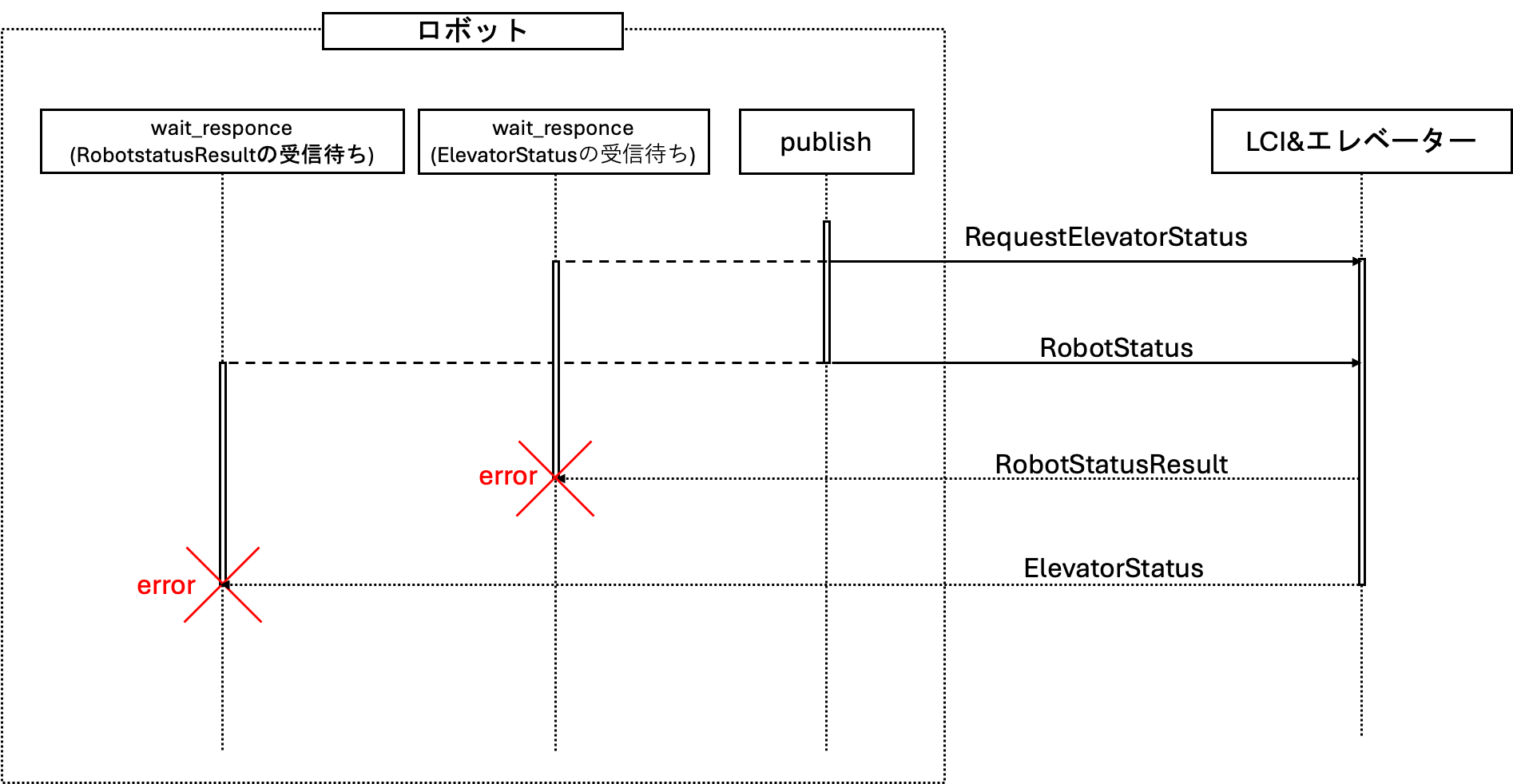
エラーの原因
前回のエレベーター状態取得において、メッセージの送受信を別スレッドで5秒ごとに実施しています。
この実装により発生した上記のログから、以下の2つがエラーの原因だと考えられます。
- wait_response関数が同時に実行され、受信したいメッセージと違うメッセージを受信する場合がある
- ほぼ同時に2つのメッセージをpublishすると、publishしたメッセージの順に対応したメッセージを受信できない場合がある
コードの改良
前述したエラーの発生を防ぐには、他のメッセージのpublish及びwait_response関数が同時に実行されることを防ぐことが重要です。
今回は、threadingライブラリのthreading.Lock()を使用し、排他ロックを行い対策します。
threading.Lock は、Python の標準ライブラリ threading モジュールに含まれる 排他ロックの仕組みです。
マルチスレッド環境で、同時アクセスによるデータ競合を防ぐために使われます。
追記した変数
self.mqtt_lockを追記し、self.mqtt_publish_lockをコメントアウトします。
def __init__(self):
       self.logger = logging.getLogger('lci_client')
       self.mqtt_client = None
       self.robot_id = None
       self.timestamp = None
       self.elevator_id = None
       self.registered = False
       self.timeout_sec = None
       self.floor_list = []

       #追記 registration
       self.dry_run_registered = False

       #追記 request elevator status
       self.floor_value = None
       self.door_value = None
       self.stop_event = threading.Event()

       #追記 request elevator status 2
       self.mqtt_lock = threading.Lock()

       self.response_queue = queue.Queue()
       self.message_queue = queue.Queue()
       #self.mqtt_publish_lock = threading.Lock()
_publish
メッセージのパブリッシュを行う関数です。
self.mqtt_publish_lockによる排他ロックをコメントアウトします。
def _publish(self, topic: str, payload: str):
       #self.mqtt_publish_lock.acquire()
       self.mqtt_client.publish(topic, payload, qos=1)
       #self.mqtt_publish_lock.release()
_publish_and_wait_response
ここでは、self.mqtt_lockによって以下のシーケンスに対して排他ロックを行い、他のコマンドによるmqtt通信と重複しないようにします。
-
self._publishによるメッセージの送信 -
self.wait_responseによるメッセージの受信
def _publish_and_wait_response(self, topic: str, payload: str, orig_api: str, requested_timestamp, timeout_sec: float):
       with self.mqtt_lock:
           self._publish(topic, payload)
           res = self.wait_response(orig_api, requested_timestamp, timeout_sec)

       return res
各コマンドを実行する関数(例 def registration)
_publish_and_wait_responseを使用して、メッセージの送受信をするように各コマンドを実行する関数の一部を変更します。
例として、 def registration関数の変更例を下記に示します。
 def registration(self, dry_run: bool = False):

       #dry runが成功していたか判別
       if not self.is_dry_run_registred() and dry_run == False:
          return

       requested_time = int(time.time() * 1000)/1000
       api = 'Registration'

       if not dry_run:
           payload = json.dumps({
               'robot_id': self.robot_id,
               'timestamp': requested_time})
       else:
           payload = json.dumps({
               'robot_id': self.robot_id,
               'timestamp': requested_time,
               'dry_run': True})

       if str(self.elevator_id) == '0':
           topic = f'{self.topic_prefix}/{api}/{self.robot_id}'
       else:
           topic = f'{self.topic_prefix}/{self.elevator_id}/{api}/{self.robot_id}'

	"""
       #下記の2行をコメントアウトします。
       self._publish(topic, payload)
       res = self.wait_response(api, requested_time, self.timeout_sec)
	"""

	   #---追記---#
       res = self._publish_and_wait_response(topic, payload, api, requested_time, self.timeout_sec)
       #---------#

       return res
同様に、以下の関数についても変更を行います。
- def call_elevator
- def request_elevator_status
- def do_robot_status
- def do_release
これらの関数では、以下のように追記します。
res = self._publish_and_wait_response(topic, payload, api, requested_time,10)
10はタイムアウトまでの秒数になります。
動作確認
実装したコードを実行してみましょう。
コードを実行した際のログの一部が以下になります。
ログから、エレベーターの状態取得においてwait_response関数の返り値がNoneとならず、正常に行えていることが確認できます。
また、送信したメッセージ順に対応したメッセージを受信できていることも確認できます。
2025-10-08 16:24:18,704    DEBUG Sending PUBLISH (d0, q1, r0, m6), 'b'/lci/simulator/1/1/RequestElevatorStatus/_uClosc2'', ... (53 bytes)
2025-10-08 16:24:18,704    DEBUG Start Request Elevator Status
2025-10-08 16:24:18,913    DEBUG Received PUBACK (Mid: 6)
2025-10-08 16:24:19,013    DEBUG Received PUBLISH (d0, q1, r0, m1), '/lci/simulator/1/1/ElevatorStatus/_uClosc2', ...  (155 bytes)
2025-10-08 16:24:19,014    DEBUG Sending PUBACK (Mid: 1)
2025-10-08 16:24:19,028    ERROR floor : L  door : 0
2025-10-08 16:24:19,029    DEBUG orig_api: 'RequestElevatorStatus', result: '1', elevator_id: '1', floor: 'L', door: '0', direction: '3', timestamp: '1759908258.95', requested_robot_id: '_uClosc2', requested_timestamp: '1759908258.704'
2025-10-08 16:24:19,707    DEBUG Sending PUBLISH (d0, q1, r0, m7), 'b'/lci/simulator/1/1/RobotStatus/_uClosc2'', ... (68 bytes)
2025-10-08 16:24:19,729    DEBUG Received PUBACK (Mid: 7)
2025-10-08 16:24:19,815    DEBUG Received PUBLISH (d0, q1, r0, m1), '/lci/simulator/1/1/RobotStatusResult/_uClosc2', ...  (118 bytes)
2025-10-08 16:24:19,816    DEBUG Sending PUBACK (Mid: 1)
2025-10-08 16:24:19,868    DEBUG orig_api: 'RobotStatus', result: '3', elevator_id: '1', timestamp: '1759908259.754', requested_robot_id: '_uClosc2', requested_timestamp: '1759908259.707544'
2025-10-08 16:24:20,874    DEBUG Sending PUBLISH (d0, q1, r0, m8),
補足 : busy loopを避けたい場合
pythonにおいて、busy loopを避けたい場合の実装例は以下になります。
busy loopは、何らかの処理をし続けるループのことを指します。
追記した変数
class LciClient:
    def __init__(self):
        self.logger = logging.getLogger('lci_client')
        self.mqtt_client = None
        self.robot_id = None
        self.timestamp = None
        self.elevator_id = None
        self.registered = False
        self.timeout_sec = None
        self.floor_list = []
        self.dry_run_registered = False
        self.floor_value = None
        self.door_value = None
        self.stop_event = threading.Event()
        self.mqtt_lock = threading.Lock()
        self.response_queue = queue.Queue()
        self.message_queue = queue.Queue()
        #---追記---#
        self.recv_event = {}
        #---------#
_publish_and_wait_response
recv_eventにkey:requested_timestamp、value: eventを追加します。
その後、経過時間がtimeout_secを超えるまで、eventがsetされるのを待ちます。
 def _publish_and_wait_response(self, topic: str, payload: str, orig_api: str, requested_timestamp, timeout_sec: float):
        event = threading.Event()
        self.recv_event.update({requested_timestamp: event })
        self._publish(topic, payload)
        res = event.wait(timeout_sec)
        if not res:
            # タイムアウト
            return
        else:
            res = self.wait_response(orig_api, requested_timestamp, timeout_sec)
            return res
on_message
on_messageはMQTTにてメッセージを受け取った際に実行する関数です。
メッセージを受け取った際に、ペイロードからrequested_timestampを取り出します。
その後、recv_eventからresponse_eventを取り出します。
(_publish_and_wait_responseでrecv_eventに追加したevent)
response_eventが空でない場合に、setします。
これにより、_publish_and_wait_responseでメッセージのペイロード取得を行います。
def on_message(client, userdata, msg):
    try:
        payload_kv = json.loads(msg.payload)
    except json.JSONDecodeError as e:
        userdata.logger.debug(e)
        return
    userdata.msg_callback(msg.topic, payload_kv)

    #---追記---#
    requested_timestamp = payload_kv.get('requested_timestamp', 0)
    response_event = userdata.recv_event.get(requested_timestamp)
    if response_event is not None:
        response_event.set()
    #---------#
その他
- 本記事は、LCIプロトコル仕様書(オンライン)のv2025-10-04を参考に作成・加筆しています。
- LCI関連の開発に必要な情報が記載されている開発者用ポータルは以下からアクセスできます。
- 各種資料は以下から閲覧・ダウンロードできます。
- 開発用アカウントの発行は、以下からお問い合わせください。
連載記事リスト
- (1)はじめに・自己紹介・システム概要
- (2)開発用アカウント発行・サンプルコード
- (3)MQTTのブローカー接続・MQTTについて
- (4)エレベーター連携の全体シーケンス
- (5)エレベーター利用登録(Registration)
- (6)エレベーター呼出階・行き先階指定(CallElevator)
- (7)エレベーターの状態取得(RequestElevatorStatus)
- (8)エレベーターの状態取得2(RequestElevatorStatus)
- (9)乗り込み・乗り込み完了(RobotStatus)
他の記事もチェックしてみてください!
次回の記事では、引き続き通信プロトコルの「エレベーターの状態取得」についてサンプルコードを改良する予定です!
ご興味があれば「いいね」やフォローをいただけると励みになります!