
TensorFlow GPU設定
Q&A
Closed
TensorFlowでGPUを使う設定にしたい
状況
最近PCを新しくしました。
以前のものはGPUがなかったのでこのPCではGPUを使えるTensorFlowをインストールしたいと思いました。
Anacondaで仮想環境を作成し、公式のドキュメントなんかを読みながらとりあえず環境構築をしました。
とりあえず簡単なプログラムを走らせて見たのですが、思ったより時間がかかってしまいます。
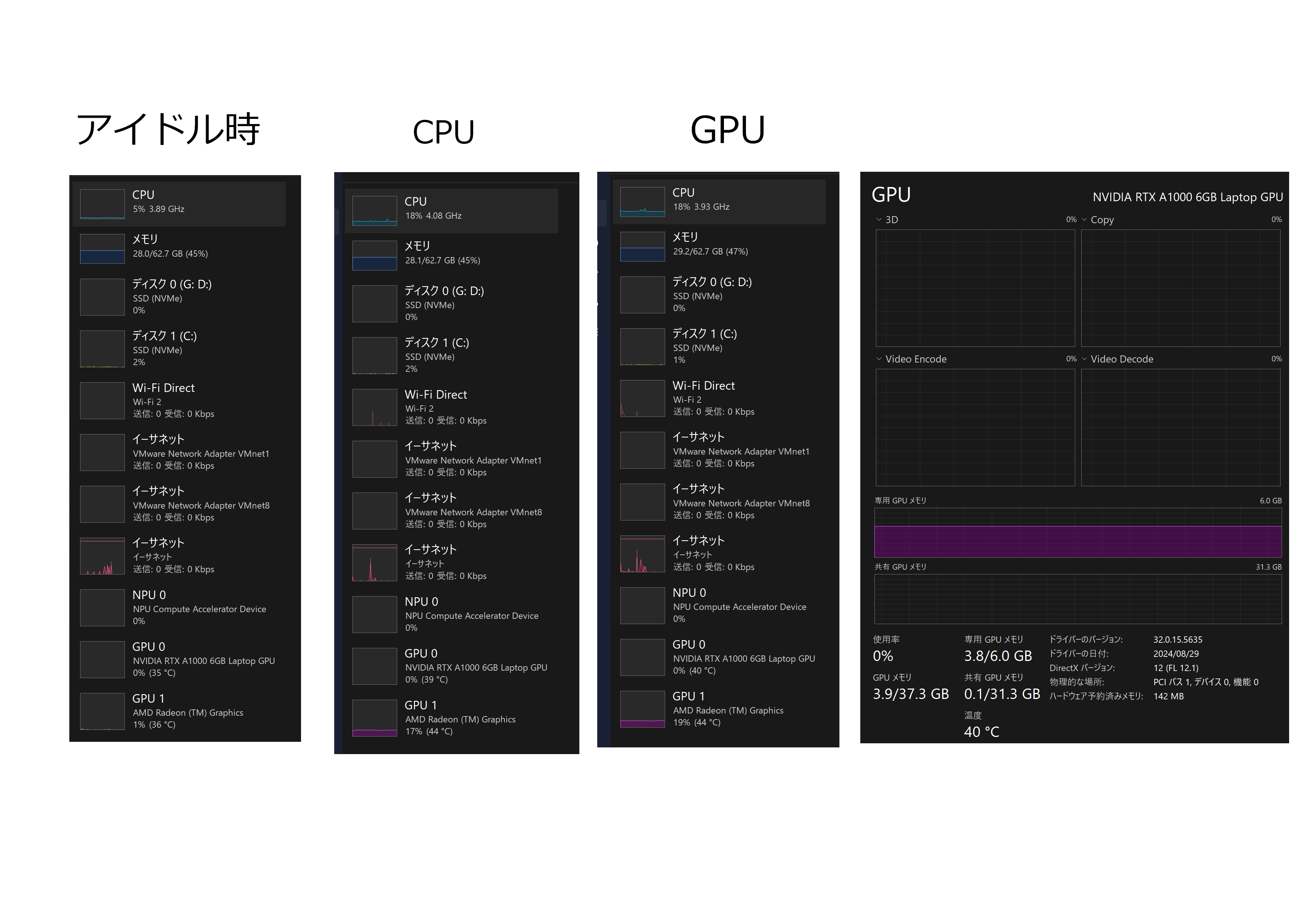
おかしいなと思ってタスクマネージャーを確認すると、NVIDIA RTXではなくRadeonの方に負荷がかかっており、NVIDIA RTXは一切負荷がかかっていませんでした。
フィッティングにかかった時間を計測したら、GPUでやっているときよりもCPUでやっているときのほうが早かったです。
多分Radeonの方で実行されているのではないかと予想します。
どうすればNVIDIA RTXを使う設定にできるのか教えてほしいです。
試したこと
TensorFlowのドキュメントを読みながら環境構築
Pythonのバージョンを3.9から3.10に変更
なお互換性の問題か何かで動かなかったためNumpyをバージョン2未満へダウングレード
AnacondaでCUDA ToolKitとcuDNNのインストール
実行時のメッセージ
CPUのみ
(py310) D:\Desktop>python xor.py
2025-01-30 23:00:04.966600: W tensorflow/stream_executor/platform/default/dso_loader.cc:64] Could not load dynamic library 'cudart64_110.dll'; dlerror: cudart64_110.dll not found
2025-01-30 23:00:04.966771: I tensorflow/stream_executor/cuda/cudart_stub.cc:29] Ignore above cudart dlerror if you do not have a GPU set up on your machine.
2025-01-30 23:00:07.111360: W tensorflow/stream_executor/platform/default/dso_loader.cc:64] Could not load dynamic library 'cudart64_110.dll'; dlerror: cudart64_110.dll not found
2025-01-30 23:00:07.112226: W tensorflow/stream_executor/platform/default/dso_loader.cc:64] Could not load dynamic library 'cublas64_11.dll'; dlerror: cublas64_11.dll not found
2025-01-30 23:00:07.114252: W tensorflow/stream_executor/platform/default/dso_loader.cc:64] Could not load dynamic library 'cublasLt64_11.dll'; dlerror: cublasLt64_11.dll not found
2025-01-30 23:00:07.114990: W tensorflow/stream_executor/platform/default/dso_loader.cc:64] Could not load dynamic library 'cufft64_10.dll'; dlerror: cufft64_10.dll not found
2025-01-30 23:00:07.115564: W tensorflow/stream_executor/platform/default/dso_loader.cc:64] Could not load dynamic library 'curand64_10.dll'; dlerror: curand64_10.dll not found
2025-01-30 23:00:07.116082: W tensorflow/stream_executor/platform/default/dso_loader.cc:64] Could not load dynamic library 'cusolver64_11.dll'; dlerror: cusolver64_11.dll not found
2025-01-30 23:00:07.116844: W tensorflow/stream_executor/platform/default/dso_loader.cc:64] Could not load dynamic library 'cusparse64_11.dll'; dlerror: cusparse64_11.dll not found
2025-01-30 23:00:07.117499: W tensorflow/stream_executor/platform/default/dso_loader.cc:64] Could not load dynamic library 'cudnn64_8.dll'; dlerror: cudnn64_8.dll not found
2025-01-30 23:00:07.117583: W tensorflow/core/common_runtime/gpu/gpu_device.cc:1934] Cannot dlopen some GPU libraries. Please make sure the missing libraries mentioned above are installed properly if you would like to use GPU. Follow the guide at https://www.tensorflow.org/install/gpu for how to download and setup the required libraries for your platform.
Skipping registering GPU devices...
2025-01-30 23:00:07.118091: I tensorflow/core/platform/cpu_feature_guard.cc:193] This TensorFlow binary is optimized with oneAPI Deep Neural Network Library (oneDNN) to use the following CPU instructions in performance-critical operations:  AVX AVX2
To enable them in other operations, rebuild TensorFlow with the appropriate compiler flags.
GPUを使うライブラリ
(tf) D:\Desktop>python xor.py
2025-01-30 23:07:11.572663: I tensorflow/core/platform/cpu_feature_guard.cc:193] This TensorFlow binary is optimized with oneAPI Deep Neural Network Library (oneDNN) to use the following CPU instructions in performance-critical operations:  AVX AVX2
To enable them in other operations, rebuild TensorFlow with the appropriate compiler flags.
2025-01-30 23:07:12.036744: I tensorflow/core/common_runtime/gpu/gpu_device.cc:1616] Created device /job:localhost/replica:0/task:0/device:GPU:0 with 3506 MB memory:  -> device: 0, name: NVIDIA RTX A1000 6GB Laptop GPU, pci bus id: 0000:01:00.0, compute capability: 8.6
Epoch 1/50000
2025-01-30 23:07:13.048877: I tensorflow/stream_executor/cuda/cuda_blas.cc:1614] TensorFloat-32 will be used for the matrix multiplication. This will only be logged once.
実行時間の比較
| 環境 | 時間 |
|---|---|
| CPU | 80.6716秒 |
| GPU | 243.4091秒 |
環境
| ノートPC | ThinkPad P16v gen1 AMD |
| CPU | AMD Ryzen 7 PRO 7840HS w/ Radeon 780M Graphics |
| GPU 0 | NVIDIA RTX A1000 6GB Laptop GPU |
| ドライバーバージョン | 556.35 |
| GPU 1 | AMD Radeon Graphics |
| ドライバーバージョン | 24.10.30.07-241112a-409548C-Lenovo |
| RAM | 64GB |
| OS | Windows 11 Home Canary Build 27774.1000 |
| Anaconda | 25.1.0 |
| Python (仮想環境) | Python 3.10 |
| TensorFlow | 2.10.1 |
| CUDA ToolKit | 11.2.2 |
| cuDNN | 8.1.0.77 |
写真は左から、待機時、TensorFlow + CPU、TensorFlow + GPUのときの様子です。
検証に使ったコード
xor.py
from keras.models import Sequential
from keras.layers import Activation, Dense
import numpy as np
import time  # timeモジュールをインポート

def main():
    model = Sequential()
    model.add(Dense(3, input_dim=2))
    model.add(Activation('sigmoid'))
    model.add(Dense(1))
    model.add(Activation('sigmoid'))

    model.compile(
        optimizer='adam',
        loss='mse',
        metrics=['accuracy'])

    # 入力データとラベル
    x = np.array([[0, 0], [0, 1], [1, 0], [1, 1]])
    y = np.array([[0], [1], [1], [0]])

    # フィッティング開始前に時間を記録
    start_time = time.time()

    # モデルの学習
    model.fit(x, y, epochs=50000)

    # フィッティング終了後に時間を記録
    end_time = time.time()

    # フィッティング時間を計算
    training_time = end_time - start_time

    # 結果の予測
    result = model.predict(x)
    print(result)

    # フィッティングにかかった時間を表示
    print(f"Training Time: {training_time:.4f} seconds")


if __name__ == '__main__':
    main()
0 likes

