


こんにちは、アイスタイルの白田(chilitreat)です。
自分が所属しているクラウド推進グループでは、全システムのクラウド移行を推進しつつ、セキュリティ系の対応も進めています。
その一環で AWS 環境に対して、最小権限の原則に基づくユーザーの権限管理が必要となり、Temporary elevated access management (TEAM)というツールを導入し数ヶ月だったので、導入に至るまでに検討したことなどを紹介します。
Temporary elevated access management (TEAM)
まず TEAM とは、時間制限付きの昇格アクセスを大規模に管理、監視が可能な OSS です。
https://github.com/aws-samples/iam-identity-center-team
TEAM 上で昇格申請をすることで、IAM Identity Center のユーザーに、一時的な権限付与が可能になります。
TEAM を導入することで、普段は本番環境のアカウントに対して操作可能な許可セットを割り当てず、使いたい時だけ半自動的に権限を渡すことができるようになりました。
詳細な機能は公式ドキュメントにわかりやすくまとまっているので覗いてみてください。
https://aws-samples.github.io/iam-identity-center-team/
背景: これまでの IAM Identity Center 運用の課題
アイスタイルでは、IAM Identity Center を使って、AWS アカウントのユーザー、権限管理を行っています。
これまで用意していた許可セットは、基本的にはAWS Control Tower で自動的に作成される許可セットをベースに少しカスタマイズし 3 種類+ α を用意していました。
| 許可セット | 用途 | 付与する対象 |
|---|---|---|
| PowerUserAccess | 更新・開発作業用 | 開発者・運用者 |
| ReadonlyAccess | 参照用 | ほぼ全員 |
| AdministratorAccess | 管理作業用 | インフラなど特定メンバーのみ |
+ α: Organization の Cost Explorerer の確認用などの限定的な用途の許可セット
また AWS アカウントは、事業領域ごと(メディア、EC、実店舗 etc...)、 環境ごと(開発、ステージング、本番)で分離するようにしてます。
ざっくりと、図で表すとこんな感じです。
自身が担当する事業に関するアカウントのみ閲覧・操作可能(別事業のアカウントにはアクセスできない)

ロールによって触れる環境を制御(業務委託メンバーは本番アカウントにアクセスできない)
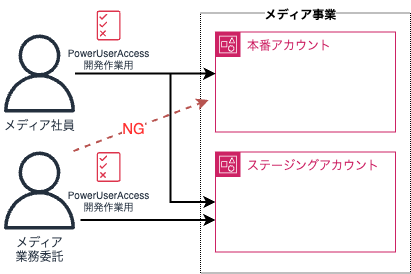
運用していく中で、業務委託メンバーでも本番作業を担当することがあるので本番権限を渡したい、部門によって複数の事業に横断的に関わるため広く権限譲渡が必要など、徐々に多くの人が本番環境に対する操作権限を持っている状態となっていました。
アイスタイルの次世代セキュリティ要件で、「不要なアカウントや権限を排除し、最小権限の原則を徹底する」という要件があります。この要件を満たすために、以下のような方針を立てました。
- 定型作業と非定型作業を分離する
- 定型作業は最小権限の原則に基づく許可セットを作成し定常的に権限を付与する
- 非定型作業は一時的な権限として付与する
検討したこと
要件を基に業務を整理すると、最終的に以下のような業務フローになりました。
権限付与の流れ

権限剥奪の流れ

課題
先述の方針で権限を付与業務を実現する場合、大きく 2 つの課題ありました。
- 障害対応など緊急時に権限付与待ちが発生し、障害の収束が長引くリスク
- 権限付与・剥奪の運用コストが高い
それぞれ説明します。
1. 障害対応で権限付与待ちが発生し、障害の収束が長引くリスク
読んで字の如くですが、非定型作業用の強い権限を一時権限にするということは、障害対応など突発的に発生する本番環境上のトラブルシューティングの際に必ず権限付与が必要になります。
IAM Identity Center の権限管理は、自分の所属するクラウド推進グループが一元管理しています。
そのため、土日やクラウド推進グループのメンバーが捕まらないと権限付与ができず、障害の収束が長引いてしまうリスクがありました。
一部メンバー(マネージャーや各チームのリーダー)に IAM Identity Center の操作権限と Runbook を渡して権限付与をしてもらうことも検討しましたが、普段 IAM Identity Center 操作をしないメンバーに渡してしまうことで全体の統制が取れなくなるリスクもあったため、こちらの実現方法は諦めました。
2. 権限付与・剥奪の運用コストが高い
障害対応やリリース作業など非定型業務は AWS Organization 単位で見ると、1 週間で数十回、多い時は 1 日に数回発生することもあります。
権限の付与・剥奪は AWS マネジメントコンソールから行っています。
1 回あたりの作業は数分程度ですが、一時権限付与中のユーザーと権限の管理、障害対応の対応状況(対応中・完了済み)をクラウド推進グループで把握する必要があるため非現実的な運用方針でした。
先述した通り、IAM Identity Center の管理はクラウド推進グループに集約しているため、一時権限の管理コストの面も無視できない課題でした。
TEAM 発見〜導入まで
検討をする中で、以下のブログを発見しました。
今回実現したい申請〜権限付与、権限剥奪後の点検まで一通りの流れを実現できることがわかり、TEAM の導入を検討しました。
導入方法、設定方法などドキュメントが充実していて見つけてから動かしてみるまでには時間がかからず、数時間で動作確認までできました。
また TEAM 自体はサーバレスアーキテクチャで、使用しない時は料金がほぼかからないことも魅力的でした。
検証環境で動かしてみて、実際の運用フローに近い形で動作することを確認できたので、TEAM の導入を決定しました。
早い段階からデモ動画の共有や検証環境を使ったお試し会を行ったこともあり、導入に対するステークホルダーの理解も得やすかったです。
工夫
基本的には TEAM の機能をそのまま使う形で運用していますが、権限剥奪後の点検作業は独自の運用をしているので紹介します。
権限昇格中に不審な操作や申請外の作業をしていないか、権限剥奪後に事後点検を行なっています。
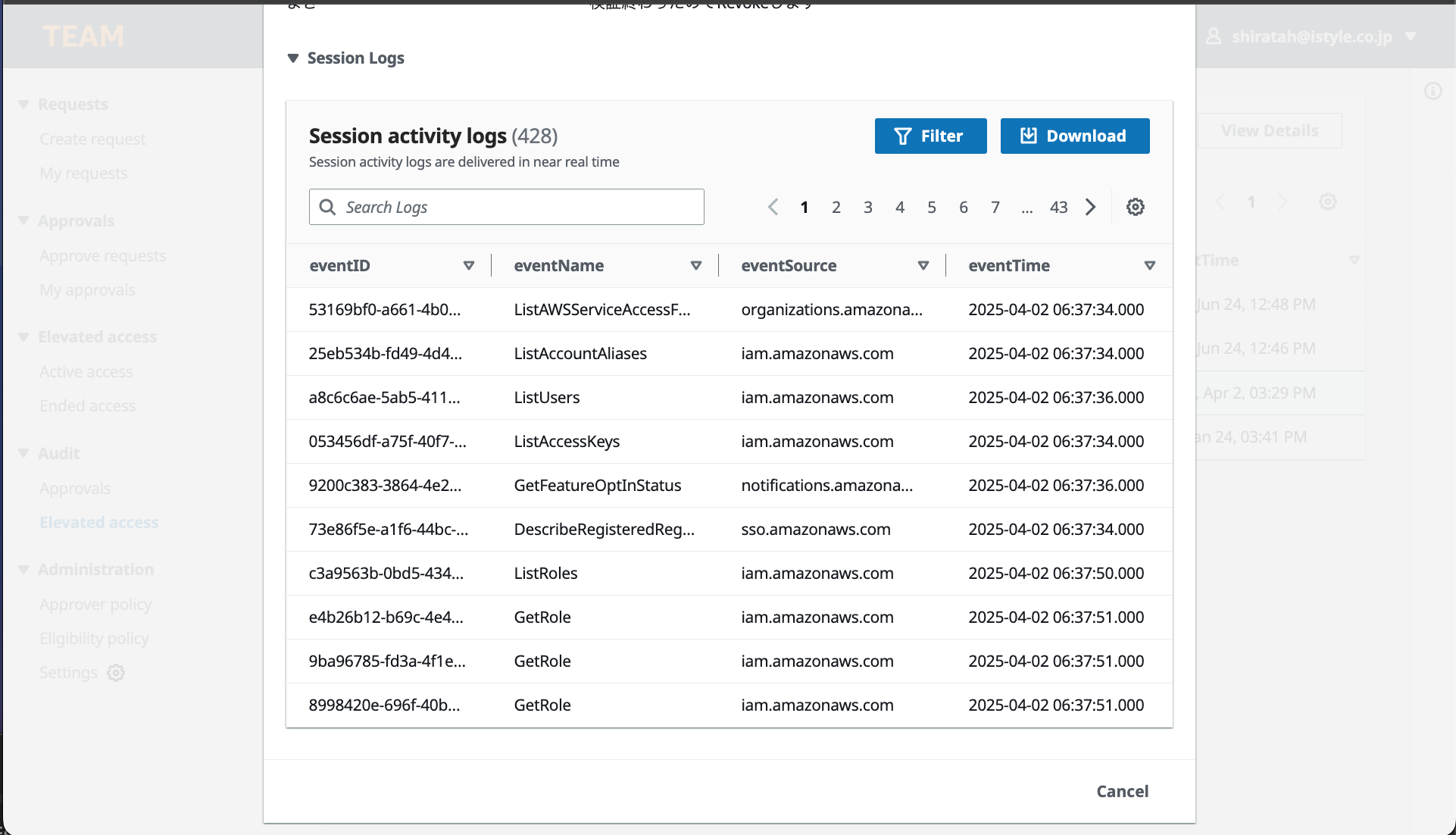
TEAM では一時昇格した権限での操作ログを確認できます。こんな感じです。

監査人ガイド | TEAMの動画(0:40)より拝借
CloudTrail の操作ログが CloudTrail Lake に集約されるのですが、少しマネジメントコンソールで操作しただけでそこそこの量のログが出力されてしまうため、点検業務で確認するには運用負荷が大きく、確認漏れが発生する懸念がありました。
そのため TEAM 自体のソースコードに修正を加え、点検を半自動化することにしました。
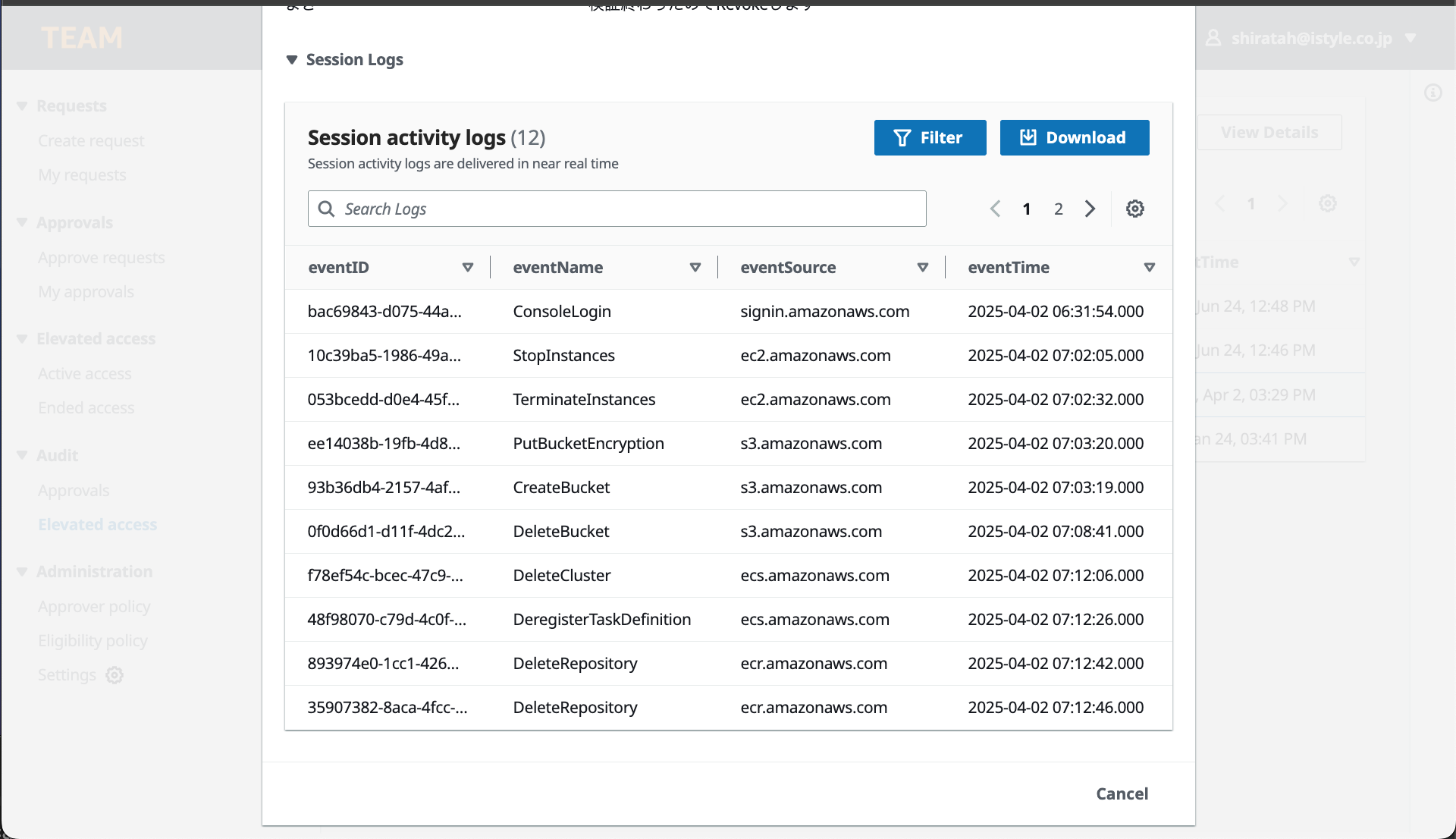
TEAM のフロントエンドは React で書かれているので、操作ログのダウンロードボタンの横に Filter ボタンを追加し、ワンクリックで点検用のフィルターが適用された状態で要注意操作があったかチェックし、結果をモーダルで表示するようにしました。

ボタンクリック後はGet*, Describe*, List* などの読み取り専用の API は点検対象外にし、書き込み系の API のみテーブルに表示をするようにしています。
フィルタ前は 428 件の操作ログがあるが、
フィルタ後は 12 件に減っている
オリジナルの TEAM(https://github.com/aws-samples/iam-identity-center-team) の変更を取り込みやすくするため、フィルタする条件に使用する CloudTrail の API コールはソースコード内(具体的には、src/components/Sessions/Logs.js)にハードコードする愚直な実装をしています
フィルタリングの実装内容
// © 2023 Amazon Web Services, Inc. or its affiliates. All Rights Reserved.
// This AWS Content is provided subject to the terms of the AWS Customer Agreement available at
// http://aws.amazon.com/agreement or other written agreement between Customer and either
// Amazon Web Services, Inc. or Amazon Web Services EMEA SARL or both.
import React, { useState, useEffect, useRef } from "react";
import {
  Box,
  Button,
  Header,
  Pagination,
  Table,
  TextFilter,
  CollectionPreferences,
  SpaceBetween,
  Modal
} from "@awsui/components-react";
import { useCollection } from "@awsui/collection-hooks";
import { getSessionLogs, fetchLogs, getSession, deleteSessionLogs } from "../Shared/RequestService";
import { API, graphqlOperation } from "aws-amplify";
import {
  onUpdateSessions,
} from "../../graphql/subscriptions";
import "../../index.css";
import { CSVLink } from "react-csv";

const COLUMN_DEFINITIONS = [
  {
    id: "eventID",
    sortingField: "eventID",
    header: "eventID",
    cell: (item) => item.eventID,
    minWidth: 180,
  },
  {
    id: "eventName",
    sortingField: "eventName",
    header: "eventName",
    cell: (item) => item.eventName,
    minWidth: 200,
  },
  {
    id: "eventSource",
    sortingField: "eventSource",
    header: "eventSource",
    cell: (item) => item.eventSource,
    minWidth: 200,
  },
  {
    id: "eventTime",
    sortingField: "eventTime",
    header: "eventTime",
    cell: (item) => item.eventTime,
    minWidth: 180,
  },
];

const MyCollectionPreferences = ({ preferences, setPreferences }) => {
  return (
    <CollectionPreferences
      title="Preferences"
      confirmLabel="Confirm"
      cancelLabel="Cancel"
      preferences={preferences}
      onConfirm={({ detail }) => setPreferences(detail)}
      pageSizePreference={{
        title: "Page size",
        options: [
          { value: 10, label: "10 Logs" },
          { value: 30, label: "30 Logs" },
          { value: 50, label: "50 Logs" },
        ],
      }}
      wrapLinesPreference={{
        label: "Wrap lines",
        description: "Check to see all the text and wrap the lines",
      }}
      visibleContentPreference={{
        title: "Select visible columns",
        options: [
          {
            label: "Log properties",
            options: [
              { id: "eventID", label: "eventID" },
              { id: "eventName", label: "eventName" },
              { id: "eventSource", label: "eventSource" },
              { id: "eventTime", label: "eventTime" },
            ],
          },
        ],
      }}
    />
  );
};

function EmptyState({ title, subtitle, action }) {
  return (
    <Box textAlign="center">
      <Box variant="strong">{title}</Box>
      <Box variant="p" padding={{ bottom: "s" }}>
        {subtitle}
      </Box>
      {action}
    </Box>
  );
}

function Logs(props) {
  const [allItems, setAllItems] = useState([]);
  const csvLink = useRef();
  const [preferences, setPreferences] = useState({
    pageSize: 10,
    visibleContent: ["eventID", "eventName", "eventSource", "eventTime"],
  });

  const {
    items,
    actions,
    filteredItemsCount,
    collectionProps,
    filterProps,
    paginationProps,
  } = useCollection(allItems, {
    filtering: {
      empty: <EmptyState title="No logs" subtitle="No logs to display" />,
      noMatch: (
        <EmptyState
          title="No matches"
          subtitle="Your search didn't return any records."
          action={
            <Button onClick={() => actions.setFiltering("")}>
              Clear filter
            </Button>
          }
        />
      ),
    },
    pagination: { pageSize: preferences.pageSize },
    sorting: {},
    selection: {},
  });

  const { selectedItems } = collectionProps;
  const [tableLoading, setTableLoading] = useState(true);
  const [refreshLoading, setRefreshLoading] = useState(false);
  const [modalVisible, setModalVisible] = useState(false);
  const [modalMessage, setModalMessage] = useState("");

  useEffect(() => {
    views();
    updateEvent()
    setRefreshLoading(false);
    // eslint-disable-next-line react-hooks/exhaustive-deps
  }, []);

  function handleRefresh() {
    setRefreshLoading(true);
    setTableLoading(true);
    views();
  }

  async function addMeta(items) {
    // eslint-disable-next-line array-callback-return
    items.map((item) => {
      item.username = props.item.email;
      item.accountName = props.item.accountName;
      item.accountId = props.item.accountId;
    });
    return items;
  }

  function AddSessionLogs(expiry,endTime,username) {
    const data = {
      id: props.item.id,
      startTime: props.item.startTime,
      endTime: endTime,
      username: username,
      accountId: props.item.accountId,
      role: props.item.role,
      approver_ids: props.item.approver_ids,
      expireAt: expiry
    };
    getSessionLogs(data)
  }

  function getQueryId(){
    const username = props.item.username
    if (props.item.status === "in progress") {
        const expiry = Math.floor(Date.now() / 1000);
        const endTime = new Date().toISOString();
        const args = {
          id: props.item.id,
        };
        deleteSessionLogs(args).then(() => {
          AddSessionLogs(expiry,endTime,username)
        })
    } else {
      getSession(props.item.id).then((data) => {
        if (data !== null) {
          getLogs(data.queryId);
        } else {
          const expiry = Math.floor(Date.now() / 1000) + 432000
          // Add an extra hour to end time to compensate PS session duration
          const endTime = new Date(Date.parse(props.item.endTime) + 60 * 60 * 1000).toISOString()
          AddSessionLogs(expiry,endTime,username)
        }
      })
    }
  }

  function getLogs(queryId) {
    let args = {
      queryId: queryId,
    };
    fetchLogs(args).then((items) => {
      if (items) {
        addMeta(items).then((items) => {
          setAllItems(items);
        });
      }
      setTableLoading(false);
      setRefreshLoading(false)
    });
  }


  function views() {
    getQueryId()
  }

  function updateEvent() {
    API.graphql(
      graphqlOperation(onUpdateSessions, {
        filter: {
          id: { eq: props.item.id },
        },
      })
    ).subscribe({
      next: ({ value }) => {
        getLogs(value.data.onUpdateSessions.queryId);
      },
      error: (error) => console.warn(error),
    });
  }

  function handleDownload() {
    csvLink.current.link.click();
  }

  function handleFilter() {
    // 環境変数やDynamodbのテーブル名を使いたいがあまり独自の実装をしたくないので、ハードコードでお茶を濁す
    const dangerousActions = [
      'CreateUser', 'DeleteUser', 'AttachUserPolicy', 'DetachUserPolicy', 'PutUserPolicy',
      'CreateRole', 'DeleteRole', 'AttachRolePolicy', 'DetachRolePolicy', 'PutRolePolicy',
      'CreateAccessKey', 'DeleteAccessKey', 'UpdateAccessKey', 'UpdateUser', 'UpdateLoginProfile', 'ChangePassword',
      'RunInstances', 'TerminateInstances', 'StopInstances',
      'AuthorizeSecurityGroupIngress', 'AuthorizeSecurityGroupEgress', 'RevokeSecurityGroupIngress', 'RevokeSecurityGroupEgress',
      'PutBucketPolicy', 'DeleteBucketPolicy', 'PutBucketAcl', 'DeleteBucket', 'CreateBucket',
      'CreateDBInstance', 'DeleteDBInstance', 'ModifyDBInstance', 'CreateDBSnapshot', 'DeleteDBSnapshot'
    ];
    const filteredItems = allItems.filter(
      (item) =>
        !item.eventName.startsWith("Describe") &&
        !item.eventName.startsWith("List") &&
        !item.eventName.startsWith("Get")
    );

    const detectedDangerousActions = allItems
      .filter((item) => dangerousActions.includes(item.eventName))
      .map((item) => item.eventName);

    if (detectedDangerousActions.length > 0) {
      setModalMessage(`要注意操作がありました。意図した操作か確認してください: ${detectedDangerousActions.join(", ")}`);
    } else {
      setModalMessage("要注意操作はありませんでした。");
    }

    setModalVisible(true);
    setAllItems(filteredItems);
  }

  return (
    <div className="container">
      {/* モーダルウィンドウ */}
      {modalVisible && (
        <Modal
          onDismiss={() => setModalVisible(false)}
          visible={modalVisible}
          header="要注意操作のチェック結果"
        >
          {modalMessage}
        </Modal>
      )}
      <Table
        {...collectionProps}
        resizableColumns="true"
        loading={tableLoading}
        loadingText="Fetching session logs"
        header={
          <Header
            counter={
              selectedItems.length
                ? `(${selectedItems.length}/${allItems.length})`
                : `(${allItems.length})`
            }
            description="Session activity logs are delivered in near real time"
            actions={
              <SpaceBetween size="s" direction="horizontal">
              {props.item.status === "in progress" &&
                <Button
                  iconName="refresh"
                  onClick={handleRefresh}
                  loading={refreshLoading}
                />
                }

                <div>
                  <Button
                    disabled={allItems.length === 0}
                    variant="primary"
                    onClick={handleFilter}
                    iconName="filter"
                    iconAlign="left"
                  >
                    Filter
                  </Button>
                </div>
                <div>
                  <Button
                    disabled={allItems.length === 0}
                    variant="primary"
                    onClick={handleDownload}
                    iconName="download"
                    iconAlign="left"
                  >
                    Download
                  </Button>
                  <CSVLink
                    data={allItems}
                    filename="session_logs.csv"
                    className="hidden"
                    ref={csvLink}
                    target="_blank"
                  />
                </div>
              </SpaceBetween>
            }
          >
            Session activity logs
          </Header>
        }
        filter={
          <div className="input-container">
            <TextFilter
              {...filterProps}
              filteringPlaceholder="Search Logs"
              countText={filteredItemsCount}
              className="input-filter"
            />
          </div>
        }
        columnDefinitions={COLUMN_DEFINITIONS}
        visibleColumns={preferences.visibleContent}
        pagination={<Pagination {...paginationProps} />}
        preferences={
          <MyCollectionPreferences
            preferences={preferences}
            setPreferences={setPreferences}
          />
        }
        items={items}
      />
    </div>
  );
}

export default Logs;
現状まだ点検する人が TEAM を開いてワンクリック後に目視確認が必要なので半自動化に留まっていますが、最終的には権限剥奪後に自動的に点検して、結果を作業者と承認者に Slack で送信するなど、より本格的な自動化までできるといいなと考えてます。
終わりに
TEAM を導入してから数ヶ月が経ちましたが、大きなトラブルもなく一時権限付与の運用が順調に進んでいます。
便利なOSSにただフリーライドするだけでなく、社内での導入事例を共有することで、少しでもコミュニティに貢献できればという思いもあり、今回記事を書かせていただきました。
今後は、現在の本番環境での一時権限付与だけでなく、TEAM を Sandbox 環境の貸し出し管理などにも活用できるのではないかと考えており、より幅広い用途での活用を検討していく予定です。
私たちクラウド推進グループでは、このような AWS に関連する様々な課題を解決しながら、アイスタイル全体のクラウド移行を推進しています。もしご興味があれば、過去に書いたこちらの記事もぜひご覧ください!