

こんにちは、Build を追いすぎて寝不足気味のアーキテクトのやまぱん!です。
補足コメントや質問、いいね、拡散、ぜひお願いします 🥺!
間違っていたら 優しく 教えてください!
今回は、Microsoft Build 2026 の keynote を起点に、X、Microsoft Learn、公式 blog、GitHub Changelog まで追いかけました。全部を網羅するより、私の中で「これは同じ線の上にあるな」と感じた発表に絞って書きます。
Microsoft Build は、Microsoft が毎年開く開発者向けイベントです。Azure、Windows、Microsoft 365、GitHub、AI / developer tools の新機能や今後の方向性がまとまって出ます。この記事でいう Build は、その 2026 年版の keynote と周辺発表を指しています。
2026/06/03 時点の整理です。
この記事では、Microsoft の公式 blog / Learn / GitHub / GitHub Changelog を中心に、必要なところだけ X 投稿や報道を補助線として使っています。Preview / Early Access / GA の差分が残っているものは、その揺れも含めて書いています。
Build 直後は rollout や docs 更新で表記が動きやすいので、実際に試す前や説明に使う前には、リンク先の一次情報も確認してください。
TL;DR
- Build 2026 では、Microsoft Scout、OpenClaw on Windows、Agent 365、Windows 365 for Agents、Foundry、GitHub まで、Agent 時代の部品が同じ線上に並びました
- 軸になっていたのは、Microsoft Scout / MXC / OpenClaw on Windows / Work IQ APIs / Agent 365 / Windows 365 for Agents が 1 本につながっていたことです
- Microsoft Scout は、公開 docs では Windows / macOS 向けの desktop AI application として説明されています。M365 Copilot の画面そのもの と捉えるとズレます。Microsoft 365 と GitHub Copilot の前提条件を持つ別アプリです
- Foundry と GitHub は、agent を作って回す層を一段前へ押し出しました。prototype で終わらせず、runtime、sandbox、memory、evaluation、SDK、CLI、backend / data まで揃えにきています
- 後半では Microsoft Discovery、MAI models、Frontier Tuning、Cobalt 200、Project Solara まで出てきました。agent を強くする model / tuning と、agent を置く compute / device を扱っています
この記事の前提
この記事は、Build 2026 を全部追えていない人向けの超入門ではありません。keynote や live blog で断片的に見えたものを、どの層の話だったのか でつなぎ直すためのメモです。
タイトルに入れている 俺的 Book of News も、そのつもりで付けています。Microsoft の公式な Book of News を置き換える記事ではありません。Microsoft Build Live と個別 blog / Learn / GitHub Changelog を、自分なりの順番で並べ直したメモです。
先に結論: Build 2026 を 4 層で読む
Build 2026 の keynote をそのまま時系列で追うと、私は途中で頭が飽和しました。そこで、いったん 4 層に分けました。
| 層 | 何をする層か | Build 2026 で目立ったもの |
|---|---|---|
| 1 | Agent を動かす | Microsoft Scout、OpenClaw on Windows、MXC、Windows 365 for Agents、Agent 365 |
| 2 | Agent に文脈を与える | Microsoft IQ、Work IQ、Fabric IQ、Foundry IQ、Web IQ |
| 3 | Agent を作って運用する | Foundry hosted agents、Toolboxes、Memory、Agent Optimizer / Rubric、GitHub Copilot app / CLI、Copilot SDK、Rayfin、HorizonDB、Fabric Data Warehouse |
| 4 | Agent を強くする / 置く場所を増やす | MAI models、Frontier Tuning、Microsoft Discovery、Cobalt 200、Surface RTX Spark Dev Box、DGX Station for Windows、Project Solara、Majorana 2 |
keynote では、Microsoft Scout や OpenClaw on Windows の実行環境、Microsoft IQ の文脈レイヤー、Foundry / GitHub の開発ツール、MAI models、Cobalt 200、Surface RTX Spark Dev Box まで同じ場に出てきました。
1. Microsoft Scout / OpenClaw on Windows / Windows 365 for Agents
最初に引っかかったのは、agent をローカル PC や Cloud PC で常時動かし、実際に作業させる前提がはっきり出ていたところでした。
Windows blog には Coreutils for Windows のような開発者体験の更新もあります。ここで主に見たいのは、agent runtime 側です。
Microsoft Scout が正式に出た
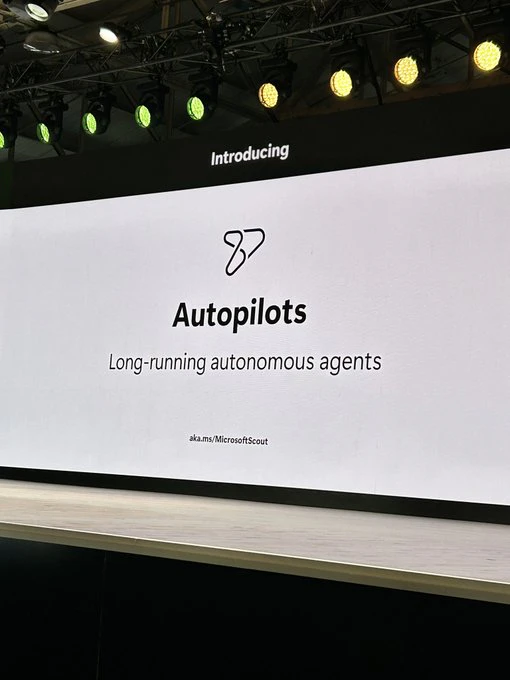
Autopilots の紹介スライド。Build 2026 では、まず「always-on」「long-running」「autonomous agents」というカテゴリ名をそのまま掲げていました。
2026 年 6 月 2 日付の Microsoft 365 blog の Scout 発表 では、Microsoft Scout を first Autopilot として正式に出しました。
Scout は Microsoft Scout overview と Admin access overview では、Windows / macOS で動く desktop app として説明されています。M365 Copilot の新しい画面 にそのまま載ったものではありません。Frontier preview では、Microsoft 365 側の有効化、Intune policy、管理者 attestation、GitHub Copilot Business / Enterprise license まで揃えて入る設計です。発表の重心は UI 追加よりも、enterprise 向け local agent をどう公開・管理するか にありました。
GitHub Copilot 側の前提も落とし穴です。Admin access overview では、Frontier access だけでも GitHub Copilot license だけでも足りない、という書き方になっています。Microsoft 365 側の Frontier 有効化と GitHub Copilot Business / Enterprise 側の前提を両方見ておく必要があります。
Microsoft Scout (Frontier) overview では、Scout が扱える範囲として次が確認できます。
- ファイルの読み書き
- shell command 実行
- Playwright による browser automation
- Microsoft 365 への接続
- heartbeat / automations による background 実行
- sub-agent delegation
公開 docs で目を引くのは、Microsoft Scout が desktop app と local resources まで reach を持っている 点です。この性格が、OpenClaw on Windows や MXC の話につながります。
名前も少しややこしいです。Admin Intune setup では、設定名は AllowScoutFrontierAccess なのに、UI ラベルには Allow Clawpilot Frontier access が残っています。pre-release の policy templates や screenshots には internal product name が残ると明記されています。Build Live の Scout 導線にも ProjectLobster の短縮 URL が残っていました。公開名は Scout、ClawPilot / Project Lobster は移行期の internal naming / alias と見るのが自然です。
Microsoft Scout / OpenClaw / ClawPilot の名前整理と、仕事エージェントとして触った手触りは、別記事でもう少し深く書いています。
「聞く AI」から「進める AI」へ: OpenClaw / ClawPilot / Microsoft Scout が見せる仕事エージェントの未来🦞
OpenClaw on Windows と MXC
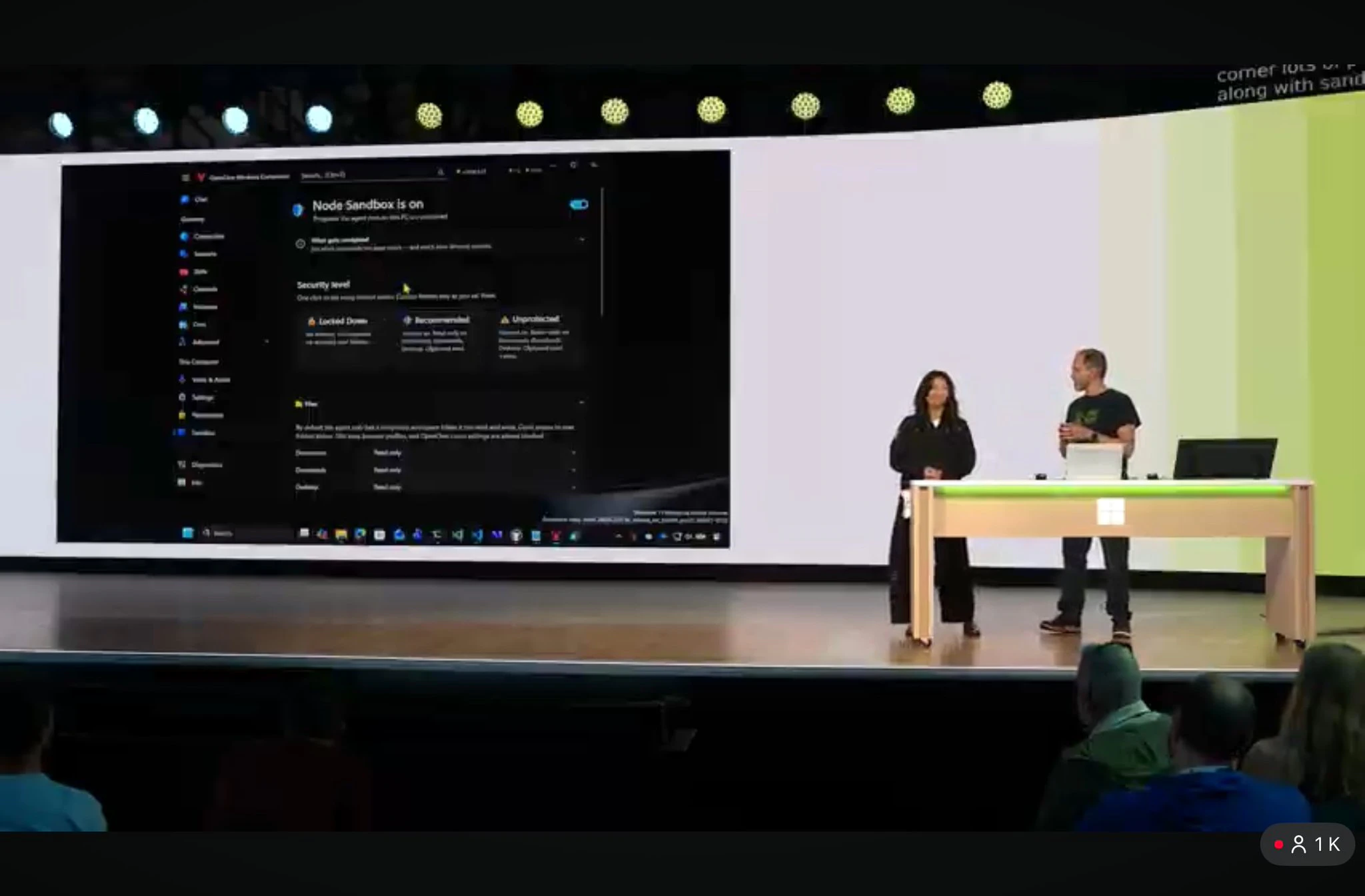
OpenClaw on Windows デモ。ここで見たかったのは、Node Sandbox、Security level、Permissions が product surface に出ていたことです。
Windows Developer Blog は、Build 2026 で Microsoft Execution Containers (MXC) を early preview として出し、その上で OpenClaw now runs natively on Windows leveraging MXC と明記しました。
OpenClaw 側の入口は、まず openclaw/openclaw です。OpenClaw 本体は、手元の device で動かす personal AI assistant で、gateway を control plane として使います。Windows で使う場合は、Windows companion suite の openclaw/openclaw-windows-node が実際の入口になります。
Windows 側の README では、OpenClaw Windows Hub として、system tray app、shared client library、CLI validator がまとめられています。Quick Start には「end-user installer は docs/SETUP.md を見る」とあり、ビルド不要の導線も用意されています。開発者としてビルドする場合の前提は、公開 README 上では次の通りです。
- Windows 10 20H2 以降、または Windows 11
- .NET 10.0 SDK
- Windows 10 SDK(WinUI build 用)
- WebView2 Runtime
OpenClaw 本体側は、README で Node 24 推奨、または Node 22.19 以降 と書かれています。セットアップは npm install -g openclaw@latest から入り、openclaw onboard --install-daemon で gateway、workspace、channels、skills の初期設定へ進む流れです。Windows では WSL2 経由が strongly recommended とされています。
OpenClaw on Windows の主役は、Windows PC を OpenClaw agent が扱える node にする ところです。Windows Hub の Node Mode を有効にすると、gateway に device pairing request が出て、openclaw devices approve <id> で承認します。その後、gateway 側の allowlist に system.run、canvas.present、screen.snapshot、camera.snap、tts.speak など、許可したい command を明示的に入れます。
読者が試すなら、順番はこのあたりです。
- openclaw/openclaw で gateway / assistant 本体をセットアップする
- openclaw/openclaw-windows-node から Windows Hub を入れる、または build する
- Windows Hub の Node Mode を有効にして gateway と pairing する
- gateway 側で command allowlist と exec approval policy を絞る
-
openclaw nodes invokeなどで Windows node に対して通知、Canvas、スクリーンショット、command 実行を試す
このデモで私は、OpenClaw を enterprise で動かすときに必要な containment / permission / policy を Windows 側が引き受け始めた ところに引っかかりました。Windows で native に動くことと、実行時の containment が同じ発表の中に入っています。
microsoft/mxc の README では、現時点では early preview であり、現在の profile を security boundary 扱いにしてはいけない、と明記しています。まだ完成品として閉じた印象ではありません。OS レベルの containment foundation を public に出し、そこへ OpenClaw などを乗せ始めた 段階だと読みました。
特に system.run や screen.record、camera / microphone / location 系は、gateway-side allowlist と node-local exec approval policy を分けて見る必要があります。Build のデモ画面に permissions や security level が出ていたのは、agent に Windows を触らせるための権限設計 が主題だからです。
Windows 365 for Agents は execution layer
Windows 365 for Agents in Agent 365 は、Agent 365 が reasoning / orchestration に集中し、Windows 365 for Agents が execution layer を担うと整理しています。
What’s new in Windows 365 for Agents では Week of June 1, 2026 に GA と出ています。一方で What is Windows 365 for Agents? や Pricing for Windows 365 for Agents には preview 表記も残っていて、public preview は United States のみとも書かれています。surface ごとに availability wording が揺れています。
Cloud PC を check-out / check-in しながら agent が UI を実行する。docs はその前提をはっきり書いています。API だけで完結しない作業を、ちゃんとした enterprise execution environment で回す ところまで入っています。
Agent 365 は agent の registry / governance / security を受け持つ
Agent 365 は、組織内に増えていく agent を observe / govern / secure するための control plane です。
Agent 365 overview では、2026 年 5 月 1 日時点で commercial segment では user-per-user の GA と書かれています。Build 当日に急に生えた新語、という感じではありません。control plane 側の公開情報は 5 月時点で既に出ていました。
Agent 365 は、Microsoft 365 admin center の Agent registry、Microsoft Entra、Microsoft Purview、Microsoft Defender 側の統合を横断して使う control plane です。Agent 365 自体は有効化に特定の製品前提を要求しない一方で、docs では少なくとも 1 人に qualifying Microsoft Agent 365 license を割り当てる必要があり、Entra P1 / P2 または Entra Suite、Purview DLP との併用が推奨されています。
Agent 365 overview では、次の 3 本柱で説明されています。
- Observe: agent registry と activity を横断して可視化する
- Govern: ライフサイクル、アクセス制御、レビューを一元管理する
- Secure: Entra、Purview、Defender と繋いで runtime protection をかける
Microsoft Scout、MXC、Windows 365 for Agents だけを追うと、「どこで動くか」の話が中心になります。Agent 365 は、その agent を企業としてどう見て、どう管理するか を受け持ちます。
MDE の local AI agent discovery は「Secure」を具体物にした
ここに Microsoft Defender for Endpoint の local AI agent discovery が入ってきます。Public Preview として出てきた Build 2026 の security 側で、私は少し身を乗り出しました。local AI agent を Defender の inventory に載せる、という見せ方だったからです。
The next frontier in endpoint security: Securing local AI agents with Microsoft Defender では、Microsoft Defender が local AI agents を first-class asset として扱い、専用 inventory、exposure map、Advanced Hunting、さらに一部 agent では runtime protection まで出しています。
Docs の Local AI agent discovery with Microsoft Defender for Endpoint (Preview) では、preview の公開面として次が明記されています。
- onboarded device 上の local AI agents と MCP server configurations を自動 discovery する
- Defender portal 上で inventory / exposure map / Advanced Hunting に出す
- supported local agents として、GitHub Copilot CLI、Codex CLI、Gemini CLI、Cursor、Windsurf、GitHub Copilot extension、OpenClaw、Clawpilot、Ollama Desktop などを挙げている
適用対象は Microsoft Defender for Endpoint Plan 2 で、docs 上は Windows endpoints 上の supported local AI agents が対象です。サポート対象の local agent と MCP server configuration を、user / device / agent type の組み合わせとして Defender portal に出す 機能だと読むのが近いです。
Build 2026 では、agent を作る話だけでは止まりません。endpoint 上で誰がどの agent を動かしていて、その agent がどこまで届くかを Defender で見に行く ところまで入っています。
Protect AI assets from emerging threats and vulnerabilities using Microsoft Defender では、Defender が Agent 365-managed agents と統合され、local AI agents discovery や runtime protection もその一部に入っています。MDE は、Agent 365 の Secure を endpoint 側で受け持つ 位置にあります。
2. Work IQ / Fabric IQ / Foundry IQ
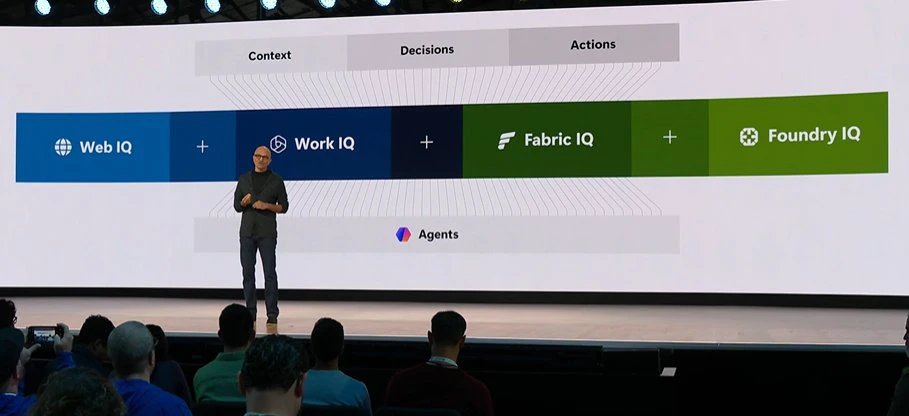
IQ のスライド。Work IQ / Fabric IQ / Foundry IQ / Web IQ が、Context → Decisions → Actions の流れに並んでいました。
Build 2026 の前半では、Microsoft が agent の価値を「モデルの賢さ」より context の質 に寄せていました。その上位概念として出てきたのが Microsoft IQ です。
Build Live では、Microsoft IQ を shared intelligence foundation として扱い、その中に次の 4 つが並んでいました。
- Work IQ: 人、会議、メール、チャット、予定表など、Microsoft 365 の仕事文脈
- Fabric IQ: business data と semantic layer 側の文脈
- Foundry IQ: enterprise knowledge を agent から取る retrieval 面
- Web IQ: web / news / image / video grounding
What’s new in Microsoft Foundry | Build Edition では、Foundry IQ を Work IQ、Fabric IQ、Azure SQL、File Search、MCP sources をまとめて扱う knowledge layer として説明しています。毎回 RAG を組むより、まずここへ寄せる発想です。
同時に、Announcing the new Work IQ APIs では Work IQ APIs を Chat / Context / Tools / Workspaces の 4 ドメインで出しています。Work IQ も agent が reasoning しながら tool を叩き、途中成果を workspace に置くための context + tools layer を前提にしています。
Work IQ API overview では、Work IQ API は preview として整理されています。A2A と local MCP は利用可能、REST と remote MCP は coming soon という扱いです。要求は signed-in user の context で実行され、Microsoft 365 の permissions、sensitivity labels、compliance policies を引き継ぎます。Work IQ API は、Microsoft 365 の仕事文脈を permission-trimmed な形で agent に渡す入口 です。
Web IQ は outside world への grounding、Fabric IQ は業務データ、Work IQ は人と手順、という並びで説明されていました。Foundry routines と組み合わせると、1 回きりの response を schedule 付きの継続実行へ寄せられます。IQ は検索 API の追加だけではありません。Work IQ、Fabric IQ、Foundry IQ、Web IQ を、agent が途中で参照する文脈の入口として並べています。
Microsoft Scout の Work IQ powered も、この並びに入ります。Scout は local runtime だけで完結せず、M365 側の intelligence layer を desktop 側へ引っ張ってきています。Foundry 側では、同じ考え方を enterprise retrieval や web grounding まで広げていました。Build 2026 の IQ 話は、M365 と Foundry をまたいで agent に文脈を渡す入口をそろえた発表 です。
3. Foundry / GitHub / backend
Build 2026 では、Foundry と GitHub がちょうど真ん中を埋めにきました。agent を「作る」「育てる」「並行で回す」「評価する」「publish する」領域です。
Foundry は prototype から production へ寄った
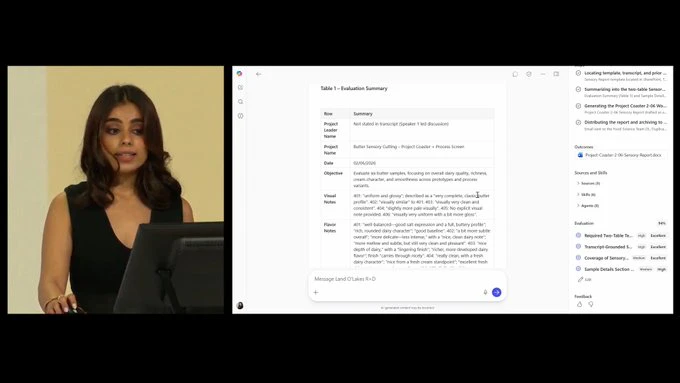
Foundry 側のデモ画面。evaluation summary、run details、sample data まで並び、評価と改善も product surface に入っていました。
What’s new in Microsoft Foundry | Build Edition と What’s New in Hosted Agents in Foundry Agent Service を合わせると、Foundry は production runtime を前面に出しています。
この発表群は、次の 4 本で見ると追いやすいです。
- hosted agents: session sandbox と persistent state 付きで code-first agent を動かす runtime
- Toolboxes: MCP / OpenAPI / IQ / search 系の tool surface をまとめる managed endpoint
- Memory: session / user / procedural memory
- Agent Optimizer / Rubric: 本番 trace と評価をもとに prompt / skill / tool description を詰める機能
Hosted agents docs でも、sandbox、persistent filesystem、agent identity、Toolbox MCP endpoint、OpenTelemetry trace が揃っています。Foundry は、sandbox、persistent filesystem、agent identity、trace まで含めて、agent を production に載せる場所 を用意しています。
Hosted agents の提供状態は、Build Edition blog では early July 2026 までに GA 到達見込み、Hosted Agents 専用 blog では 2026 年 6 月末に向けて GA へ進む と案内されています。Learn 本文には preview 表記が残っていますが、Build blog の文脈では GA に向かう production agent hosting です。
構成としては、自分の agent code を container image として Azure Container Registry に置き、Foundry Agent Service が pull して、session ごとの VM-isolated sandbox、persistent filesystem、dedicated Microsoft Entra ID、dedicated endpoint を用意します。Toolbox は Foundry project 側の Toolbox MCP endpoint に agent code から接続します。third-party model / tool / server と組み合わせる場合のデータ境界やコストは、使う側が確認する必要があります。
Build の Foundry は runtime に加えて、source-code deployment、built-in guardrails、Voice Live / WebSocket、Managed Compute まで並べています。さらに ASSERT や Agent Control Specification も出ていて、agent を動かす runtime と 評価・安全・仕様化 を同じ発表群で扱っています。
開発者体験では、Build Edition blog で Foundry Toolkit for VS Code が GA、Microsoft Agent Framework の orchestration building blocks が stable release として出ています。Foundry は portal だけで agent を作る場所に収まらず、VS Code、SDK、hosted runtime、evaluation までつないでいます。
GitHub 側は Build 当日に Changelog が祭りだった
Build 2026 に合わせて、GitHub 側の Changelog も 2026 年 6 月 2 日付でまとまって更新されました。個別項目の多さより、agent session を作り、並べ、検証し、あとから振り返る導線が同じ日に出た ことに驚きました。
- Copilot app: 複数 session を worktree 単位で並べて回す desktop control center
- Copilot CLI: tabs、rubber duck、prompt scheduling、voice input まで拡張
- Copilot SDK: 複数言語対応、MCP、OpenTelemetry、hook system を含めて GA
- sandboxes / memory / /chronicle / cloud agent: 実行、継続、観測、自動化を補強
GitHub Copilot app: The agent-native desktop experience と Expanded technical preview availability for the GitHub Copilot app では、app の説明をしながら git worktrees、canvas、Agent Merge、cloud and local sandboxes、Copilot SDK、Copilot CLI まで一つの workflow として束ねています。
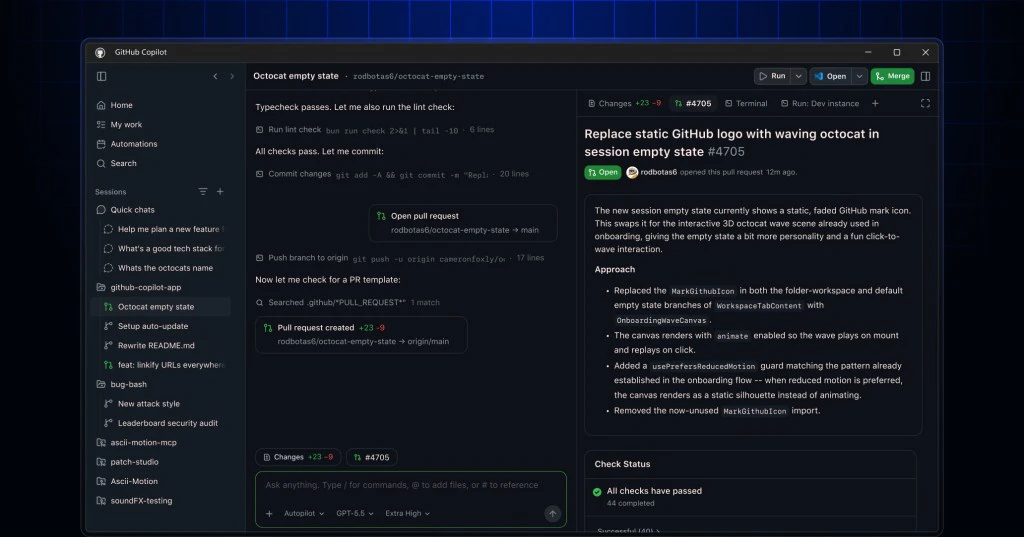
GitHub Copilot app のスクリーンショット。複数 session を worktree 単位で並べ、browser / terminal / plan / diff で確認する画面です。
私には、新しいアプリ 1 つを出したという話より、agent session を回す workflow 一式をまとめて出してきたように見えました。GitHub 側は、agent session を作り、worktree で分け、canvas や sandbox で検証する導線をまとめて出してきました。裏側でも internal platform や data plane 側の更新が並び、agent app を実運用へ持っていくための sandbox、memory、trace、automation が揃ってきました。
ちなみに app 本体の導線は github/app に出ています。GitHub blog では existing Copilot Pro、Pro+、Business、Enterprise users 向けの technical preview と書かれており、agent-native desktop experience を preview として出した 形です。
データと backend 側も agent 前提に寄っている
GitHub app や Foundry が agent を作って動かす場所なら、その下の data / backend 側 でも Build 2026 の発表がありました。ここはさらっと流すには少し惜しいです。
Microsoft Build 2026: Building agentic apps with Microsoft Fabric and Microsoft Databases では、冒頭から business context が bottleneck になると書いています。新しい agent を作るたびに、どこにデータがあり、どのルールで扱い、どの業務語彙で判断するのかを毎回覚え直す。この問題を Fabric と Microsoft Databases 側から埋めにいった発表でした。
-
Rayfin
- agent や開発者が app backend を作るための open-source SDK / CLI
- database、auth、storage、access policy をまとめ、Microsoft Fabric 上に deploy する
-
Azure HorizonDB
- agentic apps 向けに出てきた PostgreSQL-compatible managed database preview
- 128 TB storage、最大 3,072 vCores、zone resilient 構成、sub-millisecond multi-zone commit latency を掲げる
- vector search、semantic ranker、AI model management、Fabric mirroring、Foundry / Fabric 連携を持つ
-
GPU-accelerated Fabric Data Warehouse
- Fabric Data Warehouse の eligible query を NVIDIA accelerated computing へ push down する早期 preview
- SQL を書き換えずに、reporting、app backend、agent-driven analytics を速くする早期 preview
- Microsoft の内部 benchmark では、比較対象の外部 3 社に対して最大 7 倍高速と説明されている
Rayfin は、特に agent 時代っぽいです。README では Backend-as-a-Service with built-in auth, data, and more と説明されていて、npm create @microsoft/rayfin@latest で project を scaffold し、npx rayfin up で deploy / run する導線が出ています。TypeScript decorators で data model を定義すると、database、authentication、Data APIs、storage、hosting を Rayfin 側が用意する。Build blog では、agent や developer が data model、backend logic、access policy を GitHub ベースの workflow で code として持ち、Fabric に deploy すると説明されています。
Rayfin app の data は OneLake に入り、Fabric の analytics、operational data、real-time data、AI engines とつながります。agent が作った app を prototype で止めず、企業の governed data estate に乗せるところまで含んでいます。
Azure HorizonDB は、その app が使う transactional database です。PostgreSQL-compatible なので、既存の app / developer experience を捨てずに使えます。その上で、vector search、semantic ranker、in-database AI model management、Fabric mirroring を足している。agent が参照する transactional data と vector / semantic search を別々に縫い合わせるより、database 側に寄せた方が設計が単純になります。
Fabric Data Warehouse の GPU acceleration は、agent が enterprise data を読むときの待ち時間に効きます。人間の dashboard なら数秒待てても、agent-driven analytics で tool call が重なると、遅い query はそのまま agent の待ち時間になります。Build blog では、query rewrite なしで acceleration が効き、responsive applications、interactive reporting、agent-driven analysis を支えると説明しています。early access preview は 2026 年 7 月予定です。
同じ blog では、Fabric IQ も GA とされ、graph in Fabric と operations agents も GA として出ています。ここまで合わせると、Build 2026 の data / backend 側は次のように見えます。
- Rayfin: agent / developer が app backend を code で作り、Fabric に載せる
- Azure HorizonDB: agentic app 向けの PostgreSQL-compatible transactional database を用意する
- Fabric Data Warehouse: agent が読む analytical data を低 latency に寄せる
- Fabric IQ / operations agents: data に業務語彙と action を載せる
この 3 つを並べると、Build 2026 は agent runtime だけでなく、backend、database、warehouse、semantic layer まで同じ方向へ寄せていたことが分かります。
4. Microsoft Discovery / MAI models / compute
後半は Microsoft Discovery、MAI models、Cobalt 200、Project Solara まで広がりました。モデル、tuning、compute、device が同じ場に出てきます。
Microsoft Discovery
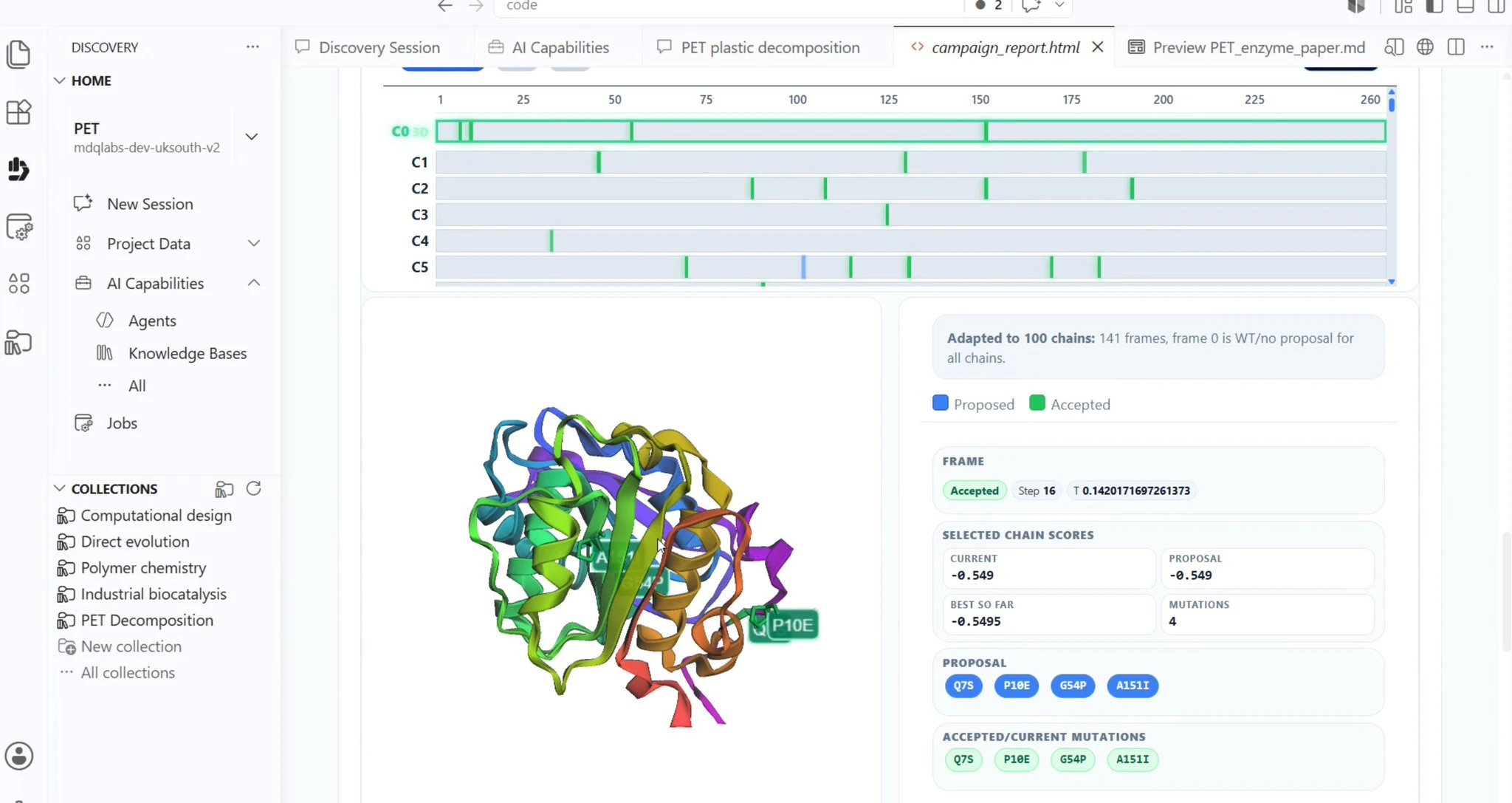
Microsoft Discovery の画面。VS Code for the Web 系の UI で、protein variations workflow を開いています。
Microsoft Discovery は、研究開発の進め方そのものを agent で回すための platform です。チャットで論文を要約して終わり、ではありません。研究テーマを置くと、Discovery Engine が作業を分解し、専門 agent、graph-based knowledge foundation、HPC、必要なら実験装置や robotics までつないで、仮説、実験、分析、検証の loop を回す設計です。
私がここで引っかかったのは、Microsoft が agent の対象を「情報整理」から「研究の進行管理と実験系」まで伸ばしていたところです。Announcing Microsoft Discovery general availability and Microsoft Discovery app preview でも、Discovery Engine、graph-based knowledge foundation、HPC、physical lab integration が並んでいました。
Discovery も availability の表記が割れています。Azure blog では Microsoft Discovery は GA、一方で Microsoft Discovery app は preview と書かれています。さらに Learn の platform card には Public Preview / select customers の表記も残っています。enterprise R&D platform としての Discovery と、手元で始める Discovery app preview は別の入口です。
Microsoft Discovery と Discovery app の比較ページ では、Discovery app は Windows 向けの local app で、GitHub Copilot account から始める軽量入口です。一方、Microsoft Discovery 本体は Azure 上の cloud service で、multi-user collaboration、governance、scalable compute を前提にしています。この違いを押さえると、GA と preview を分けて読めます。
公開 docs を読むと、Discovery の守備範囲はもっと広いです。Discovery Engine を cognitive orchestrator と呼び、specialized agents が knowledge を読み、仮説を作り、広い探索空間の中で検証していくものとして説明しています。普通の Copilot 体験より、研究 workflow に寄った設計です。
- Discovery Engine
- hypothesis → experiment → analysis → validation の loop
- enterprise governance
- local app preview
- microsoft/discovery repo
Microsoft Discovery は、scientific method そのものを loop として運用する platform として出ています。
MAI models と Frontier Tuning
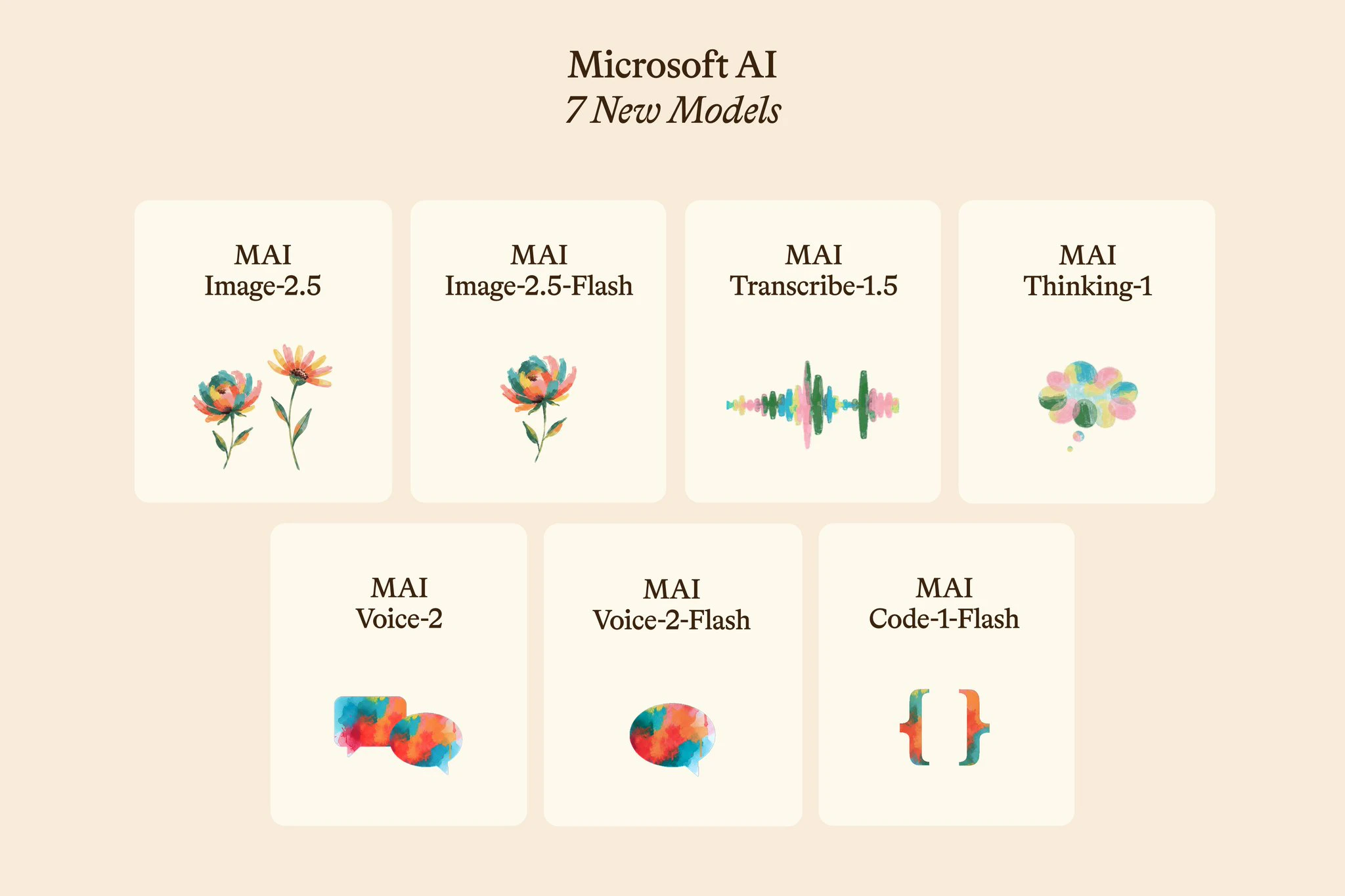
MAI models の概要。text / image / transcription / voice を family として揃え、Frontier Tuning とセットで「自社向けに持つ」話へつながっていました。
MAI models は、Build 2026 で Microsoft の自前 model family として登場しました。reasoning、coding、image、speech の役割ごとに束を作っています。
Building a hill-climbing machine: Launching seven new MAI models では、variant まで含めて 7 つの MAI models が発表されています。役割が見えやすい代表どころは次です。
- MAI-Thinking-1: reasoning と code に寄った中量級モデル
- MAI-Code-1-Flash: GitHub Copilot / VS Code 向けの軽量 coding model
- MAI-Image-2.5: text-to-image と image editing の両方
- MAI-Transcribe-1.5: speech-to-text
- MAI-Voice-2: multilingual text-to-speech
そのうえで Frontier Tuning を「your model, trained on your data, within your environment, controlled by you」とまで言い切っている。モデルを借りる から 自社 workflow に合わせて持つ へ踏み込み始めています。
Security 側では、MDASH multi-model agentic security system が改めて出てきました。MDASH はエンドユーザー向けの製品名ではありません。100 以上の specialized agents を束ねて脆弱性発見や修復候補の提示を回す security harness です。Build 当日の新発表ではありませんが、keynote で再度触れられていました。agent を強くする話は、開発や研究から security harness まで伸びています。
Cobalt 200、Surface RTX Spark Dev Box、Project Solara、Majorana 2
NVIDIA と Microsoft の stack 図。Build 2026 後半では、agent を支える compute / device 側まで扱っていました。
ここから先は、agent を走らせる場所の発表です。model 自体の話から少し離れます。
-
Azure Cobalt 200 VMs
- agentic AI workloads 向け compute
-
Surface RTX Spark Dev Box
- ローカルで AI / agent workloads を回すための GPU-first developer machine
-
DGX Station for Windows
- Windows 上で frontier AI models / agents を動かす deskside AI supercomputer
-
Project Solara
- agent-first devices の reference designs
-
Microsoft Build Live
- Majorana 2 を Discovery 文脈とも結びつけて紹介
Surface RTX Spark Dev Box も出てきました。Windows Developer Blog では、これを 1 petaflop の AI compute と 128GB の unified memory を持つ developer-optimized Windows 11 machine として説明しています。
Cobalt 200 が Azure 側の compute だとすると、Surface RTX Spark Dev Box は ローカル側で model optimization や大きめの inference workload を回すための開発箱 です。Build 2026 の hardware 話は、クラウドとローカルの両方を見ていました。
さらに Windows Developer Blog では、DGX Station for Windows も出ています。これは NVIDIA GB300 Grace Blackwell-class の deskside AI supercomputer として説明されていて、最大 1 trillion-parameter frontier AI models をローカルで動かす文脈まで踏み込んでいます。Surface RTX Spark Dev Box が developer box なら、DGX Station for Windows はもっと frontier model / agent 実行寄りの箱です。
OpenClaw on Windows と Surface RTX Spark Dev Box は、同じ Windows Developer Blog の中でも別項目です。前者は agent runtime と containment、後者は local AI / agent workload 向け hardware の発表です。
Project Solara は、badge device と desk device の 2 つの concept reference design を見せながら、agent-first device を成立させるための platform を考えている発表です。
- badge concept: 常時携帯する agent access device
- desk concept: デスクに置く companion / Windows 365 client
- 3 つの柱: enterprise-readiness、agent-driven interaction model、bring-your-own agents extensibility
Project Solara は、device のコンセプト図だけで終わっていません。MDEP、Intune、Entra ID、Hello for Business、just-in-time UI、bring-your-own agents まで platform 要素を先に出していて、enterprise stack の延長線上で agent-first device を作ろうとしています。
後半は、「agent をもっと賢くするモデル」と「agent をどこで走らせるか」「agent をどんな device に載せるか」が同じ場に出ていました。
Build で GA / stable / GA 予定として拾うもの
Build 2026 周辺は preview が多い一方で、公式 blog / changelog 上で GA、stable release、または GA 予定 と書けるものもありました。本文で見た地図に関係する代表項目だけ拾うと、次のあたりです。
| 項目 | 公式情報 | 読み方 |
|---|---|---|
| Windows 365 for Agents | Windows Developer Blog で GA / Agent 365 内で GA | agent の execution layer として GA 扱い |
| Microsoft Agent 365 | Agent 365 overview で 2026/05/01 時点の commercial segment GA | agent registry / governance / security の control plane |
| Foundry Toolkit for VS Code | Foundry Build Edition blog で GA | Foundry の開発者体験として GA |
| Hosted agents in Foundry Agent Service | Build Edition blog と Hosted Agents blog で 2026 年 6 月末〜7 月初旬の GA 到達見込み | GA に向かう production agent hosting |
| Fabric IQ | Fabric / Databases blog で GA | agent が使う shared business context |
| GitHub Copilot SDK | GitHub Changelog で GA | agent runtime を自作アプリへ埋め込む GA SDK |
| Microsoft Discovery | Azure blog で GA | platform は GA、Discovery app は preview と分ける |
| Microsoft IQ | Foundry Build Edition blog で GA の intelligence layer | Work IQ / Fabric IQ / Foundry IQ / Web IQ の個別提供状態とは分けて読む |
GA ではないけど新しく出た Preview / Early access 系
GA だけを見ると、Build 2026 の面白いところを取りこぼします。Preview / Early access 側で特に見たいのは、agent を動かす環境、agent が使う文脈、agentic app の backend、model / device の 4 か所です。
| 項目 | 提供状態 | 見どころ |
|---|---|---|
| Microsoft Execution Containers (MXC) | early preview |
agent の file / network / UI access を policy-driven に containment する layer |
| OpenClaw on Windows | open-source availability / preview 文脈 | Windows node / gateway / companion app を公開 repo で触れるようにした |
| Work IQ APIs | preview | A2A と local MCP から、M365 の仕事文脈を agent に渡す入口 |
| Toolboxes / Skills / Tool search in Foundry | public preview / preview | MCP / OpenAPI / IQ / search 系の tool surface を managed endpoint と catalog に寄せる |
| Memory in Foundry Agent Service | public preview | procedural / user / session memory を Foundry agent 側へ拡張 |
| GitHub Copilot app | technical preview | 複数 agent session を desktop app で並列管理する体験 |
| Rayfin / Azure HorizonDB / GPU-accelerated Fabric Data Warehouse | preview / early access preview | agentic app の backend / database / warehouse 側の部品 |
| Microsoft Discovery app | preview | Microsoft Discovery の local desktop app。GitHub Copilot account から始める入口 |
| MAI models / Frontier Tuning | public preview / select early partners | Microsoft の first-party model family と workflow-specific tuning |
| Project Solara | concept / private pilot direction | agent-first device の badge / desk reference design |
今すぐ試せるもの、まだ様子見のもの
情報量が多いので、私が試す順番に近い形で切っています。
比較的すぐ試しやすいもの
- Coreutils for Windows
- Windows Developer Configurations
- OpenClaw Windows Node / Companion repo
- Rayfin
- GitHub Copilot app technical preview
- Copilot CLI の新 UI / voice / scheduling
- Copilot SDK GA
Preview / rollout 差分に注意したいもの
- Microsoft Scout
- MXC
- Windows 365 for Agents
- Foundry publish to Teams / M365
- Azure HorizonDB
- GPU-accelerated Fabric Data Warehouse
- Agent Optimizer
- Microsoft Discovery app preview
- Frontier Tuning
- Surface RTX Spark Dev Box
すぐ使うより「方向を見る」もの
まとめ
私にとって Build 2026 は、agent を動かす場所、agent に文脈を与える層、agent を作って運用する道具、agent を強くするモデルと compute が同じ場に並んだ回でした。
私はまず OpenClaw on Windows / Microsoft Scout の流れから追い直します。ここを押さえると、Work IQ、Agent 365、Windows 365 for Agents、MXC、GitHub Copilot app、Foundry を同じ agent 前提の地図に置けます。
「chat で答える AI」から、「裏でずっと動き続ける agent」へ。Build 2026 は、その転換点が前面に出た回でした。
参考
全体を掴むハブ
Windows / Scout / OpenClaw
- Introducing Microsoft Scout: Your always-on personal agent
- Microsoft Scout (Frontier) overview
- Admin Intune setup for Microsoft Scout
- Build 2026: Furthering Windows as the trusted platform for development
- openclaw/openclaw
- openclaw/openclaw-windows-node
- microsoft/mxc
Work IQ / Agent 365 / Windows 365 for Agents
- Announcing the new Work IQ APIs
- Work IQ API overview
- Microsoft Web IQ: A new standard for AI grounding
- Agent 365 overview
- The next frontier in endpoint security: Securing local AI agents with Microsoft Defender
- Local AI agent discovery with Microsoft Defender for Endpoint (Preview)
- Protect AI assets from emerging threats and vulnerabilities using Microsoft Defender
- What’s new in Windows 365 for Agents
- What is Windows 365 for Agents?
- Pricing for Windows 365 for Agents
Foundry / GitHub / models
- What’s new in Microsoft Foundry | Build Edition
- What’s New in Hosted Agents in Foundry Agent Service
- Microsoft Agent Framework: Layered SDK for loops, workflows, and harnesses
- ASSERT: Written intent as executable evaluations
- Agent Control Specification runtime governance
- Publish agents to Microsoft 365 Copilot and Microsoft Teams
- Microsoft Build 2026: Building agentic apps with Microsoft Fabric and Microsoft Databases
- microsoft/rayfin
- Azure HorizonDB
- Microsoft Discovery and the Microsoft Discovery app
- Platform card: Microsoft Discovery
- Microsoft Discovery docs overview
- microsoft/discovery
- GitHub Copilot app: The agent-native desktop experience
- github/app
- Building a hill-climbing machine: Launching seven new MAI models
- Microsoft 365 Copilot Tuning overview
- Announcing Microsoft Discovery general availability and Microsoft Discovery app preview
- Defense at AI speed: Microsoft’s new multi-model agentic security system tops leading industry benchmark
GitHub Changelog で追う主要更新
- Expanded technical preview availability for the GitHub Copilot app
- Copilot SDK is now generally available
- Copilot CLI: Improved UI, rubber duck, prompt scheduling, and voice input
- Cloud and local sandboxes for GitHub Copilot now in public preview
- Extend GitHub with agent apps
- Gemini models in Copilot CLI, cloud agent, and the Copilot app
- Gain insights across your agent sessions with /chronicle
- Schedule and automate tasks with Copilot cloud agent
- Copilot Memory supports user preferences for Business, Enterprise
- MAI-Code-1-Flash is now available for GitHub Copilot
Infrastructure / devices
- New Azure Cobalt 200 VMs deliver 50% performance improvement, fully optimized for modern agentic AI workloads
- Build 2026: Furthering Windows as the trusted platform for development
- Composing a new platform for agent-first devices