
Tableau(タブロー)とは
BI(ビジネスインテリジェンス)に特化したインタラクティブなデータの可視化・分析ツール。
いくつか種類があり、今回はTableau Cloudを利用。
状況
先日Tableau埋め込みのフロントエンド実装を担当しました。
バックエンド実装は弊社のメンバー、Tableauの実装は他社の方が担当しました。
検証環境にデプロイ後、いくつかエラーが発生したので1つずつ何が原因を調査しました。
- TableauのURLとJWTを呼び出すBFF API:Status code 200
- Tableau へのサインイン API:Status code 200
(/vizportal/api/web/v1/auth/embed/signin) - Tableauは表示されている
→ Tableauへのサインインと表示自体はできている
エラー画面
コンソール
開発者ツールのconsole画面を確認。
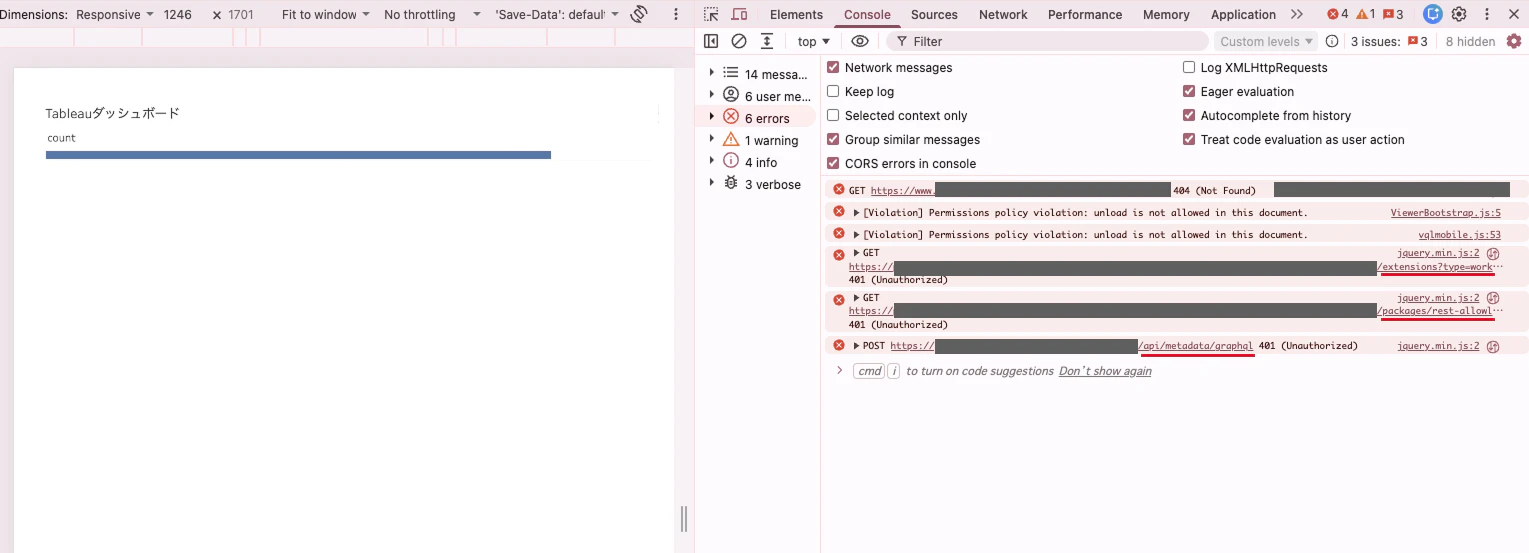
発生しているエラー一覧はこちら。
hoge-page:1 GET https://www.test.com/hoge-page 404 (Not Found)

ViewerBootstrap.js:5 [Violation] Permissions policy violation: unload is not allowed in this document.

vqlmobile.js:53 [Violation] Permissions policy violation: unload is not allowed in this document.

jquery.min.js:2  GET https://test.tableau.com/api/exp/sites/0000/extensions?type=workspace 401 (Unauthorized)

jquery.min.js:2  GET https://test.tableau.com/api/exp/sites/0000/packages/rest-allowlist 401 (Unauthorized)

jquery.min.js:2  POST https://test.tableau.com/api/metadata/graphql 401 (Unauthorized)
エラー原因
1つずつ確認してきます。
404エラー
hoge-page:1 GET https://www.test.com/hoge-page 404 (Not Found)
AWS S3のために、CloudFrontで403が返ってきたら404にしてindex.htmlを返す設定をしていることが原因。
今回作成しているWebアプリケーションは、1つのindex.htmlの中で画面を切り替える作り(SPA:Reactによるシングルページアプリケーション)。
例えば、/settingという画面のURLはS3にファイルとしては存在していない。
S3は存在しないファイルにアクセスされると403を返却するため、それをindex.htmlに差し替えて表示している。
この設定はCloudFront全体にかかるため、S3から返却された403のみに限定できない。
結果、403が返ってきたら404にしており404 (Not Found)エラーが表示される。
パーミッションエラー
ViewerBootstrap.js:5 [Violation] Permissions policy violation: unload is not allowed in this document.

vqlmobile.js:53 [Violation] Permissions policy violation: unload is not allowed in this document.
Tableauのスクリプトの問題。
どちらもブラウザの「Permissions Policy(権限ポリシー)」によってunloadの使用が禁止されている状態で、TableauのJavaScriptがunloadを利用しようとしたために出ている警告。
Tableauの表示自体には影響しない。
<Claude Codeより>
- unload イベント: ページを閉じたり移動したりするときに、処理を動かすための古い仕組み
- Chrome の方針: Chromeは、このunloadを段階的に廃止していて、使えないようにする制限(Permissions Policy の unload)を、少しずつ広げている
- 警告が出る理由: ViewerBootstrap.jsとvqlmobile.jsは、Tableauのビューアーのスクリプトで、埋め込んだiframeの中で動いている
このスクリプトが unload のイベントを登録しようとしたところ、ブラウザに止められ、警告文が表示されている。
401エラー
jquery.min.js:2 GET https://test.tableau.com/api/exp/sites/0000/extensions?type=workspace 401 (Unauthorized)
jquery.min.js:2 GET https://test.tableau.com/api/exp/sites/0000/packages/rest-allowlist 401 (Unauthorized)
jquery.min.js:2 POST https://test.tableau.com/api/metadata/graphql 401 (Unauthorized)
いずれもTableau Cloud側のAPIへのリクエストが認証されていない、または認証情報が正しく引き継がれていないことを示している。
Tableauへのサインイン成功後、ビューアーがiframe内で呼んでいるAPIでエラーが発生している。
React側のAPIではなく、Tableau側の認証・セッションに関する問題と考えられる。
上記のエラーをNetworkで確認。

extensions?type=workspac
| 項目 | 内容 |
|---|---|
| Request URL | https://〜〜〜/api/exp/sites/0000/extensions?type=workspace |
| Request method | GET |
| Status code | 401 Unauthorized |
| Referrer policy | strict-origin-when-cross-origin |
| Response | {"error":{"summary":"不正アクセス","detail":"認証資格情報が指定されませんでした。","code":"401000"}} |
| Cookie | あり(省略) |
rest-allowlist
| 項目 | 内容 |
|---|---|
| Request URL | https://〜〜〜/api/exp/sites/0000/packages/rest-allowlist |
| Request method | GET |
| Status code | 401 Unauthorized |
| Referrer policy | strict-origin-when-cross-origin |
| Response | {"error":{"summary":"不正アクセス","detail":"認証資格情報が指定されませんでした。","code":"401000"}} |
| Cookie | あり(省略) |
graphql
| 項目 | 内容 |
|---|---|
| Request URL | https://〜〜〜/api/metadata/graphql |
| Request method | POST |
| Status code | 401 Unauthorized |
| Referrer policy | strict-origin-when-cross-origin |
| Response | {"timestamp": "2026-11-19T01:01:47.975Z","status": 401,"error": "Unauthorized","path": "/relationship-service-war/graphql"} |
| Cookie | あり(省略) |
Metadata APIのライセンス要件を満たしていない可能性が考えられる。
2026年10月以降、Tableau CloudのMetadata APIにはData Managementが必要。
認証情報だけでなく、このライセンス要件も確認する必要がある。
参考サイト