
PostgreSQL実験室/環境構築
- 記事一覧 PostgreSQL実験室
Rocky Linux 10.x インストール
- Minimalインストール
- パッケージ追加インストール
$ sudo LC_ALL=C dnf groupinstall "Server with GUI"
$ sudo LC_ALL=C dnf install git
PostgreSQL 17インストール
-
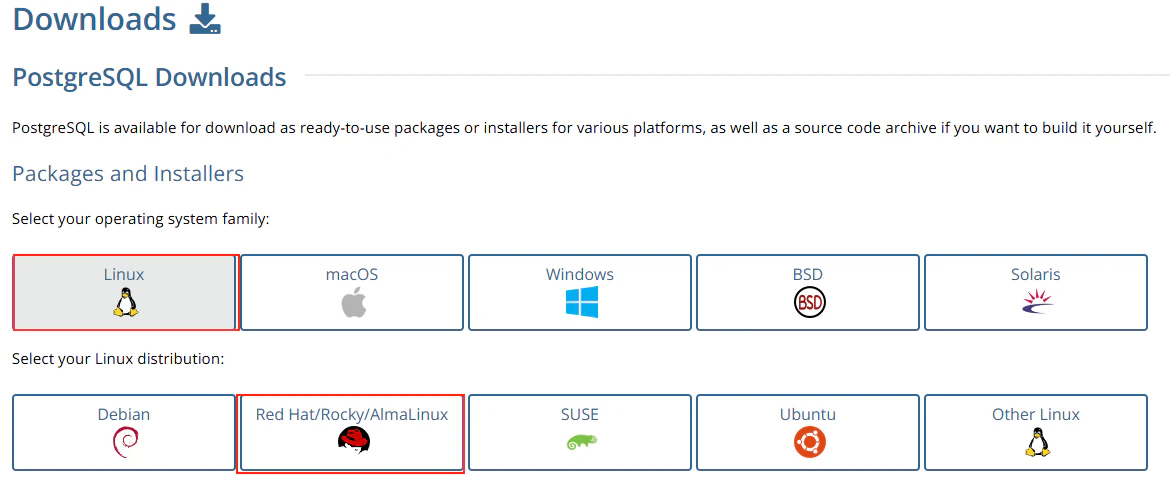
PostgreSQLのサイトにアクセスします.
PostgreSQL: Downloads -
OS, ディストリビューションを選択します.
-
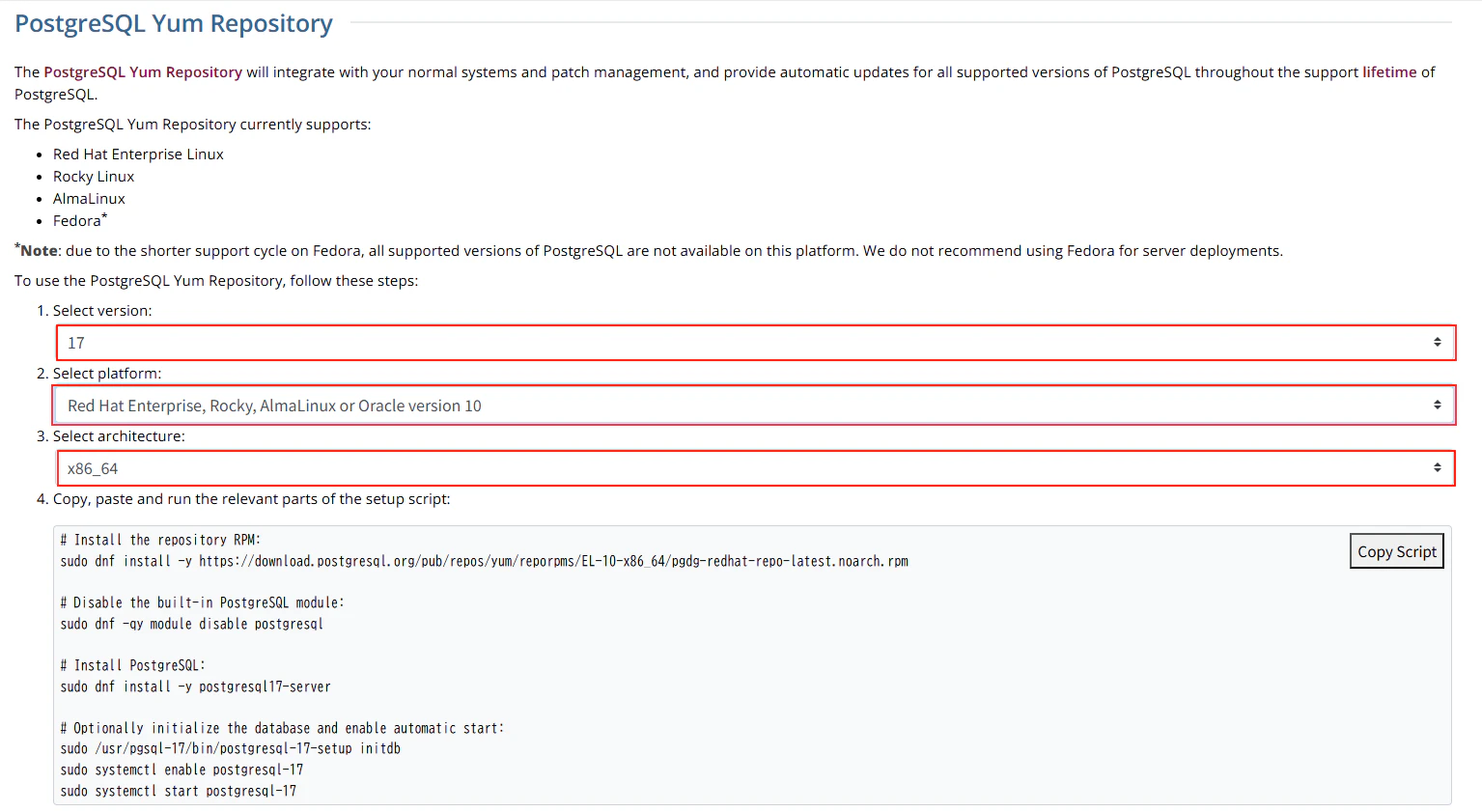
PostgreSQLの「バージョン」「プラットフォーム」「アーキテクチャ」を選択します.
-
インストールスクリプトが表示されるので、コマンドをコピーします.
リポジトリインストール
- コマンド
$ LC_ALL=C sudo dnf install -y https://download.postgresql.org/pub/repos/yum/reporpms/EL-10-x86_64/pgdg-redhat-re
po-latest.noarch.rpm
Last metadata expiration check: 0:02:29 ago on Mon Nov  3 15:29:02 2025.
pgdg-redhat-repo-latest.noarch.rpm                                                             83 kB/s |  13 kB     00:00
Dependencies resolved.
==============================================================================================================================
 Package                           Architecture            Version                        Repository                     Size
==============================================================================================================================
Installing:
 pgdg-redhat-repo                  noarch                  42.0-59PGDG                    @commandline                   13 k

Transaction Summary
==============================================================================================================================
Install  1 Package

Total size: 13 k
Installed size: 18 k
Downloading Packages:
Running transaction check
Transaction check succeeded.
Running transaction test
Transaction test succeeded.
Running transaction
  Preparing        :                                                                                                      1/1
  Installing       : pgdg-redhat-repo-42.0-59PGDG.noarch                                                                  1/1

Installed:
  pgdg-redhat-repo-42.0-59PGDG.noarch

Complete!
デフォルトパッケージ無効化
-
コマンド
$ sudo dnf -qy module disable postgresql
GPG 鍵 0x08B40D20 をインポート中:
 Userid     : "PostgreSQL RPM Repository <pgsql-pkg-yum@lists.postgresql.org>"
 Fingerprint: D4BF 08AE 67A0 B4C7 A1DB CCD2 40BC A2B4 08B4 0D20
 From       : /etc/pki/rpm-gpg/PGDG-RPM-GPG-KEY-RHEL
GPG 鍵 0x08B40D20 をインポート中:
 Userid     : "PostgreSQL RPM Repository <pgsql-pkg-yum@lists.postgresql.org>"
 Fingerprint: D4BF 08AE 67A0 B4C7 A1DB CCD2 40BC A2B4 08B4 0D20
 From       : /etc/pki/rpm-gpg/PGDG-RPM-GPG-KEY-RHEL
GPG 鍵 0x08B40D20 をインポート中:
 Userid     : "PostgreSQL RPM Repository <pgsql-pkg-yum@lists.postgresql.org>"
 Fingerprint: D4BF 08AE 67A0 B4C7 A1DB CCD2 40BC A2B4 08B4 0D20
 From       : /etc/pki/rpm-gpg/PGDG-RPM-GPG-KEY-RHEL
GPG 鍵 0x08B40D20 をインポート中:
 Userid     : "PostgreSQL RPM Repository <pgsql-pkg-yum@lists.postgresql.org>"
 Fingerprint: D4BF 08AE 67A0 B4C7 A1DB CCD2 40BC A2B4 08B4 0D20
 From       : /etc/pki/rpm-gpg/PGDG-RPM-GPG-KEY-RHEL
GPG 鍵 0x08B40D20 をインポート中:
 Userid     : "PostgreSQL RPM Repository <pgsql-pkg-yum@lists.postgresql.org>"
 Fingerprint: D4BF 08AE 67A0 B4C7 A1DB CCD2 40BC A2B4 08B4 0D20
 From       : /etc/pki/rpm-gpg/PGDG-RPM-GPG-KEY-RHEL
GPG 鍵 0x08B40D20 をインポート中:
 Userid     : "PostgreSQL RPM Repository <pgsql-pkg-yum@lists.postgresql.org>"
 Fingerprint: D4BF 08AE 67A0 B4C7 A1DB CCD2 40BC A2B4 08B4 0D20
 From       : /etc/pki/rpm-gpg/PGDG-RPM-GPG-KEY-RHEL
GPG 鍵 0x08B40D20 をインポート中:
 Userid     : "PostgreSQL RPM Repository <pgsql-pkg-yum@lists.postgresql.org>"
 Fingerprint: D4BF 08AE 67A0 B4C7 A1DB CCD2 40BC A2B4 08B4 0D20
 From       : /etc/pki/rpm-gpg/PGDG-RPM-GPG-KEY-RHEL
引数 postgresql を解決できません
エラー: リクエスト中の問題:
足りないグループまたはモジュール: postgresql
PostgreSQLインストール
- コマンド
依存パッケージとしてインストールされることを抑止するあめ, pgdg18リポジトリを無効化しておきます.$ LC_ALL=C sudo dnf --disablerepo=pgdg18 install postgresql17-server PostgreSQL 17 for RHEL / Rocky / AlmaLinux 10 - x86_64 412 B/s | 659 B 00:01 Dependencies resolved. ============================================================================================================================== Package Architecture Version Repository Size ============================================================================================================================== Installing: postgresql17-server x86_64 17.6-1PGDG.rhel10 pgdg17 7.0 M Installing dependencies: postgresql17 x86_64 17.6-1PGDG.rhel10 pgdg17 1.9 M postgresql17-libs x86_64 17.6-1PGDG.rhel10 pgdg17 345 k Transaction Summary ============================================================================================================================== Install 3 Packages Total download size: 9.3 M Installed size: 42 M Is this ok [y/N]: y Downloading Packages: (1/3): postgresql17-libs-17.6-1PGDG.rhel10.x86_64.rpm 116 kB/s | 345 kB 00:02 (2/3): postgresql17-17.6-1PGDG.rhel10.x86_64.rpm 94 kB/s | 1.9 MB 00:20 (3/3): postgresql17-server-17.6-1PGDG.rhel10.x86_64.rpm 73 kB/s | 7.0 MB 01:38 ------------------------------------------------------------------------------------------------------------------------------ Total 96 kB/s | 9.3 MB 01:38 Running transaction check Transaction check succeeded. Running transaction test Transaction test succeeded. Running transaction Preparing : 1/1 Installing : postgresql17-libs-17.6-1PGDG.rhel10.x86_64 1/3 Running scriptlet: postgresql17-libs-17.6-1PGDG.rhel10.x86_64 1/3 Installing : postgresql17-17.6-1PGDG.rhel10.x86_64 2/3 Running scriptlet: postgresql17-17.6-1PGDG.rhel10.x86_64 2/3 Running scriptlet: postgresql17-server-17.6-1PGDG.rhel10.x86_64 3/3 Installing : postgresql17-server-17.6-1PGDG.rhel10.x86_64 3/3 Running scriptlet: postgresql17-server-17.6-1PGDG.rhel10.x86_64 3/3 Installed: postgresql17-17.6-1PGDG.rhel10.x86_64 postgresql17-libs-17.6-1PGDG.rhel10.x86_64 postgresql17-server-17.6-1PGDG.rhel10.x86_64 Complete!
データベース初期設定
- コマンド
$ sudo /usr/pgsql-17/bin/postgresql-17-setup initdb
Initializing database ... OK
サービス自動起動設定
- コマンド
$ sudo systemctl enable postgresql-17
Created symlink '/etc/systemd/system/multi-user.target.wants/postgresql-17.service' → '/usr/lib/systemd/system/postgresql-17.service'.
$ sudo systemctl start postgresql-17
OS設定
postgresユーザー
-
パスワード設定
$ LC_ALL=C passwd postgres New password: ******** BAD PASSWORD: The password contains the user name in some form Retype new password: ******** passwd: password updated successfully -
.bashrc作成
.bashrcが存在しない場合は作成します.# ".bashrc"を新規作成 $ touch ~/.bashrc # 644にモード設定 $ chmod 644 ~/.bashrc # ファイル編集 $ vim ~/.bashrc # .bashrc # Source global definitions if [ -f /etc/bashrc ]; then . /etc/bashrc fi # User specific environment if ! [[ "$PATH" =~ "$HOME/.local/bin:$HOME/bin:" ]] then PATH="$HOME/.local/bin:$HOME/bin:$PATH" fi export PATH # Uncomment the following line if you don't like systemctl's auto-paging feature: # export SYSTEMD_PAGER= # User specific aliases and functions alias rm='rm -i' alias cp='cp -i' alias mv='mv -i'