

はじめに
本記事はAIXのTrusted Execution (TE)を試した際の作業メモです。
Trusted Executionとは
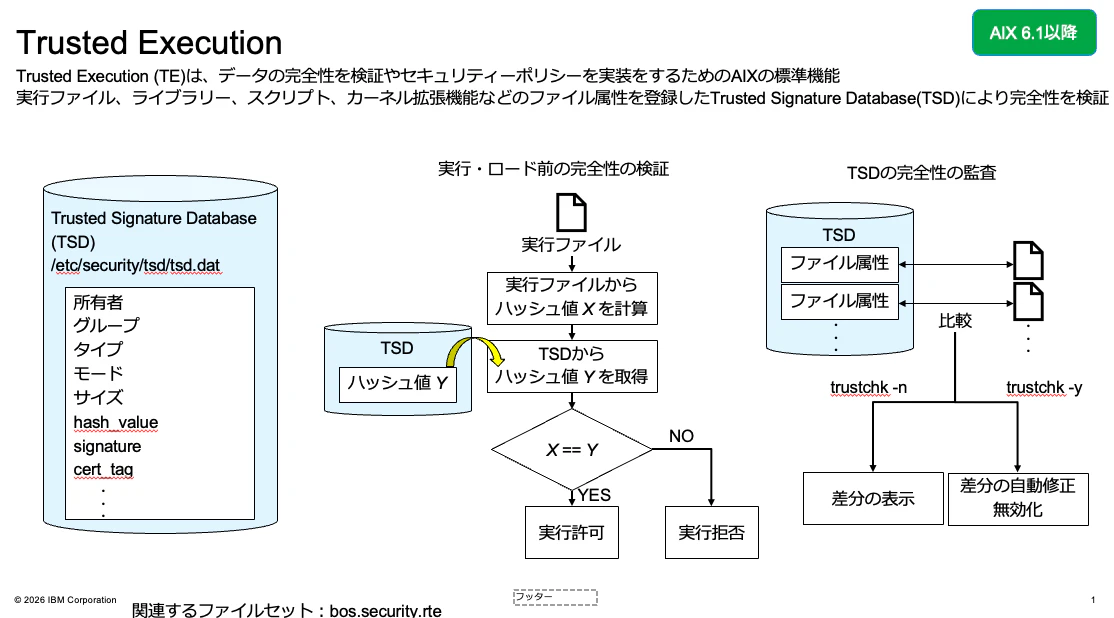
TEとはシステムの整合性の検証や高度なセキュリティーポリシーを実装するための機能です。
悪意のあるユーザーがシステムを攻撃する一般的な方法として、システムにアクセスしてトロイの木馬やルートキットをインストールしたり、セキュリティー上で重要なファイルを改ざんすることにより、脆弱なシステムにして悪用する方法があります。
TEの機能の根底にある考え方は、このような攻撃を防ぐ、あるいは最悪の場合でも、このようなインシデントを特定できるようにすることです。
Trusted Signature Databaseによる実行管理
TEでは、Trusted Signature Database(TSD)に実行ファイルなどのファイル属性を登録し、登録されているファイル属性と情報が一致したものの実行を許可します。
今回はTEが有効化された環境で新たにスクリプトを作成して、実行可能な状態まで設定を行いました。
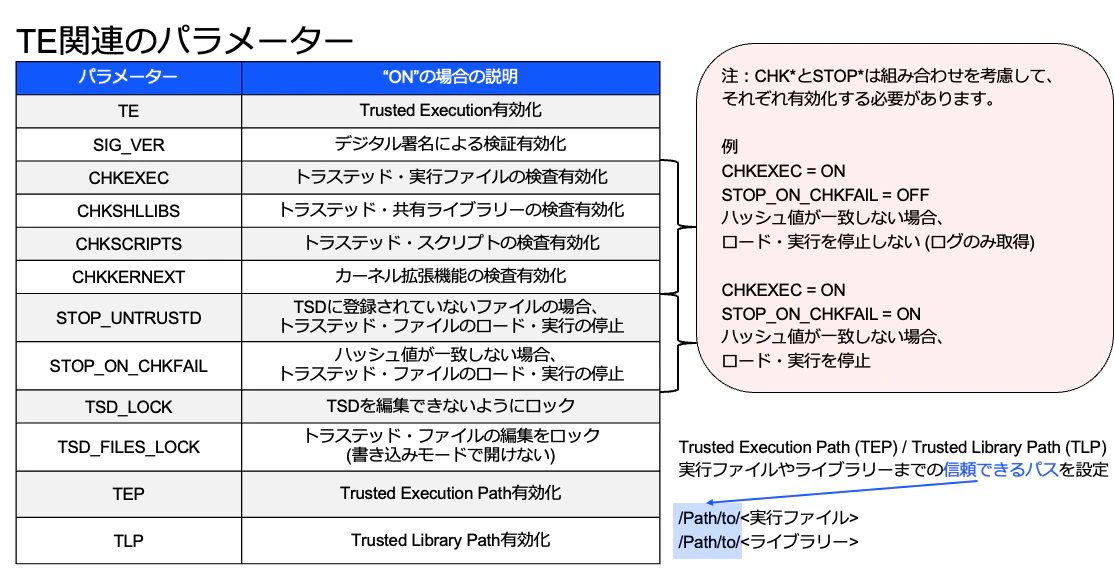
開始時点におけるTEに関するパラメーターの値は、以下のように設定しました。
# trustchk -p
TE=ON
SIG_VER=OFF
CHKEXEC=ON
CHKSHLIB=ON
CHKSCRIPT=ON
CHKKERNEXT=ON
STOP_UNTRUSTD=ON
STOP_ON_CHKFAIL=ON
LOCK_KERN_POLICIES=OFF
TSD_FILES_LOCK=OFF
TSD_LOCK=OFF
TEP=OFF
TLP=OFF
まず、スクリプトを配置するためのディレクトリーを作成し、hello.shというスクリプトを作成しました。
さらに、hello.shには実行権限を追加しました。
# mkdir shell
# vi /shell/hello.sh
# cat /shell/hello.sh
#!/bin/bash
echo "hello TE"
# ls -l /shell
total 8
-rw-r--r--    1 root     system           33 Apr  1 13:17 hello.sh
# chmod 744 /shell/hello.sh
# ls -l /shell
total 8
-rwxr--r--    1 root     system           33 Apr  1 13:17 hello.sh
TEが有効化されている(CHKSCRIPT=ON、STOP_UNTRUSTD=ON)ため、TSDに登録されていないhello.shの実行は拒否されました。
# /shell/hello.sh
bash: /shell/hello.sh: Not a Trusted Program
hello.shをTSDに登録するため、秘密鍵と証明書を生成しました。
# trustchk -k -s signing_key -v verification_file -N
生成した秘密鍵と証明書を使用して、hello.shをTSDに登録しました。
# trustchk -s signing_key -v verification_file -a /shell/hello.sh
hello.shをTSDに登録後、実行が許可されました。
# /shell/hello.sh
hello TE
Trusted Execution Pathによる実行管理
TSDによる検証の他にTrusted Execution Path(TEP)/Trusted Library Path(TLP)による整合性の検証機能もあります。
TEP/TLPはそれぞれ実行を許可する実行ファイル/ライブラリーまでのパスを指定します。
TEP/TLPを指定することにより許可しないディレクトリーに配置された実行ファイル/ライブラリーの実行を防ぐことができます。
TEPを有効化した際の挙動も確認しました。
# trustchk -p TEP=ON
# trustchk -p
TE=ON
SIG_VER=OFF
CHKEXEC=ON
CHKSHLIB=ON
CHKSCRIPT=ON
CHKKERNEXT=ON
STOP_UNTRUSTD=ON
STOP_ON_CHKFAIL=ON
LOCK_KERN_POLICIES=OFF
TSD_FILES_LOCK=OFF
TSD_LOCK=OFF
TEP=ON
TLP=OFF
hello.shは、TSDに登録されていますが、hello.shまでのパスがTEPに登録されていないため、実行が拒否されました。
# /shell/hello.sh
bash: /shell/hello.sh: Not a Trusted Program
hello.shまでのパスをTEPに登録しました。
# trustchk -p TEP
TEP=ON
TEP=/usr/bin:/(省略):/usr/lpp/bosinst
# trustchk -p TEP=/usr/bin:/(省略):/usr/lpp/bosinst:/shell
hello.shまでのパスが登録されたので、実行が許可されました。
# /shell/hello.sh
hello TE
以上