
はじめに
毎日ひとつ、AIアプリをつくる。
日替わりでテーマに沿って小さなアプリを開発します。Claudeで。
この記事は  AI Code Challenge Advent Calender 2025 の 8 日目の記事です!
 7日目の記事:3Dテトリスゲームアプリを作ってみた!
9日目の記事:映画のセリフで英語の発音練習するアプリを作ってみた! 
AI アプリ
概要

1枚の写真からわかることを洗い出してみよう。
Aiプロファイリングだ! 
AI 実装
Claude Desktopでプロンプトを与えて実装してもらいます。
 プロンプト:
AIプロファイリングするアプリを作って
アップロードした写真からAIがプロファイリングする

写真から人物の特徴をAIで分析するプロファイリングアプリを作成します。
AIプロファイリングアプリを作成しました!
完成したアプリ
できました!
 AI PROFILING
 のリンクからアプリを確認できます
使い方:
- ドラッグ&ドロップまたはクリックで画像を選択
- 以下の項目をプロファイリング
第一印象
性格特性(4つの特徴)
ライフスタイル(興味・関心)
コミュニケーションスタイル
強み(3つ)
適職(3つの職業)
独特な洞察
こんなイメージです。
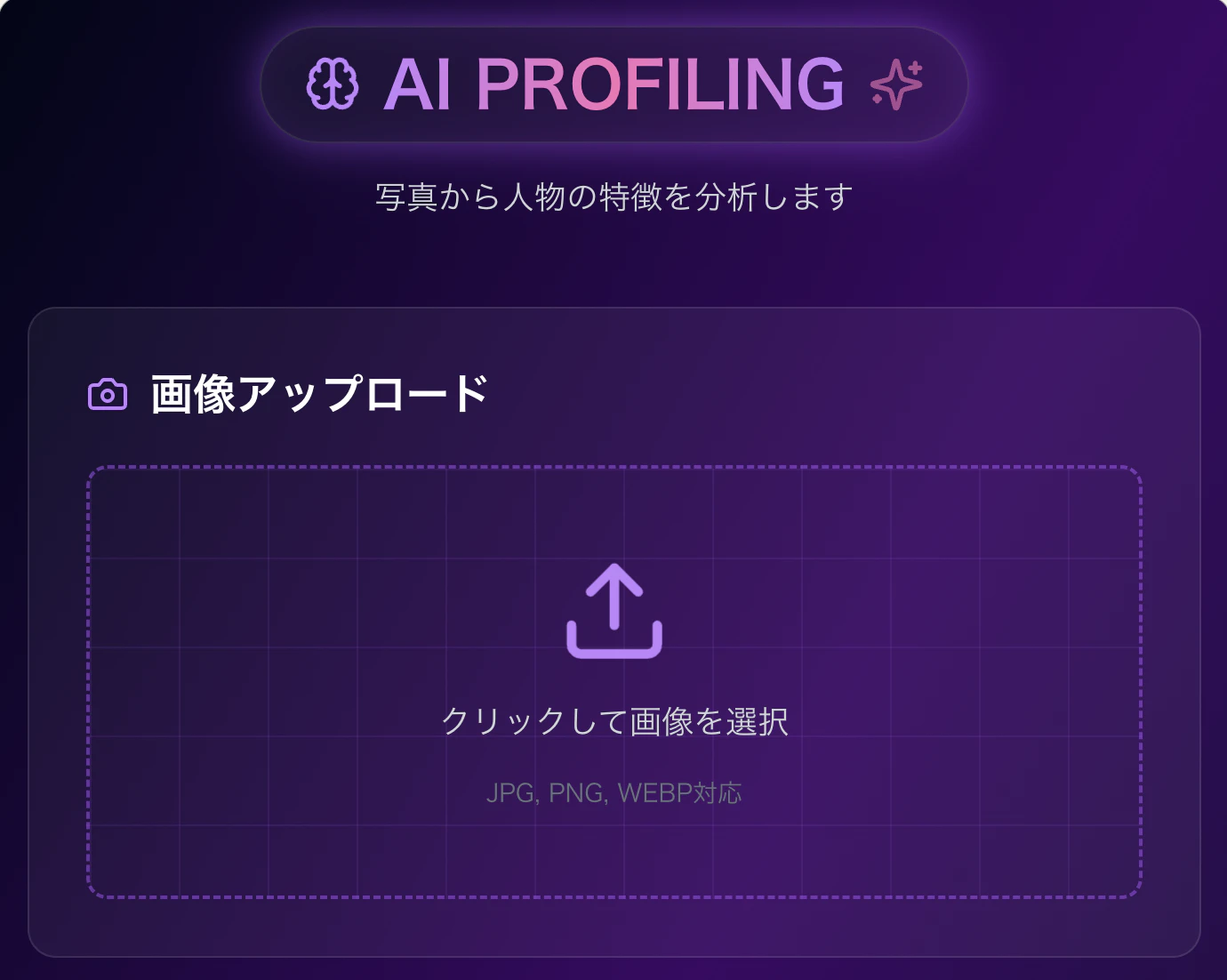
試しに写真をアップロードしてみます。
使用した写真はこちらです。

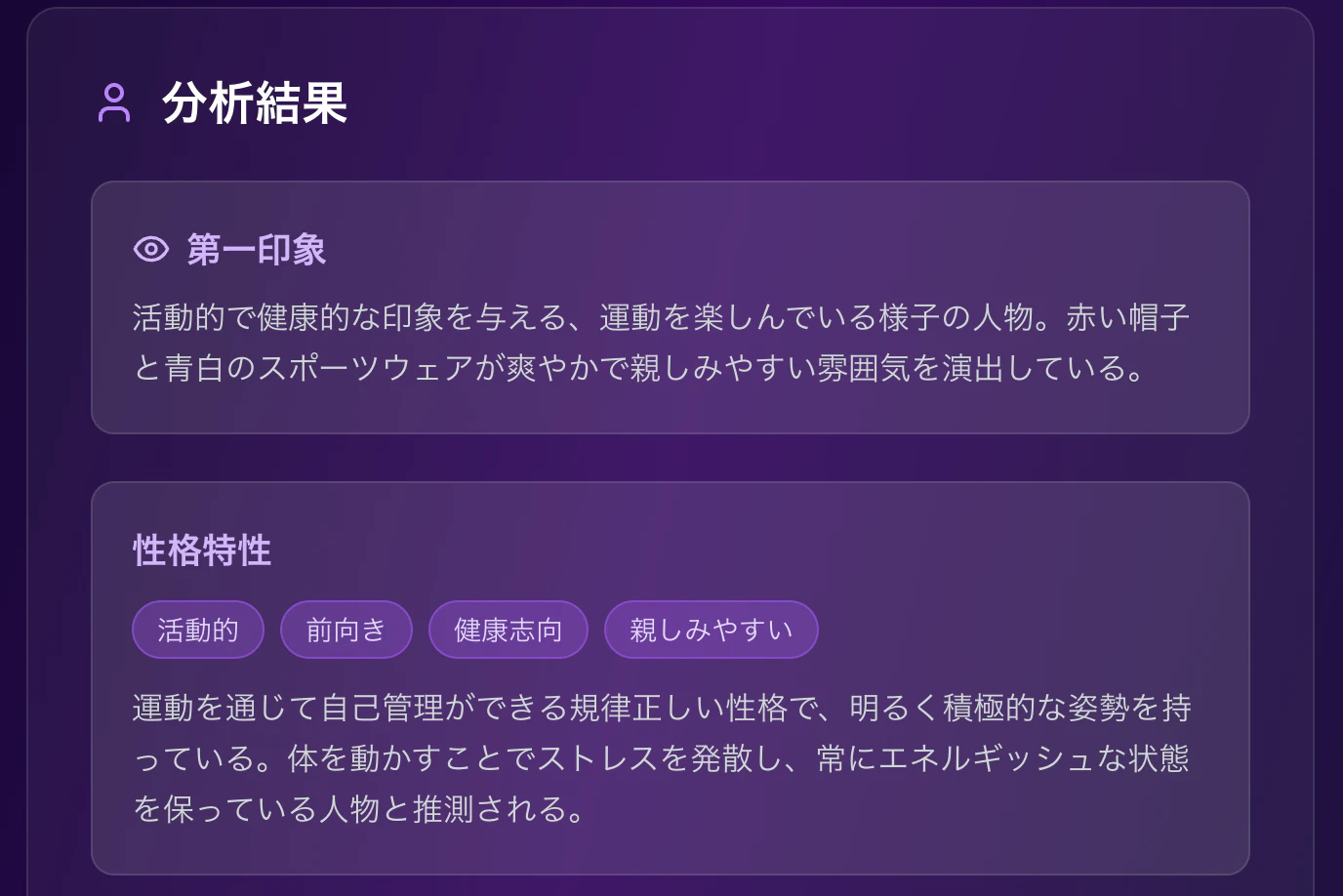
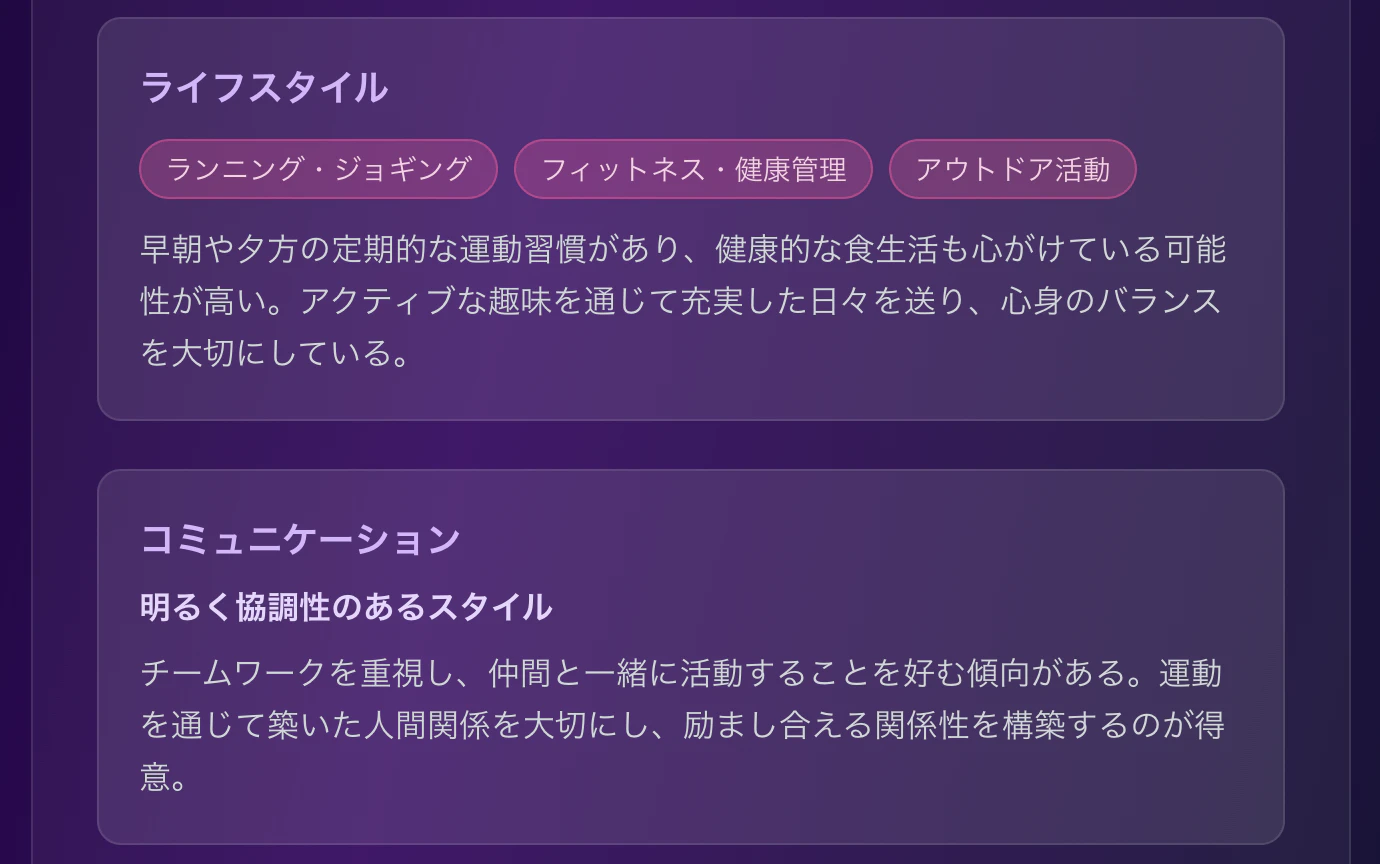
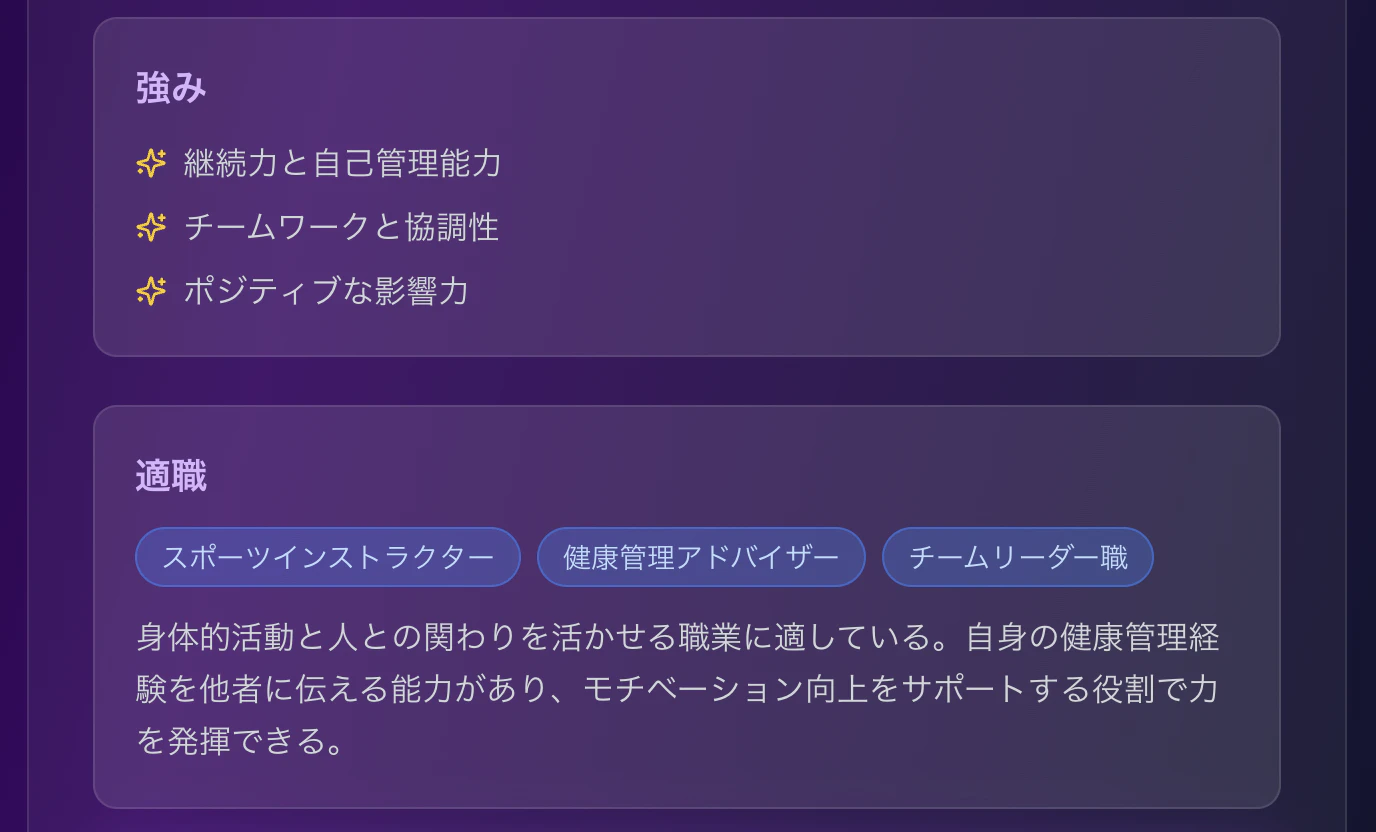
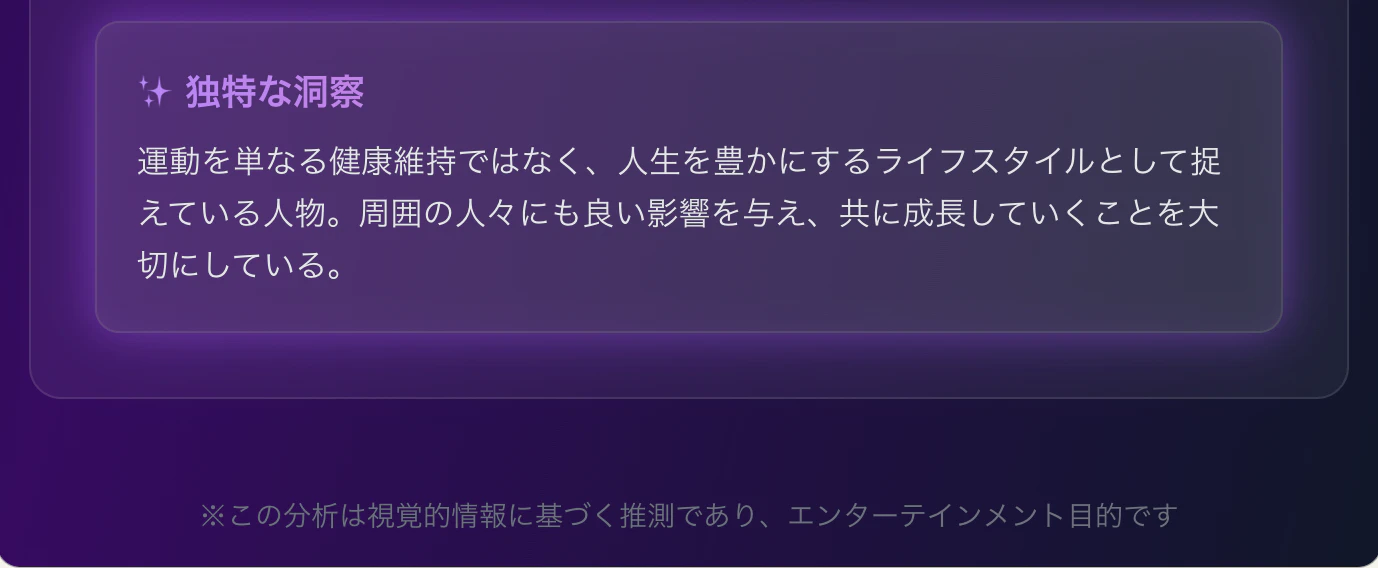
かなり細かく分析してくれました!
プログラム解説
ポイントとなるプログラムを解説します。
  const handleImageUpload = async (event) => {
    const file = event.target.files[0];
    if (!file) return;

    if (!file.type.startsWith('image/')) {
      setError('画像ファイルを選択してください');
      return;
    }

    setError(null);
    const reader = new FileReader();

    reader.onload = async (e) => {
      const imageUrl = e.target.result;
      setImage(imageUrl);

      const base64Data = imageUrl.split(',')[1];
      const mediaType = file.type;
      setImageData({ base64Data, mediaType });
    };

    reader.readAsDataURL(file);
  };

  const analyzeImage = async () => {
    if (!imageData) return;

    setLoading(true);
    setError(null);
    setProfile(null);

    try {
      const response = await fetch("https://api.anthropic.com/v1/messages", {
        method: "POST",
        headers: {
          "Content-Type": "application/json",
        },
        body: JSON.stringify({
          model: "claude-sonnet-4-20250514",
          max_tokens: 2000,
          messages: [
            {
              role: "user",
              content: [
                {
                  type: "image",
                  source: {
                    type: "base64",
                    media_type: imageData.mediaType,
                    data: imageData.base64Data,
                  }
                },
                {
                  type: "text",
                  text: `この写真から読み取れる情報を基に、創造的なプロファイリングを行ってください。以下の形式のJSONで回答してください:

{
  "visualImpression": "第一印象(1-2文)",
  "personality": {
    "traits": ["特徴1", "特徴2", "特徴3", "特徴4"],
    "description": "性格の総合的な分析(2-3文)"
  },
  "lifestyle": {
    "interests": ["趣味・関心1", "趣味・関心2", "趣味・関心3"],
    "description": "ライフスタイルの推測(2-3文)"
  },
  "communication": {
    "style": "コミュニケーションスタイル",
    "description": "対人関係の特徴(2-3文)"
  },
  "strengths": ["強み1", "強み2", "強み3"],
  "professionalFit": {
    "careers": ["適職1", "適職2", "適職3"],
    "description": "職業適性の説明(2-3文)"
  },
  "uniqueInsight": "この人物についての独特な洞察(2-3文)"
}

DO NOT OUTPUT ANYTHING OTHER THAN VALID JSON. 分析は写真から読み取れる視覚的情報(表情、服装、背景、雰囲気など)に基づいて、ポジティブで建設的な内容にしてください。`
                }
              ]
            }
          ]
        })
      });

      if (!response.ok) {
        throw new Error(`API request failed: ${response.status}`);
      }

      const data = await response.json();
      let responseText = data.content[0].text;

      responseText = responseText.replace(/```json\n?/g, "").replace(/```\n?/g, "").trim();

      const profileData = JSON.parse(responseText);
      setProfile(profileData);
    } catch (err) {
      console.error("Error in analysis:", err);
      setError('分析中にエラーが発生しました。もう一度お試しください。');
    } finally {
      setLoading(false);
    }
  };
- 画像を Base64形式のDataURL に変換し、setImageData によりAI APIに送信するためのデータ(Base64文字列+MIMEタイプ)を保存します。
const reader = new FileReader();

reader.onload = async (e) => {
  const imageUrl = e.target.result;
  setImage(imageUrl);

  const base64Data = imageUrl.split(',')[1];
  const mediaType = file.type;
  setImageData({ base64Data, mediaType });
};
- ClaudeのArtifacts上でAnthropicのAPIを実行します。
response = await fetch("https://api.anthropic.com/v1/messages" ...)
- 生成AIのモデルは「claude-sonnet-4」です。
model: "claude-sonnet-4-20250514"
- こちらがClaudeが生成したユーザプロンプトです。
この写真から読み取れる情報を基に、創造的なプロファイリングを行ってください。以下の形式のJSONで回答してください:

{
  "visualImpression": "第一印象(1-2文)",
  "personality": {
    "traits": ["特徴1", "特徴2", "特徴3", "特徴4"],
    "description": "性格の総合的な分析(2-3文)"
  },
  "lifestyle": {
    "interests": ["趣味・関心1", "趣味・関心2", "趣味・関心3"],
    "description": "ライフスタイルの推測(2-3文)"
  },
  "communication": {
    "style": "コミュニケーションスタイル",
    "description": "対人関係の特徴(2-3文)"
  },
  "strengths": ["強み1", "強み2", "強み3"],
  "professionalFit": {
    "careers": ["適職1", "適職2", "適職3"],
    "description": "職業適性の説明(2-3文)"
  },
  "uniqueInsight": "この人物についての独特な洞察(2-3文)"
}

DO NOT OUTPUT ANYTHING OTHER THAN VALID JSON. 分析は写真から読み取れる視覚的情報(表情、服装、背景、雰囲気など)に基づいて、ポジティブで建設的な内容にしてください。
おわりに
- 人物のプロファイリングしますので、人物の写真をアップロードしてください。
- この分析は視覚的情報に基づく推測であり、エンターテイメント目的です!
AI で楽しいアプリ開発を!!
この記事は AI Code Challenge Advent Calender 2025 の 8 日目の記事です!
7日目の記事:3Dテトリスゲームアプリを作ってみた!
9日目の記事:映画のセリフで英語の発音練習するアプリを作ってみた!