
はじめに
毎日ひとつ、AIアプリをつくる。
日替わりでテーマに沿って小さなアプリを開発します。Claudeで。
この記事は  AI Code Challenge Advent Calender 2025 の 7 日目の記事です!
 6日目の記事:3Dブロック崩しゲームアプリを作ってみた!
8日目の記事:AIプロファイリングアプリを作ってみた! 
AI アプリ
概要

ゲームを作りたい。一番やりこめるのはテトリス。
でも単純すぎるからもっと複雑にしたい。
3Dのテトリスはどうだろう!? 
AI 実装
Claude Desktopでプロンプトを与えて実装してもらいます。
 プロンプト:
3Dテトリスゲームアプリをつくって

3Dテトリスゲームを作成しました!
プロンプト:
奥行きも再現して
奥行きのある本格的な3Dテトリスに改良しました!
プロンプト:
見た目をモダナイズして
ゲームの見た目を大幅にモダナイズしました!
完成したアプリ
できました!
 3Dテトリス
 のリンクからアプリを確認できます
使い方:
- ← → : 左右移動(X軸)
- A D : 奥行き移動(Z軸)
- ↓ : 下に移動(Y軸)
- W : X軸回転
- Q E : Y軸回転
- R : Z軸回転
- スペース : 一気に落下
こんなイメージです。
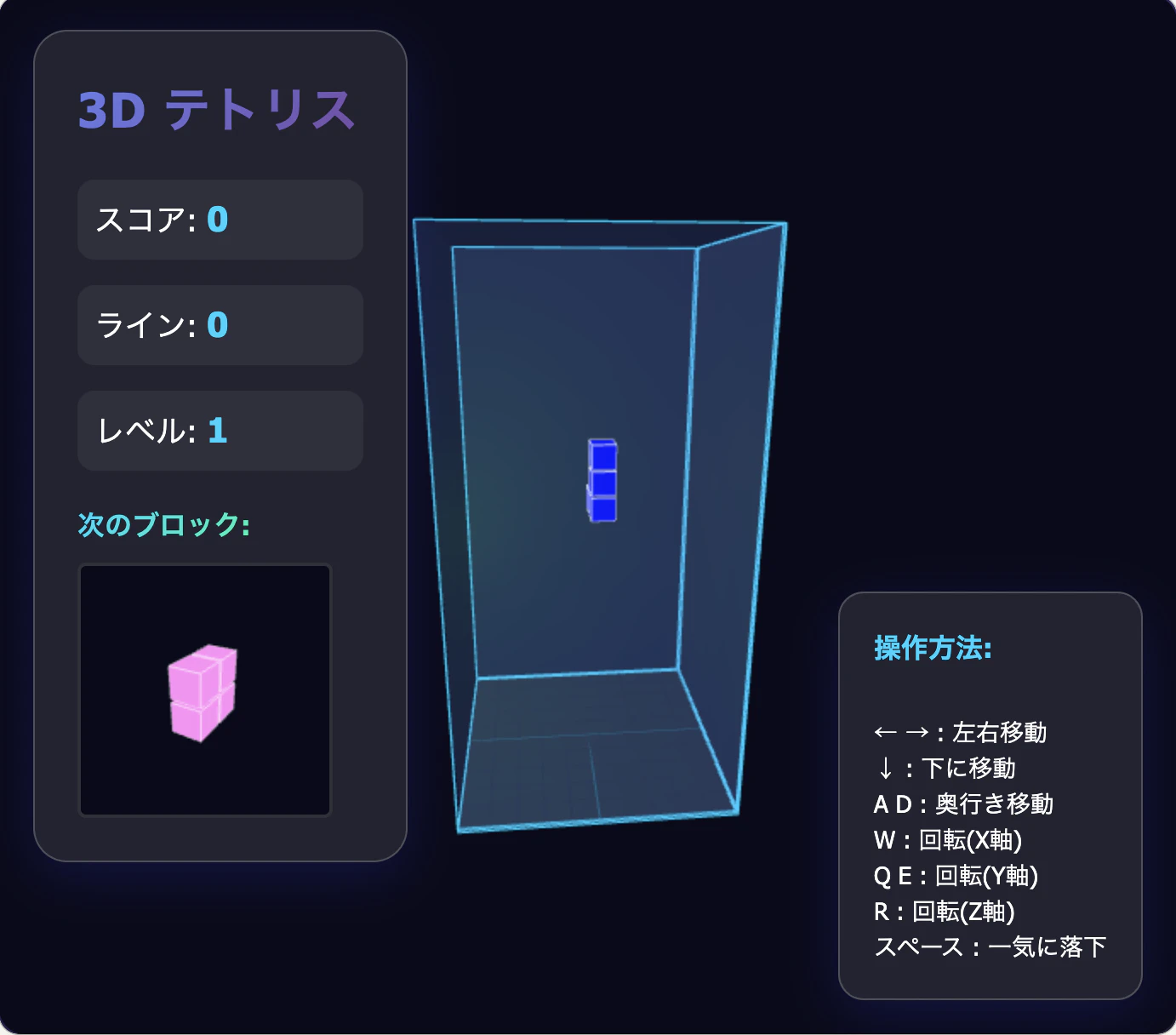
あとは実際にゲームしてみてください!
PCでお楽しみください!(矢印キーを使うため)
プログラム解説
ポイントとなるプログラムを解説します。
        // シーン設定
        const scene = new THREE.Scene();
        scene.background = new THREE.Color(0x0a0a1a);
        scene.fog = new THREE.Fog(0x0a0a1a, 30, 60);

        // 3Dテトリミノの形状 (x, y, z座標の配列)
        const SHAPES = [
            // I字型(縦長)
            [[0,0,0], [0,1,0], [0,2,0], [0,3,0]],
            // O字型(立方体)
            [[0,0,0], [1,0,0], [0,1,0], [1,1,0], [0,0,1], [1,0,1], [0,1,1], [1,1,1]],
            // T字型
            [[0,0,0], [1,0,0], [2,0,0], [1,1,0]],
            // L字型
            [[0,0,0], [0,1,0], [0,2,0], [1,2,0]],
            // J字型
            [[1,0,0], [1,1,0], [1,2,0], [0,2,0]],
            // S字型
            [[0,0,0], [1,0,0], [1,1,0], [2,1,0]],
            // Z字型
            [[1,0,0], [2,0,0], [0,1,0], [1,1,0]],
            // 3D L字型
            [[0,0,0], [0,1,0], [0,0,1], [0,1,1]],
            // 3Dコーナー
            [[0,0,0], [1,0,0], [0,1,0], [0,0,1]],
            // 3D十字
            [[0,0,0], [1,0,0], [2,0,0], [1,0,1], [1,0,-1]],
        ];

        createBoardFrame();

        // ブロックを作成(3D位置対応)- モダンデザイン
        function createBlock(x, y, z, color) {
            const geometry = new THREE.BoxGeometry(BLOCK_SIZE * 0.9, BLOCK_SIZE * 0.9, BLOCK_SIZE * 0.9);
            const material = new THREE.MeshPhongMaterial({
                color: color,
                shininess: 150,
                specular: 0xffffff,
                emissive: color,
                emissiveIntensity: 0.2
            });
            const block = new THREE.Mesh(geometry, material);
            block.position.set(x + BLOCK_SIZE / 2, y + BLOCK_SIZE / 2, z + BLOCK_SIZE / 2);
            block.castShadow = true;
            block.receiveShadow = true;

            // エッジを追加(より明るく)
            const edges = new THREE.EdgesGeometry(geometry);
            const line = new THREE.LineSegments(
                edges,
                new THREE.LineBasicMaterial({ color: 0xffffff, linewidth: 2, opacity: 0.8, transparent: true })
            );
            block.add(line);

            return block;
        }

        // ピースデータからピースを作成
        function createPieceFromData(pieceData) {
            const piece = {
                shape: pieceData.shape,
                color: pieceData.color,
                blocks: []
            };

            pieceData.shape.forEach(([x, y, z]) => {
                const block = createBlock(0, 0, 0, pieceData.color);
                piece.blocks.push({ block, offsetX: x, offsetY: y, offsetZ: z });
                scene.add(block);
            });

            return piece;
        }

        // 次のピースのプレビューを更新
        function updateNextPiecePreview() {
            // 既存のプレビューをクリア
            while(previewScene.children.length > 2) { // ライト2つを残す
                previewScene.remove(previewScene.children[2]);
            }

            if (!nextPiece) return;

            // 中心点を計算
            let centerX = 0, centerY = 0, centerZ = 0;
            nextPiece.shape.forEach(([x, y, z]) => {
                centerX += x;
                centerY += y;
                centerZ += z;
            });
            centerX /= nextPiece.shape.length;
            centerY /= nextPiece.shape.length;
            centerZ /= nextPiece.shape.length;

            // プレビュー用ブロックを作成(モダンデザイン)
            nextPiece.shape.forEach(([x, y, z]) => {
                const geometry = new THREE.BoxGeometry(0.8, 0.8, 0.8);
                const material = new THREE.MeshPhongMaterial({
                    color: nextPiece.color,
                    shininess: 150,
                    emissive: nextPiece.color,
                    emissiveIntensity: 0.3
                });
                const block = new THREE.Mesh(geometry, material);

                // 中心を原点に
                block.position.set(
                    (x - centerX) * 0.9,
                    (y - centerY) * 0.9,
                    (z - centerZ) * 0.9
                );

                const edges = new THREE.EdgesGeometry(geometry);
                const line = new THREE.LineSegments(
                    edges,
                    new THREE.LineBasicMaterial({ color: 0xffffff, opacity: 0.6, transparent: true })
                );
                block.add(line);

                previewScene.add(block);
            });

            // プレビューをレンダリング
            previewRenderer.render(previewScene, previewCamera);
        }

        // 衝突判定(3D版)
        function checkCollision(piece, pos) {
            if (!piece) return true;

            for (let i = 0; i < piece.blocks.length; i++) {
                const { offsetX, offsetY, offsetZ } = piece.blocks[i];
                const newX = pos.x + offsetX;
                const newY = pos.y + offsetY;
                const newZ = pos.z + offsetZ;

                // 境界チェック
                if (newX < 0 || newX >= BOARD_WIDTH ||
                    newY >= BOARD_HEIGHT ||
                    newZ < 0 || newZ >= BOARD_DEPTH) {
                    return true;
                }

                // ボードとの衝突チェック
                if (newY >= 0 && board[newY][newZ][newX]) {
                    return true;
                }
            }
            return false;
        }

        // ラインをクリア(3D版 - 平面をクリア)
        function clearLines() {
            let linesCleared = 0;

            for (let y = BOARD_HEIGHT - 1; y >= 0; y--) {
                // 平面が完全に埋まっているかチェック
                let isFull = true;
                for (let z = 0; z < BOARD_DEPTH; z++) {
                    for (let x = 0; x < BOARD_WIDTH; x++) {
                        if (board[y][z][x] === null) {
                            isFull = false;
                            break;
                        }
                    }
                    if (!isFull) break;
                }

                if (isFull) {
                    linesCleared++;

                    // ブロックを削除
                    for (let z = 0; z < BOARD_DEPTH; z++) {
                        for (let x = 0; x < BOARD_WIDTH; x++) {
                            if (board[y][z][x]) {
                                scene.remove(board[y][z][x]);
                            }
                        }
                    }

                    // 上のブロックを下に移動
                    for (let moveY = y; moveY > 0; moveY--) {
                        for (let z = 0; z < BOARD_DEPTH; z++) {
                            for (let x = 0; x < BOARD_WIDTH; x++) {
                                board[moveY][z][x] = board[moveY - 1][z][x];
                                if (board[moveY][z][x]) {
                                    board[moveY][z][x].position.y -= BLOCK_SIZE;
                                }
                            }
                        }
                    }

                    // 最上段をクリア
                    for (let z = 0; z < BOARD_DEPTH; z++) {
                        for (let x = 0; x < BOARD_WIDTH; x++) {
                            board[0][z][x] = null;
                        }
                    }

                    y++; // 同じ行を再チェック
                }
            }

            if (linesCleared > 0) {
                lines += linesCleared;
                score += linesCleared * linesCleared * 200 * level; // 3Dなのでスコア倍増
                level = Math.floor(lines / 5) + 1; // レベルアップを早めに
                dropSpeed = Math.max(100, 1000 - (level - 1) * 100);

                updateUI();
            }
        }

        // 新しいピースを生成(3D版)
        function spawnNewPiece() {
            // nextPieceがあればそれを使用、なければ新規作成
            if (nextPiece) {
                currentPiece = createPieceFromData(nextPiece);
            } else {
                currentPiece = createNewPiece();
            }

            // 次のピースを準備
            nextPiece = createPieceData();
            updateNextPiecePreview();

            // 中央に配置
            currentPosition = {
                x: Math.floor(BOARD_WIDTH / 2) - 1,
                y: 0,
                z: Math.floor(BOARD_DEPTH / 2) - 1
            };

            if (checkCollision(currentPiece, currentPosition)) {
                endGame();
            } else {
                updatePiecePosition();
            }
        }

        // ゲームオーバー
        function endGame() {
            gameOver = true;
            document.getElementById('final-score').textContent = score;
            document.getElementById('final-lines').textContent = lines;
            document.getElementById('game-over').style.display = 'block';
        }

        // 3D回転関数
        function rotateX(piece) {
            piece.blocks.forEach(block => {
                const y = block.offsetY;
                const z = block.offsetZ;
                block.offsetY = -z;
                block.offsetZ = y;
            });
        }

        function rotateY(piece) {
            piece.blocks.forEach(block => {
                const x = block.offsetX;
                const z = block.offsetZ;
                block.offsetX = z;
                block.offsetZ = -x;
            });
        }

        function rotateZ(piece) {
            piece.blocks.forEach(block => {
                const x = block.offsetX;
                const y = block.offsetY;
                block.offsetX = -y;
                block.offsetY = x;
            });
        }

        // ピースを回転(3D版)
        function rotatePiece(axis) {
            if (!currentPiece || gameOver) return;

            // 回転前の状態を保存
            const oldOffsets = currentPiece.blocks.map(b => ({
                offsetX: b.offsetX,
                offsetY: b.offsetY,
                offsetZ: b.offsetZ
            }));

            // 指定軸で回転
            if (axis === 'x') rotateX(currentPiece);
            else if (axis === 'y') rotateY(currentPiece);
            else if (axis === 'z') rotateZ(currentPiece);

            // 衝突チェック
            if (checkCollision(currentPiece, currentPosition)) {
                // 衝突する場合は元に戻す
                currentPiece.blocks.forEach((block, i) => {
                    block.offsetX = oldOffsets[i].offsetX;
                    block.offsetY = oldOffsets[i].offsetY;
                    block.offsetZ = oldOffsets[i].offsetZ;
                });
            } else {
                updatePiecePosition();
            }
        }

        // ゲームループ
        function animate(currentTime) {
            requestAnimationFrame(animate);

            if (!gameOver && currentPiece) {
                if (currentTime - lastDropTime > dropSpeed) {
                    if (!checkCollision(currentPiece, { x: currentPosition.x, y: currentPosition.y + 1, z: currentPosition.z })) {
                        currentPosition.y++;
                        updatePiecePosition();
                    } else {
                        lockPiece();
                    }
                    lastDropTime = currentTime;
                }
            }

            // カメラを回転
            const radius = 25;
            camera.position.x = Math.sin(currentTime * 0.0002) * radius + BOARD_WIDTH / 2;
            camera.position.z = Math.cos(currentTime * 0.0002) * radius + BOARD_DEPTH / 2;
            camera.lookAt(BOARD_WIDTH / 2, BOARD_HEIGHT / 2, BOARD_DEPTH / 2);

            renderer.render(scene, camera);
        }

        // ゲーム開始
        spawnNewPiece();
        animate(0);
- Three.js を使って3D空間を実装。ここにブロックやライトを配置。
const scene = new THREE.Scene();
scene.background = new THREE.Color(0x0a0a1a);
scene.fog = new THREE.Fog(0x0a0a1a, 30, 60);
- BoxGeometry で立方体の形状を表現し、MeshPhongMaterial で光沢のある材質を表現します。
function createBlock(x, y, z, color) {
    const geometry = new THREE.BoxGeometry(BLOCK_SIZE * 0.9, ...);
    const material = new THREE.MeshPhongMaterial({ color, shininess: 150, ... });
    const block = new THREE.Mesh(geometry, material);
    block.position.set(...);
    block.castShadow = true;
    block.receiveShadow = true;

    // エッジを追加
    const edges = new THREE.EdgesGeometry(geometry);
    const line = new THREE.LineSegments(edges, new THREE.LineBasicMaterial({ color: 0xffffff }));
    block.add(line);

    return block;
}
- カメラをゆっくり回転させて立体的な見栄えを演出しています。
function animate(currentTime) {
    requestAnimationFrame(animate);
    ...
    // カメラを回転
    camera.position.x = Math.sin(currentTime * 0.0002) * radius + BOARD_WIDTH / 2;
    camera.position.z = Math.cos(currentTime * 0.0002) * radius + BOARD_DEPTH / 2;
    camera.lookAt(BOARD_WIDTH / 2, BOARD_HEIGHT / 2, BOARD_DEPTH / 2);
    renderer.render(scene, camera);
}
おわりに
- テトリスを3Dにして難易度をかなり上げてみました。
3Dの表示もAI Codingで簡単にできました。 - 作っておいてまだレベル1もクリアしていないので💦 お楽しみください!
AI で楽しいアプリ開発を!!
この記事は AI Code Challenge Advent Calender 2025 の 7 日目の記事です!