
背景・目的
先日、Create budgets to monitor account spendingが発表されました。
今まで、Systemsテーブルを参照しながらコストと予算を設定したダッシュボードを運用していたので、これにより、代替可能か試してみたいと思います。
まとめ
下記の特徴をまとめます。
| 特徴 | 説明 |
|---|---|
| 概要 | 予算を使用すると、アカウント全体の使用状況を監視できる 予算を設定しアカウント全体の支出を追跡 フィルターを使用して特定のチーム、プロジェクト、ワークスペースの支出を追跡できる 予算は、USDで測定される、プラットフォームアドオンを含むSKUの定価(list price)が使用される |
| 要件 | 予算の作成、管理にはアカウント管理者である必要がある |
| 注意点 | Usageや料金は停止できない 最終的な支払いがBudgetを超える可能性がある 2024/6/16 時点でパブリックプレビュー |
| 制限事項 | 発生から通知まで最大24時間遅れの可能性あり 予算作成後、予算のDetailが表示されるまで時間がかかる可能性がある 予算には、アカウントに適用される請求クレジットや、交渉による割引は考慮されない。使用量とSKUの低下を掛けて計算される |
概要
Use budgets to monitor account spending
Use budgets to monitor account spendingを基に整理します。
2024/6/16 時点でパブリックプレビューです
This article explains how to use budgets to track spending in your Databricks account.
Budgets enable you to monitor usage across your account. You can set up budgets to either track account-wide spending, or apply filters to track the spending of specific teams, projects, or workspaces.
Budgets are measured in USD and use the list price of the SKU, including platform add-ons.
- 予算を使用すると、アカウント全体の使用状況を監視できる
- 予算を設定しアカウント全体の支出を追跡
- フィルターを使用して特定のチーム、プロジェクト、ワークスペースの支出を追跡できる
- 予算は、USDで測定される、プラットフォームアドオンを含むSKUの定価(list price)が使用される
Important
Budgets improve your ability to monitor usage. They do not stop usage or charges from happening. Your final bill can exceed your budget amount.
- Usageや料金は停止できない
- 最終的な支払いがBudgetを超える可能性がある
Requirements
You must be an account admin to create and manage budgets.
- 予算の作成、管理にはアカウント管理者である必要がある
Known limitations
- There could be up to a 24-hour delay between usage occurring and an email notification being sent.
- After you create a new budget, there could be a delay before you can see the budget details.
- Budgets do not factor in any billing credits or negotiated discounts your account might have. The spent amount is calculated by multiplying usage by the SKU list price.
- 発生から通知まで最大24時間遅れの可能性あり
- 予算作成後、予算のDetailが表示されるまで時間がかかる可能性がある
- 予算には、アカウントに適用される請求クレジットや、交渉による割引は考慮されない。使用量とSKUの低下を掛けて計算される
実践
Create a budget
- アカウントコンソールにサインインします
- ナビゲーションペインの使用量をクリックします

1.① 「予算」タブをクリック、②「Add budget」をクリックします

- 下記を入力し、作成をクリックします
- 名前:任意
- 金額:月額を設定。アラートを確認したいので「$1」に設定しました
- ワークスペース:空白にすることで、すべて&将来作成されるワークスペースが適用されます
- タグ:限定する場合、指定します
- Email addresses:月額予算を超過した際に、メール通知させるアドレスを指定します

View budget details
-
作成直後、ステータスは、「No data」です

-
予算名をクリックすると、右側に詳細が表示されます。作成直後なのでグラフは表示されていません

-
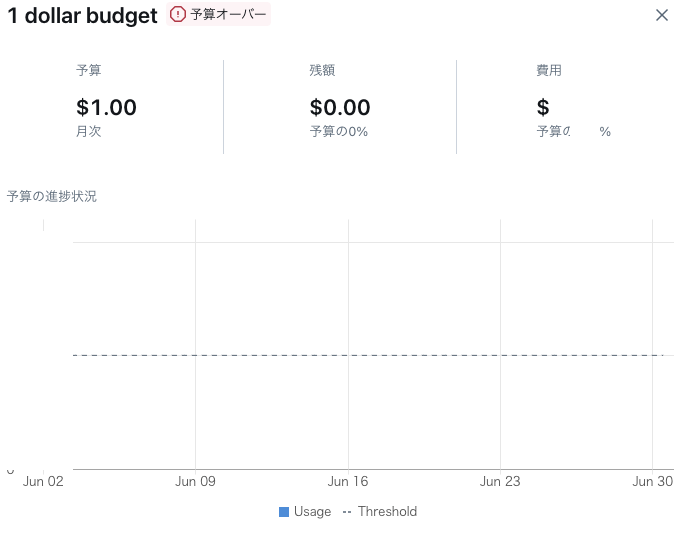
しばらくすると、ステータスが予算オーバーになりました

-
名前をクリックすると、下記が確認できました!※金額は伏せています
- 予算額
- 残額
- 費用
- 予算の進捗状況
Notification
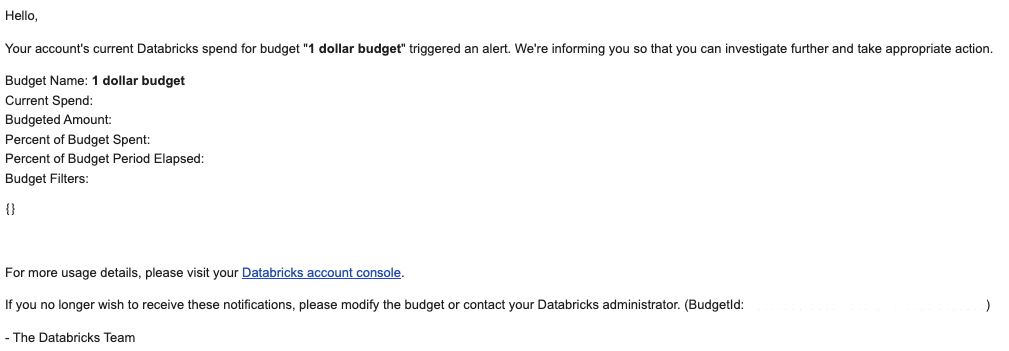
- メールボックスを確認すると下記の通知が来ていました
- タイトル:Databricks Budget Notification - 1 dollar budget
- 内容
考察
今回は、アカウント予算のモニタリングを試してみました。
AWS のBudgetと同じように予算設定と通知ができるようになりました。これで使いすぎたときに、すぐに気付けて安心ですね。
今後は、予測コストやDailyの予算など設定できると、もっと嬉しいです。
参考