

はじめに
建物の名前から正確な位置を地図上に表示したい――
そんなときに便利なのが、ZENRIN Maps API の建物・テナント名称検索API です。
このサンプルでは、入力した建物名を検索し、
候補リストから選択するだけで地図上にマーカーを表示できるようにしています。
また、検索結果には建物の住所や階数、郵便番号などの情報も表示されるため、
不動産や防災、配送など「建物単位の位置把握」が求められる業務にも応用できます。
地図の初期化・検索・マーカー表示といった基本的な流れが一通り学べる構成になっているので、
初めて ZENRIN Maps API を使う方にもおすすめのサンプルです。
この記事でできること
- 建物名から住所情報を検索
- 検索結果の候補一覧を表示
- 候補を選択して住所フォームに自動入力
- 緯度経度情報から地図上にマーカーを表示
APIキーの取得
ZENRIN Maps API を利用するには、事前に APIキーの取得が必要です。
現在、ZENRIN Maps API は 2か月間の無料トライアルが用意されており、期間中は主要な機能を実際にお試しいただけます。開発や評価の初期段階でも安心してご利用いただけます。
APIキーの取得方法については、以下の記事で詳しく解説されています。
初めての方は、まずこちらをご覧いただき、APIキーの発行と設定を行ってください。
公式リファレンス
- 地図描画 メインクラス(Map)
- 拡大縮小ボタンのクラス(ZoomButton)
- コンパスのクラス(Compass)
- スケールバーのクラス(ScaleBar)
- マーカーのクラス(Marker)
- 建物・テナント名称検索(building_name)
ファイル構成
project/
├─ zma_building_name.html
├─ css/
│   └─ zma_building_name.css
└─ js/
    └─ zma_building_name.js
サンプルコード
<!DOCTYPE html>
<html lang="ja">

<head>
    <meta charset="UTF-8">
    <meta name="viewport" content="width=device-width, initial-scale=1.0">
    <title>ZENRIN Maps API - 建物名から住所フォーム自動補完</title>
    <!-- Font Awesome 6.4.2 (SIL Open Font License) -->
    <link rel="stylesheet" href="https://cdnjs.cloudflare.com/ajax/libs/font-awesome/6.4.2/css/all.min.css">
    <link rel="stylesheet" href="css/zma_building_name.css">
</head>

<body>
    <div id="ZMap"></div>

    <div class="search-panel">
        <div class="panel-header">
            <h2><i class="fas fa-building"></i> 建物名から住所自動補完</h2>
            <p>建物名を入力して住所情報を自動取得できます</p>
        </div>

        <div class="panel-body">
            <!-- 建物名検索セクション -->
            <div class="form-section-title">
                <i class="fas fa-search"></i> 建物名検索
            </div>

            <div class="form-grid">
                <label class="form-label">建物名</label>
                <div class="search-box">
                    <input type="text" class="search-input" id="buildingWord" placeholder="例: 田町ステーションタワー">
                </div>

                <label class="form-label">一致方法</label>
                <select id="wordMatchType" class="select">
                    <option value="3" selected>部分一致</option>
                    <option value="2">前方一致</option>
                    <option value="1">完全一致</option>
                </select>
            </div>

            <div class="actions">
                <button id="btnSearch" class="btn primary"><i class="fas fa-search"></i> 検索</button>
                <button id="btnClear" class="btn"><i class="fas fa-eraser"></i> クリア</button>
            </div>

            <div class="search-info" id="searchInfo">
                <i class="fas fa-info-circle"></i>
                <span id="searchInfoText"></span>
            </div>

            <div class="error-message" id="errorMessage">
                <i class="fas fa-exclamation-triangle"></i>
                <span id="errorMessageText"></span>
            </div>

            <div class="loading" id="loading">
                <div class="spinner"></div>
                <p>検索中...</p>
            </div>

            <!-- 候補選択セクション -->
            <div class="form-section-title">
                <i class="fas fa-list"></i> 候補選択
            </div>

            <select id="candidateList" class="candidate-select" size="5" disabled>
                <option>建物名を検索してください</option>
            </select>

            <!-- 住所フォームセクション -->
            <div class="form-section-title">
                <i class="fas fa-map-marked-alt"></i> 住所情報
            </div>

            <div class="address-form">
                <div class="form-row">
                    <label for="zipcode">郵便番号</label>
                    <input type="text" id="zipcode" readonly placeholder="候補を選択すると自動入力されます">
                </div>

                <div class="form-row">
                    <label for="address">住所</label>
                    <input type="text" id="address" readonly placeholder="候補を選択すると自動入力されます">
                </div>

                <div class="form-row">
                    <label>緯度・経度</label>
                    <div class="latlon-row">
                        <input type="text" id="latitude" readonly placeholder="緯度">
                        <input type="text" id="longitude" readonly placeholder="経度">
                    </div>
                    <div class="info-text">
                        <i class="fas fa-info-circle"></i> 地図上にマーカーを表示するために使用されます
                    </div>
                </div>
            </div>

            <!-- 検索結果セクション(詳細表示用) -->
            <div class="results-container" id="resultsContainer">
                <div class="results-header"><span id="hitCount">0</span> 件ヒット</div>
                <div id="resultsList"></div>
            </div>
        </div>
    </div>

    <script src="https://test-js.zmaps-api.com/zma_loader.js?key=YOUR_API_KEY&auth=referer"></script>
    <script src="js/zma_building_name.js"></script>
</body>

</html>
CSS(クリックで展開)
/* 基本スタイル */
* { box-sizing: border-box; }
body { font-family: 'Segoe UI', Tahoma, Geneva, Verdana, sans-serif; height: 100vh; overflow: hidden; }
#ZMap { position: absolute; width: 100%; height: 100%; top: 0; left: 0; }

/* パネルスタイル */
.search-panel { position: absolute; top: 20px; left: 20px; width: 420px; max-height: calc(100vh - 40px); background: #fff; border-radius: 12px; box-shadow: 0 4px 20px rgba(0,0,0,0.15); z-index: 1000; overflow: hidden; display: flex; flex-direction: column; }
.panel-header { padding: 16px 20px; background: linear-gradient(135deg, #667eea 0%, #764ba2 100%); color: #fff; }
.panel-header h2 { font-size: 18px; margin: 0 0 4px; }
.panel-header p { font-size: 12px; opacity: .9; margin: 0; }
.panel-body { padding: 16px 20px 20px; overflow-y: auto; }

/* フォームスタイル */
.form-grid { display: grid; grid-template-columns: 120px 1fr; gap: 10px 12px; align-items: center; margin-bottom: 12px; }
.form-label { font-size: 12px; color: #555; }
.input, .select, .search-input { width: 100%; padding: 10px 12px; border: 2px solid #e0e0e0; border-radius: 8px; font-size: 14px; transition: all .2s; }
.input:focus, .select:focus, .search-input:focus { outline: none; border-color: #667eea; box-shadow: 0 0 0 3px rgba(102,126,234,.1); }

/* ボタンスタイル */
.actions { display: flex; gap: 8px; margin: 4px 0 12px; }
.btn { background: #e9ecef; border: none; border-radius: 8px; padding: 10px 14px; cursor: pointer; font-size: 14px; }
.btn.primary { background: #667eea; color: #fff; }
.btn:hover { filter: brightness(0.97); }

/* メッセージスタイル */
.search-info { display: none; background: #f8f9fa; padding: 10px 12px; border-radius: 8px; margin-bottom: 10px; font-size: 12px; color: #555; }
.search-info.show { display: block; }
.error-message { display: none; background: #fee; color: #c33; padding: 10px 12px; border-radius: 8px; margin-bottom: 10px; font-size: 12px; }
.error-message.show { display: block; }

/* ローディングスタイル */
.loading { display: none; text-align: center; padding: 16px; }
.loading.show { display: block; }
.spinner { border: 3px solid #f3f3f3; border-top: 3px solid #667eea; border-radius: 50%; width: 34px; height: 34px; animation: spin 1s linear infinite; margin: 0 auto 8px; }
@keyframes spin { 0% { transform: rotate(0deg); } 100% { transform: rotate(360deg); } }

/* 検索結果スタイル */
.results-container { display: none; }
.results-container.show { display: block; }
.results-header { font-size: 13px; font-weight: 600; margin: 6px 0 10px; color: #333; }
.result-item { background: #f8f9fa; padding: 12px; border-radius: 8px; margin-bottom: 8px; border: 2px solid transparent; cursor: pointer; transition: all .2s; }
.result-item:hover { background: #eef2ff; border-color: #667eea; }
.result-title { font-size: 14px; font-weight: 600; margin-bottom: 4px; color: #333; }
.result-sub { font-size: 12px; color: #666; margin-bottom: 6px; }
.result-meta { display: flex; gap: 8px; flex-wrap: wrap; font-size: 12px; color: #555; }
.badge { display: inline-block; background: #667eea; color: #fff; padding: 2px 8px; border-radius: 10px; font-size: 11px; }
.meta { background: #fff; border: 1px solid #e3e7ff; border-radius: 8px; padding: 2px 8px; }

/* フォーム専用のスタイル */
.address-form {
    background: #f8f9fa;
    padding: 16px;
    border-radius: 8px;
    margin-bottom: 16px;
}

.form-row {
    margin-bottom: 12px;
}

.form-row label {
    display: block;
    font-size: 12px;
    font-weight: 600;
    color: #555;
    margin-bottom: 6px;
}

.form-row input {
    width: 100%;
    padding: 10px 12px;
    border: 2px solid #e0e0e0;
    border-radius: 8px;
    font-size: 14px;
    background: #fff;
    transition: all 0.2s;
}

.form-row input:focus {
    outline: none;
    border-color: #667eea;
    box-shadow: 0 0 0 3px rgba(102, 126, 234, 0.1);
}

.form-row input[readonly] {
    background: #f5f5f5;
    color: #666;
    cursor: not-allowed;
}

.candidate-select {
    width: 100%;
    padding: 10px 12px;
    border: 2px solid #e0e0e0;
    border-radius: 8px;
    font-size: 14px;
    background: #fff;
    min-height: 120px;
    margin-bottom: 12px;
}

.candidate-select:disabled {
    background: #f5f5f5;
    color: #999;
    cursor: not-allowed;
}

.form-section-title {
    font-size: 14px;
    font-weight: 600;
    color: #333;
    margin: 16px 0 12px;
    padding-bottom: 8px;
    border-bottom: 2px solid #e0e0e0;
}

.form-section-title:first-child {
    margin-top: 0;
}

.latlon-row {
    display: grid;
    grid-template-columns: 1fr 1fr;
    gap: 8px;
}

.info-text {
    font-size: 11px;
    color: #666;
    margin-top: 4px;
    line-height: 1.4;
}

/* レスポンシブデザイン */
@media (max-width: 768px) {
    .search-panel { width: calc(100% - 40px); }
    .form-grid { grid-template-columns: 1fr; }
}
// マップ変数
let map;
let marker = null;

// DOM要素
const $ = (id) => document.getElementById(id);

// API設定
const API_ENDPOINT = 'https://test-web.zmaps-api.com/search/building_name';
const API_KEY = 'YOUR_API_KEY';
const API_AUTH = 'referer';

// 検索結果を保持
let searchResults = [];

// 候補リストの更新中フラグ(changeイベントを抑制するため)
let isUpdatingCandidates = false;

// 地図の初期化
ZMALoader.setOnLoad(function (mapOptions, error) {
    if (error) {
        console.error('Map Loader Error:', error);
        setError('地図の読み込みに失敗しました');
        return;
    }

    // 東京駅を中心に設定
    const lat = 35.681236;
    const lng = 139.767125;

    // 地図オプションを設定
    mapOptions.center = new ZDC.LatLng(lat, lng);
    mapOptions.zoom = 14;
    mapOptions.mouseWheelReverseZoom = true;

    // 地図を作成
    const mapElement = document.getElementById('ZMap');
    if (!mapElement) {
        console.error('ZMap element is not found.');
        setError('地図表示エリアが見つかりません');
        return;
    }

    map = new ZDC.Map(
        mapElement,
        mapOptions,
        function () {
            map.addControl(new ZDC.ZoomButton('bottom-right', new ZDC.Point(-20, -35)));
            map.addControl(new ZDC.ScaleBar('bottom-left'));
        },
        function () {
            setError('地図の初期化に失敗しました');
        }
    );
});

// マーカーをクリア
function clearMarker() {
    if (marker && map) {
        map.removeWidget(marker);
        marker = null;
    }
}

// マーカーを追加
function addMarker(lng, lat, title) {
    if (!map) {
        console.warn('Map is not initialized');
        return;
    }

    // 数値に変換
    const longitude = typeof lng === 'string' ? parseFloat(lng) : lng;
    const latitude = typeof lat === 'string' ? parseFloat(lat) : lat;

    // 数値チェック
    if (typeof longitude !== 'number' || typeof latitude !== 'number' ||
        isNaN(longitude) || isNaN(latitude)) {
        setError('座標情報が無効です');
        return;
    }

    // 有効な範囲チェック(緯度: -90 ~ 90、経度: -180 ~ 180)
    if (latitude < -90 || latitude > 90 || longitude < -180 || longitude > 180) {
        setError('座標が範囲外です');
        return;
    }

    try {
        clearMarker();

        // ZDC.LatLngは(緯度, 経度)の順序で受け取る
        const position = new ZDC.LatLng(latitude, longitude);
        marker = new ZDC.Marker(position, {
            label: title || ''
        });

        map.addWidget(marker);
        map.setCenter(position);
        map.setZoom(18);

        setError('');
    } catch (error) {
        console.error('マーカーの追加に失敗:', error);
        setError('マーカーの表示に失敗しました');
    }
}

// ローディング表示
function setLoading(show) {
    $('loading').classList.toggle('show', show);
}

// エラーメッセージ表示
function setError(message) {
    const box = $('errorMessage');
    $('errorMessageText').textContent = message || '';
    box.classList.toggle('show', Boolean(message));
}

// 情報メッセージ表示
function setInfo(message) {
    const box = $('searchInfo');
    $('searchInfoText').textContent = message || '';
    box.classList.toggle('show', Boolean(message));
}

// 検索実行
async function search() {
    setError('');
    setInfo('');

    const word = $('buildingWord').value.trim();
    if (!word) {
        setError('建物名を入力してください');
        return;
    }

    setLoading(true);
    try {
        const wordMatchType = $('wordMatchType').value;
        const params = new URLSearchParams({
            word: word,
            word_match_type: wordMatchType,
            limit: '0,20',
            datum: 'JGD'
        });

        const res = await fetch(`${API_ENDPOINT}?${params.toString()}`, {
            headers: {
                'x-api-key': API_KEY,
                'Authorization': API_AUTH
            }
        });
        if (!res.ok) throw new Error(`HTTP ${res.status}`);

        const json = await res.json();

        if (json.status !== 'OK') {
            throw new Error(json.message || '検索に失敗しました');
        }

        // 検索結果を保存
        const items = Array.isArray(json.result?.item) ? json.result.item : [];
        searchResults = items;

        // 検索結果が0件の場合はメッセージを表示(renderCandidates内で処理)
        renderCandidates(items);
        renderResults(json.result || {});
    } catch (e) {
        setError(e.message);
        renderCandidates([]);
    } finally {
        setLoading(false);
    }
}

// 候補リストを表示
function renderCandidates(items) {
    const select = $('candidateList');

    // changeイベントを抑制するフラグを設定
    isUpdatingCandidates = true;

    // changeイベントが発火しないように、一時的にdisabledにする
    select.disabled = true;
    select.innerHTML = '';
    select.value = ''; // 明示的にvalueをクリア

    if (items.length === 0) {
        const option = document.createElement('option');
        option.textContent = '候補は見つかりませんでした';
        select.appendChild(option);
        select.disabled = true;
        clearFormFields();
        // 検索結果が0件の場合にメッセージを表示
        setInfo('この建物の座標情報はありません');
        isUpdatingCandidates = false;
        return;
    }

    items.forEach((item, index) => {
        const option = document.createElement('option');
        option.value = String(index);

        // 表示テキスト: 建物名|都道府県市区町村
        const buildingName = item.name || item.building_name || '(名称なし)';
        const address = [
            item.pref_name || '',
            item.city_name || '',
            item.oaza_name || ''
        ].filter(Boolean).join('');

        option.textContent = `${buildingName}|${address}`;
        select.appendChild(option);
    });

    // 候補リストを有効化する前に、valueを空に設定(自動選択を防ぐ)
    select.value = '';

    // 候補リストを有効化
    select.disabled = false;

    // フラグをリセット(次のtickで実行されるようにsetTimeoutを使用)
    // より長い遅延を設定して、ブラウザの自動選択を確実に回避
    setTimeout(() => {
        isUpdatingCandidates = false;
        // 念のため、valueが空でない場合はクリア
        if (select.value !== '') {
            select.value = '';
        }
    }, 100);

    // 検索直後は情報メッセージをクリア(候補が選択されるまで表示しない)
    setInfo('');
}

// 候補が選択されたときの処理
function onCandidateSelected(item = null) {
    // 候補リストの更新中は処理をスキップ
    if (isUpdatingCandidates && !item) {
        return;
    }

    let selectedItem = item;

    // itemが指定されていない場合は、セレクトボックスから取得
    if (!selectedItem) {
        const select = $('candidateList');
        // disabled、valueが空、または更新中の場合は処理をスキップ
        if (select.disabled || select.value === '' || isUpdatingCandidates) {
            return;
        }

        const index = parseInt(select.value, 10);
        // インデックスが無効な場合は処理をスキップ
        if (isNaN(index) || index < 0 || index >= searchResults.length) {
            return;
        }
        selectedItem = searchResults[index];
    }

    if (!selectedItem) {
        return;
    }

    // フォームに値を設定
    $('zipcode').value = selectedItem.post_code || '';

    // 住所を結合(建物名も含める)
    const addressParts = [
        selectedItem.pref_name || '',
        selectedItem.city_name || '',
        selectedItem.oaza_name || '',
        selectedItem.chome_name || '',
        selectedItem.building_name || ''
    ].filter(Boolean);
    $('address').value = addressParts.join('');

    // 緯度経度を取得
    // リファレンス: positionは["経度","緯度"]の配列形式
    let lng = null;
    let lat = null;
    const buildingName = selectedItem.name || selectedItem.building_name || '選択された建物';

    if (Array.isArray(selectedItem.position) && selectedItem.position.length >= 2) {
        // position[0]が経度、position[1]が緯度
        const pos0 = selectedItem.position[0];
        const pos1 = selectedItem.position[1];

        // 数値型か文字列型かを確認して変換
        if (typeof pos0 === 'number' && typeof pos1 === 'number' &&
            !isNaN(pos0) && !isNaN(pos1)) {
            lng = pos0; // 経度
            lat = pos1; // 緯度
        } else {
            // 文字列の場合は数値に変換
            const parsedLng = parseFloat(pos0);
            const parsedLat = parseFloat(pos1);
            if (!isNaN(parsedLng) && !isNaN(parsedLat)) {
                lng = parsedLng; // 経度
                lat = parsedLat; // 緯度
            }
        }
    }

    // 座標情報があればフォームに設定し、マーカーを表示
    if (lng !== null && lat !== null && typeof lng === 'number' && typeof lat === 'number' &&
        !isNaN(lng) && !isNaN(lat)) {
        $('longitude').value = String(lng);
        $('latitude').value = String(lat);
        addMarker(lng, lat, buildingName);
        setInfo('');
    } else {
        // 座標情報がない場合はフォームをクリア(メッセージは表示しない)
        $('longitude').value = '';
        $('latitude').value = '';
        clearMarker();
        setInfo('');
    }
}

// 検索結果を詳細表示
function renderResults(result) {
    const items = Array.isArray(result.item) ? result.item : [];
    $('hitCount').textContent = String((result.info && result.info.hit) || items.length || 0);

    const list = $('resultsList');
    list.innerHTML = '';

    if (items.length === 0) {
        $('resultsContainer').classList.add('show');
        // メッセージはrenderCandidates()で表示されるため、ここでは表示しない
        return;
    }

    items.forEach((it, index) => {
        const name = it.name || it.building_name || '(名称なし)';
        const address = it.address || [
            it.pref_name || '',
            it.city_name || '',
            it.oaza_name || '',
            it.chome_name || ''
        ].filter(Boolean).join('');

        const type = it.building_type === 1 ? 'テナント' : it.building_type === 3 ? '建物' : '';
        const floors = `地上${it.building_top_floor_num ?? '-'} / 地下${it.building_bottom_floor_num ?? '-'}`;

        const row = document.createElement('div');
        row.className = 'result-item';
        row.innerHTML = `
            <div class="result-title"><i class="fas fa-location-dot"></i> ${name}</div>
            <div class="result-sub">${address}</div>
            <div class="result-meta">
                <span class="badge">${type}</span>
                <span class="meta">階数: ${floors}</span>
                ${it.post_code ? `<span class="meta">郵便番号: ${it.post_code}</span>` : ''}
            </div>
        `;

        // クリックで候補を選択
        row.addEventListener('click', () => {
            // セレクトボックスにも反映
            const select = $('candidateList');
            if (!select.disabled && select.options.length > index) {
                select.value = String(index);
            }
            // 選択処理を実行
            onCandidateSelected(it);
        });

        list.appendChild(row);
    });

    $('resultsContainer').classList.add('show');
}

// フォームフィールドをクリア
function clearFormFields() {
    $('zipcode').value = '';
    $('address').value = '';
    $('latitude').value = '';
    $('longitude').value = '';
    clearMarker();
}

// フォーム全体をクリア
function clearForm() {
    $('buildingWord').value = '';
    $('wordMatchType').value = '3';
    $('candidateList').innerHTML = '<option>建物名を検索してください</option>';
    $('candidateList').disabled = true;
    $('hitCount').textContent = '0';
    $('resultsList').innerHTML = '';
    $('resultsContainer').classList.remove('show');
    searchResults = [];
    clearFormFields();
    setError('');
    setInfo('');
}

// イベント設定
function wireEvents() {
    $('btnSearch').addEventListener('click', search);
    $('btnClear').addEventListener('click', clearForm);

    // 建物名入力でEnterキーを押したら検索
    $('buildingWord').addEventListener('keydown', (e) => {
        if (e.key === 'Enter') {
            e.preventDefault();
            search();
        }
    });

    // 候補選択時の処理
    $('candidateList').addEventListener('change', onCandidateSelected);
}

// ページ読み込み時にイベントを設定
window.addEventListener('DOMContentLoaded', () => {
    wireEvents();
});
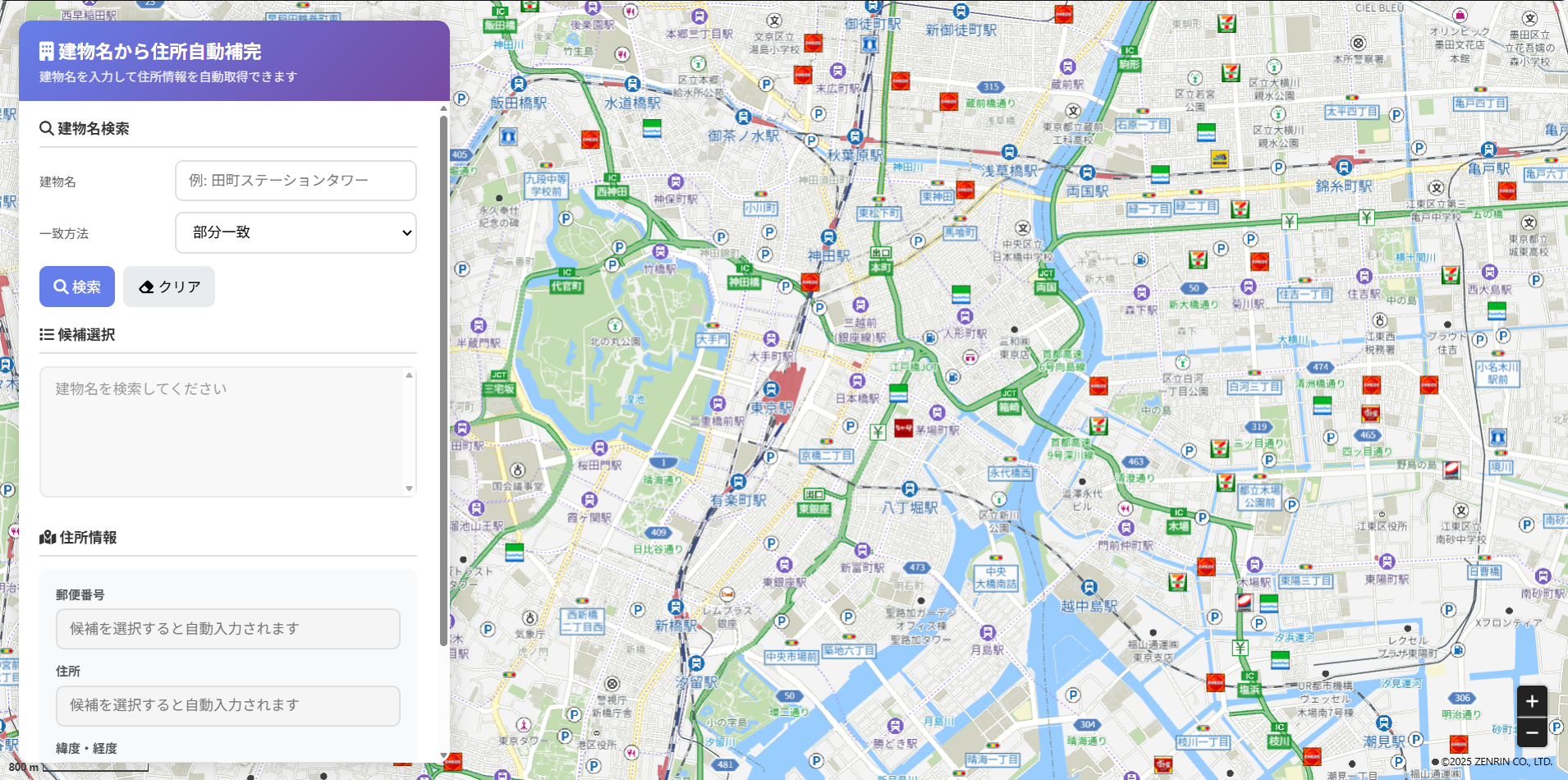
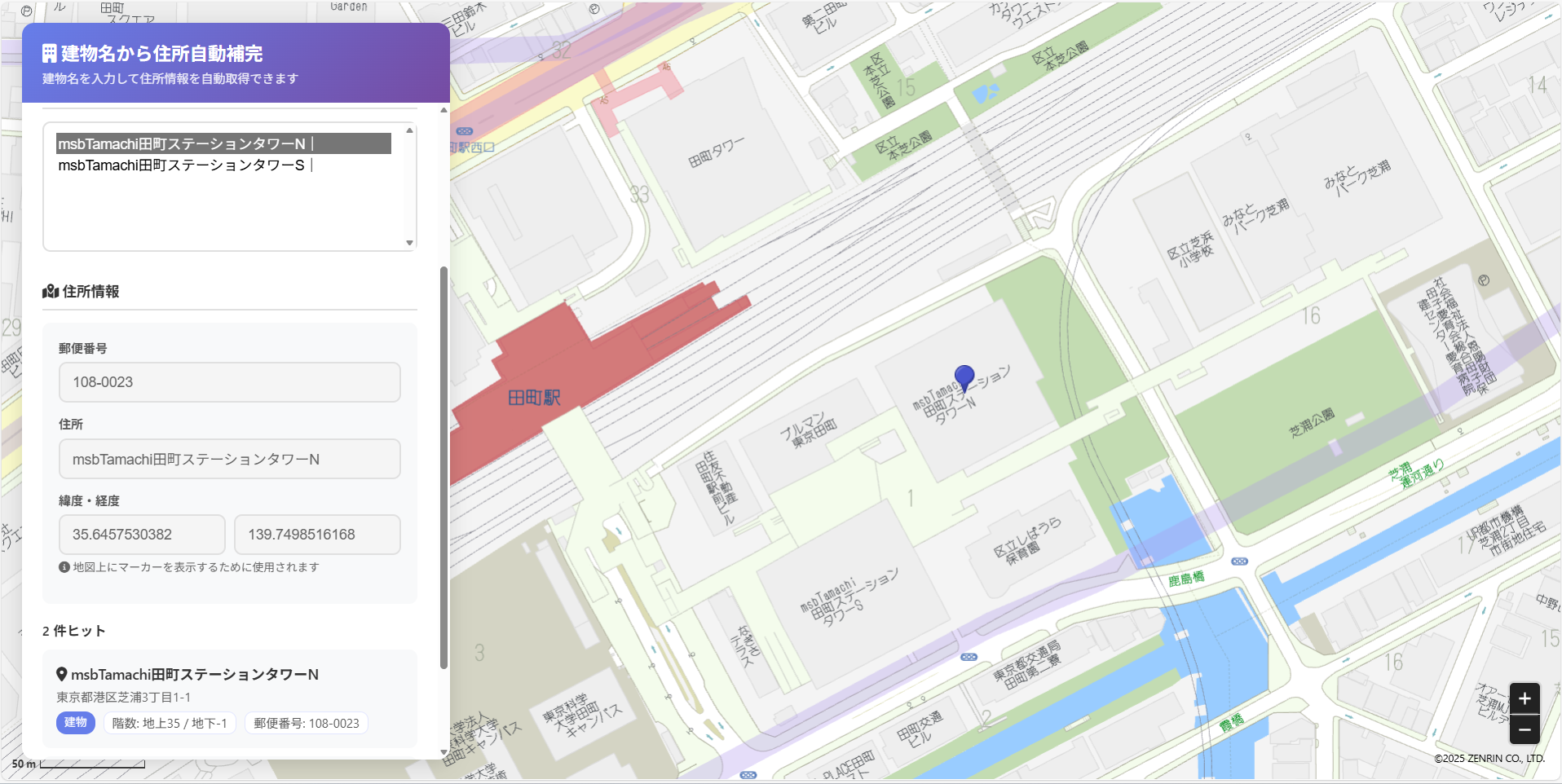
コードを実行した結果は、以下になります。
検索した結果をクリックすると選択した地点を地図上にマーカー表示します。
Step 1:HTML構造の準備
まずはフォームと地図の表示領域を用意します。
<div id="ZMap"></div>

<div class="search-panel">
  <h2>建物名から住所自動補完</h2>
  <input type="text" id="buildingWord" placeholder="例: 田町ステーションタワー">
  <select id="wordMatchType">
    <option value="3" selected>部分一致</option>
    <option value="2">前方一致</option>
    <option value="1">完全一致</option>
  </select>
  <button id="btnSearch">検索</button>

  <select id="candidateList" size="5" disabled>
    <option>建物名を検索してください</option>
  </select>

  <div class="address-form">
    <label>郵便番号</label>
    <input id="zipcode" readonly>

    <label>住所</label>
    <input id="address" readonly>

    <label>緯度・経度</label>
    <input id="latitude" readonly>
    <input id="longitude" readonly>
  </div>
</div>
ここでは「建物名入力 → 候補選択 → 住所表示」の流れを実現するための要素を定義しています。
Step 2:地図の初期化
次に、ZENRIN Maps APIのJavaScriptライブラリを読み込み、地図を表示します。
<script src="https://test-js.zmaps-api.com/zma_loader.js?key=YOUR_API_KEY&auth=referer"></script>
<script>
let map;

// ZMA Loaderの読み込み完了時に地図を初期化
ZMALoader.setOnLoad(function (mapOptions, error) {
  if (error) {
    console.error('地図読み込みに失敗しました');
    return;
  }

  const lat = 35.681236;
  const lng = 139.767125;

  mapOptions.center = new ZDC.LatLng(lat, lng);
  mapOptions.zoom = 14;

  const mapElement = document.getElementById('ZMap');
  map = new ZDC.Map(mapElement, mapOptions, function () {
    map.addControl(new ZDC.ZoomButton('bottom-right'));
    map.addControl(new ZDC.ScaleBar('bottom-left'));
  });
});
</script>
Step 3:建物・テナント名称検索APIの呼び出し
次に、建物名で住所情報を検索します。
const API_ENDPOINT = 'https://test-web.zmaps-api.com/search/building_name';
const API_KEY = 'YOUR_API_KEY';
const API_AUTH = 'referer';

async function search() {
  const word = document.getElementById('buildingWord').value.trim();
  if (!word) return alert('建物名を入力してください');

  const wordMatchType = document.getElementById('wordMatchType').value;
  const params = new URLSearchParams({
    word: word,
    word_match_type: wordMatchType,
    limit: '0,20',
    datum: 'JGD'
  });

  const res = await fetch(`${API_ENDPOINT}?${params}`, {
    headers: {
      'x-api-key': YOUR_API_KEY,
      'Authorization': API_AUTH
    }
  });

  const json = await res.json();
  if (json.status !== 'OK') {
    alert('検索に失敗しました');
    return;
  }
    // 検索結果を保存
    const items = Array.isArray(json.result?.item) ? json.result.item : [];
    searchResults = items;

    // 検索結果が0件の場合はメッセージを表示(renderCandidates内で処理)
    renderCandidates(items);
    renderResults(json.result || {});
}
Step 4:検索結果を候補リストに表示
検索結果の配列を <select> 要素に出力します。
function renderCandidates(items) {
  const select = document.getElementById('candidateList');
  select.innerHTML = '';
  select.disabled = items.length === 0;

  items.forEach((item, index) => {
    const option = document.createElement('option');
    const address = [item.pref_name, item.city_name, item.oaza_name]
      .filter(Boolean).join('');
    option.value = index;
    option.textContent = `${item.building_name || '(名称なし)'}|${address}`;
    select.appendChild(option);
  });
}
候補が選択されたときに住所フォームへ反映します。
Step 5:選択した建物をフォームと地図に反映
選択された建物情報を住所欄に入力し、緯度経度をもとにマーカーを表示します。
let marker = null;

function onCandidateSelected(items) {
  const select = document.getElementById('candidateList');
  const item = items[parseInt(select.value, 10)];
  if (!item) return;

  document.getElementById('zipcode').value = item.post_code || '';
  document.getElementById('address').value =
    [item.pref_name, item.city_name, item.oaza_name, item.chome_name, item.building_name]
      .filter(Boolean).join('');

  if (Array.isArray(item.position)) {
    const [lng, lat] = item.position.map(Number);
    document.getElementById('longitude').value = lng;
    document.getElementById('latitude').value = lat;
    addMarker(lng, lat, item.building_name);
  }
}

function addMarker(lng, lat, title) {
  if (marker) map.removeWidget(marker);
  const position = new ZDC.LatLng(lat, lng);
  marker = new ZDC.Marker(position, { label: title || '' });
  map.addWidget(marker);
  map.setCenter(position);
  map.setZoom(18);
}
これで、候補をクリックするたびに地図上へ建物の位置が表示されます。
おわりに
このサンプルでは、建物名をもとに検索して地図上へマーカーを表示するまでの基本的な処理を実装しました。
実際の開発では、検索条件や表示項目を拡張することで、
たとえば以下のような応用も可能です。
- テナント情報をクリックで詳細表示する
- 建物の種類ごとにマーカーアイコンを変える
- 住所検索や経路検索と組み合わせて地図アプリを構築する
ZENRIN Maps API は、地図の見た目をカスタマイズしたり、
検索対象を建物・住所・POIなどに切り替えたりと、柔軟に拡張できます。
今回のコードをベースに、自社の業務やサービスに合わせた“建物検索マップ”を
ぜひ作ってみてください。