
この記事は、AWSでのL7パケットキャプチャの結果を記録しておくものです。読んで面白いものではないです。
Application Load Balancer + EC2
クライアント端末からcurlでGetリクエストをALB(80番ポート)に送信し、ALBがターゲットグループのホスト(8000番ポート)に中継するという構成。
ALB→ターゲットホストのヘルスチェック(ターゲットホスト側でのキャプチャ)
ALB→ターゲットホストのヘルスチェック(ターゲットホスト側でのキャプチャ)
GET / HTTP/1.1
Host: xxx.xxx.xxx.xxx:8000
Connection: close
User-Agent: ELB-HealthChecker/2.0
Accept-Encoding: gzip, compressed
<CR-LF>
<CR-LF>
- Hostの値はターゲットホストのプライベートIP。
- 「ターゲットの種類」の指定(インスタンスまたはipのいずれか)に関係なく、
Hostの値はプライベートDNSではなくプライベートIP。
クライアント→ALB→ターゲットホスト(ターゲットホスト側でのキャプチャ)
クライアントでの実行コマンド
$ curl -v xxxxx-alb-xxxxxxxxx.ap-northeast-1.elb.amazonaws.com:80
-
xxxxx-alb-xxxxxxxxx.ap-northeast-1.elb.amazonaws.comは、ALBのパブリックDNS。 - ALBのリスナーポートは
80番。
Getリクエスト(ターゲットホスト側でのキャプチャ)
GET / HTTP/1.1
X-Forwarded-For: xxx.xxx.xxx.xxx
X-Forwarded-Proto: http
X-Forwarded-Port: 80
Host: xxxxx-alb-xxxxxxxxx.ap-northeast-1.elb.amazonaws.com
X-Amzn-Trace-Id: Root=1-5ee58a8f-ddc1e7f02f0142206947f2a0
User-Agent: curl/7.55.1
Accept: */*
<CR-LF>
<CR-LF>
-
X-Forwarded-Forの値はクライアントのグローバルIP。 -
Hostの値はALBのパブリックDNS。
API Gateway + ALB + EC2
Client(curl)→API Gateway→ALB→EC2(Webサーバ)
GET / HTTP/1.1
X-Forwarded-For: 3.112.163.59
X-Forwarded-Proto: http
X-Forwarded-Port: 80
Host: xxxxx-alb-xxxxxxxxx.ap-northeast-1.elb.amazonaws.com
X-Amzn-Trace-Id: Self=1-5ee5a43c-dd74d6339c12b241bc3c6a38;Root=1-5ee5a43c-1bbb2733e2f4da50ca3b3d4d
x-amzn-apigateway-api-id: xxxxxxxxxx
User-Agent: AmazonAPIGateway_xxxxxxxxxx
Accept: application/json
-
User-Agentの値は、AmazonAPIGateway_の後にx-amzn-apigateway-api-idの値を追加したもの。 -
Hostの値は、ALBのパブリックDNS。 -
X-Forwarded-Forの3.112.163.59は、API Gatewayの基盤のEC2インスタンスのグローバルIPアドレス? -
X-Forwarded-ForにAPI Gatewayより前の経由IPが入ってないということは、API GatewayはX-Forwarded-Forが実装されていない様子。アクセス元IPの取得はマッピングテンプレートを利用すれば可能らしい。(参考)「API Gatewayでもアクセス元IPを取得したい #アドカレ2015」
API Gateway + Lambda
Lambda関数は、JSONデータのメンバ変数bodyに、Lambda関数の引数eventの内容をダンプした文字列をそのままセットして返しているだけです。
Lambda関数の実装
import json

def lambda_handler(event, context):
    print('Event: {}'.format(event))

    return {
        'statusCode': 200,
        'headers': {
            'Content-Type': 'application/json; charset=utf-8'
        },
        'body': json.dumps(event, indent = 2)
    }
Lambdaプロキシ統合有効の場合
API Gatewayの「メソッド」の「統合リクエスト」で「Lambda プロキシ統合の使用」を有効にすると、Lambda関数の引数のeventオブジェクトに、HTTPリクエストの詳細が渡されます。
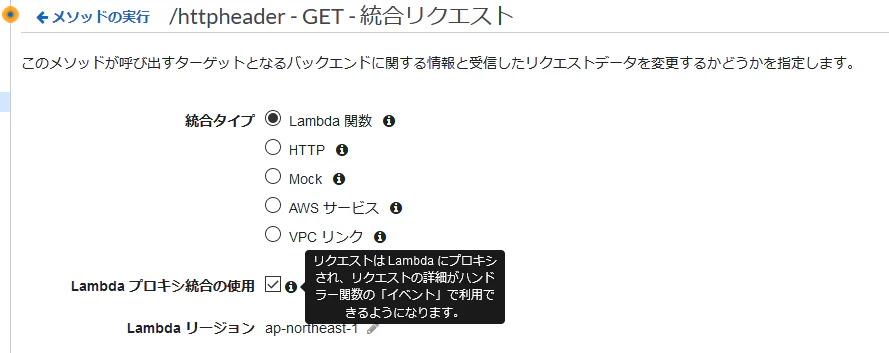
以下は、Lambdaプロキシ統合有効時のHTTPレスポンスです。メッセージボディに、Lambda関数の引数のeventオブジェクトが返って来ています。
eventのダンプ(Lambdaプロキシ統合有効)
HTTP/1.1 200 OK
Date: Sun, 14 Jun 2020 10:04:49 GMT
Content-Type: application/json; charset=utf-8
Content-Length: 1934
Connection: keep-alive
x-amzn-RequestId: b66fce5c-943e-46cd-b965-dc98eef6c8c1
x-amz-apigw-id: OHNqRHJjtjMFpvg=
X-Amzn-Trace-Id: Root=1-5ee5f641-b7ceb780f01cd2f07af9b4d0;Sampled=0

{
  "resource": "/",
  "path": "/",
  "httpMethod": "GET",
  "headers": {
    "Accept": "*/*",
    "Host": "xxxxxxxxxx.execute-api.ap-northeast-1.amazonaws.com",
    "User-Agent": "curl/7.55.1",
    "X-Amzn-Trace-Id": "Root=1-5ee5f641-b7ceb780f01cd2f07af9b4d0",
    "X-Forwarded-For": "xxx.xxx.xxx.xxx",
    "X-Forwarded-Port": "443",
    "X-Forwarded-Proto": "https"
  },
  "multiValueHeaders": {
    "Accept": [
      "*/*"
    ],
    "Host": [
      "xxxxxxxxxx.execute-api.ap-northeast-1.amazonaws.com"
    ],
    "User-Agent": [
      "curl/7.55.1"
    ],
    "X-Amzn-Trace-Id": [
      "Root=1-5ee5f641-b7ceb780f01cd2f07af9b4d0"
    ],
    "X-Forwarded-For": [
      "xxx.xxx.xxx.xxx"
    ],
    "X-Forwarded-Port": [
      "443"
    ],
    "X-Forwarded-Proto": [
      "https"
    ]
  },
  "queryStringParameters": null,
  "multiValueQueryStringParameters": null,
  "pathParameters": null,
  "stageVariables": null,
  "requestContext": {
    "resourceId": "bwmpj1",
    "resourcePath": "/",
    "httpMethod": "GET",
    "extendedRequestId": "OHNqRHJjtjMFpvg=",
    "requestTime": "14/Jun/2020:10:04:49 +0000",
    "path": "/test/",
    "accountId": "999999999999",
    "protocol": "HTTP/1.1",
    "stage": "test",
    "domainPrefix": "xxxxxxxxxx",
    "requestTimeEpoch": 1592129089612,
    "requestId": "b66fce5c-943e-46cd-b965-dc98eef6c8c1",
    "identity": {
      "cognitoIdentityPoolId": null,
      "accountId": null,
      "cognitoIdentityId": null,
      "caller": null,
      "sourceIp": "xxx.xxx.xxx.xxx",
      "principalOrgId": null,
      "accessKey": null,
      "cognitoAuthenticationType": null,
      "cognitoAuthenticationProvider": null,
      "userArn": null,
      "userAgent": "curl/7.55.1",
      "user": null
    },
    "domainName": "xxxxxxxxxx.execute-api.ap-northeast-1.amazonaws.com",
    "apiId": "xxxxxxxxxx"
  },
  "body": null,
  "isBase64Encoded": false
}
Lambdaプロキシ統合無効の場合
以下は、Lambdaプロキシ統合を無効にした状態で、curlからAPI GatewayのURLにGetリクエストを送信してLambda関数を呼び出した時のHTTPレスポンスです。bodyが空ということは、Lambda関数の引数のeventには空のJSONデータが渡されているようです。
HTTP/1.1 200 OK
Date: Sun, 14 Jun 2020 09:58:34 GMT
Content-Type: application/json
Content-Length: 97
Connection: keep-alive
x-amzn-RequestId: ac27b88f-32d7-4875-ad75-857a469c5429
x-amz-apigw-id: OHMvtFxlNjMFrqQ=
X-Amzn-Trace-Id: Root=1-5ee5f4ca-4a019800eff68340d5566ea0;Sampled=0

{
  "statusCode": 200,
  "headers": {
    "Content-Type": "application/json; charset=utf-8"
  },
  "body": "{}"
}