
この記事の目的
Anaconda Navigatorを用いて仮想環境を構築する際の, 自分用のメモです.
STEP1
左側の「Environments」を選択して, 中央下の「Create」で新しい環境を構築
設定は, 適当に「Python 3.7」などの選択を行って完了.
STEP2
右側上のプルダウンから, 「All」(もしくは「Notinstalled」)を選択して, 未インストールのライブラリが表示されるようにする.
右上の検索バーを使って, 以下のライブラリをインストールしていく.
# 必須
notebook
numpy
pandas
matplotlib


# 機械学習用
scikit-learn
keras (tensorflowも併せてインストールしてくれる)


# 自然言語処理用
gensim


# 画像用
pillow
opencv
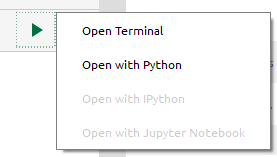
上が完了したら, 中央にある環境の実行ボタンを押して, 「Open with Jupyter Notebook」を選択.
この際, 上でnotebookをインストールしていないと, with Jupyter Notebookは選択できないので注意.
STEP3
STEP2のGUI画面からでは追加できないライブラリをターミナルから追加する.
# matplotlibの日本語表示のため
pip install japanize-matplotlib

# 拡張機能で便利にコーディングするため(特にHinterlandが便利)
pip install jupyter-contrib-nbextensions