

DSPy と LangGraph の組み合わせを試しました。
モチベーション
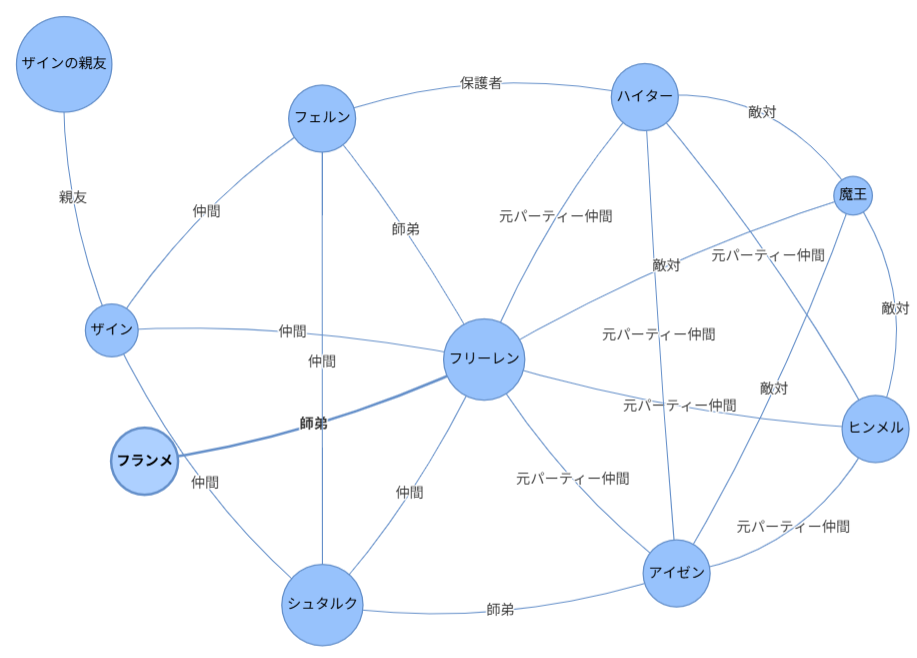
葬送のフリーレンのあらすじ から登場人物とその関係を AI に抽出させたところ GPT とその他の LLM(Grok、Claude Haiku、Gemini Pro など)に違いがあることが分かりました。
その違いとは、「魔王」や「ザインの親友」といった匿名の人物を抽出するか否かということです。GPT は抽出し、他の LLM は抽出しない。
GPT の抽出結果の例
その他の LLM の抽出結果の例
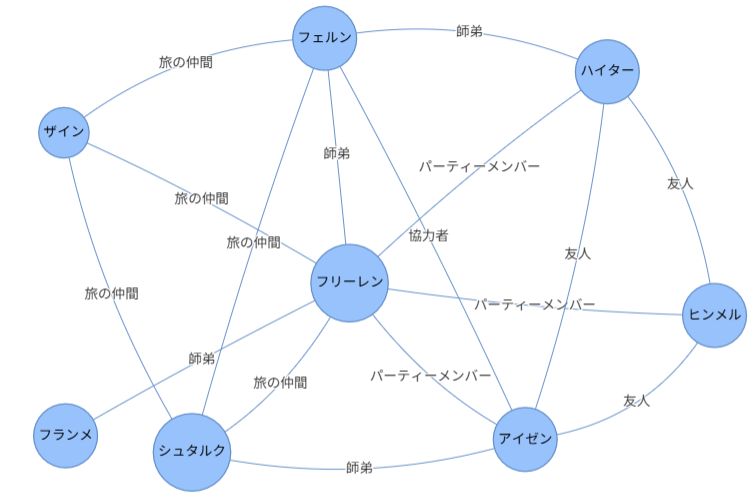
調べた結果、プロンプトに「登場人物」や「Character」というニュアンスが微妙に異なる表現を含むことが影響しているようです。
そのようなプロンプトの表現や意味のわずかな「揺らぎ」によって AI の出力が大きく変化してしまうことをプロンプトの脆さ(Prompt Brittleness)などと呼ぶようです。
プロンプトの脆さは、LLM の種類や検証サンプルによっては発見が難しい潜在不具合となりかねません。開発者の経験と勘に頼ったプロンプト作成ではなくもっと工学的にアプローチできないものか。
DSPy ならそんな希望を叶えてくれるかもしれません。
次の記事によると DSPy は、「手動のプロンプトエンジニアリングを排除できる可能性を秘めている」とのこと。Chainer に出会ったとき以来の興奮を覚えました。
LangGraph などのフレームワークと比較されることもある DSPy ですが、実際に使ってみて思ったのは、DSPy と LangGraph は必ずしも対立するものでなく相互補完的なポジションにあるということです。
DSPy の核心は、処理フロー(Pythonコード)とパラメータ(プロンプト)の分離にあります。処理フローそのものは DSPy の核心ではありません。他方 LangGraph は、処理フローをステートグラフ(State Graph)としてモデル化します。
であれば LangGraph で定義したフローを DSPy でプロンプト最適化できたら最高かも。
これは試すしかない!
LangGraph を単体で使用するコード例
バックエンドの LiteLLM プロキシの APIベースとAPIキーを環境変数に設定しておきます。
import os
os.environ["LITELLM_PROXY_API_BASE"] = "https://XXXXXXXXXXXXXXXXXX"
os.environ["LITELLM_PROXY_API_KEY"] = "sk-XXXXXXXXXXXXXXXXXXXXXX"
LangGraph のステートグラフを作成し実行。
import os
from typing import TypedDict, Dict
from pydantic import BaseModel, Field
from langgraph.graph import StateGraph, START, END
from langchain_core.runnables import RunnableConfig
from langchain_litellm import ChatLiteLLM
from IPython.display import Image, display

# LiteLLMプロキシ
llm = ChatLiteLLM(model="litellm_proxy/gemini-flash-lite")

# 構造化出力
class LocationInfo(BaseModel):
    name: str
    country: str

# ステート定義
class TestState(TypedDict):
    user_query: str
    capital: LocationInfo

# ノード定義
def node_chatbot(state: TestState) -> Dict:
    response = llm.invoke(state["user_query"], response_format=LocationInfo)
    capital = LocationInfo.model_validate_json(response.content)
    return {"capital": capital}

# グラフ定義
graph = StateGraph(TestState)
graph.add_node("chatbot", node_chatbot)
graph.add_edge(START, "chatbot")
graph.add_edge("chatbot", END)

# グラフ作成
workflow = graph.compile()

# グラフ表示
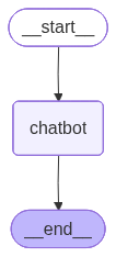
display(Image(workflow.get_graph().draw_mermaid_png()))

# グラフ実行
final_state = workflow.invoke({"user_query": "フランスの首都は?"})

print(final_state)
実行結果
{'user_query': 'フランスの首都は?',
 'capital': LocationInfo(name='Paris', country='France')}
DSPy を単体で使用するコード例
シグネチャとモジュールを定義し実行します。シグネチャとは、関数シグネチャのように入出力を定義するものです。モジュールとは、PyTorch のモジュールと似た存在で、モジュールを組み合わせて新たなモジュールを定義できます。
import os
from typing import TypedDict, Dict
import dspy
from pydantic import BaseModel

# 構造化出力スキーマ
class LocationInfo(BaseModel):
    name: str
    country: str

# シグネチャ定義
class TestSignature(dspy.Signature):
    user_query: str = dspy.InputField(desc="問い合わせ")
    location: LocationInfo = dspy.OutputField(desc="回答")

# モジュール定義
class TestModule(dspy.Module):
    def __init__(self):
        self.agent = dspy.Predict(TestSignature)

    def forward(self, user_query: str) -> LocationInfo:
        # LLM 呼び出し
        result = self.agent(user_query=user_query)
        return result

# モジュール作成
program = TestModule()

# モジュール実行
with dspy.context(lm=dspy.LM('litellm_proxy/gemini-flash-lite', cache=False)):
    result = program("フランスの首都は?")

print(result)
実行結果
Prediction(
    location=LocationInfo(name='Paris', country='France')
)
モジュールの forward メソッドに処理フローが記述されていることに注目ください。ここでは LLM を呼び出しているだけですが、以降でこの処理を LangGraph に置き換えます。
DSPy でプロンプト最適化
評価関数と訓練データを準備しオプティマイザ COPRO で最適化します。データ件数をもっと増やすべきですがここでは見通しの良さを優先します。
# 評価関数
def validate_answer(example, pred, trace=None) -> float:
    score_a = 0.5 * (example.location.name == pred.location.name)
    score_b = 0.5 * (example.location.country == pred.location.country)
    return score_a + score_b

# 訓練データ
trainset = [
    dspy.Example(user_query="日本で一番広い湖は?", location=LocationInfo(name="琵琶湖", country="日本")),
    dspy.Example(user_query="日本で一番高い山は?", location=LocationInfo(name="富士山", country="日本")),
    dspy.Example(user_query="日本で一番広い砂丘は?", location=LocationInfo(name="猿ヶ森砂丘", country="日本")),
]
trainset = [x.with_inputs('user_query') for x in trainset]

# オプティマイザ
optimizer = dspy.COPRO(metric=validate_answer, breadth=5)

# 最適化
with dspy.context(lm=dspy.LM('litellm_proxy/gemini-flash-lite', cache=True)):
    optimized_program = optimizer.compile(
        TestModule(),
        trainset=trainset,
        eval_kwargs={'num_threads': 1},
    )
※ 日本一広い砂丘は「猿ヶ森砂丘」ではないとする説
推論
with dspy.context(lm=dspy.LM('litellm_proxy/gemini-flash-lite', cache=True)):
    result = optimized_program(user_query="フランスの首都は?")
result
実行結果
Prediction(
    location=LocationInfo(name='Paris', country='France')
)
最適化された指示プロンプトを確認
optimized_program.predictors()[0].signature.instructions
実行結果
Your task is to act as a highly specialized location extraction assistant. Given a `user_query`, your primary function is to pinpoint and return the most specific geographical location mentioned. This could encompass a full address, city, state, country, or a recognized region. Prioritize accuracy and context. If multiple locations are present, identify the most prominent or relevant one based on the query's intent. Do not include any extraneous information, only the extracted location.
【和訳】
あなたのタスクは、高度に専門化された位置情報抽出アシスタントとして機能することです。提供された user_query から、あなたの主な機能は、言及されている最も具体的な地理的な位置情報を特定し、返すことです。これには、完全な住所、都市、州(または都道府県)、国、あるいは認知された地域が含まれる場合があります。正確性と文脈を最優先にしてください。複数の位置情報が存在する場合は、クエリの意図に基づいて最も目立つまたは最も関連性の高いものを特定してください。抽出された位置情報のみを返し、余分な情報を含めないでください。
DSPy + LangGraph
前述の LangGraph グラフは、ChatLiteLLM 経由で LLM を呼び出しました。
前述の DSPy モジュール TestModule は、dspy.Predict 経由で LLM を呼び出しました。なお dspy.Predict もモジュールです。ややこしいですが。
DSPy と LangGraph を組み合わせて使用する場合、次図のように DSPy モジュールから LangGraph のグラフを呼び出します。LLM の呼び出しは、LangChain の ChatLiteLLM から DSPy の dspy.Predict へ変更します。
ですがこの構成は1つ問題がありました。DSPy のパラレル実行において LangGraph のグラフが DeepCopy されるようで正常に動作しませんでした。対策としてグラフをグローバル変数に格納し DeepCopy を抑制し、DSPyモジュールからはグローバル変数を参照するようにします。実運用では contextvars にすると良いかもしれません。
しかし、そうすると今度は、グローバルなグラフがローカルの dspy.Predict オブジェクトを参照できません。対策としてグラフ実行時 invoke の引数 config に dspy.Predict オブジェクトの参照を渡します。
DSPy + LangGraph の構成
LangGraph グラフをグローバルな WORKFLOW に格納する。
# 構造化出力スキーマ
class LocationInfo(BaseModel):
    name: str = Field(..., description="地名")
    country: str = Field(..., description="国名")

# LangGraph ステート
class TestState(TypedDict):
    user_query: str
    name: str
    country: str

# LangGraph ノード
def node_chatbot(state: TestState, config: RunnableConfig) -> dict:
    """LangGraphノード"""
    user_query = state["user_query"]
    #################################
    ### 【重要】DSPy のモジュールを取得
    #################################
    agent = config["configurable"]["agent"]
    result = agent(user_query=user_query)
    return result.location.model_dump()

# LangGraph グラフ定義
graph = StateGraph(TestState)
graph.add_node("chatbot", node_chatbot)
graph.add_edge(START, "chatbot")
graph.add_edge("chatbot", END)

# LangGraph グラフ作成
WORKFLOW = graph.compile()
DSPy のシグネチャとモジュールを定義。LangGraph グラフ WORKFLOW を呼び出します。呼び出し時に RunnableConfig に dspy.Predict への参照を格納します。
# DSPy シグネチャ
class TestSignature(dspy.Signature):
    user_query: str = dspy.InputField(desc="問い合わせ")
    location: LocationInfo = dspy.OutputField(desc="回答")


# DSPy モジュール
class TestModule(dspy.Module):
    def __init__(self):
        self.agent = dspy.Predict(TestSignature)

    def forward(self, user_query: str) -> LocationInfo:
        config = {
            "recursion_limit": 10,
            #################################
            ### 【重要】DSPy のモジュールを格納
            #################################
            "configurable": {"agent": self.agent},
        }
        # LangGraph のグラフを実行
        final_state = WORKFLOW.invoke({"user_query": user_query}, config=config)
        return LocationInfo(**final_state)
プロンプトの最適化は前述の コード と同じです。試してみると LangGraph を用いた場合でもプロンプトを最適化できました。素晴らしい!
なお、フリーレンのあらすじでの検証は、訓練データが少なすぎて過剰適合したので割愛します。
最後に
システムを維持していくことを考えると最適化と評価がセットになった DSPy と LangGraph の組み合わせは有望な選択肢だと感じました。もっと複雑なフローの場合はどうかなど機会があれば検証したいと思います。
なお、DSPy は繰り返し LLM を呼び出すので費用にご注意ください。また、本記事ではオプティマイザ COPRO を用いましたが本格的に評価するなら GEPA の方が良いかもしれません。
以上です。
最後までお読みいただきありがとうございます。