
はじめに
はじめまして!今回が私にとって初めてのQiita記事投稿となります。
記念すべき最初のテーマは、私がJavaScriptを使って作成したシンプルなスロットプログラムです。
こちらの記事では、プログラムの実装と並行して基本的なJSの文法についても解説させていただきます。
HTML
<!DOCTYPE html>
<html lang="ja">
<head>
    <meta charset="UTF-8" />
    <meta name="viewport" content="width=device-width, initial-scale=1.0" />
    <title>Slot Machine</title>
    <link rel="stylesheet" href="style.css" />
</head>
<body>

    <div id="game-info">
        <p id="credit-display">CREDIT: <span id="credit-amount">100</span></p>
        <p id="bet-display">BET: <span id="bet-amount">3</span></p>
    </div>

    <div class="slot">
        <div class="reel" id="reel1"></div>
        <div class="reel" id="reel2"></div>
        <div class="reel" id="reel3"></div>
    </div>

    <div id="result-message">SPIN!</div>

    <button id="spin">SPIN</button>

    <script src="main.js"></script>
</body>
</html>
CSS
body {
  display: flex;
  flex-direction: column;
  align-items: center;
  justify-content: center;
  min-height: 100vh;
  margin: 0;
  background: #0A192F;
  color: white;
  font-family: sans-serif;
}


#game-info {
  margin-bottom: 20px;
  font-size: 1.5em;
  font-weight: bold;
  background-color: #000;
  padding: 10px 30px;
  border-radius: 5px;
  display: flex;
  gap: 50px;
  border: 3px solid #00ff44;
  box-shadow: 0 0 15px rgba(0, 255, 68, 0.7);
}

#credit-amount, #bet-amount {
  color: #00ff44;
  font-family: 'Courier New', monospace;
  font-size: 1.2em;
  text-shadow: 0 0 5px rgba(0, 255, 68, 1);
}


.slot {
  display: flex;
  justify-content: center;
  gap: 20px;
  margin-bottom: 30px;
  border: 10px solid #504a44;
  border-radius: 20px;
  padding: 20px;
  background-color: #1a1a1a;
  box-shadow:
      0 0 50px rgba(0, 0, 0, 0.9),
      inset 0 0 10px rgba(255, 255, 255, 0.1);
}

.reel {
  width: 130px;
  height: 130px;
  background: #0d0d0d;
  border: 5px inset #444;
  border-radius: 12px;
  overflow: hidden;
  position: relative;
  display: flex;
  align-items: center;
  justify-content: center;
  box-shadow: inset 0 0 15px rgba(0, 0, 0, 0.8);
}

.reel img {
  width: 100%;
  height: 100%;
  object-fit: contain;
  transition: transform 0.3s ease-out;
}

#result-message {
  margin-top: 10px;
  margin-bottom: 20px;
  font-size: 1.8em;
  font-weight: bold;
  min-height: 30px;
  color: #ffd700;
  text-shadow: 0 0 5px rgba(255, 215, 0, 0.7);
}

button {
  font-size: 24px;
  padding: 10px 30px;
  border-radius: 8px;
  cursor: pointer;
  border: none;
  transition: all 0.1s;
  font-weight: bold;
  color: white;
}

#spin {
  background-color: #ff4500;
  box-shadow: 0 6px #b33100,
              0 0 20px rgba(255, 69, 0, 0.7);
}

#spin:hover {
  background-color: #e63e00;
}

#spin:active {
  transform: translateY(4px);
  box-shadow: 0 2px #b33100;
}

@keyframes rainbow-border {
  0% { border-color: #ff0000; box-shadow: 0 0 20px #ff0000; }
  20% { border-color: #ff7f00; box-shadow: 0 0 20px #ff7f00; }
  40% { border-color: #ffff00; box-shadow: 0 0 20px #ffff00; }
  60% { border-color: #00ff00; box-shadow: 0 0 20px #00ff00; }
  80% { border-color: #0000ff; box-shadow: 0 0 20px #0000ff; }
  100% { border-color: #8b00ff; box-shadow: 0 0 20px #8b00ff; }
}

@keyframes red-flash {
  0%, 100% {
      color: #ff0000;
      text-shadow: 0 0 10px rgba(255, 0, 0, 0.8);
  }
  50% {
      color: #fff;
      text-shadow: 0 0 20px rgba(255, 0, 0, 1);
  }
}

.reel.seven-win {
  background-color: #000;
  border: 5px solid;
  animation: rainbow-border 1.5s infinite linear;
}

#result-message.jackpot-glow {
  font-size: 2.5em;
  color: #fff;
  text-shadow: 0 0 5px red, 0 0 10px orange, 0 0 15px yellow, 0 0 20px lime, 0 0 25px blue, 0 0 30px indigo;
  animation: none;
}

.reel.bar-win {
  background-color: #400;
  border-color: #f00;
  box-shadow: 0 0 15px rgba(255, 0, 0, 0.8);
}

#result-message.big-win-glow {
  animation: red-flash 0.3s infinite;
  font-weight: 900;
}
今回、本プログラムを作成するにあたり、JavaScriptの基本的な仕組みの学習に最も重点を置きました。
そのため、グラフィックやUIなどにはあまり時間をかけず、スロットの見た目と、「7」や「BAR」が揃った時の簡単な当たりアニメーションの実装に機能を絞っています。
JavaScript
const symbols = [
  "images/cherries.png",
  "images/lemon.png",
  "images/grape.png",
  "images/seven.png",
  "images/bar.png"
];

const PAYOUTS = {
  "images/seven.png": 50,    // 7が3つ揃ったら50クレジット
  "images/bar.png": 30,      // BARが3つ揃ったら30クレジット
  "images/cherries.png": 15, // チェリーが3つ揃ったら15クレジット
  "images/lemon.png": 10,    // レモンが3つ揃ったら10クレジット
  "images/grape.png": 5       // グレープが3つ揃ったら 5クレジット
};

function randomSymbol() {
  const index = Math.floor(Math.random() * symbols.length);
  return symbols[index];
}

const reel1 = document.getElementById("reel1");
const reel2 = document.getElementById("reel2");
const reel3 = document.getElementById("reel3");

function setReelImage(reel, imgPath) {
  reel.innerHTML = `<img src="${imgPath}" alt="Slot Symbol" />`;
}
//  ゲーム状態
let credit = 100; // 初期クレジットを100に設定
const currentBet = 3; // 1回のスピンで3クレジットをベット

const creditAmountEl = document.getElementById("credit-amount");
const resultMessageEl = document.getElementById("result-message");

function updateDisplays() {
  creditAmountEl.textContent = credit;
}

/**
* 判定
* @param {string} r1 - リール1
* @param {string} r2 - リール2
* @param {string} r3 - リール3
* @returns {boolean}
*/
function checkWin(r1, r2, r3) {
  if (r1 === r2 && r2 === r3) {
      return PAYOUTS[r1] || 0;
  }
  return 0; // 揃わなかった場合は0
}

// 初期表示の更新
updateDisplays();


document.getElementById("spin").addEventListener("click", () => {
  //  クレジットの確認
  if (credit < currentBet) {
      resultMessageEl.textContent = "クレジットが不足しています!";
      return;
  }

  //  ベットの差し引き
  credit -= currentBet;
  updateDisplays();

  //アニメーションリセット
  reel1.classList.remove('seven-win', 'bar-win');
  reel2.classList.remove('seven-win', 'bar-win');
  reel3.classList.remove('seven-win', 'bar-win');
  resultMessageEl.classList.remove('jackpot-glow', 'big-win-glow');

  //  スピン
  const result1 = randomSymbol();
  const result2 = randomSymbol();
  const result3 = randomSymbol();

  setReelImage(reel1, result1);
  setReelImage(reel2, result2);
  setReelImage(reel3, result3);

  const winAmount = checkWin(result1, result2, result3);

  //  勝利判定と払い出し
  if (winAmount > 0) {
    credit += winAmount;
      const symbolFileName = result1.split('/').pop().split('.')[0];
      if (winAmount >= 50) { // 7が揃った場合
        reel1.classList.add('seven-win');
        reel2.classList.add('seven-win');
        reel3.classList.add('seven-win');
        resultMessageEl.classList.add('jackpot-glow');
        resultMessageEl.textContent = `JACKPOT!! ${winAmount} クレジット獲得!`;

    } else if (winAmount >= 30) { // BARが揃った場合
        reel1.classList.add('bar-win');
        reel2.classList.add('bar-win');
        reel3.classList.add('bar-win');
        resultMessageEl.classList.add('big-win-glow');
        resultMessageEl.textContent = `BIG WIN! ${winAmount} クレジット獲得!`;

    } else { // その他の図柄
        resultMessageEl.textContent = `WIN! ${winAmount} クレジット獲得!`;
    }
} else {
    resultMessageEl.textContent = "残念、ハズレです。";
}
updateDisplays();
});
これでスロットプログラムの完成です!今回のスロットプログラムには、クレジットのシステム、3つの絵柄が揃った際のクレジット配当の仕組み、そして絵柄によって配当金が変わる仕組みなどを盛り込んでいます。さらに、ゲームの状態を伝える要素として、勝利した際のテキストや、クレジットが無くなった時の通知テキストなども用意しました。
完成形
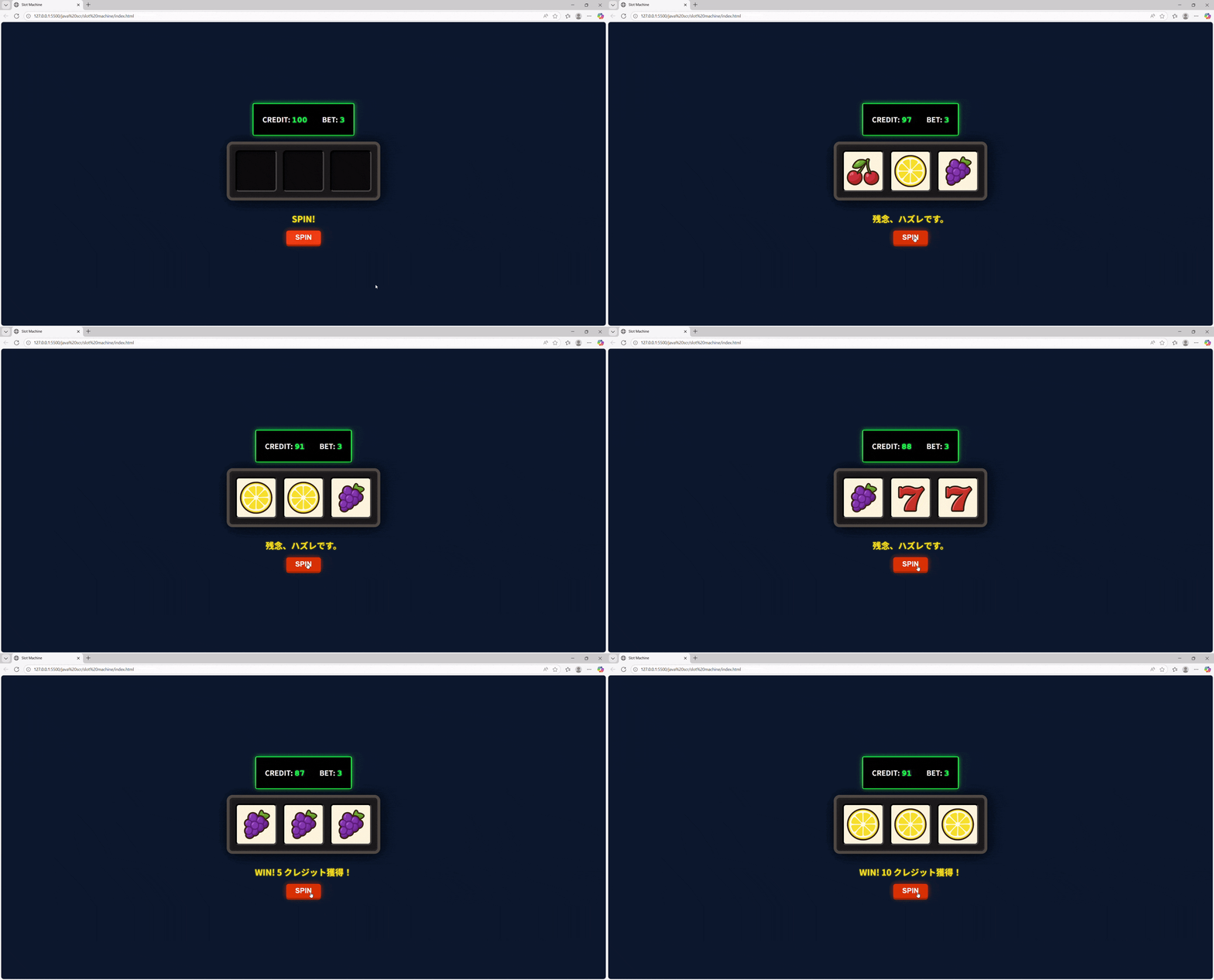
問題なく動かすことが出来ました!
終わりに
本記事でご紹介したスロットプログラムは、JavaScriptで作成しました。個人的に目標としていたクレジットシステムの導入が実現でき、嬉しいです。
まだ改善の余地は多くあり、今後は絵柄の出現確率の調整など、さらに深く作り込んでいきたいと考えています。
ぜひ、お読みいただいた方からのご意見や、機能追加に関するアイデアがあれば、コメントにてお気軽にお知らせください。