0
1

Delete article

Deleted articles cannot be recovered.

Draft of this article would be also deleted.

Are you sure you want to delete this article?

More than 3 years have passed since last update.

Windows10のバッチで外部txtを1行ずつ読み込んでループ(変数に格納など)

0
Posted at

やり方

batと同じフォルダーにあるtxtを1行ずつ処理するサンプル
rem 遅延環境変数を使う為の宣言
setlocal ENABLEDELAYEDEXPANSION

rem batと同じフォルダーにあるtester.txtの中身を1行ずつ読み込むループ
rem ただし、tester.txtの文字コードはShift-JISにしないと文字化ける
for /f %%a in (tester.txt) do (

	rem variableという名前の変数に1行分を格納
	set variable=%%a

	rem 変数の中身を確認したいので画面出力(遅延環境変数を使った場合は%ではなく!で囲う)
	echo !variable!

)

rem setlocalの終了
endlocal

rem コマンドプロンプト画面閉じずに一旦止める
pause

txtの中身。
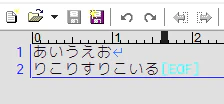
image.png

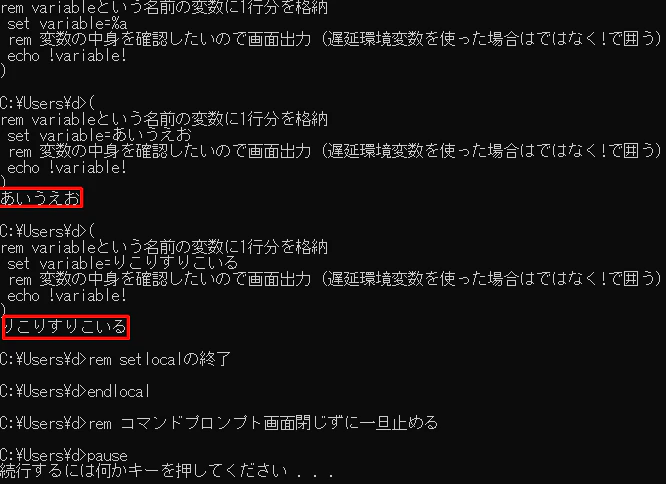
batの実行結果。
image.png

読み込んだ1行を変数に格納してうんたらかんたら…
なことが多いから 遅延環境変数 もセットで扱う(覚える)のがポイント。

参考サイトさん

バージョン

Windows 10 Pro 21H2 OSビルド 19044.1889

0
1
0

Register as a new user and use Qiita more conveniently

  1. You get articles that match your needs
  2. You can efficiently read back useful information
  3. You can use dark theme
What you can do with signing up
0
1

Delete article

Deleted articles cannot be recovered.

Draft of this article would be also deleted.

Are you sure you want to delete this article?