
- 執筆者: Richard King (Ubinity AI)
- 連載: HomeLab SRE Cookbook (基石とギークアーキテクチャ編 D1-15)
- 実機検証環境:
n100-staging(192.168.3.208 / Ubuntu 26.04.1 LTS x86_64) •pi3b(ARM64 / 192.168.3.202) • 本番予約帯 (192.168.3.2~10) Exit Code 2 インターロック遮断隔離
1. 問題提起:公式 Redmine Compose 構成をそのまま最小権限ホストに投入してはならない 4 つの理由
第 014 章では n100-staging(192.168.3.208)の storage 階層上に Rootless Gitea(1.22.6-rootless)を構築した。それに続くエンジニアリング管理層として Redmine 6.0-alpine を配備し、Git コミット(fixes #N / refs #N)と課題チケットを自動連携させる際、公式の Docker Compose 例をそのまま最小権限(方式 A)で保護された Linux ホストへ適用すると、以下の 4 つの技術的欠陥が発生する。
-
公式
docker-entrypoint.shが/usr/src/redmine/config/への書き込みを前提としており、read_only: trueでクラッシュする :第 013 章の/usr/local/sbin/sre-compose-ctlAST ファイアウォールは全サービスにread_only: trueを強制する。公式イメージは起動時に/usr/src/redmine/config/database.ymlやconfig/secrets.yml、db/schema.rbを書き込もうとするが、逆に/usr/src/redmine/config全体へ空のtmpfsをマウントすると、既存のroutes.rbやapplication.rb、initializers/が隠蔽されて Rails が起動不能になる。 -
environment:による平文鍵注入が AST 検査で拒否され、docker inspectからも漏洩する :REDMINE_SECRET_KEY_BASE等をcompose.yamlのenvironment:に記述すると、第 012 章のゼロ.env原則に反するだけでなく、sre-compose-ctlの AST ポリシーによってrc=1で拒否される。 -
未調整の Ruby YARV ヒープ拡張(
1.8倍)と glibc アリーナ断片化によるメモリ肥大化 :Ruby 3.3 / Rails 7.2 をデフォルト設定のまま稼働させると、一般的な未調整環境では単一コンテナで300〜450 MiB程度(本 Staging 実機では未計測の参考目安)の匿名メモリを消費しやすく、8GB RAM の Intel N100 ノード上で同居サービスのメモリ予算を圧迫する。 -
未署名 Webhook の露出とネットワーク再送による重複ジャーナル汚染 :Redmine の
:3000をそのまま LAN に公開したり、冪等性チェックのないフック受信器を使うと、再送時に同一チケットへ重複コメントが書き込まれる。
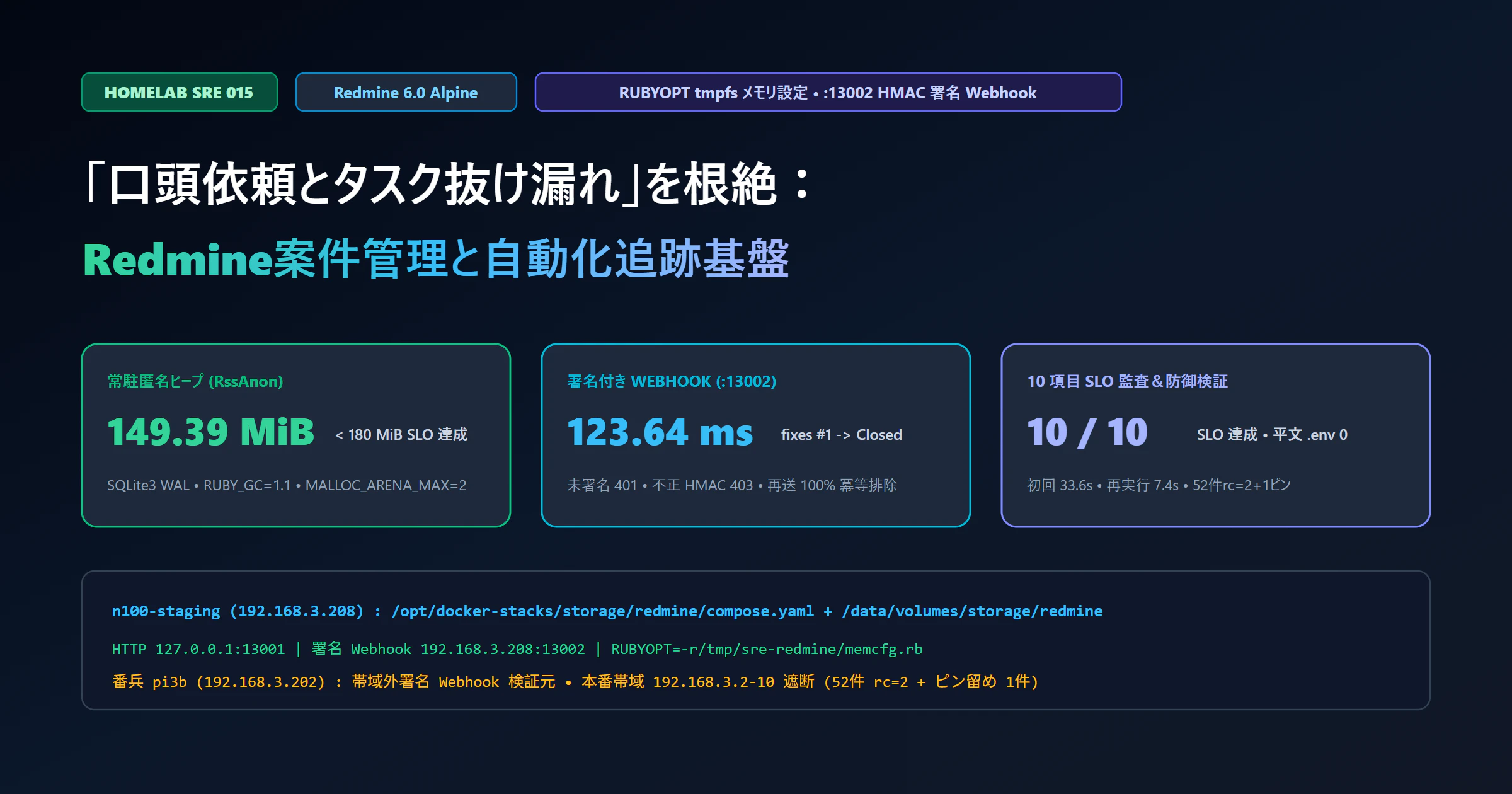
本章では n100-staging(192.168.3.208)の storage 階層上に、第 013 章の /usr/local/sbin/sre-compose-ctl を 1 行も変更せずに通過し、 常駐匿名ヒープ RssAnon = 149.39 MiB(監査時 150.94 MiB)・SSD 設定テンプレートの平文秘密ゼロ(0 .env)・pi3b からの HMAC-SHA256 署名付き Git プッシュ通知で 123.64 ms でチケットを自動クローズする Redmine 6.0-alpine 基盤 を構築・検証する。
2. RUBYOPT インメモリ設定リダイレクトと HMAC Webhook ブリッジアーキテクチャ
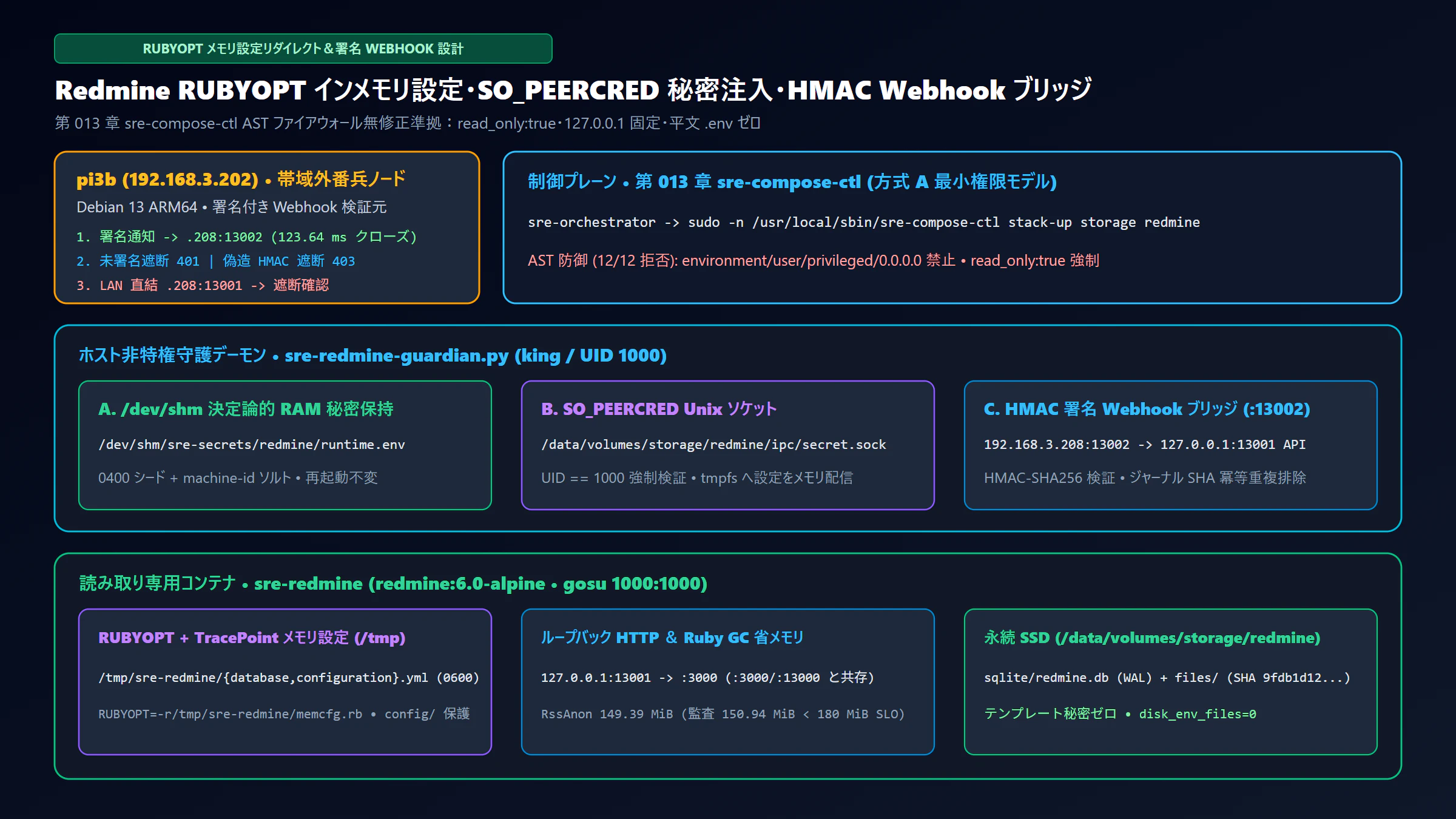
| 構成プレーン | リスナー / マウントパス | カーネル&VM 分離メカニズム | Staging 実測結果 |
|---|---|---|---|
| 1. HTTP ループバック&内部網 | ホスト 127.0.0.1:13001 -> :3000 / 内部 sre-internal-net (http://redmine:3000) |
sre-compose-ctl の 127.0.0.1 ルールに準拠し、第 003 章 :3000 &第 014 章 :13000 と共存 |
pi3b からの :13001 直結は遮断(lan_http_13001_blocked=true) |
2. /dev/shm + SO_PEERCRED 注入 |
ホスト /dev/shm/sre-secrets/redmine/runtime.env / ソケット /data/volumes/storage/redmine/ipc/secret.sock
|
0400 オペレータシード鍵 + /etc/machine-id HMAC-SHA256 決定論的派生 + SO_PEERCRED (UID == 1000) |
disk_env_files=0・template_secret_free=true・tmpfs_reboot_secret_determinism=true
|
3. RUBYOPT + TracePoint メモリ設定 |
コンテナ tmpfs /tmp/sre-redmine/{database.yml,configuration.yml,memcfg.rb,schema.rb}
|
gosu 1000:1000 降格後、Unix ソケット経由で設定を取得し、RUBYOPT="-r/tmp/sre-redmine/memcfg.rb" で設定読込を tmpfs へリダイレクト |
読み取り専用 rootfs 下でマイグレーションと起動が正常完了・admin_auth_ok=true
|
| 4. HMAC 署名 Webhook ブリッジ | 守護デーモン 192.168.3.208:13002 & 127.0.0.1:13002 (/webhook/gitea) |
X-Gitea-Signature 定数時間 HMAC 検証 + 既存 journals によるコミット SHA 重複排除 + PUT /issues/N.json
|
未署名 401・不正署名 403・正規配信 123.64 ms で Issue #1 -> Closed・再送重複ゼロ |
5. /data 永続化&省メモリ設定 |
/data/volumes/storage/redmine/{sqlite,files} |
SQLite3 WAL (timeout=5000) + attachments_storage_path + RUBY_GC_HEAP_GROWTH_FACTOR=1.1 + MALLOC_ARENA_MAX=2
|
RssAnon = 149.39 MiB(監査時 150.94 MiB)・添付 SHA-256 9fdb1d12... 一致 |
(静止データ境界:.env や設定テンプレート・docker inspect に平文秘密は出力しない一方、永続ディスク上には決定論的派生の信頼起点である /home/king/.local/libexec/.sre-redmine-seed.key(0400)と Redmine 標準の SQLite tokens.value が保持される。)
3. 実装抜粋:RUBYOPT メモリ設定フックと HMAC 冪等 Webhook ブリッジ
3.1 code/compose-redmine.yaml(第 96〜131 行)
/usr/src/redmine/config を読み取り専用のまま無傷で保ちつつ、Ruby VM の TracePoint.new(:end) と File 特異メソッド差し替えによって /tmp/sre-redmine/(tmpfs、0600)上の database.yml と configuration.yml を読み込ませる。
        class << File
          alias_method :__sre_exist?, :exist?
          alias_method :__sre_file?, :file?
          alias_method :__sre_read, :read
          alias_method :__sre_open, :open
          def exist?(p); __sre_exist?(SREMemCfg.map_path(p)); end
          def file?(p); __sre_file?(SREMemCfg.map_path(p)); end
          def read(p, *a, **kw, &b); __sre_read(SREMemCfg.map_path(p), *a, **kw, &b); end
          def open(p, *a, **kw, &b); __sre_open(SREMemCfg.map_path(p), *a, **kw, &b); end
        end
        TracePoint.new(:end) do |tp|
          name = tp.self.name rescue nil
          if name == "Rails::Application::Configuration" || name == "Redmine::Configuration"
            SREMemCfg.apply!
          end
        end.enable
        RBEOF
          chmod 0600 /tmp/sre-redmine/memcfg.rb
          export RAILS_ENV=production
          export SCHEMA=/tmp/sre-redmine/schema.rb
          export SECRET_KEY_BASE="$$(cat /tmp/sre-redmine/secret_key_base)"
          rm -f /tmp/sre-redmine/secret_key_base
          export RAILS_LOG_TO_STDOUT=1
          export HOME=/tmp/sre-redmine
          export RUBYOPT="-r/tmp/sre-redmine/memcfg.rb"
          export RUBY_GC_HEAP_GROWTH_FACTOR=1.1
          export RUBY_GC_MALLOC_LIMIT=16777216
          export MALLOC_ARENA_MAX=2
          export WEB_CONCURRENCY=0
          export RAILS_MAX_THREADS=3
          bundle exec rake db:migrate
          NEED_SEED="$$(python3 -c "import sqlite3; c=sqlite3.connect(\"/var/lib/redmine/sqlite/redmine.db\"); print(1 if c.execute(\"select count(*) from trackers\").fetchone()[0]==0 else 0)")"
          if [ "$$NEED_SEED" = "1" ]; then
            bundle exec rake redmine:load_default_data REDMINE_LANG=en
          fi
          exec ruby -r/tmp/sre-redmine/memcfg.rb bin/rails server -b 0.0.0.0 -p 3000
3.2 code/sre-redmine-guardian.py(第 317〜342 行)
ホスト側の king(UID 1000)で動作する守護デーモンは、署名検証済みの Git プッシュペイロードから課題番号を抽出し、GET /issues/{iid}.json?include=journals で既存のコミット SHA を照合して冪等性を保証した上でステータス遷移を実行する。
        issue_actions: dict[int, bool] = {}
        for verb, issue_str in ISSUE_REF_RE.findall(message):
            iid = int(issue_str)
            close_flag = verb.lower() in CLOSE_VERBS
            issue_actions[iid] = issue_actions.get(iid, False) or close_flag

        for iid, should_close in issue_actions.items():
            _, issue_doc = redmine_api_request(http_port, api_key, "GET", f"/issues/{iid}.json?include=journals")
            issue_obj = issue_doc.get("issue") or {}
            journals = issue_obj.get("journals") or []
            if any(commit_id in str(j.get("notes") or "") for j in journals):
                deduplicated.append({"issue_id": iid, "commit_id": commit_id})
                continue

            first_line = message.splitlines()[0][:160]
            note = f"[SRE Webhook Bridge] Commit {commit_id} in {repo_name} by {author}: {first_line}"
            update_body: dict = {"issue": {"notes": note}}

            if should_close:
                if closed_status_id is None:
                    _, st_doc = redmine_api_request(http_port, api_key, "GET", "/issue_statuses.json")
                    statuses = st_doc.get("issue_statuses") or []
                    for st in statuses:
                        if st.get("is_closed") and str(st.get("name", "")).lower() == "closed":
                            closed_status_id = int(st["id"])
                            break
4. 運用でハマりやすい 4 つの技術的落とし穴と解決策
-
read_only: true環境でのdb/schema.rbとアセットキャッシュ書き込みエラー(Errno::EROFS) :/tmp、/usr/src/redmine/tmp、/usr/src/redmine/log、/usr/src/redmine/public/assetsの 4 パスにrw,noexec,nosuid,uid=1000,gid=1000のtmpfsをマウントし、export SCHEMA=/tmp/sre-redmine/schema.rbを指定することで解決する。 -
公式イメージの
redmineユーザー(UID 999)とホストSO_PEERCRED//dataボリューム(UID 1000)の不一致 :sre-compose-ctlはuser:キーを禁止しているため、公式イメージ同梱のgosuを用いてexec gosu 1000:1000 /bin/sh -ec '...'で起動し、ホスト側のUID 1000と一致させる。 -
ホスト再起動(
/dev/shm消失)時の API キー変化による認証エラー :/data外のオペレータ専用0400シード鍵(/home/king/.local/libexec/.sre-redmine-seed.key)と/etc/machine-idをソルトにしたHMAC-SHA256決定論的派生により、コンテナ停止・/dev/shm/sre-secrets消去後のコールドスタートでも同一のSECRET_KEY_BASEとREDMINE_API_KEY(runtime.envSHA-2563802e5ab...)を再構築できる。 -
Webhook 再送による重複コメント防止 :
PUT /issues/{iid}.jsonを呼ぶ前に既存ジャーナル内のコミット SHA を照合し、既処理コミットをdeduplicatedとしてスキップする。
5. Staging 実機検証ログ (evidence/execution.log)
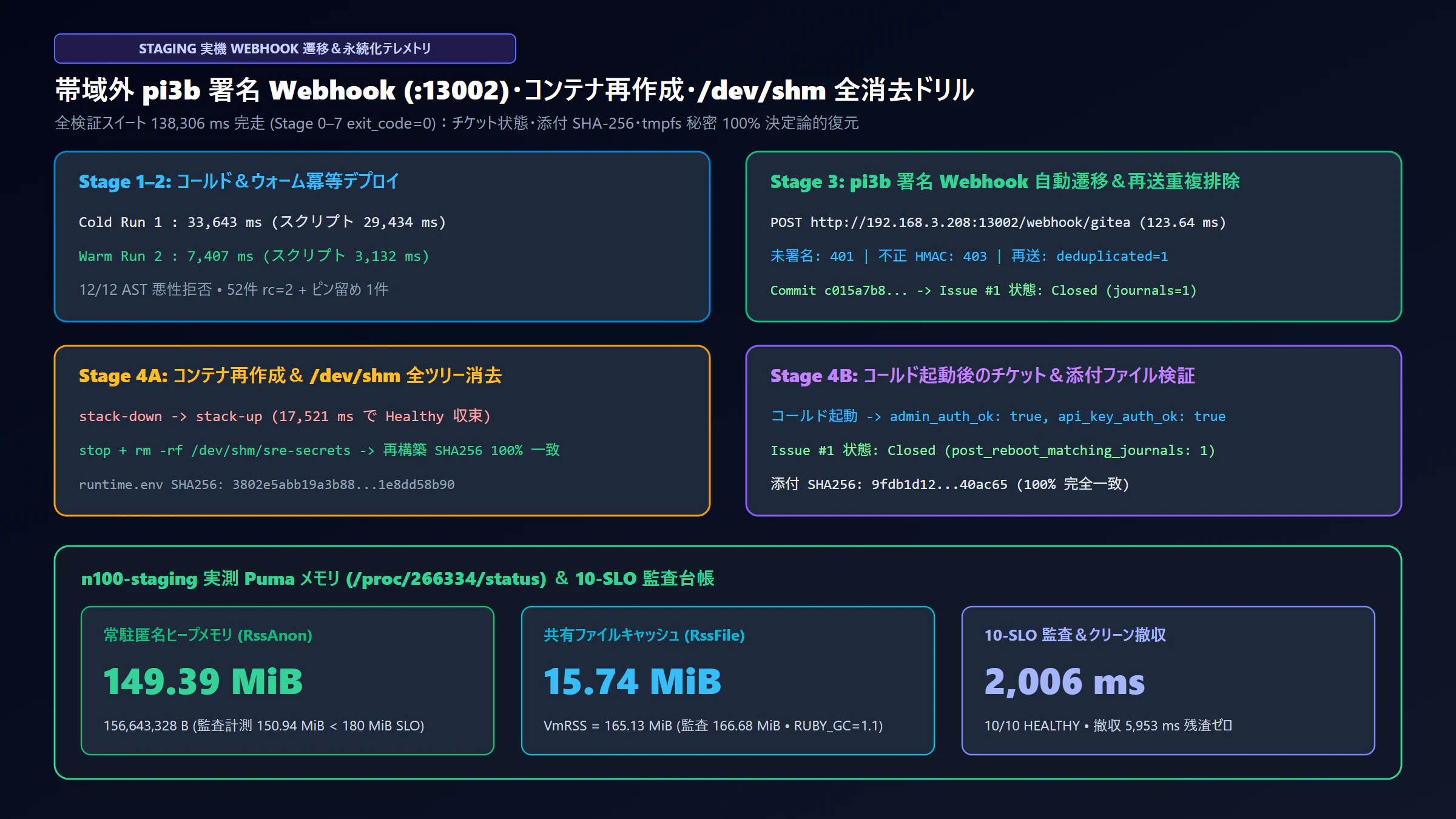
以下は Staging クラスタ(n100-staging .208 / pi3b .202 / i5-staging .209)での実機検証ログ抜粋である(中略行は独立した [...] で表記):
================================================================================
 HOMELAB SRE COOKBOOK - CHAPTER 015 LIVE STAGING VERIFICATION SUITE
 Start Time UTC : 2026-11-21T05:18:56Z
 Runner Host    : rtx4060 (x86_64)
================================================================================
[...]
  * pi3b (192.168.3.202)         : Debian GNU/Linux 13 (trixie)|aarch64|ctl_absent=1|git version 2.47.3
  * n100-staging (192.168.3.208) : Ubuntu 26.04.1 LTS|x86_64|data=ext4   62G|shm=tmpfs  3.6G|vol_owner=1000:1000|ch013_ctl=1
  * i5-staging (192.168.3.209)   : Ubuntu 26.04.1 LTS|x86_64

>>> [Stage 1] Cold Deployment on n100-staging & Node Boundary Refusals
  * [PASS] redmine-deploy.sh --device pi3b refused cleanly (rc=1): [ERROR] Refusing Redmine deployment onto sentinel-only host 'pi3b' (192.168.3.202).
  * [PASS] redmine-deploy.sh --device i5-staging refused cleanly (rc=1): [ERROR] Refusing Redmine deployment onto compute_worker 'i5-staging' (192.168.3.209); stateful Redmine belongs strictly on n100-staging.
[...]
  * BOOTSTRAP_FIXTURE_OK:project=homelab-sre:issue_id=1:attachment_sha256=9fdb1d122dd0b13a6df34030ae05ce8eee2e45be44f74b8ab27d677ae640ac65
[...]
>>> [Stage 3] Out-of-Band pi3b Signed Webhook, Replay Idempotency & Attachment Check
  * pi3b webhook drill           : {"lan_http_13001_blocked": true, "unsigned_http_code": 401, "invalid_hmac_http_code": 403, "webhook_delivery_ms": 123.64, "webhook_first_processed": 1, "webhook_replay_deduplicated": 1, "commit_sha": "c015a7b8c9d0e1f2a3b4c5d6e7f8091021324354"}
  * [n100-staging] issue #1 state: {"issue_id": 1, "status": "Closed", "matching_journals": 1, "attachment_filename": "sre-backlog-spec.txt", "attachment_sha256": "9fdb1d122dd0b13a6df34030ae05ce8eee2e45be44f74b8ab27d677ae640ac65"}

>>> [Stage 4] Container Destruction & /dev/shm Full-Tree Wipe Drill
[...]
  * [n100-staging] STACK_UP_OK:storage:redmine (17521 ms)
  --- Simulated Host Reboot: Full /dev/shm/sre-secrets Wipe & Reconstruction ---
  * [n100-staging] runtime.env sha256 before wipe : 3802e5abb19a3b887fe07fdaecfb3954fc130f432d28378c9e07481e8dd58b90
[...]
  * [n100-staging] container stopped before wipe : STACK_DOWN_OK:storage:redmine (stack-ps=)
  * [n100-staging] simulated host reboot tmpfs wipe : GUARDIAN_STOPPED=true WIPED_FULL_TREE
[...]
  * [n100-staging] runtime.env sha256 after rebuild: 3802e5abb19a3b887fe07fdaecfb3954fc130f432d28378c9e07481e8dd58b90
[...]
  * [n100-staging] container cold start against reconstructed /dev/shm secrets : STACK_UP_OK:storage:redmine
  * [n100-staging] post-reboot issue #1: {"post_reboot_issue_status": "Closed", "post_reboot_matching_journals": 1, "post_reboot_attachment_sha256": "9fdb1d122dd0b13a6df34030ae05ce8eee2e45be44f74b8ab27d677ae640ac65"}
  * [PASS] tmpfs_reboot_secret_determinism: true; issue #1 Closed, journal commit SHA & attachment SHA-256 matched 100%, admin_auth_ok: true.
[...]
>>> [Stage 5] Independent 10-SLO Audit (Live --json & --skip-probe --json)
[...]
  * pi3b Compose Ctl Absent : 1
  * LAN Loopback Blocked    : 13001=1
  * Webhook :13002 Healthz  : 1
  * Host SSH :22 Banner     : SSH-2.0-OpenSSH_10.2p1 Ubuntu-2ubuntu3.8
================================================================================
 CHAPTER 015 AUDIT RESULT: [HEALTHY] (Elapsed: 2006ms)
================================================================================
6. 次回予告
n100-staging の storage 階層でプライベート Git 基盤(Gitea)と案件管理基盤(Redmine)の双方向連携が稼働を開始したところで、次章では独立した障害ドメインからクラスタ全体を常時監視する外形監視プローブ基盤を構築する。
次回予告:「障害をユーザー報告で知る」をゼロにする:Uptime Kuma番兵と外形監視
独立した番兵ノードからの HTTP・TCP・内部サービス死活監視プローブの設計と、ミリ秒単位の LAN レイテンシ計測基盤を解説する。