

はじめに
- 今回は、GoogleのAIエージェントSDKである、ADK(Agent Development Kit)に触れていきたい
- 以前、AWS AgentCoreのメモリ機能が面白かったので記事(↓)に書いたんだが、最近はGoogle環境に注力しており、こちらでもMemory機能があったので、比較も兼ねて触ってみたので共有したい
ADK の Memory 機能
- ADKには、Memory機能が用意されており、主に長期記憶を簡易的に制御するための機能である
- 標準で2種類のMemory(記憶)機能があり、InMemoryMemoryService と、VertexAiMemoryBankService がある
- InMemoryMemoryServiceは、エージェントの実行メモリ内に簡易的に保存するものであり、エージェントを再起動すると消滅する
- VertexAiMemoryBankServiceは、Google CloudのVertexAIの機能である、Agent Engineの機能を前提としたもので、永続化が可能となる。Google Cloudとセットでの利用が前提
InMemoryMemoryService
- リファレンスにもあるが、あくまで検証目的での利用にとどめ、商用では使うべきではないものとなる
動作概念
- エージェントの実装の中で、
add_session_to_memory関数を利用して、会話履歴をMemoryに蓄積していく -
load_memory関数がADKで用意されており、それをToolとしてAgent内に指定することで、必要なタイミングでエージェントから参照される
memory_agent = LlmAgent(
    model="gemini-2.5-flash",
    name="ChatbotAgent",
    instruction="You are a helpful AI assistant. If asked about past conversations,
                 use the 'load_memory' tool to retrieve information.",
    tools=[load_memory] # Give the agent the tool
)
実動作例
-
「私の好きなものなんだっけ」とエージェントに質問すると、Function Callingで、以下のように自動的にクエリ「私の好きなもの」が生成され、以下のようにメモリに蓄積された会話履歴からマッチする履歴検索が行われる
  model_version='gemini-2.5-flash' content=Content(
  parts=[
    Part(
      function_call=FunctionCall(
        args={
          'query': '私の好きなもの'
        },
        id='adk-3a36a809-191f-4f07-80c9-e41f28b7554b',
        name='load_memory'
      ),
      thought_signature=b'\n\xde\x02\x01r\xc8\xda|M\xda_\xf0F66\xbe\x01\xa2^\x88\xd0\x1a\x98\xbaT\xfc6\xc1\x89\x06}\x8c\xcfc\xc7t\xccfC\x07$NY\xcc/\x19I\xaf\xc3A\xed\xb1#\xa3\x98\xc9\x80\xab\x05^\x8a\xab\x8a\xf83\x89\xa2T\xd8\xee2\x91M\xaaF4z\x13\xd8M\x81\x8b\x98.p\xcf\x11+\xebE\x06Q\x8d\x186\xcf\xb6...'
    ),
  ],
注意点
1. 日本語の会話には使えない
- InMemoryMemoryServiceは、現状、日本語ではうまく動作しないため注意が必要
- 実際、
load_memory内では以下のように単語を正規表現マッチングでのみ検索が行われている - Function Call内で検索キーワードが
「私の好きなもの」となっていたように、これと完全一致するキーワードでないとヒットしないため、日本語の場合はほぼヒットしないと考えていいだろう- 英語であれば単語間が自動的にスペースで区切られるため、問題ない
def _extract_words_lower(text: str) -> set[str]:
  """Extracts words from a string and converts them to lowercase."""
  return set([word.lower() for word in re.findall(r'[A-Za-z]+', text)])
2. 本当に本番利用はダメ
- メモリの蓄積上限もないため、蓄積が進んでいくとメモリ枯渇が起こるため、本当に本番で利用してはいけない
VertexAIMemoryBankService
動作概念
- 使い方はInMemoryMemoryServiceと同様で、保存先がVertexAI AgentEngineとなる
- が、保存形式が異なり、自動的に会話の中から抽出された事実のみ端的に保存される
- 検索もVertexAIの検索機能で行われる。こちらは日本語でも問題ない
実動作例
- 以下のようにダラダラと会話をなげたら
await call_agent(
    "ああ、今日はいい天気だなあ。ところで私はバナナが好きなんだ。あ、ところで日本の首都ってどこだっけ?",
    session.id,
    USER_ID,
)
- 保存されたMemoryはこのように、I like bananas. のみが保存されている

Topic
- AgentCoreと同様に、保存する記憶の種別を増やすことができる。AgentCoreでいう
Strategyに該当する - Agent Engineの機能となるため、Agent Engine作成時に設定が必要
サンプル
- 今回はカスタムTOPICとして、ユーザーのトラブルを記憶する
USER_TROUBLEというTOPICを作成した
import os
import vertexai
from dotenv import load_dotenv

load_dotenv()

project_id = os.getenv("VERTEX_PROJECT_ID")
location = os.getenv("VERTEX_LOCATION")

if not all([project_id, location]):
    print("Environment variables missing.")
    exit(1)

print(f"Creating Agent Engine (Memory Bank) in {project_id}/{location}...")

memory_customization = [
    {
        "memory_topics": [
            {"managed_memory_topic": {"managed_topic_enum": "USER_PERSONAL_INFO"}},
            {"managed_memory_topic": {"managed_topic_enum": "USER_PREFERENCES"}},
            {"managed_memory_topic": {"managed_topic_enum": "KEY_CONVERSATION_DETAILS"}},
            {
                "custom_memory_topic": {
                    "label": "USER_TROUBLE",
                    "description": "Extract any problems, issues, or troubles the user is facing or complaining about. Focus on technical issues, bugs, or life difficulties mentioned."
                }
            }
        ]
    }
]

try:
    client = vertexai.Client(project=project_id, location=location)

    agent_def = {
        "memory_bank_config": {
            "customization_configs": memory_customization
        }
    }

    # Passing agent_def as 'agent' argument?
    # inspecting signature said: create(agent: Optional[AgentDefinition] = None, config: Optional[AgentEngineConfig] = None)
    # Dictionary seems accepted as AgentDefinition (or equivalent protobuf/dict)

    operation = client.agent_engines.create(
        agent=agent_def
    )

    print("Result:")
    # It might return an object directly or an operation
    print(operation)

    if hasattr(operation, 'api_resource'):
        name = operation.api_resource.name
        print(f"Created Agent Engine Name: {name}")
        ae_id = name.split("/")[-1]
        print(f"Created Agent Engine ID: {ae_id}")

        # Helper to update .env
        env_file = ".env"
        with open(env_file, "r") as f:
            lines = f.readlines()

        new_lines = []
        found = False
        for line in lines:
            if line.startswith("VERTEX_AGENT_ENGINE_ID="):
                new_lines.append(f"VERTEX_AGENT_ENGINE_ID={ae_id}\n")
                found = True
            else:
                new_lines.append(line)
        if not found:
            new_lines.append(f"VERTEX_AGENT_ENGINE_ID={ae_id}\n")

        with open(env_file, "w") as f:
            f.writelines(new_lines)
        print(f"Updated {env_file} with new ID.")

    else:
        print("Couldn't find api_resource name.")

except Exception as e:
    print(f"Creation failed: {e}")
実動作例
- Google CloudのWeb画面上からはTOPICの判別はできない
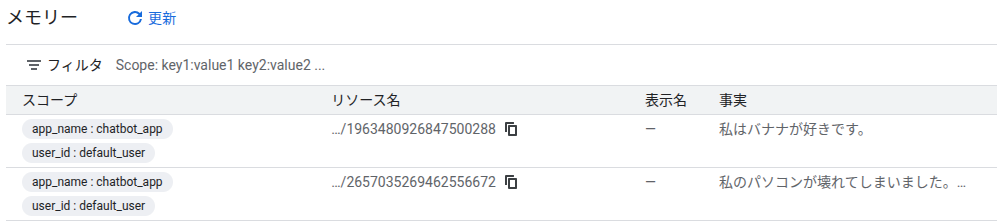
- が、実データ上はしっかりラベリングされていた
- Memoryのデータ構造を確認したので共有する。結構情報量多い
expire_time=None ttl=None
revision_expire_time=None
revision_ttl=None
disable_memory_revisions=None
description=None display_name=None
fact='私のパソコンが壊れてしまいました。ウイルスに感染したかもしれないです。'
name='projects/xxxxx/locations/us-central1/reasoningEngines/xxxxxxxx/memories/2657035269462556672'
scope={'app_name': 'chatbot_app', 'user_id': 'default_user'}
create_time=datetime.datetime(2025, 12, 13, 15, 39, 53, 342391, tzinfo=TzInfo(0))
update_time=datetime.datetime(2025, 12, 13, 15, 41, 2, 274917, tzinfo=TzInfo(0))
topics=[MemoryTopicId(custom_memory_topic_label='USER_TROUBLE')]
最後に:AgentCoreとの比較
- ADKには短期記憶の機構こそ無いが、Agent Engineの長期記憶は、AgentCoreと同様に複数の切り口で記憶を保存できることがわかった
- Sessionを活用すれば、短期記憶もAgentCoreと同様の振る舞いは可能だと思われる
- Agent EngineではTOPICの上限数に関する記述が無いため、もしかしたら上限が無いのかもしれず、その場合はGoogle Cloudが柔軟性の点で利点があるかもしれない
- いずれにしろ、現段階ではAgent Engineのメモリ機能はプレビュー版であるため、今後進化する可能性も考えられるため、正式版を楽しみに待ちたい!
ソース
- 以下のリポジトリに VertexAiMemoryBankService 検証用に作った簡易チャットボット保存済
- https://github.com/tuneyuki/adk-memory