

はじめに
Ateam LifeDesign Advent Calendar 2025 15日目は @tsutorm がお送りします。
毎年あまり知られてないものをやってみるような記事を書いてるので、今年は最近気になっているFeature Flag関連を少し触ってみようかなと思います。
Feature Flagって?
Feature Flagは、デプロイと機能公開を分離し、段階リリースや切り戻しを高速化するための仕組みです。
詳細は Fowler の feature-toggles や、電通総研テックブログ-Feature Flagという開発手法についてまとめる、2024年のAWS Summitのフィーチャーフラグの現在と未来 などが詳しいです。
要するにスイッチ切り替えるだけでアプリケーションの挙動が変わるように作っておくと便利だよ。ということですね。
実務上のユースケースでいくと、「Webサービスのリリースなどでトラブルが発生して切り戻しリリースを慌ててやる。」みたいなことではなく、「機能フラグのOn/Offでリリースを制御したほうが安全でやりやすいよね。」ということです。
LaunchDarklyって?
Feature Flag管理のためのSaaSとSDKを提供するサービスです。
日本語記事はまだ多くない印象ですが、とても高機能で個人的に注目しています 
Quickstart Guide をやってみる
おもむろにアカウントを作ってやってみましょう。
Quickstart Guideを一通り進めます。

まずはフラグ名を決めます。こだわりないのでデフォルトの Sample feature でいいでしょう。

続いて利用するSDKを決めます。併せて実行環境が決まります。
LaunchDarklyでは Client-side SDKとServer-side SDK の2系統があります。
(リファレンスでは Edge と AIなど様々なSDK系統の説明がありますが、基本はClient/Serverのように見えます)
何が違うかというと、認証と評価時のLaunchDarklyサービスとの通信方法に差があるようです。

今回はRubySDKでやっていきます。手元の環境はこいつです
$ ruby -v
ruby 3.4.7 (2025-10-08 revision 7a5688e2a2) +PRISM [x86_64-linux]
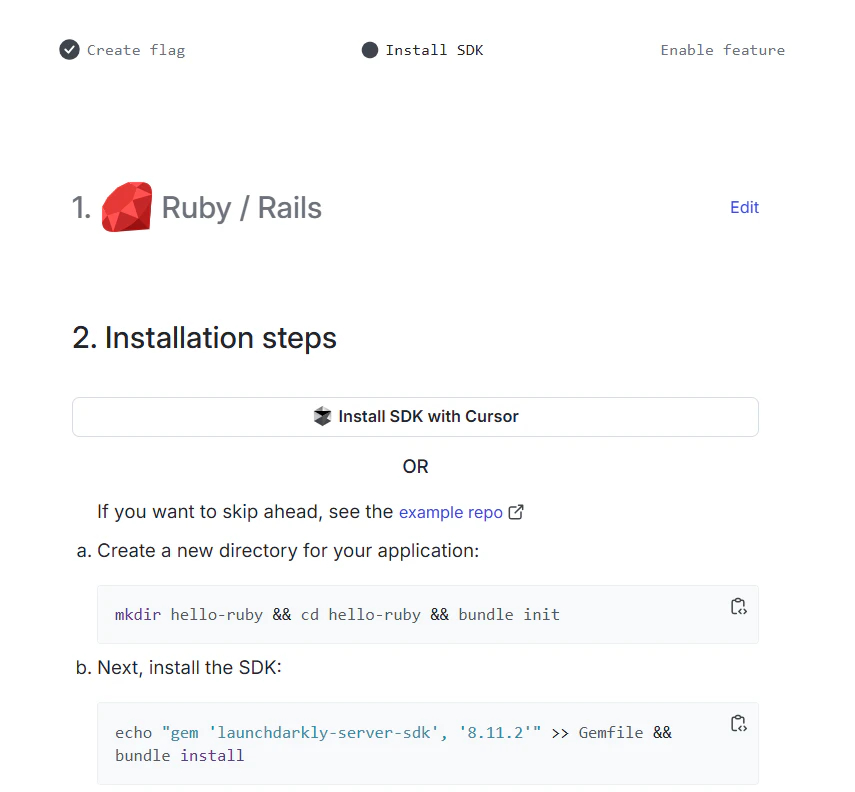
セットアップの方法が一通り画面に出ると思うのでそのまま進めましょう。実装コードはこんな感じのシンプルなRubyスクリプトです。
require 'ldclient-rb'

# Set sdk_key to your LaunchDarkly SDK key before running
sdk_key = ENV['LAUNCHDARKLY_SDK_KEY']

# Set feature_flag_key to the feature flag key you want to evaluate
feature_flag_key = 'sample-feature'

if sdk_key == ''
  puts "*** Please set the LAUNCHDARKLY_SDK_KEY environment variable\n"
  exit 1
elsif feature_flag_key == ''
  puts "*** Please set the LAUNCHDARKLY_FLAG_KEY environment variable\n"
  exit 1
end

def show_flag_message(flag_key, flag_value)
  puts "*** The '#{flag_key}' feature flag evaluates to #{flag_value}.\n"

  if flag_value
    puts
    puts "        ██       "
    puts "          ██     "
    puts "      ████████   "
    puts "         ███████ "
    puts "██ LAUNCHDARKLY █"
    puts "         ███████ "
    puts "      ████████   "
    puts "          ██     "
    puts "        ██       "
    puts
  end
end

class FlagChangeListener
  def update(changed)
    show_flag_message(changed.key, changed.new_value)
  end
end

client = LaunchDarkly::LDClient.new(sdk_key)

if client.initialized?
  puts "*** SDK successfully initialized!\n"
else
  puts "*** SDK failed to initialize\n"
  exit 1
end

# Set up the context properties. This context should appear on your LaunchDarkly contexts dashboard
# soon after you run the demo.
context = LaunchDarkly::LDContext.create({
                                           key: 'example-user-key',
                                           kind: 'user',
                                           name: 'Sandy'
                                         })

flag_value = client.variation(feature_flag_key, context, false)

show_flag_message(feature_flag_key, flag_value)

client.flag_tracker.add_flag_value_change_listener(feature_flag_key, context, FlagChangeListener.new)

# Run the Hello App continuously to react to flag change in LaunchDarkly
thr = Thread.new {
  puts "*** Waiting for changes."
  sleep
}
thr.join
Sleepする別スレッドにmainスレッドをjoinすることで待ち状態を作っておいてflag trackerを通じて変更イベントをフックにshow_flag_message でCLI上メッセージを表示するかどうかを評価していますね。
$ bundle exec env LAUNCHDARKLY_SDK_KEY="sdk-xxxxxxxx-xxxx-xxxx-xxxx-xxxxxxxxxxxx" ruby main.rb
/home/tsutorm/.asdf/installs/ruby/3.4.7/lib/ruby/gems/3.4.0/gems/launchdarkly-server-sdk-8.11.2/lib/ldclient-rb/config.rb:1: warning: logger was loaded from the standard library, but will no longer be part of the default gems starting from Ruby 3.5.0.
You can add logger to your Gemfile or gemspec to silence this warning.
*** SDK successfully initialized!
*** The 'sample-feature' feature flag evaluates to false.
*** Waiting for changes.
実行するとこのようになります。sample-feature flagが false なのでそのような表示になっていますね。
(Warningはlogger, benchmark の2gemを追加すると出なくなります)
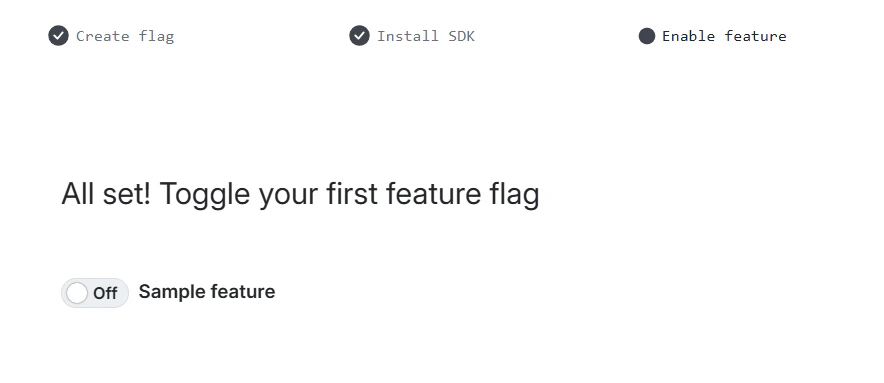
トグルをonにしてみましょう。
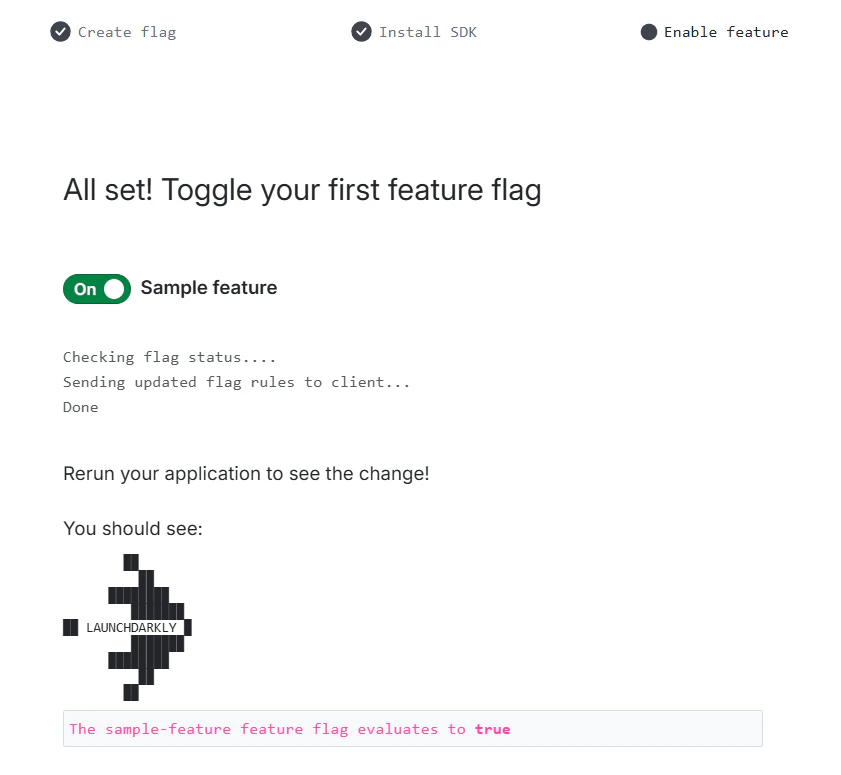
こんな表示になっているか確認してね的なことを言われます。実際にcli側を確認してみると・・・
*** Waiting for changes.
*** The 'sample-feature' feature flag evaluates to true.

        ██
          ██
      ████████
         ███████
██ LAUNCHDARKLY █
         ███████
      ████████
          ██
        ██
表示が変更されましたね。
Quickstart Guideが終わると管理コンソールが確認できます。
先ほど追加した Sample Feature の設定が表示されています。

フラグの詳細設定画面はこのような感じになっています。

Evaluationsは最初閉じていますが、開くと利用状況がバーチャートで可視化されています。
今回は true/false のフラグを合計で3回評価し、falseが2回、trueが1回評価されている状況が確認できますね。
どの機能状態がどの程度利用されたのかが非常にわかりやすいです。
他にもVariations, Monitoring, Audience, FeedbackやEnvironmentなど様々な機能があります。

フラグの設定変更の場所です。現状はターゲティングルールは設定していませんので、全トラフィックを自分が指定した値(on=true)で評価しています。
試しに off にしてみましょう。
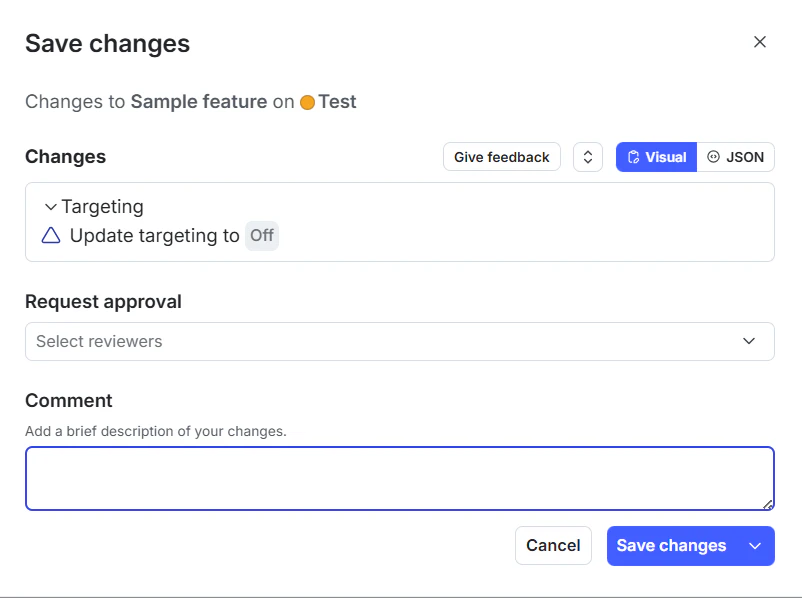
設定変更時に発生する差分や承認機構、実施時のコメントなど運用時の考慮がされていてよさげです。
Save changesを実施してしばらくすると・・・
*** The 'sample-feature' feature flag evaluates to false.
*** Waiting for changes.
*** The 'sample-feature' feature flag evaluates to true.

        ██
          ██
      ████████
         ███████
██ LAUNCHDARKLY █
         ███████
      ████████
          ██
        ██

*** The 'sample-feature' feature flag evaluates to false.
falseになりました。
ダッシュボード上のEvaluationグラフに反映されるまで10秒程度のラグがあるようです。

続いて Ruleを利用して A/Bテストを実施してみます。

Contextの user.name を元に 50% vs 50% で true or falseとなるようにしました。
ちょっと雑なやり方ですが、実装上の user.name を適当に変更しながらプログラムを何回か実行しなおしてみると挙動が変わっていくことがわかります。
# Set up the context properties. This context should appear on your LaunchDarkly contexts dashboard
# soon after you run the demo.
context = LaunchDarkly::LDContext.create({
                                           key: 'example-user-key',
                                           kind: 'user',
                                           name: 'Eddy'  # <- SandyからEddy,Taro等変更して動作確認
                                         })
動作を見ていると、一度セグメントしたユーザーには同じ値が評価されているようです。いいですね。
こんな感じでプログラムリリースによる機能変更ではなく、Feature Flagを用いて段階リリースやA/Bテストを行うことでビジネスや状況変化に対して機敏に対応できるアプリケーションが実現できます。
OpenFeature
ただ、Feature Flag管理サービスを一度何かに決定すると簡単にほかのサービスに移行するのは難しくなってしまいます。
この "ベンダーロックイン" を緩和するため、オープンソースでFeature Flagの抽象化レイヤーを提供するのが OpenFeature です。
すごいわかりやすい図が公式ドキュメントに記載されていたので引用しておきます。

出典: OpenFeature公式ドキュメント - What is OpenFeature?
このように、実態としてのフラグサービスをOpenFeature SDKが隠蔽することでPluggableな構成を実現します。
実態としてのフラグサービスは Provider と呼ばれていて、Providerを差し替えることでベンダーロックインを低減する。という構成です。
Providerはめちゃくちゃたくさんあるので、一例を抜粋。
ローカルはflagdで開発しておいて、本番は LaunchDarklyとかもやれそうですね。
ではこのまま、LaunchDarklyをOpenFeatureのプロバイダーとして利用するケースを見ていきましょう。
OpenFeature via LaunchDarkly
RubySDKもあります。ドキュメント上は Ruby 3.3 系までの記載でしたが、手元の Ruby 3.4 系でも動作確認できました。将来的な対応は要確認です。
LaunchDarklyのProviderはこちらです。更新頻度はあまり高くなさそうです。
https://github.com/launchdarkly/openfeature-ruby-server
Quickstart Guideを見ながら先ほどのコードをOpenFeature対応版に変更していきます。
# frozen_string_literal: true

source "https://rubygems.org"

# gem "rails"
gem 'launchdarkly-server-sdk', '~> 8.0'
gem 'launchdarkly-openfeature-server-sdk', '~> 0.1.0'
gem 'openfeature-sdk'

gem 'logger'
gem 'benchmark'
diff --git a/main.rb b/main.rb
index 4f7278f..e3fd882 100644
--- a/main.rb
+++ b/main.rb
@@ -1,4 +1,7 @@
+require 'open_feature/sdk'
+require 'json'
 require 'ldclient-rb'
+require 'ldclient-openfeature'

 # Set sdk_key to your LaunchDarkly SDK key before running
 sdk_key = ENV['LAUNCHDARKLY_SDK_KEY']
@@ -14,6 +17,21 @@ elsif feature_flag_key == ''
   exit 1
 end

+provider = LaunchDarkly::OpenFeature::Provider.new(
+  sdk_key,
+  LaunchDarkly::Config.new
+)
+
+OpenFeature::SDK.configure do |config|
+  begin
+    config.set_provider_and_wait(provider)
+    puts "*** SDK successfully initialized!\n"
+  rescue OpenFeature::SDK::ProviderInitializationError => e
+    puts "*** SDK failed to initialize\n"
+    exit(1)
+  end
+end
+
 def show_flag_message(flag_key, flag_value)
   puts "*** The '#{flag_key}' feature flag evaluates to #{flag_value}.\n"

@@ -38,32 +56,27 @@ class FlagChangeListener
   end
 end

-client = LaunchDarkly::LDClient.new(sdk_key)
+client = OpenFeature::SDK.build_client(
+  evaluation_context: OpenFeature::SDK::EvaluationContext.new(
+    key: 'example-user-key',
+    kind: 'user',
+    name: 'Taro'
+  )
+)

-if client.initialized?
-  puts "*** SDK successfully initialized!\n"
-else
-  puts "*** SDK failed to initialize\n"
-  exit 1
-end
-
-# Set up the context properties. This context should appear on your LaunchDarkly contexts dashboard
-# soon after you run the demo.
-context = LaunchDarkly::LDContext.create({
-                                           key: 'example-user-key',
-                                           kind: 'user',
-                                           name: 'Taro'
-                                         })
-
-flag_value = client.variation(feature_flag_key, context, false)
+flag_value = client.fetch_boolean_value(
+  flag_key: feature_flag_key,
+  default_value: false
+)

 show_flag_message(feature_flag_key, flag_value)

-client.flag_tracker.add_flag_value_change_listener(feature_flag_key, context, FlagChangeListener.new)
-
-# Run the Hello App continuously to react to flag change in LaunchDarkly
-thr = Thread.new {
-  puts "*** Waiting for changes."
-  sleep
-}
-thr.join
\ No newline at end of file
+# Eventが未対応なので flag_tracker 相当の機能が無いので一回動作させるだけに修正
+# client.flag_tracker.add_flag_value_change_listener(feature_flag_key, context, FlagChangeListener.new)
+#
+## Run the Hello App continuously to react to flag change in LaunchDarkly
+#thr = Thread.new {
+#  puts "*** Waiting for changes."
+#  sleep
+#}
+#thr.join
\ No newline at end of file
で、同じように実行してみましょう
$ bundle exec env LAUNCHDARKLY_SDK_KEY="sdk-xxxxxxxx-xxxx-xxxx-xxxx-xxxxxxxxxxxx" ruby main.rb
*** SDK successfully initialized!
*** The 'sample-feature' feature flag evaluates to true.

        ██
          ██
      ████████
         ███████
██ LAUNCHDARKLY █
         ███████
      ████████
          ██
        ██
同じように動作しましたね。
感想とまとめ
OpenFeatureを経由してLaunchDarklyを利用する実装を一通り試してみました。
将来的にベンダーロックインを避けることが必須の要件である場合は使うと良いんですが、ベンダーロックインを避けなければならないためのコストとして
- 抽象化層としての OpenFeature の仕様把握と、具象化層としての Feature Flag SaaS(今回は LaunchDarkly)の仕様を二重に理解したうえで、どこがどの機能に対応しているのかを理解する必要がある
- OpenFeature SDKとしての各Providerとの仕様適合状況がまちまちで、SDKによっては未対応もある
という点があることには注意が必要です。
- 入れる価値が高い
- プラットフォームチームが共通SDKを配布したい & 配布先でFeature Flag SaaSベンダが揺れる
- 入れない(/後回しでよい)
- ベンダ選定が固まっており、当面移行しない
- Providerの対応状況(イベント、詳細なターゲティング等)が要件を満たせない
というところでしょうか。
個人的には、初手で理由もなくOpenFeatureを間に噛ませる必要はあまりないかなと感じました。
将来的な移行パスとしてOpenFeatureを横目で見つつ、どこがベンダーロックイン実装でどこが移行容易な実装なのかをアーキテクチャとしてとらえておく。位の行き来はしておくとよいんじゃないかなと感じます。