0
0

Delete article

Deleted articles cannot be recovered.

Draft of this article would be also deleted.

Are you sure you want to delete this article?

ラズベリーパイにVNCで接続する

0
Posted at

はじめに

Raspberry Pi OSでVNCを有効にして、Androidタブレットから接続する。

設定

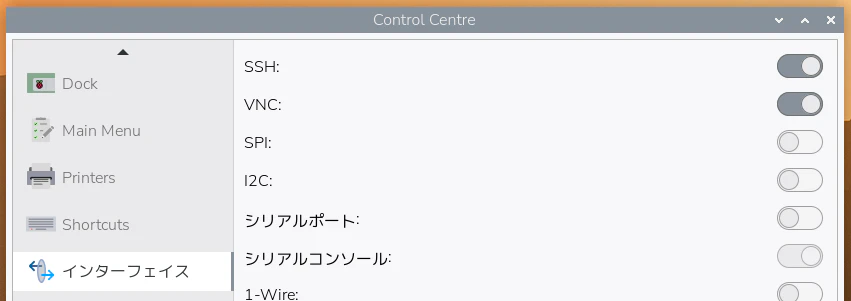
ラズベリーパイのVNCを有効化

  1. 左上のメニューから「設定」>「Control Centre」を開く
  2. 「インターフェイス」タブを選び、「VNC」を「有効」にする
    20261126_214745_grim.png

Android VNC Viewer インストール

  1. Google Play ストアから「vnv viewer」を検索する
  2. 「RealVNC Viewer」をインストールする

VNC接続

  1. Androidの「RVNC Viewer」を起動する
  2. 右下の緑色の+をタップする
  3. 「New connection」で、AddressにラズベリーパイのIPアドレスを、Nameにホストネーム(通常は、raspberrypi.local)を入力する
  4. 「Authentication」で、Usernameにラズベリーパイのユーザーネームを、Passwordにパスワードを入力して、「CONTINUE」をタップする
0
0
0

Register as a new user and use Qiita more conveniently

  1. You get articles that match your needs
  2. You can efficiently read back useful information
  3. You can use dark theme
What you can do with signing up
0
0

Delete article

Deleted articles cannot be recovered.

Draft of this article would be also deleted.

Are you sure you want to delete this article?