
はじめに
Windows上で、複数ホストに一斉にpingするツールを作った。
そのマニュアル
はじめに
長年ネットワークを使っていると、次第にネットワーク機器が痛んでいきます。
完全に疎通ができない。とかなら良いんだけど、たまに繋がらなくなったり、数十パケットに1回だけ疎通できなくなるとか、数十秒に1~2秒不通になるとか、そういうことが起きると、どの機器を交換した方がよいか判断に迷うことになる。
sPingTrace.exe
複数ホストを指定してもらい、一斉にping。
指定順にネットワークがつながっていると想定して、疎通確認。
返事なかったホスト以降は(返事があったとしても)無視して、表示。
そんなツールです。
sPingTrace.exe
C:\>sPingTrace.exe
sPingTrace.exe ver 1.0.0.0
                            created by active@window.goukaku.com

usage : sPingTrace.exe <<option>>
 OPTIONS
   -Target <<host>>       : Add TargetAddress
   -Fragment              : allow IPFragment
   -TTL <<uint>>          : Set IP's TTL(Default:127, Max=255)
   -Timeout <<uint>>      : set ICMP Timeout (Default:5000ms)
   -IntervalTime <<uint>> : set Charenge IntervalTime (Default:2000ms)
   -OnlyError             : non VERBOSE MODE
サンプル
こんなネットワークを想定してみる
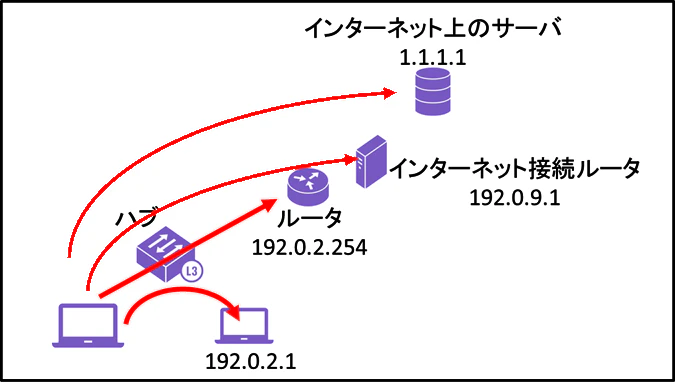
sPingTrace.exe
c:\>sPingTrace.exe -Target 192.0.2.1 -Target 192.0.2.254 -Target 192.0.9.1 -Target 1.1.1.1
を実行してみてNGとなる確率が多いホストが、ネットワークを不安定にしているヤツではないかと推定できると思う
例えば、192.0.2.1がソレだった場合は、経路上のハブが怪しいということになるだろうね。
出力形式は例えばこんな感じ
sPingTrace.exe
2026/05/15 19:53:11.928 192.0.2.1 0ms 0/1819(0%), 192.0.2.254 0ms 17/1819(0%), 192.0.9.1 0ms 5/1819(0%), 1.1.1.1 6ms 0/1819(0%), Sucess=1797/1819(98%)
2026/05/15 19:53:13.945 192.0.2.1 0ms 0/1820(0%), 192.0.2.254 0ms 17/1820(0%), 192.0.9.1 0ms 5/1820(0%), 1.1.1.1 6ms 0/1820(0%), Sucess=1798/1820(98%)
2026/05/15 19:53:15.962 192.0.2.1 0ms 0/1821(0%), 192.0.2.254 NG 18/1821(0%), 192.0.9.1 -- 5/1821(0%), 1.1.1.1 -- 0/1821(0%), Sucess=1798/1821(98%)
2026/05/15 19:53:22.910 192.0.2.1 0ms 0/1822(0%), 192.0.2.254 0ms 18/1822(0%), 192.0.9.1 0ms 5/1822(0%), 1.1.1.1 5ms 0/1822(0%), Sucess=1799/1822(98%)