

はじめに
本記事はS3 Tables × Icebergシリーズの第3弾(完結編)です。
| # | テーマ | 記事 |
|---|---|---|
| 1 | S3 Tables + Apache Icebergのテーブルを構築、Athenaからのクエリ、Glue JobでのETLを実施 | 前々回 |
| 2 | EventBridge + Step Functionsで自動ETLパイプラインを構築 | 前回 |
| 3 | Redshift Serverlessでレイクハウスクエリ + Glue Data Qualityで品質検査 | 本記事 |
第1弾でデータの入れ物を作り、第2弾でデータを自動で流す仕組みを構築しました。
しかし、本番運用ではまだ2つの課題が残っています。
課題1: クエリ性能と分析の柔軟性
Athenaは手軽ですが、大量データの結合やウィンドウ関数を多用する複雑な分析には限界があります。Redshift Serverlessから同じIcebergテーブルを直接クエリできれば、データのコピーなしで高速な分析基盤が手に入ります。
課題2: データ品質の担保
現在のパイプラインはファイルが来たら投入するだけです。中身が不正なCSVや型が壊れたデータもそのままIcebergテーブルに入ってしまいます。投入前に品質チェックを入れ、不合格データはブロックする仕組みが必要です。
本記事では、この2つをTerraformで構築し、レイクハウスを完成させます。
この記事でやること
- Redshift ServerlessをTerraformでプロビジョニング
- RedshiftからS3 TablesのIcebergテーブルを直接クエリ(External Database経由)
- RedshiftからIcebergテーブルへの書き込み(INSERT / CTAS)
- Glue Job内にGlue Data Quality(DQDL)の品質チェックを組み込み
- 品質チェック不合格時の自動ブロック + SNS通知
- 全リソースをTerraformでIaC化
用語・技術をざっくり理解する
記事全体で登場する用語を、先にまとめて解説します。
Redshift 関連
| 用語 | 解説 |
|---|---|
| Amazon Redshift | AWSのデータウェアハウス。大量データに対する複雑なSQL分析を高速に処理するための専用エンジン。列指向ストレージ・大規模並列処理(MPP)が特徴 |
| Redshift Serverless | サーバー管理不要のRedshift。ノード数やクラスタ構成を気にせず使える。使った分だけ課金(RPU 単位)。 |
| RPU | Redshiftの処理能力の単位。Redshift Processing Unit。ServerlessではベースキャパシティをRPUで指定する(最小 4 RPU、1 RPU = 16 GB メモリ)。 |
| Namespace | テーブル・スキーマ・ユーザー・暗号化キー等を管理する論理グループ |
| Workgroup | RPU 数・VPC・セキュリティグループ等を管理する論理グループ。Namespaceと1:1で紐づく。 |
| External Database | 外部カタログへの参照。Redshiftの外にあるGlue Data CatalogのデータベースをRedshiftから直接参照する仕組み |
データ品質関連
| 用語 | 解説 |
|---|---|
| AWS Glue Data Quality | データ品質チェックサービス。DQDLでルールを定義し、データが条件を満たすか自動評価する。Glue ETLジョブ内で実行可能。 |
| DQDL | Data Quality Definition Language。AWS 独自のデータ品質ルール定義言語。IsComplete, IsUnique, ColumnValues 等のルールを記述する |
| 品質ゲート | 品質チェックに不合格のデータを下流に流さない仕組み |
| 品質スコア | ルール通過率。定義したルールのうち、何%がパスしたかの指標(例: 8/10 ルール通過 = 80%) |
前提条件
| 項目 | 要件 |
|---|---|
| 第1弾記事 | S3 Tables + Icebergテーブルが構築済み |
| 第2弾記事 | EventBridge + Step Functionsパイプラインが構築済み |
| リージョン | ap-northeast-1(東京) |
| Terraform | >= 1.5.0 |
| AWS Provider | >= 5.82.0 |
アーキテクチャ(完成版)
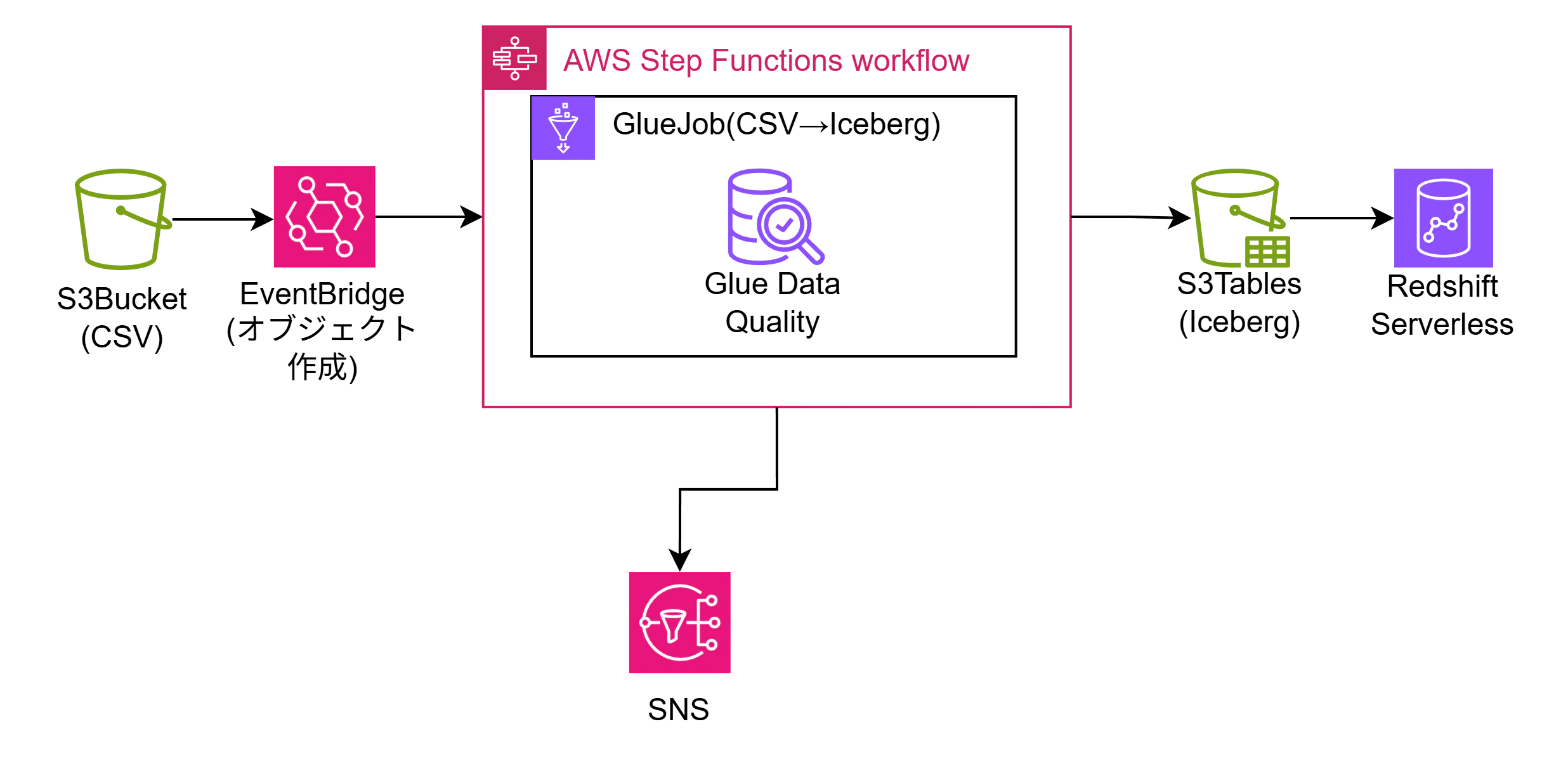
Glue JobにGlue Data Qualityによるデータ品質チェックを組み込みます。合格ならS3TablesのIcebergテーブルへINSERTを行い、不合格ならS3の隔離フォルダに対象の生データを移行します。また、Redshift ServerlessでのIcebergテーブルに対するクエリを実行します。
Terraformディレクトリ構成
前回記事のディレクトリ構成に今記事用のリソースを追加しました。
s3-tables-iceberg-lab/
├── main.tf          ← モジュールの呼び出し
├── providers.tf     ← プロバイダー情報
├── variables.tf     ← 変数
└── modules/         ← 各モジュールを格納
    ├── s3_tables/   ← S3テーブル関連
    │   ├── main.tf
    │   ├── variables.tf
    │   └── outputs.tf
    ├── s3_landing/  ← 生データ格納S3関連
    │   ├── main.tf
    │   ├── variables.tf
    │   └── outputs.tf
    ├── iam/         ← IAM権限関連
    │   ├── main.tf
    │   ├── variables.tf
    │   └── outputs.tf
    ├── glue/        ← glue関連
    │   ├── main.tf
    │   ├── variables.tf
    │   ├── outputs.tf
    │   └── scripts/
    ├── step_functions/ ← step functions関連
    │   ├── main.tf
    │   ├── variables.tf
    │   └── outputs.tf
    └── redshift/ ← redshift関連
        ├── main.tf
        └── variables.tf
Part A: Redshift Serverless × Iceberg
Step 1:Redshift ServerlessをTerraformでプロビジョニング
modules/redshift/main.tf
Redshift Serverlessの各種設定を定義します。
# Namespace(データベース・ユーザーの入れ物)
resource "aws_redshiftserverless_namespace" "main" {
  namespace_name      = "${var.project_name}-ns"
  db_name             = "dev"
  admin_username      = "admin"
  admin_user_password = var.redshift_admin_password

  # RedshiftがS3/Glue/Lake FormationにアクセスするためのIAMロール
  iam_roles = [var.redshift_iam_role_arn]

  lifecycle {
    ignore_changes = [admin_user_password] # 初回作成後はパスワードの差分を無視する
  }

  tags = {
    Project = var.project_name
  }
}

# Workgroup(計算リソースの入れ物)
resource "aws_redshiftserverless_workgroup" "main" {
  namespace_name = aws_redshiftserverless_namespace.main.namespace_name
  workgroup_name = "${var.project_name}-wg"

  # ベースキャパシティ: 4RPU(最小値、検証用)
  # 制限: 最大ストレージ32TB、テーブルあたり最大100カラム、メモリ64GB
  base_capacity = 4

  # パブリックアクセス(検証用。本番ではfalseにしてVPC内からのみ)
  publicly_accessible = true

  tags = {
    Project = var.project_name
  }
}

# 使用量制限(コスト暴走防止)
resource "aws_redshiftserverless_usage_limit" "daily" {
  resource_arn  = aws_redshiftserverless_workgroup.main.arn
  usage_type    = "serverless-compute"
  amount        = 8  # 1日あたり最大8RPU時間
  period        = "daily"
  breach_action = "deactivate"  # 上限到達でクエリ停止
}
modules/redshift/variables.tf
redshiftモジュールのmain.tfで使用する変数を定義します。
variable "project_name" {
  description = "プロジェクト名"
  type        = string
  default     = "iceberg-lab"
}

variable "redshift_admin_password" {
  description = "Redshift Serverless管理者パスワード"
  type        = string
  sensitive   = true
}

variable "redshift_iam_role_arn" {
  description = "redshift用IAMロールARN"
  type        = string
}
modules/iam/main.tf
今記事で必要な各リソースが処理を実行するためのIAM権限を定義します。
#glue用IAMロール
resource "aws_iam_role" "glue" {
  name = "${var.project_name}-glue-role"

  assume_role_policy = jsonencode({
    Version = "2012-10-17"
    Statement = [{
      Action    = "sts:AssumeRole"
      Effect    = "Allow"
      Principal = { Service = "glue.amazonaws.com" }
    }]
  })
}

#glue用IAMポリシーアタッチ
resource "aws_iam_role_policy_attachment" "glue_service" {
  role       = aws_iam_role.glue.name
  policy_arn = "arn:aws:iam::aws:policy/service-role/AWSGlueServiceRole"
}

#glue用IAMポリシー
resource "aws_iam_role_policy" "glue_data_access" {
  name = "${var.project_name}-glue-data-access"
  role = aws_iam_role.glue.id

  # 生データランディング用バケット、S3Tables用バケット、Lakeformation、Glueに対する権限
  policy = jsonencode({
    Version = "2012-10-17"
    Statement = [
      {
        Sid    = "S3LandingAccess"
        Effect = "Allow"
        Action = ["s3:GetObject", "s3:ListBucket"]
        Resource = [
          var.landing_bucket_arn,
          "${var.landing_bucket_arn}/*",
          var.scripts_bucket_arn,
          "${var.scripts_bucket_arn}/*",
        ]
      },
      {
        Sid      = "S3TablesAccess"
        Effect   = "Allow"
        Action   = ["s3tables:*"]
        Resource = [
          var.s3tables_bucket_arn,
          "${var.s3tables_bucket_arn}/*"
        ]
      },
      {
        Sid      = "GlueAndLakeFormation"
        Effect   = "Allow"
        Action   = ["glue:*", "lakeformation:GetDataAccess"]
        Resource = ["*"]
      }
    ]
  })
}

# EventBridge用ロール
# EventBridgeがStep Functionsを起動するために必要
resource "aws_iam_role" "eventbridge" {
  name = "${var.project_name}-eventbridge-role"

  assume_role_policy = jsonencode({
    Version = "2012-10-17"
    Statement = [
      {
        Action = "sts:AssumeRole"
        Effect = "Allow"
        Principal = {
          Service = "events.amazonaws.com"
        }
      }
    ]
  })
}

resource "aws_iam_role_policy" "eventbridge_start_sfn" {
  name = "start-step-functions"
  role = aws_iam_role.eventbridge.id

  policy = jsonencode({
    Version = "2012-10-17"
    Statement = [
      {
        Effect   = "Allow"
        Action   = "states:StartExecution"
        Resource = var.etl_pipeline_statemachine_arn
      }
    ]
  })
}

# Step Functions用ロール
# Step FunctionsがGlue Job を起動し、SNSに通知するために必要
resource "aws_iam_role" "step_functions" {
  name = "${var.project_name}-sfn-role"

  assume_role_policy = jsonencode({
    Version = "2012-10-17"
    Statement = [
      {
        Action = "sts:AssumeRole"
        Effect = "Allow"
        Principal = {
          Service = "states.amazonaws.com"
        }
      }
    ]
  })
}

resource "aws_iam_role_policy" "sfn_glue_sns" {
  name = "glue-and-sns"
  role = aws_iam_role.step_functions.id

  policy = jsonencode({
    Version = "2012-10-17"
    Statement = [
      {
        # Glue Jobの起動・ステータス確認
        Effect = "Allow"
        Action = [
          "glue:StartJobRun",
          "glue:GetJobRun",
          "glue:GetJobRuns",
          "glue:BatchStopJobRun"
        ]
        Resource = var.csv_to_iceberg_glue_job_arn
      },
      {
        # SNSへの通知
        Effect   = "Allow"
        Action   = "sns:Publish"
        Resource = var.pipeline_notification_sns_topic_arn
      }
    ]
  })
}


################################以下今回追加箇所#####################################


# Redshift用ロール
resource "aws_iam_role" "redshift" {
  name = "${var.project_name}-redshift-role"

  assume_role_policy = jsonencode({
    Version = "2012-10-17"
    Statement = [
      {
        Action = "sts:AssumeRole"
        Effect = "Allow"
        Principal = {
          Service = "redshift.amazonaws.com"
        }
      }
    ]
  })
}

resource "aws_iam_role_policy" "redshift_lakehouse" {
  name = "lakehouse-access"
  role = aws_iam_role.redshift.id

  policy = jsonencode({
    Version = "2012-10-17"
    Statement = [
      {
        # Glue Data Catalogへのアクセス
        Effect = "Allow"
        Action = [
          "glue:GetDatabase",
          "glue:GetDatabases",
          "glue:GetTable",
          "glue:GetTables",
          "glue:GetPartitions",
          "glue:GetCatalog",
          "glue:GetCatalogs",
          "glue:CreateTable",
          "glue:UpdateTable"
        ]
        Resource = "*"
      },
      {
        # S3 Tables(Iceberg テーブル)へのアクセス
        Effect = "Allow"
        Action = [
          "s3tables:*"
        ]
        Resource = "*"
      },
      {
        # S3データ読み書き
        Effect = "Allow"
        Action = [
          "s3:GetObject",
          "s3:PutObject",
          "s3:ListBucket",
          "s3:GetBucketLocation"
        ]
        Resource = "*"
      },
      {
        # Lake Formation権限
        Effect = "Allow"
        Action = [
          "lakeformation:GetDataAccess"
        ]
        Resource = "*"
      }
    ]
  })
}
modules/iam/output.tf
他モジュールで使用する出力を定義します。
output "glue_iamrole_arn" {
  value = aws_iam_role.glue.arn
}

output "eventbridge_iamrole_arn" {
  value = aws_iam_role.eventbridge.arn
}

output "step_functions_iam_role_arn" {
  value = aws_iam_role.step_functions.arn
}

################################以下今回追加箇所#####################################

output "redshift_iam_role_arn" {
  value = aws_iam_role.redshift.arn
}
main.tf
モジュールの呼び出し側となるtfファイルを定義します。
# S3テーブル関連
module "s3_tables" {
  source        = "./modules/s3_tables/"
  project_name  = var.project_name
}

# 生データ格納S3関連
module "s3_landing" {
  source        = "./modules/s3_landing/"

  project_name                  = var.project_name
  etl_pipeline_statemachine_arn = module.step_functions.etl_pipeline_statemachine_arn
  eventbridge_iamrole_arn       = module.iam.eventbridge_iamrole_arn
}

# IAM関連
module "iam" {
  source          = "./modules/iam/"

  project_name                        = var.project_name
  landing_bucket_arn                  = module.s3_landing.landing_bucket_arn
  s3tables_bucket_arn                 = module.s3_tables.s3tables_bucket_arn
  scripts_bucket_arn                  = module.glue.scripts_bucket_arn
  etl_pipeline_statemachine_arn       = module.step_functions.etl_pipeline_statemachine_arn
  csv_to_iceberg_glue_job_arn         = module.glue.csv_to_iceberg_glue_job_arn
  pipeline_notification_sns_topic_arn = module.step_functions.pipeline_notification_sns_topic_arn
}

# Glue関連
module "glue" {
  source        = "./modules/glue/"

  project_name         = var.project_name
  s3tables_bucket_name = module.s3_tables.s3tables_bucket_name
  glue_iamrole_arn     = module.iam.glue_iamrole_arn
}

# StepFunctions関連
module "step_functions" {
  source = "./modules/step_functions/"

  project_name                 = var.project_name
  step_functions_iam_role_arn  = module.iam.step_functions_iam_role_arn
  csv_to_iceberg_glue_job_name = module.glue.csv_to_iceberg_glue_job_name
  s3tables_bucket_name         = module.s3_tables.s3tables_bucket_name
  notification_email           = var.notification_email
}

################################以下今回追加箇所#####################################


# Redshift関連
module "redshift" {
  source = "./modules/redshift/"

  project_name                 = var.project_name
  redshift_admin_password      = var.redshift_admin_password
  redshift_iam_role_arn        = module.iam.redshift_iam_role_arn
}
デプロイ
まずは新しく作成したモジュールを読み込むためにterraform initを実行します。
C:\s3-tables-iceberg-lab > terraform init
Initializing the backend...
Initializing modules...
- redshift in modules\redshift
Initializing provider plugins...
- Reusing previous version of hashicorp/aws from the dependency lock file
- Using previously-installed hashicorp/aws v6.33.0

Terraform has been successfully initialized!

You may now begin working with Terraform. Try running "terraform plan" to see
any changes that are required for your infrastructure. All Terraform commands
should now work.

If you ever set or change modules or backend configuration for Terraform,
rerun this command to reinitialize your working directory. If you forget, other
commands will detect it and remind you to do so if necessary.
次にterraform planを実行します。実行前にTF_VAR_変数名という環境変数を設定します。これにより、モジュール呼び出しのmain.tfにて使用している変数redshift_admin_passwordに機微情報であるパスワードをコードに記載せずに値を設定できます。
C:\s3-tables-iceberg-lab > set TF_VAR_redshift_admin_password=xxx

C:\s3-tables-iceberg-lab > terraform plan
module.s3_tables.data.aws_caller_identity.current: Reading...
module.s3_landing.data.aws_caller_identity.current: Reading...
module.glue.data.aws_caller_identity.current: Reading...
module.step_functions.data.aws_caller_identity.current: Reading...
module.iam.aws_iam_role.eventbridge: Refreshing state... [id=iceberg-lab-eventbridge-role]
module.iam.aws_iam_role.step_functions: Refreshing state... [id=iceberg-lab-sfn-role]
module.step_functions.aws_sns_topic.pipeline_notification: Refreshing state... [id=arn:aws:sns:ap-northeast-1:{AccoundId}:iceberg-lab-pipeline-notification]
module.iam.aws_iam_role.glue: Refreshing state... [id=iceberg-lab-glue-role]
module.s3_tables.aws_s3tables_table_bucket.main: Refreshing state... [name=iceberg-lab]
module.step_functions.data.aws_caller_identity.current: Read complete after 0s [id={AccoundId}]
module.s3_tables.data.aws_caller_identity.current: Read complete after 0s [id={AccoundId}]
module.glue.data.aws_caller_identity.current: Read complete after 0s [id={AccoundId}]
module.s3_landing.data.aws_caller_identity.current: Read complete after 0s [id={AccoundId}]
module.glue.aws_s3_bucket.glue_scripts: Refreshing state... [id=iceberg-lab-glue-scripts-{AccoundId}]
module.s3_landing.aws_s3_bucket.landing: Refreshing state... [id=iceberg-lab-landing-{AccoundId}]
module.step_functions.aws_sns_topic_subscription.email: Refreshing state... [id=arn:aws:sns:ap-northeast-1:{AccoundId}:iceberg-lab-pipeline-notification:e0e63b7a-82f3-44ea-8a59-ba38e5f2af88]
module.s3_tables.aws_s3tables_namespace.analytics: Refreshing state...
module.s3_tables.data.aws_iam_policy_document.table_bucket: Reading...
module.s3_tables.data.aws_iam_policy_document.table_bucket: Read complete after 0s [id=3931547792]
module.s3_tables.aws_s3tables_table_bucket_policy.main: Refreshing state...
module.s3_tables.aws_s3tables_table.orders: Refreshing state... [name=orders]
module.s3_tables.aws_s3tables_table.customers: Refreshing state... [name=customers]
module.glue.aws_s3_object.glue_script: Refreshing state... [id=iceberg-lab-glue-scripts-{AccoundId}/scripts/glue_csv_to_iceberg.py]
module.s3_landing.aws_s3_bucket_notification.landing_eventbridge: Refreshing state... [id=iceberg-lab-landing-{AccoundId}]
module.s3_landing.aws_cloudwatch_event_rule.s3_csv_arrived: Refreshing state... [id=iceberg-lab-csv-arrived]
module.s3_landing.aws_s3_bucket_versioning.landing: Refreshing state... [id=iceberg-lab-landing-{AccoundId}]
module.iam.aws_iam_role_policy_attachment.glue_service: Refreshing state... [id=iceberg-lab-glue-role/arn:aws:iam::aws:policy/service-role/AWSGlueServiceRole]
module.iam.aws_iam_role_policy.glue_data_access: Refreshing state... [id=iceberg-lab-glue-role:iceberg-lab-glue-data-access]
module.glue.aws_glue_job.csv_to_iceberg: Refreshing state... [id=iceberg-lab-csv-to-iceberg]
module.iam.aws_iam_role_policy.sfn_glue_sns: Refreshing state... [id=iceberg-lab-sfn-role:glue-and-sns]
module.step_functions.aws_sfn_state_machine.etl_pipeline: Refreshing state... [id=arn:aws:states:ap-northeast-1:{AccoundId}:stateMachine:iceberg-lab-etl-pipeline]
module.iam.aws_iam_role_policy.eventbridge_start_sfn: Refreshing state... [id=iceberg-lab-eventbridge-role:start-step-functions]
module.s3_landing.aws_cloudwatch_event_target.step_functions: Refreshing state... [id=iceberg-lab-csv-arrived-terraform-20260225153517622700000001]

Terraform used the selected providers to generate the following execution plan. Resource actions are indicated with the
following symbols:
  + create

Terraform will perform the following actions:

  # module.iam.aws_iam_role.redshift will be created
  + resource "aws_iam_role" "redshift" {
      + arn                   = (known after apply)
      + assume_role_policy    = jsonencode(
            {
              + Statement = [
                  + {
                      + Action    = "sts:AssumeRole"
                      + Effect    = "Allow"
                      + Principal = {
                          + Service = "redshift.amazonaws.com"
                        }
                    },
                ]
              + Version   = "2012-10-17"
            }
        )
      + create_date           = (known after apply)
      + force_detach_policies = false
      + id                    = (known after apply)
      + managed_policy_arns   = (known after apply)
      + max_session_duration  = 3600
      + name                  = "iceberg-lab-redshift-role"
      + name_prefix           = (known after apply)
      + path                  = "/"
      + tags_all              = (known after apply)
      + unique_id             = (known after apply)

      + inline_policy (known after apply)
    }

  # module.iam.aws_iam_role_policy.redshift_lakehouse will be created
  + resource "aws_iam_role_policy" "redshift_lakehouse" {
      + id          = (known after apply)
      + name        = "lakehouse-access"
      + name_prefix = (known after apply)
      + policy      = jsonencode(
            {
              + Statement = [
                  + {
                      + Action   = [
                          + "glue:GetDatabase",
                          + "glue:GetDatabases",
                          + "glue:GetTable",
                          + "glue:GetTables",
                          + "glue:GetPartitions",
                          + "glue:GetCatalog",
                          + "glue:GetCatalogs",
                          + "glue:CreateTable",
                          + "glue:UpdateTable",
                        ]
                      + Effect   = "Allow"
                      + Resource = "*"
                    },
                  + {
                      + Action   = [
                          + "s3tables:*",
                        ]
                      + Effect   = "Allow"
                      + Resource = "*"
                    },
                  + {
                      + Action   = [
                          + "s3:GetObject",
                          + "s3:PutObject",
                          + "s3:ListBucket",
                          + "s3:GetBucketLocation",
                        ]
                      + Effect   = "Allow"
                      + Resource = "*"
                    },
                  + {
                      + Action   = [
                          + "lakeformation:GetDataAccess",
                        ]
                      + Effect   = "Allow"
                      + Resource = "*"
                    },
                ]
              + Version   = "2012-10-17"
            }
        )
      + role        = (known after apply)
    }

  # module.redshift.aws_redshiftserverless_namespace.main will be created
  + resource "aws_redshiftserverless_namespace" "main" {
      + admin_password_secret_arn        = (known after apply)
      + admin_password_secret_kms_key_id = (known after apply)
      + admin_user_password              = (sensitive value)
      + admin_user_password_wo           = (write-only attribute)
      + admin_username                   = (sensitive value)
      + arn                              = (known after apply)
      + db_name                          = "dev"
      + iam_roles                        = (known after apply)
      + id                               = (known after apply)
      + kms_key_id                       = (known after apply)
      + namespace_id                     = (known after apply)
      + namespace_name                   = "iceberg-lab-ns"
      + region                           = "ap-northeast-1"
      + tags                             = {
          + "Project" = "iceberg-lab"
        }
      + tags_all                         = {
          + "Project" = "iceberg-lab"
        }
    }

  # module.redshift.aws_redshiftserverless_usage_limit.daily will be created
  + resource "aws_redshiftserverless_usage_limit" "daily" {
      + amount        = 8
      + arn           = (known after apply)
      + breach_action = "deactivate"
      + id            = (known after apply)
      + period        = "daily"
      + region        = "ap-northeast-1"
      + resource_arn  = (known after apply)
      + usage_type    = "serverless-compute"
    }

  # module.redshift.aws_redshiftserverless_workgroup.main will be created
  + resource "aws_redshiftserverless_workgroup" "main" {
      + arn                 = (known after apply)
      + base_capacity       = 4
      + endpoint            = (known after apply)
      + id                  = (known after apply)
      + namespace_name      = "iceberg-lab-ns"
      + port                = (known after apply)
      + publicly_accessible = true
      + region              = "ap-northeast-1"
      + security_group_ids  = (known after apply)
      + subnet_ids          = (known after apply)
      + tags                = {
          + "Project" = "iceberg-lab"
        }
      + tags_all            = {
          + "Project" = "iceberg-lab"
        }
      + track_name          = (known after apply)
      + workgroup_id        = (known after apply)
      + workgroup_name      = "iceberg-lab-wg"

      + config_parameter (known after apply)

      + price_performance_target (known after apply)
    }

Plan: 5 to add, 0 to change, 0 to destroy.

───────────────────────────────────────────────────────────────────────────────────────────────────────────────────────

Note: You didn't use the -out option to save this plan, so Terraform can't guarantee to take exactly these actions if
you run "terraform apply" now.
terraform applyを実行します。
C:\s3-tables-iceberg-lab > terraform apply
module.s3_tables.data.aws_caller_identity.current: Reading...
module.s3_landing.data.aws_caller_identity.current: Reading...
module.step_functions.data.aws_caller_identity.current: Reading...
module.glue.data.aws_caller_identity.current: Reading...
module.iam.aws_iam_role.glue: Refreshing state... [id=iceberg-lab-glue-role]
module.iam.aws_iam_role.eventbridge: Refreshing state... [id=iceberg-lab-eventbridge-role]
module.iam.aws_iam_role.step_functions: Refreshing state... [id=iceberg-lab-sfn-role]
module.step_functions.aws_sns_topic.pipeline_notification: Refreshing state... [id=arn:aws:sns:ap-northeast-1:{AccoundId}:iceberg-lab-pipeline-notification]
module.s3_tables.aws_s3tables_table_bucket.main: Refreshing state... [name=iceberg-lab]
module.s3_tables.data.aws_caller_identity.current: Read complete after 0s [id={AccoundId}]
module.s3_landing.data.aws_caller_identity.current: Read complete after 0s [id={AccoundId}]
module.s3_landing.aws_s3_bucket.landing: Refreshing state... [id=iceberg-lab-landing-{AccoundId}]
module.glue.data.aws_caller_identity.current: Read complete after 0s [id={AccoundId}]
module.glue.aws_s3_bucket.glue_scripts: Refreshing state... [id=iceberg-lab-glue-scripts-{AccoundId}]
module.step_functions.data.aws_caller_identity.current: Read complete after 0s [id={AccoundId}]
module.step_functions.aws_sns_topic_subscription.email: Refreshing state... [id=arn:aws:sns:ap-northeast-1:{AccoundId}:iceberg-lab-pipeline-notification:e0e63b7a-82f3-44ea-8a59-ba38e5f2af88]
module.s3_tables.aws_s3tables_namespace.analytics: Refreshing state...
module.s3_tables.data.aws_iam_policy_document.table_bucket: Reading...
module.s3_tables.data.aws_iam_policy_document.table_bucket: Read complete after 0s [id=3931547792]
module.s3_tables.aws_s3tables_table_bucket_policy.main: Refreshing state...
module.s3_tables.aws_s3tables_table.orders: Refreshing state... [name=orders]
module.s3_tables.aws_s3tables_table.customers: Refreshing state... [name=customers]
module.s3_landing.aws_s3_bucket_notification.landing_eventbridge: Refreshing state... [id=iceberg-lab-landing-{AccoundId}]
module.s3_landing.aws_s3_bucket_versioning.landing: Refreshing state... [id=iceberg-lab-landing-{AccoundId}]
module.s3_landing.aws_cloudwatch_event_rule.s3_csv_arrived: Refreshing state... [id=iceberg-lab-csv-arrived]
module.glue.aws_s3_object.glue_script: Refreshing state... [id=iceberg-lab-glue-scripts-{AccoundId}/scripts/glue_csv_to_iceberg.py]
module.iam.aws_iam_role_policy_attachment.glue_service: Refreshing state... [id=iceberg-lab-glue-role/arn:aws:iam::aws:policy/service-role/AWSGlueServiceRole]
module.iam.aws_iam_role_policy.glue_data_access: Refreshing state... [id=iceberg-lab-glue-role:iceberg-lab-glue-data-access]
module.glue.aws_glue_job.csv_to_iceberg: Refreshing state... [id=iceberg-lab-csv-to-iceberg]
module.iam.aws_iam_role_policy.sfn_glue_sns: Refreshing state... [id=iceberg-lab-sfn-role:glue-and-sns]
module.step_functions.aws_sfn_state_machine.etl_pipeline: Refreshing state... [id=arn:aws:states:ap-northeast-1:{AccoundId}:stateMachine:iceberg-lab-etl-pipeline]
module.iam.aws_iam_role_policy.eventbridge_start_sfn: Refreshing state... [id=iceberg-lab-eventbridge-role:start-step-functions]
module.s3_landing.aws_cloudwatch_event_target.step_functions: Refreshing state... [id=iceberg-lab-csv-arrived-terraform-20260225153517622700000001]

Terraform used the selected providers to generate the following execution plan. Resource actions are indicated with the
following symbols:
  + create

Terraform will perform the following actions:

  # module.iam.aws_iam_role.redshift will be created
  + resource "aws_iam_role" "redshift" {
      + arn                   = (known after apply)
      + assume_role_policy    = jsonencode(
            {
              + Statement = [
                  + {
                      + Action    = "sts:AssumeRole"
                      + Effect    = "Allow"
                      + Principal = {
                          + Service = "redshift.amazonaws.com"
                        }
                    },
                ]
              + Version   = "2012-10-17"
            }
        )
      + create_date           = (known after apply)
      + force_detach_policies = false
      + id                    = (known after apply)
      + managed_policy_arns   = (known after apply)
      + max_session_duration  = 3600
      + name                  = "iceberg-lab-redshift-role"
      + name_prefix           = (known after apply)
      + path                  = "/"
      + tags_all              = (known after apply)
      + unique_id             = (known after apply)

      + inline_policy (known after apply)
    }

  # module.iam.aws_iam_role_policy.redshift_lakehouse will be created
  + resource "aws_iam_role_policy" "redshift_lakehouse" {
      + id          = (known after apply)
      + name        = "lakehouse-access"
      + name_prefix = (known after apply)
      + policy      = jsonencode(
            {
              + Statement = [
                  + {
                      + Action   = [
                          + "glue:GetDatabase",
                          + "glue:GetDatabases",
                          + "glue:GetTable",
                          + "glue:GetTables",
                          + "glue:GetPartitions",
                          + "glue:GetCatalog",
                          + "glue:GetCatalogs",
                          + "glue:CreateTable",
                          + "glue:UpdateTable",
                        ]
                      + Effect   = "Allow"
                      + Resource = "*"
                    },
                  + {
                      + Action   = [
                          + "s3tables:*",
                        ]
                      + Effect   = "Allow"
                      + Resource = "*"
                    },
                  + {
                      + Action   = [
                          + "s3:GetObject",
                          + "s3:PutObject",
                          + "s3:ListBucket",
                          + "s3:GetBucketLocation",
                        ]
                      + Effect   = "Allow"
                      + Resource = "*"
                    },
                  + {
                      + Action   = [
                          + "lakeformation:GetDataAccess",
                        ]
                      + Effect   = "Allow"
                      + Resource = "*"
                    },
                ]
              + Version   = "2012-10-17"
            }
        )
      + role        = (known after apply)
    }

  # module.redshift.aws_redshiftserverless_namespace.main will be created
  + resource "aws_redshiftserverless_namespace" "main" {
      + admin_password_secret_arn        = (known after apply)
      + admin_password_secret_kms_key_id = (known after apply)
      + admin_user_password              = (sensitive value)
      + admin_user_password_wo           = (write-only attribute)
      + admin_username                   = (sensitive value)
      + arn                              = (known after apply)
      + db_name                          = "dev"
      + iam_roles                        = (known after apply)
      + id                               = (known after apply)
      + kms_key_id                       = (known after apply)
      + namespace_id                     = (known after apply)
      + namespace_name                   = "iceberg-lab-ns"
      + region                           = "ap-northeast-1"
      + tags                             = {
          + "Project" = "iceberg-lab"
        }
      + tags_all                         = {
          + "Project" = "iceberg-lab"
        }
    }

  # module.redshift.aws_redshiftserverless_usage_limit.daily will be created
  + resource "aws_redshiftserverless_usage_limit" "daily" {
      + amount        = 8
      + arn           = (known after apply)
      + breach_action = "deactivate"
      + id            = (known after apply)
      + period        = "daily"
      + region        = "ap-northeast-1"
      + resource_arn  = (known after apply)
      + usage_type    = "serverless-compute"
    }

  # module.redshift.aws_redshiftserverless_workgroup.main will be created
  + resource "aws_redshiftserverless_workgroup" "main" {
      + arn                 = (known after apply)
      + base_capacity       = 4
      + endpoint            = (known after apply)
      + id                  = (known after apply)
      + namespace_name      = "iceberg-lab-ns"
      + port                = (known after apply)
      + publicly_accessible = true
      + region              = "ap-northeast-1"
      + security_group_ids  = (known after apply)
      + subnet_ids          = (known after apply)
      + tags                = {
          + "Project" = "iceberg-lab"
        }
      + tags_all            = {
          + "Project" = "iceberg-lab"
        }
      + track_name          = (known after apply)
      + workgroup_id        = (known after apply)
      + workgroup_name      = "iceberg-lab-wg"

      + config_parameter (known after apply)

      + price_performance_target (known after apply)
    }

Plan: 5 to add, 0 to change, 0 to destroy.

Do you want to perform these actions?
  Terraform will perform the actions described above.
  Only 'yes' will be accepted to approve.

  Enter a value: yes

module.iam.aws_iam_role.redshift: Creating...
module.iam.aws_iam_role.redshift: Creation complete after 2s [id=iceberg-lab-redshift-role]
module.iam.aws_iam_role_policy.redshift_lakehouse: Creating...
module.redshift.aws_redshiftserverless_namespace.main: Creating...
module.redshift.aws_redshiftserverless_namespace.main: Creation complete after 0s [id=iceberg-lab-ns]
module.redshift.aws_redshiftserverless_workgroup.main: Creating...
module.iam.aws_iam_role_policy.redshift_lakehouse: Creation complete after 0s [id=iceberg-lab-redshift-role:lakehouse-access]
module.redshift.aws_redshiftserverless_workgroup.main: Still creating... [00m10s elapsed]
module.redshift.aws_redshiftserverless_workgroup.main: Still creating... [00m20s elapsed]
module.redshift.aws_redshiftserverless_workgroup.main: Still creating... [00m30s elapsed]
module.redshift.aws_redshiftserverless_workgroup.main: Still creating... [00m40s elapsed]
module.redshift.aws_redshiftserverless_workgroup.main: Still creating... [00m50s elapsed]
module.redshift.aws_redshiftserverless_workgroup.main: Still creating... [01m00s elapsed]
module.redshift.aws_redshiftserverless_workgroup.main: Still creating... [01m10s elapsed]
module.redshift.aws_redshiftserverless_workgroup.main: Still creating... [01m20s elapsed]
module.redshift.aws_redshiftserverless_workgroup.main: Creation complete after 1m26s [id=iceberg-lab-wg]
module.redshift.aws_redshiftserverless_usage_limit.daily: Creating...
module.redshift.aws_redshiftserverless_usage_limit.daily: Creation complete after 0s [id=57431a2c-1c31-45e0-9a73-2ac3e771c0bc]

Apply complete! Resources: 5 added, 0 changed, 0 destroyed.
リソースの作成が完了しました。
上記のようにSETで設定した環境変数はセッション限りの一時的なもの。システム環境変数に設定することで新たなセッションを作成時、同様の作業を避けることができる。
4RPU構成の制限事項
| 項目 | 制限 |
|---|---|
| ベースメモリ | 64GB(4 RPU × 16 GB) |
| 最大マネージドストレージ | 32TB |
| テーブルあたり最大カラム数 | 100カラム |
| VACUUM BOOST(テーブルの不要領域を解放・ソートするVACUUM操作を、専用の追加リソースを割り当てて高速化する) | 非対応(8RPU以上が必要) |
検証用途であれば4RPUで十分です。本番で100カラム超のテーブルを扱う場合は8RPU以上を検討してください。
Step 2:Lake FormationでRedshiftにアクセス権限を付与
RedshiftよりS3 Tablesにクエリを実行するためのカタログ、データベース、テーブルに対するアクセス権限をLake Formationで設定します。
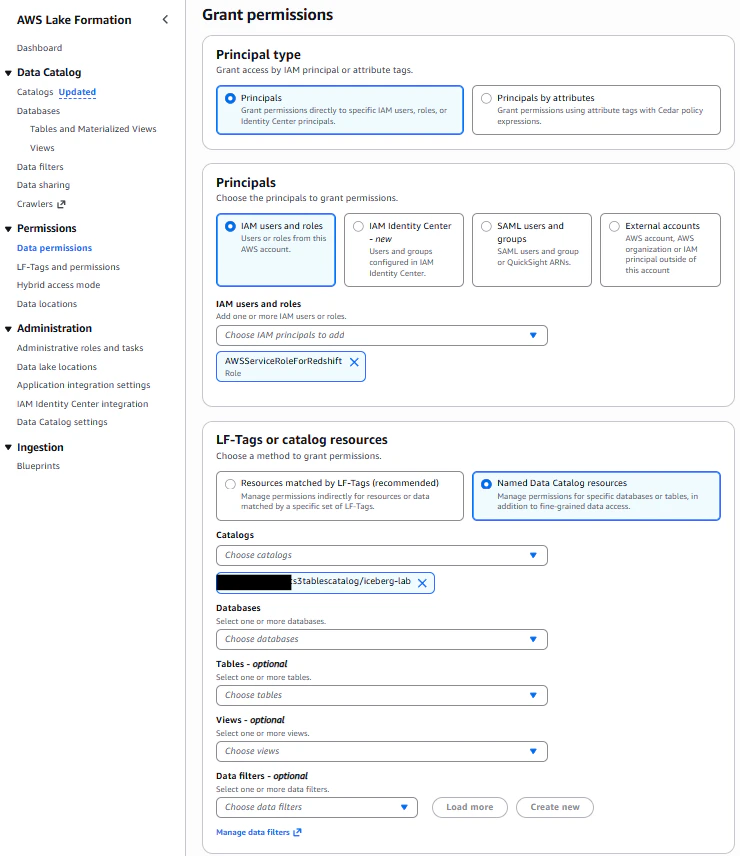
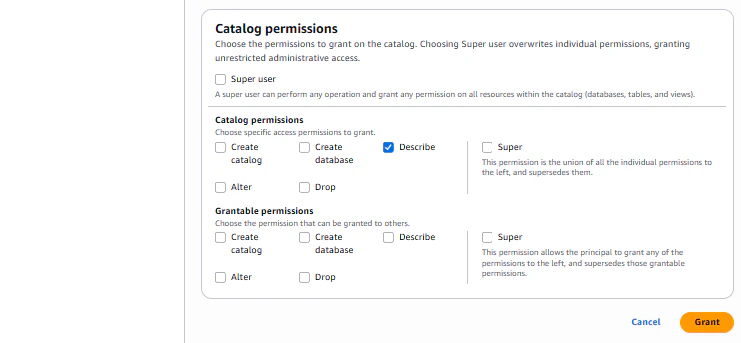
まずはカタログへの権限を設定します。
| 項目 | 設定値 |
|---|---|
| Principals | Redshiftサービスロール(RedshiftからLake Formationにアクセス可能にするため。Redshiftがカタログを見れる状態にする。) |
| LF-Tags or catalog resources | Named Data Catalog resources |
| Catalogs | s3tablescatalog/<テーブルバケット名> |
| permissions | DESCRIBE |
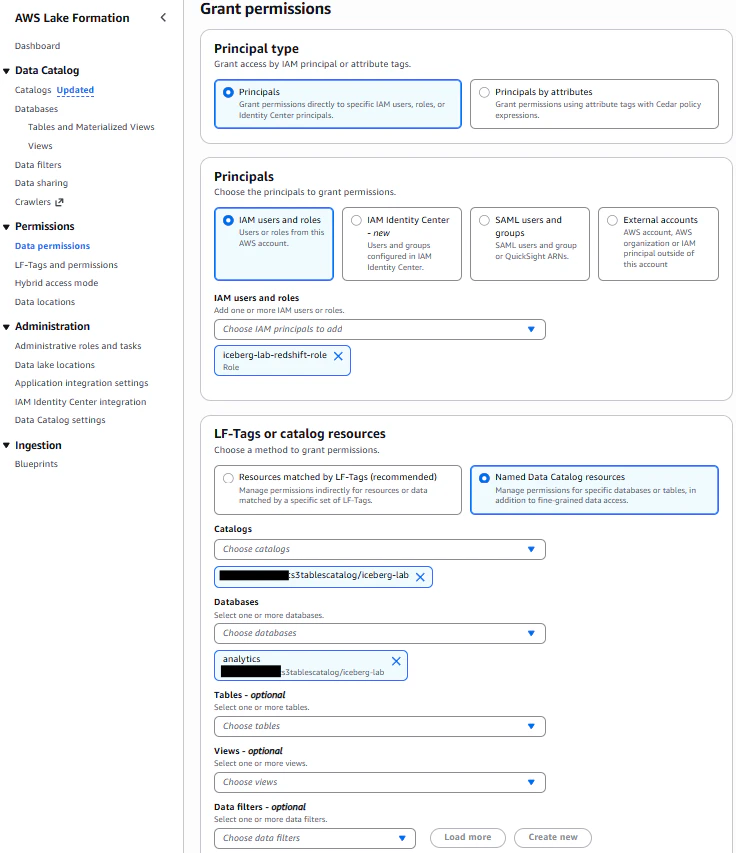
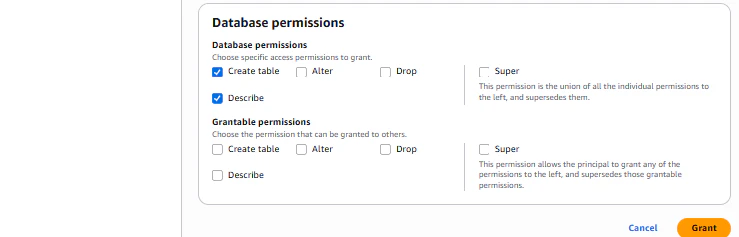
次にデータベースへの権限を設定します。
| 項目 | 設定値 |
|---|---|
| Principals | 今回作成したRedshiftが使用するロール |
| LF-Tags or catalog resources | Named Data Catalog resources |
| Catalogs | s3tablescatalog/<テーブルバケット名> |
| Databases | analytics |
| permissions | DESCRIBE, CREATE_TABLE |
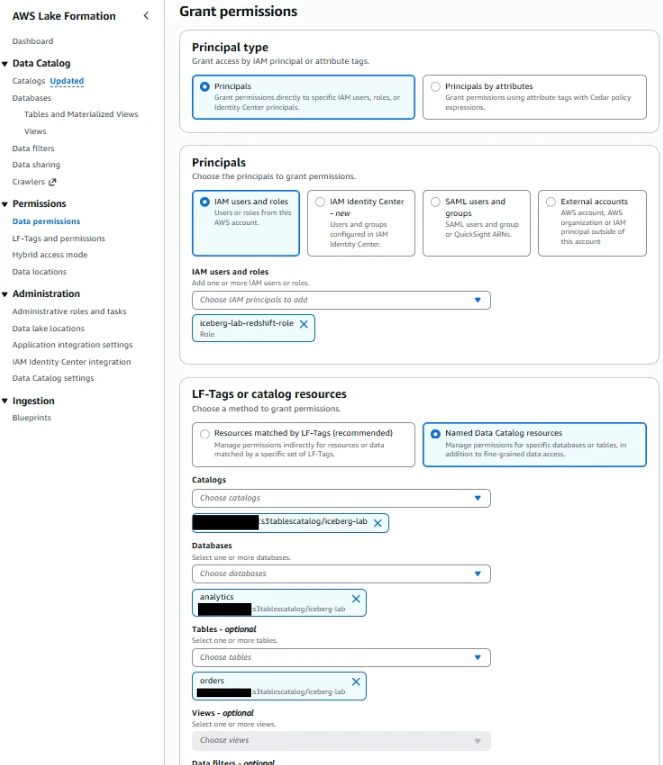
最後にテーブルへの権限を設定します。
| 項目 | 設定値 |
|---|---|
| Principals | 今回作成したRedshiftが使用するロール |
| LF-Tags or catalog resources | Named Data Catalog resources |
| Catalogs | s3tablescatalog/<テーブルバケット名> |
| Databases | analytics |
| permissions | SELECT, INSERT, DELETE, DESCRIBE, ALTER |
| Tables | orders |
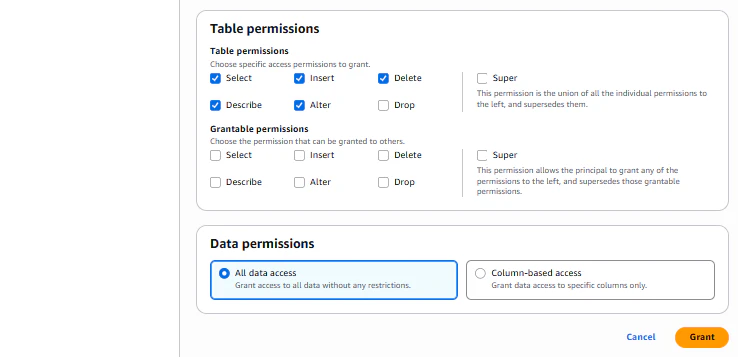
3レベルでの権限付与が完了しました。


Step 3:RedshiftからIceberg テーブルをクエリ
3-1. Redshift Query Editor v2に接続
RedShiftのコンソール画面から、ワークグループを選択し、クエリエディタを開始します。


画面左のワークグループを選択すると、接続開始設定の画面が出るので、接続方法はfederated user、接続先のデータベースはdevとします。
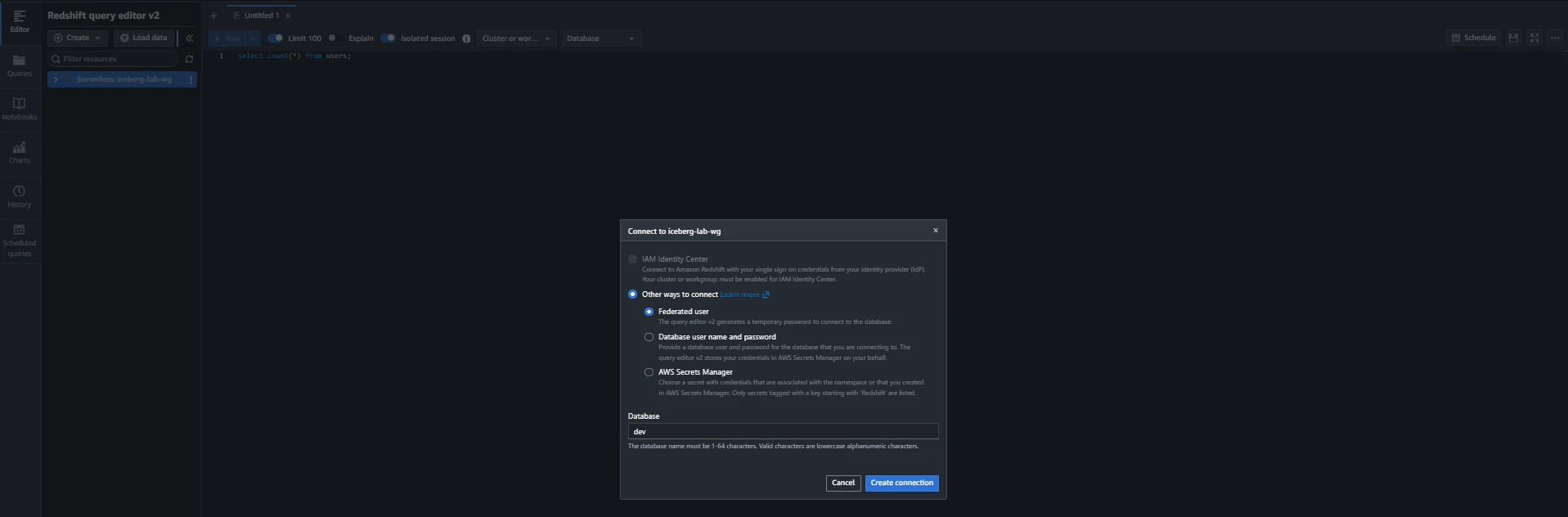
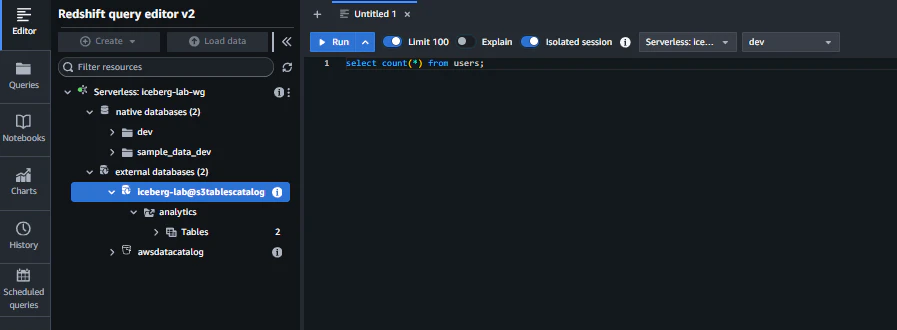
外部データベースとして、Lake Formationに登録されたs3tablescatalogがマウントされていることを確認できます。また、s3tablescatalogに登録されたテーブルバケット、その中のデータベース、テーブルも確認できます。
3-2. Icebergテーブルへのクエリ
いくつかのクエリを実行してみます。
〇S3 TablesのIcebergテーブルを直接クエリ
SELECT
  order_id,
  customer_id,
  order_date,
  status
FROM
    "iceberg-lab@s3tablescatalog"."analytics"."orders"
ORDER BY order_date DESC
LIMIT 10;

-- 実行結果
order_id customer_id order_date  status
1008     3           2024-10-01  completed
1007     2           2024-09-01  completed
1005     4           2024-07-15  completed
1004     1           2024-07-01  completed
1003     3           2024-06-10  completed
1002     2           2024-06-05  completed
1001     1           2024-06-01  refunded
1014     2003        2024-01-17  pending
1011     2003        2024-01-17  pending
1014     2003        2024-01-17  pending
〇RedshiftローカルテーブルとIcebergテーブルの結合(ローカルにマスタ、Icebergにトランザクションデータ)
Redshiftのローカルデータベースdevにcustomersテーブルを作成、データを挿入します。
CREATE TABLE customers (
  customer_id   BIGINT,
  customer_name VARCHAR(256),
  email         VARCHAR(256),
  city          VARCHAR(256),
  country       VARCHAR(256),
  segment       VARCHAR(256),
  created_at    TIMESTAMP
);

INSERT INTO customers VALUES (
  1,
  'Taro Yamada',
  'taro.yamada@example.com',
  'Tokyo',
  'Japan',
  'Consumer',
  '2024-01-15 09:00:00'
);
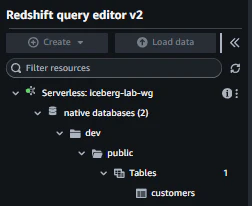
クエリエディタでテーブルを確認できます。
RedshiftローカルテーブルcustomersとIcebergテーブルordersを結合し、データの参照を行います。
SELECT
  o.order_id,
  c.customer_name,
  o.order_date,
  o.status
FROM
    "iceberg-lab@s3tablescatalog"."analytics"."orders" o
JOIN
  dev.public.customers c ON o.customer_id = c.customer_id;

-- 実行結果
order_id  customer_name order_date  status
1001      Taro Yamada   2024-06-01  refunded
1004      Taro Yamada   2024-07-01  completed
AthenaとRedshiftで同じIcebergテーブルを参照できる。データのコピーは一切不要。Athenaはアドホック分析向き、Redshiftは複雑な結合や大量集計向き、と使い分けられる。
Step 4:RedshiftからIcebergテーブルへの書き込み
RedshiftはIcebergテーブルへの直接書き込みもサポートしています。
4-1. RedshiftからIcebergテーブルにINSERT
RedshiftのSQLで直接Icebergテーブルに書き込み、参照してみます。
INSERT INTO "iceberg-lab@s3tablescatalog"."analytics"."orders"
(order_id, customer_id, order_date, total_amount, status)
VALUES
(9001, 1, DATE '2026-02-28', 50000, 'completed'),
(9002, 2, DATE '2026-02-28', 32000, 'processing');
Icebergテーブルにデータが挿入されていることが確認できました。
SELECT
  order_id,
  customer_id,
  order_date,
  status
FROM
    "iceberg-lab@s3tablescatalog"."analytics"."orders"
ORDER BY order_date DESC
LIMIT 10;

-- 実行結果
order_id customer_id order_date  status
1008     3           2024-10-01  completed
1007     2           2024-09-01  completed
1005     4           2024-07-15  completed
1004     1           2024-07-01  completed
1003     3           2024-06-10  completed
1002     2           2024-06-05  completed
1001     1           2024-06-01  refunded
1014     2003        2024-01-17  pending
1011     2003        2024-01-17  pending
1014     2003        2024-01-17  pending
9001     1           2026-02-28  completed
9002     2           2026-02-28  processing
4-2. CTAS(集計結果を新しいIcebergテーブルとして保存)
Icebergテーブルから集計した日次集計結果をIcebergテーブルとして作成します。
CREATE TABLE "iceberg-lab@s3tablescatalog"."analytics"."daily_summary"
USING ICEBERG
AS
SELECT
  order_date,
  COUNT(*)                                              AS order_count,
  SUM(total_amount)                                     AS total_amount,
  CAST(AVG(total_amount) AS DECIMAL(12,2))              AS avg_amount,
  SUM(CASE WHEN status = 'completed' THEN 1 ELSE 0 END) AS completed_count
FROM
  "iceberg-lab@s3tablescatalog"."analytics"."orders"
GROUP BY order_date;
クエリエディタでテーブルを確認できます。
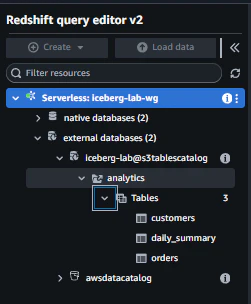
S3のテーブルバケットのコンソール画面からも確認できます。

作成したテーブルは想定通りのデータを持っていました。
SELECT * FROM "iceberg-lab@s3tablescatalog"."analytics"."daily_summary"
ORDER BY order_date;

-- 実行結果
order_date order_count total_amount avg_amount completed_count
2024-01-15 3           294000.00    98000.00   3
2024-01-16 3           22500.00     7500.00    3
2024-01-17 3           34800.00     11600.00   0
2024-06-01 1           359.88       359.88     0
2024-06-05 1           599.97       599.97     1
2024-06-10 1           499.99       499.99     1
2024-07-01 1           719.76       719.76     1
2024-07-15 1           189.99       189.99     1
2024-09-01 1           849.96       849.96     1
2024-10-01 1           299.99       299.99     1
RedshiftのIceberg書き込みでサポートされるDMLはCREATE TABLE(CTAS含む)とINSERTのみであり、DELETE, UPDATE, MERGE, ALTER TABLEは未サポート。行レベルの更新・削除が必要な場合は、引き続きAthena / Glueなどを使用する。
Part B: Glue Data Quality品質ゲート
Step 5:Glue Data Qualityルールの設計
AWS Glue Data QualityはS3 Tables、Lake Formation管理のIcebergテーブルにも対応しています。ETLパイプラインに品質チェックを組み込みます。CSVデータが以下のルール全てを満たさない場合、Icebergテーブルへの投入をブロックします。
品質ルール設計
Rules = [
    # 1. レコード数: 空ファイルでないこと
    RowCount > 0,

    # 2. order_id: 全行に値があること(NULL禁止)
    IsComplete "order_id",

    # 3. order_id: 重複がないこと
    IsUnique "order_id",

    # 4. total_amount: 全行に値があること
    IsComplete "total_amount",

    # 5. total_amount: 0以上であること(マイナス金額はNG)
    ColumnValues "total_amount" >= 0,

    # 6. status: 許可された値のみ
    ColumnValues "status" in ["completed", "pending", "processing", "cancelled"],

    # 7. order_date: 全行に値があること
    IsComplete "order_date",

    # 8. customer_id: 全行に値があること
    IsComplete "customer_id"
]
ルール設計のポイント
| ルール種別 | 目的 | 失敗時の影響 |
|---|---|---|
| RowCount | 空ファイル検知 | Glue Jobの無駄な実行を防止 |
| IsComplete | NULLチェック | 下流のJOINやフィルタでの予期しない結果を防止 |
| IsUnique | 重複チェック | 集計の二重カウントを防止 |
| ColumnValues (範囲) | 値域チェック | 異常値の混入を防止 |
| ColumnValues (許可リスト) | カテゴリ値チェック | 未定義ステータスの混入を防止 |
Step 6:Glue Jobに品質チェックを組み込み
第2弾記事のGlue Jobスクリプト(scripts/glue_csv_to_iceberg.py)を拡張し、品質チェックを追加します。
scripts/glue_csv_to_iceberg.py(品質チェック追加版)
import sys
import json
import boto3
from awsglue.transforms import *
from awsglue.utils import getResolvedOptions
from awsglue.context import GlueContext
from awsglue.job import Job
from awsglue.dynamicframe import DynamicFrame
from awsgluedq.transforms import EvaluateDataQuality  # AWS Glue Data Quality
from pyspark.context import SparkContext
from pyspark.sql import SparkSession

# ── パラメータ取得 ──
args = getResolvedOptions(sys.argv, [
    'JOB_NAME', 'SOURCE_PATH', 'TARGET_TABLE',
    'CATALOG_ID', 'WAREHOUSE_PATH', 'SNS_TOPIC_ARN'
])

# ── Sparkセッション設定 ──
spark = (SparkSession.builder
    .config("spark.sql.extensions",
            "org.apache.iceberg.spark.extensions.IcebergSparkSessionExtensions")
    .config("spark.sql.defaultCatalog", "s3tablescatalog")
    .config("spark.sql.catalog.s3tablescatalog",
            "org.apache.iceberg.spark.SparkCatalog")
    .config("spark.sql.catalog.s3tablescatalog.catalog-impl",
            "org.apache.iceberg.aws.glue.GlueCatalog")
    .config("spark.sql.catalog.s3tablescatalog.glue.id", args['CATALOG_ID'])
    .config("spark.sql.catalog.s3tablescatalog.warehouse", args['WAREHOUSE_PATH'])
    .config("spark.sql.iceberg.handle-timestamp-without-timezone", "true")
    .getOrCreate()
)

glueContext = GlueContext(spark.sparkContext)
job = Job(glueContext)
job.init(args['JOB_NAME'], args)

sns_client = boto3.client('sns')

# ── Step 1: CSV読み込み ──
print(f"Reading CSV from: {args['SOURCE_PATH']}")
df = spark.read \
    .option("header", "true") \
    .option("inferSchema", "true") \
    .csv(args['SOURCE_PATH'])

record_count = df.count()
print(f"Record count: {record_count}")

# DynamicFrame に変換(EvaluateDataQualityがDynamicFrameを受け取るため)
dyf = DynamicFrame.fromDF(df, glueContext, "incoming_orders")

# ── Step 2: DQDLでデータ品質ルールを定義 ──
DQDL_RULESET = """
Rules = [
    RowCount > 0,
    IsComplete "order_id",
    IsUnique "order_id",
    IsComplete "total_amount",
    ColumnValues "total_amount" >= 0,
    ColumnValues "status" in ["completed", "pending", "processing", "cancelled"],
    IsComplete "order_date",
    IsComplete "customer_id"
]
"""

# ── Step 3: EvaluateDataQualityで品質チェック実行 ──
dq_results = EvaluateDataQuality().process_rows(
    frame=dyf,
    ruleset=DQDL_RULESET,
    publishing_options={
        "dataQualityEvaluationContext": "orders_quality_check",
        "enableDataQualityCloudWatchMetrics": True,   # CloudWatchにメトリクス送信
        "enableDataQualityResultsPublishing": True,   # Glueコンソールに結果表示
    },
    additional_options={
        "performanceTuning.caching": "CACHE_NOTHING"
    }
)

# ルールごとの合否結果を取得
rule_outcomes_dyf = SelectFromCollection.apply(
    dfc=dq_results,
    key="ruleOutcomes",
    transformation_ctx="ruleOutcomes"
)
rule_outcomes_df = rule_outcomes_dyf.toDF()

# ── Step 4: 品質スコア計算&レポート出力 ──
total_rules = rule_outcomes_df.count()
passed_rules = rule_outcomes_df.filter(
    rule_outcomes_df["Outcome"] == "Passed"
).count()
quality_score = (passed_rules / total_rules) * 100

print(f"\n{'='*50}")
print(f"DATA QUALITY REPORT")
print(f"{'='*50}")
print(f"Score: {quality_score:.1f}% ({passed_rules}/{total_rules} rules passed)")
rule_outcomes_df.select("Rule", "Outcome", "FailureReason").show(truncate=False)
print(f"{'='*50}\n")

# ── Step 5: 品質ゲート判定 ──
if quality_score < 100:
    # 不合格:隔離フォルダに退避
    quarantine_path = args['SOURCE_PATH'].replace('/raw/', '/quarantine/')
    df.write.mode("overwrite").option("header", "true").csv(quarantine_path)
    print(f"Quarantined data to: {quarantine_path}")

    # 失敗ルール一覧を収集してSNS通知
    failed_rules = rule_outcomes_df.filter(
        rule_outcomes_df["Outcome"] == "Failed"
    ).select("Rule", "FailureReason").collect()

    failure_detail = "\n".join(
        f"  - {row['Rule']}: {row['FailureReason']}" for row in failed_rules
    )
    sns_client.publish(
        TopicArn=args['SNS_TOPIC_ARN'],
        Subject="Data Quality Check FAILED",
        Message=(
            f"Data Quality FAILED for {args['SOURCE_PATH']}\n"
            f"Score: {quality_score:.1f}%\n"
            f"Failed rules:\n{failure_detail}"
        )
    )

    # ジョブを失敗させる → Step FunctionsのCatchに遷移
    raise Exception(f"Data Quality check failed: {quality_score:.1f}%")

# ── Step 6: 品質チェック合格 → Icebergテーブルに投入 ──
print("Data Quality PASSED. Writing to Iceberg table...")

df.createOrReplaceTempView("incoming_orders")

spark.sql(f"""
    INSERT INTO {args['TARGET_TABLE']}
    SELECT *
    FROM incoming_orders
""")

print(f"Successfully wrote {record_count} records to {args['TARGET_TABLE']}")

# 合格通知
sns_client.publish(
    TopicArn=args['SNS_TOPIC_ARN'],
    Subject="Data Quality Check PASSED",
    Message=(
        f"File: {args['SOURCE_PATH']}\n"
        f"Records: {record_count}\n"
        f"Quality Score: {quality_score:.1f}%\n"
        f"All {total_rules} rules passed."
    )
)

job.commit()
Step 7:TerraformでGlue Data Qualityルールセットを定義
Glue Data Catalogに品質ルールセットを登録しておくと、コンソールからルールの確認・手動実行ができます。
modules/glue/main.tf
# 現在の実行アカウント情報を取得
data "aws_caller_identity" "current" {}

# gluescript格納用バケット
resource "aws_s3_bucket" "glue_scripts" {
  bucket = "${var.project_name}-glue-scripts-${data.aws_caller_identity.current.account_id}"
}

# gluescriptをS3バケットへ配置
resource "aws_s3_object" "glue_script" {
  bucket = aws_s3_bucket.glue_scripts.id
  key    = "scripts/glue_csv_to_iceberg.py"
  source = "${path.module}/scripts/glue_csv_to_iceberg.py"
  etag   = filemd5("${path.module}/scripts/glue_csv_to_iceberg.py")
}

# gluejob
resource "aws_glue_job" "csv_to_iceberg" {
  name     = "${var.project_name}-csv-to-iceberg"
  role_arn = var.glue_iamrole_arn

  command {
    script_location = "s3://${aws_s3_bucket.glue_scripts.id}/scripts/glue_csv_to_iceberg.py"
    python_version  = "3"
  }

  glue_version      = "5.0"
  number_of_workers = 2
  worker_type       = "G.1X"
  timeout           = 60

  default_arguments = {
    "--job-language"                    = "python"
    "--enable-metrics"                  = "true"
    "--enable-continuous-cloudwatch-log" = "true"
    "--datalake-formats"                = "iceberg"
    "--CATALOG_ID"                      = "${data.aws_caller_identity.current.account_id}:s3tablescatalog/${var.s3tables_bucket_name}"
    "--WAREHOUSE_PATH"                  = "s3://${var.s3tables_bucket_name}/warehouse/"
  }
}

################################以下今回追加箇所#####################################

locals {
  orders_ruleset = join(", ", [
    "Rules = [RowCount > 0",
    "IsComplete \"order_id\"",
    "IsUnique \"order_id\"",
    "IsComplete \"total_amount\"",
    "ColumnValues \"total_amount\" >= 0",
    "ColumnValues \"status\" in [\"completed\",\"pending\",\"processing\",\"cancelled\"]",
    "IsComplete \"order_date\"",
    "IsComplete \"customer_id\"]"
  ])
}

resource "aws_glue_data_quality_ruleset" "orders" {
  name        = "${var.project_name}-orders-quality-rules"
  description = "ordersテーブルのデータ品質ルール"

  # ルールの対象テーブル(Glue Data Catalog)
  target_table {
    database_name = "analytics"
    table_name    = "orders"
    # S3 Tablesカタログの場合、catalog_idを指定
    catalog_id = "${data.aws_caller_identity.current.account_id}:s3tablescatalog/${var.s3tables_bucket_name}"
  }

  ruleset = local.orders_ruleset # localで定義したローカル変数を使用
}
Step 8:Glue Jobの設定を更新
modules/glue/main.tf
SNS Topic ARNをGlue Jobに渡します。
resource "aws_glue_job" "csv_to_iceberg" {
  name     = "${var.project_name}-csv-to-iceberg"
  role_arn = aws_iam_role.glue.arn

  command {
    script_location = "s3://${aws_s3_bucket.landing.id}/scripts/glue_csv_to_iceberg.py"
    python_version  = "3"
  }

  glue_version      = "5.0"
  number_of_workers = 2
  worker_type       = "G.1X"
  timeout           = 60

  default_arguments = {
    "--job-language"                     = "python"
    "--enable-metrics"                   = "true"
    "--enable-continuous-cloudwatch-log" = "true"
    "--datalake-formats"                 = "iceberg"
    "--CATALOG_ID"                       = "${data.aws_caller_identity.current.account_id}:s3tablescatalog/${var.s3tables_bucket_name}"
    "--WAREHOUSE_PATH"                   = "s3://${var.s3tables_bucket_name}/warehouse/"
    "--SNS_TOPIC_ARN"                    = var.pipeline_notification_sns_topic_arn
  }
}
modules/glue/variables.tf
main.tfにて使用する変数を定義します。
variable "project_name" {
  description = "プロジェクト名"
  type        = string
  default     = "iceberg-lab"
}

variable "glue_iamrole_arn" {
  description = "glue用IAMロールARN"
  type        = string
}

variable "s3tables_bucket_name" {
  description = "S3テーブル用バケット名"
  type        = string
}

################################以下今回追加箇所#####################################

variable "pipeline_notification_sns_topic_arn" {
  description = "ETLパイプライン通知用SNSトピックARN"
  type        = string
}
modules/iam/main.tf
GlueロールにSNS発行権限、ランディング用バケットへのオブジェクト作成権限を追加します。
#glue用IAMポリシー
resource "aws_iam_role_policy" "glue_data_access" {
  name = "${var.project_name}-glue-data-access"
  role = aws_iam_role.glue.id

  # 生データランディング用バケット、S3Tables用バケット、Lakeformation、Glueに対する権限
  policy = jsonencode({
    Version = "2012-10-17"
    Statement = [
      {
        Sid    = "S3LandingAccess"
        Effect = "Allow"
        Action = ["s3:GetObject", "s3:ListBucket", "s3:PutObject"] # 変更箇所
        Resource = [
          var.landing_bucket_arn,
          "${var.landing_bucket_arn}/*",
          var.scripts_bucket_arn,
          "${var.scripts_bucket_arn}/*",
        ]
      },
      {
        Sid      = "S3TablesAccess"
        Effect   = "Allow"
        Action   = ["s3tables:*"]
        Resource = [
          var.s3tables_bucket_arn,
          "${var.s3tables_bucket_arn}/*"
        ]
      },
      {
        Sid      = "GlueAndLakeFormation"
        Effect   = "Allow"
        Action   = ["glue:*", "lakeformation:GetDataAccess"]
        Resource = ["*"]
      },

################################以下今回追加箇所#####################################
      {
        Sid      = "GlueSnsPublish"
        Effect   = "Allow"
        Action   = "sns:Publish"
        Resource = var.pipeline_notification_sns_topic_arn
      }
    ]
  })
}
main.tf
モジュール呼び出しを行うmain.tfに変更を加えます。
# Glue関連
module "glue" {
  source        = "./modules/glue/"

  project_name                        = var.project_name
  s3tables_bucket_name                = module.s3_tables.s3tables_bucket_name
  glue_iamrole_arn                    = module.iam.glue_iamrole_arn
  # 変更箇所
  pipeline_notification_sns_topic_arn = module.step_functions.pipeline_notification_sns_topic_arn
}
デプロイ
terraform planを実行します。
C:\s3-tables-iceberg-lab > terraform plan
module.step_functions.data.aws_caller_identity.current: Reading...
module.glue.data.aws_caller_identity.current: Reading...
module.s3_tables.data.aws_caller_identity.current: Reading...
module.s3_landing.data.aws_caller_identity.current: Reading...
module.iam.aws_iam_role.redshift: Refreshing state... [id=iceberg-lab-redshift-role]
module.iam.aws_iam_role.step_functions: Refreshing state... [id=iceberg-lab-sfn-role]
module.iam.aws_iam_role.eventbridge: Refreshing state... [id=iceberg-lab-eventbridge-role]
module.step_functions.aws_sns_topic.pipeline_notification: Refreshing state... [id=arn:aws:sns:ap-northeast-1:{AccountId}:iceberg-lab-pipeline-notification]
module.iam.aws_iam_role.glue: Refreshing state... [id=iceberg-lab-glue-role]
module.s3_tables.aws_s3tables_table_bucket.main: Refreshing state... [name=iceberg-lab]
module.s3_landing.data.aws_caller_identity.current: Read complete after 0s [id={AccountId}]
module.s3_landing.aws_s3_bucket.landing: Refreshing state... [id=iceberg-lab-landing-{AccountId}]
module.glue.data.aws_caller_identity.current: Read complete after 0s [id={AccountId}]
module.glue.aws_s3_bucket.glue_scripts: Refreshing state... [id=iceberg-lab-glue-scripts-{AccountId}]
module.s3_tables.data.aws_caller_identity.current: Read complete after 0s [id={AccountId}]
module.step_functions.data.aws_caller_identity.current: Read complete after 0s [id={AccountId}]
module.step_functions.aws_sns_topic_subscription.email: Refreshing state... [id=arn:aws:sns:ap-northeast-1:{AccountId}:iceberg-lab-pipeline-notification:e0e63b7a-82f3-44ea-8a59-ba38e5f2af88]
module.s3_tables.aws_s3tables_namespace.analytics: Refreshing state...
module.s3_tables.data.aws_iam_policy_document.table_bucket: Reading...
module.s3_tables.data.aws_iam_policy_document.table_bucket: Read complete after 0s [id=3931547792]
module.s3_tables.aws_s3tables_table_bucket_policy.main: Refreshing state...
module.s3_tables.aws_s3tables_table.customers: Refreshing state... [name=customers]
module.s3_tables.aws_s3tables_table.orders: Refreshing state... [name=orders]
module.s3_landing.aws_s3_bucket_versioning.landing: Refreshing state... [id=iceberg-lab-landing-{AccountId}]
module.s3_landing.aws_cloudwatch_event_rule.s3_csv_arrived: Refreshing state... [id=iceberg-lab-csv-arrived]
module.s3_landing.aws_s3_bucket_notification.landing_eventbridge: Refreshing state... [id=iceberg-lab-landing-{AccountId}]
module.glue.aws_s3_object.glue_script: Refreshing state... [id=iceberg-lab-glue-scripts-{AccountId}/scripts/glue_csv_to_iceberg.py]
module.iam.aws_iam_role_policy.redshift_lakehouse: Refreshing state... [id=iceberg-lab-redshift-role:lakehouse-access]
module.redshift.aws_redshiftserverless_namespace.main: Refreshing state... [id=iceberg-lab-ns]
module.iam.aws_iam_role_policy_attachment.glue_service: Refreshing state... [id=iceberg-lab-glue-role/arn:aws:iam::aws:policy/service-role/AWSGlueServiceRole]
module.iam.aws_iam_role_policy.glue_data_access: Refreshing state... [id=iceberg-lab-glue-role:iceberg-lab-glue-data-access]
module.glue.aws_glue_job.csv_to_iceberg: Refreshing state... [id=iceberg-lab-csv-to-iceberg]
module.redshift.aws_redshiftserverless_workgroup.main: Refreshing state... [id=iceberg-lab-wg]
module.iam.aws_iam_role_policy.sfn_glue_sns: Refreshing state... [id=iceberg-lab-sfn-role:glue-and-sns]
module.step_functions.aws_sfn_state_machine.etl_pipeline: Refreshing state... [id=arn:aws:states:ap-northeast-1:{AccountId}:stateMachine:iceberg-lab-etl-pipeline]
module.redshift.aws_redshiftserverless_usage_limit.daily: Refreshing state... [id=57431a2c-1c31-45e0-9a73-2ac3e771c0bc]
module.iam.aws_iam_role_policy.eventbridge_start_sfn: Refreshing state... [id=iceberg-lab-eventbridge-role:start-step-functions]
module.s3_landing.aws_cloudwatch_event_target.step_functions: Refreshing state... [id=iceberg-lab-csv-arrived-terraform-20260225153517622700000001]

Terraform used the selected providers to generate the following execution plan. Resource actions are indicated with the
following symbols:
  + create
  ~ update in-place

Terraform will perform the following actions:

  # module.glue.aws_glue_data_quality_ruleset.orders will be created
  + resource "aws_glue_data_quality_ruleset" "orders" {
      + arn                   = (known after apply)
      + created_on            = (known after apply)
      + description           = "ordersテーブルのデータ品質ルール"
      + id                    = (known after apply)
      + last_modified_on      = (known after apply)
      + name                  = "iceberg-lab-orders-quality-rules"
      + recommendation_run_id = (known after apply)
      + region                = "ap-northeast-1"
      + ruleset               = "Rules = [RowCount > 0, IsComplete \"order_id\", IsUnique \"order_id\", IsComplete \"total_amount\", ColumnValues \"total_amount\" >= 0, ColumnValues \"status\" in [\"completed\",\"pending\",\"processing\",\"cancelled\"], IsComplete \"order_date\", IsComplete \"customer_id\"]"
      + tags_all              = (known after apply)

      + target_table {
          + catalog_id    = "{AccountId}:s3tablescatalog/iceberg-lab"
          + database_name = "analytics"
          + table_name    = "orders"
        }
    }

  # module.glue.aws_glue_job.csv_to_iceberg will be updated in-place
  ~ resource "aws_glue_job" "csv_to_iceberg" {
      ~ default_arguments         = {
          + "--SNS_TOPIC_ARN"                    = "arn:aws:sns:ap-northeast-1:{AccountId}:iceberg-lab-pipeline-notification"
            # (6 unchanged elements hidden)
        }
        id                        = "iceberg-lab-csv-to-iceberg"
        name                      = "iceberg-lab-csv-to-iceberg"
        # (17 unchanged attributes hidden)

        # (2 unchanged blocks hidden)
    }

  # module.glue.aws_s3_object.glue_script will be updated in-place
  ~ resource "aws_s3_object" "glue_script" {
      ~ etag                          = "df9c58f8917007d62a5b4d2fd36d4b23" -> "f5ad76623540211725c61d05595732db"
        id                            = "iceberg-lab-glue-scripts-{AccountId}/scripts/glue_csv_to_iceberg.py"
        tags                          = {}
      + version_id                    = (known after apply)
        # (25 unchanged attributes hidden)
    }

  # module.iam.aws_iam_role_policy.glue_data_access will be updated in-place
  ~ resource "aws_iam_role_policy" "glue_data_access" {
        id          = "iceberg-lab-glue-role:iceberg-lab-glue-data-access"
        name        = "iceberg-lab-glue-data-access"
      ~ policy      = jsonencode(
          ~ {
              ~ Statement = [
                    # (2 unchanged elements hidden)
                    {
                        Action   = [
                            "glue:*",
                            "lakeformation:GetDataAccess",
                        ]
                        Effect   = "Allow"
                        Resource = [
                            "*",
                        ]
                        Sid      = "GlueAndLakeFormation"
                    },
                  + {
                      + Action   = "sns:Publish"
                      + Effect   = "Allow"
                      + Resource = "arn:aws:sns:ap-northeast-1:{AccountId}:iceberg-lab-pipeline-notification"
                      + Sid      = "GlueSnsPublish"
                    },
                ]
                # (1 unchanged attribute hidden)
            }
        )
        # (2 unchanged attributes hidden)
    }

Plan: 1 to add, 3 to change, 0 to destroy.

───────────────────────────────────────────────────────────────────────────────────────────────────────────────────────

Note: You didn't use the -out option to save this plan, so Terraform can't guarantee to take exactly these actions if
you run "terraform apply" now.
terraform applyを実行します。
C:\s3-tables-iceberg-lab > terraform apply
module.step_functions.data.aws_caller_identity.current: Reading...
module.glue.data.aws_caller_identity.current: Reading...
module.s3_landing.data.aws_caller_identity.current: Reading...
module.s3_tables.data.aws_caller_identity.current: Reading...
module.iam.aws_iam_role.redshift: Refreshing state... [id=iceberg-lab-redshift-role]
module.iam.aws_iam_role.step_functions: Refreshing state... [id=iceberg-lab-sfn-role]
module.iam.aws_iam_role.glue: Refreshing state... [id=iceberg-lab-glue-role]
module.step_functions.aws_sns_topic.pipeline_notification: Refreshing state... [id=arn:aws:sns:ap-northeast-1:{AccountId}:iceberg-lab-pipeline-notification]
module.iam.aws_iam_role.eventbridge: Refreshing state... [id=iceberg-lab-eventbridge-role]
module.s3_tables.aws_s3tables_table_bucket.main: Refreshing state... [name=iceberg-lab]
module.step_functions.data.aws_caller_identity.current: Read complete after 0s [id={AccountId}]
module.s3_tables.data.aws_caller_identity.current: Read complete after 0s [id={AccountId}]
module.glue.data.aws_caller_identity.current: Read complete after 0s [id={AccountId}]
module.glue.aws_s3_bucket.glue_scripts: Refreshing state... [id=iceberg-lab-glue-scripts-{AccountId}]
module.s3_landing.data.aws_caller_identity.current: Read complete after 0s [id={AccountId}]
module.s3_landing.aws_s3_bucket.landing: Refreshing state... [id=iceberg-lab-landing-{AccountId}]
module.step_functions.aws_sns_topic_subscription.email: Refreshing state... [id=arn:aws:sns:ap-northeast-1:{AccountId}:iceberg-lab-pipeline-notification:e0e63b7a-82f3-44ea-8a59-ba38e5f2af88]
module.s3_tables.aws_s3tables_namespace.analytics: Refreshing state...
module.s3_tables.data.aws_iam_policy_document.table_bucket: Reading...
module.s3_tables.data.aws_iam_policy_document.table_bucket: Read complete after 0s [id=3931547792]
module.s3_tables.aws_s3tables_table_bucket_policy.main: Refreshing state...
module.s3_tables.aws_s3tables_table.orders: Refreshing state... [name=orders]
module.s3_tables.aws_s3tables_table.customers: Refreshing state... [name=customers]
module.s3_landing.aws_s3_bucket_versioning.landing: Refreshing state... [id=iceberg-lab-landing-{AccountId}]
module.s3_landing.aws_s3_bucket_notification.landing_eventbridge: Refreshing state... [id=iceberg-lab-landing-{AccountId}]
module.s3_landing.aws_cloudwatch_event_rule.s3_csv_arrived: Refreshing state... [id=iceberg-lab-csv-arrived]
module.glue.aws_s3_object.glue_script: Refreshing state... [id=iceberg-lab-glue-scripts-{AccountId}/scripts/glue_csv_to_iceberg.py]
module.iam.aws_iam_role_policy_attachment.glue_service: Refreshing state... [id=iceberg-lab-glue-role/arn:aws:iam::aws:policy/service-role/AWSGlueServiceRole]
module.iam.aws_iam_role_policy.glue_data_access: Refreshing state... [id=iceberg-lab-glue-role:iceberg-lab-glue-data-access]
module.glue.aws_glue_job.csv_to_iceberg: Refreshing state... [id=iceberg-lab-csv-to-iceberg]
module.iam.aws_iam_role_policy.redshift_lakehouse: Refreshing state... [id=iceberg-lab-redshift-role:lakehouse-access]
module.redshift.aws_redshiftserverless_namespace.main: Refreshing state... [id=iceberg-lab-ns]
module.redshift.aws_redshiftserverless_workgroup.main: Refreshing state... [id=iceberg-lab-wg]
module.iam.aws_iam_role_policy.sfn_glue_sns: Refreshing state... [id=iceberg-lab-sfn-role:glue-and-sns]
module.step_functions.aws_sfn_state_machine.etl_pipeline: Refreshing state... [id=arn:aws:states:ap-northeast-1:{AccountId}:stateMachine:iceberg-lab-etl-pipeline]
module.redshift.aws_redshiftserverless_usage_limit.daily: Refreshing state... [id=57431a2c-1c31-45e0-9a73-2ac3e771c0bc]
module.iam.aws_iam_role_policy.eventbridge_start_sfn: Refreshing state... [id=iceberg-lab-eventbridge-role:start-step-functions]
module.s3_landing.aws_cloudwatch_event_target.step_functions: Refreshing state... [id=iceberg-lab-csv-arrived-terraform-20260225153517622700000001]

Terraform used the selected providers to generate the following execution plan. Resource actions are indicated with the
following symbols:
  + create
  ~ update in-place

Terraform will perform the following actions:

  # module.glue.aws_glue_data_quality_ruleset.orders will be created
  + resource "aws_glue_data_quality_ruleset" "orders" {
      + arn                   = (known after apply)
      + created_on            = (known after apply)
      + description           = "ordersテーブルのデータ品質ルール"
      + id                    = (known after apply)
      + last_modified_on      = (known after apply)
      + name                  = "iceberg-lab-orders-quality-rules"
      + recommendation_run_id = (known after apply)
      + region                = "ap-northeast-1"
      + ruleset               = "Rules = [RowCount > 0, IsComplete \"order_id\", IsUnique \"order_id\", IsComplete \"total_amount\", ColumnValues \"total_amount\" >= 0, ColumnValues \"status\" in [\"completed\",\"pending\",\"processing\",\"cancelled\"], IsComplete \"order_date\", IsComplete \"customer_id\"]"
      + tags_all              = (known after apply)

      + target_table {
          + catalog_id    = "{AccountId}:s3tablescatalog/iceberg-lab"
          + database_name = "analytics"
          + table_name    = "orders"
        }
    }

  # module.glue.aws_glue_job.csv_to_iceberg will be updated in-place
  ~ resource "aws_glue_job" "csv_to_iceberg" {
      ~ default_arguments         = {
          + "--SNS_TOPIC_ARN"                    = "arn:aws:sns:ap-northeast-1:{AccountId}:iceberg-lab-pipeline-notification"
            # (6 unchanged elements hidden)
        }
        id                        = "iceberg-lab-csv-to-iceberg"
        name                      = "iceberg-lab-csv-to-iceberg"
        # (17 unchanged attributes hidden)

        # (2 unchanged blocks hidden)
    }

  # module.glue.aws_s3_object.glue_script will be updated in-place
  ~ resource "aws_s3_object" "glue_script" {
      ~ etag                          = "df9c58f8917007d62a5b4d2fd36d4b23" -> "f5ad76623540211725c61d05595732db"
        id                            = "iceberg-lab-glue-scripts-{AccountId}/scripts/glue_csv_to_iceberg.py"
        tags                          = {}
      + version_id                    = (known after apply)
        # (25 unchanged attributes hidden)
    }

  # module.iam.aws_iam_role_policy.glue_data_access will be updated in-place
  ~ resource "aws_iam_role_policy" "glue_data_access" {
        id          = "iceberg-lab-glue-role:iceberg-lab-glue-data-access"
        name        = "iceberg-lab-glue-data-access"
      ~ policy      = jsonencode(
          ~ {
              ~ Statement = [
                    # (2 unchanged elements hidden)
                    {
                        Action   = [
                            "glue:*",
                            "lakeformation:GetDataAccess",
                        ]
                        Effect   = "Allow"
                        Resource = [
                            "*",
                        ]
                        Sid      = "GlueAndLakeFormation"
                    },
                  + {
                      + Action   = "sns:Publish"
                      + Effect   = "Allow"
                      + Resource = "arn:aws:sns:ap-northeast-1:{AccountId}:iceberg-lab-pipeline-notification"
                      + Sid      = "GlueSnsPublish"
                    },
                ]
                # (1 unchanged attribute hidden)
            }
        )
        # (2 unchanged attributes hidden)
    }

Plan: 1 to add, 3 to change, 0 to destroy.

Do you want to perform these actions?
  Terraform will perform the actions described above.
  Only 'yes' will be accepted to approve.

  Enter a value: yes

module.glue.aws_glue_data_quality_ruleset.orders: Creating...
module.iam.aws_iam_role_policy.glue_data_access: Modifying... [id=iceberg-lab-glue-role:iceberg-lab-glue-data-access]
module.glue.aws_s3_object.glue_script: Modifying... [id=iceberg-lab-glue-scripts-{AccountId}/scripts/glue_csv_to_iceberg.py]
module.glue.aws_glue_job.csv_to_iceberg: Modifying... [id=iceberg-lab-csv-to-iceberg]
module.glue.aws_s3_object.glue_script: Modifications complete after 1s [id=iceberg-lab-glue-scripts-{AccountId}/scripts/glue_csv_to_iceberg.py]
module.glue.aws_glue_job.csv_to_iceberg: Modifications complete after 1s [id=iceberg-lab-csv-to-iceberg]
module.glue.aws_glue_data_quality_ruleset.orders: Creation complete after 1s [id=iceberg-lab-orders-quality-rules]
module.iam.aws_iam_role_policy.glue_data_access: Modifications complete after 1s [id=iceberg-lab-glue-role:iceberg-lab-glue-data-access]

Apply complete! Resources: 1 added, 3 changed, 0 destroyed.
リソースの作成が完了しました。
Step 9:動作確認
Data Qualityを用いて設定したデータの品質チェックの動作を確認します。
9-1. 正常データのテスト
まずは正常なデータを用いた動作確認を行います。
品質チェック合格データ(good_orders.csv)
order_id,customer_id,order_date,product_name,quantity,unit_price,total_amount,status,region,created_at,discount_rate,note
2001,1,2024-06-01,Cloud Storage 1TB,12,29.99,359.88,completed,ap-northeast-1,2024-06-01 10:00:00.000000,0.00,
2002,2,2024-06-05,Compute Instance m5.xl,3,199.99,599.97,completed,ap-northeast-1,2024-06-05 11:30:00.000000,0.00,
2003,3,2024-06-10,Database RDS,1,499.99,499.99,completed,us-east-1,2024-06-10 09:15:00.000000,0.00,
上記CSVファイルをS3にアップロードします。
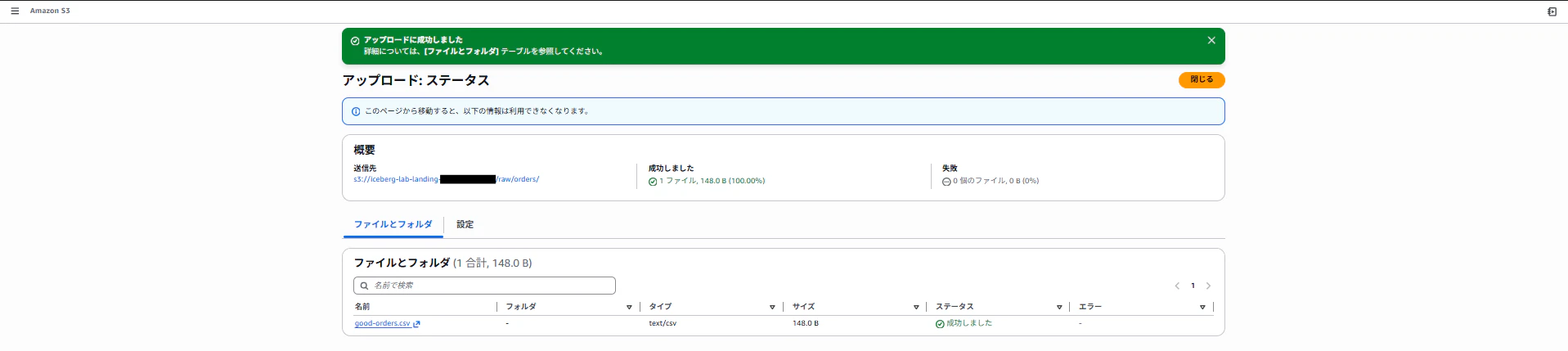
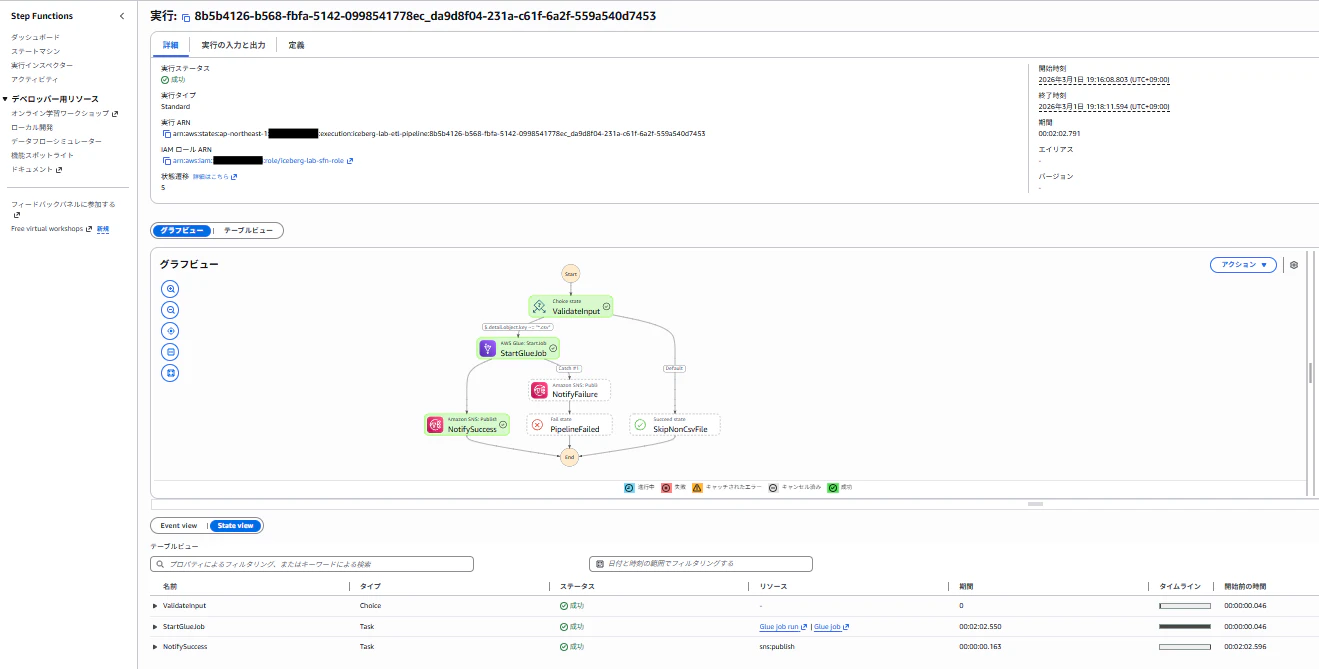
パイプラインが起動され、ETLジョブが正常に実行されました。
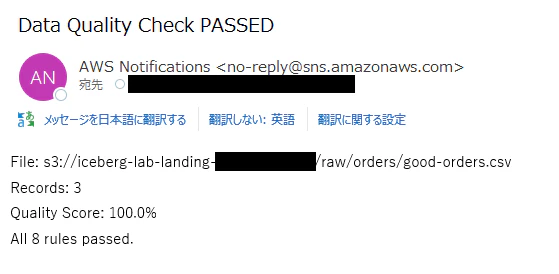
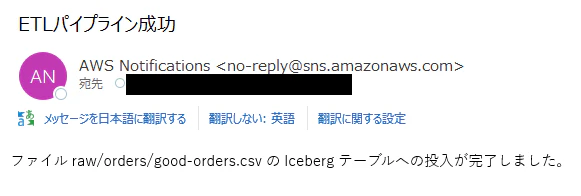
品質チェックの結果とETLパイプライン成功のメールがSNSで送信されています。
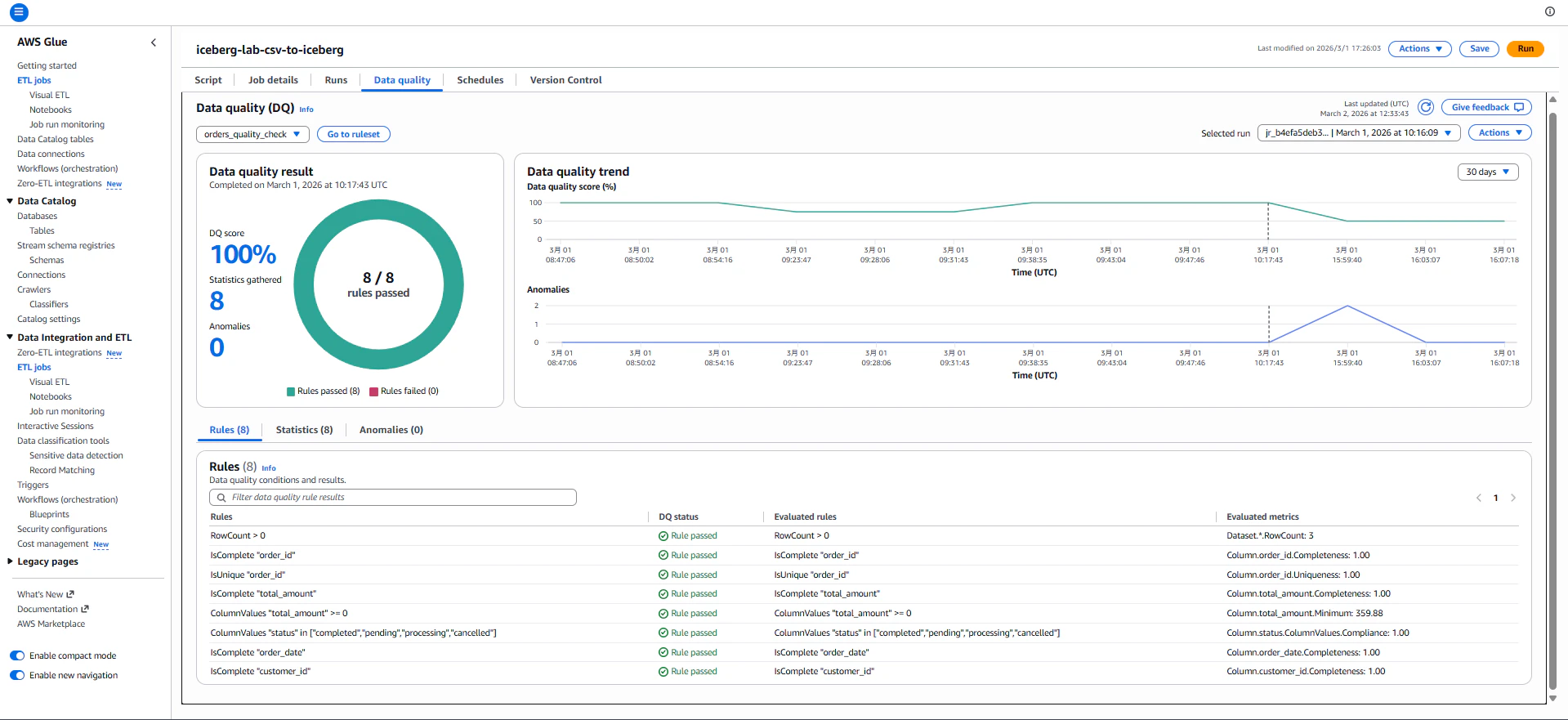
また、glueの出力ログ、コンソール画面から品質チェックの結果を詳細に確認できます。
Reading CSV from: s3://iceberg-lab-landing-{AccountId}/raw/orders/good-orders.csv
Record count: 3
/usr/lib/spark/python/lib/pyspark.zip/pyspark/sql/dataframe.py:147: UserWarning: DataFrame constructor is internal. Do not directly use it.

==================================================
DATA QUALITY REPORT
==================================================
Score: 100.0% (8/8 rules passed)
+-------------------------------------------------------------------------+-------+-------------+
|Rule                                                                     |Outcome|FailureReason|
+-------------------------------------------------------------------------+-------+-------------+
|RowCount > 0                                                             |Passed |NULL         |
|IsComplete "order_id"                                                    |Passed |NULL         |
|IsUnique "order_id"                                                      |Passed |NULL         |
|IsComplete "total_amount"                                                |Passed |NULL         |
|ColumnValues "total_amount" >= 0                                         |Passed |NULL         |
|ColumnValues "status" in ["completed","pending","processing","cancelled"]|Passed |NULL         |
|IsComplete "order_date"                                                  |Passed |NULL         |
|IsComplete "customer_id"                                                 |Passed |NULL         |
+-------------------------------------------------------------------------+-------+-------------+

==================================================

Data Quality PASSED. Writing to Iceberg table...
Successfully wrote 3 records to analytics.orders
Running autoDebugger shutdown hook.
パイプライン実行前と実行後のデータを比較し、品質チェックに合格したデータがIcebergテーブルに挿入されていることを確認します。
実行前のテーブルデータ
select * from orders;

-- 実行結果
order_id  customer_id  order_date	product_name	        quantity  unit_price	total_amount  status	region	        created_at	                discount_rate	note
1001	  1	           2024-06-01	Cloud Storage 1TB	    12	      29.99	        359.88	      refunded	ap-northeast-1	2024-06-01 10:00:00.000000	                返金処理済
1002	  2	           2024-06-05	Compute Instance m5.xl	3	      199.99	    599.97	      completed	ap-northeast-1	2024-06-05 11:30:00.000000
1003	  3	           2024-06-10	Database RDS	        1	      499.99	    499.99	      completed	us-east-1	    2024-06-10 09:15:00.000000
実行後のデータ
select * from orders;

-- 実行結果
order_id  customer_id  order_date	product_name	        quantity  unit_price   total_amount	status	    region	        created_at	                discount_rate  note
1001	  1	           2024-06-01	Cloud Storage 1TB	    12	      29.99	       359.88	    refunded	ap-northeast-1	2024-06-01 10:00:00.000000		           返金処理済
1002	  2	           2024-06-05	Compute Instance m5.xl	3	      199.99	   599.97	    completed	ap-northeast-1	2024-06-05 11:30:00.000000
1003	  3	           2024-06-10	Database RDS	        1	      499.99	   499.99	    completed	us-east-1	    2024-06-10 09:15:00.000000
2001	  1	           2024-06-01	Cloud Storage 1TB	    12	      29.99	       359.88	    completed	ap-northeast-1	2024-06-01 10:00:00.000000	0.00
2002	  2	           2024-06-05	Compute Instance m5.xl	3	      199.99	   599.97	    completed	ap-northeast-1	2024-06-05 11:30:00.000000	0.00
2003	  3	           2024-06-10	Database RDS	        1	      499.99	   499.99	    completed	us-east-1	    2024-06-10 09:15:00.000000	0.00
CSVのデータが挿入されていました。
9-2. 不正データのテスト
次には不正なデータを用いた動作確認を行います。品質チェックで100%でない場合、エラーとなり、ETL処理を行わずS3バケットの隔離フォルダに格納されます。
品質チェック不合格データ(重複order_id + マイナス金額 + 不正ステータス)(bad_orders.csv)
order_id,customer_id,order_date,product_name,quantity,unit_price,total_amount,status,region,created_at,discount_rate,note
4001,1,2026-02-28,Cloud Storage 1TB,1,15000.00,15000.00,completed,ap-northeast-1,2026-02-28 10:00:00.000000,0.00,
4001,2,2026-02-28,Compute Instance,1,500.00,-500.00,unknown_status,ap-northeast-1,2026-02-28 11:00:00.000000,0.00,
4003,,2026-02-28,Database RDS,1,8000.00,8000.00,pending,us-east-1,2026-02-28 09:00:00.000000,0.00,
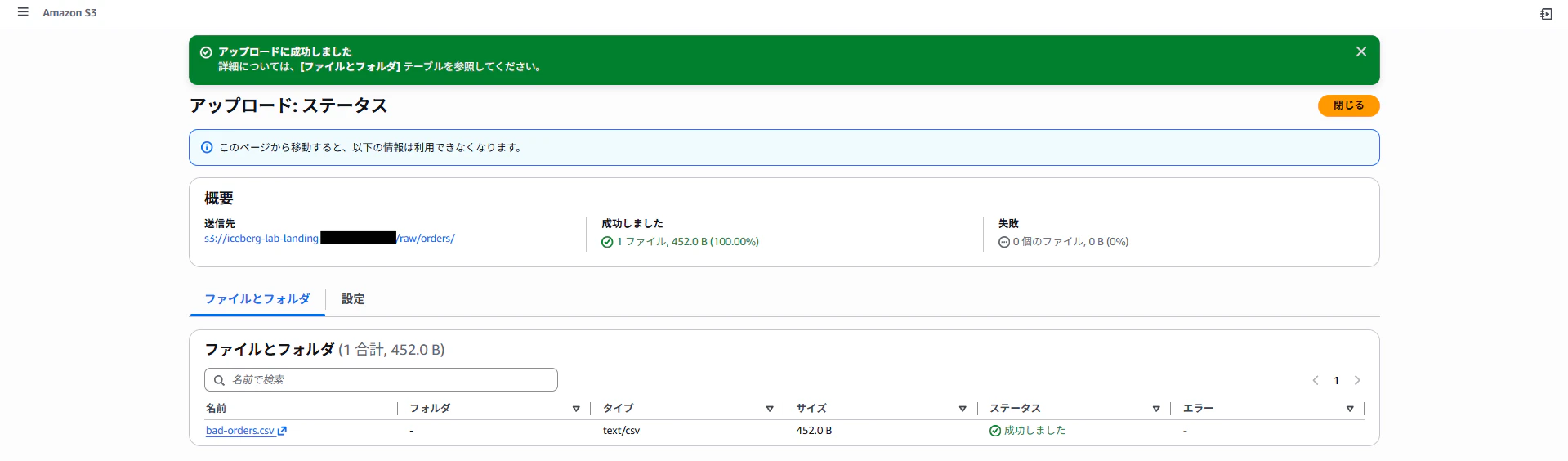
上記CSVファイルをS3にアップロードします。
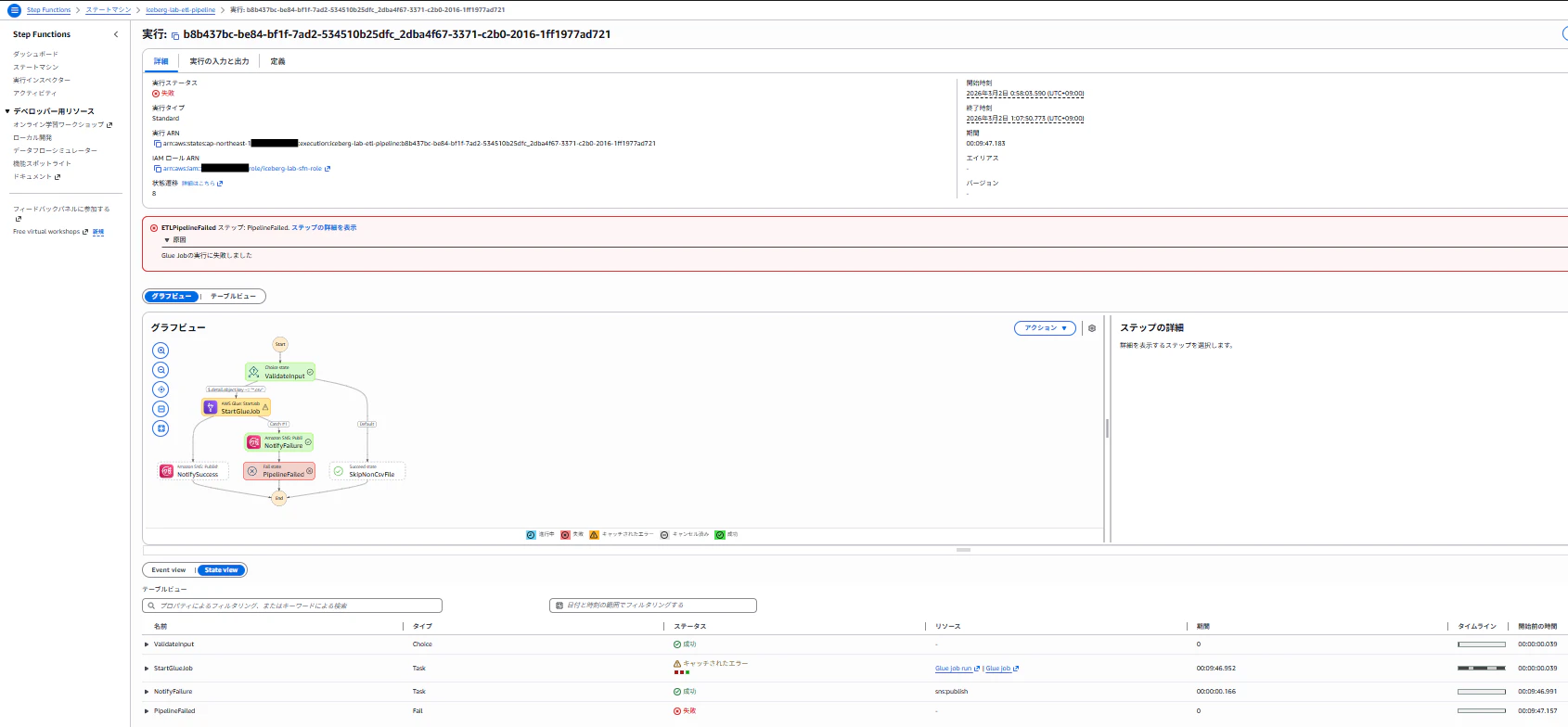
パイプラインが起動され、ETLジョブが失敗しました。
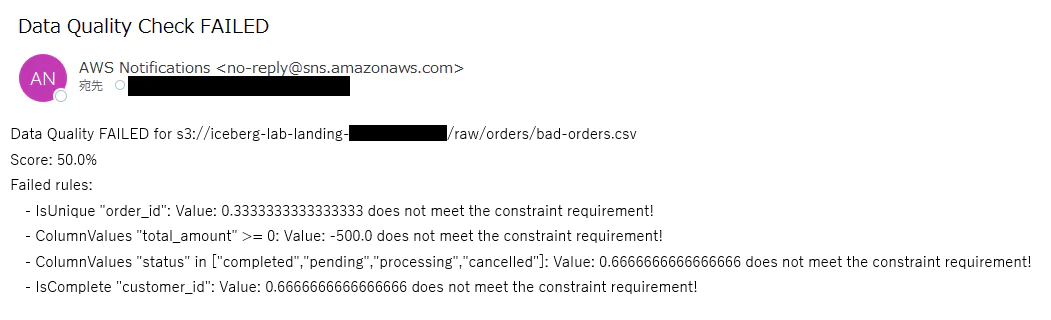
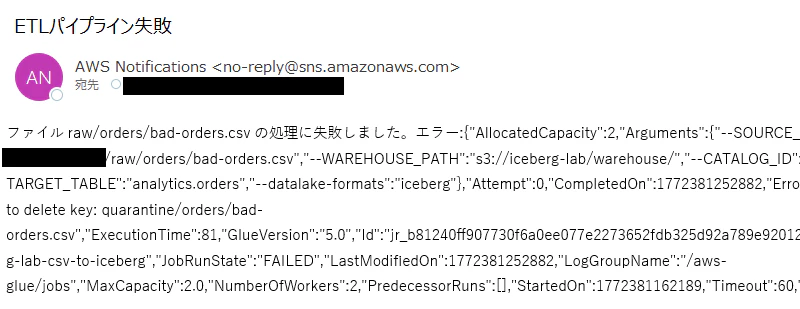
品質チェックの結果とETLパイプライン失敗のメールがSNSで送信されています。
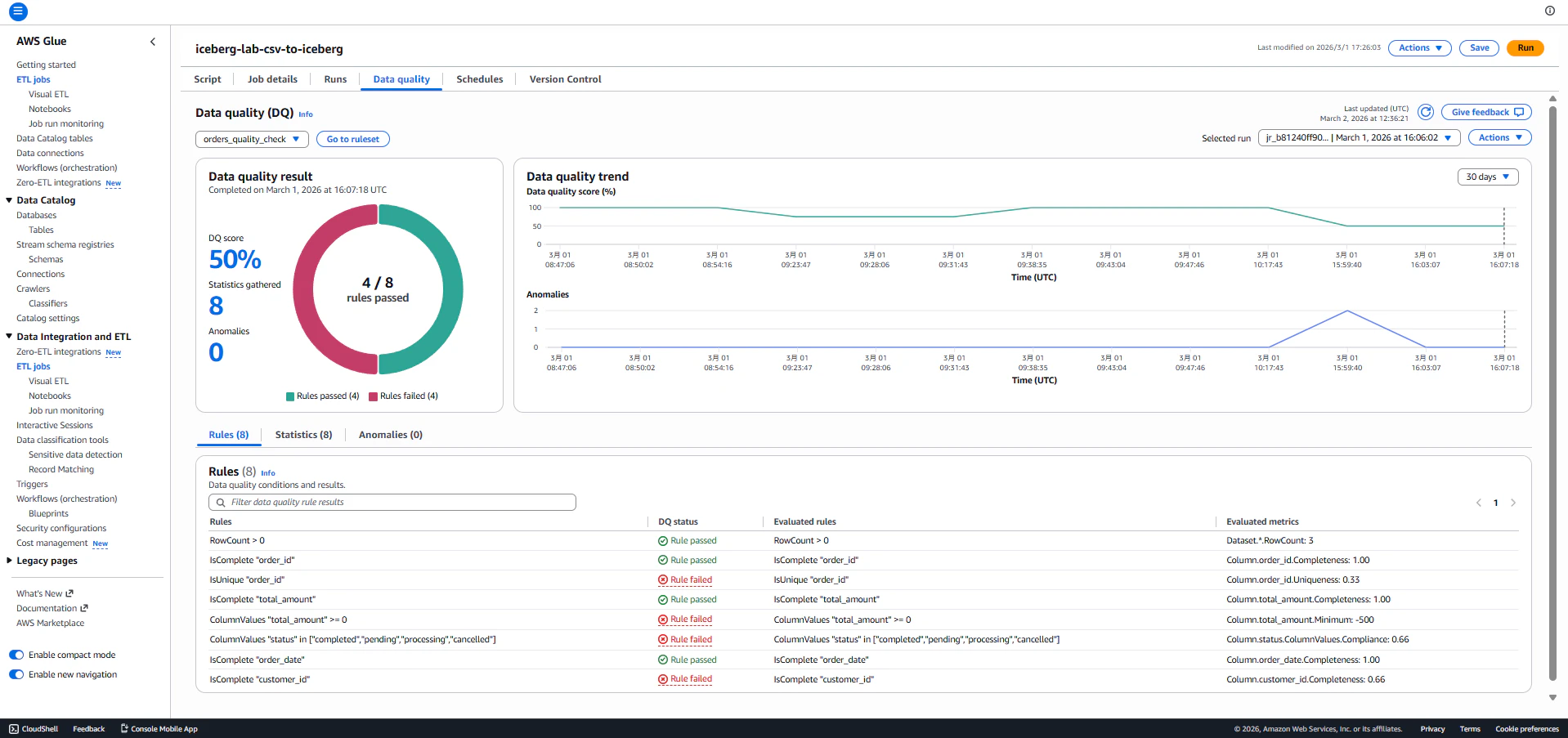
glueの出力ログ、コンソール画面から品質チェックの結果を詳細に確認します。50%の割合でルールを合格しています。
Reading CSV from: s3://iceberg-lab-landing-{AccountId}/raw/orders/bad-orders.csv
Record count: 3
/usr/lib/spark/python/lib/pyspark.zip/pyspark/sql/dataframe.py:147: UserWarning: DataFrame constructor is internal. Do not directly use it.

==================================================
DATA QUALITY REPORT
==================================================
Score: 50.0% (4/8 rules passed)
+-------------------------------------------------------------------------+-------+-------------------------------------------------------------------+
|Rule                                                                     |Outcome|FailureReason                                                      |
+-------------------------------------------------------------------------+-------+-------------------------------------------------------------------+
|RowCount > 0                                                             |Passed |NULL                                                               |
|IsComplete "order_id"                                                    |Passed |NULL                                                               |
|IsUnique "order_id"                                                      |Failed |Value: 0.3333333333333333 does not meet the constraint requirement!|
|IsComplete "total_amount"                                                |Passed |NULL                                                               |
|ColumnValues "total_amount" >= 0                                         |Failed |Value: -500.0 does not meet the constraint requirement!            |
|ColumnValues "status" in ["completed","pending","processing","cancelled"]|Failed |Value: 0.6666666666666666 does not meet the constraint requirement!|
|IsComplete "order_date"                                                  |Passed |NULL                                                               |
|IsComplete "customer_id"                                                 |Failed |Value: 0.6666666666666666 does not meet the constraint requirement!|
+-------------------------------------------------------------------------+-------+-------------------------------------------------------------------+

==================================================

Running autoDebugger shutdown hook.
S3の隔離フォルダに不正データファイルが配置されています。

パイプライン実行前と実行後のデータを比較し、品質チェックに不合格となったデータがIcebergテーブルに挿入されていないことを確認します。
実行前のテーブルデータ
select * from orders;

-- 実行結果
order_id  customer_id  order_date	product_name	        quantity  unit_price   total_amount	status	    region	        created_at	                discount_rate  note
1001	  1	           2024-06-01	Cloud Storage 1TB	    12	      29.99	       359.88	    refunded	ap-northeast-1	2024-06-01 10:00:00.000000		           返金処理済
1002	  2	           2024-06-05	Compute Instance m5.xl	3	      199.99	   599.97	    completed	ap-northeast-1	2024-06-05 11:30:00.000000
1003	  3	           2024-06-10	Database RDS	        1	      499.99	   499.99	    completed	us-east-1	    2024-06-10 09:15:00.000000
2001	  1	           2024-06-01	Cloud Storage 1TB	    12	      29.99	       359.88	    completed	ap-northeast-1	2024-06-01 10:00:00.000000	0.00
2002	  2	           2024-06-05	Compute Instance m5.xl	3	      199.99	   599.97	    completed	ap-northeast-1	2024-06-05 11:30:00.000000	0.00
2003	  3	           2024-06-10	Database RDS	        1	      499.99	   499.99	    completed	us-east-1	    2024-06-10 09:15:00.000000	0.00
実行後のデータ
select * from orders;

-- 実行結果
order_id  customer_id  order_date	product_name	        quantity  unit_price   total_amount	status	    region	        created_at	                discount_rate  note
1001	  1	           2024-06-01	Cloud Storage 1TB	    12	      29.99	       359.88	    refunded	ap-northeast-1	2024-06-01 10:00:00.000000		           返金処理済
1002	  2	           2024-06-05	Compute Instance m5.xl	3	      199.99	   599.97	    completed	ap-northeast-1	2024-06-05 11:30:00.000000
1003	  3	           2024-06-10	Database RDS	        1	      499.99	   499.99	    completed	us-east-1	    2024-06-10 09:15:00.000000
2001	  1	           2024-06-01	Cloud Storage 1TB	    12	      29.99	       359.88	    completed	ap-northeast-1	2024-06-01 10:00:00.000000	0.00
2002	  2	           2024-06-05	Compute Instance m5.xl	3	      199.99	   599.97	    completed	ap-northeast-1	2024-06-05 11:30:00.000000	0.00
2003	  3	           2024-06-10	Database RDS	        1	      499.99	   499.99	    completed	us-east-1	    2024-06-10 09:15:00.000000	0.00
差異がないことを確認できました。
まとめ
今回Redshift Serverlessでのレイクハウスクエリ、Glue Data Qualityでの品質検査を検証することができました。以下のように第1弾、第2弾の記事で実装した構成を更に拡張し、レイクハウスとして実際のユースケースに近いものを構築しました。
| 観点 | 第1弾 | 第2弾 | 第3弾(本記事) |
|---|---|---|---|
| データストレージ | S3 Tables + Iceberg | ─ | ─ |
| クエリエンジン | Athena | ─ | Redshift Serverless |
| ETL | 手動Glue Job | EventBridge → Step Functions → Glue | Data Quality品質チェック |
| 通知 | ─ | SNS(成功/失敗) | SNS(品質レポート付き) |
| IaC | Terraform | Terraform | Terraform |
この記事が皆様のお役に立てば幸いです。質問やフィードバックがあれば、コメント欄でお気軽にお寄せください!