
はじめに
MCP(Model Context Protocol)を使うと、Claude などのAIに独自のツールを追加できます。
本記事では FastMCP ライブラリを使って、シンプルな電卓MCPサーバを実装します。
今回は STDIO(標準入出力) 方式で動かします。次回は HTTP 方式での接続を実装予定です。
MCPの通信方式:STDIOとHTTP
まず最初に、MCPサーバには通信方式が2種類あることを押さえておきましょう。
| 方式 | 通信の仕組み | 主な用途 |
|---|---|---|
| STDIO(今回) | 標準入出力でプロセス間通信 | ローカル実行・Claude Desktop 連携 |
| HTTP / SSE(次回予定) | ネットワーク越しにHTTPで通信 | リモートサーバ・Web連携・複数クライアント |
今回:STDIO方式
Claude Desktop
    ↓ stdin(リクエスト)
[calclator_server.py]
    ↑ stdout(レスポンス)
Claude Desktop
mcp.run() はデフォルトで STDIOモード で起動します。
環境構築
1. パッケージマネージャー uv のインストール
curl -LsSf https://astral.sh/uv/install.sh | sh
2. バージョン確認
uv --version
3. プロジェクトの作成
uv init
4. FastMCP のインストール
uv add fastmcp
ソースコード
#!/usr/bin/env python3

"""
MCP サーバ 電卓
通信方式: STDIO(標準入出力)
"""

import math
from fastmcp import FastMCP

# MCP サーバを作成
mcp = FastMCP("tossy MCP 電卓")

@mcp.tool()
def add(a: float, b: float) -> float:
    """2つの数を足します"""
    return a + b

@mcp.tool()
def subtract(a: float, b: float) -> float:
    """2つの数を引き算する"""
    return a - b

@mcp.tool()
def multiply(a: float, b: float) -> float:
    """掛け算"""
    return a * b

@mcp.tool()
def divide(a: float, b: float) -> float:
    """割り算"""
    return a / b

@mcp.tool()   # ← () を忘れずに!(後述のハマりポイント参照)
def power(a: float, b: float) -> float:
    """a の b 乗"""
    try:
        return a ** b
    except OverflowError:
        raise ValueError("計算結果が大きすぎます")

@mcp.tool()
def square_root(a: float) -> float:
    """平方根"""
    if a < 0:
        raise ValueError("入力値が負の数です")
    return math.sqrt(a)

@mcp.tool()
def circle_area(radius: float) -> float:
    """円の面積"""
    if radius < 0:
        raise ValueError("入力値が負の数です")
    return math.pi * radius * radius

if __name__ == "__main__":
    mcp.run()  # STDIO モードで起動
実装したツール一覧
| ツール名 | 概要 | バリデーション |
|---|---|---|
add |
加算 | なし |
subtract |
減算 | なし |
multiply |
乗算 | なし |
divide |
除算 | なし |
power |
べき乗 | OverflowError キャッチ |
square_root |
平方根 | 負数チェック |
circle_area |
円の面積 | 負数チェック |
起動
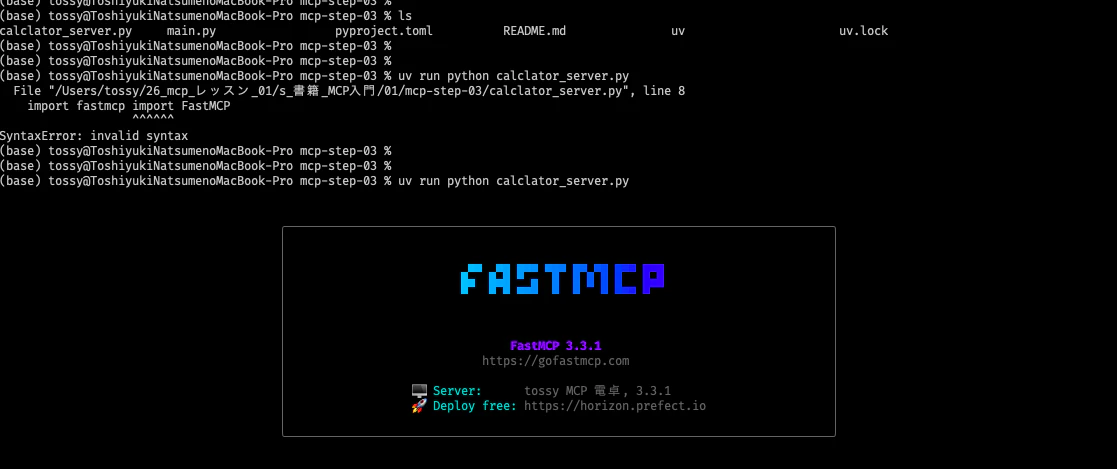
uv run python calclator_server.py
成功すると FastMCP のスプラッシュが表示されます。以下画面
まとめ
-
uv+FastMCPの組み合わせで、MCPサーバを素早く構築できる -
今回は STDIO 方式:
mcp.run()のデフォルト。ローカル開発・Claude Desktop 連携に最適 -
次回は HTTP 方式:
mcp.run(transport="http")でネットワーク越しの接続を実装予定