

1. はじめに
IBM Cloud CLIでAPI Keyを使用してログインする処理は自動化できるため、非常に便利です。しかし、API Keyはアカウント固有であるため、別のアカウントを利用する場合は、アカウントごとにAPI Keyを用意し、その都度ログインする必要があります。複数のAPI Keyを管理するのは手間がかかるため、その代替策としてTrusted Profileの利用してみた方法を紹介するのが本稿の目的です。
API Keyを使ってログイン
syasuda@MacBook-Pro ~ % ibmcloud login -a cloud.ibm.com --apikey @ibmcloud_apikey_17xxx23 -r jp-tok
API endpoint: https://cloud.ibm.com
Authenticating...
Retrieving API key token...
OK

Targeted account IBM (039xxxxxxxxxxxxxxxxxxxxxxxxxxxxx45da) <-> 17xxx23

Targeted region jp-tok


API endpoint:     https://cloud.ibm.com
Region:           jp-tok
User:             xxxxxxx@xx.ibm.com
Account:          IBM (039xxxxxxxxxxxxxxxxxxxxxxxxxxxxx45da) <-> 17xxx23
Resource group:   No resource group targeted, use 'ibmcloud target -g RESOURCE_GROUP'
他のアカウントに切り替え用としても、API Keyは該当アカウントでしか利用できないのでエラーになる。
syasuda@MacBook-Pro ~ % ibmcloud target -c 27dcxxxxxxxxxxxxxxxxxxxxxxxxxxad13
Correlation-ID: ac2c4005-2fd7-4516-9f77-f03c9dca02e5
FAILED
Could not set account. Please login again:
Remote server error. Status code: 400, error code: BXNIM0413E, message: Cannot switch accounts for a token that was created using the grant type urn:ibm:params:oauth:grant-type:apikey.
以下、Trusted Profileを使って別アカウントの情報を単一のAPIキーを使って管理する方法を紹介します。
2. Trusted Profileを作成。
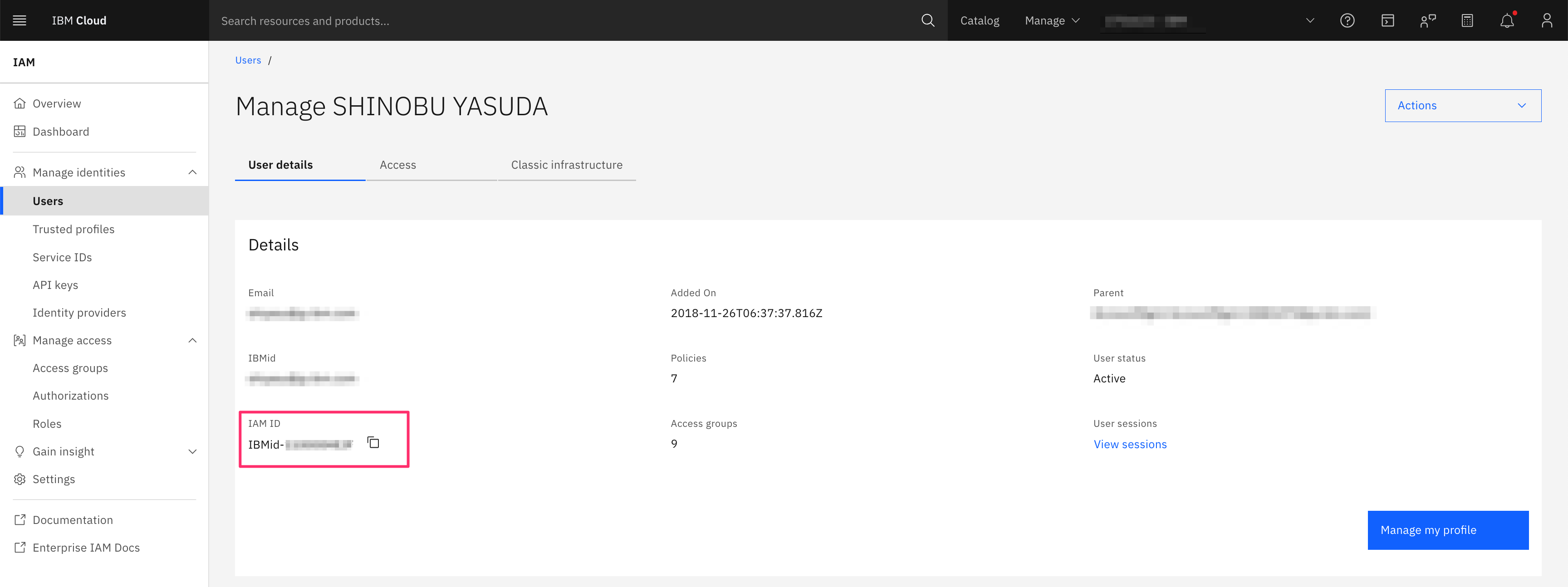
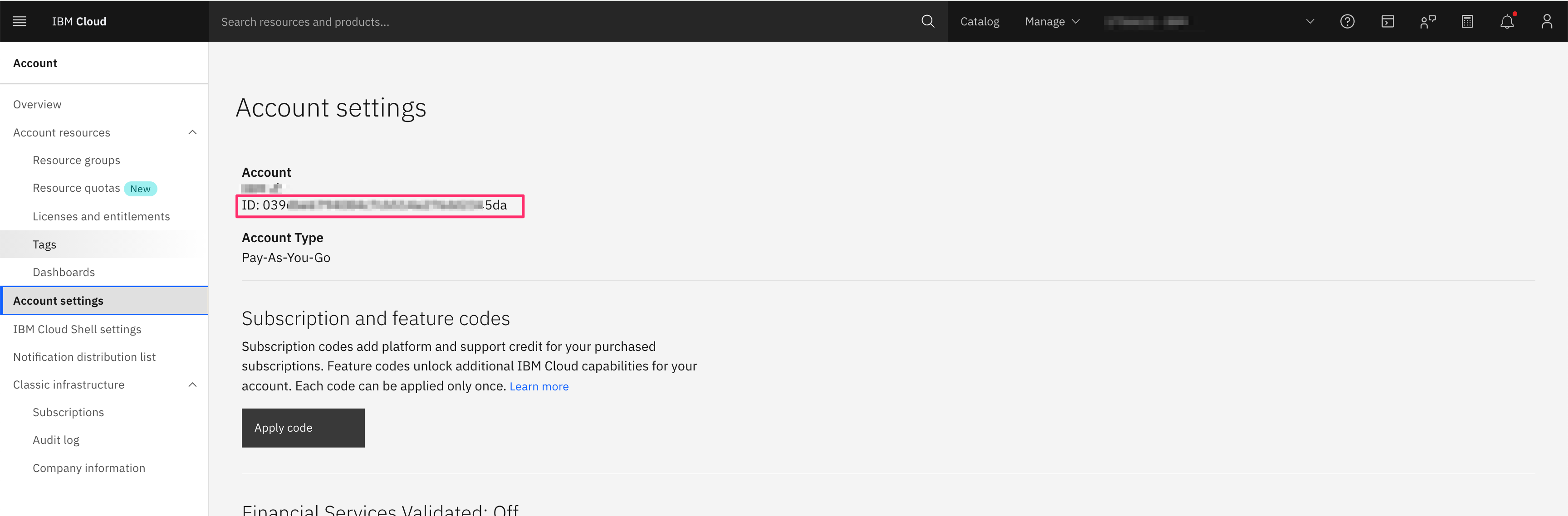
2-1. 呼ぶ側のアカウントにおけるIAM IDとAccount IDを記録しておく
このIAM IDとAccount IDに対して、呼び出される側のアカウントからアクセスを許可します。そのために、これらの情報をあらかじめ記録しておきます。
2-2. 呼び出される側(アクセスを許可する側)でTrusted Profileを作成する。
- Create

- 名前などを指定。

- Individual users -> External usersで、先ほどのIAM ID及びAccount IDを入力し、Addを押下。
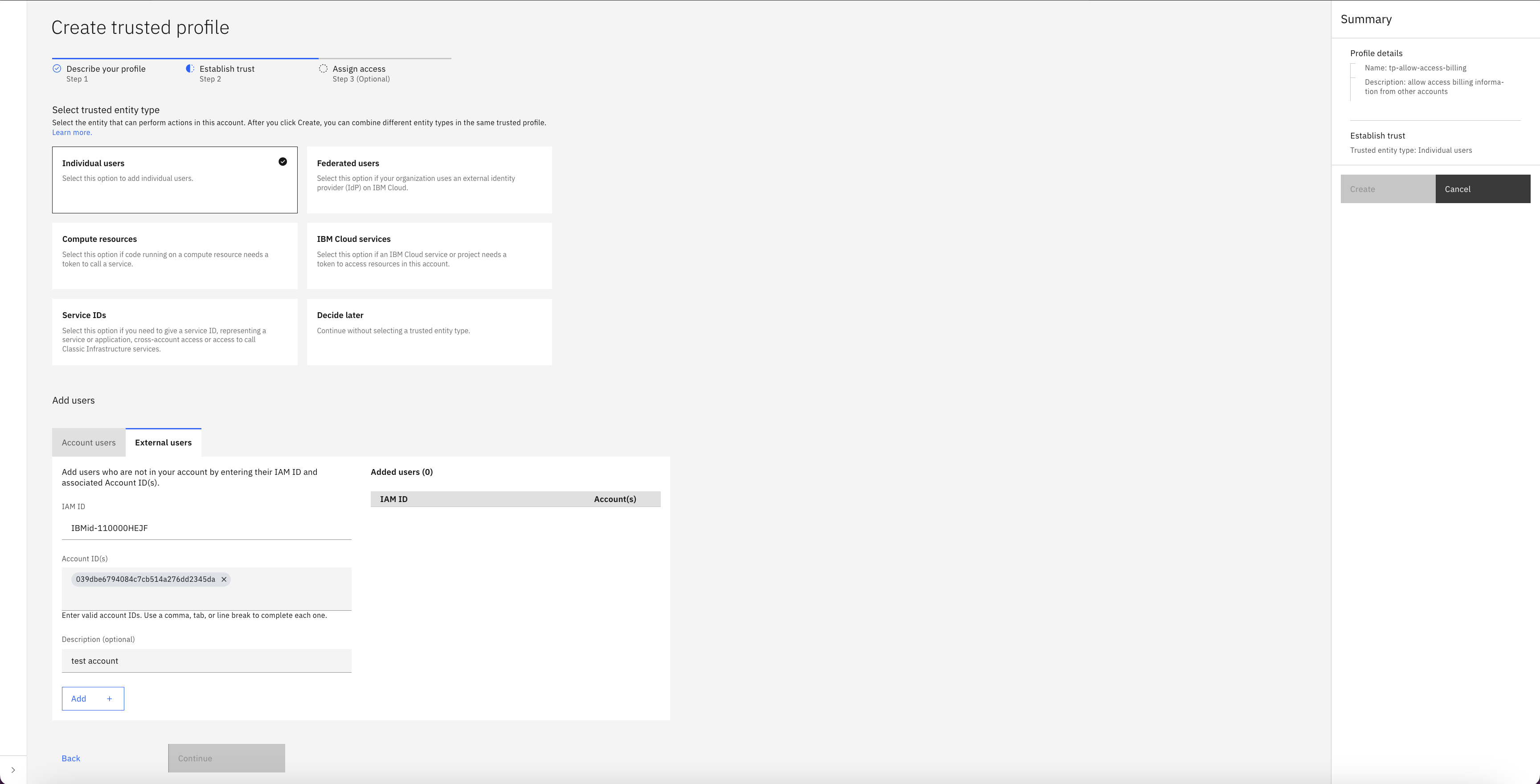
すると、以下のようにユーザーが追加されるので、次に。
- 適切な権限を付与する。

3. テスト
自分のアカウントにログイン
syasuda@MacBook-Pro ~ % ibmcloud login -a cloud.ibm.com --apikey @ibmcloud_apikey_17xxx23 -r jp-tok
API endpoint: https://cloud.ibm.com
Authenticating...
Retrieving API key token...
OK

Targeted account IBM (039xxxxxxxxxxxxxxxxxxxxxxxxxxxxx45da) <-> 17xxx23

Targeted region jp-tok


API endpoint:     https://cloud.ibm.com
Region:           jp-tok
User:             xxxxxxx@xx.ibm.com
Account:          IBM (039xxxxxxxxxxxxxxxxxxxxxxxxxxxxx45da) <-> 17xxx23
Resource group:   No resource group targeted, use 'ibmcloud target -g RESOURCE_GROUP'
CLIが利用するアカウント情報を確認
syasuda@MacBook-Pro ~ % ibmcloud target


API endpoint:     https://cloud.ibm.com
Region:           jp-tok
User:             xxxxxxx@xx.ibm.com
Account:          IBM (039xxxxxxxxxxxxxxxxxxxxxxxxxxxxx45da) <-> 17xxx23
Resource group:   No resource group targeted, use 'ibmcloud target -g RESOURCE_GROUP'
自アカウントのBilling情報を取得
syasuda@MacBook-Pro ~ % ibmcloud billing account-usage
Retrieving usage for account IBM...
OK

======================================================================
IBM Cloud Monthly Account Usage On November 2025
======================================================================

Resource Usage Summary
----------------------------------------------------------------------
Type                                       Billable Charges   Non Billable Charges
Transit Gateway                            0.00 USD           0.00 USD
Bare Metal Servers and Attached Services   0.00 USD           0.00 USD
Network                                    0.00 USD           0.00 USD
Virtual Servers and Attached Services      0.00 USD           0.00 USD

(以下略)
先ほど作成したTrusted Profileを使用(呼び出される側で作成したTrusted Profileを、アクセスが許可された呼ぶ側のアカウント側で利用します)
syasuda@MacBook-Pro ~ % ibmcloud iam trusted-profile-assume tp-allow-access-billing

Assuming trusted profile tp-allow-access-billing...
OK
Assumed Trusted Profile Profile-62d2e88f-ef53-40a3-9294-2b388cf2dfe8
CLIが利用するアカウント情報を確認。Trusted Profileが有効になり、別アカウントが指定されている!
syasuda@MacBook-Pro ~ % ibmcloud target


API endpoint:     https://cloud.ibm.com
Region:           jp-tok
User:             Profile-62d2e88f-ef53-40a3-9294-2b388cf2dfe8
Account:           (27dcxxxxxxxxxxxxxxxxxxxxxxxxxxad13) <-> 26xxxx3
Resource group:   No resource group targeted, use 'ibmcloud target -g RESOURCE_GROUP'
他アカウントのBilling情報の取得
syasuda@MacBook-Pro ~ % ibmcloud billing account-usage
Retrieving usage for account ...
OK

======================================================================
IBM Cloud Monthly Account Usage On November 2025
======================================================================

Resource Usage Summary
----------------------------------------------------------------------
Type                                                 Billable Charges   Non Billable Charges
Security and Compliance Center Workload Protection   124.16 USD         0.00 USD
Virtual Private Endpoint for VPC                     0.00 USD           0.00 USD
Cloud Object Storage                                 3.90 USD           0.00 USD
Cloud Monitoring                                     22.82 USD          0.00 USD
DNS Services                                         3.51 USD           0.00 USD
Cloud Logs                                           17.50 USD          0.00 USD
Virtual Private Cloud                                0.00 USD           0.00 USD
Transit Gateway                                      138.72 USD         0.00 USD
Floating IP for VPC                                  10.87 USD          0.00 USD
Load Balancer for VPC                                5.03 USD           0.00 USD
Secrets Manager                                      251.39 USD         0.00 USD
Event Notifications                                  0.01 USD           0.00 USD
Code Engine                                          0.00 USD           0.00 USD
Power Virtual Server Virtual Machine                 88.88 USD          0.00 USD
Power Virtual Server Volume                          20.22 USD          0.00 USD
VCF as a Service - Cloud Director Site               43.66 USD          0.00 USD
Power Virtual Server Shared Processor Pool           8.96 USD           0.00 USD
Bare Metal Servers and Attached Services             918.98 USD         0.00 USD
Network                                              0.00 USD           0.00 USD
Unattached Services                                  0.00 USD           0.00 USD
Kubernetes Service                                   679.17 USD         0.00 USD
VCF as a Service - Virtual Data Center               402.91 USD         0.00 USD
Key Protect                                          0.14 USD           0.00 USD
Internet Services                                    33.48 USD          0.00 USD
Container Registry                                   0.02 USD           0.00 USD
Image Service for VPC                                0.25 USD           0.00 USD
Client VPN for VPC                                   11.74 USD          0.00 USD
Block Storage for VPC                                48.14 USD          0.00 USD
Virtual Server for VPC                               52.04 USD          0.00 USD
File Storage for VPC                                 29.51 USD          0.00 USD
Virtual Servers and Attached Services                21.64 USD          0.00 USD

(以下略)