
はじめに
今回は、Terraformを使ってAWSのAPI GatewayとLambdaを組み合わせたWeb API環境を構築してみます。
簡単な内容にはなりますが、実際に動かした手順とエラーが出たポイントについて説明できればと思います。
Terraformについて
Terraformとは、クラウドやオンプレミスのリソースを人間が読める構成ファイルで定義し、バージョン管理や再利用、共有ができるInfrastructure as Code(IaC)ツールです。
一貫性のあるワークフローを用いて、インフラのライフサイクル全体を通じてプロビジョニングや管理を行うことが可能です。
詳しくは公式ドキュメントをご覧ください。
実装について
Lambdaのコード作成
const awsServerlessExpress = require('aws-serverless-express');
const app = require('./app');
const server = awsServerlessExpress.createServer(app);

exports.handler = (event, context) => awsServerlessExpress.proxy(server, event, context);
const serverlessExpress = require('aws-serverless-express/middleware');
var express = require('express');
var app = express();

app.use(serverlessExpress.eventContext());

app.get('/', (req, res) => {
    res.send({message: "Hello World"});
});

module.exports = app
TerraFormコード作成
terraform {
  required_providers {
    aws = {
      source  = "hashicorp/aws"
      version = "~> 5.0"
    }
  }
}

provider "aws" {
  region = "ap-northeast-1"
  default_tags {
    tags = {
      env = "cnsi"
    }
  }
}
data "archive_file" "test_function_name" {
  type        = "zip"
  source_dir  = "lambda"
  output_path = "./test_function_name.zip"
}

resource "aws_lambda_function" "test_function_name" {
  filename         = data.archive_file.test_function_name.output_path
  function_name    = "test_function_name"
  role             = aws_iam_role.test_lambda_role.arn
  handler          = "index.handler"
  source_code_hash = data.archive_file.test_function_name.output_base64sha256
  runtime          = "nodejs22.x"

  memory_size = 128
  timeout     = 60
}

resource "aws_iam_role" "test_lambda_role" {
  name = "test_lambda_role"

  assume_role_policy = <<POLICY
{
  "Version": "2012-10-17",
  "Statement": [
    {
      "Action": "sts:AssumeRole",
      "Principal": {
        "Service": "lambda.amazonaws.com"
      },
      "Effect": "Allow",
      "Sid": ""
    }
  ]
}
POLICY
}

resource "aws_lambda_permission" "apigw_lambda" {
  statement_id  = "AllowExecutionFromAPIGateway"
  action        = "lambda:InvokeFunction"
  function_name = aws_lambda_function.test_function_name.function_name
  principal     = "apigateway.amazonaws.com"
  source_arn = "${aws_api_gateway_rest_api.test_api.execution_arn}/*/*/*"
}
resource "aws_api_gateway_rest_api" "test_api" {
  name = "test_api"
  endpoint_configuration {
    types = ["REGIONAL"]
  }
}

resource "aws_api_gateway_method" "test_api_method_root" {
  rest_api_id   = aws_api_gateway_rest_api.test_api.id
  resource_id   = aws_api_gateway_rest_api.test_api.root_resource_id
  http_method   = "ANY"
  authorization = "NONE"
}

resource "aws_api_gateway_resource" "test_api_resource" {
  path_part   = "{proxy+}"
  parent_id   = aws_api_gateway_rest_api.test_api.root_resource_id
  rest_api_id = aws_api_gateway_rest_api.test_api.id
}

resource "aws_api_gateway_method" "test_api_method" {
  rest_api_id   = aws_api_gateway_rest_api.test_api.id
  resource_id   = aws_api_gateway_resource.test_api_resource.id
  http_method   = "ANY"
  authorization = "NONE"
}

resource "aws_api_gateway_integration" "test_api_proxy" {
  rest_api_id             = aws_api_gateway_rest_api.test_api.id
  resource_id             = aws_api_gateway_resource.test_api_resource.id
  http_method             = aws_api_gateway_method.test_api_method.http_method
  integration_http_method = "POST"
  type                    = "AWS_PROXY"
  uri                     = aws_lambda_function.test_function_name.invoke_arn
}

resource "aws_api_gateway_integration" "test_api_proxy_root" {
  rest_api_id             = aws_api_gateway_rest_api.test_api.id
  resource_id             = aws_api_gateway_rest_api.test_api.root_resource_id
  http_method             = aws_api_gateway_method.test_api_method_root.http_method
  integration_http_method = "POST"
  type                    = "AWS_PROXY"
  uri                     = aws_lambda_function.test_function_name.invoke_arn
}

resource "aws_api_gateway_deployment" "test_deployment" {
  depends_on = [aws_api_gateway_integration.test_api_proxy]

  rest_api_id = aws_api_gateway_rest_api.test_api.id
}

resource "aws_api_gateway_stage" "test_stage" {
  stage_name    = "dev"
  rest_api_id   = aws_api_gateway_rest_api.test_api.id
  deployment_id = aws_api_gateway_deployment.test_deployment.id
}
Terraformで実行したコマンド
実際に使ったコマンドは以下になります。
1.プロジェクトの初期化
$ terraform init
2.リソースの作成・変更・削除を行わずに、実行予定の操作を表示
$ terraform plan
3.インフラの作成・変更・削除を実行
$ terraform apply
実際に動かしてみた結果
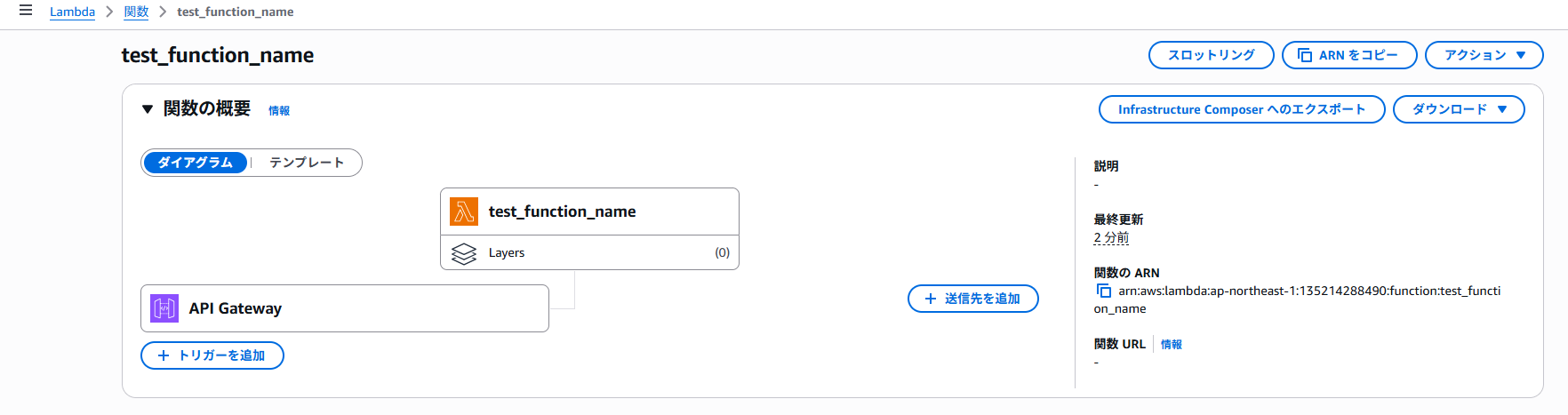
AWSマネジメントコンソールからLambdaとAPI Gatewayを確認したところ、実際に環境が構築されていることを確認できました。
Lambda
API Gateway
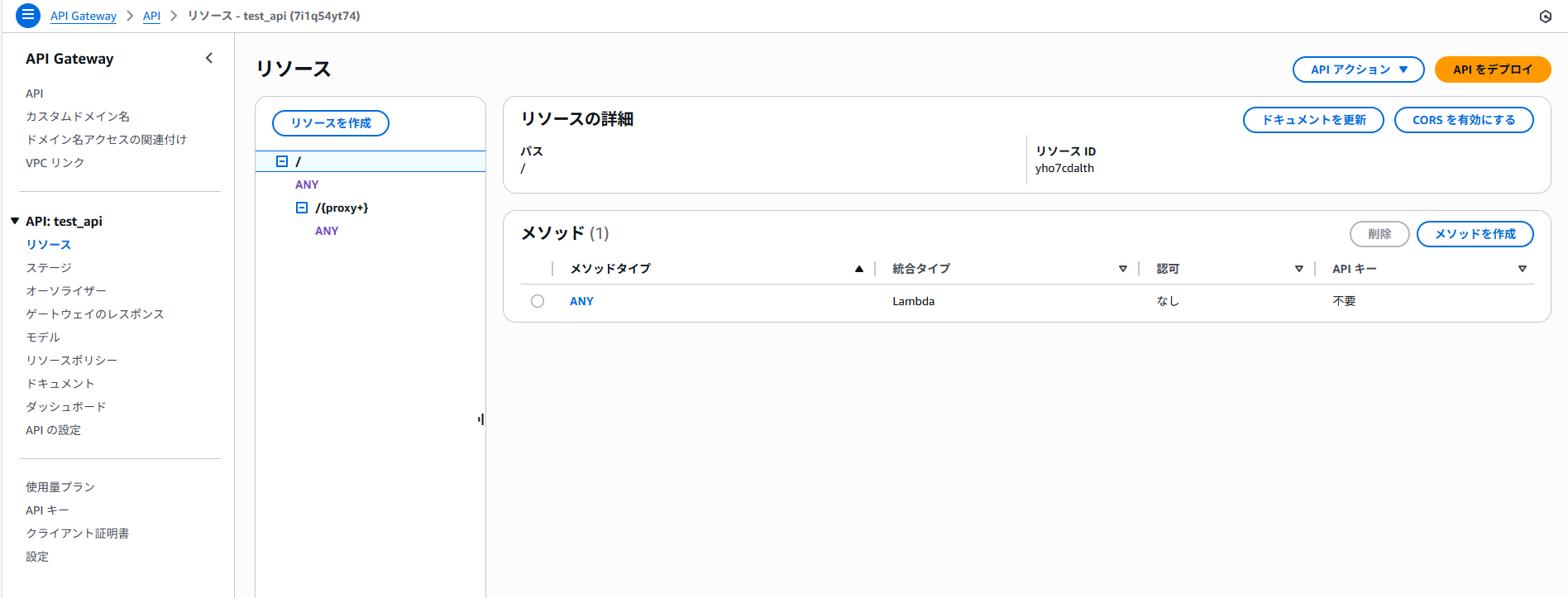
上記の確認ができたので、APIのURLを確認し、ブラウザでアクセスしてみました。
レスポンスの確認
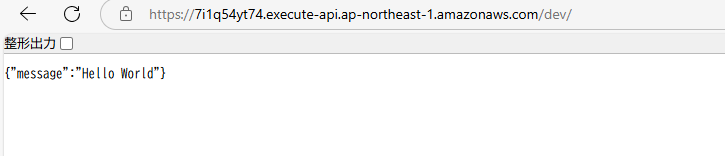
このように、レスポンスが取得できることを確認しました。
確認ができたら、環境を削除するために以下のコマンドを実行します。
(定義されているリソースをすべて削除)
$ terraform destroy
Terraformのコマンド実行時にエラー
AWSプロバイダーのバージョン違いによるエラー
terraform plan を実行した際に以下のエラーが発生しました。
エラー内容
Error: expected runtime to be one of [nodejs nodejs4.3 nodejs6.10 nodejs8.10 nodejs10.x nodejs12.x nodejs14.x nodejs16.x java8 java8.al2 java11 python2.7 python3.6 python3.7 python3.8 python3.9 dotnetcore1.0 dotnetcore2.0 dotnetcore2.1 dotnetcore3.1 dotnet6 nodejs4.3-edge go1.x ruby2.5 ruby2.7 provided provided.al2 nodejs18.x], got nodejs22.x
│
│   with aws_lambda_function.test_function_name,
│   on lambda.tf line 13, in resource "aws_lambda_function" "test_function_name":
│   13:   runtime          = "nodejs22.x"
エラーメッセージによると、Lambdaのランタイムに指定可能な値は固定のリストの中から選ぶ必要があり、nodejs22.x は使用できないことがわかりました。
設定していたAWSプロバイダーのバージョンが古いため、nodejs22.x をサポートしておらず、認識されずエラーとなっていました。
aws.tf のプロバイダー指定を ~> 3.0 から、nodejs22.x をサポートする最新のバージョン(例:~> 5.0)に上げます。
terraform {
  required_providers {
    aws = {
      source  = "hashicorp/aws"
      version = "~> 5.0" //はじめ3.0を指定していた
    }
  }
}
バージョンを変更した後、以下のコマンドでプロバイダーのアップグレードを反映します。
$ terraform init -upgrade
これにより最新バージョンが適用され、再度 terraform plan を実行するとエラーがなくなりました。
おわりに
今回はTerraformを使ってAPI GatewayとLambdaを組み合わせたWeb API環境を構築しました。
Terraform自体を初めて触ることもあり、いくつか苦戦する部分もありました。特にバージョン差異による動作の違いは注意が必要だと感じました。
今回は簡単な構成でしたが、今後はEC2やALBなど、他のAWSリソースでも構築を行い、さらに理解を深めていきたいと思います。