

antis the official CLI for calling the Claude API from your terminal; Managed Agents runs Claude as an autonomous agent on Anthropic-managed infrastructure. Combine the two and you can run Sysdig's cloud-security workflows without keeping Claude Code open on your laptop. This article walks through the whole thing end to end — the big picture, the design, the steps, and the gotchas.
Introduction — beyond "it works on my machine"
Sysdig publishes its cloud-security expertise as AI-agent skills in the sysdig/skills repository: ranking vulnerable images, remediating CVEs, investigating runtime threats — workflows you drive by giving Claude natural-language instructions.
But that repo is designed as a plugin for Claude Code (your local CLI / IDE). The default shape is "you open a terminal and work interactively."
Which raises an obvious question:
"I want to run vulnerability scans as a nightly batch." "I want investigation tasks to run unattended for tens of minutes to hours." "I want this as a standing team platform." — how do I get that long-running, asynchronous, server-resident usage?
The answer is Claude Managed Agents, and the tool to drive it declaratively is the ant CLI. This article carefully assembles the "blueprint" and the "runbook" for running Sysdig's skills with this combination, so you never get lost.
By the end you'll have three things:
- The precise division of roles between
ant, Managed Agents, and Sysdig skills - The mapping mindset for porting a Claude Code plugin to Managed Agents
- Copy-and-run, step-by-step build instructions (and the honest gotchas)
Chapter 1 — Meet the three actors
A complex-looking topic gets a lot clearer once you sort out the cast. There are three leads here.
Actor 1: the ant CLI — "the gh command for the Claude API"
ant is Anthropic's official CLI for driving the Claude API straight from your terminal. Every API resource becomes a subcommand: ant <resource> <action>.
brew install anthropics/tap/ant   # macOS
ant --version
Unlike hand-writing JSON for curl, ant gives you:
- Typed flags or YAML/JSON to build requests (no hand-written JSON)
-
@pathto inline a file's contents into the body (PDFs auto-base64-encoded) -
--transform(GJSON) to extract just the fields you want from a response (nojq) - Automatic pagination on list endpoints
Think of it as the "Claude API edition" of the gh command for GitHub. You can explore interactively, and drop it straight into shell scripts or CI. Crucially, Claude Code itself knows how to use ant — ask it to "summarize which of my recent sessions errored out" and it will call ant under the hood to find out.
Actor 2: Managed Agents — "an agent platform you don't have to build"
Normally, building an agent means assembling your own agent loop, tool-execution layer, and secure sandbox. Managed Agents provides that whole stack as a managed service from Anthropic. It's built for long-running, asynchronous tasks.
Managed Agents is made of just four concepts. Lock these in:
| Concept | What it is | Analogy |
|---|---|---|
| Agent | The "definition": model, system prompt, tools, MCP servers, skills | Recipe |
| Environment | Where a session runs (cloud, or your own sandbox) | Kitchen |
| Session | A "run instance" of an Agent on an Environment | One cooking session |
| Events | Messages between your app and the agent (utterances, tool results, state) | Talk in the kitchen |
Inside the sandbox, Claude can autonomously use bash, file ops, web search/fetch, and MCP connections. It's a "stateful" design — conversation history and sandbox state persist server-side, and you can pause and resume.
📌 Beta note: Managed Agents is currently beta (every request needs the
managed-agents-2026-04-01header;ant'sbeta:prefix adds it automatically). Because it's stateful, it is currently outside the scope of ZDR / HIPAA BAA.
Actor 3: Sysdig Headless Cloud Security — "a cloud-security expertise pack"
sysdig/skills packages Sysdig's runtime-derived security expertise as skills. There are seven:
| Skill | Role |
|---|---|
| sysdig-investigate | Rank vulnerable images by a risk metric and build a remediation plan |
| sysdig-onboarding | Guide AWS account / Kubernetes cluster connection |
| sysdig-posture | Author Rego-based custom controls/policies, emit Terraform |
| sysdig-remediate | Fix a specific CVE in a container image and open a PR |
| sysdig-runtime-investigate | Analyze Falco-detected threats with a confidence score |
| sysdig-runtime-remediate | Execute approved runtime response actions |
| sysdig-sysql | SysQL query-language reference and debugging |
The repo is, in substance, a Claude Code plugin.
skills/
├── .claude-plugin/marketplace.json
├── plugins/headless-cloud-security/
│   ├── .claude-plugin/plugin.json
│   └── skills/<skill-name>/
└── skills/<skill-name>/   ← spec-compliant mirror (the SKILL.md set)
And there are two ways these skills reach the API — which matters later:
- Via the hosted Sysdig MCP server (
https://<region>.app.sysdig.com/mcp/secure, OAuth auth) - Via bundled Python scripts hitting the Sysdig REST API directly (using env vars
SYSDIG_SECURE_URL/SYSDIG_SECURE_API_TOKEN)
Chapter 2 — The crux: why you can't "just install it"
This is the single most important realization in the article.
Sysdig's repo is built for Claude Code, to be installed via /plugin marketplace add → /plugin install. But Managed Agents reads neither plugins nor marketplaces.
What Managed Agents understands is exactly these three "parts":
- custom skills (individual skills you upload to your workspace)
- MCP servers (declared in the agent definition, authenticated at session time)
- agent_toolset (bash / files / web — required to run the Python inside a skill)
So the job is: "take the plugin apart, translate the parts into the Managed Agents vocabulary, and reassemble." This translation table is the starting point for the whole design.
🔁 Translation table: Claude Code plugin → Managed Agents
| Sysdig-side building block | How Claude Code handles it | Managed Agents equivalent |
|---|---|---|
7 skills (skills/<name>/SKILL.md) |
Bulk-installed via /plugin install
|
Uploaded individually via ant beta:skills create, then attached to the agent under skills:
|
Sysdig MCP (/mcp/secure) |
claude mcp add ... secure-mcp-server |
Declared in the agent's mcp_servers + enabled via mcp_toolset. Auth lives in a vault
|
SYSDIG_SECURE_API_TOKEN (env) |
A shell env var | Must be injected into the sandbox (see the verification point below) |
| bash / file ops | Provided by your local environment | Add agent_toolset_20260401 to tools |
💡 A MECE way to see it: what a Sysdig skill does decomposes into three things — "① knowledge (the runbook), ② API access, ③ a script-execution environment." Map them one-to-one — ①→skills, ②→MCP (+vault), ③→agent_toolset + environment — and you get no gaps and no overlaps.
Chapter 3 — The blueprint: the whole picture in one diagram
Once you understand the parts, hold the assembled shape in your head. The whole thing is easier to grasp as four layers — "① caller," "② Managed Agents (definitions and the vault)," "③ sandbox execution," and "④ external Sysdig."
▼ Architecture overview (4 layers: ① Caller / ② Managed Agents / ③ Sandbox execution / ④ External Sysdig)
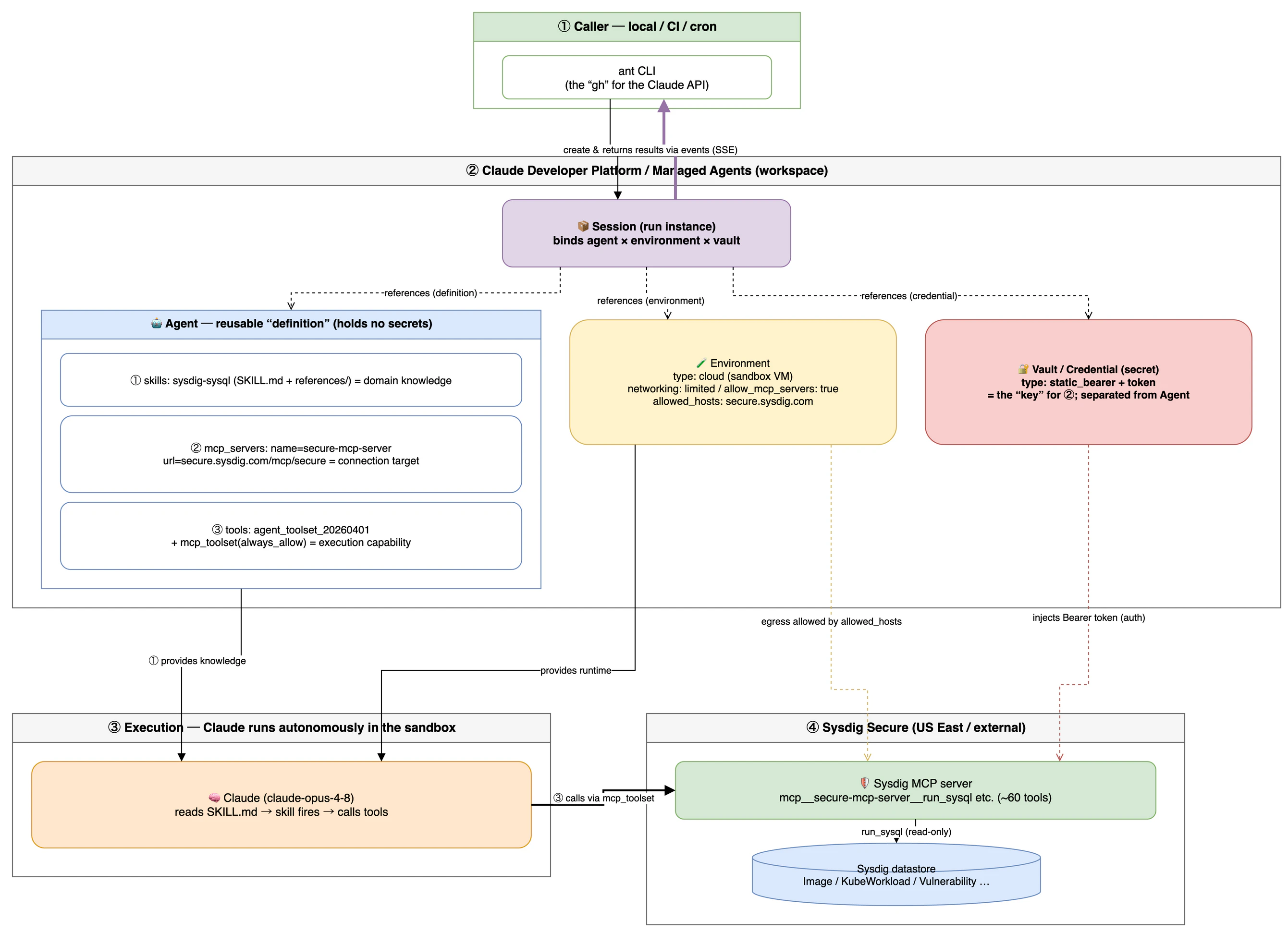
How to read the diagram (legend)
| Symbol | Meaning |
|---|---|
| solid line | control / invocation flow (who drives whom) |
| thick solid line | the result stream (events / SSE) |
| dashed line | reference / injection (a Session binding its resources, a Vault handing over the key, etc.) |
| 🔐 | secret material (auth). Separated from the agent definition |
| 🤖 | the reusable definition (agent). Holds no token |
And the ①②③ correspondence (same numbers as the Chapter 2 translation table):
| # | Agent component | Role | Phase-1 value |
|---|---|---|---|
| ① | skills |
Domain knowledge (what it knows) |
sysdig-sysql (SKILL.md + references/) |
| ② |
mcp_servers + vault
|
API connection target (②) and its key (②'s key) |
secure-mcp-server / static_bearer token |
| ③ | tools |
Execution capability (what it can do) |
agent_toolset + mcp_toolset(always_allow)
|
The heart of the design is that "secret material (auth)" is separated from "the reusable definition (agent)" (the 🔐 and 🤖 in the diagram). The agent definition carries no auth token; the token goes into a vault (a per-session-referenced safe). That lets you reuse the same agent with different auth per user and per environment, keep the definition under code management (GitOps), and keep secrets in the vault — a clean split of responsibilities.
💡 The data path: a natural-language instruction makes Claude fire the skill in ③, which calls the Sysdig MCP in ④ via
mcp_toolset. That traffic is allowed outbound by the Environment'sallowed_hostsand authenticated by the Vault's Bearer token. In other words, it's a layered structure where data is reachable only when all three line up: "execution capability (③)," "the route (Environment)," and "the key (Vault)."
Chapter 4 — Hands-on: build it in six steps
Now the hands-on part. You won't get lost if you keep track of "which row of the translation table" each step implements.
Step 0: Prepare
# Authenticate (browser OAuth; for API-key usage, export ANTHROPIC_API_KEY=... works too)
ant auth login
ant auth status        # check which credential / workspace is active

# Get the Sysdig skills
git clone https://github.com/sysdig/skills.git
Step 1: Upload the skills (= row ① of the table)
Upload each SKILL.md directory under skills/skills/<name>/ as a custom skill. Keep the returned skill_id.
All files must live in a single top-level directory, with SKILL.md at its root. Upload subdirectories like references/ too.
⚠️ Per-file
--filedoes NOT work (verified on real hardware, 2026-06):ant 1.10.0's--file <path>truncates the multipartfilenameto its basename, so a skill with subdirectories fails with400 "SKILL.md file must be exactly in the top-level folder". The fix is to zip the whole folder and pass it as one file (details in Chapter 5 ②).
# Zip the skill folder (sysdig-investigate/) as the top-level dir and pass it as one file
cd skills/skills
zip -r /tmp/sysdig-investigate.zip sysdig-investigate

SKILL_INVESTIGATE=$(ant beta:skills create --file /tmp/sysdig-investigate.zip \
  --display-title "Sysdig Investigate" \
  --transform id --raw-output)
rm -f /tmp/sysdig-investigate.zip

# Same idea for sysql / remediate / runtime-investigate, etc.
📋 The skill name comes from SKILL.md:
ant beta:skills createhas no--nameflag. The name is taken from the SKILL.md frontmattername:field (--display-titleis a human-facing label and is not included in the prompt).📋 Naming rules:
nameis lowercase letters, digits, and hyphens only; the reserved wordsclaude/anthropicare not allowed. Sysdig's names (sysdig-*) comply.📋 Cap: a session allows 20 skills total. Attach only what you need.
Step 2: Define the Agent (= binds rows ①②③)
Bring skill attachment, the Sysdig MCP declaration, and the toolset together in one YAML.
AGENT_ID=$(ant beta:agents create --transform id --raw-output <<YAML
name: Sysdig Cloud Security
model: claude-opus-4-8
system: |
  You are a Sysdig cloud security operator. Use the attached Sysdig skills
  to investigate, prioritize, and remediate cloud risk. Always keep a human
  in the loop before any write or remediation action.
mcp_servers:
  - type: url
    name: sysdig-secure
    url: https://us2.app.sysdig.com/mcp/secure   # ← change to your region
tools:
  - type: agent_toolset_20260401                  # ③ bash etc. Required to run skill Python
  - type: mcp_toolset                              # ② enable the Sysdig MCP
    mcp_server_name: sysdig-secure                 #    must match the name in mcp_servers
skills:                                            # ① knowledge
  - { type: custom, skill_id: $SKILL_INVESTIGATE, version: latest }
  - { type: custom, skill_id: $SKILL_SYSQL,       version: latest }
YAML
)
⚠️ Consistency rule: a server declared in
mcp_serversmust be referenced by anmcp_toolsetintools(and vice versa). An unreferenced server, or a dangling toolset, makes the API reject the agent definition.
Step 3: Create the Environment (= the foundation for row ③)
There are two environment types; choose based on how the Sysdig skill accesses the API (the why is detailed in Chapter 5 ①).
(A) cloud (Anthropic-managed) — when everything goes through MCP
A cloud environment's config consists of just networking and packages (confirmed in the ant 1.10.0 API reference). There is no field for injecting env vars or secrets. Because this is a security tool, prefer limited (scoped to Sysdig's endpoints) over wide-open unrestricted.
ENV_ID=$(ant beta:environments create --transform id --raw-output <<YAML
name: sysdig-env
config:
  type: cloud
  networking:
    type: limited
    allow_mcp_servers: true             # allow traffic to MCP servers declared on the agent
    allowed_hosts:
      - us2.app.sysdig.com              # change to your region
  packages:
    pip: []                             # list any deps the skill's Python needs
YAML
)
(B) self_hosted (your own infra) — when Python hits REST directly
A skill that wants SYSDIG_SECURE_API_TOKEN via env cannot do that on cloud. In that case create a self_hosted environment and run ant beta:worker on your own machine/container. You fully control the worker's env vars, so you can set the token as an ordinary env var.
ENV_ID=$(ant beta:environments create --transform id --raw-output <<YAML
name: sysdig-selfhosted
config:
  type: self_hosted
YAML
)

# In another terminal, put the token in env and start the worker
export SYSDIG_SECURE_URL="https://us2.app.sysdig.com"
export SYSDIG_SECURE_API_TOKEN="..."
ant beta:worker --environment-id "$ENV_ID" --environment-key "$ENV_KEY"
Step 4: Prepare the auth vault (= the key for row ②)
Register the Sysdig MCP credentials in a vault. If the server accepts a fixed API token as a Bearer, static_bearer is the simplest.
VAULT_ID=$(ant beta:vaults create \
  --display-name "sysdig-secure" \
  --transform id --raw-output)

ant beta:vaults:credentials create --vault-id "$VAULT_ID" <<YAML
display_name: Sysdig Secure token
auth:
  type: static_bearer
  mcp_server_url: https://us2.app.sysdig.com/mcp/secure   # must exactly match the agent's url
  token: $SYSDIG_SECURE_API_TOKEN
YAML
🔑 Exact URL match is everything: credentials are injected only when
mcp_server_urland the agent'surlmatch as exact strings — trailing slash included. If they don't match, the connection is attempted "unauthenticated," and if the server requires auth you'll get a runtime error.🔑 If OAuth is required: use the
mcp_oauthtype instead ofstatic_bearer, registeringaccess_token+ refresh details (token_endpoint/client_id/refresh_token, etc.). Anthropic auto-refreshes the token on expiry.🔒 Handling secrets: secret fields like
token/access_tokenare write-only and never reappear in API responses. The vault is workspace-scoped, so anyone holding an API key in the same workspace can reference it — archive/delete it when no longer needed.
Step 5: Start a Session and instruct it (= run)
SESSION_ID=$(ant beta:sessions create \
  --agent "$AGENT_ID" \
  --environment-id "$ENV_ID" \
  --vault-id "$VAULT_ID" \
  --title "Sysdig investigation" \
  --transform id --raw-output)

# Send a user message
ant beta:sessions:events send --session-id "$SESSION_ID" \
  --event '{type: user.message, content: [{type: text, text:
    "Show me the top vulnerable images by actually-exploitable findings and build a remediation plan."}]}'
Step 6: Observe execution (= read the Events)
# Follow in real time (SSE)
ant beta:sessions:events stream --session-id "$SESSION_ID"

# Read history afterward; extract just the text
ant beta:sessions:events list --session-id "$SESSION_ID" \
  --transform 'content.0.text' --format auto --raw-output
Sessions can run for a long time, be interrupted, and resumed. Send another user.message to steer mid-flight, or a user.interrupt event to stop it.
What it looks like in practice (verified on a US East tenant)
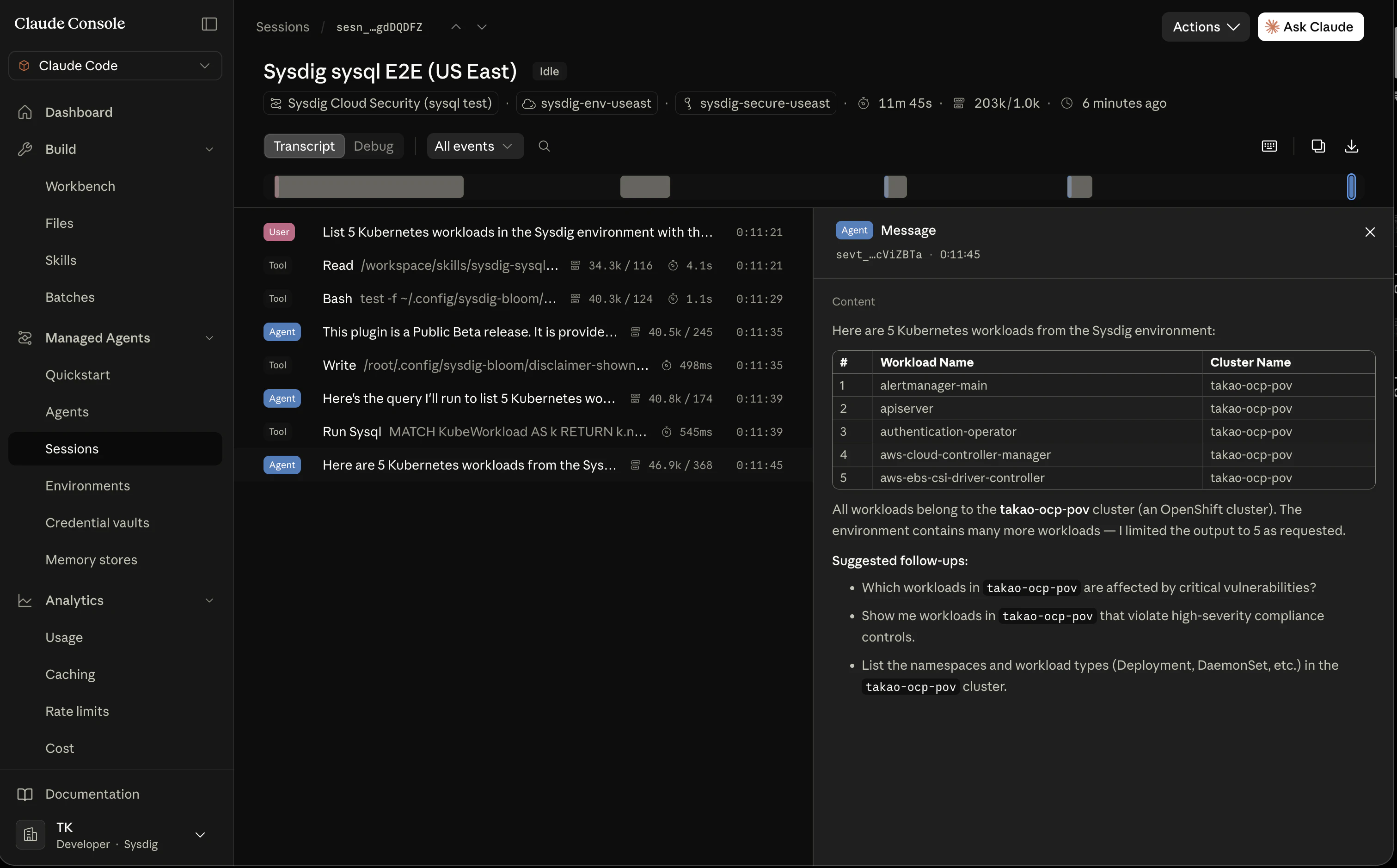
Here is the Console while actually running the sysdig-sysql skill on cloud + a vault (static_bearer). From user.message, through skill firing (reading SKILL.md) → running the MCP tool run_sysql → a table answer with real data, the whole thing flows headlessly.
▼ Screenshot 1: the full session transcript
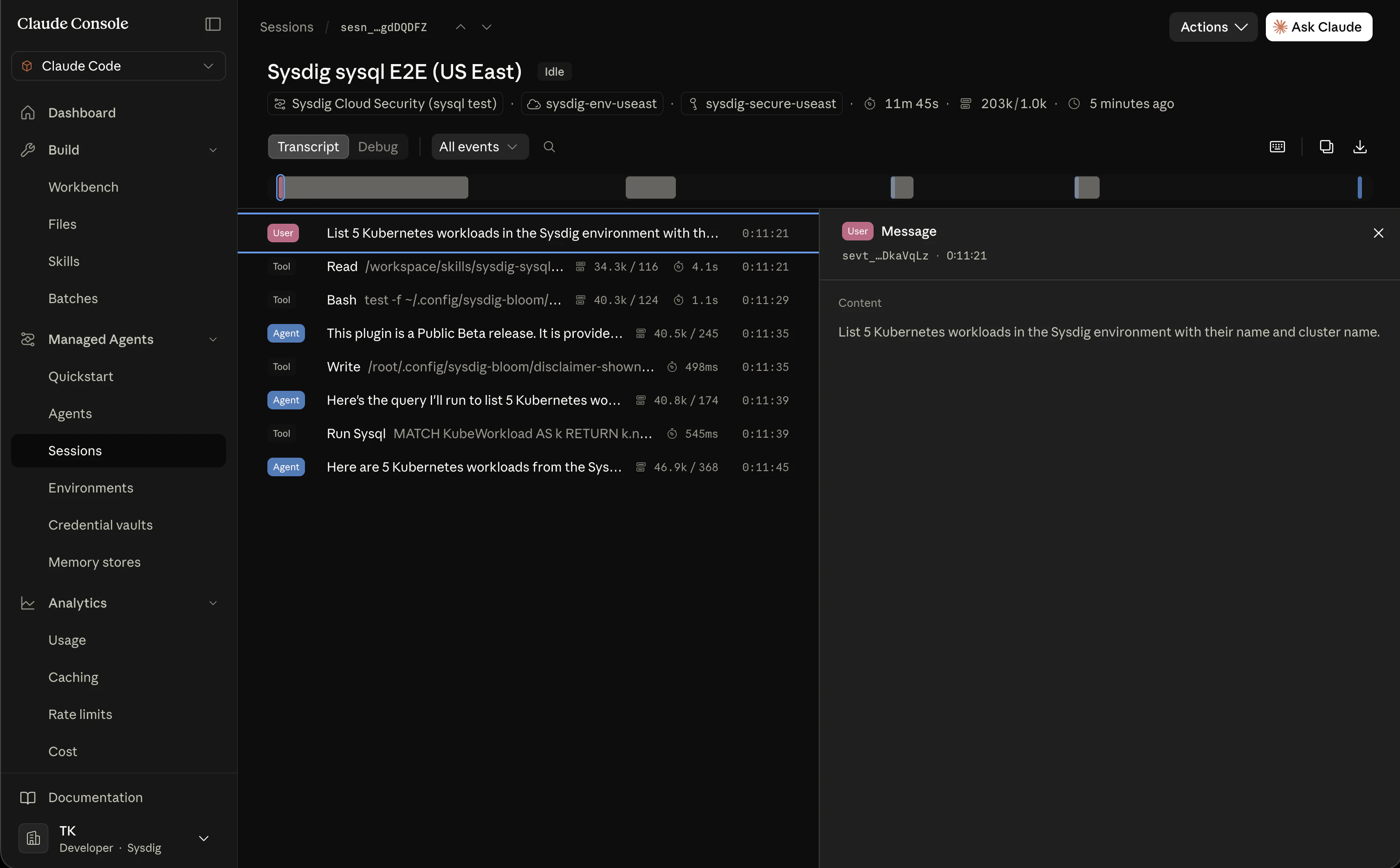
In the end, a natural-language question ("five Kubernetes workloads") is translated into SysQL, and real environment data fetched via the Sysdig MCP comes back as a table.
▼ Screenshot 2: the final answer (a table of real workloads)
Chapter 5 — Gotchas (four of them, honestly)
This is the "no glossing over it" chapter. Here are four points, MECE, that you'll actually hit when you run this.
① How to get the Python-script token into the sandbox (verified; conclusion reached)
This was the biggest issue. Checking the cloud environment's config schema in the ant 1.10.0 API reference, the only subfields are networking and packages — there is no way to inject env vars or secrets. So the "Python reads SYSDIG_SECURE_API_TOKEN from env" pattern is confirmed impossible on Anthropic-managed cloud.
The fix is to use the right environment type (see Step 3).
| Skill's API access method | Environment | How to pass the token |
|---|---|---|
| Via Sysdig MCP (investigate / sysql, etc.) |
cloud is fine |
vault (static_bearer / mcp_oauth). No env needed ✅ |
| Python hits REST directly (env required) | self_hosted |
Run ant beta:worker yourself; set it in the worker's env vars ✅ |
→ Recommendation: push anything that can go through MCP onto cloud + vault, and split off only the skills that truly need an env token onto a self_hosted worker. The practical answer is to keep both environment types in one workspace and route by skill characteristics.
② Skill upload format (verified)
ant beta:skills create takes files via --file (repeatable); there is no --directory or --name flag, and the skill name comes from the SKILL.md frontmatter. The SKILL.md rules (name ≤64 chars, lowercase + symbols only, reserved words claude/anthropic forbidden; description ≤1024 chars) match the official spec.
But there was one gotcha on real hardware (verified 2026-06). ant 1.10.0's --file <path> truncates the multipart filename to its basename, so passing a skill with subdirectories (references/) as individual files never produces the server-required "filename with a top-level folder (<skill>/SKILL.md)" — it fails with 400 "SKILL.md file must be exactly in the top-level folder" (the same happens for a lone SKILL.md).
The workaround is a zip upload (a method the docs also describe). Zip the whole skill folder and pass it as one file; the server expands it preserving structure.
# Inside <repo>/skills/, zip sysdig-sysql/ as the top-level folder
cd skills/skills
zip -r /tmp/sysdig-sysql.zip sysdig-sysql      # contents: sysdig-sysql/SKILL.md, sysdig-sysql/references/...
SKILL_ID=$(ant beta:skills create --file /tmp/sysdig-sysql.zip \
  --display-title "Sysdig SysQL" --transform id --raw-output)
rm -f /tmp/sysdig-sysql.zip
Also verified on real hardware: a Claude Code-format SKILL.md that includes allowed-tools is accepted as-is and fires correctly as a skill at agent runtime (see the Step 6 screenshots). To delete, you must delete the versions first (ant beta:skills:versions delete → ant beta:skills delete).
③ Permission policy (automation vs. safety trade-off)
mcp_toolset defaults to always_ask (it requests approval on every tool call, answered via the user.tool_confirmation event).
- Run unattended (nightly batch, etc.) → you need to loosen the permission policy. But beware: remediation skills include destructive operations.
- Safety first (Sysdig's design philosophy) → leave the default and keep a human in the loop.
The practical landing spot is to draw the line by operation type: "investigation/visualization is automatic; writes/fixes require approval."
④ Beta status and data retention
Both Managed Agents and Skills are beta (managed-agents-2026-04-01). Furthermore, because of the stateful design, they are outside ZDR / HIPAA BAA scope — investigation data, sandbox state, and outputs are stored server-side. Given the sensitive nature of security investigation, understand the retention policy and delete unneeded sessions/uploaded files via the API.
Chapter 6 — Operational tips, a step further
GitOps: manage agent definitions as code
ant's real strength is that you can keep agent / environment / skill definitions as YAML in a repo and sync them with the API in CI.
# Materialize the definition into a file and commit it
ant beta:agents create   < sysdig.agent.yaml
# Update by passing the ID and version (optimistic locking)
ant beta:agents update --agent-id "$AGENT_ID" --version 1 < sysdig.agent.yaml
You can treat "Sysdig agent configuration" with the same discipline as infrastructure (review → merge → auto-apply).
Script chaining: pipe list output into the next command
# Pull recent session IDs, then inspect the ones that errored, etc.
ant beta:sessions list --transform id --raw-output | head -5
--transform + --raw-output give you an unquoted column of IDs, ready to pipe straight into xargs or head.
Handling connection failures
MCP connection and auth are not validated at session-creation time. If the server is unreachable you get mcp_connection_failed_error; if auth is rejected, mcp_authentication_failed_error — both arriving as session.error events. The session itself doesn't stop, so you can watch for these and choose to "block / rotate credentials / continue with just that skill disabled."
Conclusion — "translation" is the key to everything
Compressing the key points:
-
Understand the three actors separately:
ant(the API-driving CLI) / Managed Agents (the managed agent platform, four concepts) / Sysdig skills (the knowledge pack). - Managed Agents doesn't read plugins. So "take the plugin apart → translate the parts → reassemble." The translation axis is the three-way (MECE) split: ① knowledge = skills, ② API = MCP + vault, ③ execution environment = agent_toolset + environment.
- Six steps: prepare → upload skills → define agent → environment → vault → start & observe the session.
- Four honest verification points: injecting the Python token into the sandbox / skill upload format / permission policy / beta & data retention.
From "use it interactively in local Claude Code" to "run it declaratively, unattended, as a platform." The essence of that transition isn't learning some new, arcane technology — it's re-translating parts you already have into a different vocabulary. With this translation table in hand, you can put skill sets beyond Sysdig onto Managed Agents the same way.
Appendix: primary sources used (Anthropic official docs)
-
antCLI overview:/docs/en/api/sdks/cli - Managed Agents overview:
/docs/en/managed-agents/overview - Tools (agent_toolset / custom tools):
/docs/en/managed-agents/tools - Skills (attaching to an agent):
/docs/en/managed-agents/skills - MCP connector (mcp_servers / mcp_toolset):
/docs/en/managed-agents/mcp-connector - Vaults (credentials):
/docs/en/managed-agents/vaults - Reference (event types / MCP support / rate limits):
/docs/en/managed-agents/reference - Sysdig skills: https://github.com/sysdig/skills
The commands in this article were verified against
ant 1.10.0's CLI help and API reference, and end-to-end on a real US East tenant (thesysdig-sysqlskill ran headlessly oncloud+ astatic_bearervault and returned real data viarun_sysql). The MCP / vault / session API schemas follow the official docs above.