

Introduction
Using the Sysdig Secure remote MCP server newly added to Claude Code, together with the Agent Skills distributed as a plugin, I actually ran the full loop of investigating (investigate) → remediating (remediate) a runtime threat.
This article is the technical deep-dive version of that "I tried it" experience. It goes all the way down to the MCP tools that were actually called, the SysQL, the API responses, and the availability preflight and blast-radius analysis logic the agent performs internally.
Intended readers:
- People interested in architectures that connect a security product to an AI agent over MCP (Model Context Protocol)
- People who care about how far — and how safely — you can hand "acting on a production environment" to an AI
- People who want to understand Sysdig's Response Actions / Threats Engine / SysQL at the API level
1. Overall architecture
The pieces involved here fall broadly into two domains: "local" and "remote."
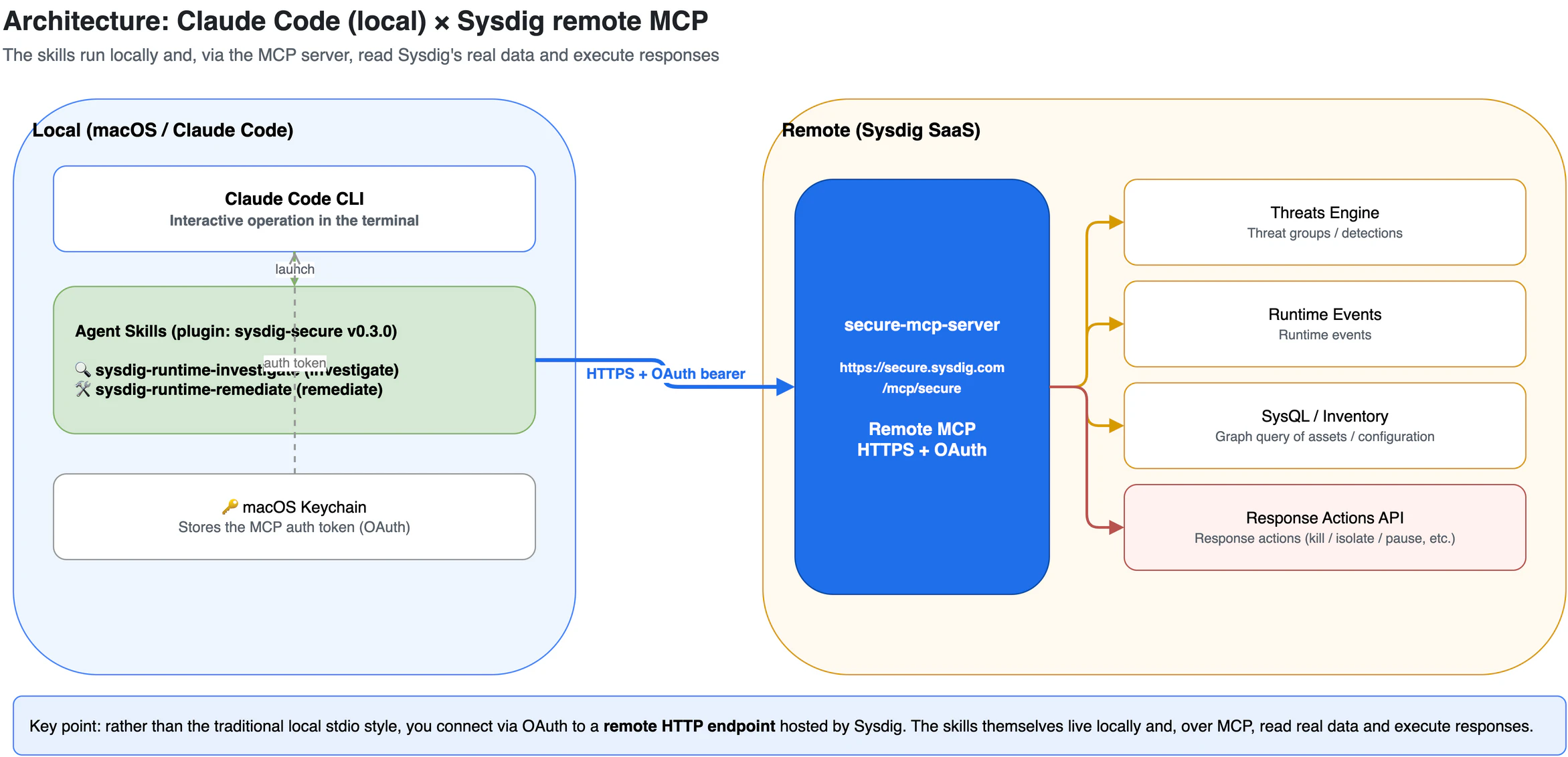
The key point is that the MCP server is remote (hosted by Sysdig). Rather than the traditional style of launching a stdio process locally, you connect to an HTTP endpoint, https://secure.sysdig.com/mcp/secure, authenticating via OAuth. The skills themselves live locally as a plugin, and through MCP they read Sysdig's real data and execute responses.
2. How the investigate skill works internally
All the user does is ask, in a single sentence: "Investigate the runtime threats." From there the skill automatically carries out, in order, the kind of investigation a human analyst would do by hand. The flow breaks down into four steps.
- Preflight — confirm we are actually connected to Sysdig
- Surface — list the threats that are currently happening
- Investigate — reconstruct the "attack flow" of a selected threat
- Report — pull it together into a readable report
Below, we look at what happens behind the scenes of each, in order.
Step 1: Preflight — making sure "are we even connected?"
Before starting the investigation, the skill first checks "are we properly logged in to Sysdig?" What's interesting here is that it makes this judgment without sending any query at all.
Here's how it works. When you are not logged in to Sysdig, the only tool the skill can see is the "login tool." Only once you are logged in do the full set of real tools — "read customer settings," "list threats," and so on — become visible. In other words, just by looking at which tools are currently in hand, you can tell the login state. It's a well-mannered design that finishes the precondition check without ever touching real data.
Next the skill checks its own notepad for "is there any earlier investigation to continue?" This time it's the first run, so the notepad is empty. The skill decides "let's start from a clean slate" and moves on.
💡 This notepad (shared state) is the mechanism that remembers past cases and user preferences such as "report to Jira, please." On the second run onward, it reads from here so it doesn't have to ask the same things again.
Step 2: Surface — current threats, newest first
The skill asks Sysdig to "show me the 5 most recent open threats, newest first." Back come five threat groups. Here the skill shows some smarts.
Four of the five occurred within the same few hours on May 29th, on the same cluster, with the same container image. Even if they look like scattered alerts, when the time, place, and tooling all line up, they are very likely different scenes of a single attack campaign. The skill decides to bundle these and treat them as "one incident." Reading alerts not as "dots" but as a "line" — that's the first step of an analyst.
Step 3: Investigate — reconstructing the "attack flow"
This is the main event. For the bundled threat groups, the skill queries Sysdig for the details — "which resources were involved in this incident?" "what specific threats does it contain?" — and draws the outline of the scene. The following facts came to light.
| Item | Value | What it is |
|---|---|---|
| Cluster |
takao-ocp-pov (OpenShift) |
The Kubernetes environment where the attack happened |
| namespace | sysdig-dr-test |
A compartment within it. The name screams "for testing" |
| Pods involved |
drift-sandbox / crypto-test
|
The two containers that became the stage for the attack |
| Image | nicolaka/netshoot:latest |
An all-purpose toolbox image for network investigation |
| Cloud | AWS (Tokyo region) | The underlying cloud environment |
Reconstructing the attack flow, all the way up to the present state
The skill cross-references multiple clues to assemble the attack story: the structure of the detection rules, and the natural-language behavior descriptions Sysdig's AI had left behind (e.g. "downloaded xmrig via curl"). Overlaying these makes "what happened, in what order, where" stand out sharply.
The skill doesn't stop at reconstructing the past, either — it also adds the check "is this attack still going on right now?" It looked for high-severity events in the last 7 days, and the result was zero. In other words, this attack was a single burst on May 29th and has already died down — and that's confirmed. The solidness of nailing down both the past reconstruction and the present situation is reassuring.
Giving the attack a "name" (MITRE ATT&CK)
Finally, from the detection rules and behaviors, the skill assigns which entries in "MITRE ATT&CK," the world-standard catalog of attack techniques, this attack corresponds to. The lead role here is Impact (T1496: resource hijacking = cryptomining), backed up by Execution (T1059: dropping and executing an illicit binary into /tmp). These "labels" also become clues for finding other, related attacks.
The reconstructed attack flow
The attack flow reconstructed this way is shown in the figure below. The horizontal axis is the MITRE ATT&CK phases (① initial access / execution → ② tool transfer → ③ execution / defense evasion → ④ impact), and the two vertical lanes are the two Pods that became the stage for the attack. Tools downloaded from external infrastructure are executed in /tmp, and ultimately the cryptocurrency miner xmrig is run — you can follow this whole sequence along the timeline.
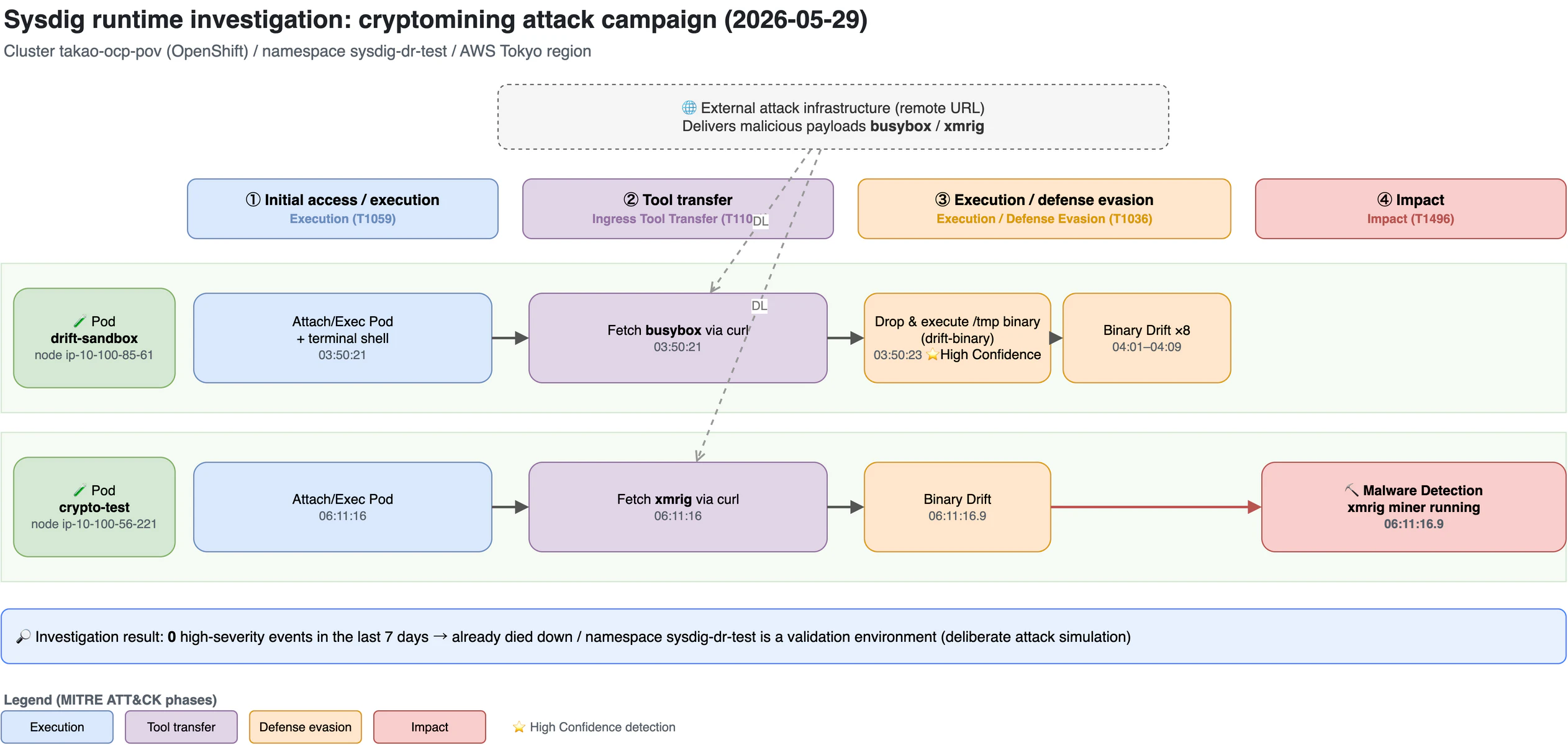
| Time (UTC) | Where | Action |
|---|---|---|
03:50:21 |
drift-sandbox |
Attach/Exec Pod + Terminal shell
|
03:50:21 |
drift-sandbox |
Ingress Remote File Copy — fetched busybox via curl
|
03:50:23 |
drift-sandbox |
Drop and Execute /tmp Binary(HC) + Execution from /tmp
|
04:01–04:09 |
drift-sandbox |
Binary Drift ×8 (Crit) |
06:11:16 |
crypto-test |
Attach/Exec → fetched xmrig via curl
|
06:11:16.9 |
crypto-test |
Malware Detection + Binary Drift
|
The "honesty" that impressed me most
What impressed me most in this investigation was that the skill did not take the alerts at face value.
In fact, Sysdig's AI had left, on the /tmp binary drop, the annotation "Legitimate Testing Activity Detected" — a rather benign-leaning note. The compartment is named sysdig-dr-test, and the container names are drift-sandbox and crypto-test. By any reading, this is an "attack rehearsal" deliberately built for validation/demo purposes.
The skill saw through this and wrote in the report: "The accuracy of the detection itself is a perfect score (5/5). However, the likelihood that this is a real attacker is low." Rather than jumping on a bright-red alert, it corrects the temperature based on circumstantial evidence. In a field that tends to be worn down dealing with false positives, you can imagine how welcome this is.
Report: two ready-to-use reports
Finally, the skill wrote the investigation results to two files: a Markdown version you can paste straight into a ticket, and an HTML version that, when opened in a browser, displays the attack-flow diagram from earlier as an actual image. What it puts in chat is just a two-paragraph summary, with the long evidence and tables kept on the file side. The clean cut of "humans read the summary; the deep dive lives in a file" is pleasant.
It then saves the investigation record to its own notepad and hands the baton to the next "remediate" stage. From here, Act II begins.
3. How the remediate skill works internally
When the investigation ends, the "remediate" skill that received the baton begins to move. The user's role here is to choose whether to approve or decline a proposed response. The skill will never stop or delete a container on its own. It doesn't reach out abruptly; first it scouts the scene, lines up what it can do, and takes permission one item at a time — this caution is its greatest characteristic.
First, confirm "what can I even do?"
Before proposing any response, the skill asks Sysdig for "the list of response actions I can take in this environment." Back came 24 kinds in total. These split into three categories by where they take effect.
| Where it acts | Example actions | Roughly speaking |
|---|---|---|
| Host (per server) | Force-kill a process, kill / pause a container, quarantine a suspicious file | Directly stop the running "thing" |
| Cluster (per Kubernetes) | Delete a Pod, restart a workload, network isolation | Contain it at the K8s layer |
| Cloud (per AWS) | Isolate an IAM user/role, make public resources private | Tighten cloud permissions / exposure |
But "it's on the list" does not mean "I can run it right now." Here too the skill doesn't get optimistic. For example, some actions like log capture won't work unless a destination storage is configured. On checking, storage in this environment is not configured. The skill judged "these would fail if proposed" and dropped them from the candidates at the proposal stage. Furthermore, since the past execution history was also zero, it stayed cautious: "I won't declare it actually works until I actually try."
The real strength: "before you break something, confirm the target is alive"
This is the highlight of the remediate skill. Before any destructive operation, it scouts the scene read-only.
The first check is "is the operation target in my hands actually pointing at the correct cluster?" On checking, the local connection target was a different cluster from the investigation target takao-ocp-pov. The skill instantly sensed "if I run kubectl with this, I'd mis-operate an unrelated cluster" and did not ask for permission to use kubectl. It nips the seed of an accident itself.
Next, it queries Sysdig's database: "do the Pods from the time of the attack still exist?" Here the way Sysdig's own query language is written is a little peculiar, and the first two attempts were rejected with syntax errors. Rather than forcing more hand-writing, the skill had "an assist feature that generates the correct query from natural language" build the right form, and succeeded in fetching with it — in effect, it had the tool teach it how to use the tool.
The answer that came back was the clincher. The Pods currently in that compartment are two: media-sandbox and shell-sandbox. Neither drift-sandbox nor crypto-test, used in the attack, exists anymore. The containers from the time of the attack had long since been torn down and replaced with other test Pods.
Conclusion: declaring "there is nothing to fix"
Since the targets are gone, running anything is meaningless. The skill honestly crossed out each proposal candidate, one by one.
| Response category | Verdict | Reason |
|---|---|---|
| Stopping/isolating containers | ❌ Not executable | The container to stop no longer exists |
| Pod deletion / network isolation | ❌ Not executable | The target Pod doesn't exist |
| Log / capture acquisition | ❌ Not executable | Destination storage is not configured |
| Cloud permission isolation | ⚠️ Held off | No specific malicious account to isolate has been identified |
And the skill closed the case without executing a single destructive response. Many tools love to line up "buttons you can press for now," but this skill is different. It does not propose operations that will end up as a swing and a miss. If there's no target, it says "there's none" outright. It's understated, but this is sophisticated behavior.
The advice it left at the end was apt too: "organization over remediation." Since this is a deliberate rehearsal in a validation environment, just organize (archive) the relevant threats, or exclude this compartment from normal monitoring as "for testing." If it were a real incident, it could run the same flow all the way to containment. If it's "just a drill," it tells you how to tidy up without needlessly moving its hands. This cleverness in telling the two cases apart was the value.
4. Design choices I felt were well done, technically
Finally, here are five design touches I thought were "slick" from an engineer's point of view.
- Precondition check with zero queries: it judges login state without actually hitting the API, purely from "which tools are visible right now." It can confirm safely, with no side effects.
- Flexibly mixing information sources: it cross-references multiple data sources — detection rules, the AI's behavior descriptions, auto-generated queries — to reach a conclusion.
- Determining "what's possible" before execution: it cross-checks in advance the available responses, past execution history, and storage configuration, and never proposes actions that will fail.
-
Fine-grained approval: investigation-only (reads) is no-gate; operations that change the environment require an explicit Yes per item. Even
kubectland cloud permissions are granted only for that moment, not saved. -
Evidence over guessing: it doesn't guess whether a Pod is alive — it confirms by query; nor is it optimistic about whether a response can be taken — it confirms. It thoroughly practices
Evidence > assumptions.
5. Wrap-up
This exercise made a good case study of "how far — and how safely — you can hand security operations to an AI agent."
- investigate digs deep read-only, corrects the temperature with context, and leaves a reusable report (Markdown / HTML with Mermaid).
- remediate scouts before it breaks, determines capability in advance, and if "there's nothing to fix," honestly says so.
Not a single flashy action was executed. Even so, the judgment of "this is a campaign / this is a validation environment / the target is already gone" is what saves the field the most time. The value of AI agent × security lies not in the power to execute, but in judgment with safety devices attached — that's what these two runs made me feel.
Environment: Claude Code + Sysdig Secure remote MCP server (secure.sysdig.com/mcp/secure) / plugin sysdig-secure v0.3.0