
こんにちは!
ClaudeCodeと楽しく戯れつつも、少しAI疲れが気になる今日この頃です。
今日はClaudeCodeのstatuslineをちょっと便利にカスタマイズしようと思い立ったので、
その記録をアウトプットしようと思います。
statuslineとは
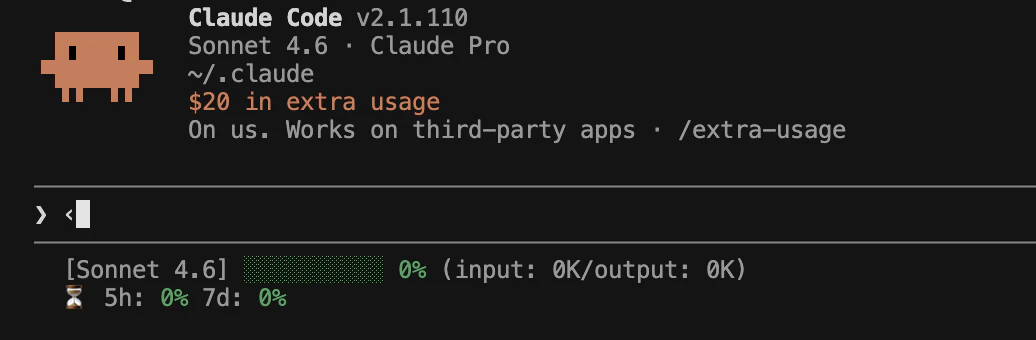
ClaudeCodeのプロンプト入力欄の下にちょっとした情報を表示できる機能です。
今回、私はこのような感じでカスタマイズしてみました!
1行目には使用中のモデル、コンテキストの使用量を、
2行目にはレート制限の消費割合を表示しています。
設定方法
シェルスクリプトの配置
~/.claude配下に以下のシェルスクリプトを配置します。
statusline.sh
#!/bin/bash
# stdioからの入力を読み込み
input=$(cat)

# 値の取得
model_name=$(echo "${input}" | jq -r '.model.display_name')
used_parcentage=$(echo "${input}" | jq -r '.context_window.used_percentage // 0' | cut -d. -f1)
input_tokens=$(echo "${input}" | jq -r '.context_window.total_input_tokens // "0"')
output_tokens=$(echo "${input}" | jq -r '.context_window.total_output_tokens // "0"')
five_hour_used_percentage=$(echo "${input}" | jq -r '.rate_limits.five_hour.used_percentage // "0"')
seven_day_used_percentage=$(echo "${input}" | jq -r '.rate_limits.seven_day.used_percentage // "0"')

GREEN="\033[32m"
YELLOW="\033[33m"
RED="\033[31m"
RESET="\033[0m"

ceil() {
  echo "$1" | awk '{print ($1 == int($1)) ? int($1) : int($1)+1}'
}

get_color() {
  local val="${1%.*}"
  if [ "${val}" -le 50 ]; then
    echo "${GREEN}"
  elif [ "${val}" -le 80 ]; then
    echo "${YELLOW}"
  else
    echo "${RED}"
  fi
}

# プログレスバーの構築
bar_width=10
filled=$((used_parcentage * bar_width / 100))
empty=$((bar_width - filled))
bar=""
[ "${filled}" -gt 0 ] && printf -v F "%${filled}s" && bar="${F// /▓}"
[ "${empty}" -gt 0 ] && printf -v P "%${empty}s" && bar="${bar}${P// /░}"

ctx_color=$(get_color "${used_parcentage}")
bar_colored="${ctx_color}${bar}${RESET}"
used_parcentage_colored="${ctx_color}${used_parcentage}%${RESET}"

five_hour_ceil=$(ceil "${five_hour_used_percentage}")
seven_day_ceil=$(ceil "${seven_day_used_percentage}")
five_hour_colored="$(get_color "${five_hour_ceil}")${five_hour_ceil}%${RESET}"
seven_day_colored="$(get_color "${seven_day_ceil}")${seven_day_ceil}%${RESET}"

echo -e "[${model_name}] ${bar_colored} ${used_parcentage_colored} (input: ${input_tokens}K/output: ${output_tokens}K)"
echo -e "⏳ 5h: ${five_hour_colored} 7d: ${seven_day_colored}"
setting.jsonの編集
~/.claude配下のsetting.jsonに以下のブロックを追記します。
  "statusLine": {
    "type": "command",
    "command": "~/.claude/statusline.sh"
  }
おわりに
statuslineを設定すると知りたいことが一目で分かるのでオススメです。
特に現在のコンテキスト使用率は必須で出しておきたい内容ですね。
しかしまぁ、ClaudeCodeを便利に使うためのシェル実装さえもClaudeCodeに頼ってしまってるという…。
最後に自力でプログラムを組んだのはいつだっけな、と思い出せないぐらいには生成AIに依存しちゃってますね。