
この記事で直す症状
Windows 版 Codex で Computer Use を使おうとしたら、次のようなエラーで落ちました。
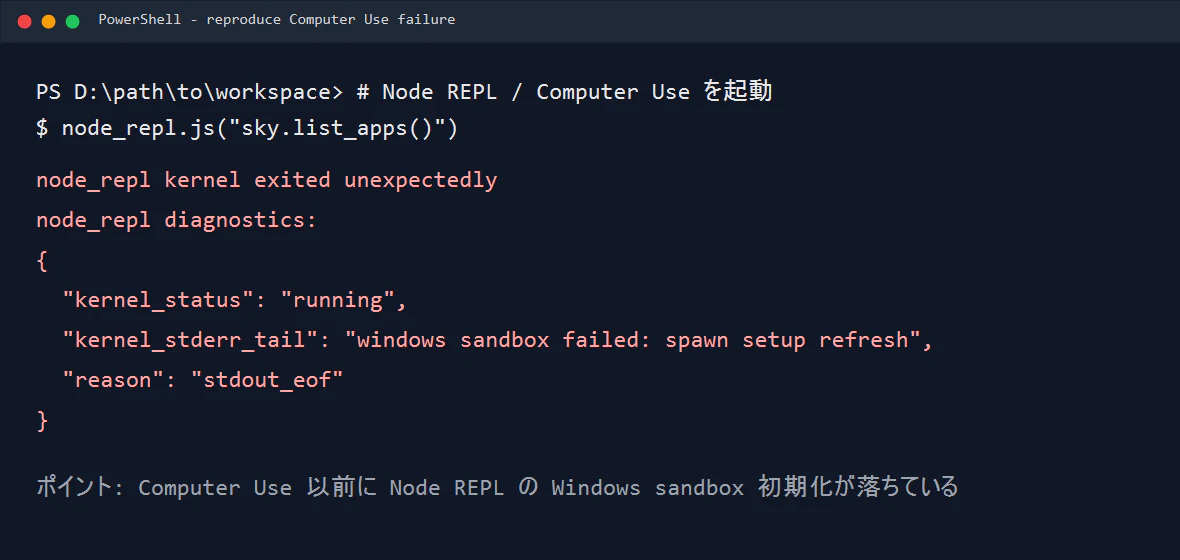
表面上は Computer Use が壊れているように見えます。
node_repl kernel exited unexpectedly
windows sandbox failed: spawn setup refresh
reason: stdout_eof
でも、今回のポイントはここです。
Computer Use 本体ではなく、その前段の Node REPL / Windows sandbox setup が落ちていた。
まず結論
原因はこれでした。
codex-windows-sandbox-setup.exe が Windows に「管理者特権が必要」と判定され、
通常権限で起動できず os error 740 で落ちていた
対処は、該当する codex-windows-sandbox-setup.exe に RUNASINVOKER を設定することです。
ただし、ここで重要なのは sandbox 側ユーザーではなく、Codex GUI 側ユーザーの registry に設定すること です。
原因の樹形図
切り分けはこの順番で見ると迷いにくいです。
何が起きていたか
Computer Use の初期化は、ざっくり言うと次のような流れです。
- Codex が Node REPL を起動する
- Node REPL が Windows sandbox を初期化する
-
codex-windows-sandbox-setup.exeが起動される - その後に Computer Use の
sky.list_apps()などが使えるようになる
今回は 4 に到達する前、3 の helper 起動で止まっていました。
そのため、Computer Use の API や対象アプリをいくら見ても直りません。先に Node REPL / sandbox setup を直す必要があります。
環境
- Windows
- Codex Desktop
- Computer Use plugin
- Node REPL MCP
ユーザー構成は、概念的にはこういう状態でした。
GUI 側ユーザー: <YourUser>
Codex sandbox 側ユーザー: <CodexSandboxUser>
ここが重要です。
PowerShell で whoami すると sandbox 側ユーザーに見えても、Codex アプリ本体は別ユーザー hive の registry を見ることがあります。
まずログを見る
最初に見るべきログはここです。
Get-Content "$env:USERPROFILE\.codex\.sandbox\sandbox.2026-06-05.log" -Tail 80
実際のログではこうなっていました。
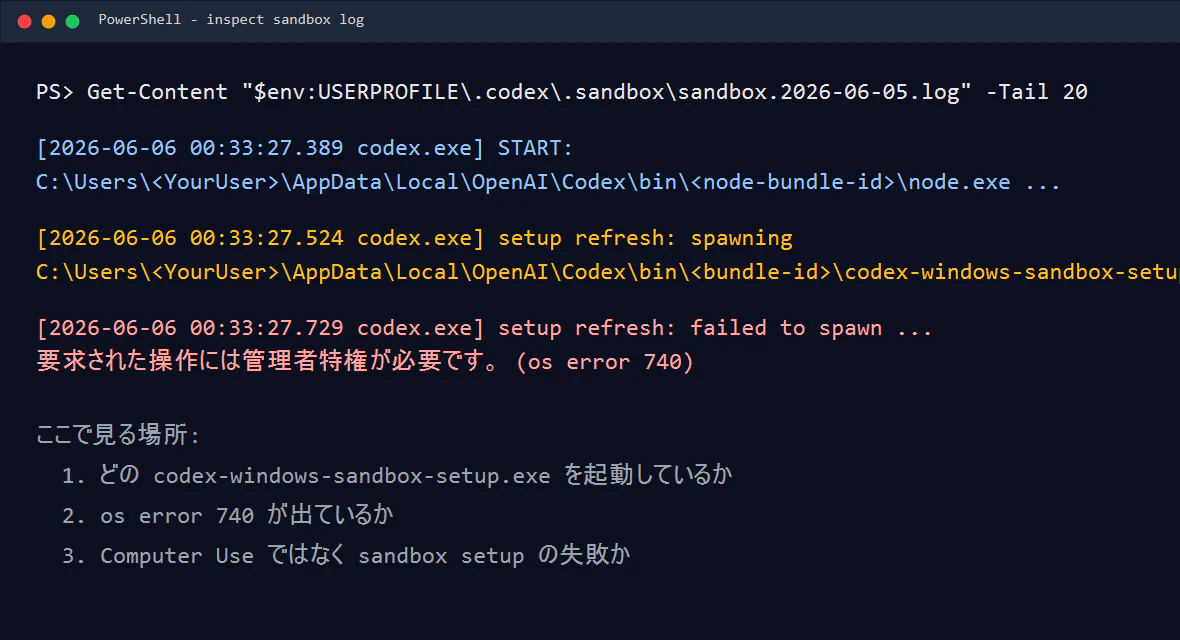
重要なのはこの部分です。
setup refresh: spawning
C:\Users\<YourUser>\AppData\Local\OpenAI\Codex\bin\<bundle-id>\codex-windows-sandbox-setup.exe

setup refresh: failed to spawn ...
要求された操作には管理者特権が必要です。 (os error 740)
os error 740 は、Windows の「この操作には昇格が必要」という意味です。
つまり、Computer Use が失敗しているのではなく、Computer Use を動かす前の sandbox setup helper が起動できていません。
切り分けのコツ
Computer Use の初期化コードは、だいたいこういう流れです。
const { setupComputerUseRuntime } = await import(
  "C:/Users/<YourUser>/.codex/plugins/cache/openai-bundled/computer-use/<version>/scripts/computer-use-client.mjs"
);

await setupComputerUseRuntime({ globals: globalThis });
await sky.list_apps();
ただし、今回は sky.list_apps() の前に Node REPL 自体が落ちていました。
なので、まずは Computer Use ではなく、単純な Node REPL 実行で確認します。
nodeRepl.write(JSON.stringify({ ok: true }));
これでも同じ windows sandbox failed: spawn setup refresh が出るなら、原因は Computer Use ではなく Node REPL / Windows sandbox setup 側です。
やっても直らなかったこと
workspace をフルアクセスにする
関係ありませんでした。
今回の問題はファイル読み書き権限ではなく、Windows が helper exe に elevation を要求していたことです。
config.toml の CODEX_CLI_PATH を書き換える
一時的には直せそうに見えました。
しかし、Codex 再起動時に config.toml が自動生成され直され、元に戻りました。
helper exe を別ファイルで置き換える
今回の環境では、ローカルキャッシュ版と WindowsApps 同梱版の codex-windows-sandbox-setup.exe は同じハッシュでした。
つまり、ファイルの中身ではなく、起動パスや互換性設定の問題でした。
解決方法
codex-windows-sandbox-setup.exe に RUNASINVOKER を設定します。
RUNASINVOKER は、アプリが昇格を要求しても「呼び出し元と同じ権限で起動する」互換性設定です。
1. 問題の helper path を確認する
ログからこの path を探します。
C:\Users\<YourUser>\AppData\Local\OpenAI\Codex\bin\<bundle-id>\codex-windows-sandbox-setup.exe
<bundle-id> の部分は環境によって変わります。
2. GUI 側ユーザーの SID を確認する
sandbox 内で whoami すると、Codex GUI 側とは別ユーザーに見えることがあります。
whoami
[System.Security.Principal.WindowsIdentity]::GetCurrent().User.Value
もし sandbox shell で次のように見えても、
<PCName>\<CodexSandboxUser>
<sandbox-user-SID>
Codex GUI 側は別 SID の可能性があります。
<GUI-user-SID>
今回効いたのは、GUI 側ユーザー SID への設定でした。
3. GUI 側ユーザーの registry に RUNASINVOKER を入れる
$helper = 'C:\Users\<YourUser>\AppData\Local\OpenAI\Codex\bin\<bundle-id>\codex-windows-sandbox-setup.exe'
$sid = '<GUI-user-SID>'
$key = "Registry::HKEY_USERS\$sid\Software\Microsoft\Windows NT\CurrentVersion\AppCompatFlags\Layers"

if (!(Test-Path $key)) {
  New-Item -Path $key -Force | Out-Null
}

New-ItemProperty `
  -Path $key `
  -Name $helper `
  -Value '~ RUNASINVOKER' `
  -PropertyType String `
  -Force | Out-Null
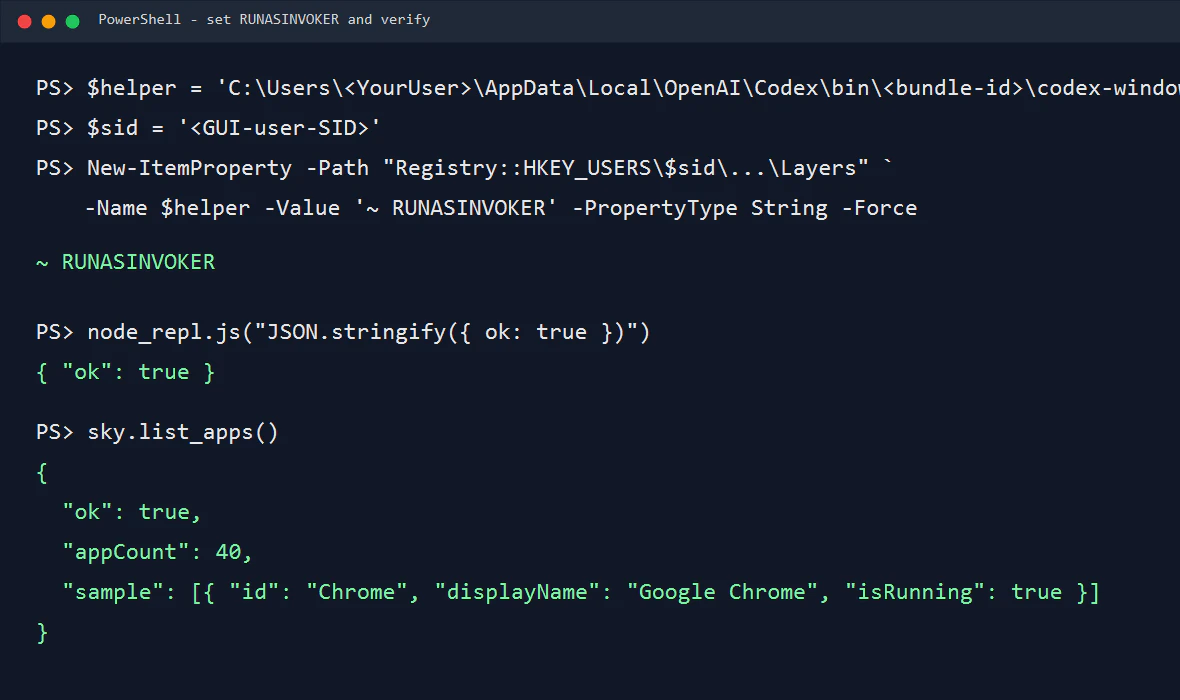
設定確認:
Get-ItemProperty -Path $key -Name $helper |
  Select-Object -ExpandProperty $helper
期待値:
~ RUNASINVOKER
注意: HKCU に入れるだけでは足りない場合がある
最初、自分はこのように HKCU: へ設定しました。
$key = 'HKCU:\Software\Microsoft\Windows NT\CurrentVersion\AppCompatFlags\Layers'
New-ItemProperty -Path $key -Name $helper -Value '~ RUNASINVOKER' -PropertyType String -Force
しかし、この PowerShell が sandbox 側ユーザーとして動いていたため、sandbox 側ユーザーの HKCU に入っただけでした。
Computer Use / Node REPL を起動する Codex GUI 側には効きません。
そのため、HKEY_USERS\<GUI-user-SID>\... に明示的に入れる必要がありました。
Codex を再起動する
registry を設定したら、Codex を再起動します。
既存の node_repl.exe が残っている場合は止めます。
Get-Process node_repl -ErrorAction SilentlyContinue | Stop-Process -Force
ただし、普通に Codex アプリを再起動するのが一番わかりやすいです。
復旧確認
再起動後、まず Node REPL が動くか確認します。
nodeRepl.write(JSON.stringify({ ok: true, cwd: nodeRepl.cwd }, null, 2));
期待値:
{
  "ok": true,
  "cwd": "D:\\path\\to\\workspace"
}
次に Computer Use を確認します。
if (!globalThis.sky) {
  const { setupComputerUseRuntime } = await import(
    "C:/Users/<YourUser>/.codex/plugins/cache/openai-bundled/computer-use/<version>/scripts/computer-use-client.mjs"
  );
  await setupComputerUseRuntime({ globals: globalThis });
}

globalThis.apps = await sky.list_apps();
nodeRepl.write(JSON.stringify({
  ok: true,
  appCount: apps.length,
  sample: apps.slice(0, 3).map(a => ({
    id: a.id,
    displayName: a.displayName,
    isRunning: a.isRunning
  }))
}, null, 2));
成功すると、次のようにアプリ一覧が返ります。
{
  "ok": true,
  "appCount": 40,
  "sample": [
    {
      "id": "Chrome",
      "displayName": "Google Chrome",
      "isRunning": true
    }
  ]
}
まとめ
今回の流れはこうでした。
- Computer Use が
windows sandbox failed: spawn setup refreshで落ちる -
node_repl単体でも落ちることを確認 - sandbox log に
os error 740を発見 -
codex-windows-sandbox-setup.exeが昇格要求で起動失敗していた -
RUNASINVOKERを設定 - ただし sandbox 側 HKCU ではなく GUI 側ユーザー SID に設定する必要があった
- Codex 再起動後、
node_replとsky.list_apps()が復旧
この症状では、まずログを見るのが一番早いです。
Get-Content "$env:USERPROFILE\.codex\.sandbox\sandbox.2026-06-05.log" -Tail 80
そこで os error 740 が出ていたら、RUNASINVOKER を疑う価値があります。